Cloud portal interface overview
The Management Portal interface provides access to all features available in the Cloud Management Portal.
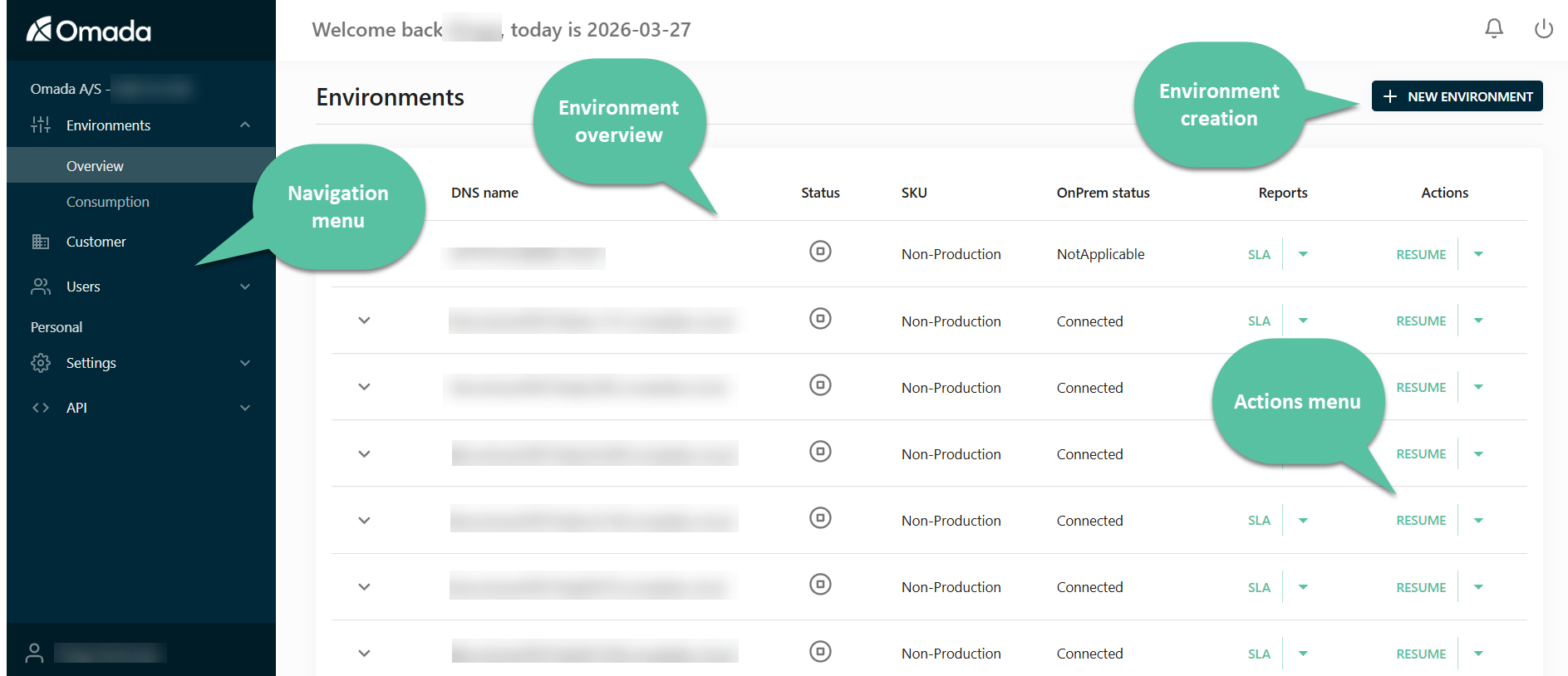
This page gives an overview of the main navigation structure and helps you understand where to perform specific tasks.
Navigation menu
Subscription-specific sections
These sections apply to your subscription and environments.
Environments
The Environments section is the central place to:
- View all environments.
- Monitor status and provisioning.
- Access environment details and actions.
👉 This is where most operational work happens.
Customer
The Customer section provides:
- Contract and subscription information.
- Overview of your organization setup.
👉 Use this section to understand licensing and contract scope.
Users
The Users section allows you to:
- Manage users with access to the portal.
- Control permissions and access.
👉 Use this to manage who can operate the portal.
Authentication
The Authentication section allows you to:
- Verify domains for federated authentication.
- Configure and manage Identity Providers.
- Enable federated login for portal users.
👉 Use this to manage how users authenticate to the Management Portal.
Personal sections
These sections apply only to your user account.
Settings
The Settings section allows you to:
- Configure personal preferences.
- Customize your portal experience.
API
The API section provides:
- Access to API functionality.
- Integration capabilities with external systems.
👉 Use this when integrating the portal with other tools or automation.