Data import
Connection details
| Setting | Description |
|---|---|
| Host Name Address | Type the Fully Qualified Domain Name of a valid host name. |
| Connection type | Select if the connection is to be done via HTTP or secured HTTP. |
| Client | Specify the client number from SAP to which to connect. |
| Port | Type the port number of the application server. |
| Timeout in seconds | Specify the timeout for the connection - in seconds. |
| User | Type the username of the administrative user used to access the service. |
| Password | Type the password for the administrative user. Each time you make a change to any of the settings in the Connection details dialog box, you must enter your password again. |
| Skip certificate check | Select this checkbox to ignore any certificate check when connecting using SSL. |
| Security protocol | Select the protocol used for HTTPS handshake. |
| Test connection | Enable this setting to test the specified connection details. For the Test connection to work correctly, the Company Code web service must be enabled in SAP. |
System definition: Advanced
| Setting | Description |
|---|---|
| Language | When you connect to SAP, you define a language so that the text in the user interface is provided in the required language. By default, English (E) is selected as the language of the SAP system. Optionally, you can remove this value and type the proper country code for your system, for example D (Germany). |
| Use delta | When having this checkbox selected the imports will be set to Delta mode. For Delta mode to work properly, enable the Paging option. For more information go to the Paging section of the document. Additionally, when having Delta mode enabled, be sure to periodically run a Full import. |
System definition: Queries and mappings
If you are planning an upgrade form version 14.0.8 or lower, follow these steps after the upgrade is complete, but before the first import:
- Modify the filter attribute for the Jobs query with the one below:
"#MaxRow(id, validto)#!(string.IsNullOrEmpty(validto) || validto ==
"00000000" || DateTime.ParseExact
(validto,"yyyyMMdd",null) <= DateTime.UtcNow)"
-
Enable the Distinct option for all queries.
-
Do not enable paging for Cost Centers and Positions queries.
Queries and mappings provided out of the box
| Object type | Biding/Service | Interface | Description |
|---|---|---|---|
| Identity | employee_get | omada/empl_get_resp | Employees |
| Identity owner | employee_get | omada/empl_get_resp | Managers |
| Context | orgunit_get | omada/hr_orgunit_resp | OrgUnit |
| Context owner | orgunit_get | omada/hr_orgunit_resp | Managers |
| Context | personnelarea_get | omada/hr_persarea_resp | Personnel Area |
| Context | personnelsubarea_get | omada/hr_perssubarea_resp | Personnel Subarea |
| Context | companycode_get | omada/fico_comp_code_resp | Company Codes |
| Context | costcenter_get | omada/fico_cost_center_resp | Cost Centers |
| Context | building_get | omada/hr_build_resp | Buildings |
| Context | position_get | omada/hr_orgpos_resp | Positions |
| Context | jobs_get | omada/hr_jobs_resp | Jobs |
| Context assignment | employee_get | omada/empl_get_resp | OrgUnit Assignments for Identities |
| Context assignment | employee_get | omada/empl_get_resp | Building Assignments for Identities |
| Context assignment | employee_get | omada/empl_get_resp | Personnel Area Assignments for Identities |
| Context assignment | employee_get | omada/empl_get_resp | Personnel SubArea Assignments for Identities |
| Context assignment | employee_get | omada/empl_get_resp | Company Code Assignments for Identities |
| Context assignment | employee_get | omada/empl_get_resp | Cost Center Assignments for Identities |
| Context assignment | employee_get | omada/empl_get_resp | Job Assignments for Identities |
| Context assignment | position_get | omada/hr_orgpos_resp | Position Assignments for Identities |
Edit query mappings
To edit a query mapping, click the Edit button in the Queries and mappings window.This button opens the Edit query mapping dialog box, where you can define settings for that particular mapping. The Edit query mapping dialog box consists of three tabs: Web Method, Paging, and Mappings.
Web Method
In this tab you can define the web method for the query mapping.The tab consists of the following fields:
- Binding - Enter the binding name you had used when the web services were generated in SAP via transaction SOAMANAGER.It is recommended to use the default naming convention, so you are only required to change the value if you have used a custom naming of the binding in SAP. Also refer to the 1.0.1 Generate Web Services using SOAMANAGER section.
- Service - Enter the service name you had used when the web services were generated in SAP via transaction SOAMANAGER.It is recommended to use the default naming convention, so you are only required to change the value if you have used a custom naming of the service in SAP. Also refer to the 1.0.1 Generate Web Services using SOAMANAGER section.
- Distinct - Set this option to Yes to allow the query to yield more rows with the same values.
- Filter - Provide a logical expression for each row imported, for example, Name eq 'John.' If it is evaluated to false, the row will be skipped by the collector.
- Enabled - If the query is not Enabled the collector will not perform it.
- Description - Provide a meaningful description of the query mapping.
Paging
This tab allows you to enable and define the paging method. The tab consists of the following fields:
- Use paging - Set this option to No to disable Paging for the collector.
- Request Page Number - Specify the page number from which the collector will start collecting data.
- Request Rows Per Page - Specify the number of rows that will be collected per each page.
Paging and Delta support
The following table presents which interfaces support paging and delta in the SAP Identity Data web services.
| Object | Omada interface in SAP | Paging support | Delta support |
|---|---|---|---|
| Employees | /OMADA/EMPL_GET_RESP | Yes | Yes |
| Company Codes | /OMADA/FICO_COMP_CODE_RESP | Yes | No |
| Cost Centers | /OMADA/FICO_COST_CENTER_RESP | No | No |
| Buildings | /OMADA/HR_BUILD_RESP | Yes | No |
| Jobs | /OMADA/HR_JOBS_RESP | Yes | No |
| Positions | /OMADA/HR_ORGPOS_RESP | Yes | No |
| Org. Units | /OMADA/HR_ORGUNIT_RESP | Yes | No |
| Personnel Area | /OMADA/HR_PERSAREA_RESP | Yes | No |
| Personnel Subarea | /OMADA/HR_PERSSUBAREA_RESP | Yes | No |
Mappings
This tab provides standard mapping table to define Source and Destination of the mappings between the SAP system and Omada Identity.
Enable/Disable import of objects
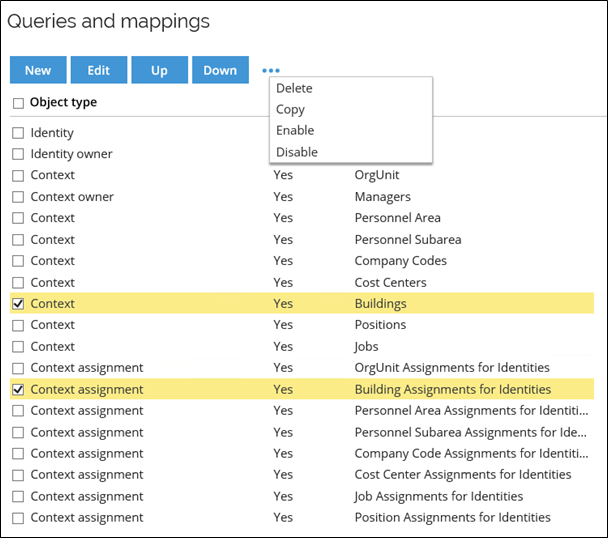
All Object types are enabled per default, if an Object type is not required it is possible to disable the import of individual objects. It is recommended to disable not used object types to optimize the performance of the import. Bear in mind that once an import has been performed for an object type, it is not possible to disable that object type.You can enable an object if it was initially disabled.
To enable/disable object types, select the ones that are to be changed and use the context menu to choose a desired option.
SAP mappings to Data Warehouse
Provided Queries and Mappings are supplied as templates and can be adopted to meet customer requirements. The tables below present pre-defined set of names for each object type - see the column Alias Mappings.
Bear in mind that SAP HCM connectivity uses Alias mappings that are all lowercase.
Identity
The following attributes are available for the Identity dimension.
| XML | Data Warehouse (Destination) | Alias Mappings (Source) | Comment |
|---|---|---|---|
| /EMPL/INF02PERNO | ComposedBusinessKey, UID | employeeid | Used as part of the business key and the UID and any context assignments or identity ownership |
| /EMPL/INF02INITIALS | inf02initials | ||
| /EMPL/EMPL_STRUCT/INF02FIRST_NAME | First name | firstname | The Name value is constructed out of all three INF02xxx_NAMEparts |
| /EMPL/EMPL_STRUCT/INF02MIDDLE_NAME | middlename | The Name value is constructed out of all three INF02xxx_NAMEparts | |
| /EMPL/EMPL_STRUCT/INF02LAST_NAME | Last name | lastname | The Name value is constructed out of all three INF02xxx_NAMEparts |
| /EMPL/EMPL_STRUCT/INF105SMTPADR | |||
| /EMPL/EMPL_STRUCT/INF01JOBTX | JobTitle | inf01jobtx | |
| /EMPL/EMPL_STRUCT/INF00EMPL_STATUS | Status | status | status == "0" ? "Terminated" : (status == "1" ? "Inactive" : (status == "2" ? "Disabled" : (status == "3" ? "Active" : "Unknown"))) |
| /EMPL/EMPL_STRUCT/INF01ESUBGROUP | Type | inf01esubgroup | |
| /EMPL/EMPL_STRUCT/INF01EGROUP | inf01egroup | ||
| /EMPL/EMPL_STRUCT/INF06COUNTRY | Country | inf06country | |
| /EMPL/EMPL_STRUCT/INF01COMP_CODETX | Company | inf01comp_codetx | |
| /EMPL/EMPL_STRUCT/INF02PERNO | EmployeeID | ||
| /EMPL/EMPL_STRUCT/INF00START_DATE | ValidFrom | validfrom | DateTime.ParseExact(validfrom,"yyyyMMdd",null) |
| /EMPL/EMPL_STRUCT/INF00END_DATE | ValidTo | validto | DateTime.ParseExact(validto,"yyyyMMdd",null) |
| /EMPL/EMPL_STRUCT/MGR_PERNO | mgr_perno | Used in the generation of an IdentityOwner row for this identity | |
| /EMPL/EMPL_STRUCT/INF01ORG_UNIT | inf01org_unit | Used in the generation of an IdentityOwner row and a ContextAssignment row for this identity | |
| /EMPL/EMPL_STRUCT/INF01COMP_CODE | inf01comp_code | Used in the generation a ContextAssignment row for this identity | |
| /EMPL/EMPL_STRUCT/INF02INITIALS | inf02initials | ||
| /EMPL/EMPL_STRUCT/ACTION_TYPE_TEXT | actiontypetext | ||
| /EMPL/EMPL_STRUCT/CSKTKTEXT | csktktext | ||
| /EMPL/EMPL_STRUCT/CSKTLTEXT | csktltext | ||
| /EMPL/EMPL_STRUCT/EMPLOYMENT_STATUS_TEXT | emplstatustext | ||
| /EMPL/EMPL_STRUCT/EMPLOYMENT_GROUP_TEXT | emplgrouptext | ||
| /EMPL/EMPL_STRUCT/EMPLOYMENT_SUBGROUP_TEXT | emplsubgrptext | ||
| /EMPL/EMPL_STRUCT/HEADOFORG_UNIT | headoforg_unit | ||
| /EMPL/EMPL_STRUCT/HRR_INITS | hrr_inits | ||
| /EMPL/EMPL_STRUCT/INF00ACTIONTYPE | inf00actiontype | ||
| /EMPL/EMPL_STRUCT/INF00MASSG | inf00massg | ||
| /EMPL/EMPL_STRUCT/INF01ANSVH | inf01ansvh | ||
| /EMPL/EMPL_STRUCT/INF01BEGIN_DATE_NEXT_RECORD | inf01bgdatnxrec | ||
| /EMPL/EMPL_STRUCT/INF01COSTCENTER | inf01costcenter | ||
| /EMPL/EMPL_STRUCT/INF01JOB | inf01job | ||
| /EMPL/EMPL_STRUCT/INF01JOB_NEXT | inf01job_next | ||
| /EMPL/EMPL_STRUCT/INF01JOBTX_NEXT | inf01jobtx_next | ||
| /EMPL/EMPL_STRUCT/INF01ORG_UNIT_NEXT | inf01orgunitnext | ||
| /EMPL/EMPL_STRUCT/INF01ORGTXLONG | inf01orgtxlong | ||
| /EMPL/EMPL_STRUCT/INF01ORGTXLONG_NEXT | inf01orgtxlngnex | ||
| /EMPL/EMPL_STRUCT/INF01ORGTXSHORT | inf01orgtxshort | ||
| /EMPL/EMPL_STRUCT/INF01ORGTXSHORT_NEXT | inf01orgtxshrtnx | ||
| /EMPL/EMPL_STRUCT/INF01PERS_AREA | inf01pers_area | ||
| /EMPL/EMPL_STRUCT/INF01PERS_AREATX | inf01pers_areatx | ||
| /EMPL/EMPL_STRUCT/INF01POSITION | inf01position | ||
| /EMPL/EMPL_STRUCT/INF01POSITION_NEXT | inf01positionnxt | ||
| /EMPL/EMPL_STRUCT/INF01POSITIONTX | inf01positiontx | ||
| /EMPL/EMPL_STRUCT/INF01POSITIONTX_NEXT | inf01posittx_nxt | ||
| /EMPL/EMPL_STRUCT/INF01SUPERVISORAREA | inf01supervisarea | ||
| /EMPL/EMPL_STRUCT/INF02ANRED | inf02anred | ||
| /EMPL/EMPL_STRUCT/INF02FULL_NAME | fullname | ||
| /EMPL/EMPL_STRUCT/INF02GENDER | inf02gender | ||
| /EMPL/EMPL_STRUCT/INF02NAME_PREFIX | inf02name_prefix | ||
| /EMPL/EMPL_STRUCT/INF02NAMEAFFIX | inf02nameaffix | ||
| /EMPL/EMPL_STRUCT/INF02NICK_NAME | nickname | ||
| /EMPL/EMPL_STRUCT/INF02PERID | inf02perid | ||
| /EMPL/EMPL_STRUCT/INF02TITLE | inf02title | ||
| /EMPL/EMPL_STRUCT/INF03FIRST_NAME | inf03first_name | ||
| /EMPL/EMPL_STRUCT/INF03LAST_NAME | inf03last_name | ||
| /EMPL/EMPL_STRUCT/INF06CITY | inf06city | ||
| /EMPL/EMPL_STRUCT/INF06COM01 | inf06com01 | ||
| /EMPL/EMPL_STRUCT/INF06COM02 | inf06com02 | ||
| /EMPL/EMPL_STRUCT/INF06COM03 | inf06com03 | ||
| /EMPL/EMPL_STRUCT/INF06COM04 | inf06com04 | ||
| /EMPL/EMPL_STRUCT/INF06COM05 | inf06com05 | ||
| /EMPL/EMPL_STRUCT/INF06COM06 | inf06com06 | ||
| /EMPL/EMPL_STRUCT/INF06NUM01 | inf06num01 | ||
| /EMPL/EMPL_STRUCT/INF06NUM02 | inf06num02 | ||
| /EMPL/EMPL_STRUCT/INF06NUM03 | inf06num03 | ||
| /EMPL/EMPL_STRUCT/INF06NUM04 | inf06num04 | ||
| /EMPL/EMPL_STRUCT/INF06NUM05 | inf06num05 | ||
| /EMPL/EMPL_STRUCT/INF06NUM06 | inf06num06 | ||
| /EMPL/EMPL_STRUCT/INF06POSTAL_CODE | inf06postal_code | ||
| /EMPL/EMPL_STRUCT/INF06STREET | inf06street | ||
| /EMPL/EMPL_STRUCT/INF06TELNR | inf06telnr | ||
| /EMPL/EMPL_STRUCT/INF105BADGE | inf105badge | ||
| /EMPL/EMPL_STRUCT/INF105SUBTYPMAIL | inf105subtypmail | ||
| /EMPL/EMPL_STRUCT/INF105SUBTYPCELL | inf105subtypcell | ||
| /EMPL/EMPL_STRUCT/INF105SUBTYP0090 | siteid | ||
| /EMPL/EMPL_STRUCT/INF105SUBTYP9MID | myaccessid | ||
| /EMPL/EMPL_STRUCT/INF105USERID | userid | ||
| /EMPL/EMPL_STRUCT/INF32BLDING_NO | inf32blding_no | ||
| /EMPL/EMPL_STRUCT/INF32ROOM_NO | inf32room_no | ||
| /EMPL/EMPL_STRUCT/INF32SUBAREA | inf32subarea | ||
| /EMPL/EMPL_STRUCT/INF32SUBAREATX | inf32subareatx | ||
| /EMPL/EMPL_STRUCT/INF32TEL01 | inf32tel01 | ||
| /EMPL/EMPL_STRUCT/INF32TEL02 | inf32tel02 | ||
| /EMPL/EMPL_STRUCT/INF32WAUSW | inf32wausw | ||
| /EMPL/EMPL_STRUCT/INF709PERSONID_EXT | globalid | ||
| /EMPL/EMPL_STRUCT/INF105TLNMBR1 | inf105tlnmbr1 | ||
| /EMPL/EMPL_STRUCT/INFO40LOAN_OBJ | info40loan_obj | ||
| /EMPL/EMPL_STRUCT/INFO40LOAN_OBJ_NAME | info40loanobjnam | ||
| /EMPL/EMPL_STRUCT/INFO40LOAN_OBJ_NO | info40loan_objno | ||
| /EMPL/EMPL_STRUCT/INFO40UNIT | info40unit | ||
| /EMPL/EMPL_STRUCT/MGR_EMAIL | mgr_email | ||
| /EMPL/EMPL_STRUCT/MGR_INITS | mgr_inits | ||
| /EMPL/EMPL_STRUCT/ORGBEGDA | centralpersonstartdate | ||
| /EMPL/EMPL_STRUCT/ORGBUILD | orgbuild | ||
| /EMPL/EMPL_STRUCT/ORGCNAME | orgcname | ||
| /EMPL/EMPL_STRUCT/ORGENDDA | centralpersonenddate | ||
| /EMPL/EMPL_STRUCT/ORGLAND | orgland | ||
| /EMPL/EMPL_STRUCT/ORGOBJID | centralpersonhrobjid | ||
| /EMPL/EMPL_STRUCT/ORGORT01 | orgort01 | ||
| /EMPL/EMPL_STRUCT/ORGOTYPE | centralpersonotype | ||
| /EMPL/EMPL_STRUCT/ORGPSTLZ | orgpstlz | ||
| /EMPL/EMPL_STRUCT/ORGRCOMP_INT | orgrcomp_int | ||
| /EMPL/EMPL_STRUCT/ORGSHORT_F_AREA | orgshort_f_area | ||
| /EMPL/EMPL_STRUCT/ORGSOBID | centralpersonsobid | ||
| /EMPL/EMPL_STRUCT/ORGSTEXT | orgstext | ||
| /EMPL/EMPL_STRUCT/ORGSTEXT_F_AREA | orgstext_f_area | ||
| /EMPL/EMPL_STRUCT/ORGSTRAS | orgstras | ||
| /EMPL/EMPL_STRUCT/ORGSTRS2 | orgstrs2 | ||
| /EMPL/EMPL_STRUCT/ORGTELNR | orgtelnr | ||
| /EMPL/EMPL_STRUCT/PERS_SUB_AREA | pers_sub_area | ||
| /EMPL/EMPL_STRUCT/PERS_SUB_AREA_TEXT | persubareatext | ||
| /EMPL/EMPL_STRUCT/PERSAREA_CITY | persarea_city | ||
| /EMPL/EMPL_STRUCT/PERSAREA_COMPANY_NAME | persareacompname | ||
| /EMPL/EMPL_STRUCT/PERSAREA_COUNTRY_KEY | persareacontrkey | ||
| /EMPL/EMPL_STRUCT/PERSAREA_PO_BOX | persarea_po_box | ||
| /EMPL/EMPL_STRUCT/PERSAREA_POSTAL_CODE | persareapostcode | ||
| /EMPL/EMPL_STRUCT/PERSAREA_REGION | persarea_region | ||
| /EMPL/EMPL_STRUCT/PERSAREA_STREET | persarea_street | ||
| /EMPL/EMPL_STRUCT/SCLAS_F_AREA | sclas_f_area | ||
| /EMPL/EMPL_STRUCT/SOBID_F_AREA | sobid_f_area | ||
| /EMPL/EMPL_STRUCT/TELNR | |||
| /EMPL/EMPL_STRUCT/TERMDATE | termdate | ||
| /EMPL/EMPL_STRUCT/CUST_EXT1 | cust_ext1 | ||
| /EMPL/EMPL_STRUCT/CUST_EXT2 | cust_ext2 | ||
| /EMPL/EMPL_STRUCT/CUST_EXT3 | cust_ext3 | ||
| /EMPL/EMPL_STRUCT/CUST_EXT4 | cust_ext4 | ||
| /EMPL/EMPL_STRUCT/CUST_EXT5 | cust_ext5 | ||
| /EMPL/EMPL_STRUCT/CUST_EXT6 | cust_ext6 | ||
| /EMPL/EMPL_STRUCT/CUST_EXT7 | cust_ext7 | ||
| /EMPL/EMPL_STRUCT/CUST_EXT8 | cust_ext8 | ||
| /EMPL/EMPL_STRUCT/CUST_EXT9 | cust_ext9 | ||
| /EMPL/EMPL_STRUCT/CUST_EXT10 | cust_ext10 | ||
| /EMPL/EMPL_STRUCT/CUST_EXT11 | cust_ext11 | ||
| /EMPL/EMPL_STRUCT/CUST_EXT12 | cust_ext12 | ||
| /EMPL/EMPL_STRUCT/CUST_EXT13 | cust_ext13 | ||
| /EMPL/EMPL_STRUCT/CUST_EXT14 | cust_ext14 | ||
| /EMPL/EMPL_STRUCT/CUST_EXT15 | cust_ext15 | ||
| /EMPL/EMPL_STRUCT/CUST_EXT16 | cust_ext16 | ||
| /EMPL/EMPL_STRUCT/CUST_EXT17 | cust_ext17 | ||
| /EMPL/EMPL_STRUCT/CUST_EXT18 | cust_ext18 | ||
| /EMPL/EMPL_STRUCT/CUST_EXT19 | cust_ext19 | ||
| /EMPL/EMPL_STRUCT/CUST_EXT20 | cust_ext20 |
Context - Org Unit
The following attributes are available for the Context dimension for contexts that are sourced from SAP Org Units.
| XML | Data Warehouse (Destination) | Alias Mappings (Source) | Comment |
|---|---|---|---|
| /SAP_HR_ORG_GET_STRUCT/ORG_UNIT | ComposedBusinessKey, Name | id | Used as part of the business key and as the Name if STEXT is empty |
| /SAP_HR_ORG_GET_STRUCT/STEXT | Name | name | When non-empty this is used as the Name value |
| /SAP_HR_ORG_GET_STRUCT/TEXT1 | ShortName | shortname | |
| /SAP_HR_ORG_GET_STRUCT/PARENT_ORG_UNIT | Parent_ComposedBusinessKey | parent | Used as part of the parent context business key |
| /SAP_HR_ORG_GET_STRUCT/MGR_PERNO | mgrid | Used for Context and Identity ownerships | |
| /SAP_HR_ORG_GET_STRUCT/MGR_BNAME | mgrname | ||
| /SAP_HR_ORG_GET_STRUCT/MGR_INITS | mgrinitials | ||
| /SAP_HR_ORG_GET_STRUCT/MGR_PERID_EXT | mgrglobalid | ||
| /SAP_HR_ORG_GET_STRUCT/PARENT_TEXT1 | parenttext | ||
| /SAP_HR_ORG_GET_STRUCT/STATUS | status | ||
| /SAP_HR_ORG_GET_STRUCT/TLEVEL | level | ||
| /SAP_HR_ORG_GET_STRUCT/ISFUTURE | isfuture | ||
| /SAP_HR_ORG_STRUCTURE/VALIDFROM | validfrom | ||
| /SAP_HR_ORG_STRUCTURE/VALIDTO | validto |
Context - Company Code
The following attributes are available for the Context dimension for contexts that are sourced from SAP Company Codes.
| XML | Data Warehouse (Destination) | Alias Mappings (Source) | Comment |
|---|---|---|---|
| /SAP_FI_CCODE_STRUCT/COMP_CODE | ComposedBusinessKey, Name | id | Used as part of the business key and as the Name if COMP_NAME is empty |
| /SAP_FI_CCODE_STRUCT/COMP_NAME | Name | name | When non-empty this is used as the Name value |
| /SAP_FI_CCODE_STRUCT/CITY | city | ||
| /SAP_FI_CCODE_STRUCT/COUNTRY | country |
Context - Cost Center
The following attributes are available for the Context dimension for contexts that are sourced from SAP Cost Centers.
| XML | Data Warehouse (Destination) | Alias Mappings (Source) | Comment |
|---|---|---|---|
| SAP_FI_COSTC_STRUCT/NAME | Name | namelong | If this doesn’t have a non-empty value OBJ_NAME is used instead. |
| SAP_FI_COSTC_STRUCT/ABTEI | department | ||
| SAP_FI_COSTC_STRUCT/BUKRS | companycode | ||
| SAP_FI_COSTC_STRUCT/DESCRIPT | description | ||
| SAP_FI_COSTC_STRUCT/HIERLEVEL | level | ||
| SAP_FI_COSTC_STRUCT/KOKRS | ComposedBusinessKey | kokrs | Used as part of the business key. |
| SAP_FI_COSTC_STRUCT/OBJ_NAME | ComposedBusinessKey | name | Used as part of the business key and for the name if NAME is empty |
| SAP_FI_COSTC_STRUCT/OBJ_TYPE | type | Only cost centers with an OBJ_TYPE value of "C" are collected. | |
| SAP_FI_COSTC_STRUCT/PARENT_COSTCTR_GRP | parent | ||
| SAP_FI_COSTC_STRUCT/PRCTR | profitcenter | ||
| SAP_FI_COSTC_STRUCT/STATUS | status | Only cost centers with a STATUS value of "A" are collected. | |
| SAP_FI_COSTC_STRUCT/VERAK | verak | ||
| SAP_FI_COSTC_STRUCT/DATAB | validfrom | ||
| SAP_FI_COSTC_STRUCT/DATBI | validto |
Context - Personnel area
The following attributes are available for the Context dimension for contexts that are sourced from SAP Personnel area.
| XML | Data Warehouse (Destination) | Alias Mappings (Source) | Comment |
|---|---|---|---|
| /PERS_AREAS_STRUCT/PERSA | ComposedBusinessKey | id | Used as part of the business key |
| /PERS_AREAS_STRUCT/MOLGA | countrygroup | ||
| /PERS_AREAS_STRUCT/BUKRS | companycode | ||
| /PERS_AREAS_STRUCT/NAME1 | Name | name | When non-empty, this is used as the Name value |
| /PERS_AREAS_STRUCT/NAME2 | name2 | ||
| /PERS_AREAS_STRUCT/STRAS | street | ||
| /PERS_AREAS_STRUCT/PSTLZ | zipcode | ||
| /PERS_AREAS_STRUCT/ORT01 | city | ||
| /PERS_AREAS_STRUCT/LAND1 | country | ||
| /PERS_AREAS_STRUCT/REGIO | region | ||
| /PERS_AREAS_STRUCT/ADRNR | adrno | ||
| /PERS_AREAS_STRUCT/CITYC | citycode | ||
| /PERS_AREAS_STRUCT/COUNC | countrycode | ||
| /PERS_AREAS_STRUCT/PFACH | pobox |
Context : Personnel sub area
| XML | Data Warehouse (Destination) | Alias Mappings (Source) | Comment |
|---|---|---|---|
| /PERS_SUB_AREAS_STRUCT/GUID | guid | ||
| /PERS_SUB_AREAS_STRUCT/WERKS | ComposedBusinessKey, Parent_ComposedBusinessKey | id | Used as part of the business key and for the parent context business key |
| /PERS_SUB_AREAS_STRUCT/BTRTL | ComposedBusinessKey | altname | Used as part of the business key |
| /PERS_SUB_AREAS_STRUCT/BTEXT | Name | name | When non-empty, this is used as the Name value |
| /PERS_SUB_AREAS_STRUCT/WKTYP | wktyp | PS Grouping | |
| /PERS_SUB_AREAS_STRUCT/MOLGA | molga | Country Grouping | |
| /PERS_SUB_AREAS_STRUCT/MOURA | moura | PS Grpg Leave Types | |
| /PERS_SUB_AREAS_STRUCT/TRFGB | trfgb | Pay scale area | |
| /PERS_SUB_AREAS_STRUCT/TRFAR | trfar | Pay scale type | |
| /PERS_SUB_AREAS_STRUCT/MOABT | moabt | Reserved/unused field | |
| /PERS_SUB_AREAS_STRUCT/MOABW | moabw | PS grouping | |
| /PERS_SUB_AREAS_STRUCT/MOVER | mover | PS grouping | |
| /PERS_SUB_AREAS_STRUCT/URLKL | urlkl | PS grouping | |
| /PERS_SUB_AREAS_STRUCT/JUPER | juper | Legal Person | |
| /PERS_SUB_AREAS_STRUCT/MOBDE | mobde | PS grouping | |
| /PERS_SUB_AREAS_STRUCT/MOZKO | mozko | PSGrpg Tm Quota Typ | |
| /PERS_SUB_AREAS_STRUCT/MOPTB | moptb | PS grouping | |
| /PERS_SUB_AREAS_STRUCT/MOSTA | mosta | Statistics Mod. | |
| /PERS_SUB_AREAS_STRUCT/MOBUR | mobur | PS grouping | |
| /PERS_SUB_AREAS_STRUCT/MODSZ | modsz | Reserved/unused field | |
| /PERS_SUB_AREAS_STRUCT/MOFID | mofid | Holiday calendar ID | |
| /PERS_SUB_AREAS_STRUCT/MOSID | mosid | PS grouping |
Context - Buildings
| XML | Data Warehouse (Destination) | Alias Mappings (Source) | Comment |
|---|---|---|---|
| BUILDING/BUILD | ComposedBusinessKey, Name | id | |
| BUILDING/STEXT | name | ||
| BUILDING/STRAS | street | ||
| BUILDING/ORT01 | city | ||
| BUILDING/PSTLZ | zip | ||
| BUILDING/LAND1 | country | ||
| BUILDING/TELNR | phone | ||
| BUILDING/FAXNR | fax | ||
| BUILDING/REGIO | region | ||
| BUILDING/STRS2 | street2 | ||
| BUILDING/HAUSN | building |
Context - Positions
| XML | Data Warehouse (Destination) | Alias Mappings (Source) | Comment |
|---|---|---|---|
| ORGPOS/OBJID | ComposedBusinessKey, Name | id | |
| ORGPOS/STEXT | longdesc | ||
| ORGPOS/SHORT | shortdesc | ||
| ORGPOS/EMPLOYEE_REF | employeeid | ||
| ORGPOS/EMPLOYEE_FULL_NAME | employeename | ||
| ORGPOS/ORG_REF | orgunit | ||
| ORGPOS/JOB_REF | job | ||
| ORGPOS/BEGDA | validfrom | ||
| ORGPOS/ENDDA | validto |
Context - Jobs
| XML | Data Warehouse (Destination) | Alias Mappings (Source) | Comment |
|---|---|---|---|
| JOBS/OBJID | ComposedBusinessKey, Name | id | |
| JOBS/OTYPE | type | ||
| JOBS/ISTAT | status | ||
| JOBS/LANGU | language | ||
| JOBS/BEGDA | validfrom | ||
| JOBS/ENDDA | validto | ||
| JOBS/SHORT | shorttext | ||
| JOBS/STEXT | name |
Context owner - Managers
| XML | Data Warehouse (Destination) | Alias Mappings (Source) | Comment |
|---|---|---|---|
| ORGUNIT/ORG_UNIT | Context business key | orgid | |
| ORGUNIT/MGR_PERNO | Owner UID | mgrid |
Context assignment - OrgUnit Assignments for Identities
| XML | Data Warehouse (Destination) | Alias Mappings (Source) | Comment |
|---|---|---|---|
| /EMPL/INF00EMPL_STATUS | status | ||
| /EMPL/INF709PERSONID_EXT | cpid | ||
| /EMPL/INF02PERNO | Identity UID | id | |
| /EMPL/INF01ORG_UNIT | Context business key | orgunitid |
Context assignment - Building Assignments for Identities
| XML | Data Warehouse (Destination) | Alias Mappings (Source) | Comment |
|---|---|---|---|
| /EMPL/INF00EMPL_STATUS | status | ||
| /EMPL/INF709PERSONID_EXT | cpid | ||
| /EMPL/INF02PERNO | Identity UID | id | |
| /EMPL/BUILD_ID | Context business key | buildingid |
Context assignment - Personnel Area Assignments for Identities
| XML | Data Warehouse (Destination) | Alias Mappings(Source) | Comment |
|---|---|---|---|
| /EMPL/INF00EMPL_STATUS | status | ||
| /EMPL/INF709PERSONID_EXT | cpid | ||
| /EMPL/INF02PERNO | Identity UID | id | |
| /EMPL/INF01PERS_AREA | Context business key | persareaid |
Context assignment - Personnel SubArea Assignments for Identities
| XML | Data Warehouse (Destination) | Alias Mappings (Source) | Comment |
|---|---|---|---|
| /EMPL/INF00EMPL_STATUS | status | ||
| /EMPL/INF709PERSONID_EXT | cpid | ||
| /EMPL/INF02PERNO | Identity UID | id | |
| /EMPL/INF32SUBAREA | Context business key | perssubareaid | |
| /EMPL/PERS_SUB_AREA | Context business key | perssubareaaltname |
Context assignment - Company Code Assignments for Identities
| XML | Data Warehouse (Destination) | Alias Mappings (Source) | Comment |
|---|---|---|---|
| /EMPL/INF00EMPL_STATUS | status | ||
| /EMPL/INF709PERSONID_EXT | cpid | ||
| /EMPL/INF02PERNO | Identity UID | id | |
| /EMPL/INF01COMP_CODE | Context business key | compcodeid |
Context assignment - Cost Center Assignments for Identities
| XML | Data Warehouse (Destination) | Alias Mappings (Source) | Comment |
|---|---|---|---|
| /EMPL/INF00EMPL_STATUS | status | ||
| /EMPL/INF709PERSONID_EXT | cpid | ||
| /EMPL/INF02PERNO | Identity UID | id | |
| /EMPL/INF01COSTCENTER | Context business key | costcenterid | |
| /EMPL/INF01COMP_CODE | companycode |
Context assignment - Job Assignments for Identities
| XML | Data Warehouse (Destination) | Alias Mappings (Source) | Comment |
|---|---|---|---|
| /EMPL/INF00EMPL_STATUS | status | ||
| /EMPL/INF709PERSONID_EXT | cpid | ||
| /EMPL/INF02PERNO | Identity UID | id | |
| /EMPL/INF01JOB | Context business key | jobid |
Context assignment - Position Assignments for Identities
| XML | Data Warehouse (Destination) | Alias Mappings (Source) | Comment |
|---|---|---|---|
| /EMPL/OBJID | Context business key | id | |
| /EMPL/STEXT | longdesc | ||
| /EMPL/SHORT | shortdesc | ||
| /EMPL/EMPLOYEE_REF | Identity UID | employeeidemployeeid | |
| /EMPL/EMPLOYEE_FULL_NAME | employeename | ||
| /EMPL/ORG_REF | orgunit | ||
| /EMPL/JOB_REF | job | ||
| /EMPL/BEGDA | validfrom | ||
| /EMPL/ENDDA | validto |
Warehouse to portal mappings
In order to import the SAP HCM Identity Data from the Data Warehouse to the Enterprise Server, several default mappings are provided. However, some of these mappings must be enabled manually.
| Data object type | Enabled | Description | SAP object |
|---|---|---|---|
| Organizational units | Yes | Context update - Organizational Units | Org Unit |
| Organizational units | Yes | Context delete - Organizational Units | Org Unit |
| Organizational units | Yes | Context parent update – Organizational Units | Org Unit |
| Identities | Yes | Identity update | Identity |
| Identities | Yes | Identity Manager (Explicit owner) | Identity |
| Identities | Yes | Identity update - Omada Identity | Identity |
| Identities | Yes | Identity Delete | Identity |
| Organizational units | Yes | Context manager - Organizational Units | Org Unit |
| Companies | No | Context update - Companies | Company Code |
| Companies | No | Context delete - Companies | Company Code |
| Companies | No | Context parent update - Companies | Company Code |
| Companies | No | Context manager - Companies | Company Code |
| Cost centers | No | Context update - Cost centers | Cost Center |
| Cost centers | No | Context delete - Cost centers | Cost Center |
| Cost centers | No | Context manager - Cost centers | Cost Center |
| Cost centers | No | Context parent update - Cost centers | Cost Center |
| Employments | No | Context update - Employments | Position |
| Employments | No | Context delete - Employments | Position |
| Employments | No | Context owner - Employments | Position |
| Locations | No | Context update – Locations | Personnel Area |
| Locations | No | Context delete – Locations | Personnel Area |
| Subareas | No | Context update – SubAreas | Personnel Sub Area |
| Subareas | No | Context delete – SubAreas | Personnel Sub Area |
| Buildings | No | Context update – Buildings | Building |
| Buildings | No | Context delete – Buildings | Building |
| Job titles | No | Context update – Job Titles | Job |
| Job titles | No | Context delete – Job Titles | Job |
Default Views to display the Identity Data imported from SAP HCM are available in the Enterprise Server via the menu Master Data > Organization.
With the Horizons feature enabled, the behavior of Warehouse to Portal mappings has changed. For more information, go to Migrating to Horizons documentation.