Release highlights
We've just released Omada Identity Cloud update! What's new?
Technical Preview feature: Omada Identity MCP
Omada Identity MCP is now available in Claude and ChatGPT. Omada hosts the MCP server for you and enables it on request.
Omada Identity MCP is included at no extra cost. However, your agreement with Omada must include the Omada Identity Graph API, because Omada Identity MCP works through the Graph API.
All actions run through the same governance controls as the Omada Identity user interface, such as eligibility checks, approval workflows, and Segregation of Duties (SoD) policies. Besides reading data, users can request access, process approvals, and revoke access from their AI assistant, and these actions are governed in the same way.
For setup and usage, see Technical Preview feature: Omada Identity MCP documentation.
You can perform the following actions through the MCP. Each tool is controlled by an authorization role, which is assigned to the following user groups by default:
| Tool | What users can do | Default user groups |
|---|---|---|
| Documentation | Ask questions about Omada Identity and get answers based on the Omada documentation. | Everyone |
| Access request | Request access in a conversation. Requests follow the normal approval workflow. | Everyone |
| Resource finder | Find requestable resources. Omada Identity checks eligibility for each user. | Everyone |
| Approvals | View and act on pending approvals. Approvers see only the requests that they are authorized to approve. | Managers, Resource Owners, System Owners, Security Officers |
| Revoke access | Revoke access assignments. Managers can revoke access only for their own reports. | Managers, Security Officers, Operation Administrators |
| Compliance Workbench | Review compliance data and get recommendations. This tool is read-only. | Auditors, Security Officers, Data Administrators |
See an example of getting a summary of your access requests through Claude:
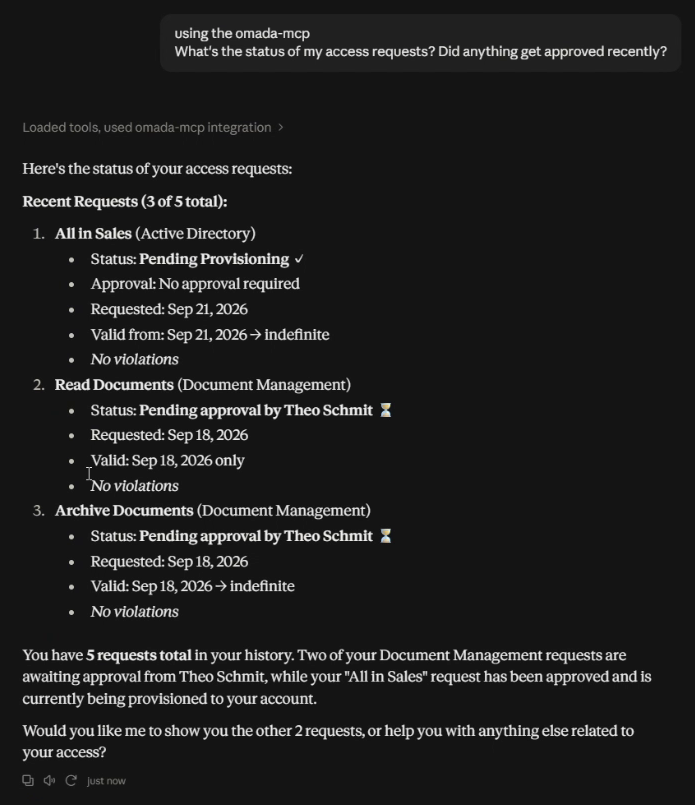
With the release of the Omada Identity MCP, the self-hosted Omada MCP Server project on GitHub will be deprecated. If you use it, plan to move to Omada Identity MCP.
Comprehensive administrative logging
Omada Identity now logs administrative and configuration changes as audit events. Each event identifies who made the change, when it occurred, which object was affected, and whether it was created, modified, or deleted. For selected fields, the new values are included.
Audit events are written for changes to:
- Users, user groups, and authorization roles, including authorization role element permissions.
- Timers, event definitions, copy rules, mail templates, and process templates.
- Data Object Types at the type level, code method configurations, data connections, and data exchange configurations.
- Customer settings and master settings.
Each changeset import is also logged, including the user who imported it. Individual entries for changes made during the import include a ChangeUId, which distinguishes them from changes made directly in the user interface.
The events are written to the configured log targets and can be viewed on the Event Log page. No configuration is needed: in Omada Identity Cloud, system event logging is enabled by default and managed by Omada.
Event IDs and their meanings are documented and remain stable across releases. For the full list, see the Log overview documentation.
Omada Identity Analytics (OIA)
Identity Comparison dashboard shows current access by default
Previously, when you compared identities in the Identity Comparison dashboard, expired resource assignments appeared alongside current ones. This made it harder to see what access the identities actually have today.
The dashboard now shows currently effective resource assignments by default. Reviewers get an accurate view of current access from the start, with less noise and no extra filtering.
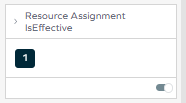
For point-in-time analysis, you can still change the Resource Assignment Is Effective filter directly in the dashboard.
For more information, see Resource Assignment Is Effective in Filters specific to the Identity Comparison dashboard.
UX and UI
Unresolved button renamed to Unmatched accounts
The Unresolved button in the Account rules status dialog on the onboarded system page has been renamed to Unmatched accounts. Selecting it now opens the Identity, Unresolved [UNRESOLVED] page in a new browser tab, with the Access rights tab selected, so you can see which accounts were not resolved and mapped to identities. Because the page opens in a separate tab, you can review unmatched accounts without leaving the onboarded system page.
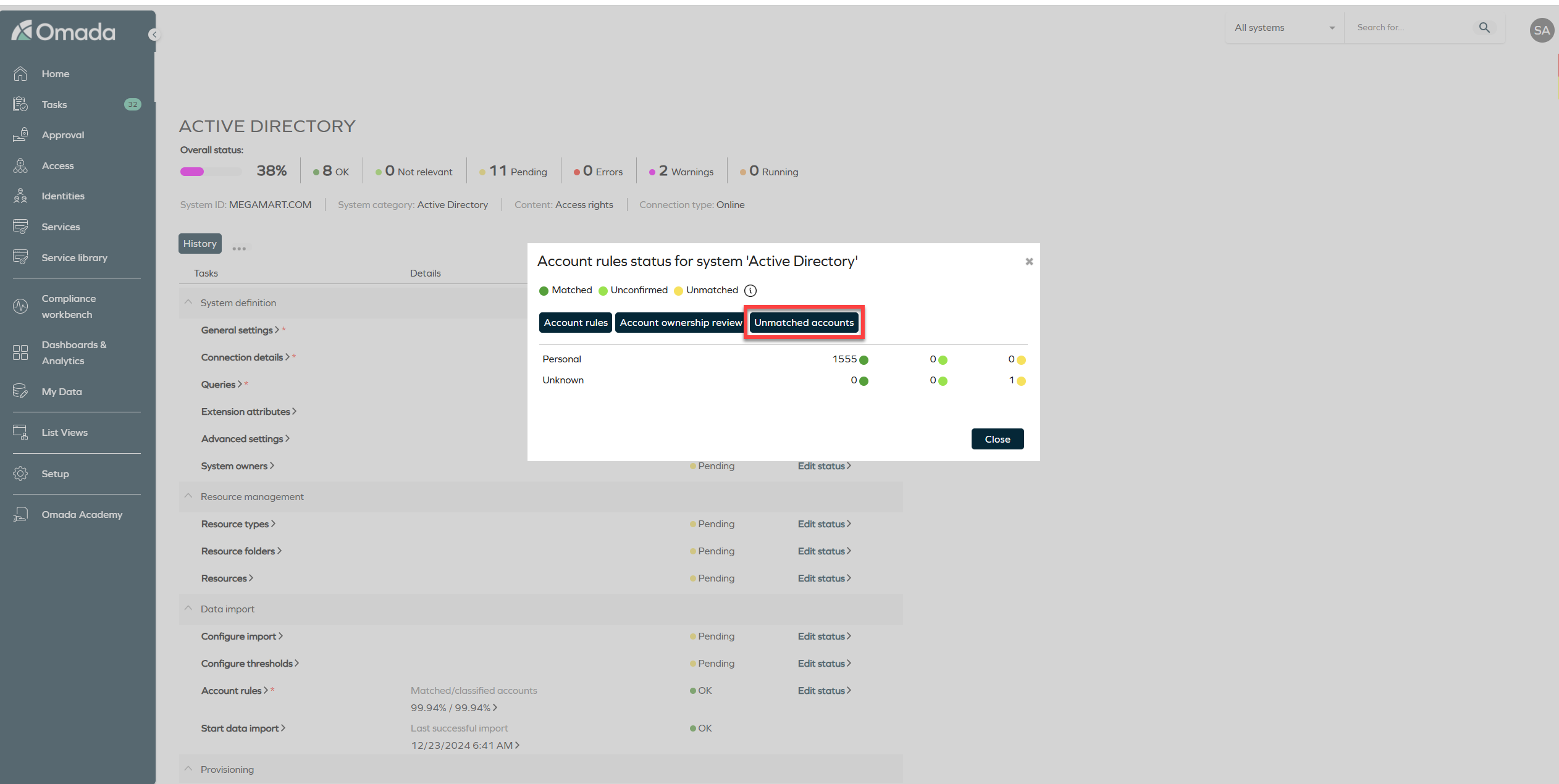
For more information, see Matched/classified accounts and Access rights tab.
Constraint column in policy violation summaries
The policy violations summary now includes a Constraint column that shows a short description of the constraint. You can see why a violation occurred without opening the policy. The column appears wherever you can open the violations summary, for example, in the Policy and risk check panel of an access request and in access approvals.
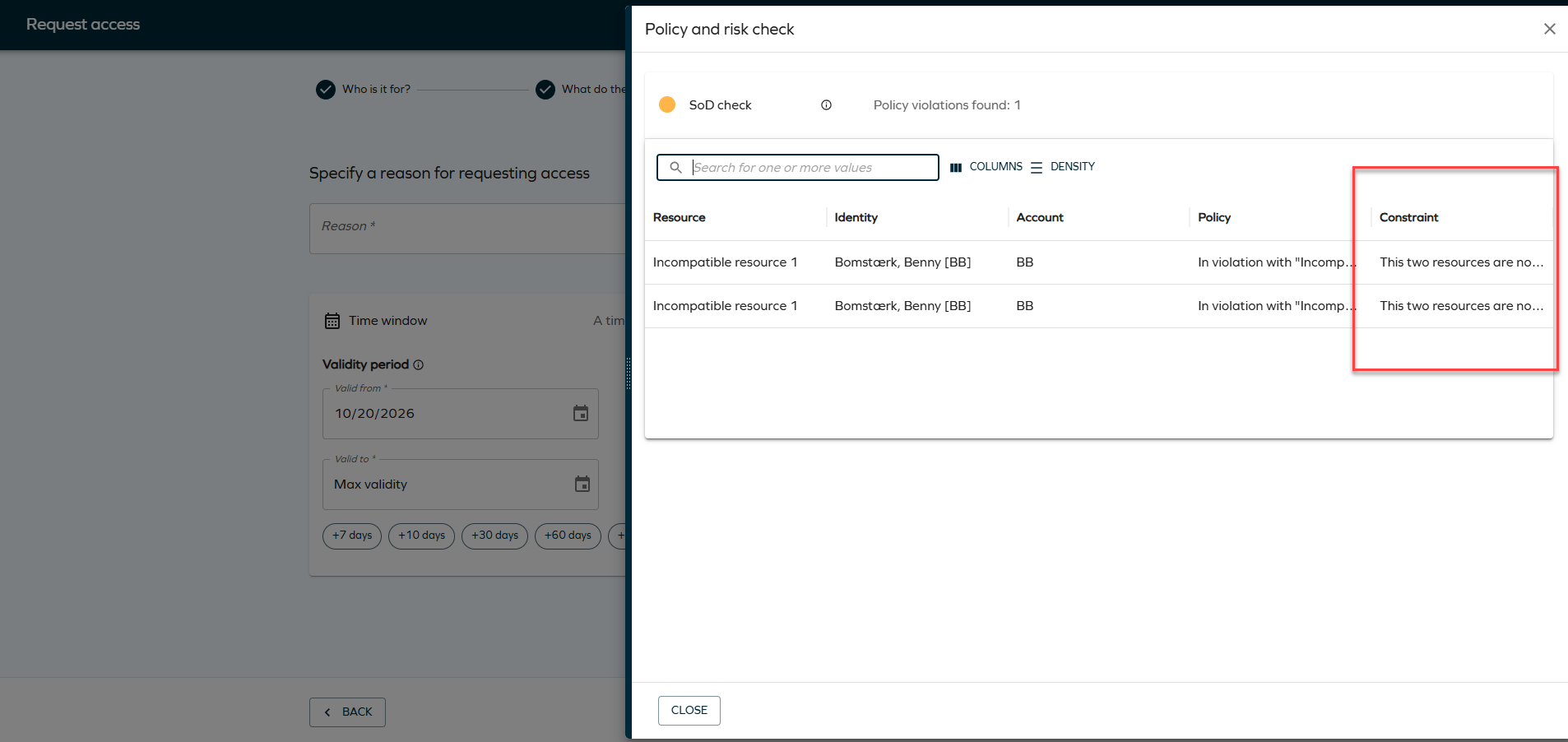
For more information, see Policy risk documentation.
Request the same resource multiple times in Access request
We have added a new capability to Access request and to the access request process for non-human (technical) identities: you can now request the same resource more than once in a single access request, as long as each request uses a different set of attribute values.
Each requested instance appears as a separate line in the Selected resources table. Every line has its own attributes, so you can provide different values for each one, and you can remove each line individually without affecting the others.
In the resource search results, the button next to a resource shows what you can do with it:
- Add - the resource is not selected yet.
- Add again - the resource has configurable attributes and is already added. Each time you click Add again, a new request line is created.
- Added - the resource has no configurable attributes and is already added.
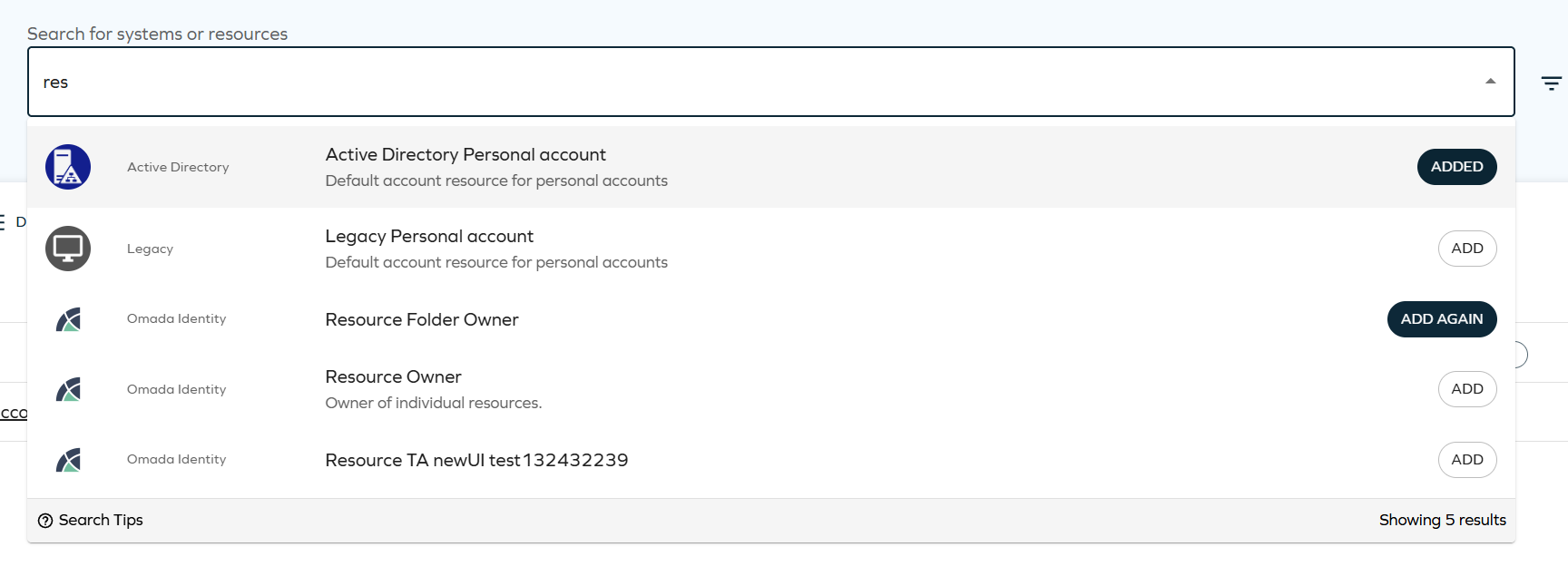
The following example shows the same resource added twice, with each line having its own Add attributes chip and Remove action:
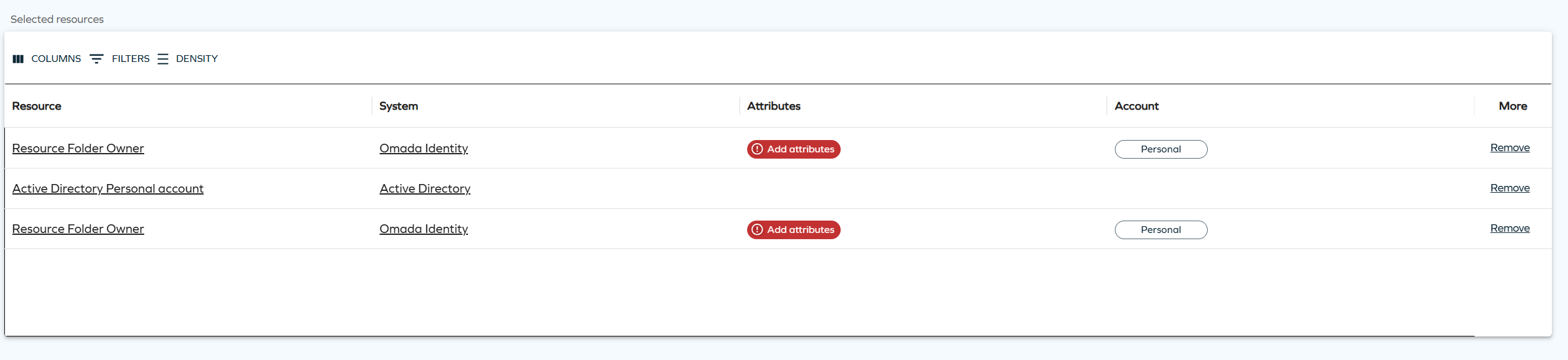
You can add a resource again only when its attribute values differ from an existing request line for the same resource. Identical combinations of resource and attribute values are not allowed.
Resources without configurable attributes are still limited to one request per access request.
For more information, see Request the same resource multiple times.
Connectors
SAP SuccessFactors authentication enhancements
The SAP SuccessFactors data import and data provisioning, in both the OData-based and the SCIM-based connectivity packages, are now supporting additional authentication options:
- OAuth2 Client Credentials through SAP Identity Authentication Service (IAS) - Omada Identity obtains an access token from IAS by using OpenID Connect and the OAuth 2.0 client credentials grant, and then uses the token to call the SAP SuccessFactors APIs. This option suits service-to-service integrations and does not require a SAML assertion.
- Local SAML assertion generation for OAuth2 SAML - The SAML IDP Endpoint field is now optional. If you leave it empty, Omada Identity generates and signs the SAML assertion itself, so you no longer need an external identity provider. In this case, you must also fill in the Certificate, Assertion Issuer, and Audience fields.
The change is backward compatible. Existing OAuth2 SAML configurations that use an external identity provider continue to work without changes.
For more information, go to SAP SuccessFactors data import.
REST Relay - sending all tasks as an array and reading the status of each task
The REST Relay connector now supports target systems that accept one request for the whole provisioning job, with one item for each provisioning task, and that return the status of each item separately. An example is a single access request with an individual line for each requested role.
- Send all tasks as an array - When Send all tasks in one request is selected, use the new Array JSON path setting (for example,
$.items) to add each task as one JSON object to an array in the request. The fields mapped with Use for job are written once at the root of the request. - Status of each task - The new Task status field or JSON path setting, the
TaskStateFieldOrPathobject detail, and the Task completed/pending/failed status values settings let each task read its own status from the response, instead of all tasks receiving the same status. The job stays pending while any task is pending. - Job external identifier check - The new
JobExternalIdentifierRequiredobject detail fails the job if the target system returns HTTP 200 without the job external identifier. The identifier is also used to fill the[JobExternalIdentifier]placeholder inResourcePathGetStatus.
The settings Request item status field, Request item pending values, Request item failed values, and Request completed values are now described as the status settings of the job. They are also used for the tasks unless the new task settings are set. The change is backward compatible: when the new settings are empty, the connector works as before.
REST connector - success codes in responses and test query clarification
- ResponseSuccessCodes - The new object detail defines which values, found with ResponseHttpCodePath, mean success. You can use it when the API reports success with a code that is not an HTTP code. ResponseHttpCodePath now also accepts several JSON paths separated by semicolons.
- Test query and ResourcePathGetStatus - The documentation now clarifies that these paths are added to the Base address only, without the Entity root. If you use an entity root, include it in the path.
For more information, go to REST Relay connector and REST connector configuration.
Horizons
Clearing property values
You can now clear a property value in the Enterprise Server by setting the property mapping to a Constant type with the NULL value configured.
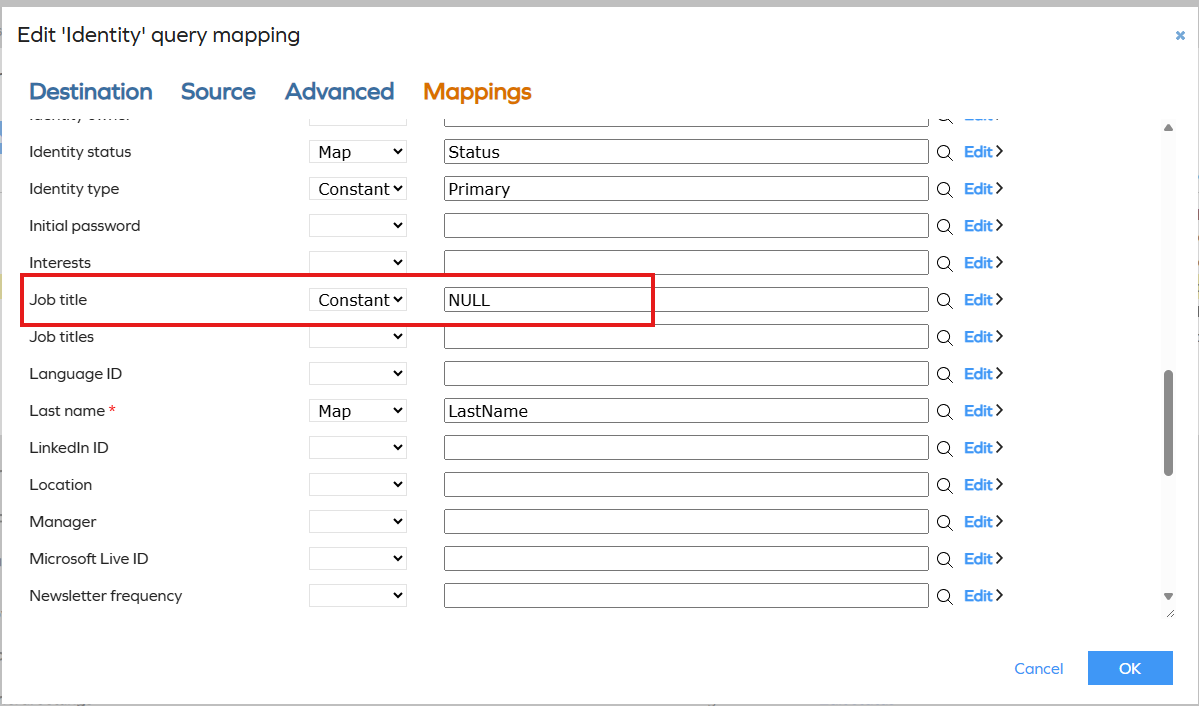
For more information, go to the Clearing property values section.
Role and Policy Engine
Resource parent-child relationships in the RoPE database are disabled by default
The ResourceParentChildInRoPEDb setting is now disabled for all users, and users can no longer enable it themselves. If you have a business or performance-critical scenario that requires this setting, contact Customer Support to request a review. Requests are evaluated case by case.
For more information on this setting, refer to the Customer settings section.
Surveys
Changes to CalculatedAssignmentVerdictSurveyPostActionHandler
The CalculatedAssignmentVerdictSurveyPostActionHandler post action handler now handles obsoletion for each direct assignment. For this, it uses the RESASSIGNMENT property on the survey object.
The Access review for resource owners survey template has been updated to include the RESASSIGNMENT property. Both access review survey templates now include and populate this property, which brings their design closer together.
Custom survey templates that use this post action handler must be updated to include the RESASSIGNMENT property for obsoletion to continue working as intended.
For more information, see Built-in post action handlers and CalculatedAssignmentVerdictSurveyPostActionHandler survey settings.
API
Omada Identity Graph API 3.9
The GraphQL API has been updated to version 3.9 with the following change:
- A new ConstraintDescription field has been added to SoDPolicyCheckResultType. It contains the description of the violated constraint.
For more details, see GraphQL API Changelog.
Other
New code method FindIdentityInRefPropertyAndRemove
We have introduced a new code method called FindIdentityInRefPropertyAndRemove. With this code method, you can remove an identity from the reference properties of other data objects, for example, from the owner properties of resources and resource folders.
The code method runs on identity data objects. It searches for data objects of the data object types that you specify and removes the identity from the reference properties that you specify for each of those types.
For configuration details, see FindIdentityInRefPropertyAndRemove in the Code methods documentation.
Code method UpdatePrimaryObject is obsolete
The UpdatePrimaryObject code method in the SaaS assembly is obsolete and will be removed in a future version. The method is still available in this release.
Use the UpdatePrimaryObject instance method in Omada.OE.UtilityCodeAssembly.Main instead, and update any code or configuration that calls the obsolete method.
For the removal timeline, see the Deprecation calendar.
Documentation
API client authentication documentation
We have added Authenticate API clients with OAuth, a central guide to configuring API clients with Microsoft Entra ID or Okta. It covers creating the client application and Omada Identity service user, obtaining and testing an access token, troubleshooting authentication errors, and configuring impersonation when needed.
We also have updated the Graph API, OData REST API, and ServiceNow integration documentation to link to the shared setup guidance and retain their API-specific or integration-specific instructions.
Data exchange file retention
We have added documentation explaining data exchange file retention and version history. It clarifies that files are retained while referenced by a data exchange configuration, that deleting the configuration can make its file eligible for cleanup, and that run history is pruned separately according to MaintenanceLogFileDeleteAfterDays (180 days by default).
For more information, see the Data exchange documentation.
Data retention documentation
We have extended the documentation on data retention and the right to be forgotten.
See Data retention and right to be forgotten for full information.
Clarified RoPE identity status and validity behavior
We have updated the Identities and Validity period and disabled status documentation to clarify identity status transitions, the effect of identity status on account assignments versus role and permission assignments, and how validity dates affect calculated assignments. The updates also describe how RoPE handles resource and direct assignment statuses, including obsolete assignments.
Attribute-based approval guidance updated
The reference path documentation now explains how to use $AttributeValueReferences to determine access request approvers and describes the related limitations. For more information, refer to the Specifying reference path documentation.
Encryption documentation updated
The encryption documentation now specifies the JWE algorithm identifiers (PBES2-HS512+A256KW and A256GCM) and explains how the p2c parameter is determined. It also clarifies that HS512 identifies the HMAC SHA-512 pseudorandom function used by PBKDF2 and does not imply a key length.
The password encryption key guidance now explains that PswEncryptionKey is a PBKDF2 password input, recommends a randomly generated value with at least 128 bits of entropy, and provides practical character-set guidance. The documentation also clarifies that JWE is implemented and disabled by default through the UseJWE customer setting.