Log overview
This page describes where to find the different logs in Omada Identity and lists Enterprise Server event IDs and their meanings.
Page activity log
All user access to web pages that are a part of the Omada Identity are logged in to the dbo.tblActLog table in the database.
Writing logs to the dbo.tblActLog table can be managed by setting the EnableActivityLog customer setting to the desired value:
- If this setting is enabled, logs are written to
tblActLogtable. This is the default value for on-premise customers. - If this setting is disabled, logs are not written to
tblActLogtable. This is the default value for Cloud customers. - If this setting is not defined, logs are written to
tblActLogtable.
Web request activity information is always written to the configured OIS logging targets, regardless of the EnableActivityLog customer setting.
Only Platform Administrators can change the value of the EnableActivityLog setting.
dbo.tblActLog
The dbo.tblActLog table to which the logs are written includes many different columns, such as:
ID- unique ID is assigned to each new page access.UserId- the IDs for the user and customer accessing the page.CreateTime- the time when the user first accessed the page.PageName- he name of the page that the user accessed, for example,dataobjviewdlg.aspx.PagePath- he complete path to the page, for example,/webservice/oim_systemonboarding.asmx.QueryString- the query string is used to call the page, for example,op=pushconfiguration.EndTime- the time when the user finished accessing the page.IP- the IP address from which the access to the page came.
You can extract the data and paste it into a more reading-friendly format, for example, in a Microsoft Excel spreadsheet. You can also use the IIS page log for this type of information. To do this, follow these steps:
-
Open IIS Manager on your computer.
-
Locate the properties for the relevant view.
-
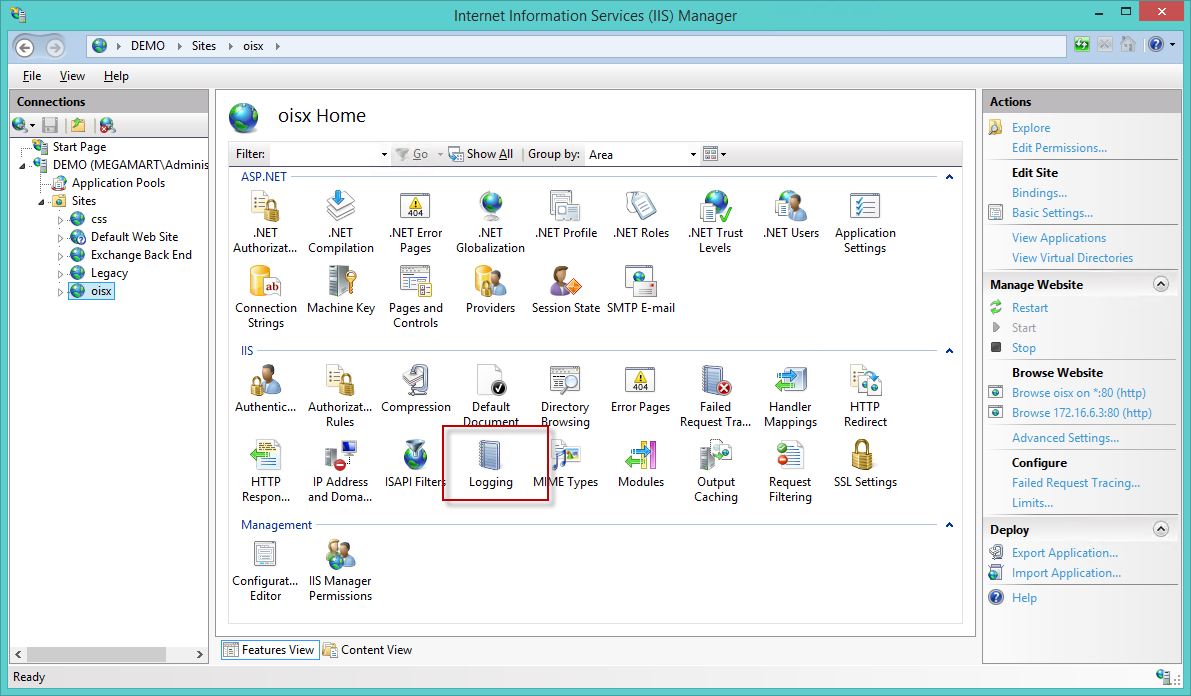
Open the Logging feature.
-
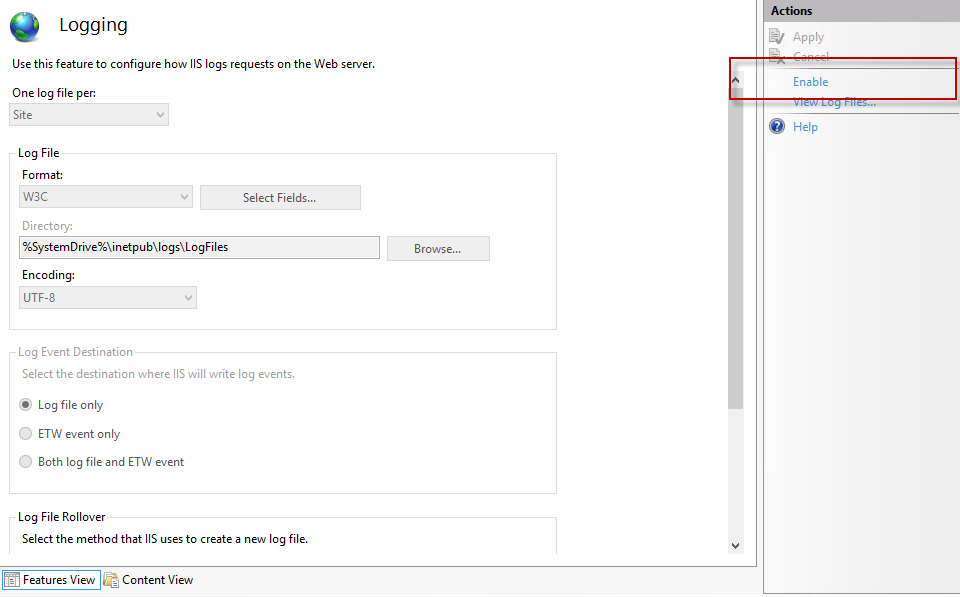
In the Logging feature, select Enable in the Actions pane and specify the format for the log in the Format field.
-
To set up the log schedule, select from the available log schedules in the Log File Rollover section.
-
To set the location of the log file directory, click Browse in the Log file section and select the specific location of the file. The path is displayed in the Directory field.
Performance counters
Performance counters are instrumental in monitoring the health of the Omada Identity. Leveraging Windows functionality, this set of counters aids in ensuring system performance.
The installation of the performance counter category and instances occurs within the Enterprise Server MSI installer.
To initiate performance counters, you can access the Start performance counters master setting. For more information, refer to the Monitoring section in the Master settings document.
They include the following counters:
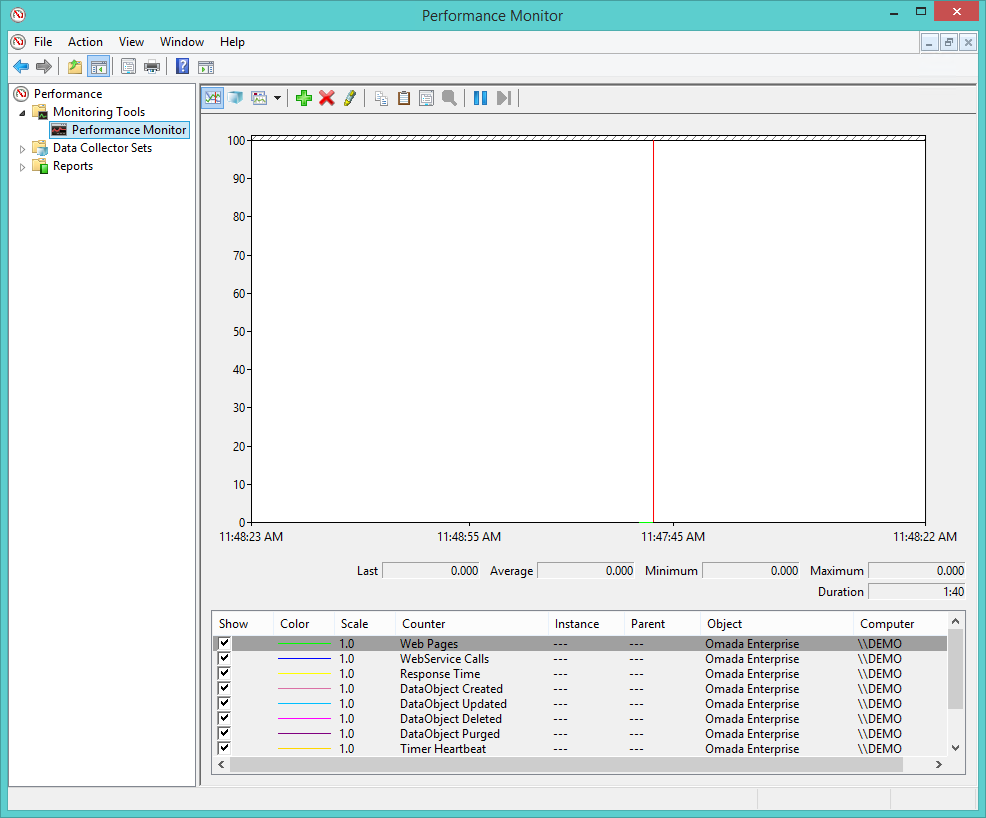
- Web Pages – incremented for each WebPage request.
- Web Service Calls – incremented for each WebService call.
- Response Time – average response time.
- DataObject Created – incremented for each data object created.
- DataObject Updated – incremented for each data object updated.
- DataObject Deleted – incremented for each data object deleted.
- DataObject Purged – incremented for each data object purged.
- Session Count – sample of number of interactive sessions.
- Timer Heartbeat – incremented for each timer cycle.
- RoleEngine Heartbeat – incremented for each role engine cycle.
- RoleEngine Identity Calculated – incremented for each identity calculation.
- Obsolete Property Value Count – sample of number of obsolete property value rows in the database.
- Obsolete DataObject Version Count – sample of number of data object version rows in the database.
- Deleted DataObject Count – sample of number of data object marked as deleted in the database.
You can find the counters on the application server under the Omada Enterprise category:
Synthetic transactions
PingDatabase.aspx
There are two functions in the Web Application for synthetic transactions. External monitoring tools can use the transactions to check the availability of the Omada Identity. PingDatabase.aspx is a webpage that shows the message OK when the application is up and running.
The Web Service's end-point is WebService/MasterWebService.asmx. It contains the web service called PingDatabase(), which returns the message OK when the application is up and running.
LoadBalancer.aspx (Health check endpoint for load balancers)
Omada Identity provides a dedicated unauthenticated endpoint that can be used by load balancers to verify node availability:
[BaseURL]/LoadBalancer.aspx
This endpoint returns one of the following:
- 200 –
Response.StatusCode, node is available. - 503 –
Response.StatusCode, node is unavailable. - No response – the server cannot handle the load.
To prevent excessive polling, this endpoint caches the previous response for 5 seconds. Querying it more frequently provides no additional value.
The endpoint behavior is controlled by the LoadBalancerNodeEnabled key in web.config:
- empty or true - endpoint returns data (200 or 503).
- false - endpoint always returns 503.
This endpoint does not require authentication and is intended for load balancer health checks only.
Code method log
You can use code methods to modify many configurations, for example, data objects, forms, processes, and users. Code methods are included in the basic setup, but users can also create and modify more code methods to suit their particular configuration. Code methods are linked to events, such as creating or modifying objects or the transition of a process.
Whenever someone uses a code method, the use is logged in the Code Method Log. You can find this log in the System Management menu. The code method log can assist you with monitoring the use of code methods and if the code methods are successful.
Find the Code method log view by going to Setup > Logs> Code Method Log. The main view displays a list of code methods that the system has run, as shown in the following image:
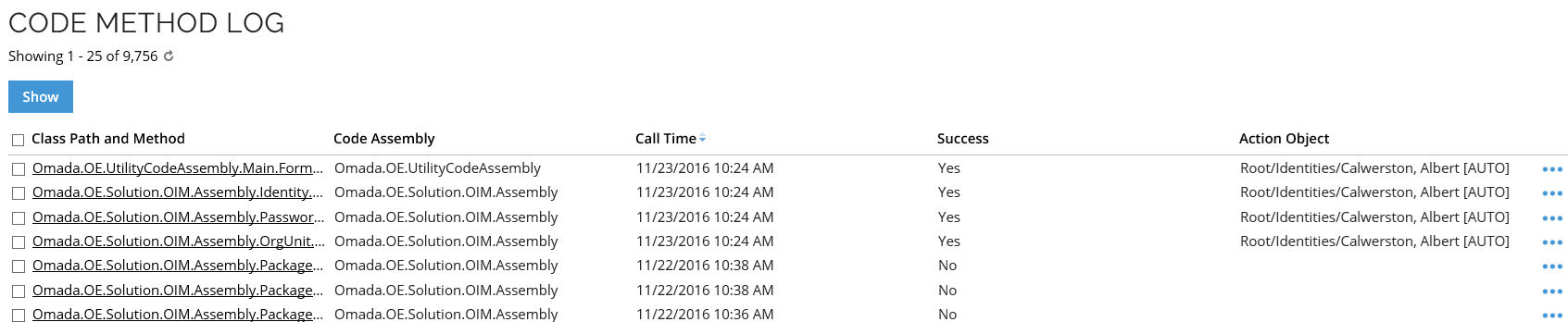
The complete list view includes the following information:
- Class path and method - shows the name of the class path and code method.
- Code assembly - show the code assembly that the code method used.
- Call time - shows the time when the code method was called.
- Success - shows if the code method ran successfully. This can be Yes or No.
- Action object - shows the target of the code method’s action.
When you click a code method in the list, a page opens to display the complete details of the code method that has run.
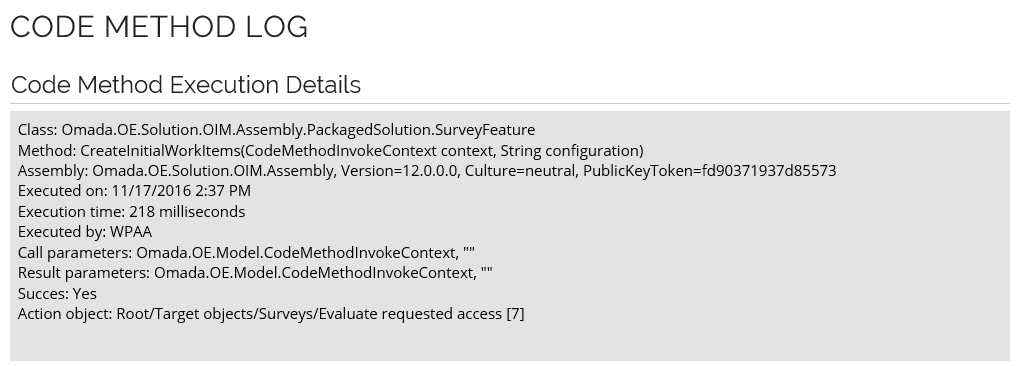
The details on the page include:
- Assembly - shows the code assembly used by the code method.
- Executed on - shows the time and date on which the code method ran.
- Execution time - shows how long time it took to run the code method.
- Executed by - shows the User ID of the user who called the code method.
- Call parameters
- Result parameters
- Success - shows if the code method ran successfully. This can be Yes or No.
- Action object - shows the object on which the code method action took place.
The Code Method Execution Details page can help you troubleshoot a code method if it has not worked successfully. You can also find details about the code methods in the SQL Server database table dbo.tblCodeMethodLog.
Enterprise Server logs
Event IDs and their meanings are stable across releases. New event IDs may be added in later releases. Changes to existing event IDs are announced in advance and versioned.
The Omada Logging Framework sends entries, including all event IDs listed here, to the configured log targets. You can view them on the Event Log page. This applies to all deployments. In Omada Identity Cloud, only Omada can change the log configuration. For details, see Event Logging configuration.
For a list of Omada Logging Framework event types and their event IDs, see Omada Logging Framework event types.
By default, on-premises installations record Enterprise Server errors, warnings, and information messages in the Windows event log under Application. You can view these entries in Event Viewer.
General and database events
| Event ID | Name | Description |
|---|---|---|
| 10000 | Other | Uncategorized error. |
| 10001 | LogError | Error in the log configuration. |
| 10002 | ServerConfiguration | Server configuration error. |
| 10003 | LicenseError | Licensing error. |
| 10100 | ObjectNotFound | Object not found. |
| 10200 | SqlCommon | Uncategorized SQL error. This can be a syntax error. |
| 10201 | SqlTimeOut | SQL error caused by a locked resource or a long-running statement. |
| 10202 | SqlNetworkError | Cannot access the SQL Server. Can be caused by a connection string with errors. |
| 10203 | SqlLoginFailed | Access to the SQL Server is denied. The username or password may not be correct. |
| 10204 | SqlTransientError | SQL transient error. |
| 10205 | SqlUniquenessError | SQL uniqueness error. |
| 10206 | SqlRollbackFailure | SQL rollback error. |
| 10300 | CacheLockTimeout | A cache refresh failed because of a locked resource. |
Authentication events
| Event ID | Name | Description |
|---|---|---|
| 10400 | LogonFailure | A user has failed to log in to the application. |
| 10401 | SamlResponseFailed | SAML response failed. |
| 10402 | OpenIDResponseFailed | OpenID response failed. |
| 10403 | UserAuth | Failed to set user password. |
| 10404 | LogonUserIsInactive | User is inactive. |
| 10405 | TooManyLogonAttempts | Too many logon attempts. |
| 10406 | PasswordExpired | Password has expired. |
| 10407 | SamlConfiguration | SAML configuration error. |
| 10408 | LogConfiguration | Log configuration errors and changes. Always logged, regardless of EnableSystemEventLogging. |
| 10409 | LogonSuccessful | Logon successful. |
| 10410 | LogoffInitiated | Log off initiated. |
| 10411 | LogInitialized | Log in initialized. |
Code method and access modifier events
| Event ID | Name | Description |
|---|---|---|
| 10500 | CodeMethodException | A code method has failed. |
| 10501 | CodeMethodFriendlyException | A code method has thrown a non-fatal exception. |
| 10502 | CodeMethodMalConfiguration | A code method has been configured which contains errors. |
| 10503 | CodeMethodValidation | Code method validation error. |
| 10504 | AccessModifierValidation | Access modifier validation error. |
| 10506 | ReferencedObjectDeleted | Referenced object deleted. |
| 10550 | XmlSchemaFileUpdateError | Error in the XML schema file update. |
Database update events
| Event ID | Name | Description |
|---|---|---|
| 10600 | DatabasePatchApplied | A database patch has been installed. |
| 10601 | DatabaseScriptExecute | Database script executed. |
| 10602 | AppStringsImported | App strings imported. |
| 10603 | UpdateActionAssemblyError | Error in the assembly update action. |
| 10604 | UpdateActionExpectedError | Error in the action expected update. |
Mail events
| Event ID | Name | Description |
|---|---|---|
| 10700 | MailTooManyReceivers | A function was prevented from sending notifications because it would send out too many emails, resulting in spam. |
| 10701 | MailNoValidEmailAddress | An email notification could not be sent because no valid email address was found. |
| 10702 | MailCannotSendMail | An error occurred while sending an email notification. This may be because of an email relay problem. |
| 10703 | MailCannotBeQueued | Mail cannot be queued. |
| 10704 | MailCannotDecryptVar | Unable to decrypt mail variable. |
| 10705 | MailCannotRemoveMailFromQueue | Cannot remove mail from queue. |
| 10706 | MailCannotAddMailLog | Cannot save mail to the log. |
| 10707 | MailSent | Mail sent. |
| 10708 | MailConnection | Mail connection error. |
| 10709 | MailAuthentication | Mail authentication error. |
Execution and integration events
| Event ID | Name | Description |
|---|---|---|
| 10800 | EventDefTooManyObjects | An event definition did not trigger on all filtered objects because the threshold number of objects was exceeded. |
| 11000 | TraceInformation | Trace information from a code method or another function. |
| 11001 | WebRequest | Web request failed. |
| 12003 | SimulationHubRun | Simulation service failed. |
| 12100 | RunArchiveBatch | Archiving cycle failed. |
| 13000 | WebserviceError | Web service request failed. |
Password reset events
| Event ID | Name | Description |
|---|---|---|
| 13200 | PasswordResetSucceded | Password reset success. |
| 13201 | PasswordResetFailed | Password reset failure. |
| 13202 | PasswordResetOneTimeCode | Password reset one-time code. |
| 13203 | PasswordResetBruteForceDetected | Password reset brute-force attempt detected. |
| 13204 | PasswordResetMissingDelegateMethod | Password reset is missing the delegate method. |
| 13205 | PasswordResetNotificationFailed | Password reset notification was not sent. |
| 13206 | PasswordResetVerifyPasswordFailed | Password reset password verification failed. |
| 13207 | PasswordResetAccountLookupFailed | Password reset account lookup failed. |
| 13208 | PasswordResetSystemLookupFailed | Password reset system lookup failed. |
| 13209 | PasswordFilterFailed | Password filter failure. |
| 13210 | PasswordChanged | Password changed. |
| 13211 | PasswordResetClientLoadFailure | Failure to load the password reset client. |
Access request and policy check events
| Event ID | Name | Description |
|---|---|---|
| 13300 | AccessRequestStatusConfigError | Error in the configuration of the access request status. |
| 13350 | PolicyCheckConfigurationError | Error in the policy check configuration. |
| 13351 | PolicyCheckExecutionError | Error during policy check execution. |
API events
| Event ID | Name | Description |
|---|---|---|
| 13400 | ODataError | OData error. |
| 13500 | GraphQLError | GraphQL error. |
User interface and survey events
| Event ID | Name | Description |
|---|---|---|
| 14000 | AjaxGridError | Ajax grid error. |
| 14001 | AjaxGridPossibleSqlInjectionPrevented | Possible SQL injection in the Ajax grid has been prevented. |
| 15000 | SurveyFeatureInfo | Survey feature information. |
| 15001 | SurveyOwnershipNotAccepted | Ownership of a survey has been rejected. |
Data and reporting events
| Event ID | Name | Description |
|---|---|---|
| 16000 | ComplexDataSetBuilderError | Complex data set builder error. |
| 16001 | CrossDatabaseQueryDetected | Cross-database query detected. |
| 17000 | KPIEvaluationError | KPI evaluation error. |
Other application events
| Event ID | Name | Description |
|---|---|---|
| 18000 | VirtualPropertyResolverError | Virtual property resolver error. |
| 19000 | AssigneeExpressionPathResolutionInfo | Information message about assignee expression path resolution. |
| 19001 | AssigneeExpressionPathResolutionWarning | Warning message about assignee expression path resolution. |
| 20000 | OPEJobNotification | OPE job notification. |
| 21000 | TimeZoneAlignment | Time zone alignment. |
| 21001 | CustomerSettingRangeError | Customer setting range error. |
Configuration import and upgrade events
| Event ID | Name | Description |
|---|---|---|
| 22001 | ConfigurationChangeImport | Configuration change import. |
| 22100 | UpgradeSyncOfflineSystems | Upgrade sync offline systems. |
Employment events
| Event ID | Name | Description |
|---|---|---|
| 23001 | SystemEventCat_Employments_IdentityDisabled | Identity has been disabled. |
| 23002 | SystemEventCat_Employments_IdentityLocked | Identity has been locked. |
| 23003 | SystemEventCat_Employments_IdentityReEnabled | Identity has been re-enabled. |
Access request events
| Event ID | Name | Description |
|---|---|---|
| 23101 | SystemEventCat_AccessRequests_RequestSubmitted | Access request submitted. |
| 23102 | SystemEventCat_AccessRequests_RequestApproved | Access request approved. |
| 23103 | SystemEventCat_AccessRequests_RequestRejected | Access request rejected. |
| 23104 | SystemEventCat_AccessRequests_RequestCancelled | Access request cancelled. |
Configuration events
Configuration events record changes to configuration objects. They use the Configuration category.
Configuration event metadata can include these keys:
Actor: The user ID of the user who made the change.EventType: The type of change, such asCreated,Modified, orDeleted. For the changeset import event (23226), the value isImported.ObjectType: The type of the changed object, for example,TimerorUserGroup.ObjectInformation: Object details such asId,UId, andName. For data objects such as Data Connections, it can also includeTypeIdandTypeName.PropertyValues: Values for selected fields. The fields included depend on the object type. For example, Mail Template subjects and message content are not included.
The time is recorded as the log entry's DateTime; it is not a metadata key.
Individual entries for configuration changes applied during a changeset import include ChangeUId at the top level of MetaData. This GUID identifies the individual configuration change being applied and is always present on these entries. ChangeSetId is included only when its value is greater than 0; it is not written for file imports. The import event and these per-change entries can be correlated by time.
Most configuration events depend on EnableSystemEventLogging.
- For on-premises, this setting is disabled by default and can be configured by a platform administrator.
- In Omada Identity Cloud, it is enabled by default and managed by Omada; Cloud customers cannot change or disable it.
The following events are always logged, regardless of this setting:
10408–LogConfiguration: Changes to the log configuration.23224–SystemEventCat_Configuration_SystemEventLoggingChanged: Changes toEnableSystemEventLogging.23225–SystemEventCat_Configuration_MasterSettingChanged: Master Setting changes.
To find these events, open the Event Log page and filter by the Configuration category.
Event text uses modified when the object itself is updated, for example, “Identity modified”, and changed when a reference is updated, for example, “System owner(s) changed.”
PropertyValues contains only the new values, not the previous ones.
Events triggered by UI requests may also include request context metadata: UserAgent, UserHostAddress, HttpMethod, QueryString, UserDateTime, and AuthenticationType. These keys are absent from changeset import entries and system actions.
For example, a Timer change may appear as follows:
Event ID: 23214
Message: Timer ('Timer 1000009') was modified by DWO@OMADA.NET.
MetaData: {"Actor":1021254,"EventType":"Modified","ObjectType":"Timer","ObjectInformation":{"Name":"Timer 1000009","UId":"456cd9e2-eaf5-45a0-a244-d49a7567c61b"},"PropertyValues":{"Timer_RepeatPattern":3}}
A UI change to EnableSystemEventLogging may appear as follows:
Event ID: 23224
Message: The 'EnableSystemEventLogging' customer setting was disabled.
MetaData: {"Actor":1021254,"EventType":"Modified","ObjectType":"CustomerSetting","ObjectInformation":{"Name":"EnableSystemEventLogging"},"PropertyValues":{"EnableSystemEventLogging":false},"UserAgent":"<user agent>","UserHostAddress":"<client address>","HttpMethod":"POST","QueryString":"","UserDateTime":"2026-10-30T15:42:53.6019329Z","AuthenticationType":"OpenID"}
| Event ID | Name | Meaning and actions | Additional metadata |
|---|---|---|---|
| 23201 | SystemEventCat_Configuration_MembersAdded | User Group members added. | Actor, EventType, ObjectType, ObjectInformation, PropertyValues |
| 23202 | SystemEventCat_Configuration_MembersRemoved | User Group members removed. | Actor, EventType, ObjectType, ObjectInformation, PropertyValues |
| 23203 | SystemEventCat_Configuration_ResourceChanged | Resource configuration changed. | Actor, EventType, ObjectType, ObjectInformation, PropertyValues |
| 23204 | SystemEventCat_Configuration_ApprovalConfigurationChanged | Approval configuration changed. | Actor, EventType, ObjectType, ObjectInformation, PropertyValues |
| 23205 | SystemEventCat_Configuration_AssignmentPolicyChanged | Assignment policy changed. | Actor, EventType, ObjectType, ObjectInformation, PropertyValues |
| 23206 | SystemEventCat_Configuration_ConstraintChanged | Constraint changed. | Actor, EventType, ObjectType, ObjectInformation, PropertyValues |
| 23207 | SystemEventCat_Configuration_PrioritizationPolicyChanged | Prioritization policy changed. | Actor, EventType, ObjectType, ObjectInformation, PropertyValues |
| 23208 | SystemEventCat_Configuration_AuthRoleChanged | Authorization Role created, modified, or deleted. | Actor, EventType, ObjectType, ObjectInformation, PropertyValues |
| 23209 | SystemEventCat_Configuration_AuthRoleElementPermissionChanged | Authorization Role element permission added, revoked, or changed. | Actor, EventType, ObjectType, ObjectInformation, PropertyValues |
| 23210 | SystemEventCat_Configuration_UserChanged | User data object changed. | Actor, EventType, ObjectType, ObjectInformation, PropertyValues |
| 23211 | SystemEventCat_Configuration_UserGroupChanged | User Group created, modified, or deleted. Reference changes, such as role assignment changes, appear as changed in the event text. | Actor, EventType, ObjectType, ObjectInformation, PropertyValues |
| 23214 | SystemEventCat_Configuration_TimerChanged | Timer created, modified, or deleted. | Actor, EventType, ObjectType, ObjectInformation, PropertyValues |
| 23215 | SystemEventCat_Configuration_EventDefinitionChanged | Event Definition created, modified, or deleted. | Actor, EventType, ObjectType, ObjectInformation, PropertyValues |
| 23216 | SystemEventCat_Configuration_CopyRuleChanged | Copy Rule created, modified, or deleted. | Actor, EventType, ObjectType, ObjectInformation, PropertyValues |
| 23217 | SystemEventCat_Configuration_MailTemplateChanged | Mail Template created, modified, or deleted. | Actor, EventType, ObjectType, ObjectInformation, PropertyValues |
| 23218 | SystemEventCat_Configuration_ProcessTemplateChanged | Process Template created, modified, or deleted. | Actor, EventType, ObjectType, ObjectInformation (object Name and UId), PropertyValues (empty: {}). |
| 23220 | SystemEventCat_Configuration_DataObjectTypeChanged | Data Object Type created, modified, or deleted. Changes to its properties, views, and filters are not logged when made separately from the Data Object Type. | Actor, EventType, ObjectType, ObjectInformation (object Name and UId), PropertyValues (empty: {}). |
| 23221 | SystemEventCat_Configuration_CodeMethodConfigurationChanged | Code Method Configuration created, modified, or deleted. | Actor, EventType, ObjectType, ObjectInformation, PropertyValues |
| 23222 | SystemEventCat_Configuration_DataConnectionChanged | Data Connection created, modified, or deleted. A Data Connection stores connection details, such as a connection string. | Actor, EventType, ObjectType, ObjectInformation, PropertyValues |
| 23223 | SystemEventCat_Configuration_CustomerSettingChanged | Customer Setting modified. | Actor, EventType, ObjectType, ObjectInformation, PropertyValues |
| 23224 | SystemEventCat_Configuration_SystemEventLoggingChanged | EnableSystemEventLogging changed. | Actor, EventType, ObjectType, ObjectInformation, PropertyValues. Always logged. |
| 23225 | SystemEventCat_Configuration_MasterSettingChanged | Master Setting modified. | Actor, EventType, ObjectType, ObjectInformation, PropertyValues. Always logged. |
| 23226 | SystemEventCat_Configuration_ChangeSetImported | A changeset was imported. The event is written once per import and identifies who imported it and when. It does not include a changeset identifier. | Actor, EventType (Imported), ObjectType (ChangeSet), ObjectInformation (empty), and PropertyValues (empty). Logged when EnableSystemEventLogging is enabled. |
| 23229 | SystemEventCat_Configuration_DataExchangeConfigurationChanged | Data Exchange Configuration created, modified, or deleted. It defines a data exchange operation, including its object type and import type. | Actor, EventType, ObjectType, ObjectInformation, PropertyValues |
Governance events
| Event ID | Name | Description |
|---|---|---|
| 23301 | SystemEventCat_Governance_SurveyStarted | Survey started. |
| 23302 | SystemEventCat_Governance_SurveyCompleted | Survey completed. |
| 23303 | SystemEventCat_Governance_SystemOwnersChanged | System owners changed. |
| 23304 | SystemEventCat_Governance_SystemClassificationChanged | System classification changed. |
| 23305 | SystemEventCat_Governance_IdentityCreated | Identity created. |
| 23306 | SystemEventCat_Governance_IdentityModified | Identity modified. |
| 23307 | SystemEventCat_Governance_IdentityManagersChanged | Managers of the identity have been changed. |
| 23308 | SystemEventCat_Governance_OrgUnitManagersChanged | Managers of the organizational unit have been changed. |
System operation events
| Event ID | Name | Description |
|---|---|---|
| 23401 | SystemEventCat_SystemOperation_NewSystemOnboarded | New system onboarded. |
| 23402 | SystemEventCat_SystemOperation_TechnicalIdentityRequested | Technical identity has been requested. |
| 23403 | SystemEventCat_SystemOperation_WarehouseImportSucceeded | Successful Data Warehouse import. |
| 23404 | SystemEventCat_SystemOperation_WarehouseImportPartiallySucceeded | Partially successful Data Warehouse import. |
| 23405 | SystemEventCat_SystemOperation_WarehouseImportFailed | Failure of the Data Warehouse import. |
Email log
The Omada Identity’s system administrator can view a log of all emails that the system has generated.
Omada Identity does not log emails that include sensitive material to the email log, for example, emails that include passwords. Find the log by going to Setup > Administration > System Management > Email Log. The initial view shows an overview of generated emails.
The email log shows:
- The To and From names.
- The Subject of the email.
- The Date and Time sent.
View the details of a sent email by clicking the Subject in the list view. The details for the email are shown in the Sent Email dialog box.
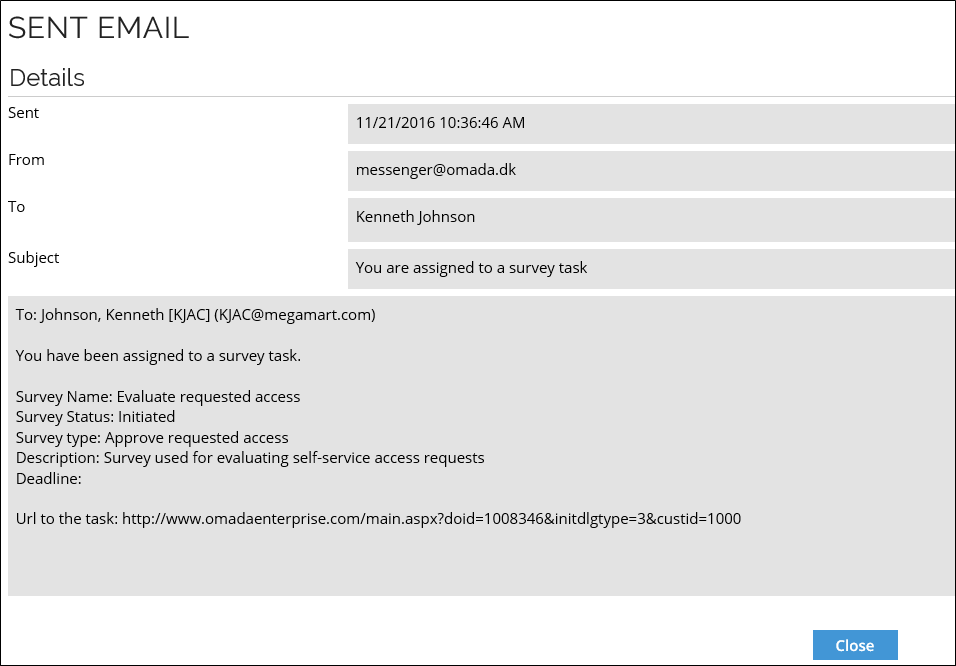
You can also find details about sent emails in the SQL Server's database table dbo.tblMailLog.
Data Exchange log
Whenever you have run a data exchange, a log entry of the data exchange is added to the data exchange log. To find the log for data exchange, go to Setup > Administration > Connectivity > Data Exchange.
In the initial view, right-click the data exchange you want to view and select History. The Data Exchange Log dialog box opens and shows all the data exchanges that have taken place on your system.
Click any of the listed data exchanges to see the Data exchange log details for this data exchange. The Data exchange log details include the date and length of the time when the exchange ran, the status of exchange, the number of objects created or updated, and more.
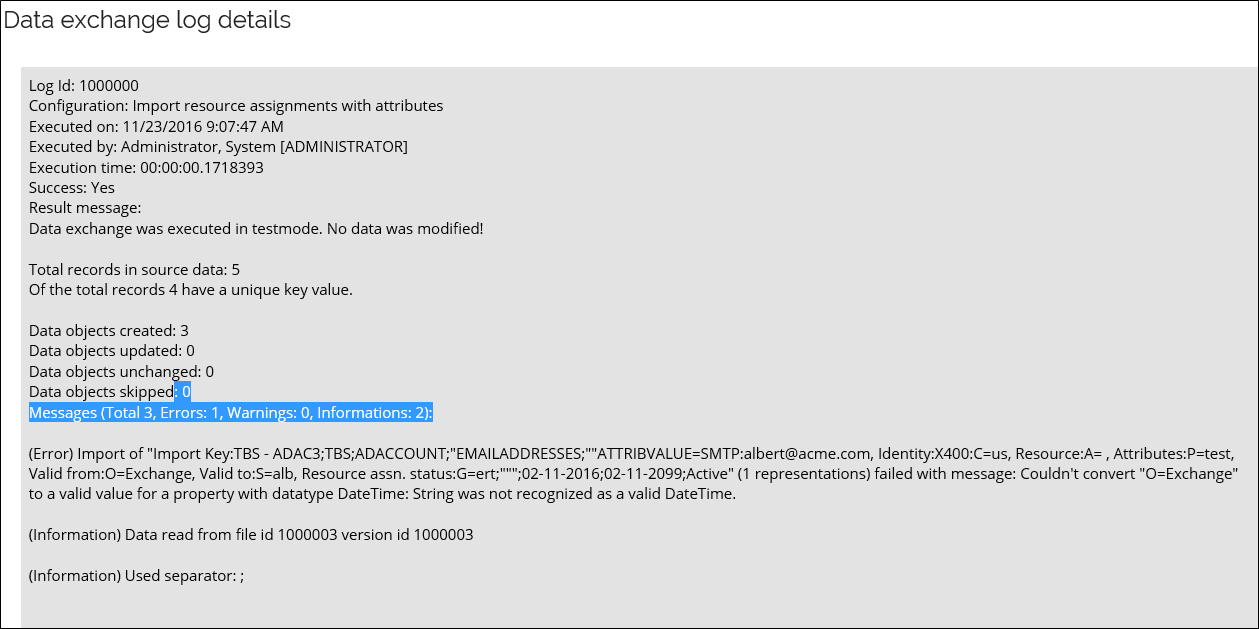
Timer execution log
The timer log list displays a list of all timer runs times. To see this log, go to Setup > Administration > Data management > Timers, click the ellipsis (...) menu for a given timer, and select History. The Timer Execution Log will be displayed.
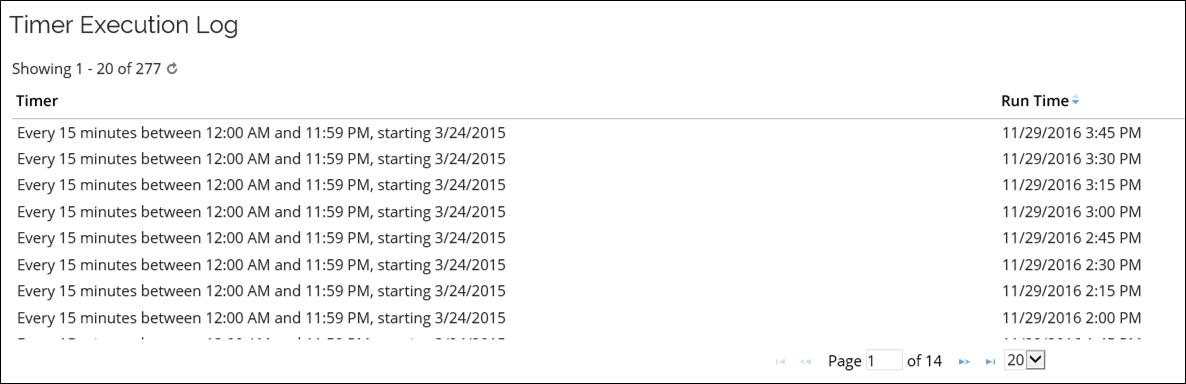
The Timer Execution Log lists the history of whenever a timer ran:
- The name of the timer.
- When the timer ran.
- The name of the triggering server.
You can also find these details in the Enterprise Server's database. The timer log is stored in a table called dbo.tblTimerLog.
Omada Role and Policy Engine log
The Role and Policy Engine creates a log for the Event Viewer with the application name Omada Role and Policy Engine with many events to log.
Info messages
| ID | Name | Description |
|---|---|---|
| 100 | GeneralInfo | The 100-series are information messages. |
| 101 | CycleRunStarted | RoPE has started a calculation cycle. |
| 102 | CycleRunCompleted | RoPE has completed a calculation cycle. |
| 104 | RequeuedPreviousFailures | RoPE has automatically queued identities that previously failed calculation again. |
| 105 | QueuedIdentitiesWithRecent ActivationsOrExpirations | The engine has automatically queued identities that either have: An assignment that was pre-valid at the time of calculation, but has meanwhile entered its validity period Or: An assignment that is enabled but with a date in the Valid To setting that is in the past. |
| 106 | DeletedHistoricCalculations | The engine has completed the periodic deletion of historic calculations for all identities. |
| 107 | TraceOutput | Info written for problem tracing purposes. |
| 108 | Paused | RoPE paused. |
| 110 | CycleRunCleanup | Cyclerun cleanup error. |
| 111 | CalculationInfo | Calculation message. |
| 112 | Resumed | RoPE resumed. |
| 113 | GetActualStateEvents | Loading actual state events. |
| 114 | GetActualState | Loading actual state. |
| 115 | QueuingTasks | RoPE service running hourly tasks. |
| 116 | DailyTasks | RoPE service running daily tasks. |
| 117 | SchemaUpdate | Schema updates. |
| 118 | PublishingOdsMessages | RoPE service publishing Operational Data Store messages. |
| 119 | DeletingOldOdsMessages | RoPE service deleting old Operational Data Store messages. |
| 120 | DeleteOldRecords | Delete old cycle runs and related data. |
Warning messages
| ID | Name | Description |
|---|---|---|
| 200 | GeneralWarning | The 200-series are warning messages. |
| 201 | MasterDataIssue | A non-fatal issue exists in the engine's master data configuration. |
| 202 | GetActualStateAssignmentIgnored | An assignment returned from actual store was ignored. |
Error messages
| ID | Name | Description |
|---|---|---|
| 300 | GeneralError | The 300-series are error messages. |
| 301 | LockAndLoadQueued IdentitiesError | Error occurred while attempting to lock and load queued identities for calculation processing. |
| 302 | GeneralExecutionError | General execution error. |
| 303 | IdentityCalculationError | Error calculating identity. |
| 304 | BatchProcessingError | Batch processing error. |
| 305 | ServiceExecutionError | Service execution error. |
| 306 | ODWBusinessKeyResolution Error | Could not resolve an Omada Identity Data Warehouse composed business key to a data object in ES. |
| 307 | ResourcePoolWithMissing ODWBusinessKeyError | One or more systems/resource pools detected that has a system category and thus is expected to be present in the Omada Identity Data Warehouse but does not have a business key in the ES. |
| 308 | SimulationError | Simulation failed. |
| 309 | RemoteAPIAuthentication Failed | Authentication of the RemoteAPI client failed. |
| 310 | ConfigurationError | Required configuration is missing or invalid. |
| 311 | RollbackFailure | Rollback failure. |
| 312 | GetActualStateError | Error occurred loading data. |
| 313 | GetActualStateErrorGraphQL | Error occurred loading data - GraphQL Error. |
| 314 | IdentityCalculationTransientError | Identity calculation failed with transient error - retrying. |
Other messages
| ID | Name | Description |
|---|---|---|
| 900 | Other | Other. |
Omada Provisioning Service logs
OPS creates a log for the Event Viewer with the application name Omada Provisioning Service with many events to log.
| EventId | Name | Description |
|---|---|---|
| 101 | FailedToLoadExtension | OPS failed to load extension method. |
| 102 | UnexpectedDatabaseError | Unexpected database error. |
| 103 | EntityValidationErrors | Errors in the entity validation. |
| 130 | UnhandledError | Unhandled error. |
| 151 | FailedParsingConnectionString | Failed parsing of the connection string. |
| 152 | UpgradeFailed | Upgrade failure. |
| 201 | FailedToLoadSystemConfiguration | Failed to load system configuration. |
| 202 | UnexpectedErrorInSystemManager | Unexpected error in system manager. |
| 203 | JobDeemedDuplicate | Duplicate jobs error. |
| 204 | ErrorSavingBatch | OPS batch could not be saved. |
| 205 | FailedToInitializeSystemConfiguration | Failed to initialize the system configuration. |
| 206 | FailedToNotifyQueued | Failed to notify queued. |
| 207 | IntegrityChecker | Integrity checker. |
| 301 | TaskProcessingException | Task processing exception. |
| 302 | TaskProcessingFailed | Task processing failure. |
| 303 | JobProcessingFailed | Job processing failure. |
| 304 | NoConnectorsAvailableInPool | No connectors available in pool. |
| 305 | ErrorDequeuingJob | Dequeuing job error. |
| 401 | StatisticsRefreshed | Statistics have been refreshed. |
| 402 | ThresholdExceeded | Threshold has been exceeded. |
| 403 | NotificationError | Notification error. |
| 501 | NotificationFailed | Notification failed. |
| 502 | NotificationQueue | Notification queue. |
| 601 | ErrorArchivingJobs | Jobs could not be archived. |
| 602 | FailedToInitializeSystemConfiguration | Initialization of the system configuration failed. |
| 603 | UnexpectedErrorInSystemManager | Unexpected error in system manager. |
| 701 | ErrorPurgingJobs | Error purging jobs. |
| 702 | FailedToInitializeSystemConfiguration | Failed to initialize system configuration. |
| 703 | UnexpectedErrorInSystemManager | Unexpected error in system manager. |
| 1001 | DequeueJob | Dequeuing of jobs. |
| 1002 | LoadJobFromStore | Job loaded from store. |
| 1003 | TaskProcessingConnector | Task processing connector. |
| 1004 | ProcessingJob | Job processed. |
| 1005 | PersistBatch | Batch persisting. |
| 1006 | PersistBatchDetails | Batch persisting details. |
| 1007 | PersistBatchDetailsTasks | Batch persisting details tasks. |
System log on-prem
You can use the system log to collect specific data that your organization requires. The system log is stored in a table called dbo.tblSystemLog found in the SQL Server.
For example, you could configure code methods that monitor that a specific process is completed and record the details of when they take place. You can configure your code methods to use the .NET methods that are found in a particular Enterprise Server class to produce logs in a readable format for reports and audits.
The benefits of the system log are flexibility of planning and the ability to create code methods to customize the data to log.
Password reset log on-prem
The Enterprise Server database contains a table tblPasswordResetLog which contains both successful and failed password reset attempts.
The log is only accessible via the SQL Server Management Studio.
The columns are:
| Columns | Description |
|---|---|
IdentityID_ | The integer ID of the Identity Data Object. |
IdentityIdent | The username / IDENTITYID. |
ActionTime | The date and time of the attempt. |
Action | see values in the table below. |
Message | Description of the attempt. |
IP | the IP address of the remote client / caller. |
Origin | reference the provisioning service OriginId. |
The values of the column Action are:
| Value | Description |
|---|---|
Enrolled = 0 | User enrolled to password reset. |
ResetSucceeded = 1 | Reset success. |
ChallengeResponsFailed = 2 | User failed to answer challenge questions. |
ResetFailed = 3 | Operation failed. |
SoftLocked = 4 | Threshold for failed attempts exceeded (temporary lock). |
HardLocked = 5 | Threshold for failed attempts exceeded (locked). |
IdentityIdentFailed = 6 | The entered username was not recognized. |
Submitted = 7 | The password change has been handed over to a provisioning service. |
Throttling = 8 | Password reset web page is throttling because of many failed requests. |
Unlocked = 9 | Identity was unlocked by an administrator. |
PartialSuccess = 10 | The password reset action partially succeeded. |
ConfigurationError = 11 | Wrong configuration of password reset handlers. |