Validity period and disabled status
RoPE calculates a validity period and disabled status for all calculated resource assignments (CRAs). If the time of calculation is outside a CRA's validity period, RoPE either disables the CRA or omits it from the calculation result. Within its validity period, the CRA can be enabled or disabled.
Deriving a validity period and disabled status
RoPE calculates the validity period for a CRA based on the objects that are involved in its creation. The involved objects always include the identity to which the CRA belongs to and the resource being assigned. More objects may be involved, depending on the reason for the assignment. Some involved objects have a validity period and some have an explicit setting indicating that they should be regarded as disabled.
RoPE narrows down the validity period by using the largest valid from and the smallest valid to of the involved objects. Similarly, it narrows down the disabled status. If at least one of the involved objects is disabled, then the CRA is disabled as well.
If the time of calculation is before the identity’s Valid from date or after its Valid to date, and the assignment is for an account resource, RoPE ignores the validity periods of other objects involved in the assignment if they do not overlap the identity’s validity period. These objects may include the resource, the assignment policy, or the resource assignment. The assignment then uses the identity’s validity period. The identity’s status is not taken into account.
If RoPE calculates a CRA and the current time is outside the validity period of the CRA, that is, before the validity period starts or after the validity period ends, then, the CRA is disabled or completely disregarded. This means that the CRA will be omitted from the calculation result. Inside the validity period, the CRA can be either enabled or disabled.
The pre-validity period is set by the Pre-validity days customer setting (3 days by default). The post-validity period is set by Post validity (days) on the resource type.
The following table shows how the identity’s Valid from and Valid to dates affect assignments. It assumes that the other objects involved, such as the resource, direct resource assignment, or assignment policy, are still valid and enabled.
| Time of calculation | Account assignments | Role and permission assignments |
|---|---|---|
| Before the pre-validity period starts | Not calculated | Not calculated |
| During the pre-validity period before the identity’s Valid from date | Disabled | Enabled |
| Between the identity’s Valid from and Valid to dates | Enabled, unless disabled by the identity status | Enabled |
| During the post-validity period after the identity’s Valid to date | Disabled | Enabled |
| After the post-validity period ends | Not calculated | Not calculated |
Objects involved in all CRAs:
- Identity - derived from the
Identity.IDENTITYSTATUSproperty. Disabled if the identity status is Pending, Terminated, Disabled, or Locked. This applies only to account assignments; see How RoPE uses the identity status. - Resource - derived from the
Resource.RESOURCESTATUSproperty. Disabled if the resource status is Disabled or Deleted.
Based on the reason for an assignment, additional objects can be involved:
| Reason | Additional involved object | Validity period | Disabled state |
|---|---|---|---|
| Direct | ResourceAssignment | Yes | Yes - derived from the ResourceAssignment.ROLEASSNSTATUS property. Disabled if the resource assignment status is Disabled, Locked, or Obsolete. |
| Policy | AssignmentPolicy | Yes | No |
| Direct, Policy | Context - for a CRA that is created due to an access request, the selected business context (if available) is considered. For a CRA that is created due to an assignment policy, the scoped business context(s) are considered (if available). | Yes | No |
| ChildResource, ImplicitChild | ParentAssignment | No | No |
| ActualDirect, ActualIndirect | ActualAssignment | Yes | Yes |
| UnconfirmedActual | ProvisioningClaim | Yes | Yes |
| ReviewOK | ApprovedAssignment | Yes | No |
If the reason for an assignment is either Direct or Policy, the membership period of the business context for the identity that was selected in the access request or used to scope the policy with is considered as well.
An identity’s Valid to date cannot be earlier than its Valid from date. Omada Identity rejects the identity when you try to save it with such dates, either in the identity form or through data import.
Validity inheriting scenario
RoPE calculates the Validity period of a CRA based on the Validity periods of all the objects involved in the creation of this CRA.
For a single CRA, the validity period will be derived from the common part of the validity periods of the objects involved in it, for example, for a CRA that is the outcome of an access request, these objects are: the Identity, the requested Resource and the ResourceAssignment.
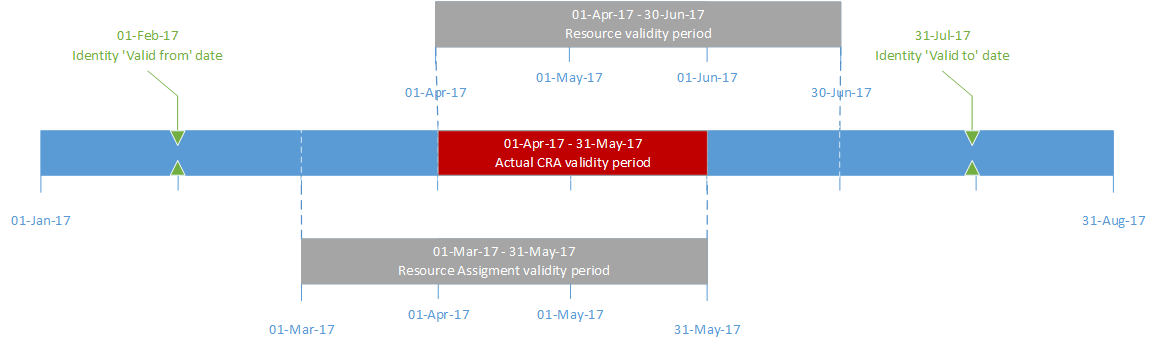
In the above example, the validity period of the CRA is from April 1, 2017 to May 31, 2017, because the largest Valid from date, April 1, is inherited from the Resource, while the smallest Valid to date, May 31, is derived from the Resource Assignment.
If an identity has two or more CRAs for the same resource, then RoPE merges them together during the calculation of the identity. When this happens, RoPE uses the earliest of the ValidTo dates and the latest of the ValidFrom dates on the merged CRA.
The following timeline illustrates how the validity period is computed when two CRAs are merged together:
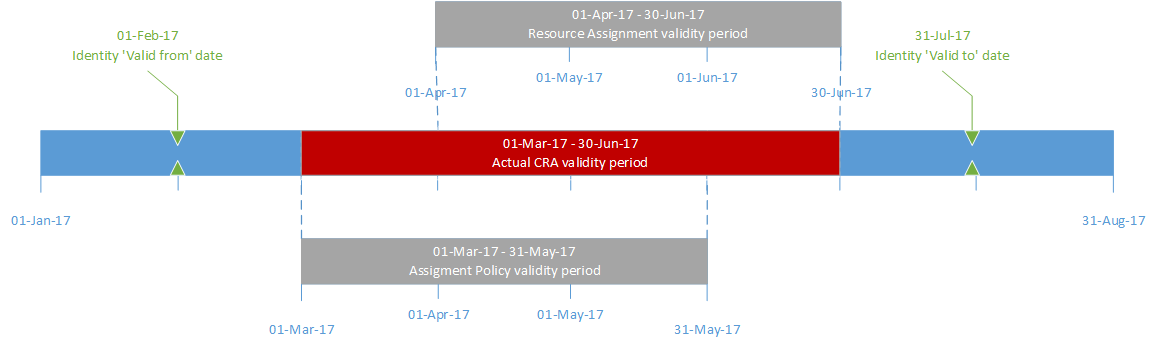
In the example above, the validity period of the CRA is from March 1, 2017 to June 30, 2017, because both Assignment Policy and Resource Assignment are valid reasons for the CRA.
Both Assignment Policy and Resource Assignment validity periods fall inside the validity period of the Identity, so the validity of the CRA is not limited by the Identity's validity.
During the access request process, the SoD simulation does not take the validity periods of role assignments into account. This means the simulation assumes all involved roles are active at the same time, which may result in a simulated SoD violation even when the actual validity dates do not overlap.
In contrast, the SoD evaluation performed during the approval process does consider the validity periods of both the existing role assignments and the new requested role. If the validity dates do not overlap, no SoD violation is raised during approval.
Example:
If a user has an existing role valid until 05/12/2025 and requests a new role starting 06/12/2025, the simulation will show a SoD violation because it does not take the validity dates into account.
However, during approval, the system checks the actual dates and does not raise a violation since the roles do not overlap.
This difference is intentional and reflects the current system design.