Identities
Processing an identity
When RoPE processes an identity, it runs through a number of steps. The result of running each step can be that resources are assigned to the identity. The steps are:
| Step | Description |
|---|---|
| Handle direct assignments | RoPE assigns CRAs based on resource assignment data objects. Resource assignment data objects are ignored if they have the status Pending, Rejected, Cancelled, Approval survey launch pending, or Approval survey launch failed. Resource assignment data objects are considered disabled if they have the status Disabled, Locked, or Obsolete, even if their dates are still valid. By default, the standard event definition Make resource assignments obsolete for obsolete identities sets direct resource assignments with the status Active or Inactive to Obsolete once the identity's Valid to is more than 3 days in the past. Permissions and roles that come only from direct resource assignments are then disabled, even during the post-validity period. Resource assignment data objects are ignored if they are referring to a business context of which the identity is no longer a member. Resource assignment data objects for permission resources are ignored if they refer to an account key for an account that the identity no longer has. |
| Evaluate assignment policies | RoPE assigns CRAs based on Assignment policy data objects. An assignment policy is ignored if the identity is not in its scope. The scope is defined either with a number of contexts or using a View of identities or both. An assignment policy is ignored if its validity is out of range. |
| Add additional assignments | RoPE assigns additional assignments to the identity based on one or more engine extensions. |
| Traverse child resources | RoPE traverses the assigned roles (and any other resources that have child resources). |
| Assign actual assignments | RoPE assigns CRAs based on actual assignments retrieved from the Data Warehouse. |
| Add assignments based on provisioning claims | RoPE assigns CRAs based on provisioning claims retrieved from Omada Identity. A provisioning claim is created by Omada Provisioning Service, or a Manual provisioning task, when the provisioning job has been completed or when it has been relayed to an external provisioning service. |
| Perform implicit role assignments | RoPE assigns Implicit assignments of enterprise and application roles. If an identity is assigned to all resources that are contained in a compound resource (for example, an enterprise role or an application role,) and these assignments are enabled, then RoPE automatically assigns the compound resource itself to the identity with reason type Implicit assignment. The purpose is to be able to define Separation of Duties (SoD) policies on the role level and have them enforced even though an identity is not explicitly assigned to the roles. |
| Assign auto accounts | In this step, RoPE assigns auto accounts. An identity can only have a permission resource assignment (CPRA) if the identity also has a corresponding account resource assignment (CARA) in the same system. If the identity has a CPRA but lacks the CARA, then RoPE assigns an auto account. However, it only does so if you configure it in the system data object or resource type data object that it should do so. You do this in the AUTOCREATEACCOUNTS property.An auto account, forming a desired state, will only be assigned if the permission resource assignment has a desired state. |
| Perform SoD evaluations | In this step, RoPE performs SoD evaluations of the access that it has assigned for the identity. |
| Add assignments from survey verdicts | In this step, RoPE assigns Review OK assignments based on verdict surveys. A verdict survey is an authoritative access review survey in which a relevant person, typically the manager, has chosen either Keep or Remove for an assignment for an identity. |
Identity status
The diagram shows the standard identity status transitions in Omada Identity:
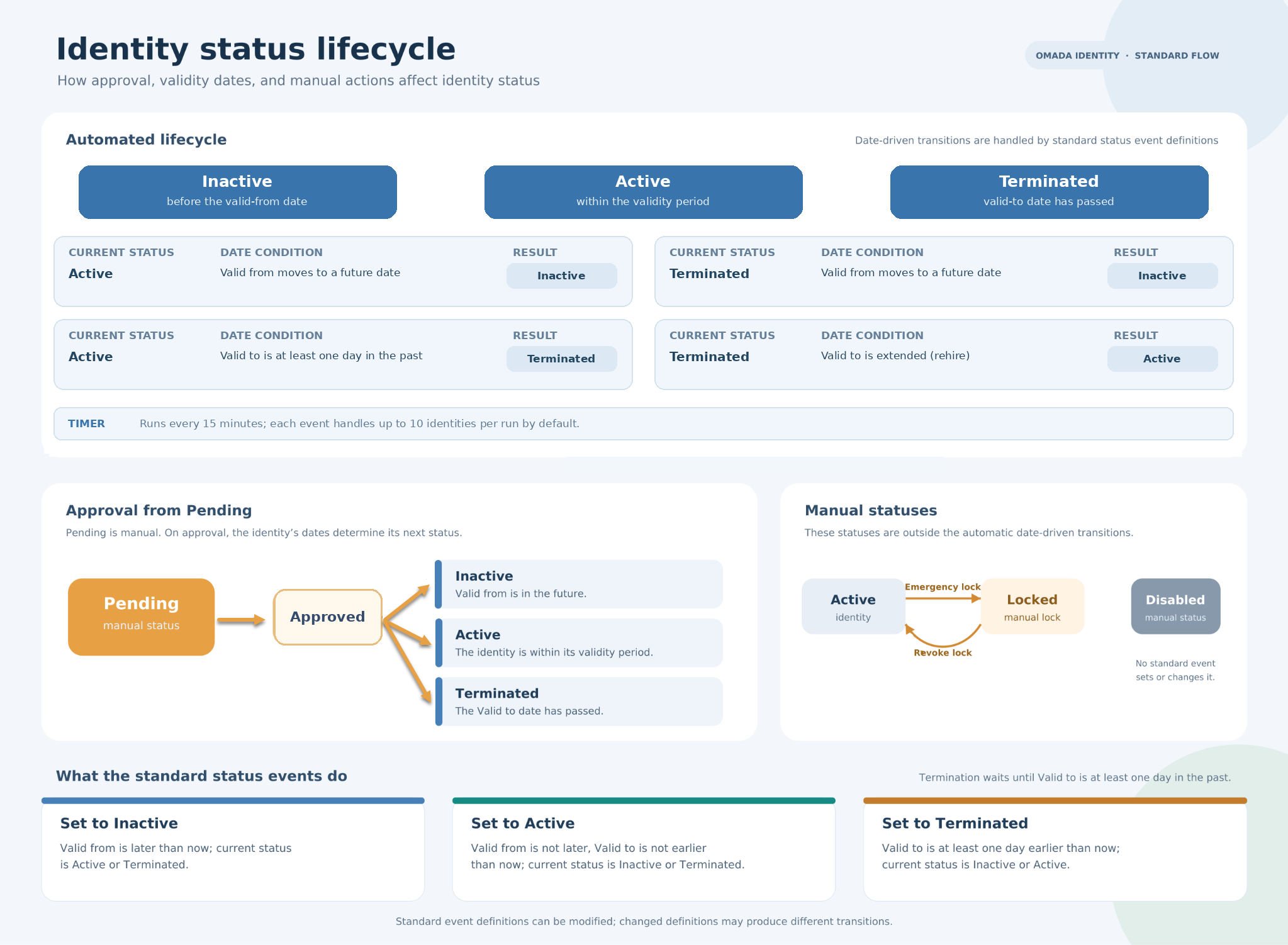
Read on the Identity statuses description:
-
Active - the identity is active; this is the normal status for an identity (employee).
-
Disabled - this is a manual status and not reached by default.
-
Inactive - the identity is onboarded or otherwise approved; however, its validity period has not yet been reached. An event sets the status to Active when the validity period is reached for the identity.
-
Locked - the identity has been locked for security reasons, for example, due to the suspicion of a security breach.
-
Pending - this is a manual status and not reached by default.
-
Terminated - an event sets the status to Terminated when the Valid to date is reached.
How RoPE uses the identity status
The identity status determines whether RoPE disables the identity’s account assignments. The identity’s Valid from and Valid to dates determine whether assignments are calculated.
| Identity status | Effect on assignments |
|---|---|
| Pending, Terminated, Disabled, or Locked | Account assignments are disabled, including accounts that RoPE creates automatically. Role and permission assignments are not affected. |
| Inactive or Active | No effect. Assignments follow the identity’s validity period. |
An identity with the status Inactive normally has no active access because its Valid from date is in the future, not because of its status. For details about how the dates affect assignments, see Validity period and disabled status.
RoPE processing behavior for account assignments
During RoPE calculation, identity status affects whether account CRAs are generated as enabled or disabled. It does not affect role and permission assignments.
| Identity status | Effect on account CRAs |
|---|---|
| Pending | Generated as disabled. |
| Active | Identity status does not disable the CRAs; their state follows the validity period and other objects involved in the assignment. |
| Disabled | Generated as disabled. |
| Inactive | Identity status does not disable the CRAs; their state follows the validity period and other objects involved in the assignment. |
| Locked | Generated as disabled. |
| Terminated | Generated as disabled. |
Identity status affects account CRAs only. It does not disable role and permission assignments.