Release highlights
We've just released Omada Identity Cloud update! What's new?
To secure a correct upgrade and functioning of the Cloud Application Gateway worker components, make sure you have deployed .NET 10 before the upgrade process.
Application improvements
Technical Preview Feature: Time-based access
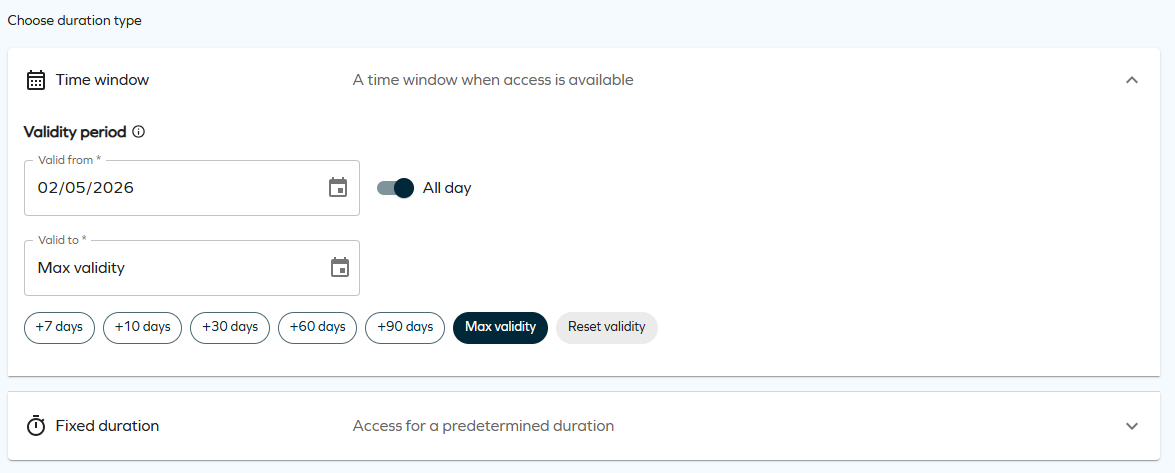
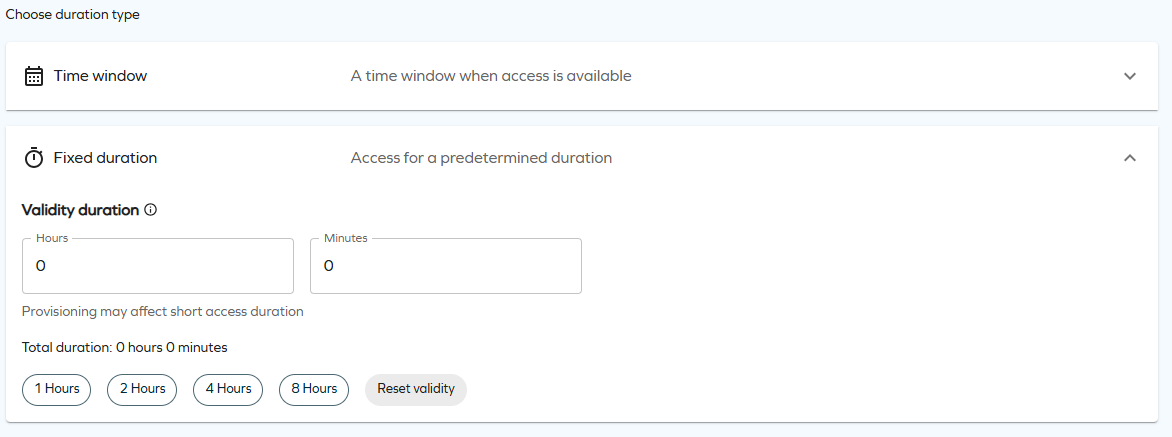
When requesting or extending access, you can now grant it for a precise length of time: choose a Time window (specific start/end dates, optionally with exact times via the All day toggle) or a Fixed duration (hours and minutes that start counting when the request receives its final approval). Approvers can review and adjust the requested validity directly from the approval grid using date, date-time, and duration pickers, and the maximum validity policy on resources, resource folders, and systems now supports days, hours, and minutes.
The Time window option allows you to request access for a specific period by selecting a start and end date, with an optional All-day toggle to define whether access applies to the full day or to specific times.
The Fixed duration option allows you to request access for a predefined amount of time by specifying duration in hours and minutes. Access becomes active from the moment the request is approved and includes quick-select options for commonly used durations.
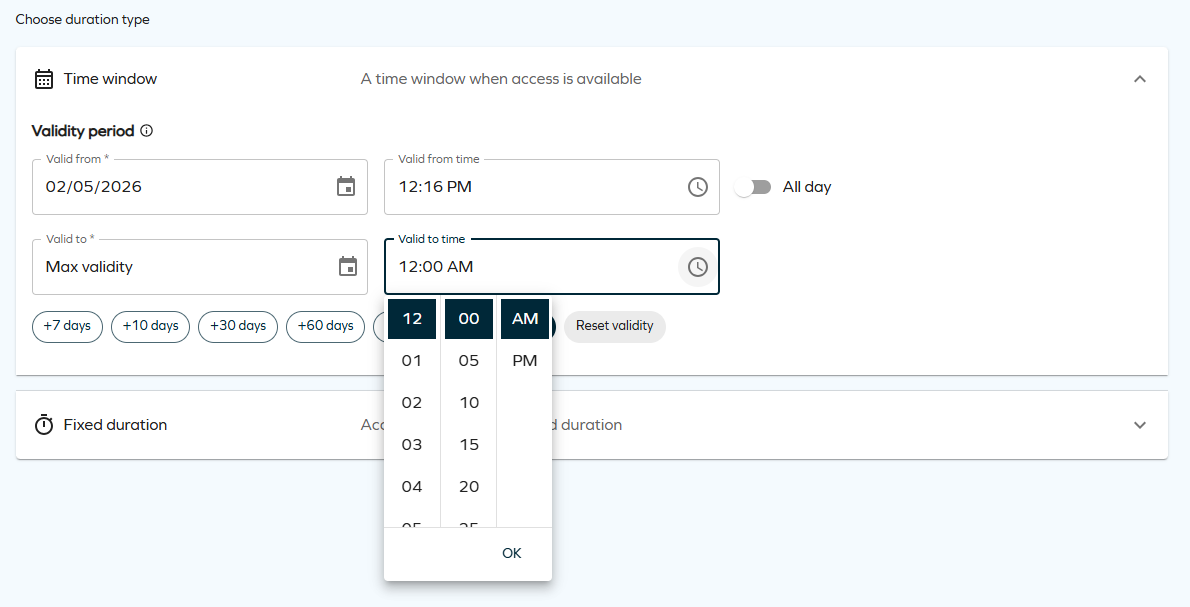
These time selection options are only available when the customer setting EnableTimeBasedAccess is enabled.
For more details, see Time-based access, Access request, Extend access, and Access approval.
-
No recurring access: each request grants a single continuous window, not a repeating schedule (for example, every Monday 09:00–17:00).
-
No per-day time restrictions: access is continuous within the validity period; there are no active hours inside a multi-day window.
-
Fixed duration starts at final approval: not at submission.
-
Approvers cannot switch modes: time window vs. fixed duration is set by the requester, approvers only adjust values within that mode.
-
Free-text requests do not support fixed duration: only the time window option is available.
-
Very short durations may be partially consumed by provisioning.
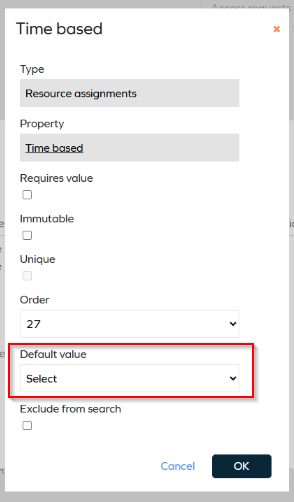
To prevent time-based from being automatically set to True when objects are edited and saved, you must explicitly define its default value.
- Go to the object (for example, Resource Assignment, Access Request).
- Locate TIME_BASED.
- Set a default value (False or True).
- Save and repeat for other objects.
AI-assisted mapping proposals for connectivity
We have introduced an AI-assisted Discover option for Queries and mappings configuration. When configuring mappings, you can now use the Discover button to automatically generate mapping proposals based on sample data from the source system. The feature is applicable for account, resource, and resource assignment object types.

The feature analyzes the provided JSON response and proposes mappings with a confidence rating for each entry, indicating the likelihood that the proposed mapping is correct. You can review the proposals and their confidence levels before accepting them into your configuration.
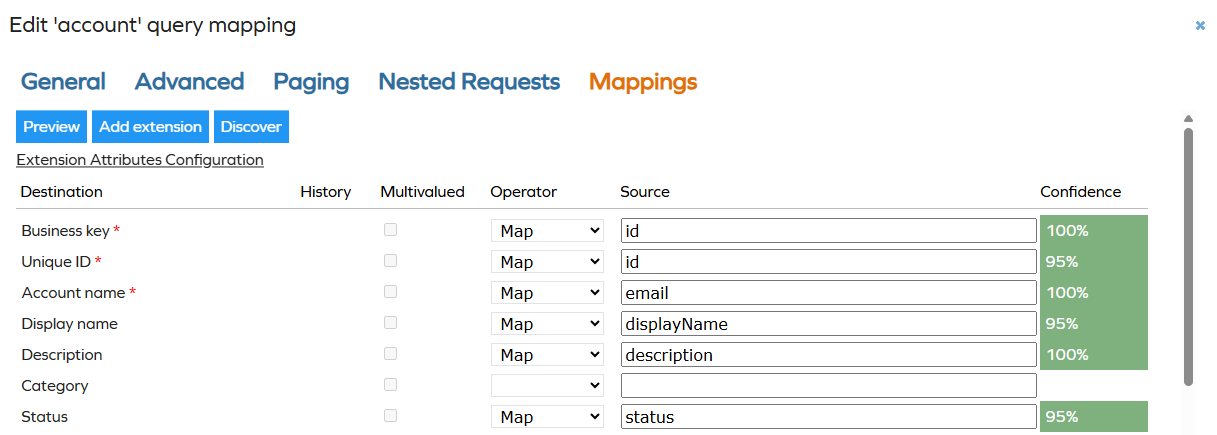
For more information, go to Connectors documentation. For example, see Data import in the REST documentation.
Time zone-aware time display in the new UI
Datetime values in the new UI now accurately reflect the user's local time all year round, including during Daylight Saving Time (DST) transitions.
The system looks up the user's full time zone definition — including when clocks change in spring and autumn — and applies the exact offset for any given date. The adjustment is automatic and based on the timezone configured in the user's profile. No action is required from users or administrators.
This improvement applies to datetime values displayed in the new UI and is the foundation for the time-based access validity feature, where exact start and end times are shown alongside dates.
Configurable transfer ownership for any object type
Ownership survey templates can now be configured to write the accepted owner to a specific, custom owner property instead of using the default property determined by the object type.
To use this, add SURV_OWNERPROPERTY to the survey object definition and populate it with the system name of the target owner property (for example, OWNERREF). The survey template can do this automatically using a constant field mapping on the data source, see Constant field mapping for DataObjects data sources below.
When the proposed owner accepts ownership, the ownership post action reads SURV_OWNERPROPERTY and writes the new owner to the configured property. In transfer ownership scenarios, the previous owner is removed before the new owner is added.
Survey objects without SURV_OWNERPROPERTY continue to use the standard object-type-based ownership behavior. Mixed templates are supported, where some survey objects use the configurable write-back path and others follow the standard path.
For configuration details, see Survey object and Data sources.
Constant field mapping for DataObjects data sources
DataObjects-based data sources in survey templates now support constant field mappings. In the survey template XML, mark a dataSourceField with fieldIsConstant="true" to treat the field attribute value as a fixed literal value assigned to the target survey object property, rather than as the name of a property to read from the source object.
<dataSourceField field="OWNERREF" mapTo="SURV_OWNERPROPERTY" fieldIsConstant="true" />
The value is converted to the target property type. For multi-value reference or set properties, comma-separated values are supported.
Constant field mapping is not supported for SQL object data sources. For SQL data sources, define constant values directly in the SQL query.
Max validity period support hours and minutes
You can now define the max validity period for resources, resource folders, and systems using hours and minutes in addition to days. This enables more precise access term limits, for example, 2 days, 4 hours, and 30 minutes. The Maximum validity period property has been renamed to Max validity period (days) and two new properties are now available alongside it:
- Max validity period (hours): accepts an integer number of hours.
- Max validity period (minutes): accepts an integer number of minutes.
The system combines all three values when calculating the effective maximum:
maxValidityInMinutes = ([days] × 1440) + ([hours] × 60) + [minutes]
Existing configurations are not affected by the naming change.
Refer to Extend access and Access request to know more.
UX and UI
Enhanced assignment timeline
The Assignment Timeline now shows additional workflow steps so you can track the progress of access requests in greater detail.
Violation status and evaluation
The timeline now displays the following details about violations related to an access request:
- Violation status — shows the constraint name(s) being violated and the resolution outcome of the violation process.
- Violation evaluation — shows each step of the violation evaluation workflow, including the actor assigned or who took action and the timestamp. Steps follow the same color pattern used throughout the timeline: red for Blocked (rejection) and green for Allowed (approval).
In the violation evaluation workflow, Allowed and Blocked are the equivalents of Approved and Rejected used in standard workflow steps.
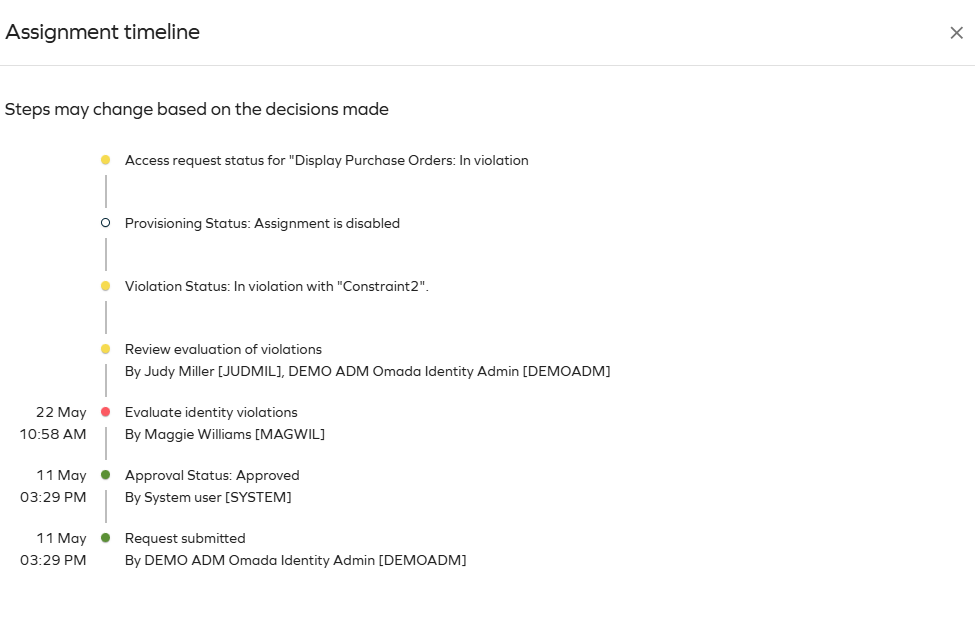
Provisioning status and manual provisioning
The timeline now provides additional detail about the provisioning status and workflow:
- Provisioning status: indicates whether provisioning is pending a manual action (and by whom), or has not started because a previous step is still pending.
- Manual provisioning steps: show the user assigned to perform the action. Once completed, the step is marked green with the completion timestamp.
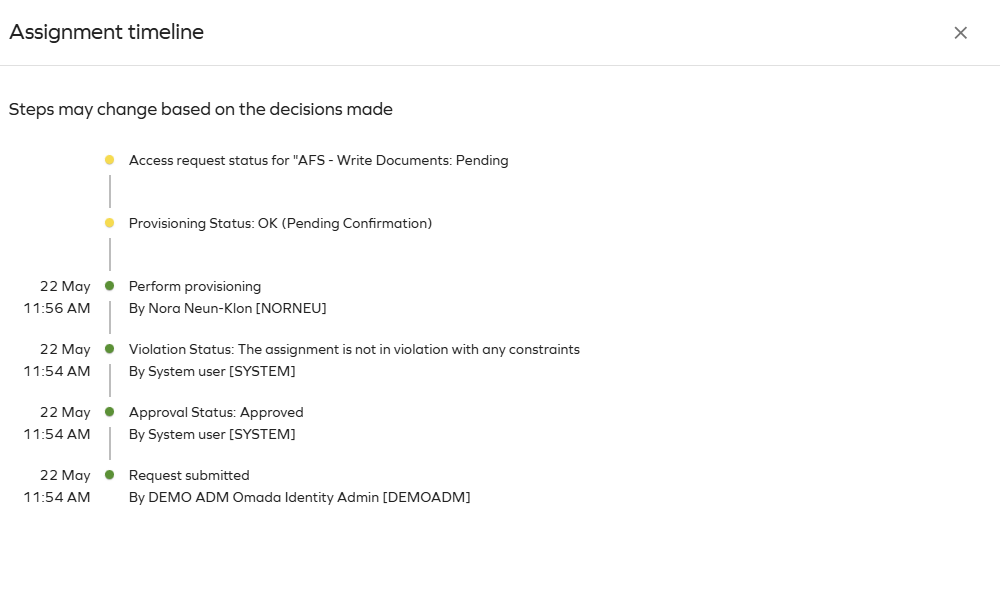
For more details, see Access.
New approvals support approval survey template reconfiguration
New approvals now support questions from both the survey template defined in your customer setting and the default survey template. Previously, only approvals that matched the template configured in the customer setting could be completed in the new approvals experience, while the rest had to be handled in the legacy interface.
When the UseNewUIForApprovalFlow customer setting is enabled, approval tasks open in the new approvals experience directly from the homepage, including those based on the default template. For example, an approval created from the default template appears as a To Do card on the homepage and opens in the new approvals experience instead of redirecting to the legacy interface.
The new approvals support reads questions from the template defined in the customer setting and from the default template, so you can complete approvals from either source in the same place.
If you disable the UseNewUIForApprovalFlow customer setting, approvals revert to the previous behavior and open in the legacy interface. No additional configuration is required beyond enabling the customer setting.
See Customer settings.
Referring objects view for identities
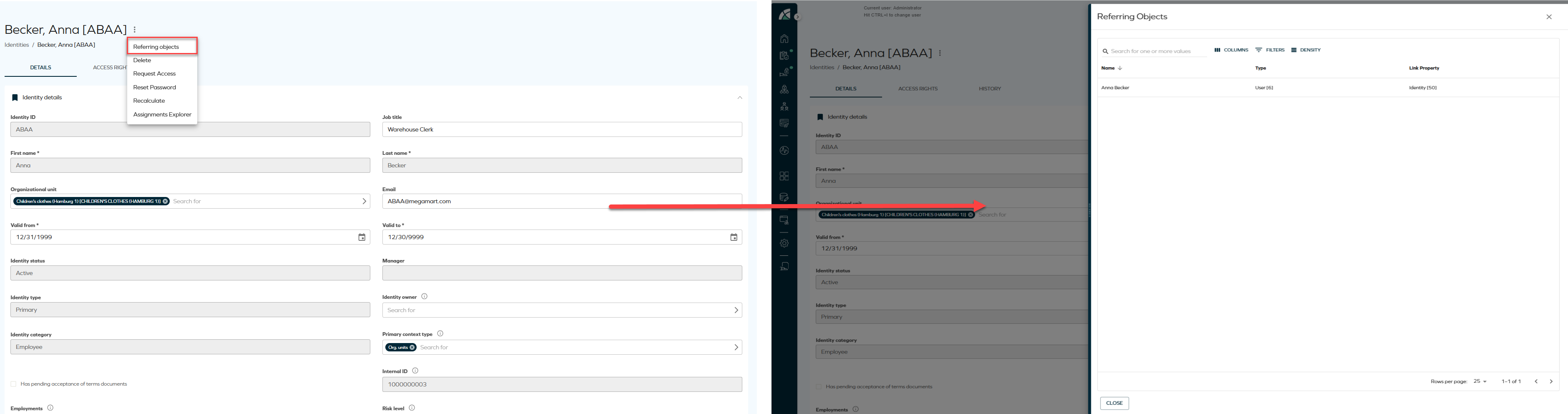
A new Referring objects option has been added to the Identities list and Identity details pages. The option is available from the three-dots menu in both views and opens a side panel displaying all data objects related to the selected identity, including the identity itself. This allows relationships to be reviewed directly from the list or details view.
-
From the Identities list, click the ellipsis button and select Referring objects.
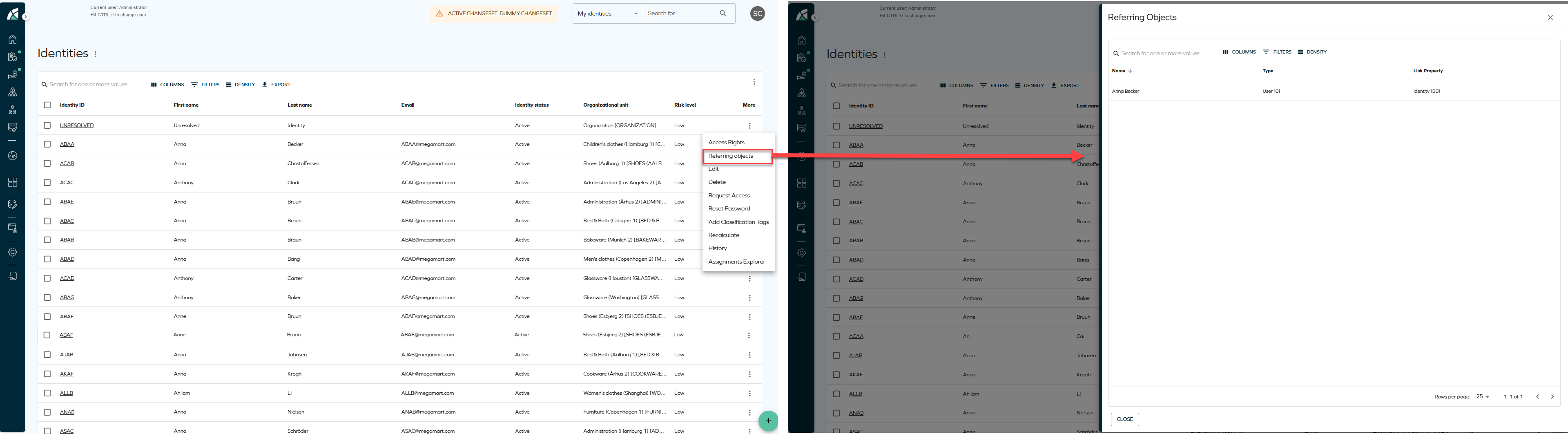
-
From the Identity details page, click the ellipsis button next to the identity name and select Referring objects.
Redesigned My profile and Account settings pages
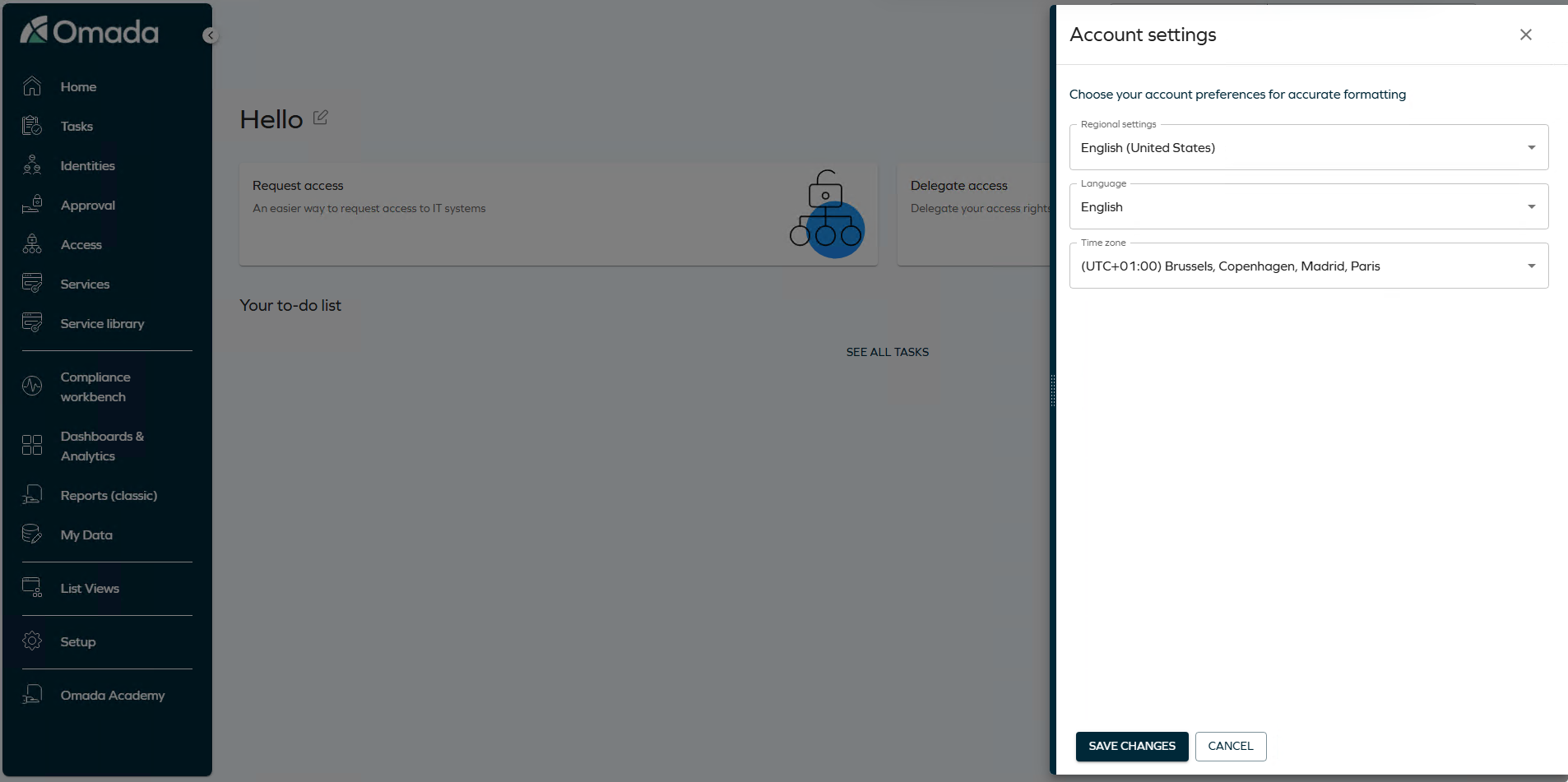
The My profile and Account settings pages have been redesigned.
Account settings now opens as a side panel from the homepage when you select the settings icon, instead of navigating to a separate page. From the panel, you can set your regional settings, language, and time zone, and select Save changes to apply them.
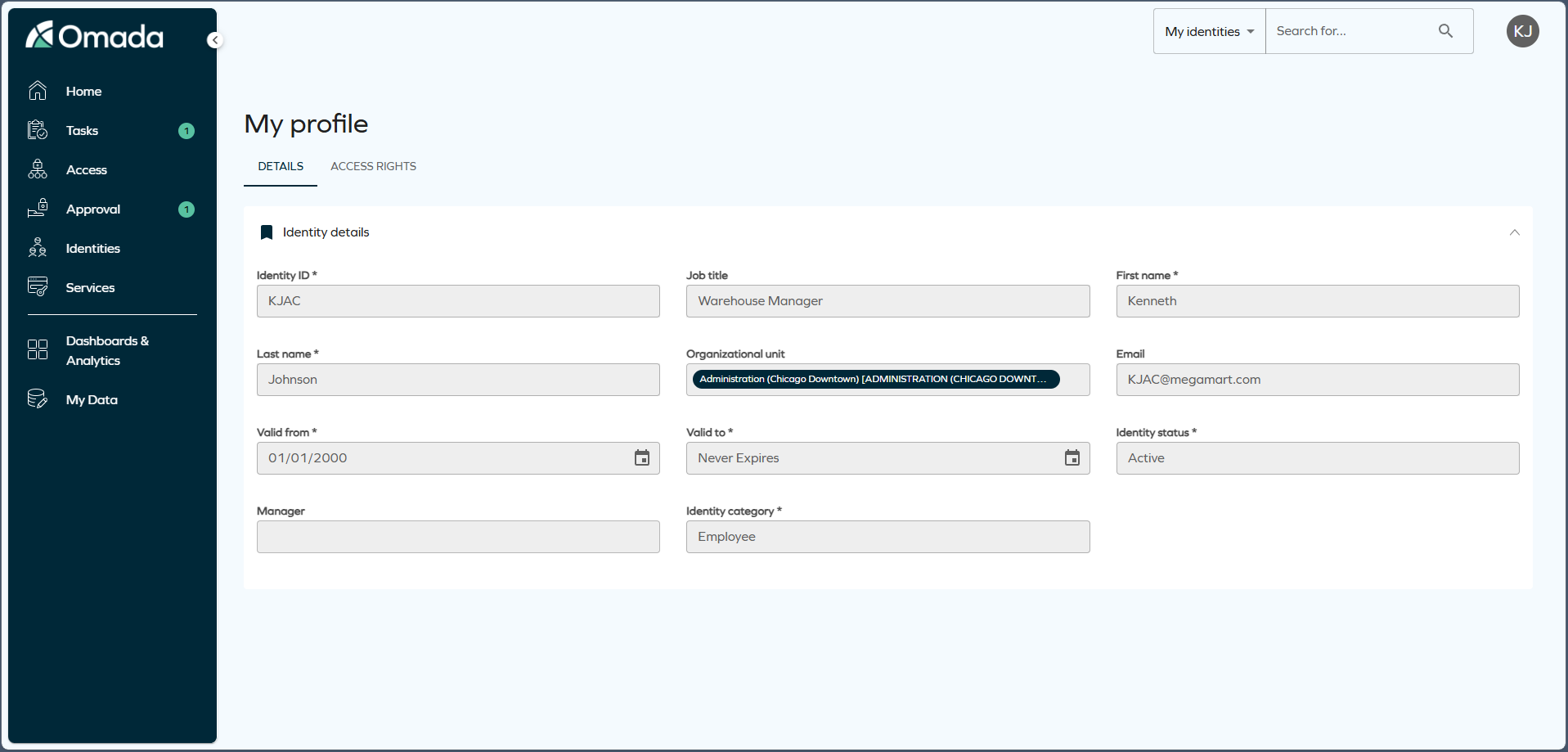
My profile is organized into two tabs:
-
Details: displays your identity information, including identity ID, job title, organizational unit, contact details, validity dates, identity status, manager, identity category, and IT access profile.
-
Access rights: displays the resources assigned to your identity, grouped for easier navigation. For each assignment, you can see the resource, account, resource type, validity dates, and attributes. To review the origin of an assignment, open the row menu and select Direct assignments.
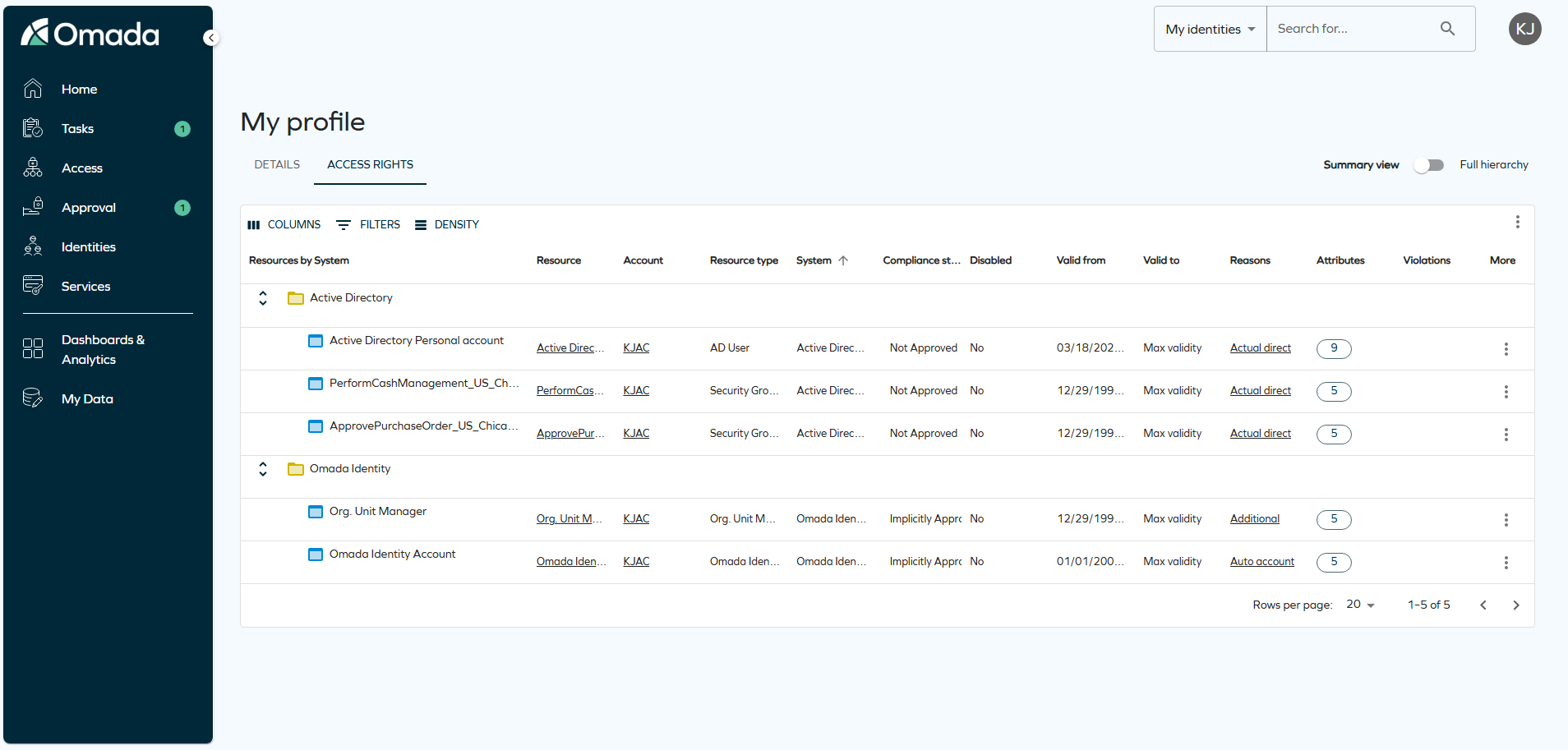
From the Access rights tab, you can search, filter, adjust columns, change density, and export the list.
For more details, see Menus and settings documentation.
Form and list sent emails
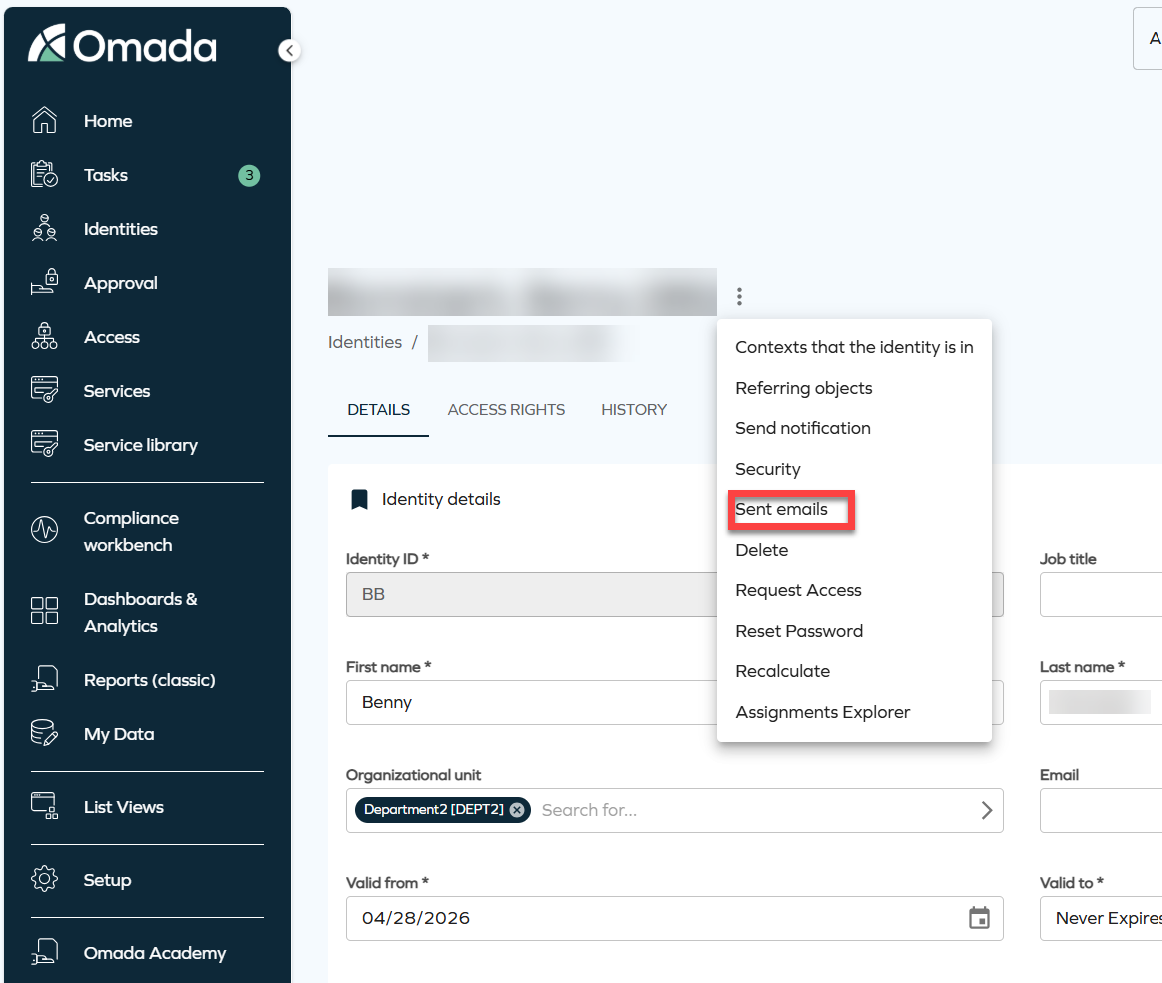
It is now possible to review the history of email notifications sent for a specific data object directly from the object's page. The new Sent emails option is available from the three-dots menu on the Identity details page, identity list rows, and resources.
Selecting Sent emails opens a side panel displaying a list of all email notifications sent in relation to that object.
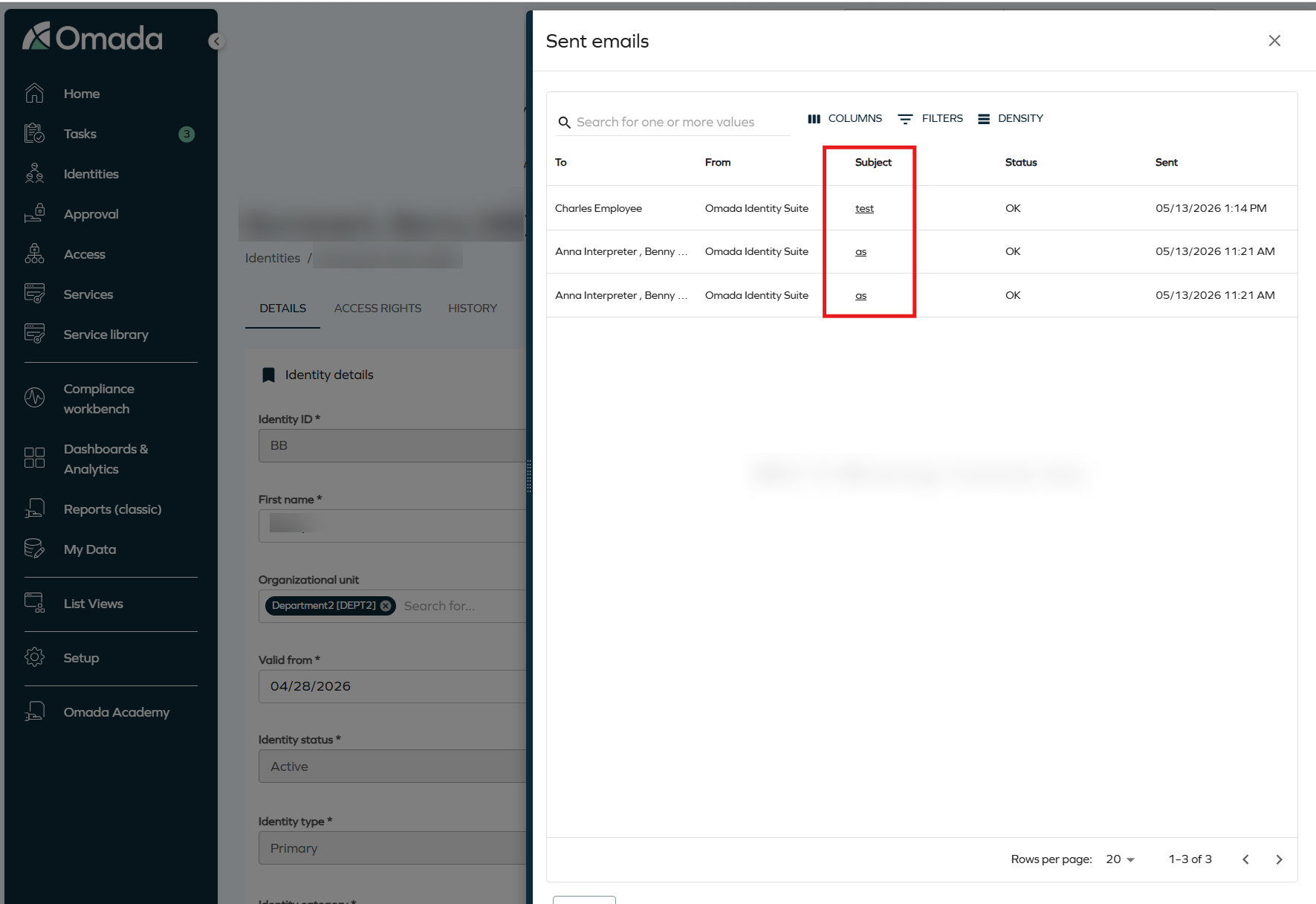
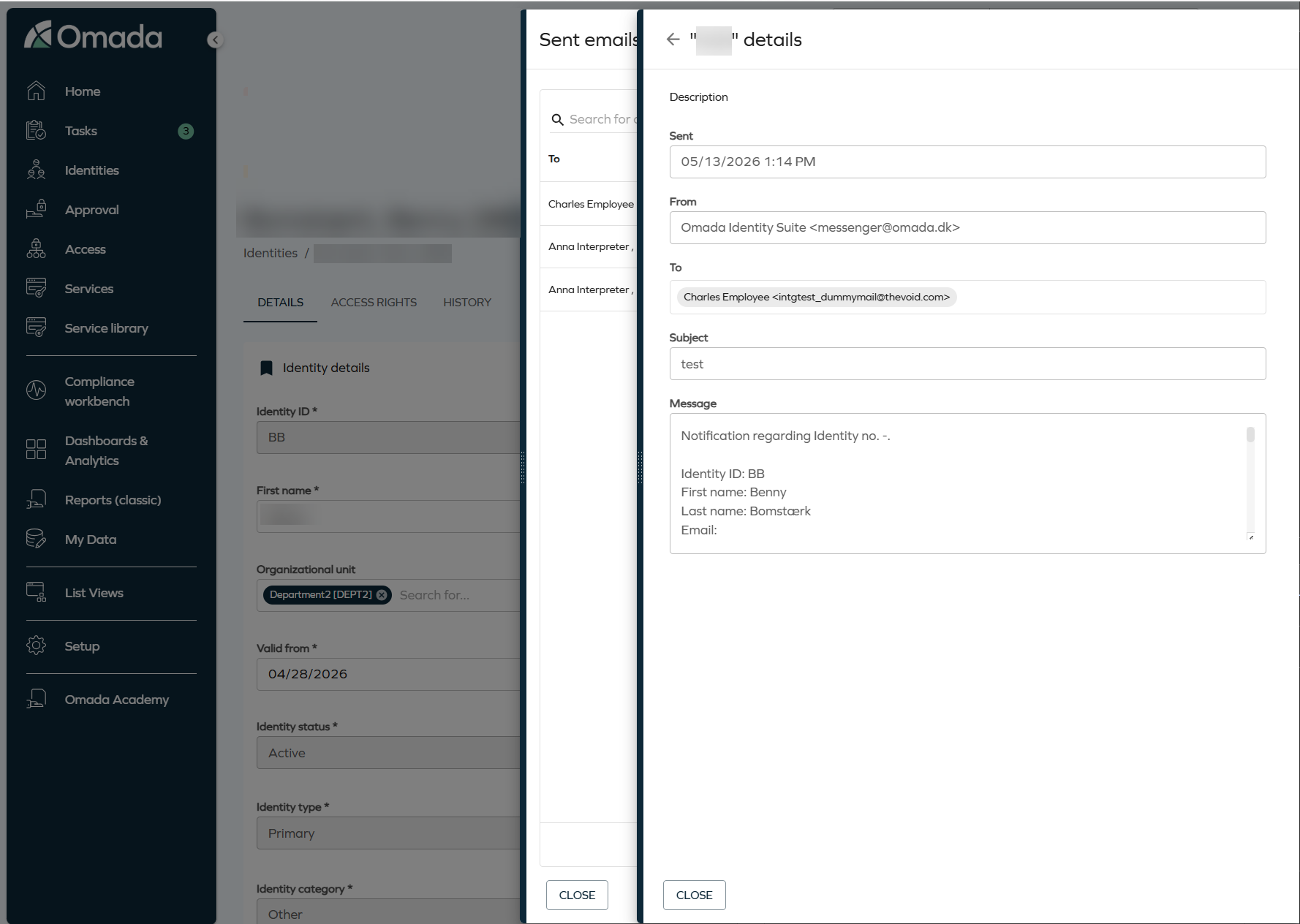
To review the full content of an email, click the subject link. A secondary panel opens with the complete details of the email, including the sender address, recipient, subject, and message body.
Modernised CSS styling for legacy interfaces
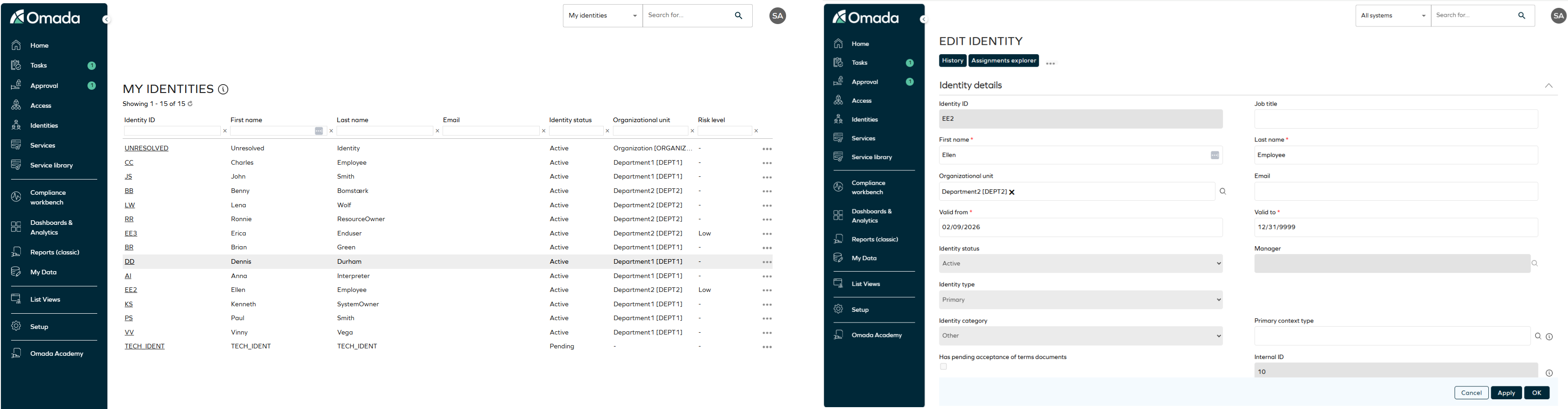
We have refreshed how our legacy interfaces look to bring them more into line with our new UI. The main key details are:
- Enabled by default when using the standard Omada theme.
- You can enable the feature using the
useRefreshedThemecustomer setting. - When a Corporate Theme is configured via the Management Portal:
- CSS Rollout is automatically enabled.
- The feature cannot be disabled.
New customer setting for CSS Rollout
A new customer setting, useRefreshedTheme, has been introduced to control the activation of the CSS Rollout feature for the Legacy UI. This customer setting enables modernized CSS styles for forms in the Legacy UI, aligning them with the New UI design language. When a Corporate Theme is configured via the Management Portal, the setting is automatically enforced and cannot be disabled.
New UI enhancements
Updated side panel navigation
We have updated how side panels behave when you navigate between related objects. Side panels now replace each other when you select a chip, instead of stacking. Changes made in a side panel are automatically reflected in the chip that opened it.
Default sorting for the Access rights grid
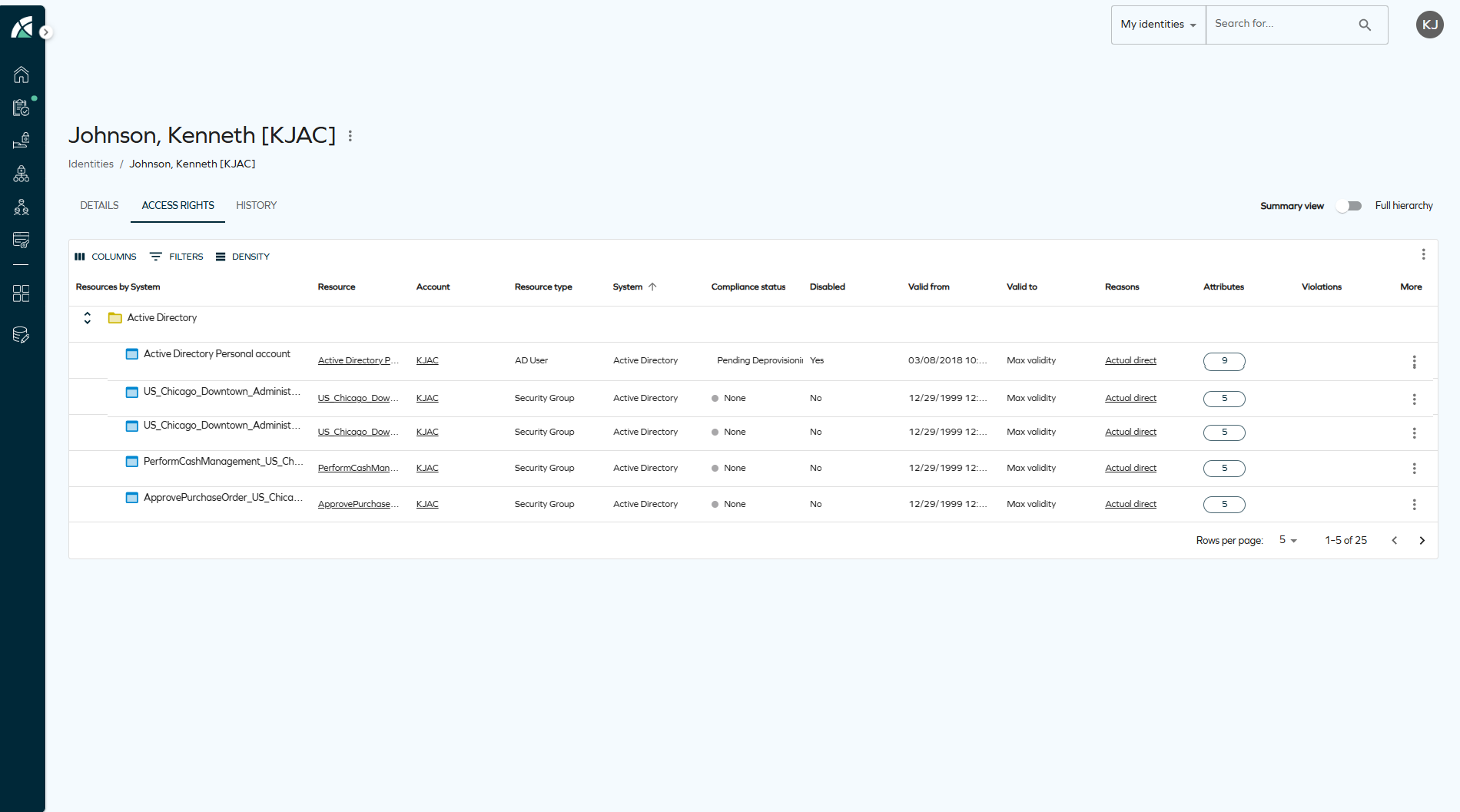
We have updated the default sort order for the Access rights grid on the identity details page. When no custom sorting preference has been saved, the grid now sorts by the System column by default. This ensures that assignments are correctly grouped by system before being grouped by parent resource.
Grouping column in Access right
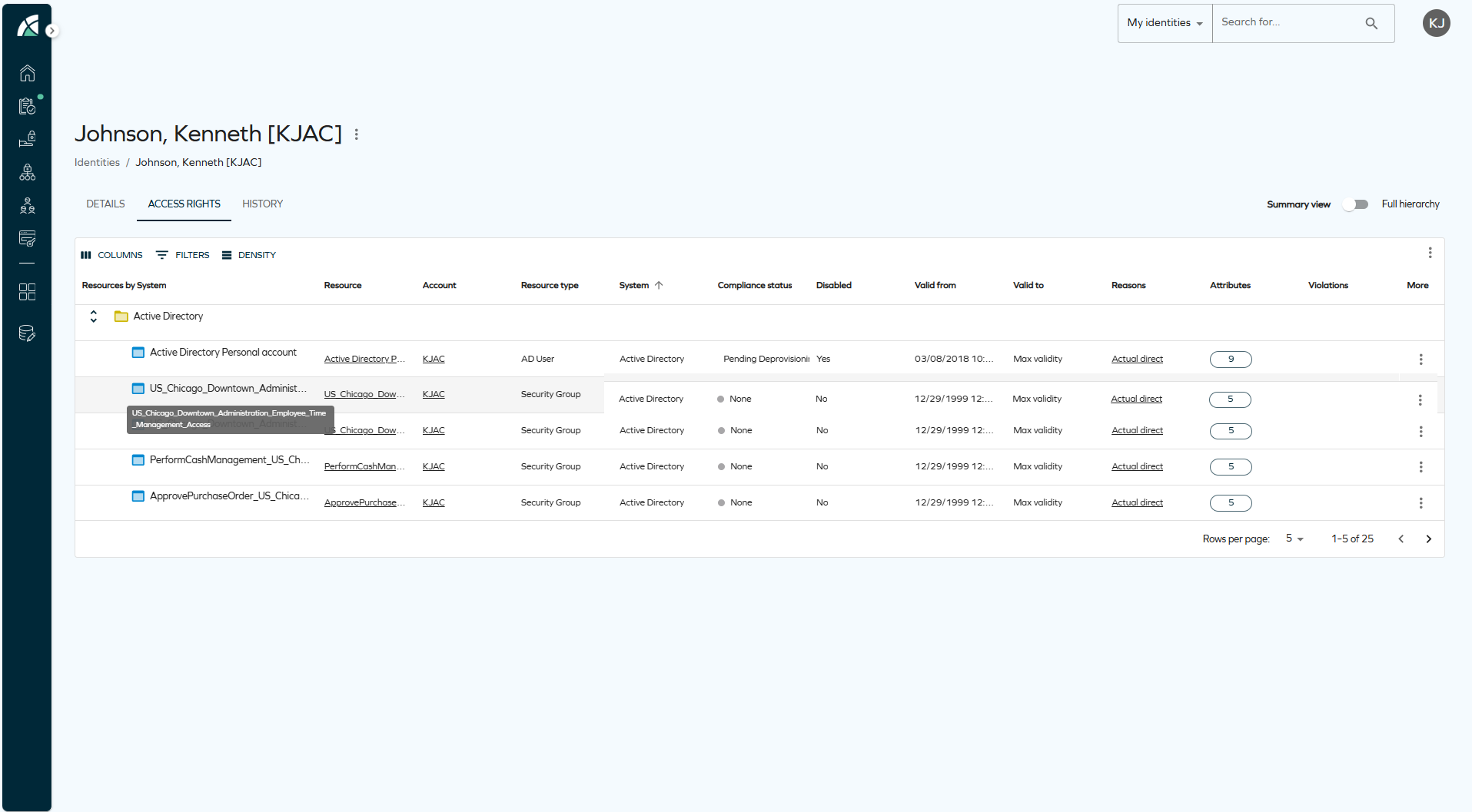
We have updated the grouping column in the Access rights grid to truncate long values with an ellipsis. A tooltip now displays the full text when you hover over a truncated value.
Eligibility filtering - upwards inheritance in context-based filtering
You can now use upwards inheritance when the system evaluates contexts for eligibility. When you assign an identity to a context, the system also includes all parent contexts in the hierarchy as part of the evaluation.
This change means that an identity assigned to a child context can also access resources associated with its parent contexts. For example, if you assign an identity to Denmark, the system also includes Europe and Global, allowing access to resources tagged with these contexts.
Upward inheritance works in one direction only. There is no way to restrict a resource so that it is visible only to identities assigned directly to a given context. For example, a resource tagged with Europe is also visible to identities in Denmark or Germany — not just those whose context is exactly Europe.
For more details, see Eligibility filtering in the Access request documentation.
Cloud Management Portal
Customer Administrator Role
A new Customer Administrator role is available in the Cloud Management Portal. Customer Administrators can manage environments, view customer and contract data, manage portal users, and configure authentication settings, including domains and identity providers. This role provides full administrative access across customer-level management functions.
For more information, refer to the Users section in the Cloud Management Portal documentation.
Federated Authentication for Cloud Management Portal
You can now configure federated authentication using Microsoft Entra ID by verifying organizational domains and associating them with an Identity Provider. Once configured, users from verified domains authenticate through their corporate identity provider instead of local credentials.
For more information, refer to the Authentication section in the Cloud Management Portal documentation.
Components upgraded to .NET 10
We have upgraded all Omada Identity components from .NET 8 to .NET 10 LTS to ensure continued support, improved performance, and alignment with long-term platform strategy ahead of .NET 8 end of life (November 2026).
API
New Omada Identity Graph API version 3.6
We have released a new version of the Graph API (v3.6), which introduces the following updates:
- Three new queries related to user profile have been added —
allTimezones,allLanguages, andallRegionalSettings— which return all available time zones, enabled languages, and supported cultures/regional settings, respectively. - A new mutation
updateUserSettingshas also been introduced, allowing the active user's language, regional settings, and/or time zone to be updated. - The
UserSettingsTypenow includes the fieldslanguageandregionalSetting, which return the current user's language and culture/regional setting, andTimeZoneTypehas been extended with anidfield, returning the database ID of the time zone.
Refer to Omada Identity Graph API to know more.
Horizons
Export queries and mappings data preview
You can now preview the data intended for import to the portal directly from the Export Queries and Mappings configuration. The Preview tab lets you validate your export query and mapping setup before data is processed, with configurable settings such as the number of retrieved records. Preview logs are also available for detailed analysis and can be exported to CSV format.
For more information, see Preview.
Omada Identity Analytics (OIA)
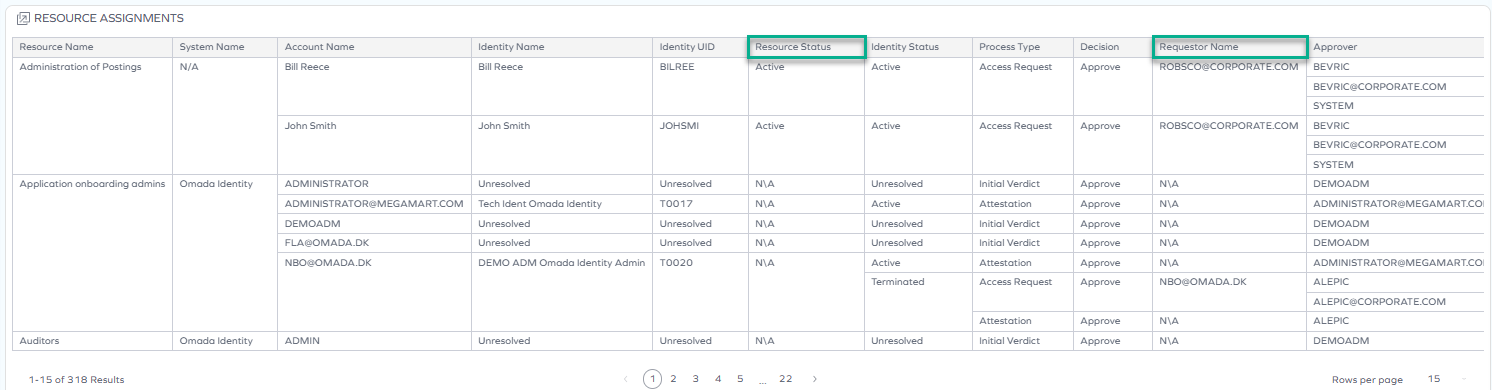
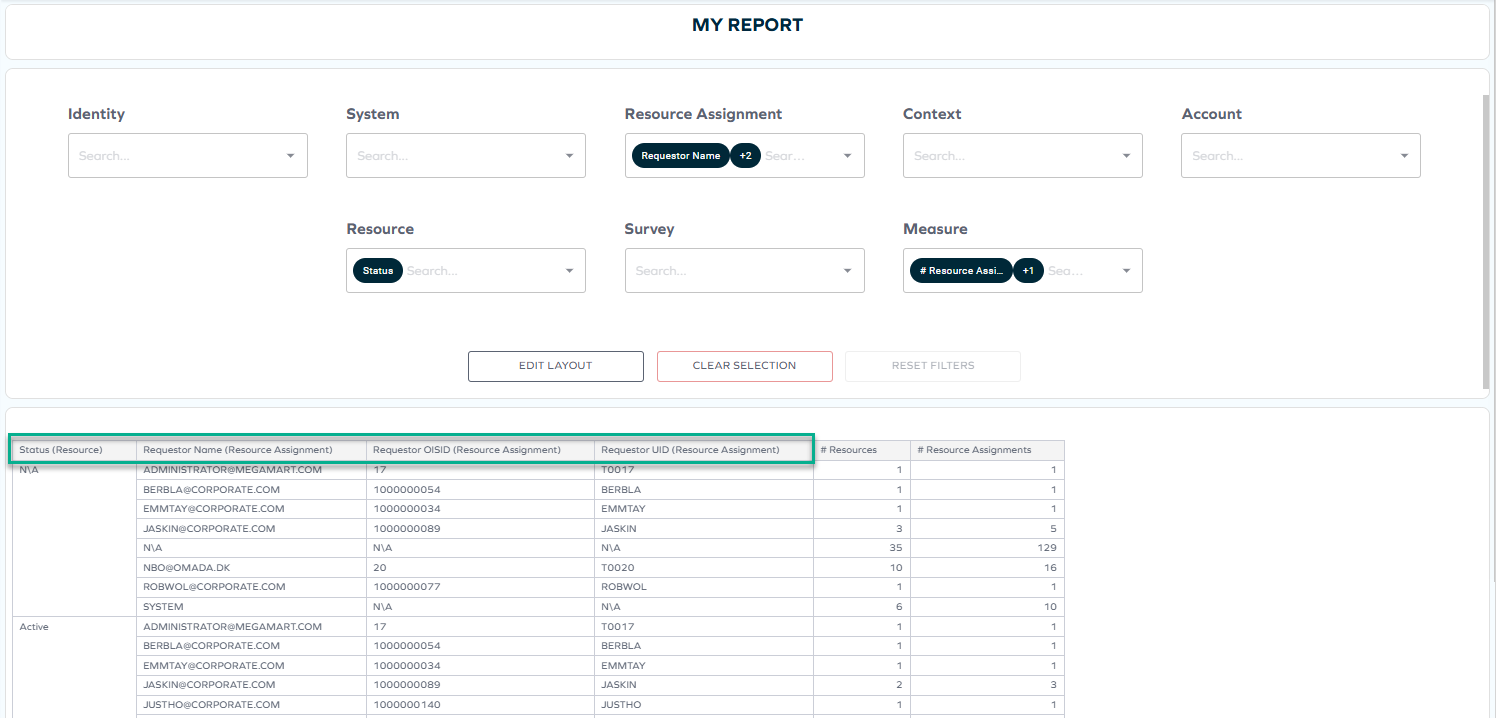
New fields: Resource status and Requestor
Two new fields have been added to the OIA data model to provide more detailed information about access requests: Requestor and Resource status. They can be found in selected widgets on the following dashboards, where they provide additional context for auditing and reporting:
-
Access Navigator (Resources tab)

-
-
Report Generator (Resource assignment and Resource category)
Certifications dashboard: resource assignment information and headers
The Certifications dashboard now displays additional resource assignment information, including resource identity and account, when opening any survey details by clickable ID.
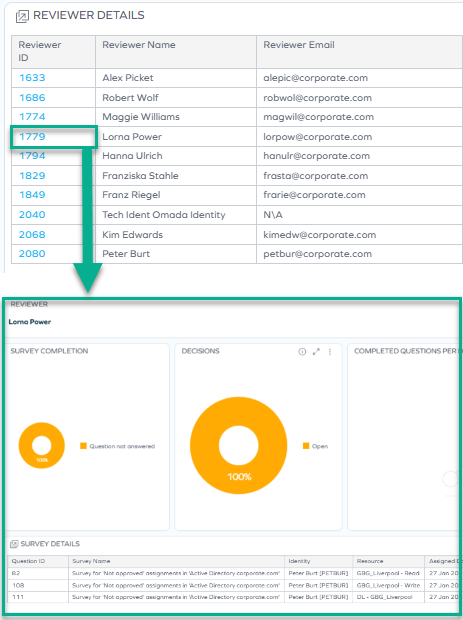
A header has also been added to pop-up views, providing key information about the displayed object. Specifically, the survey details header shows the survey name and ID, the reassignment view header includes the survey and question, and the reviewer details header displays the reviewer name.
This gives reviewers immediate context without navigating away from the dashboard, reducing the time needed to make informed certification decisions.
Expanded documentation on the IGA Scorecard dashboard
We have expanded the documentation for the IGA Scorecard OIA dashboard. The updated documentation now includes detailed descriptions of widgets, filtering behavior, jump-to dashboards, export options, data model behavior, and example use cases.
Javi – Omada AI assistant
Compliance Workbench reporting with Javi
System owners and auditors can now ask Javi to prepare compliance reports based on the Compliance Workbench data, without the necessity to manually configure and generate reports in the Compliance Workbench.
Javi proficiently handles compliance reporting, such as:
- System compliance overview Ask Javi about the compliance level of one or more systems, and receive a report with each system's compliance percentage and its compliant or non-compliant status. Additionally, Javi provides justification for the compliance status, for example, non-approved or orphaned assignments.
You ask Javi: "Which of my systems has a compliance rate below 90%?"
Javi responds with a table with system names, compliance rates, assignment counts by status (for example, Approved, Not approved, Orphaned, In violation, Pending deprovisioning), and remediation suggestions.
- Calculated assignments details Ask Javi for insights and a detailed breakdown of the calculated assignments for one or more specific systems.
You ask Javi: "Show me the non-compliant assignments in the Active Directory system."
Javi is capable of explaining what determines the system's compliance status, based on the custom compliance configuration and Omada documentation. It can then propose recommendations on how to address the non-compliance cases, for example, by requesting access reviews for non-approved assignments or by removing orphaned accounts.
For larger result sets, exceeding 15 items, Javi provides a downloadable Excel file with the full data, valid for a limited time.
Javi responses are always bound with the scope of the user's permissions in the Omada Identity system.
Javi cannot retrieve specific calculated assignments details across all systems. An assignment query must be scoped to one or more specified systems.
For more information, go to Javi and Compliance Workbench documentation.
Expanded documentation of AI description generation
We have developed a more comprehensive and detailed documentation of the AI description generation process, including security considerations and access management for user groups. The documentation provides a clearer understanding of how the AI description generation works and the measures in place to ensure security and proper access control.
See Technical preview feature: AI Description Optimizer for resources (especially expandable tabs) for more information.
Revoking a single resource assignment
You can now use Javi to revoke a single resource assignment. Talk to Javi to initiate the revoke process – it can be used for a self-revoke (for the logged-in user), or for a delegated revoke. Only one resource assignment can be revoked each time. See Javi for more information.
Surveys
Approve survey questions create direct resource assignments
The Approve survey questions create direct resource assignments feature is no longer in Technical Preview and is now generally available. The feature is now enabled by default for all customers and can be configured through the CreateDirectResourceAssignmentsOnVerdicts customer setting.
For more information, refer to the Surveys documentation.
Policy and Risk Checks
New filtering options for Risk Analysis in SAP GRC
The Risk Analysis in SAP GRC Policy & Risk check now supports two new optional fields in the RiskAnalysisWebServiceConfiguration configuration object: RiskLevel and RuleSetId.
These fields give administrators greater control over which violations are returned by the SAP GRC risk check, making it easier to focus on specific risk levels or rulesets relevant to their organization.
-
RiskLevel: allows you to filter violations by their severity level, so that only violations at or above a specific threshold are returned. For example, you can configure the check to only surface high or critical violations, reducing noise for end users during access requests.
-
RuleSetId: allows you to target a specific ruleset defined in the SAP GRC system. When specified, only violations belonging to that ruleset are returned. If omitted, all rulesets are considered.
Both fields are optional and have no impact on existing configurations. The behavior remains unchanged if neither field is set.
For more information, see Policy & Risk check.
Connectors
Egencia - updated connectivity package
An updated connectivity package for Egencia is now available, allowing you to manage users and roles. See Egencia in the Connectors section for details.
Exchange performance improvement
The Exchange connectivity package was updated to utilize the Get-EXO cmdlets instead of the legacy PowerShell commands. This change significantly improves the performance of the connector, especially for larger environments, by optimizing data retrieval and reducing execution time.
Microsoft Exchange connector – migration to Get-EXO cmdlets
The Microsoft Exchange connector now uses the modern Exchange Online PowerShell V3 Get-EXO. As part of this migration, some cmdlet parameters have been renamed or are no longer available. If your Exchange connectivity relies on specific parameter names, review your configuration after upgrading. See Inputs in Microsoft documentation for details.
Transition from HTTP Data Collector to Log Ingestion API
The HTTP Data Collector API is being deprecated and will no longer function after September 14, 2026. To ensure uninterrupted connector functionality, you must migrate to the Log Ingestion API, updating existing connectors for compatibility with Log Analytics workspaces and to leverage enhanced ingestion capabilities. For more detailed information and the migration steps, refer to the Azure Log Ingestion API configuration documentation.
Documentation
Documentation updates for filter expressions
We have added documentation for dynamic Right side (expression) filters, including:
-
$ActiveUserexpressions in view filters. For more information, see Creating a view section. -
$FORM_expressions in form field filters. For more information, see Creating reference property section. -
Event definition limitations and unsupported expression types. For more information, see Event definitions section.
Deprecation of the documentation chatbot
The documentation chatbot was deprecated and removed from the homepage. The Omada Identity documentation portal is a public site that allows traffic from all major AI models and services. You are welcome to use your preferred AI assistant to search and interact with the documentation directly.
Email template documentation enhanced with standard mail variables reference
The Email templates documentation has been expanded with a reference for standard mail variables (Fixed Fields), including recipient, editor, workflow, URL, and object identifier variables. The update also clarifies the differences between standard mail variables and object type properties, provides usage examples, and includes troubleshooting guidance.
For more information, see Email templates documentation.