Release highlights
We've just released Omada Identity Cloud update! What's new?
UX and UI
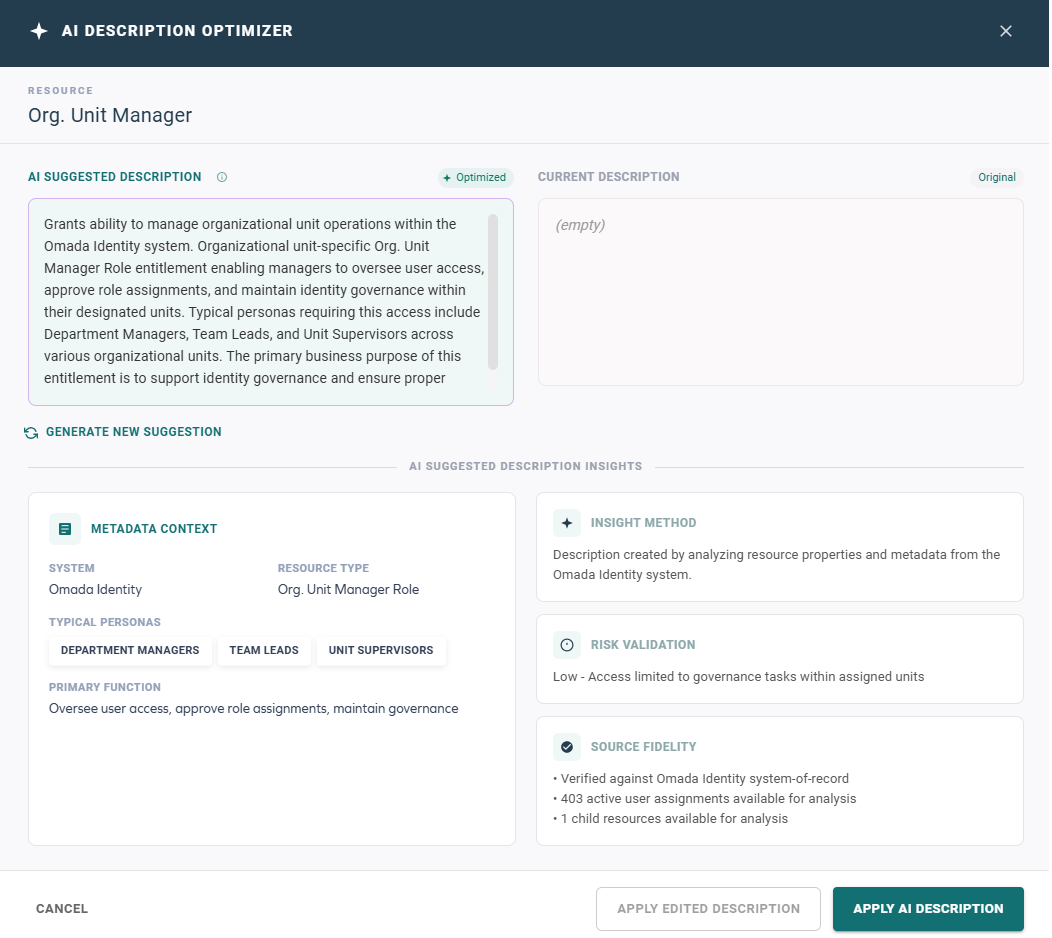
Technical preview feature: AI Description Optimizer
The AI Description Optimizer allows Data Administrators to generate, review, edit, and apply AI-suggested descriptions for resources. The feature uses contextual data to generate consistent and meaningful descriptions that can facilitate better understanding and management of resources. For more information, see the AI Description Optimizer documentation.
In the current release, the AI Description Optimizer is provided as a Technical Preview feature only. In Technical Preview, this feature may generate descriptions that require review before use in production environments. We recommend you do not use it in production environments without reviewing the generated descriptions.
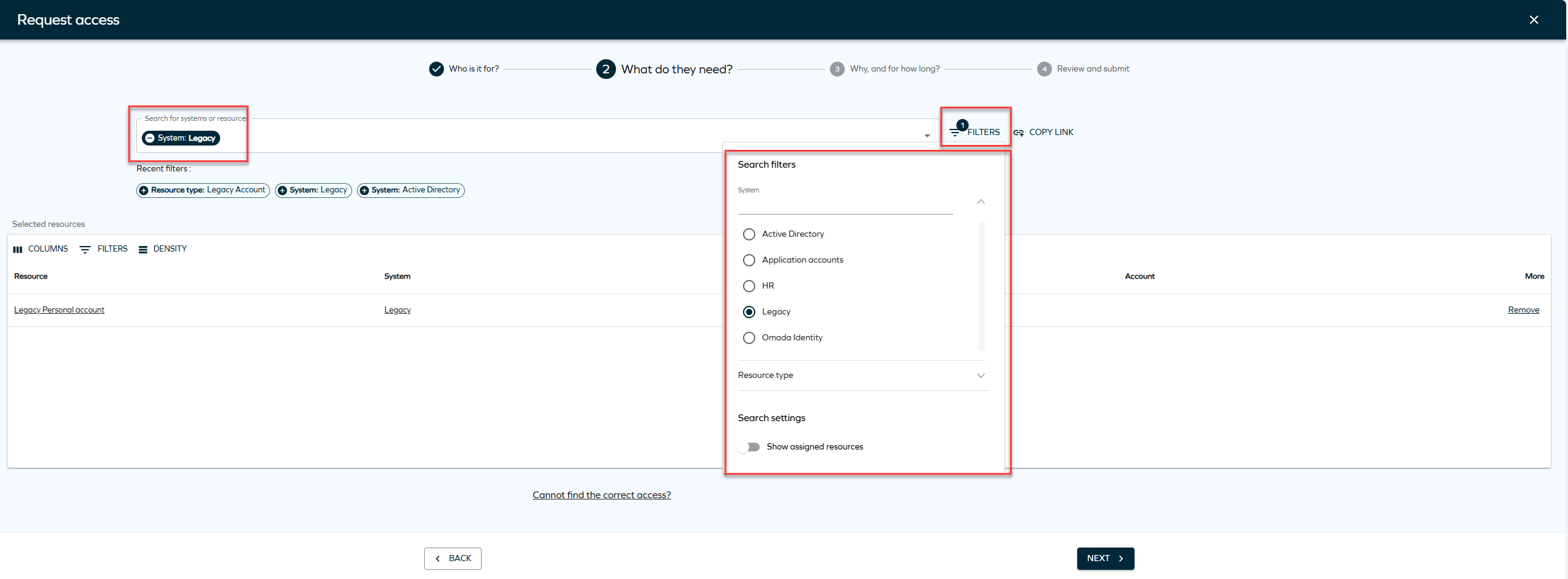
Deep links to pre-filter resources in request access
We have enhanced the deep link functionality in Access request to support filtering and more flexible configuration sharing. You can now apply filters when selecting identities and resources and share them in the generated link.
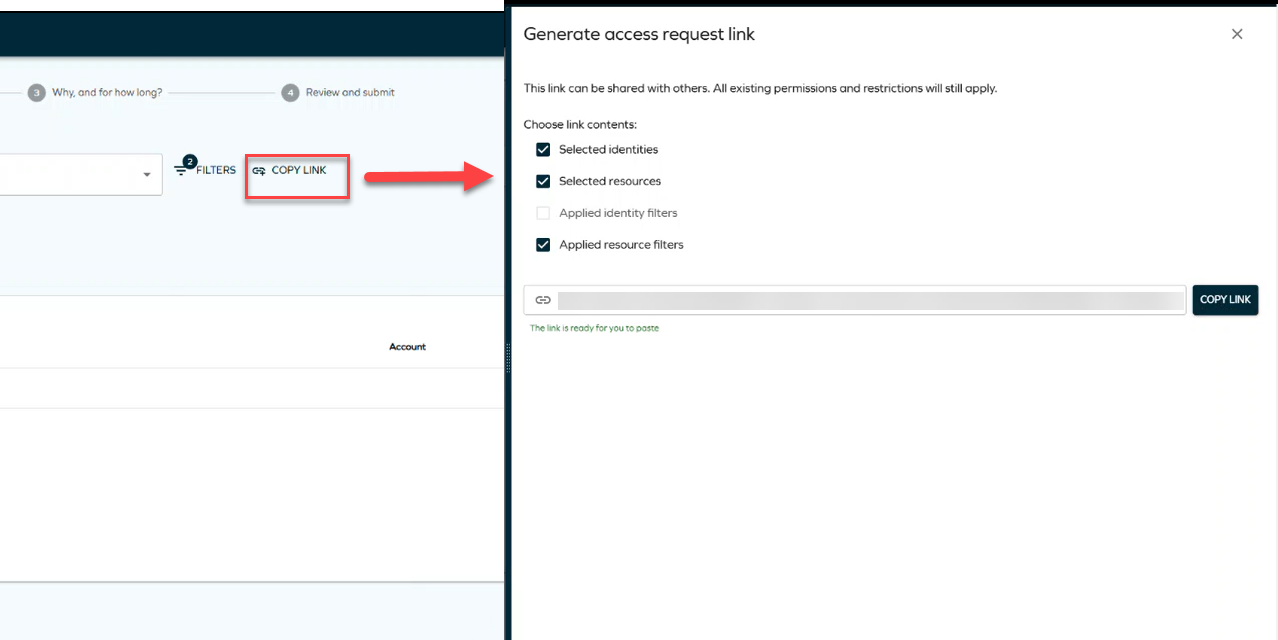
When you click Copy link, you can choose whether to include the applied filters in the generated link. The deep link can include selected identities, selected resources, and optionally the applied filters, allowing a preconfigured request to be easily shared and reused.
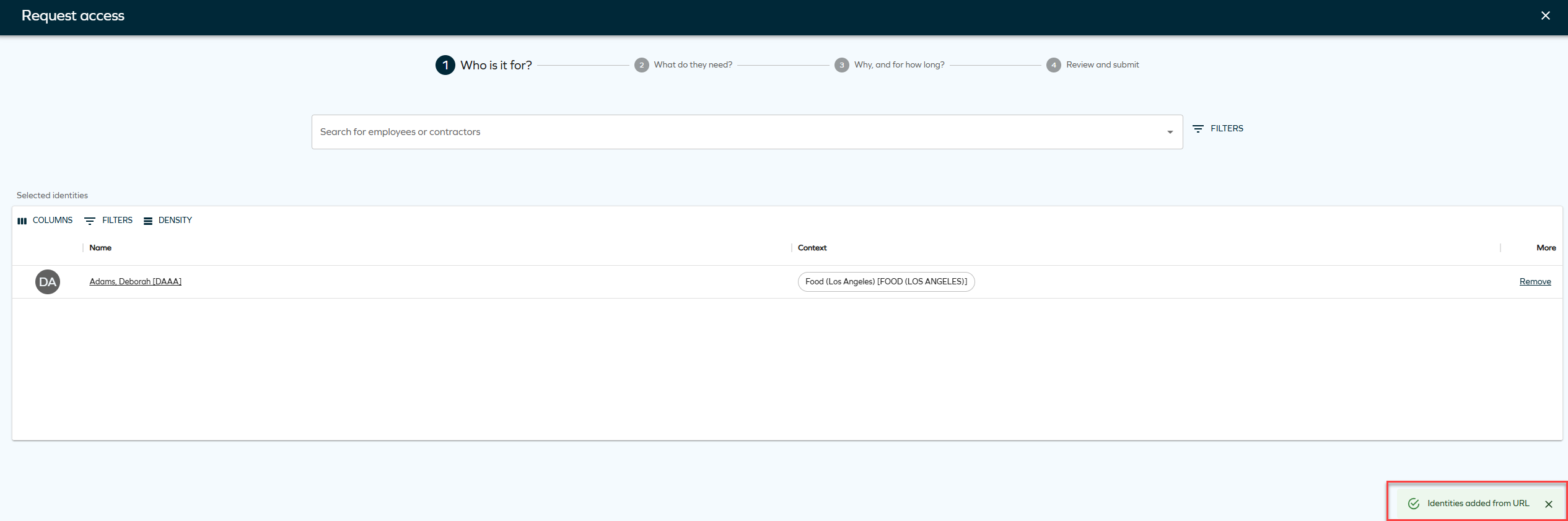
When the link is opened, the access request is automatically prefilled based on the saved configuration, while all existing validation and security rules are enforced.
For more information, see Access request documentation.
Send notifications
You can now send notifications directly from supported data objects, such as identities and accounts, from both object lists and object detail pages.
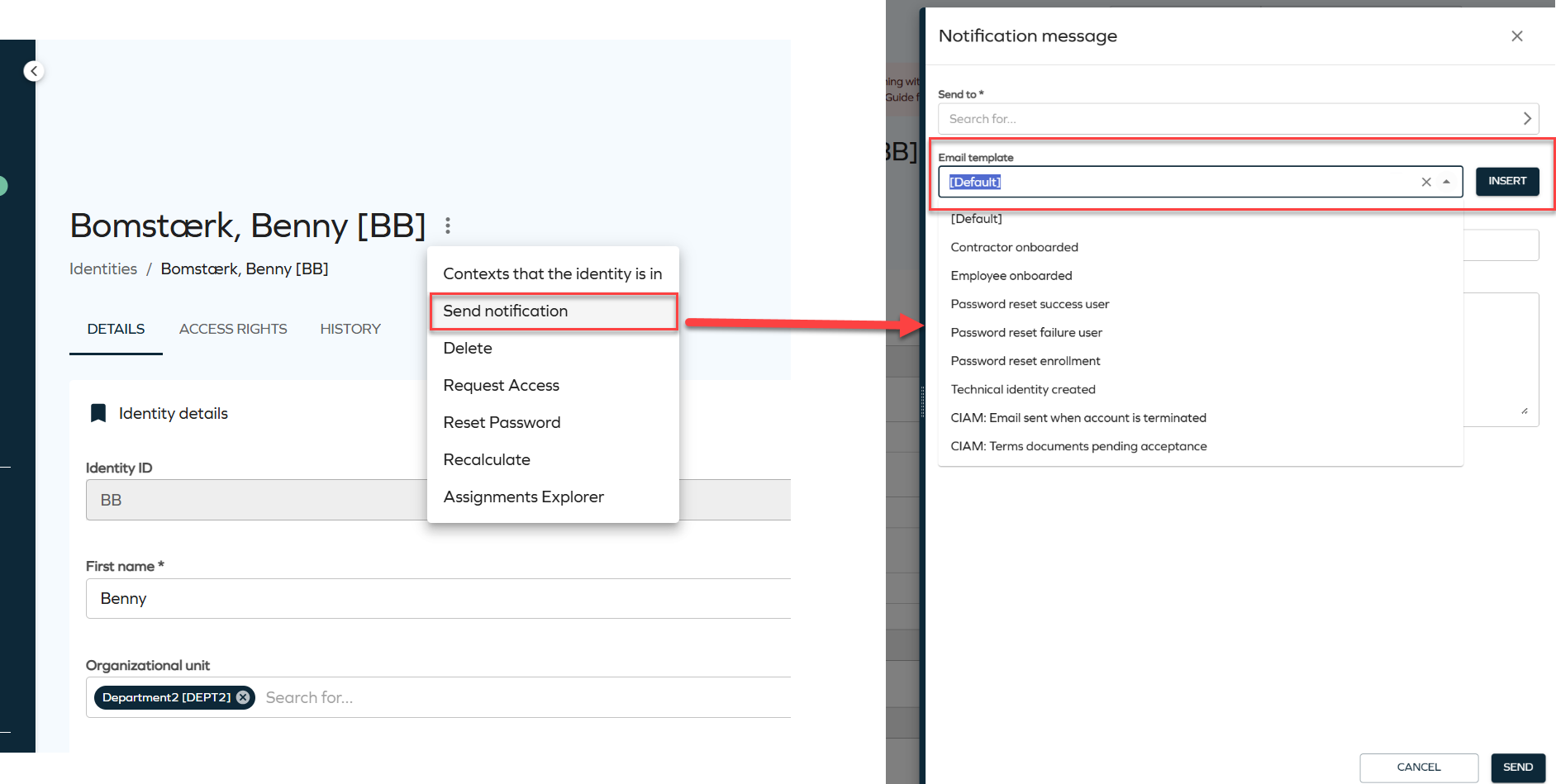
Selecting Send notification opens a side panel where you can configure and send a notification without leaving the current view. Recipients can be selected using the Send to field, which supports selecting one or more user groups.
Notifications can be created in two ways:
-
Using an email template: Select a predefined template and apply it to automatically fill the Subject and Message fields. You can edit them if needed.
-
Writing a custom notification: Manually enter the Subject and Message to send an ad-hoc notification.
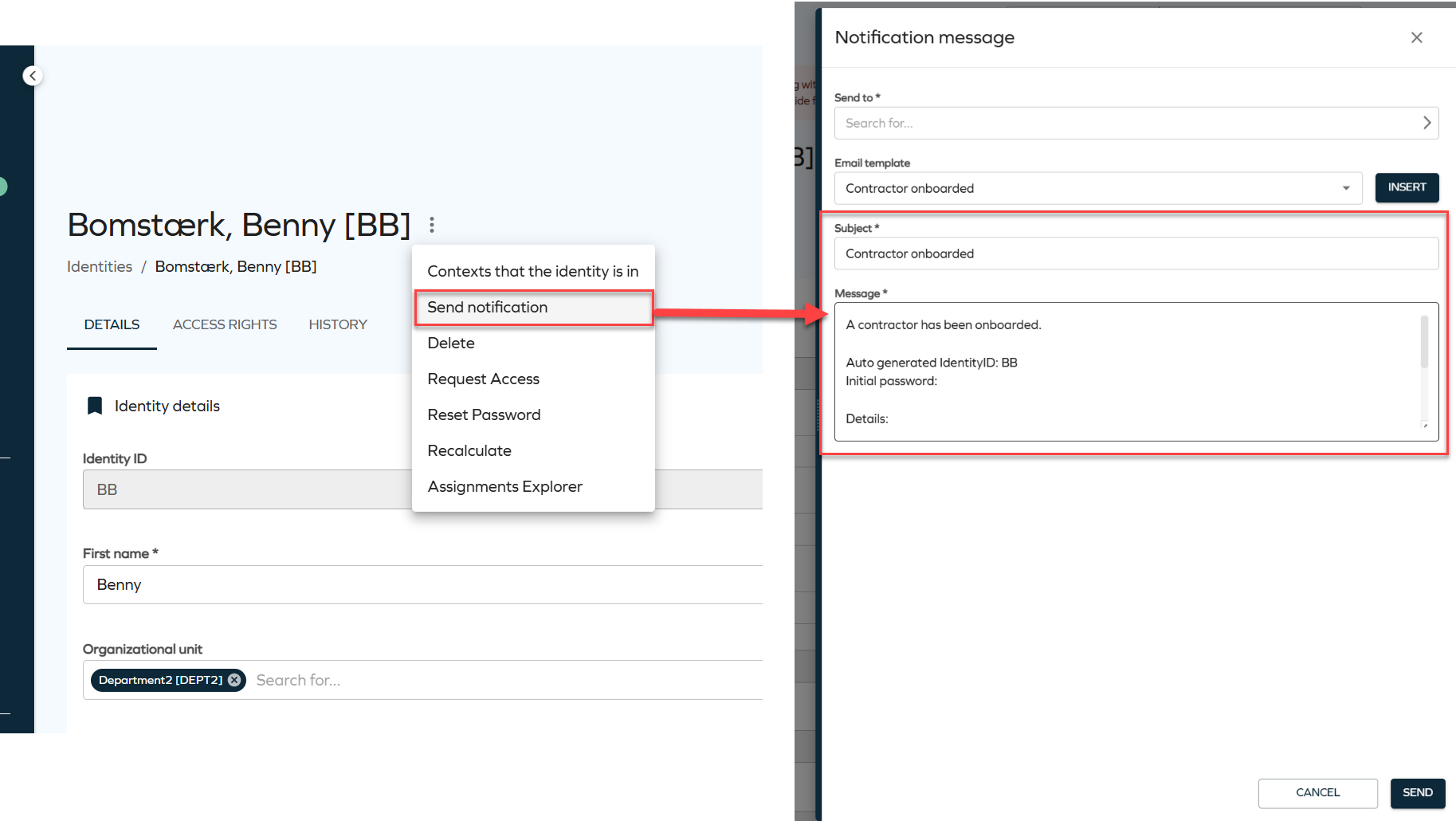
For more details, refer to the Identities documentation.
Access requests: visibility of child assignment status
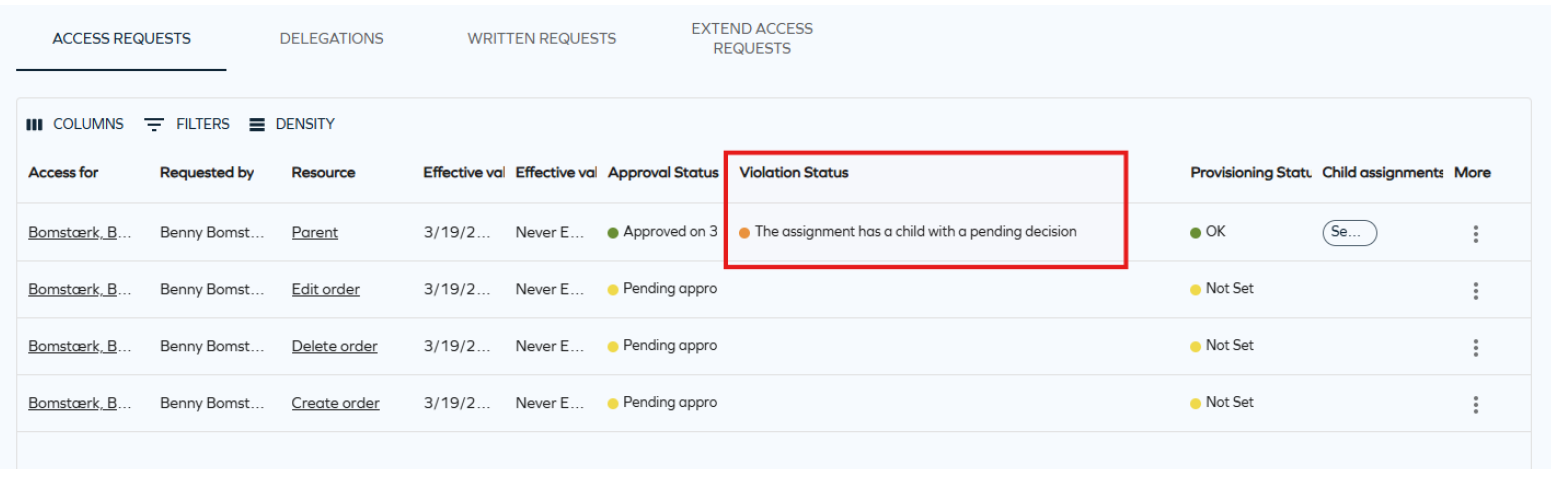
You can now see the violation and provisioning status for child assignments directly on the Access request page. A new violation status, The assignment has a child with a pending decision, highlights when a child assignment requires a decision. This status is shown with an orange indicator.
When you open an access request, the child assignments panel now includes Violation status and Provisioning status columns, giving you more insight into the state of each assignment.
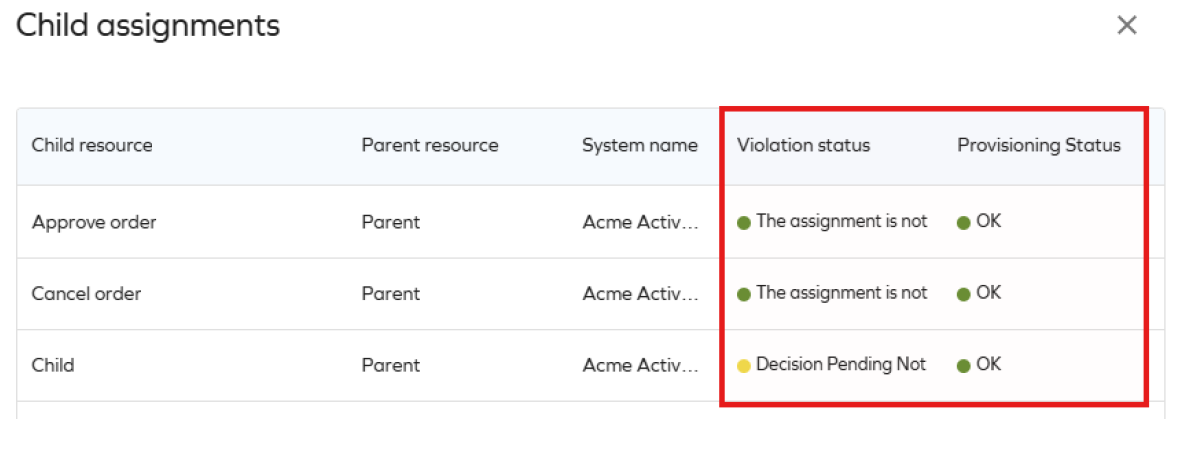
This new value will only be shown if the customer setting Show child assignment violations is set to True.
For more information, see Access request documentation.
New customer setting Show child assignments violations
A new customer setting, Show child assignment violations, controls whether child assignment violations are evaluated and displayed. When you enable this setting, the system evaluates child assignments when loading the Access request page. This evaluation is currently limited to 100 child assignments per request and may impact performance.
Referring objects view for identities
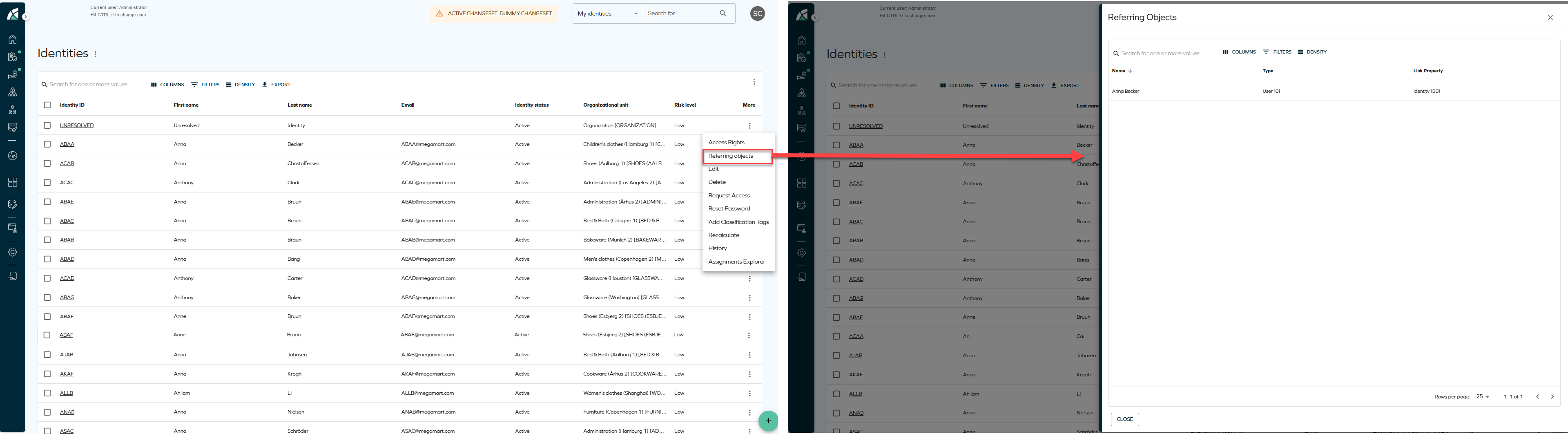
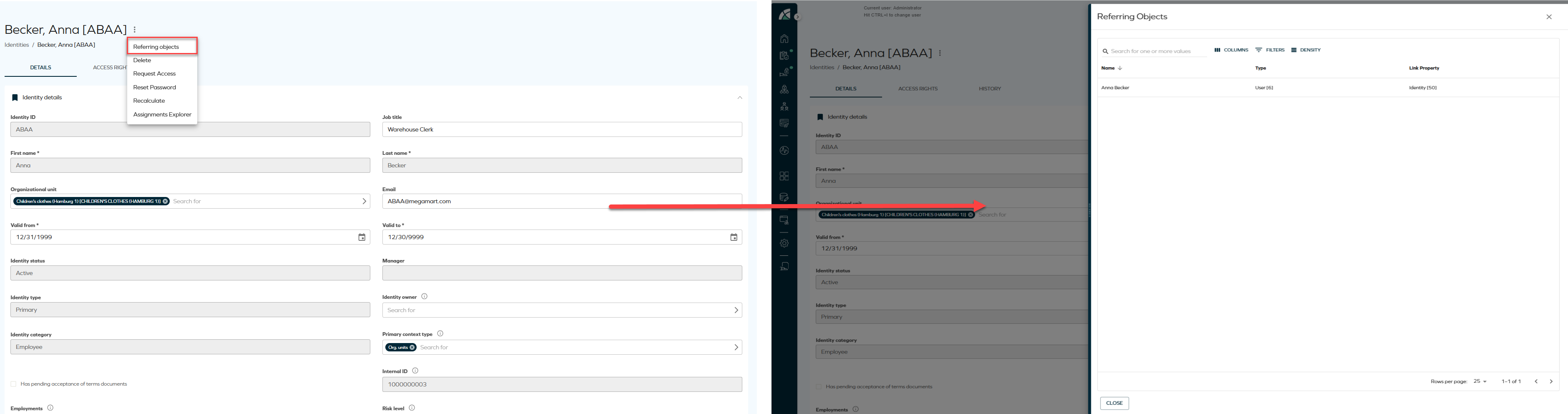
A new Referring objects option has been added to the Identities list and Identity details pages. The option is available from the three-dots menu in both views and opens a side panel displaying all data objects related to the selected identity, including the identity itself. This allows relationships to be reviewed directly from the list or details view.
-
From the Identities list, click the ellipsis button and select Referring objects.
-
From the Identity details page, click the ellipsis button next to the identity name and select Referring objects.
Security side panel for data objects
We have introduced a new Security side panel that allows you to manage permissions for data objects directly from the New UI. The side panel can be opened from the list view row or from the detail view of a data object, providing a streamlined way to review and override the users and user groups that can interact with the selected object.
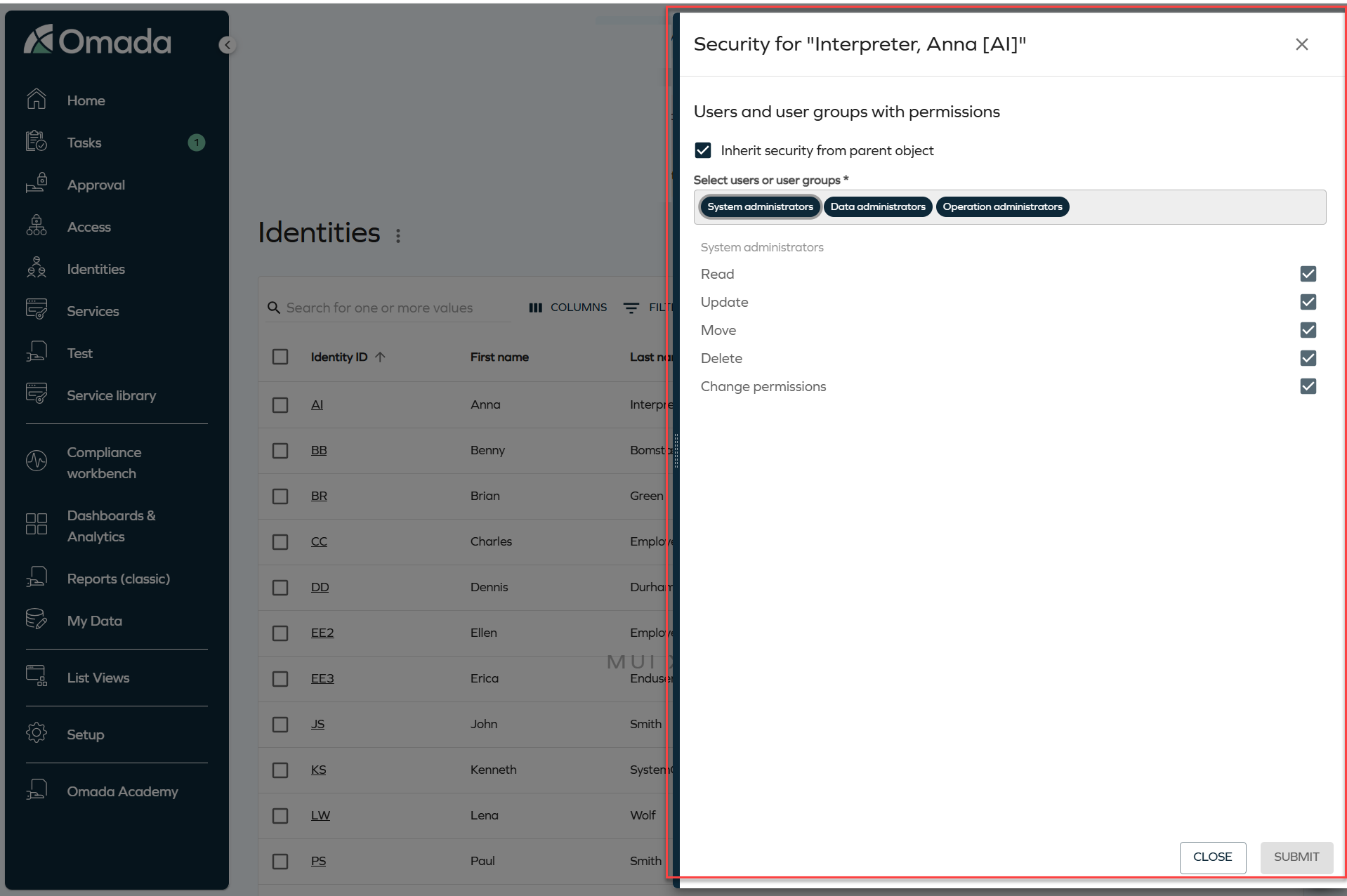
The side panel displays the users and user groups with permissions on the object, along with checkbox options to modify each permission. By default, the Inherit security from parent object checkbox is selected, meaning the object uses the security settings defined on its parent.
To modify permissions for the selected object, clear the Inherit security from parent object checkbox. This unlocks the user and user group selector and the permission checkboxes.
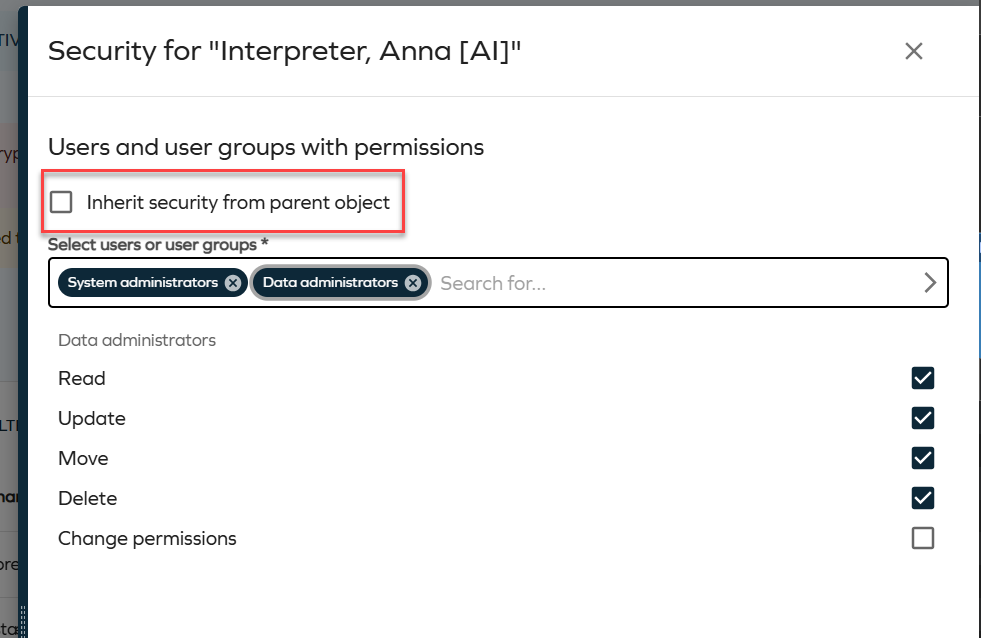
To add a user or user group, click the selector field and choose the relevant entry from the grid. The grid supports search, column selection, and filtering.
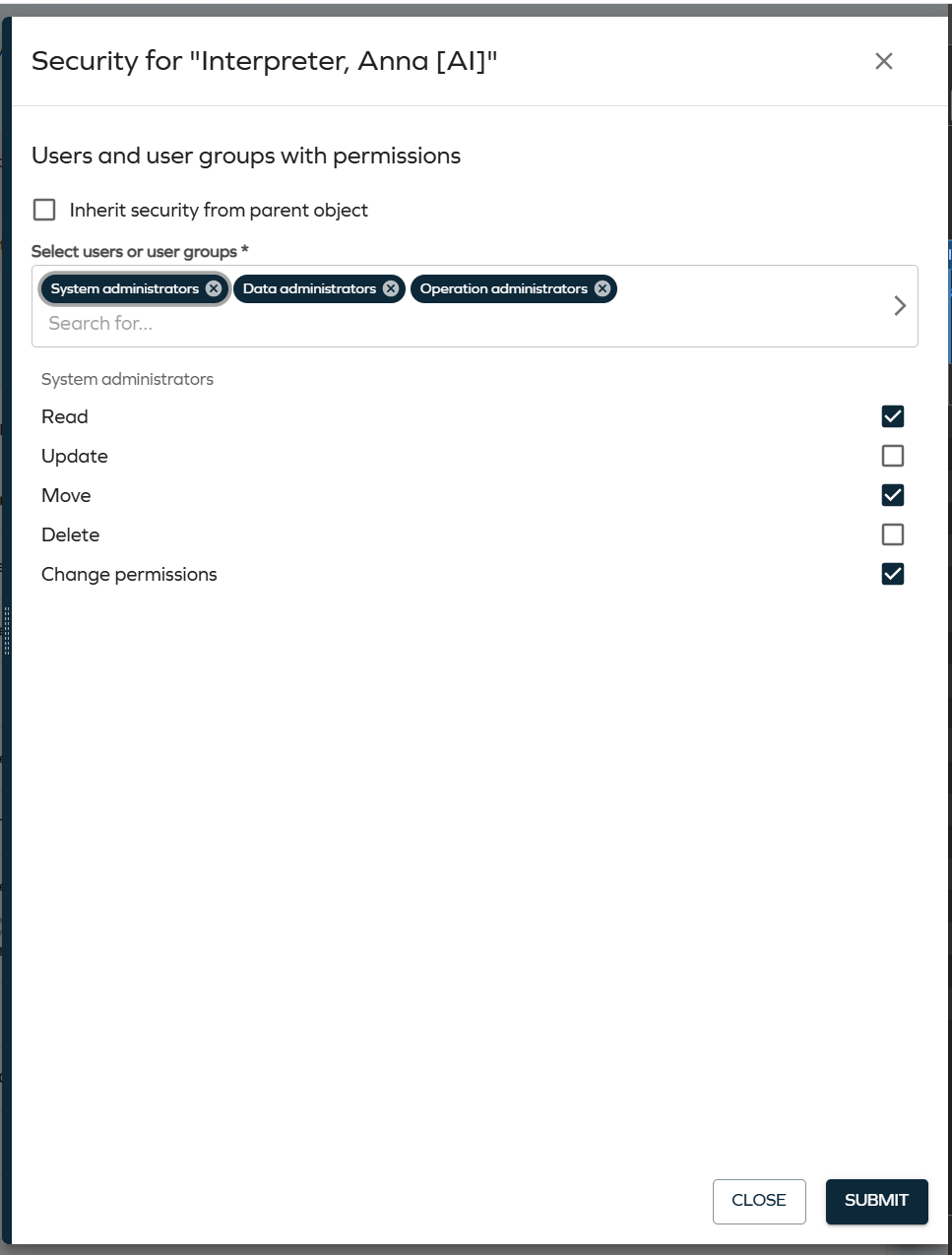
To remove a user or user group, click the X icon on the corresponding chip.
After selecting a user or user group, use the permission checkboxes (Read, Update, Move, Delete, Change permissions) to define the access level. Click Submit to save your changes.
For more information, refer to the Data object security model documentation.
Standardized date format in Access approval
We have introduced a change to standardize the date format used inside Access approval log text entries and reassignment notes. Dates now use a consistent, internationally unambiguous format: yyyy-MM-dd HH:mm:ss (UTC±Offset) (for example, 2024-06-15 14:30:00 (UTC+02:00)).
Previously, these dates were formatted according to the regional settings of the logged-in user, which meant the same audit trail entry could appear differently to a US user (6/15/2024 2:30 PM (UTC+02:00)) and a European user (15/06/2024 14:30 (UTC+02:00)), creating ambiguity when audit trails were shared or reviewed across regions.
The new format applies to the following log entries:
- The initial summary line written when an approval survey is launched (when the request was created).
- Each step decision line (when the approver approved or rejected).
- Valid to was changed to … lines, written when an approver modifies the validity period.
- The initial Access valid to: … info line in the approval log (for extend-access approvals).
- Step reassignment notes (when a step is reassigned to a new approver).
- Existing log entries are not retroactively updated. Only newly created entries from this version onward use the new format.
- If you parse the approval log text programmatically, review and adjust your scripts to account for the new format.
- Structured date input/display fields throughout the UI (such as Valid From and Valid To in the Access Request form) are not affected and continue to display dates in the user's regional format as before.
Cloud Application Gateway
The following changes were introduced to the Cloud Application Gateway enhancing its flexibility, usability, and deployment options.
Installing Cloud Application Gateway on Docker and Kubernetes
You can install now the Cloud Application Gateway on Docker or Kubernetes, in addition to the existing option of installing it on a Windows service. This provides more flexibility in deployment and allows you to choose the environment that best suits your infrastructure and operational preferences.
For more information, go to the Installing Cloud Application Gateway on Docker or Kubernetes documentation.
Cloud Application Gateway menu update
The menu structure, in the Omada Identity, for Cloud Application Gateway has been updated.
Now, when you go to the Setup>Administration>Cloud Application Gateway, you can access the Instance Groups and Instances directly, making managing them easier and more efficient.
For more information, go to the Managing Cloud Application Gateway documentation.
Additionally, if you have a worker hosted as a service, you can restart it directly from the Instance Groups view using the Restart option.
For more information, go to the Restarting worker services documentation.
Registering workers
The PowerShell command to register a worker has been changed from:
.\Omada.Identity.Import.WorkerService.exe --Operation=register
.\Omada.Identity.Provisioning.WorkerService.exe --Operation=register
to:
.\Omada.Identity.Import.WorkerService.exe register
.\Omada.Identity.Provisioning.WorkerService.exe register
For more information, go to the Registration process documentation.
Platform improvements
Multi-language support for surveys
Survey names and descriptions are now displayed according to your language settings. This improvement ensures that surveys appear consistently in the appropriate language across the user interface and in notifications.
This change applies to the areas where survey information is shown, such as To Do cards and email templates. For example, when a survey name is used in a notification template, it is now resolved in your language instead of using a single default value.
- Built-in survey templates already include translations for supported languages, so they are ready to use in multi-language environments without additional configuration.
- Custom survey templates do not include translations by default. To ensure consistent behavior across languages, you must update the name and description in each language you want to support.
When you edit a survey template, the system updates the name and description in the language currently selected in the user interface. For example, if your interface is set to Spanish when you save the template, the Spanish values are updated.
Access page column visibility behavior
Column behavior in the Access page follows the default visibility settings. Columns that are not enabled by default, such as the Access reference key, are hidden and only shown when selected.
To display the column, open the column selector in the grid and select Access reference key. The selected columns are then shown in the grid, allowing you to tailor the view based on your needs.
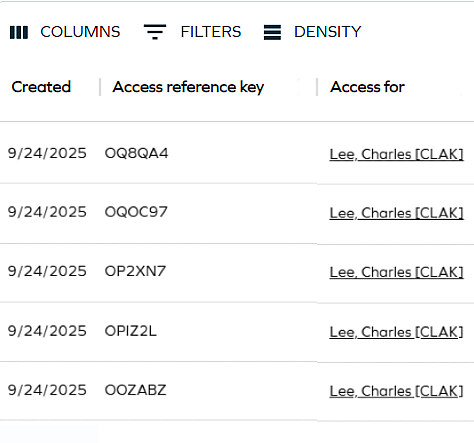
Refer to Access to know more.
New email templates
You can now download email templates as a .zip file. The templates include a modern and updated design to improve the look and feel of your email communication. After you download the file, you can update the HTML to match your requirements. Then copy the template into Setup > Email templates.
This update makes it easier to customize templates and align them with your branding. These are the available email templates:
- Access request mobile approval
- Access request mobile approval (original)
- Account created notification (identity)
- Account created notification (manager)
- Account created notification (owner)
- Activity overdue
- Activity rejected
- Approval process launch failed - Requester
- Approve data changes
- Contractor onboarded
To download these email templates, go to: New email templates.
Customer setting Exclude deleted data objects from SearchData
We have added the ExcludeDeletedDataObjectsFromSearchData customer setting, which is Enabled by default, and excludes deleted data objects from SearchData, improving performance during search updates and full-text search operations.
Improved required context during access approvals
Access approval questions now load without errors even if a required context has been deleted while the approval is still Pending.
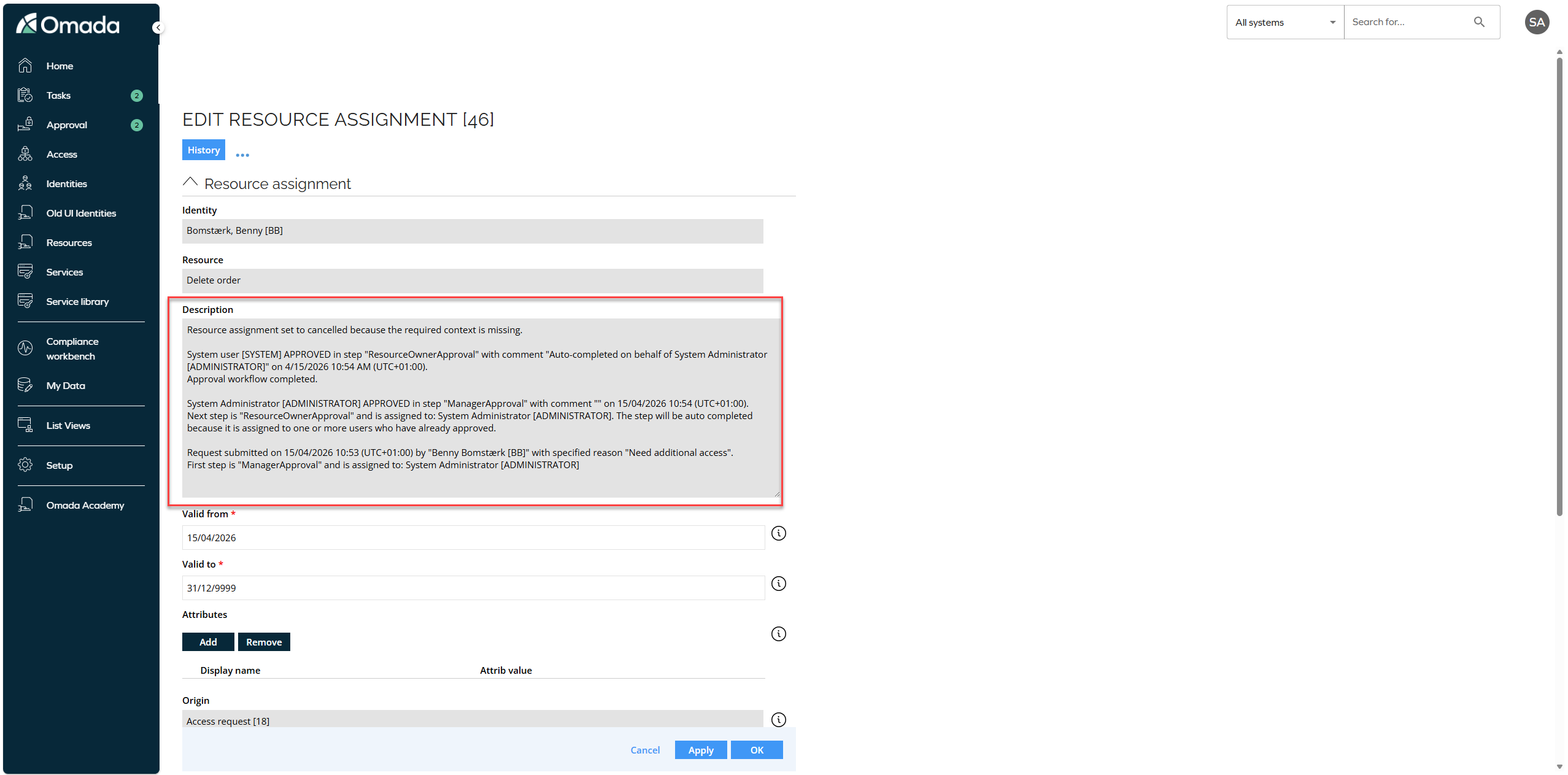
When you submit an approval and the required context is no longer available, the affected resource assignment is cancelled. The system removes the missing context from the resource assignment, updates its status to reflect that it can no longer be fulfilled, and records the action and its reason in the resource assignment description.
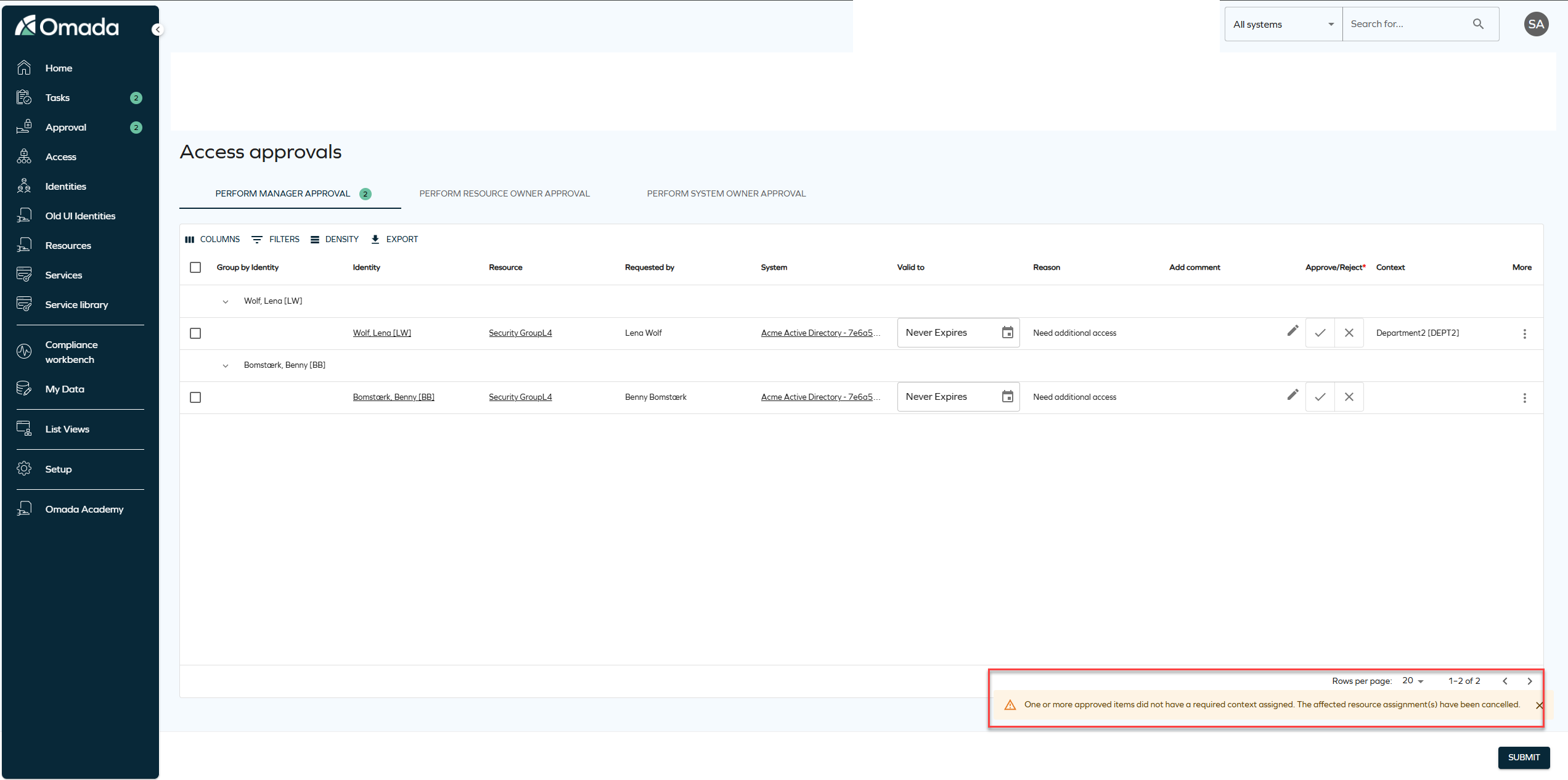
You see a message that explains that one or more approved items did not have a required context assigned and that the affected resource assignments have been cancelled.
This change ensures that the approval flow continues without errors and that invalid or indeterminate assignments are handled consistently.
Omada Identity Analytics (OIA)
Reviewing access directly from Access Intelligence dashboard
You can now review identities' access directly from the Access Intelligence dashboard. When you identify outliers in the List of resources in role table, such as identities holding a resource that is not in scope, click Review access for selection to investigate further.
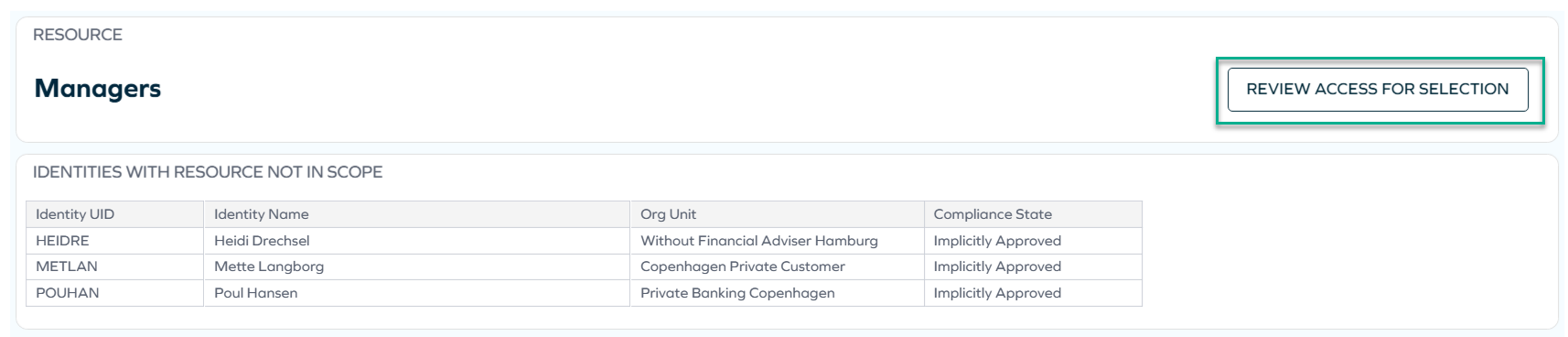
You are then taken to the Identities view, where you can remove access for the selected identities if necessary.
For more information, see Example: Reviewing access.
Role Insights process renamed to Access Intelligence
Following the renaming of the Role Insights dashboard to Access Intelligence, the associated process has also been renamed from Role Insights (previously: Role Mining) to Access Intelligence.
The new name better reflects its purpose of providing insights into access patterns and identity data. This change is reflected across the UI, documentation, and translations.
Filter naming conventions
When saving custom filter sets in OIA, you can now name them more flexibly. Filter set names can include spaces and underscores, and their allowed length has been increased to 50 characters, allowing for more descriptive and meaningful names.
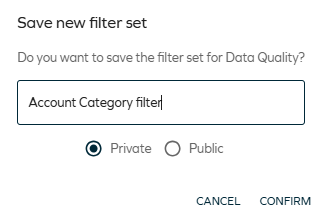
For more information on saving filter sets, see: Save new filter set.
Improved dashboard performance
The dashboard loading time in Omada Identity Analytics (OIA) has been improved, enhancing overall responsiveness and user experience.
Connectors
REST cross-platform connectivity
When onboarding a new REST system (using the generic REST connectivity), you can now select the Cross Platform REST option in the Technology drop-down menu. This update provides better integration across platforms and environments (Windows/Linux).
You can onboard a new system only using Cross Platform REST. Migrating from the existing systems will be available in the subsequent releases.
Other
GraphQL API: updates to assignment and access request fields
We have released a new version of the GraphQL API (version 3.5) with additional fields to improve visibility into assignment and Access request states.
The following fields are now available on calculated assignments:
provisioningStatusviolationStatusviolationStatusText
There have been changes to the AccessRequestStatusType in version 3.5. A new field hasChildrenInViolation has been added. This boolean value represents whether the access requests has any child assignments with actively pending violation decisions. This field always returns False, unless the new customer setting Show child assignment violations has been
set to True, as not to impact the performance of users not intending to use this feature.
The new field hasChildrenInViolation is, as of introduction, already marked as deprecated. When the GraphQL API is updated to version 4.0, this field will be removed.
A new value will be added to the enum violationStatus, which will represent this new state. It is therefore not recommended to use the field hasChildrenInViolation outside of Omada Identity.
For more information, see GraphAPI changelog.
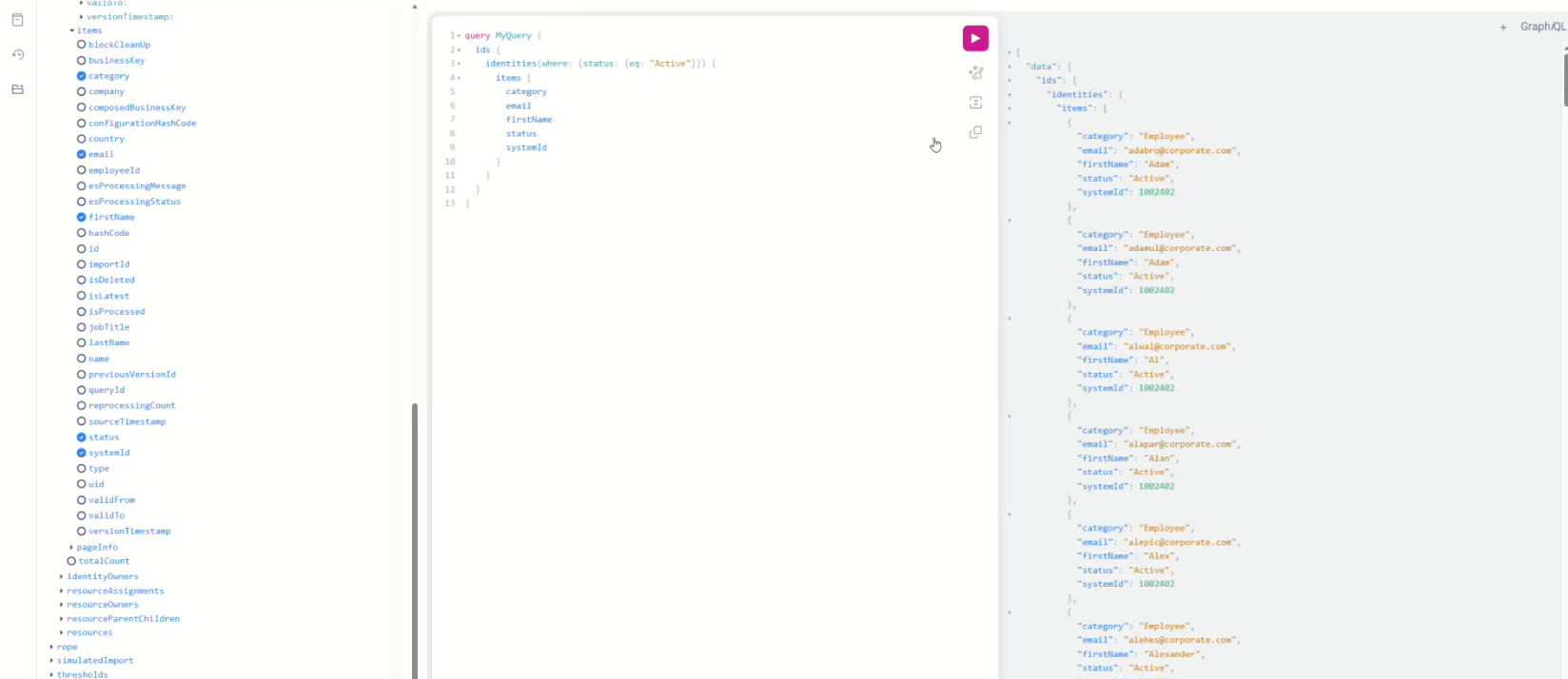
GraphQL viewer
You can access the GraphQL viewer by adding the APIDoc.aspx?api=ids suffix to the Omada Identity URL.
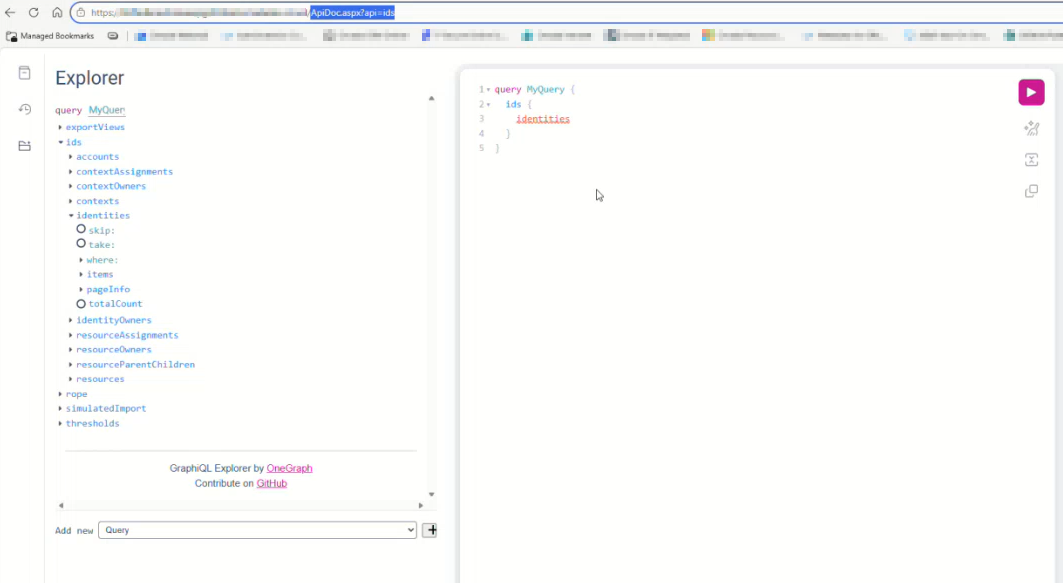
There, using the explorer, you can inspect the tables and export views.
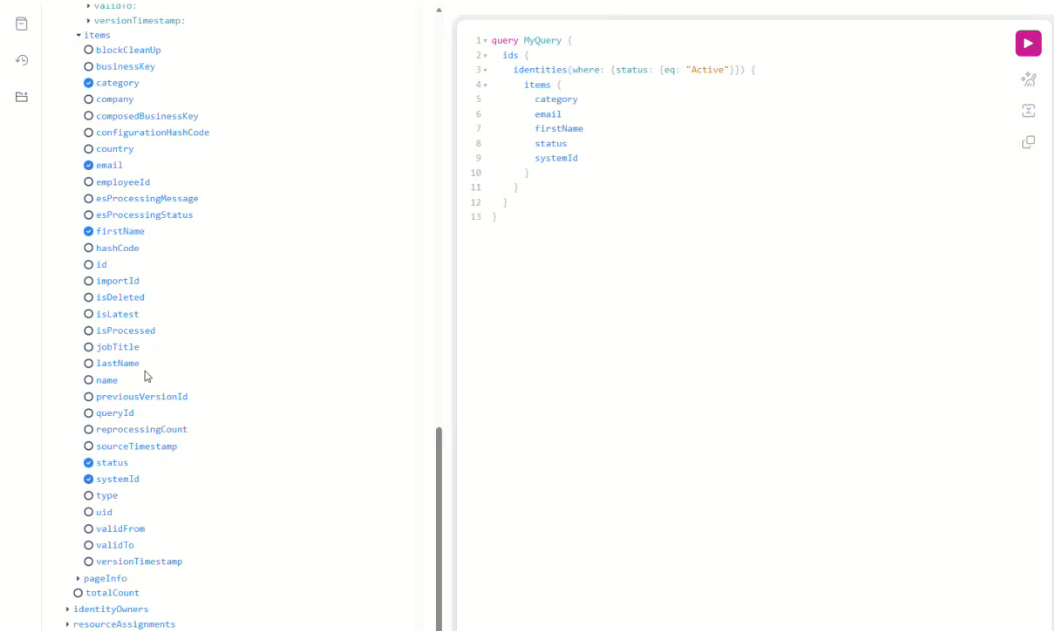
To retrieve records, create a query in the viewer by selecting the relevant table and fields, and then click Run to execute the query and see the results.
Privileged impersonation user
We have introduced a new Privileged Impersonation Service Users group designed for high-trust scenarios requiring full access.
Users in this group operate at a high authentication level, meaning that impersonated sessions inherit the full authentication context of the authenticated user. As a result, all user groups available at that level are included, and full permissions and process actions are granted.
For more information, refer to the new Impersonation and authentication levels section in the Security guide. It covers impersonation and the authentication level model, including how authentication levels are assigned, how they influence user group memberships and permissions, and how impersonation affects effective access.
Documentation
Documentation update for Role and Policy Engine customer settings
We've added documentation for the existing Role and Policy Engine (RoPE) customer setting IsRopeExtendValidityPeriods and introduced the new customer setting RoPEContextMembershipsIncludeInvalid.
RoPEContextMembershipsIncludeInvalid is related to the policy evaluation behavior changed by the resolved issue RoPE removing AD account even though identity is in an active context (INC-303500). As of this update, context memberships whose validity period has not started yet or has already ended are no longer considered during policy evaluation.
The default value of RoPEContextMembershipsIncludeInvalid is false. Setting it to true restores the previous behavior in which such invalid context memberships are included. This setting is intended as a temporary compatibility option for environments that require the previous behavior.
For information about how context membership validity is determined, see Context membership validity.
For more information on RoPE settings, refer to the Role and Policy Engine and Hidden settings section in System settings.
Advanced Analytics: Dashboard documentation update
We have updated the Advanced Analytics – Dashboards documentation to reflect the new UI theme and better explain the functionalities of the Operations Dashboard, Key Figures (as well as the concept of KPIs), Auditor Dashboard, System Owner Dashboard, and Manager Dashboard.
OIA: Identity Comparison documentation update
We have refreshed the OIA – Identity Comparison dashboard documentation to align with the latest UI changes and provide clearer explanations of the features and functionalities available in the Identity Comparison tool.