Impersonation and authentication levels
Impersonation allows an authenticated user or service to act on behalf of another user. It is typically used in integration scenarios, administrative operations, or troubleshooting.
Impersonation is initiated through the API (IMPERSONATE_USER HTTP header) and requires the authenticated user to be a member of a designated impersonation group. The resulting access depends on both the impersonation type and the authentication level of the session.
Impersonation types
Impersonation is controlled through two system user groups, which determine the authentication level and access scope of the impersonated session:
-
Impersonation Service Users
-
Authentication level: Low
-
The impersonated session is forced to run at Low authentication level, regardless of how the user authenticated.
-
As a result:
-
Only user groups with an authentication level less than or equal to Low are included.
-
Permissions and actions are restricted accordingly.
tipThis type of impersonation is intended for scenarios where limited access is required.
-
-
This behavior aligns with standard Omada Identity configuration, where impersonation via service users enforces Low authentication level to prevent access to user groups requiring Medium or High authentication.
- As a result:
- If a user has memberships in higher-level groups, these are not active during impersonation.
- Access tied to those groups is not available.
- As a result:
-
-
-
Privileged Impersonation Service Users
-
Authentication level: High
-
The impersonated session inherits the full authentication level of the authenticated user.
- As a result:
-
All user groups available at the authenticated level are included.
-
Full permissions and process actions are available.
tipThis type of impersonation is intended for trusted scenarios that require full access.
-
- As a result:
-
Users who are members of the Administrators group cannot be impersonated, regardless of impersonation type.
Authentication levels
Authentication levels define the strength of authentication and are used to control access throughout the system:
- Low (0) – minimal assurance
- Medium (1) – standard assurance
- High (2) – strongest assurance
Higher authentication levels include the permissions of lower levels.
Authentication level model
Authentication level is applied across three layers in the system:
Customer/Authentication Model
- Defines the maximum authentication level that can be granted for a given authentication entry point (for example, an alias or binding).
- This allows different entry points to enforce different authentication strengths (for example, strong SSO vs. basic authentication).
- The default maximum level is High.
User Group
- Each user group has an associated authentication level, represented as the
AuthLevelproperty on the user group. - This defines the minimum authentication level required for a user to be considered a member of that group.
- Personal user groups are always assigned Low authentication level.
For configuration of user groups and their required authentication levels, see Users and user groups.
Default configuration in Omada Identity
In Omada Identity, user groups are assigned a default required authentication level:
-
Medium (default for privileged groups):
- System administrators
- System owners
- Data administrators
- Operation administrators
- Auditors
- Application onboarding admins
- Security officers
- Service desk agents
-
Low (default for all other groups)
You can change the authentication level of a user group in Setup → Administration → Users & security → User groups. Change the value of the Required authentication level field accordingly and click Apply.
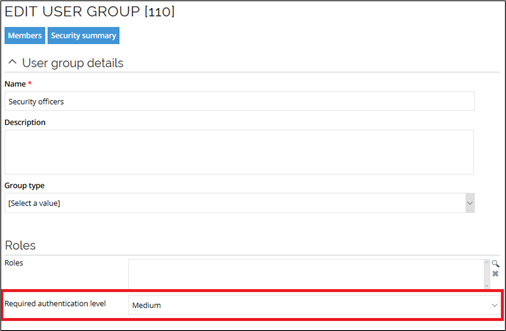
The authentication level is evaluated when a user session is initiated.
Only groups with a required level less than or equal to the session level are included.
Session/Identity
- The authentication level is assigned to the user session at login.
- This level is then used throughout the system to determine access and permissions.
Authentication level assignment
At login, the authentication level is determined based on the authentication configuration:
- The system resolves the authentication level defined for the entry point (for example, an alias).
- This level is assigned to the user session.
- The user identity is created using this authentication level.
- The authentication level is included as part of the identity context, meaning different authentication levels result in different effective identities and separate identity caching.
Default authentication level behavior
In standard configurations:
- Regular authentication assigns Medium authentication level.
- Strong authentication methods may assign High, depending on the authentication entry point configuration.
It is possible to control the maximum authentication level based on the authentication provider.
-
In on-premises deployments, this is configured via the
AuthLevelcolumn in thetblCustomerAuthtable. -
In Cloud environments, this configuration is managed by Omada and cannot be modified by customers.
This can be used, for example, to limit access to Platform and System administration when using less secure authentication providers or specific identity providers.
Setting the authentication level to Medium prevents users logged via an Identity Provider (IdP) from obtaining Platform administrator permissions.
Ensure through a firewall that the host header parameter is not tampered. Spoofing the host name could be misused to elevate the authentication level.
Effect on group memberships
Authentication level determines which user groups are active in a session:
- At High level, all group memberships are included.
- At Medium or Low level, only groups with an authentication level less than or equal to the session level are included.
As a result:
- The effective set of user groups depends on the authentication level.
- Permissions derived from those groups are automatically limited.
Effect on permissions and data access
Permissions are derived from the user groups available in the session.
- Only groups that meet the authentication level requirement contribute to permissions.
- All permission checks automatically respect the filtered group set.
The same principle applies to data access:
- When accessing data objects, the system enforces authentication level filtering.
- Lower authentication levels result in reduced data visibility.
Enforcement on process actions
Authentication level is also enforced when performing actions such as process transitions.
-
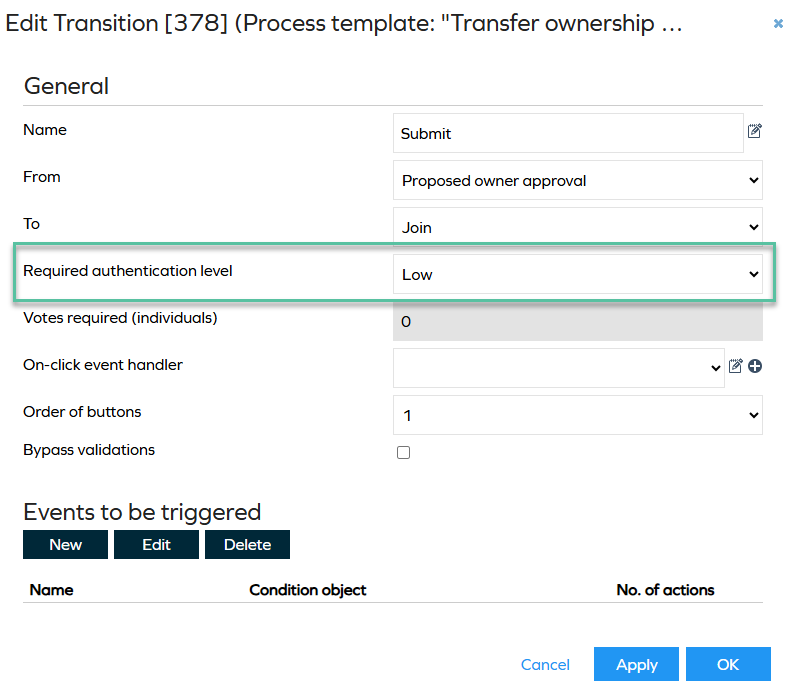
Each action can require a minimum authentication level, configured in the UI using the Required authentication level field.
-
If the session authentication level is lower than required:
- The action cannot be executed.
- The user interface may hide or disable the action.
This ensures that sensitive operations require stronger authentication.
The overall flow of authentication level and access can be summarized as:
- The authentication entry point defines the maximum authentication level.
- The user session is assigned an authentication level at login.
- The identity is created using this level.
- User group memberships are filtered based on authentication level.
- Permissions are derived from the resulting groups.
- Actions and data access are enforced based on the same level.