Post-action handler scripting
A post-action handler (PAH) is used to perform an action when a survey object is created, routed and completed, that is, it has passed all relevant workflow steps in a survey. A registered post-action handler is also executed on survey objects that are not completed when/if a survey is prematurely closed.
The script-based PAH is invoked as the PerformAction method, similar to standard PAHs. See standard PAHs.
Using a script-based post-action handler
Define a post-action handler for a survey with the class set to:
Omada.OE.Booster.Assembly.Scripting.SurveyPostAction.ScriptingPostActionHandler, Omada.OE.Booster.Assembly.Scripting
Decide when to run the script by setting Run after routing:
- Off: The post-action handler will be executed when the survey item is completed.
- On: The post-action handler will be executed when the survey item is routed from one workflow step to another, and not only after the last workflow step. Using this mode causes the PAH to be called for each survey item (so if there are 1000 items, the PAH is invoked 1000 times) during survey data generation and routing. This action is resource intensive and should therefore only be used when required.
Link the PAH to the script by adding a post-action parameter ScriptUid and assign the Uid of the script object as the value.
Execution context
Post-action handler (PAH) scripts are provided with information on:
- The survey item data in the variable named
surveyActionArgumentsof the classOmada.OE.Solution.OIM.AppLogic.SurveyFeature.PostActions.ActionArguments. See the Enterprise Server API for details. - PAH parameters in the variable named
surveyParametersof the classDictionary<String,String>.
The ScriptUid parameter is removed from the parameters list, it is not available in the script context.
Example: Getting a survey parameter
- Add a parameter to the post action handler in the survey template:
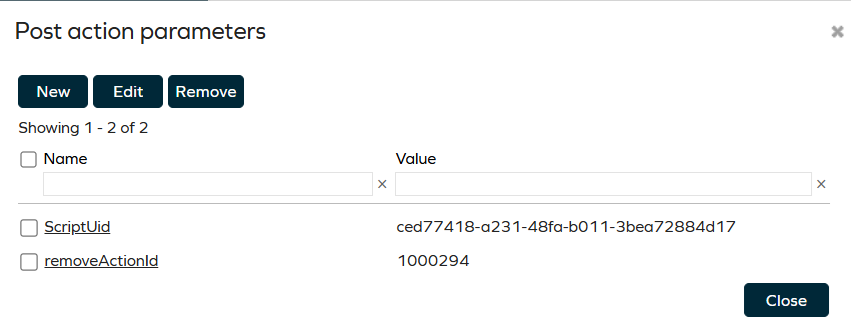
- Use a script to retrieve and log the information:
void AddLog(String s)
{
    debugger.Print(DateTime.Now + " " + s +"#");
}
AddLog("Script start");
string removeActionId;
if (surveyParameters.TryGetValue("removeActionId",out removeActionId))
{
    AddLog("Parameter: " + removeActionId);
}
else
{
    AddLog("Parameter not found");
}
AddLog("Script end");
- To execute the script, enable logging and complete an item in a survey using the PAH. View the log by opening the script and reviewing the content in the Last Execution Debug Info.
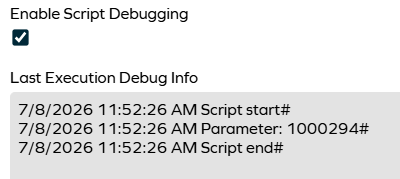
Usage example
The following script processes a survey that lists roles with a child role, and removes the child when the Remove action is applied by the responder in the survey. It uses the removeActionId parameter provided in the survey PAH configuration (since the value provided for each survey item is an integer ID of the set property value, and that ID may differ between Omada instances).
void AddLog(String s)
{
	debugger.Print(DateTime.Now + " " + s +"#");
}

/* Skip processing when workflow is not completed */
if (!surveyActionArguments.WorkflowCompleted)
{
  return;
}

var action=surveyActionArguments.GetPropertyValue("SURV_ACTION",-1);
string removeActionId;

if (surveyParameters.TryGetValue("removeActionId",out removeActionId))
{
  if (action.ToString()==removeActionId)
  {
    var roleId=surveyActionArguments.GetPropertyValue("ROLEREF",-1);
    var childId=surveyActionArguments.GetPropertyValue("CHILDROLES",-1);

    var roleList=factory.CreateFacade<IDataObjectCriteria>()
    .AddWhitelist(roleId)
    .GetLoader()
    .LoadDataObjects();

	if (roleList.Count>0)
	{
		var role=roleList[0];
		var childList=role.GetPropertyValues<int>("CHILDROLES");

		if (childList.Contains(childId))
		{
		  factory.CreateFacade<IDataObjectWriter>()
		  .RemovePropertyValues("CHILDROLES",new List<int>() {childId})
		  .Save(role);
		  AddLog("Removed " + childId + "  from " + roleId);
		}
	}
  }
}