Scripting
While Omada Identity is highly configurable, there are situations where the logic is better expressed with code to support the business requirement. The intent of the feature is to provide an additional layer of flexibility when configuring functionality, not to replace the general configuration options.
Do not use this solution to configure with too many scripts, as this causes it to deviate from standard functionality, making it less transparent and increasing maintenance cost. An example of proper use of the feature is user name generation, where the standard value generator is suitable for basic rule sets, while the scripting approach is better suited for complex logic when there are many rules.
The scripting feature is available for Omada Identity Cloud only. To enable it, create a ticket with Omada support (for each instance).
Using the feature is an advanced configuration option that requires a deep understanding of the Omada Identity product and C# development skills.
At its core, the scripting feature executes as compiled C# code, which brings most C# language features to the scripts, such as branching using if-then-else/switch constructs, and functions. The adoption of C# allows for building complex logic and structuring the code for long-term maintenance by dividing larger scripts into functions.
To protect the run-time environment, the scripting is limited to using specific classes/methods/properties (limitations may even apply to some methods/properties in an allowed class) and to a maximum call stack depth (to protect against resource exhaustion, for example caused by infinite recursion). During compilation, messages are generated if usage of disallowed classes is defined in the script, and the script is prevented from execution. A call stack depth violation is detected at runtime and causes execution to halt.
Usage
When the feature is enabled, a new Code Scripts menu item is available for System Administrators in the Setup menu. Part of the standard tutorial scripts in the view are replaced with this documentation section and therefore may contain no or incomplete information.
Scripts can be used as extension points for:
- Code methods
- Survey post action handlers
- Access modifiers
Refer to the subsections for specific information on how the scripts are used for each usage scenario. Also refer to the Omada Identity core product classes documentation for detailed information on DataObject and other classes.
Scripts can be marked as draft in which case they are not compiled during save and cannot be executed.
It can be a resource-intensive task for the system to execute scripts. You should always consider the guidelines for script usage and development.
Omada reserves the right to disable scripting in case of resource exhaustion or misuse of the feature to protect the operations and performance across instances in the cloud.
Accessing data
Scripts have access to all Data Objects in Omada, except for DataConnection and System type objects, through a set of facade classes, and thus do not have direct database access.
Reading data
Data objects are searched using the facade class IDataObjectCriteria, which instantiates an IDataObjectLoader object to provide the result set (see IDataObjectCriteria for reference).
Example: Read the display name of the unresolved identity
void AddLog(String s)
{
    debugger.Print(DateTime.Now + " " + s +"**");
}

var unresolvedUid="1d5595ae-045b-495c-a02d-df1da29208be";

IList<DataObject> dataobject=factory.CreateFacade<IDataObjectCriteria>()
    .AddFilterExpression("Uid",unresolvedUid,ExpInnerOperator.Equals)
    .SetMaxObjects(1)
    .GetLoader()
    .LoadDataObjects();

AddLog(dataobject[0].DisplayName);
Resulting log entry:
7/6/2026 1:04:06 PM Identity, Unresolved [UNRESOLVED]**
Example: Read resources from the Omada Identity system
void AddLog(String s)
{
	debugger.Print(DateTime.Now + " " + s +"**");
}

IList<DataObject> resources=factory.CreateFacade<IDataObjectCriteria>()
    .AddDataObjectType("Resource")
    .AddFilterExpression("SYSTEMREF",1000095,ExpInnerOperator.Equals)
    .SetMaxObjects(50)
    .GetLoader()
    .LoadDataObjects();

AddLog("Name of first resource: " + resources[0].DisplayName);
AddLog("Count: " + resources.Count);
Resulting log entry:
7/6/2026 1:05:22 PM Name of first resource: Operation administrators** 7/6/2026 1:05:22 PM Count: 37**
Writing data
Creating a Data Object
Example: Creating a resource assignment
void AddLog(String s)
{
	debugger.Print(DateTime.Now + " " + s +"**");
}

var resourceList=new List<int>() ;
resourceList.Add(1001286); /*Employees*/

DataObject resourceAssignment=factory.CreateFacade<IDataObjectWriter>()
  .SetPropertyValue("IDENTITYREF",1000178) /*unresolved*/
  .SetPropertyValue("DESCRIPTION","Automatically created assignment")
  .AddPropertyValues("ROLEREF",resourceList)
  .SetPropertyValue("SYSTEMREF",1000095) /*Omada Identity*/
  .SetPropertyValue("RA_CONTEXT",1000067) /*Organization*/
  .SetPropertyValue("ACCOUNTTYPE",1000190) /*Personal*/
  .SetPropertyValue("VALIDFROM",DateTime.Now)
  .SetPropertyValue("VALIDTO",DateTime.MaxValue)
  .SetPropertyValue("ROLEASSNSTATUS",530) /*Pending*/
  .CreateDataObject("Resourceassignment");

AddLog("Assignment created with id: " + resourceAssignment.Id);
Result as displayed when running in the debugger:
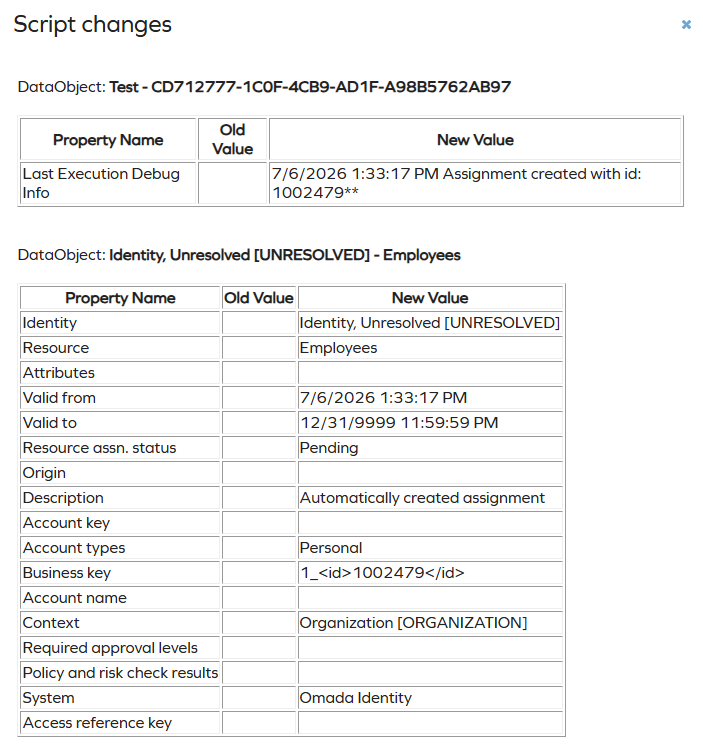
Updating a Data Object
Change data using the writer by adding one or more change actions (add/remove property values), and then calling the Save method.
factory.CreateFacade<IDataObjectWriter>()
  .RemovePropertyValues("CHILDROLES",new List<int>() {childId})
  .Save(role);
Deleting a Data Object
Data objects are deleted using the writer by providing the object ID as the parameter.
DataObject do=.....

factory.CreateFacade<IDataObjectWriter>()
  .DeleteDataObject(do.Id);
Logging
To use logging, select the Script Debugging checkbox:
When logging is enabled, each execution (using either the Run option or when executed as part of the processes in the solution) of the script is logged and stored in the Last Execution Debug Info property. Script debugging must be disabled during steady-state operation for improved performance.
When running the script, the log will only be displayed when the value is different from the previous run, and each entry in the log is combined into a single string with no newline.
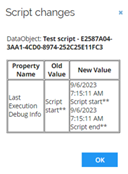
For convenience, the function below can be used to add entries to the log, where each entry is enriched with a timestamp and ** as a line ending. For larger logs, the log string can then be copied into a text editor and ** replaced with a newline to provide a more readable log.
void AddLog(String s)
{
	debugger.Print(DateTime.Now + " " + s +"**");
}
AddLog("Script start");
AddLog("Script end");
General coding guidelines
- Limit use of scripts
- Use a configuration-first, scripting-second approach, using scripting only for situations where configuration is not feasible.
- Limit database requests
- Most processes in Omada Identity involve database requests, and therefore each process must optimize database access to prevent exhaustion of resources that will impact other processes and the responsiveness of the UI.
- Be specific in the searches to get only the data required.
- Limit the number of returned objects, especially for queries that are used to find out whether something exists or not.
- Query a list rather than executing one by one; for example, when resolving the data objects in a multi-value reference property, it is better to add the IDs of all references to one query and retrieve them in a single operation.
- Be careful with data object versioning
- When a data object is saved, a new version is created. This means that the same object cannot be saved twice. In general, changes to an object should only be applied once in a script, but in cases where multiple updates are required, the object must be retrieved again before it is saved again.
- Be careful with integer IDs
- The value of reference and set properties is the integer ID of the value, which is NOT guaranteed to be the same on different Omada instances.