Code method scripting
Code methods are used in Event definitions and transitions in processes. Code method scripting allows for execution of a script in the same places as the built-in code methods.
Using a script-based code method
Scripted code methods are activated using the "ExecuteScript" Code Method.
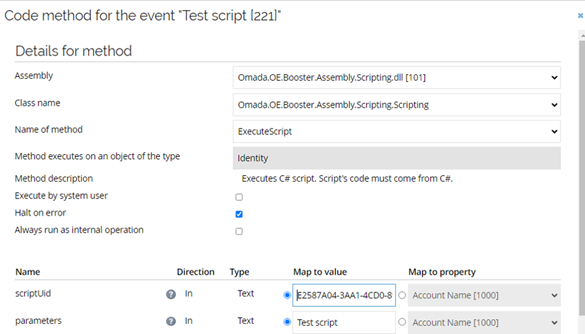
The script UID parameter is provided to define the script to be executed. Parameters are optional and can be used to provide additional information to the script when used with slight variations in different places in the configuration.
Adding the name of the execution component (in this case an event definition called "Test script") as a parameter can be useful for troubleshooting as it is visible in the code method log.
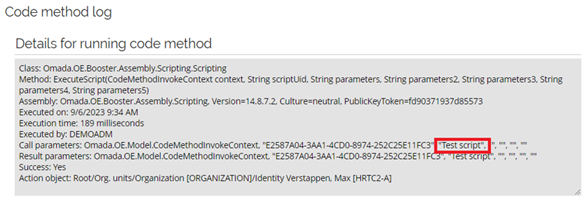
Execution context
Scripts are provided with information on the action object (in the variable named actionObject of type DataObject) and the parameters provided in the execution definition. The actionObject is assigned the value of the DataObject the event triggers on.
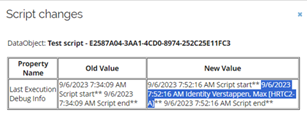
Example: Print the display name of the data object to the log
void AddLog(String s)
{
    debugger.Print(DateTime.Now + " " + s +"**");
}
AddLog("Script start");
AddLog(actionObject.DisplayName);
AddLog("Script end");
Gives the output:
Parameters are passed as string values in variables named: parameters, parameters2, parameters3, parameters4, parameters5.
Testing and debugging
Scripts execute in a closed environment on the application server, and hence debugging is different from development using an IDE such as Visual Studio. In general, the scripts should be divided into smaller functional elements like Code Methods to ease testing and troubleshooting. For larger code blocks, the functionality can be built outside of Omada and tested in a testbed, before applying it to the Omada configuration.
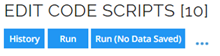
Testing and debugging in the Omada portal is supported with the debugging and logging facility in the code scripts engine. For testing a script, the editor page provides two options: Run and Run (No data saved), where the latter displays changes and skips the commit of any changes made by the script, which is useful for re-running against the same initial data set when testing changes.
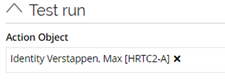
The script provides an actionObject as contextual information (for example, when the script runs as a code method in an event, the actionObject is the object that the event triggers on). For testing, the actionObject must be defined even for scripts that do not use the information.
Coding guidelines
- Build atomic functionality and consider runtime characteristics
- When a code method is triggered by a DataObject event, it executes as a transaction which locks the caller.
- For UI-triggered changes, it is visible to the user if the script runs for too long.
- For import-triggered changes, it slows down import processing.
- In both cases, consider moving processing that is not needed as part of the transaction to a background task by running it on a timer event.
- When a code method is triggered by a timer event, it executes in a single-threaded process.
- Ensure that scripts are triggered only when needed, using filters and property change selection.
- Process one change/object per invocation controlled by the event trigger functionality. Avoid scripts that search for a number of objects to process and then iterate over the list.
- When a code method is triggered by a DataObject event, it executes as a transaction which locks the caller.