Access modifiers
Limitations of Data Object Security Model
Data Object Security Model (DOSM) is used in implementations to ensure that the various users can only access relevant data. It is based on a hierarchical tree structure from which you can define security on every level, similar to a file structure.
In many situations, DOSM is too limited to support advanced requirements for Omada Identity implementation. For example, out of the box, a user can access and view identities if one or more of the following criteria are met:
- The user is a manager for the identity
- The user is the same as the identity
- The user administers a system which the identity has an account for
- The user owns a resource which is assigned to the identity
- The user is an HR manager responsible for the department in which the identity works.
The concept of the access modifier
An access modifier is a logical unit that can evaluate and modify access to data objects according to a ruleset.
More specifically, an access modifier is a .NET class that is used to modify and override the security rules stated by the DOSM.
You can apply an access modifier directly to the data object type or the view:
-
Data Object types: Access modifiers are used here to increase the access otherwise stated by the data object type. This enables you to set the DOSM with very limited access for most users, and apply access modifiers to increase the access in certain cases. On processes, a normal user does not have read or updated access. An access modifier is implemented to allow read and update a data object in processes that the user has created, or has a work item for.
-
Views: When the specified view displays data objects, the view access modifier is applied. The concept of the view access modifiers is that a view will sometimes narrow the access otherwise stated by the data object type. For example, a user might be both a business manager and a role owner – each providing the user with access to specific identities. When the user starts a provisioning process, they should only be able to pick identities for which they are manager, and not identities for which they are role owner. In that case, the access modifier for the view used for selecting an identity will narrow the access that is defined by the data object type access modifier.
When an access modifier is in use in a view, it overrules any access modifier that may be specified on the data object type.
The following image shows an access modifier that is applied to a particular view called All identities.
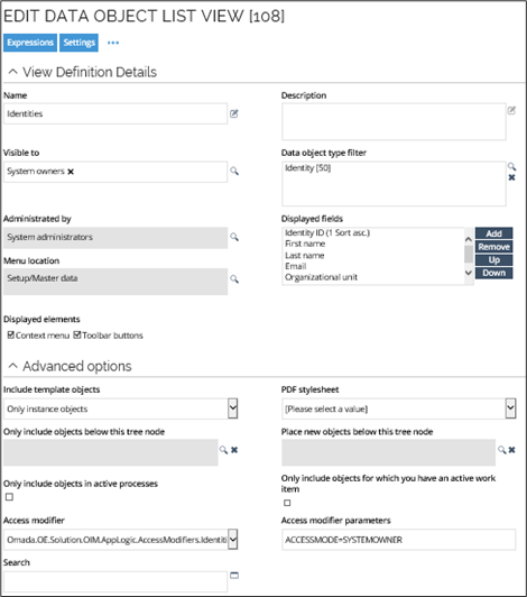
Some access modifiers have parameters to configure the business rules that must apply, for instance, ACCESSMODE on the IdentitiesAccessModifier. Here, the parameter ACCESSMODE has the value SYSTEMOWNER, so only system owners can see the data in this particular view. To see or edit the access modifier for the view, go to the Advanced options section of the Settings tab. When no ACCESSMODE is configured, the access modifier grants access according to all business rules. If, for instance, a user is both a Manager and a System Owner, then both the subordinate identities and the identities in owned systems will be displayed.
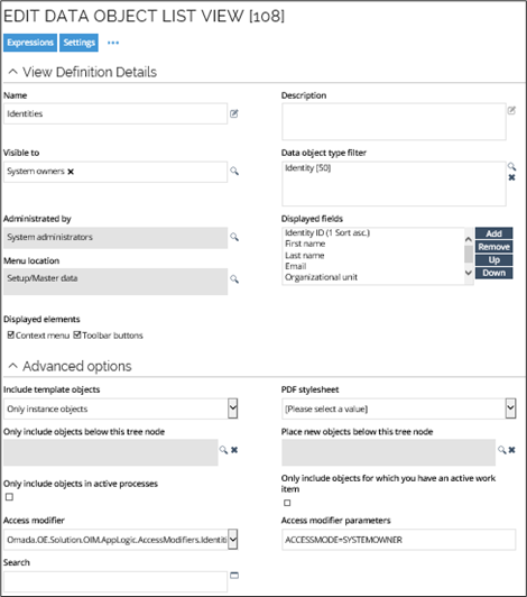
When the Identities access modifier is used without specifying an ACCESSMODE parameter, the system currently defaults to ORGUNIT access mode. This may unintentionally grant broader access than expected when no mode is configured.
For predictable, least-privilege behavior, it is recommended to explicitly specify an access mode (for example, SELF) whenever the Identities access modifier is applied.
At first sight, the particular example may seem redundant, because you have already specified that the Visible to setting should restrict the view to be visible in the UI to System owners only, but when you add the additional security from the Access modifier and Access modifier parameters settings, they restrict the view to only the identities with a system managed by this system owner.
You should only use access modifiers for views to evaluate read rights for the actual view. For example, if you have access to a data object because of an access modifier that is enabled on a view, you cannot use the various detail pages for that data object. In other words, the overruling act triggered by the access modifier limits access to the view only, allowing only the display of the data objects in the view. The overruling act does not give you access to any detail pages for any of the displayed data objects, because these are defined by the access modifier on the data object type (if any) or the underlying DOSM.
When you access the details of a data object directly, and not through a view, the data object type's access modifier is always applied.
The concept of the view access modifier is that a view can narrow the access otherwise stated by the data object type or the DOSM. If no access modifiler is applied on a view, it falls back to the access modifier on the data object type (if any) or the DOSM.
For example, a user may be both a manager and a resource owner. Each role provides the user with access to specific identities. When the user starts a provisioning process, they should only be able to pick identities for which they are manager and not identities for which they are resource owner. In such a case, the access modifier for the view used for selecting an identity narrows down the access that is defined by the data object type access modifier.
Access modifiers can only modify Read and Update permissions. DOSM still controls the remaining permissions 100%.
Even though a data object type access modifier is specified, it is not always applied. This is the case when opening a view which filters on more than one data object type -- or doesn't filter on any data object type at all. In this case, the security "falls back" on the data object security model, which is why the DOSM must be configured with very limited access.
Access modifiers centralize the access rules and, for example, eliminate the need for building custom URLs for selection screens.
Omada Identity comes with a set of standard access modifiers to use with a default installation.
Standard access modifiers
Standard access modifiers are included in the out-of-the box system. You can implement your own access modifier classes.
See the Enterprise Server API documentation for detailed information on the access modifiers available with the standard installation, and how to implement your own.
Some access modifiers are designed for use only in views because they have no access calculation logic, only load-option modification. The PrepareAccessCalculation method and CalculateAccess method are not
implemented for these access modifiers. Several access modifiers use the parameter ACCESSMODE, which specifies whether access is permitted for MANAGER, SYSTEMOWNER, ROLEOWNER, or ALL.
Other parameters are explained in the description of the specific access modifier.
- The length of the access modifiers parameter field is 1.024 characters.
- The
AccessModifierUtilsclass has queries that look for the accessible identity IDs for managers, role owners, and system owners, which are used in the implementations of access modifier classes that are not view only. - The access modifiers are located in the
Omada.OE.AppLogicassembly or theOmada.OE.Solution.OIM.AppLogicassembly. - Their namespaces are
Omada.OE.AppLogic.AccessModifiersandOmada.OE.Solution.OIM.AppLogic.AccessModifiers.
Implementing access modifiers
You can implement an access modifier on a view or a data object through the dialog boxes for either a view or a data object. You should place access modifier classes in code method assemblies, because the application always loads the assemblies, and, as a consequence, also the available access modifier classes.
Read-only access and update rights in access modifiers
Access modifiers may differ in how they evaluate read and update permissions in combination with the Data Object Security Model (DOSM).
Some access modifiers, such as the Identities access modifier, allow an object to be opened in read-only mode when the user has read access, even if update rights are not granted in the DOSM.
Other access modifiers (for example, certain reference path–based modifiers) may require update rights in the DOSM to open an object, even when no changes are made.
This difference can result in varying behavior when accessing objects through the UI or API. When configuring security, it is important to validate how the selected access modifier interacts with DOSM permissions for both read and update scenarios to ensure consistent and predictable access behavior.
Access control for data objects
Access to data objects in Omada Identity is governed by a combination of:
- Data Object Security Model (DOSM)
- Authorization roles
- Access modifiers
These mechanisms can be applied individually or in combination.
Interaction between DOSM and access modifiers
When an access modifier is applied to a data object type, it typically overrides the access defined in the DOSM for that object. Access modifiers provide more granular, business-logic-driven control, while the DOSM defines general permissions such as read, create, update, and delete.
The DOSM should be configured restrictively, as it may still apply in scenarios where no access modifier is evaluated.
The Identity access modifier restricts access to identity records based on organizational relationships. For example, a manager is granted access only to the identities managed by that manager.
Resource assignment access model
The Resource Assignment data object type has an access modifier applied by default. This defines both the access scope and the allowed operations.
Default access scope
By default, access to a resource assignment is limited to the following subjects:
- The identity to which the resource assignment belongs.
- The manager of that identity.
- The context owner for which the resource assignment is granted.
- The role owner for which the resource assignment exists.
- The system owner of the system to which the assigned resource belongs.
Default permissions
Within this scope, users are allowed to:
-
Read the resource assignment.
-
Update only the following fields:
- Valid From
- Valid To
No other properties can be modified under the default access model.
Granting access outside the default scope
To grant additional users access to resource assignments (with the same limited permissions), you must:
-
Add the users to a user group.
-
Assign an Authorization role to that group.
-
Configure the role with the authorization element:
- Access modifier - resource assignments access modifier.
- Permission level - Read or Read & Update.
System Administrator access
Members of the System Administrator user group have unrestricted access to resource assignments, including:
- Full read access.
- Permission to update all properties.
Having permission to update all properties does not necessarily mean that all fields are editable in the user interface. Forms may:
- Hide specific fields.
- Mark fields as read-only.
- Apply additional UI-level constraints.
Granting full access to additional user groups
To grant unrestricted access to resource assignments to user groups other than System Administrators, you must modify the Resource Assignment data object type.
Update the RoleAssignmentsAccessModifier parameter to include the relevant user groups:
ADMINGROUPS=guid-of-system-administrator-user-group,guid-of-custom-user-group
As a result, it:
- Preserves the default behavior for System Administrator group members.
- Grants the same unrestricted access to the specified custom user groups.