Installation Tool configuration reference
Advanced Omada Identity Installation Tool configuration
You can also use a PowerShell script to perform the configuration described below without using the Omada Identity Installation Tool.
Configuration file
The Omada Identity Installation Tool configuration file contains the information needed to install or uninstall Omada Identity.
The configuration file contains XML data. Create it using the Omada Identity Installation Tool. The following sections describe the settings and values you can customize for your organization.
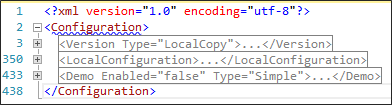
The screenshot below shows three major nodes: Version, LocalConfiguration, and Demo.
LocalConfiguration
Omada recommends that you provide information about the local machine and its configuration here.
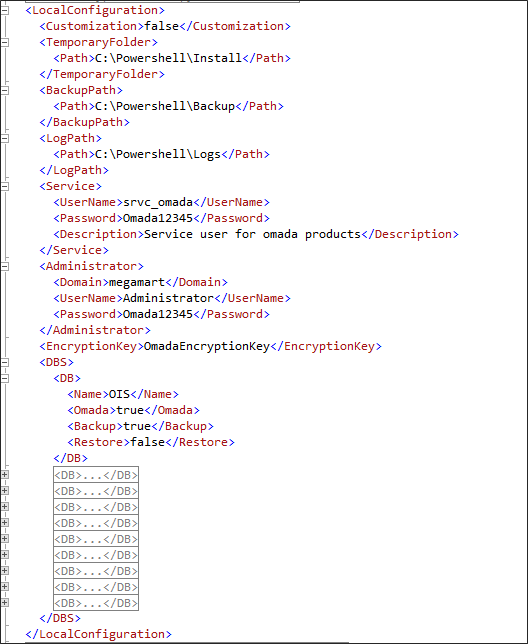
The following subnodes are required:
| Value | Description |
|---|---|
| Customization | You can add customized changesets or data objects to apply through the script. |
| TemporaryFolder | The path where local copies of the installation files are placed, or the folder from which the files are copied from Omada’s private Network Share drop zone. |
| BackupPath | The path where database backup copies are stored. |
| LogPath | The path where logs created while the script runs are stored. |
| Service | The user name and password used for the service user. |
| Administrator | Information about the local administrator user. |
| EncryptionKey | The key required to decrypt packages run by Omada Data Warehouse. |
| DBS | A list of databases used by Omada components. |
Databases
All databases used by Omada components are listed here.
| Value | Description |
|---|---|
| Name | The name of the database. |
| Omada | Indicates whether this is an Omada component database. If set to True, this database is overwritten when creating the demo environment with all systems onboard (Full). |
| Backup | If set to True, the database is backed up during uninstallation. |
| Restore | If set to True, the database is restored after its Omada component has been upgraded. |
Version
This node contains subnodes with configuration information about Omada Identity.
The main node is:
<Version Type="LocalCopy">
You can use one of the following values for the Type property:
| Value | Description |
|---|---|
| LocalCopy | All installation files are placed on the local disk. |
| Specific | Provides the version of each Omada Identity component and the network path to the Omada Identity versions repository. During installation, you must also specify credentials. |
| Newest | Downloads the newest versions of the Omada Identity components from Omada’s private Network Share drop zone. You must provide the network path to the Omada Identity versions repository. During installation, you must also specify credentials. |
Below the main node, provide the following nodes:

| Node | Description |
|---|---|
| MSSQL | Information about the Microsoft SQL Server (MSSQL) instance used during installation. |
| OIS | Information about Omada Identity Suite (OIS). |
| ES | Information about Enterprise Server (ES). |
| OPS | Information about Omada Provisioning Service (OPS). |
| ODW | Information about Omada Identity Data Warehouse (ODW). |
| RoPE | Information about Omada Identity Role and Policy Engine (RoPE). |
MSSQL
For MSSQL, provide the following subnodes:
| Subnode | Description |
|---|---|
| Version | 2017, 2019, or newer. |
| VersionNo | 14 (SQL Server 2017), 15 (SQL Server 2019), or newer. |
| Server | For example, localhost. |
| AdministratorPassword | The password for the administrative user. |
| IntegratedSecurity | If set to True, Windows integrated authentication is used to connect to SQL Server. The situation where this property is set to False has not been tested. |
Enterprise Server
You can enable or disable this node. If it is set to True, the installation or uninstallation is performed. If it is set to False, no installation or uninstallation is performed.

Provide the following subnodes:
| Subnode | Description |
|---|---|
| Version | Required only when the version is set to Specific. |
| DropFolder | Required when the version is set to Specific or Newest. |
| Name | The name of the Enterprise Server software. |
| Exe | The name of the installer file. |
| InstallationPath | The path where Enterprise Server is installed. |
| DBName | The name of the Enterprise Server database. |
| AuditDBName | The name of the Enterprise Server audit database. |
| AuditDBInitialScript | The script responsible for creating the objects in the audit database. |
| SourceSystemDBName | The name of the source system database. |
| DBUser | The user used to access the Enterprise Server database. |
| DBPassword | The password for the user used to access the Enterprise Server database. |
| DBInitialScripts | The initial SQL scripts. This node has subnodes. See DBInitialScripts for more information. |
| Features | The Enterprise Server features to install. |
| IISAppPool | The name of the application pool used by the Enterprise Server Portal website. |
| IISWebSite | The name of the Enterprise Server Portal website. |
| IISBinding | The website binding. |
| Changesets | Information about the changesets to apply. This node enables or disables merging changesets in one step. Its value can be True or False. If set to True, changeset files are applied to Enterprise Server after installation. This node has subnodes. Example: If there are multiple changeset files in one step, they can first be merged into one file and then imported, making the process faster. The Enterprise Server service needs time to process changes before the next changeset file can be imported or installation can continue. Find the argument in the Configuration > ES node. |
| ChangesetsCustomer | The names of the customers used when importing changesets. |
| ChangesetsPath | The path from which changesets are imported. |
| DataObjects | Information about the data objects to apply. These objects are applied only when Customization is set to True. This node has subnodes; see DataObjects. |
| InstallSQLSysClrTypes2012 | If set to True, place the .msi file in the support files subfolder of the Enterprise Server target path. The Enterprise Server installer does this. |
| InstallReportViewer2012 | If set to True, place the .msi file in the support files subfolder of the Enterprise Server target path. The Enterprise Server installer does this. Microsoft Report Viewer is not required from Omada Identity version 15.0.2 onward. For more information, see Omada Identity post-installation activities. |
| TimerServiceName | The name of the Windows service installed by Enterprise Server. The name is hardcoded in the installer. |
| DisableReportServerForceSSL | If set to True, this changes the Reporting Server configuration to disable forced Secure Sockets Layer (SSL). Enterprise Server reports do not work over SSL in demo or training environments because of an invalid certificate. |
| SurveyTemplates | If set to True, the survey template upload tool is used. You must provide the following information: <ToolPath>C:\Program Files\Omada Identity Suite\Enterprise Server 16\website\bin\SurveyTemplateImporterUtil.exe</ToolPath> <SurveyTemplatesPath>C:\Program Files\Omada Identity Suite\Enterprise Server 16\Survey templates</SurveyTemplatesPath> |
| LanguageVersion | The name of the language pack to use in Enterprise Server. Language packs are included in the Enterprise Server installer. Example: <LanguageVersion>danish_Language_pack-.xml</LanguageVersion> |
| RsOnAppServer | If set to True, reports are installed on the application server. By default, reports are installed on the database server. This parameter is ignored during an upgrade. Example: <RsOnAppServer>false</RsOnAppServer> |
DBInitialScripts
The subnodes for DBInitialScripts should contain the following information:
View full example
<DBInitialScripts>
    <Script>
        <DBName>OIS</DBName>
        <Step>2.2.1</Step>
        <ScriptPath>C:\Program Files\Omada Identity Suite\Enterprise Server\Sql scripts\dbcr.sql</ScriptPath>
    </Script>
    <Script>
        <DBName>Omada Source System Data DB</DBName>
        <Step>2.2.1</Step>
        <ScriptPath>C:\Program Files\Omada Identity Suite\Enterprise Server\Sql scripts\CreateSourceSystemDataDB.sql</ScriptPath>
    </Script>
    <Script>
        <DBName>OIS</DBName>
        <Step>2.2.1</Step>
        <ScriptPath>C:\Powershell\DO-UpgradeTools\Private\ES\InitialUpdates.sql</ScriptPath>
    </Script>
    <Script>
        <DBName>OIS</DBName>
        <Step>2.2.2</Step>
        <ScriptPath>C:\Powershell\DO-UpgradeTools\Private\ES\InitialUpdates_Customization.sql</ScriptPath>
    </Script>
</DBInitialScripts>
| Subnode | Description |
|---|---|
| DBName | The name of the database in which the script runs. |
| Step | The step in the installation script when the script should run. It runs from this step through the final step of the installation script. |
| ScriptPath | The path to the script. |
Changesets
The subnodes for this node should contain the following information:
<Changesets Enable="true" SkipErrors="true" CopyToLocalPath="true" OverwriteSuggestedPackages="true">
    <!-- Changesets are currently applied in steps 2.6, 6.1.1, 6.1.2, 7.2.1, 7.2.2, 7.3, 7.6, 8.1, and 8.3. -->
    <Changeset>
        <Name>suggestedpackage.xml</Name>
        <Step>6.1.1</Step>
    </Changeset>
    <Changeset>
        <Name>srvc_omada.xml</Name>
        <Step>6.1.1</Step>
    </Changeset>
    <Changeset>
        <Name>configchanges_GridChanges.xml</Name>
        <Step>6.1.1</Step>
    </Changeset>
</Changesets>
| Subnode | Description |
|---|---|
| Name | The name of the XML file containing the changesets to apply. Changesets are applied in order, from the first subnode to the last. |
| Step | The step in the installation script when the changeset should run. It runs from this step through the final step of the installation script. |
The Changesets node itself has the following properties:
| Property | Description |
|---|---|
| Enable | Determines whether the changeset is applied. |
| SkipErrors | Determines whether errors during import stop the script. |
| CopyToLocalPath | Determines whether the changeset files are copied to the local path before import. |
| OverwriteSuggestedPackages | Determines whether existing suggested packages are overwritten during import. |
DataObjects
The subnodes for this node should contain the following information:
<DataObjects OverwriteFiles="true" SourcePath="C:\powershell\DO-UpgradeTools\Private\DataObjects" ToolPath="C:\Program Files\Omada Identity Suite\Enterprise Server 16\website\...">
    <DataObject>
        <Name>Resource Assignments.xml</Name>
        <Step>7.5</Step>
    </DataObject>
    <DataObject>
        <Name>AssignmentPolicyWithoutExchange.xml</Name>
        <Step>8.2.1</Step>
    </DataObject>
    <DataObject>
        <Name>AssignmentPolicy.xml</Name>
        <Step>8.2.2</Step>
    </DataObject>
    <DataObject>
        <Name>ResourceFolderOISandAD.xml</Name>
        <Step>8.4.1</Step>
    </DataObject>
</DataObjects>
| Subnode | Description |
|---|---|
| Name | The name of the XML file containing the data objects to apply. Data object files are applied from the first subnode to the last. |
| Step | The step in the installation script when the data objects are applied. |
The DataObjects node has the following properties:
| Property | Description |
|---|---|
| OverwriteFiles | Determines whether local copies of data object files are overwritten by files in the script folder. |
| SourcePath | The folder containing data object files. Used when the OverwriteFiles property is set to True. |
| ToolPath | The path to the tool used to import data object files. |
| FilesPath | The path to the local folder where data object files are stored. |
Omada Provisioning Service
You can enable or disable the Omada Provisioning Service node. If you disable it, no OPS installation or uninstallation is performed.
View full example
<Version>16.0.x</Version>
<DropFolder>\\server\drop\OPS\Rel\v16.0\</DropFolder>
<Name>Omada Provisioning Service</Name>
<Exe>Omada Provisioning Service.exe</Exe>
<DBName>ProvisioningService</DBName>
<DBUser>megamart\srvc_omada</DBUser>
<DBPassword>*********</DBPassword>
<ServiceName>Omada ProvisioningService</ServiceName>
<PushConfigurationWebService>http://enterpriseserver/WebService/OPSWebServiceInternal.asmx?op=PushConfiguration</PushConfigurationWebService>
Provide the following subnodes:
| Subnode | Description |
|---|---|
| Version | Required only when the version is set to Specific. |
| DropFolder | Required when the version is set to Specific or Newest. |
| Name | The name of the Omada Provisioning Service software. |
| Exe | The name of the installer file. |
| DBName | The name of the Omada Provisioning Service database. |
| DBUser | The user who accesses the Omada Provisioning Service database. |
| DBPassword | The password for the user who accesses the Omada Provisioning Service database. |
| ServiceName | The name of the Windows service installed on the Enterprise Server. The name is hardcoded in the installer. |
| PushConfigurationWebService | The URL for the web service responsible for pushing the configuration. |
Omada Identity Data Warehouse
You can enable or disable the Omada Identity Data Warehouse node. If you disable it, no Omada Identity Data Warehouse installation or uninstallation is performed.
View full example
<Version>16.0.x</Version>
<DropFolder>\\server\drop\common\ODW\Rel\v16.0\</DropFolder>
<Name>Omada Identity Suite Data Warehouse</Name>
<Exe>Omada Data Warehouse .x64 SQL 2012.exe</Exe>
<SSISInstance>localhost</SSISInstance>
<DBUser>User name</DBUser>
<DBPass>Password</DBPass>
<ODWProductDatabase>Omada Data Warehouse</ODWProductDatabase>
<ODWProductDatabaseStaging>Omada Data Warehouse Staging</ODWProductDatabaseStaging>
<ODWProductDatabaseMaster>Omada Data Warehouse Master</ODWProductDatabaseMaster>
<InstallationPath>C:\Program Files\Omada Identity Suite\Datawarehouse\</InstallationPath>
<UploadReports Enabled="true">C:\Program Files\Omada Identity Suite\Datawarehouse\</UploadReports>
<DtsConfigUpdates>
    <Update>
        <File>Common\Omada ODW WebService.dtsConfig</File>
        <ParentNode>/DTSConfiguration/Configuration</ParentNode>
        <ParentElementValue>\Package.Variables[User::WebServiceURL].Properties[Value]</ParentElementValue>
        <ParentElementKey>Path</ParentElementKey>
        <KeyAttribute>ConfiguredValue</KeyAttribute>
        <KeyValue>http://enterpriseserver/webservice/dataobjectexchangewebservice.asmx</KeyValue>
    </Update>
    <Update>...</Update>
    <Update>...</Update>
    <Update>...</Update>
    <Update>...</Update>
</DtsConfigUpdates>
<ConfigurationPackages>...</ConfigurationPackages>
<DBScripts>
    <Script>
        <DBName>Omada Data Warehouse</DBName>
        <Step>3.5.1</Step>
        <ScriptPath>C:\Powershell\DO-UpgradeTool\Private\ODW\CustomResourceView\.sql</ScriptPath>
    </Script>
</DBScripts>
</ODW>
Provide the following subnodes:
| Subnode | Description |
|---|---|
| Version | Required only when the version is set to Specific. |
| DropFolder | Required when the version is set to Specific or Newest. |
| Name | The name of the Omada Identity Data Warehouse software. |
| Exe | The name of the installer file. |
| SSISInstance | The name of the SQL Server Integration Services (SSIS) instance. |
| DBUser | The name of the database user. |
| DBPass | The password for the database user. |
| ODWProductDatabase | The name of the Omada Identity Data Warehouse product database. |
| ODWProductDatabaseStaging | The name of the Omada Identity Data Warehouse staging database. |
| ODWProductDatabaseMaster | The name of the Omada Identity Data Warehouse master database. |
| InstallationPath | The path where the Omada Identity Data Warehouse is installed. |
| UploadReports | If enabled, the reports are loaded into the database. |
| UploadReportsToolPath | If UploadReports is enabled, provide the path. |
| DtsConfigUpdates | Changes to the Data Transformation Services (DTS) configuration files. This node has subnodes. |
| ConfigurationPackages | Packages to run after installing Omada Data Warehouse. This node has subnodes. |
| DBScripts | Additional scripts to apply to the database. This node has subnodes. |
DtsConfigurationUpdates
The subnodes for this node should contain the following information:
| Subnode | Description |
|---|---|
| File | The path to the file to change. The path is created using the previously provided InstallationPath as its parent path. |
| ParentNode | The parent node of the node being updated. |
| ParentElementValue | The value of the parent element. |
| ParentElementKey | The key for the parent element. |
| KeyAttribute | The attribute name. |
| KeyValue | The attribute value. |
<Configuration ConfiguredType="Property" Path="\Package\Variables[User::UseDefaultCredentials].Properties[Value]" ValueType="Boolean">
    <ConfiguredValue>True</ConfiguredValue>
</Configuration>
A node in the configuration file:
<Update>
    <File>Common\Omada ODW WebService.dtsConfig</File>
    <ParentNode>/DTSConfiguration/Configuration</ParentNode>
    <ParentElementValue>\Package.Variables[User::UseDefaultCredentials].Properties[Value]</ParentElementValue>
    <ParentElementKey>Path</ParentElementKey>
    <KeyAttribute>ConfiguredValue</KeyAttribute>
    <KeyValue>True</KeyValue>
</Update>
ConfigurationPackages
The subnodes for this node should contain the following information:
| Subnode | Description |
|---|---|
| Step | The step in the script when the package runs. |
| PackageName | The name of the package to run. |
| Arguments | An optional argument to pass to the package. |
DBScripts
The subnodes for this node should contain the following information:
| Subnode | Description |
|---|---|
| Step | The step in the script when the script runs. |
| DBName | The name of the database in which the script runs. |
| ScriptPath | The path to the script. |
Role and Policy Engine
You can enable or disable this node.
View full example
<Version>16.0.x</Version>
<DropFolder>\\server\drop\PolicyEngine\Rel\V16.0\</DropFolder>
<Name>Omada Identity Suite Role and Policy Engine</Name>
<Exe>OIS Role and Policy Engine.exe</Exe>
<RoPEProductDatabase>RoP</RoPEProductDatabase>
<DBUser>User name</DBUser>
<DBUserPassword>Password</DBUserPassword>
<RoPEServiceName>RoPE1.1</RoPEServiceName>
<InstallationPath>C:\Program Files\Omada Identity Suite\Role and Policy Engine\</InstallationPath>
<ConfigFilesSourcePath>C:\Powershell\DO-upgradeTools\Private\RoPE\</ConfigFilesSourcePath>
<ConfigFiles>
    <File>
        <Name>Omada.OE.Custom.OIMDEMO.PolicyEngineExtension.dll</Name>
        <Target>Service\</Target>
    </File>
    <File>
        <Name>EngineConfiguration.Config</Name>
        <Target>Service\ConfigFiles\</Target>
    </File>
</ConfigFiles>
</RoPE>
</Version>
<LocalConfiguration>
    <Customization>true</Customization>
    <TemporaryFolder>
        <Path>C:\Powershell\Install\</Path>
    </TemporaryFolder>
    <BackupPath>
        <Path>C:\Powershell\Backup\</Path>
    </BackupPath>
    <LogPath>
        <Path>C:\Powershell\Logs\</Path>
    </LogPath>
    <Service>
        <UserName>srvc_omada</UserName>
        <Password>Omada12345</Password>
        <Description>Service user for omada products</Description>
        <Domain>megamart</Domain>
        <DomainExt>com</DomainExt>
    </Service>
    <Administrator>
        <Domain>megamart</Domain>
        <UserName>Administrator</UserName>
        <Password>Omada12345</Password>
    </Administrator>
    <EncryptionKey>OmadaEncryptionKey</EncryptionKey>
    <DBS>
    </DBS>
</LocalConfiguration>
To configure an installation or uninstallation of Omada Identity RoPE, provide the following subnodes:
| Subnode | Description |
|---|---|
| Version | Required only when the version is set to Specific. |
| DropFolder | Required when the version is set to Specific or Newest. |
| Name | The name of the Omada Identity Role and Policy Engine. |
| Exe | The name of the installer file. |
| RoPEProductDatabase | The Role and Policy Engine database name. |
| DBUser | The Role and Policy Engine user name. |
| DBUserPassword | The Role and Policy Engine database user password. |
| RoPEServiceName | The name of the Role and Policy Engine service. |
| InstallationPath | The path where the Role and Policy Engine is installed. |
| ConfigFilesSourcePath | The path from which configuration files are copied after installation. |
| ConfigFiles | The list of files to copy after installation. This node has subnodes. |
ConfigurationFiles
The subnodes for this node should contain the following information:
| Subnode | Description |
|---|---|
| Name | The name of the configuration file. |
| Target | The target subpath, which is a child path of the InstallationPath property. |