Plan your installation
Use this page to plan the infrastructure for your Omada Identity on-premises deployment. It brings together architecture, storage, sizing, resilience, and deployment examples.
Use this guidance when designing your environment. For installation steps, return to the installation overview and follow the component guides that apply to your deployment. Across the installation documentation, you will find:
- Hardware infrastructure requirements and recommendations
- Software prerequisites
- Required permissions
- Procedures for manual installations and installations with the Omada Identity Installation Tool
- Installation procedures for related components
Omada Identity is highly customizable and scalable, so the recommendations in this guide may not suit every situation or implementation. Plan the technical design of an Omada Identity implementation in detail with Omada consultants, and adapt it to the existing system landscape and environment. Detailed implementation requirements are available in the documentation for the individual Omada Identity modules.
Components of Omada Identity
The Omada Identity solution consists of two major components:
- Omada Identity Enterprise Server (ES)
- Omada Identity Data Warehouse (ODW)
Omada Identity Enterprise Server
The ES is based on a classic three-tier web application architecture. It consists of a web browser user interface, a web application running on Internet Information Services (IIS), and a SQL Server database. You can deploy the web application and database on separate servers or on the same server.
Deploy the web application and database on separate servers to keep the application tier separate from the database tier. This is recommended when the application must be available in a low-trust environment, such as the internet or a perimeter network. This deployment also improves scalability.
Windows service components of the ES
- Role and Policy Engine
- Timer Service
- Omada Provisioning Service
Calculates the desired state—that is, the access that identities should have—and reconciles it with the actual state of the target systems. It is also responsible for triggering provisioning tasks for the Omada Provisioning Service.
Runs scheduled tasks in the Enterprise Server, for example, populating the audit database.
Performs provisioning tasks on connected systems.
Omada Identity Data Warehouse
The Data Warehouse consists of three main components:
- Databases
- SQL Server Reporting Services (SSRS) reports
- SQL Server Integration Services (SSIS) packages
The Data Warehouse also contains a fourth, optional component: Advanced Analytics Service / Tabular model, which requires SQL Server 2017 or later.
You can install Omada Identity Data Warehouse on a single server or in a distributed environment, with each component installed on a different server.
SSIS packages run as SQL Server Agent jobs, which you can schedule and configure.
Disk recommendations
Omada Identity performance depends on the I/O speed of the selected disk system.
The general recommendation is to use storage area network (SAN) disks.
If SAN disks are not an option, Omada recommends a redundant array of independent disks (RAID), such as RAID 1 or RAID 5. This is particularly important on the database server to help avoid data loss.
Temporary storage space for Omada Identity Data Warehouse imports
ODW imports require temporary storage, especially on the SSIS server. Size the page file according to the import workload; the minimum recommendation is twice the server memory. SSIS writes data to the TEMP directory of the account running the import. Data may also be written to the tempdb system database.
For Omada Identity Data Warehouse imports, make sure that:
- The page file on the SSIS server is large enough or can grow.
- The TEMP directory of the account running the import is on a drive with enough free space.
- The tempdb database has room to grow temporarily.
Location of temporary storage
Omada recommends that you do not place temporary storage on the C:\ drive.
Do not put dynamic data, including data in the TEMP folder, on the system drive. Use a data drive because:
- You cannot extend the system drive without taking the server down, but you can extend other drives.
- If the system drive is full, the server stops running. If another drive is full, the server itself can still function; only processes that use the full drive are affected.
Scalability and resilience guidelines
Use the following general rules to estimate server memory and disk space.
The following rules are suggestions.
For production environments, consider expected usage patterns and the structure of the data. Plan production server sizing with an Omada consultant.
Memory sizing
| Component | Recommendation |
|---|---|
| Enterprise Server | Add 1 GB of memory per 50,000 managed objects for each server, in addition to the 8/16 GB minimum configuration. |
| Omada Identity Data Warehouse | Add 0.5 GB of RAM per 100,000 objects to the database and SSIS servers. Always test this in your own environment. |
Disk space sizing
Server sizing depends on the number of managed identities, resources, accounts, and other objects, as well as the usage and load scenario. Perform load and performance testing for the specific environment to help ensure good performance for end users when the system goes live.
Calculate 10 KB per resource assignment (20% for database size and 80% for transaction log size), then add 50% for margin.
Resilience requirements
This section describes the high-availability configurations covered by this guide. It does not provide guidance for designing or validating disaster recovery across geographically separate sites, including active/passive failover or specific recovery time objectives (RTOs) and recovery point objectives (RPOs).
- Omada Identity Enterprise Server
- Omada Identity Data Warehouse
Use SQL Server clustering or Always On availability groups for database high availability. To deploy multiple IIS servers for improved scalability, use Network Load Balancing (NLB).
Use SQL Server clustering or Always On availability groups for high availability of the Data Warehouse databases.
If necessary, for example, in the event of a failure or during an upgrade, the standby server becomes the primary server. The Omada Identity Data Warehouse supports this setup because most required data, including configuration, master data, and transaction data, is stored in the databases. However, some configuration is stored outside the databases, for example, in XML files. Maintain these files on both application servers.
For resilience during Omada Identity Data Warehouse imports, configure the SSIS server to connect to the SQL Server Always On availability group listener for its data store.
An import running during a failover is likely to fail. Because the data is transactional, the operation is rolled back and no data is affected.
Omada Identity Data Warehouse SSIS packages are deployed to the MSDB database and cannot be deployed to SSISDB. Because an Always On availability group does not synchronize MSDB, run the Omada Identity Data Warehouse installer twice: first, specify the backup SQL Server as the Integration Services package storage location; then uninstall and run the installer again, specifying the primary SQL Server.
Installing SSIS in a clustered setup is not recommended. For more information, see Microsoft’s documentation.
For reports, use a scale-out deployment of multiple SSRS servers to improve scalability.
Load sharing
If multiple IIS instances share the Enterprise Server workload through an available method (NLB, load balancer, or application firewall), take these two measures:
- Persist the ASP.NET session state in a SQL Server database or an ASP.NET session state server. For details, see Session-State Modes.
- Enable one of the SignalR scale-out solutions: SQL Server scale-out or Service Bus scale-out, depending on the environment.
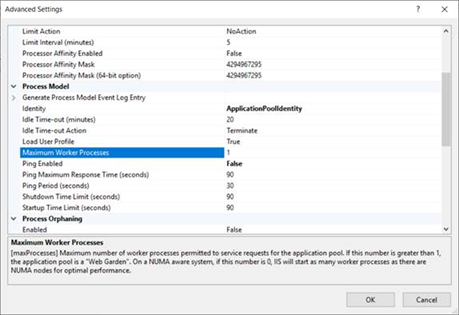
The same applies if the IIS application pool has more than one worker process configured in the Maximum Worker Processes setting:
Examples of deployment scenarios
Omada Identity can be set up in various ways, depending on the requirements and system environment. Adapt the recommendations provided here to your specific conditions. If needed, develop a detailed hardware sizing and system landscape strategy with Omada consultants.
Two deployment scenarios are presented here:
- Recommended deployment
- Minimum deployment
Here, recommended refers to a medium-sized system: approximately 150,000 to 500,000 managed objects for Enterprise Server and 1,000,000 to 5,000,000 managed objects for Data Warehouse.
Managed objects primarily include identities, resources, resource assignments, business contexts (such as organizational units), business context assignments, and policy definitions.
To determine whether a system is medium-sized, also consider the number of connected systems and users, including their usage patterns. The recommendations in this document are based on moderate usage, with 1–2 self-service requests per user per month.
- Recommended deployment
- Minimum deployment
For a production Omada Identity system, Omada recommends using three servers for the Omada modules: a database server, an SSIS server for ODW SSIS packages, and an application and SSRS server for the Omada Identity web application and services, as well as the ODW SSRS reports.
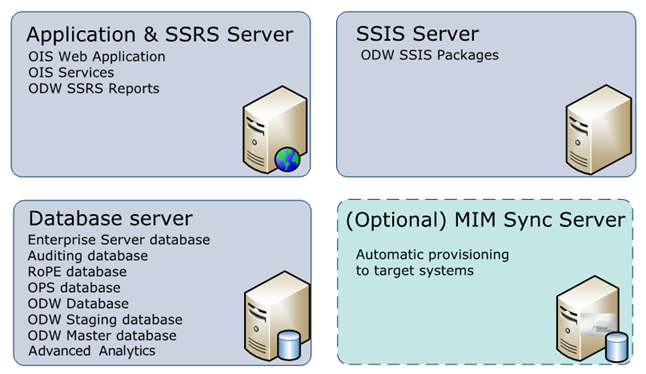
The optional MIM Sync server shown in the diagram is no longer supported. MIM support was removed in Omada Identity 16.0.0. Use Omada Provisioning Service for provisioning to target systems.
The recommended server sizing for this scenario is:
| Server | CPU | Memory | Disk space | Network |
|---|---|---|---|---|
| Application & SSRS Server | Quad Core | 32 GB | 80 GB | Gigabit |
| Database Server | Quad Core | 64 GB | 200 GB | Gigabit |
| SSIS Server | Quad Core | 64 GB | 100 GB | Gigabit |
These are standardized recommended values. Depending on your deployment size, more resources may be required.
For a minimum setup, Omada recommends using two servers for the Omada modules. One server runs the databases and the Omada Identity Data Warehouse SSIS packages. The second server runs the web application, services, and Omada Identity Data Warehouse reports.
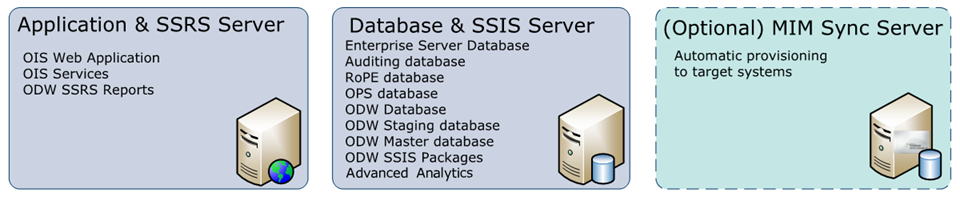
The optional MIM Sync server shown in the diagram is no longer supported. MIM support was removed in Omada Identity 16.0.0. Use Omada Provisioning Service for provisioning to target systems.
The recommended server sizing for this scenario is:
| Server | CPU | Memory | Disk space | Network |
|---|---|---|---|---|
| Application & SSRS Server | Quad Core | 32 GB | 80 GB | Gigabit |
| Database & SSIS Server | Quad Core | 64 GB | 100 GB | Gigabit |
These are standardized recommended values. Depending on your deployment size, more resources may be required.