Infrastructure architecture
Omada Identity Cloud Private uses the same Azure-based infrastructure as Omada Identity Cloud. The difference is in the hosting layer: all infrastructure resources are provisioned within your own Azure subscription and region, rather than in Omada's.
This page describes the Azure resources that make up a Cloud Private environment, explains the release process, networking, and authentication, and provides infrastructure sizing guidance.
Architecture and release process overview
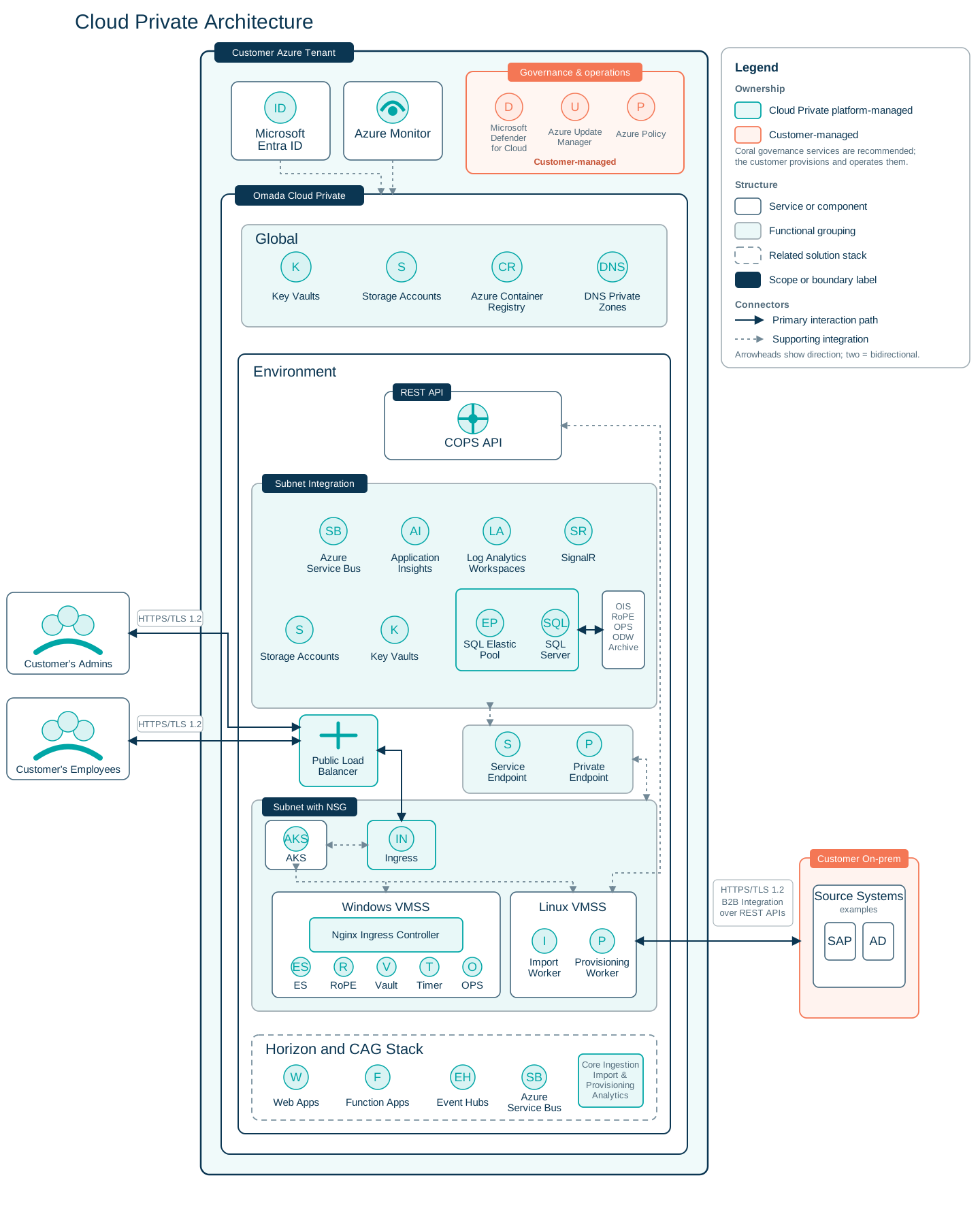
The following diagram illustrates the basics of the Omada Identity Cloud Private infrastructure architecture.
It shows the principal services, functional groupings, network boundaries, and integration paths in a Cloud Private deployment. It also illustrates the customer-managed governance services alongside the Omada-managed environment – global resources, subnet-integrated supporting services, the AKS/VMSS compute layer, and the Horizon and CAG stack – as well as how admins, employees, and on-premises source systems connect into it.
This diagram shows the release process for Cloud Private, divided into Omada-managed and customer-managed parts. Omada assembles a release package and delivers it through an installation package; the customer downloads it and deploys it into their own Azure tenant using either the Installation Script mode (recommended) or the Raw IaC mode.

Azure infrastructure components
Azure resources are the individual cloud services and components – such as databases, storage, and compute clusters – provisioned within your Azure subscription. As part of the Cloud Private deployment, Omada creates the following Azure resources in your tenant's subscription:
| Resource | Purpose |
|---|---|
| Azure Kubernetes Service (AKS) | Runs containerized Omada services. See AKS node pools. |
| Azure SQL Database / SQL Elastic Pool | Stores application and identity data. |
| Azure Storage Accounts | Stores artifacts and backups. |
| Azure Container Registry | Stores container images. |
| Azure Event Hubs | Ingests identity event streams. |
| Azure Service Bus | Internal platform messaging. |
| Azure SignalR | Used for real-time communication components. |
| Azure Key Vault | Secure storage for secrets and certificates. |
| Azure Log Analytics | Platform logging and monitoring. |
| Azure Application Insights | Application telemetry. |
| Azure NetApp Volumes | Optional high-performance storage. |
| Virtual Networks and Subnets | Network isolation for platform services. |
| Network Security Groups | Network traffic filtering. |
| Load Balancers and Public IPs | External service exposure. |
| App Service / Web Apps | Hosts platform services. |
| Function Apps | Event processing and background workloads. |
| Managed Disks | Persistent storage for compute services. |
AKS node pools
The deployment creates a single AKS cluster. Within that cluster, workloads are separated across three node pools, which do not all run the same operating system:
| Node pool | Operating system | Sized by | Workloads |
|---|---|---|---|
| System | Linux | aks_system_node_size | Kubernetes system components |
General-purpose Linux (workload=general) | Linux | aks_linux_node_size | LRDO and the four Cloud Application Gateway workers |
| Application | Windows | aks_app_node_size | Enterprise Server, RoPE, Timer, and CAGOps |
This split also determines where container logs land – see Monitoring system configuration.
Networking
Network topology
The Cloud Private deployment uses Azure Virtual Networks (VNets) to provide network isolation and secure communication between platform components. Each environment has a dedicated VNet with subnets for compute (AKS), App Service VNet integration, and optional private endpoints.
For specific CIDR ranges, subnet sizes, and detailed configuration requirements, see Networking prerequisites.
Network security
Network Security Groups (NSGs) control inbound and outbound traffic for each subnet. For detailed NSG rule configurations, priority numbers, and customization guidance, see Network Security Groups in the deployment guide.
Private endpoints (optional)
Private endpoints enable private connectivity to Azure services from within your VNet, eliminating public internet exposure for critical services. The infrastructure supports private endpoints for:
Supported services:
- Azure SQL Database →
privatelink.database.windows.net - Azure Key Vault (workspace and CAG Key Vaults; the shared Key Vault has no private endpoint) →
privatelink.vaultcore.azure.net - Azure Storage (Blob, shared storage account) →
privatelink.blob.core.windows.net - Azure Service Bus (all four namespaces) →
privatelink.servicebus.windows.net - Azure Event Hubs →
privatelink.servicebus.windows.net - Azure SignalR →
privatelink.service.signalr.net - App Service – Web Apps (including COPS API) and Function Apps →
privatelink.azurewebsites.net
When private endpoints are enabled:
- They are placed in a dedicated subnet sized
/26(59 usable IPs). - Name resolution uses private DNS zones that the deployment creates and links to your VNet.
- All Service Bus namespaces and the Event Hubs namespace are switched to the Premium tier, because private endpoints are only supported on Premium. This increases cost.
Private endpoints are not enabled by default. The required subnet is reserved during initial deployment to allow adoption at any point – for both new and existing deployments – without requiring network re-architecture. To enable private endpoints, set infrastructure.enable_private_endpoints to true in deployment-config.json (Installation Script mode) or config.enable_private_endpoints in the Terraform variables (Raw IaC mode), and re-run the deployment.
DNS configuration
DNS configuration is required for both public-facing endpoints (external DNS) and service-to-service communication (internal DNS). For DNS zone setup, record configuration, and automation guidance, see DNS configuration in the deployment guide.
Authentication
Omada Identity Cloud Private is designed with managed identity as the preferred authentication pattern for Azure service-to-service communication. User-assigned managed identities are used for cloud-native application services to minimize credential handling. Service Principals with client secrets remain in use where Entra ID app roles require explicit identity registration, primarily for Enterprise Server to backend service flows.
SQL authentication currently uses username/password; managed identity for SQL is a planned improvement. Where secrets are required, they are stored in Azure Key Vault, and no credentials are hardcoded in deployment artifacts.
For the current implementation, authentication uses two complementary mechanisms for secure inter-service communication: User-assigned managed identities (preferred pattern) and Service Principals with client secrets (required for certain service-to-service flows).
User-assigned managed identities are the preferred authentication pattern. All credentials – including client secrets and connection strings – are stored in Azure Key Vault and never hardcoded. No inline secrets exist in Terraform outputs or application configuration files.
User-assigned managed identities
User-assigned managed identities are Azure resources managed by the deployment and assigned to compute services. They provide credential-less authentication to Azure services and are the preferred pattern for cloud-native service authentication.
Application service identities
| Identity | Purpose | Assigned To |
|---|---|---|
| Core Ingestion Identity | ODS data ingestion | 10 function apps + 1 web app |
| Import Service Identity | Import processing | 1 function app + 1 web app |
| Provisioning Service Identity | User provisioning | 1 function app + 1 web app |
| History Tracking Identity | Audit history tracking | 1 function app + 1 web app |
| ODS Identity | ODS API authentication | 1 function app + 1 web app |
Admin identities
Admin identities are user-assigned managed identities with elevated permissions, used for database migrations.
| Identity | Purpose | Assigned To |
|---|---|---|
History Tracking Admin Identity (ht-admin-mi) | Database migrations for History Tracking | History Tracking service |
ODS Admin Identity (ods-admin-mi) | Database migrations for ODS | ODS service |
Infrastructure identities
| Identity | Purpose | Assigned To |
|---|---|---|
| SignalR Identity | Real-time messaging via SignalR | SignalR service; Import and Provisioning web apps and function apps (2 web apps + 2 function apps) |
CAG Workers Identity (cag-workers-mi) | Cloud Application Gateway worker authentication to the CAG Key Vault, via Azure Workload Identity | Linux CAG worker pods (4) |
All user-assigned managed identities are granted the minimum required permissions scoped to the specific resources each service needs to access. Key permissions include Storage Blob Data Reader and Azure Service Bus Data Sender.
The application service identities access the workspace Key Vault via access policies (Get, List permissions on secrets). The CAG Workers Identity accesses the CAG Key Vault via an Azure RBAC role assignment (Key Vault Secrets Officer). The admin identities and the SignalR Identity have no Key Vault access.
Service Principals (App Registrations)
Service Principals are used where managed identity authentication is not yet supported – primarily for Entra ID application role-based service-to-service flows. Client secrets are automatically generated and stored in Azure Key Vault.
The service principal list below is intended as an implementation-oriented overview. Validate the detailed exposed and consumed app-role mappings against the current Entra ID configuration before treating them as an authoritative reference.
Core Service Principals:
| Service Principal | Purpose | App Roles Exposed | App Roles Consumed |
|---|---|---|---|
| COPS API | Central authentication hub for all services | EnterpriseServer, ImportService, CoreIngestion, WorkerService, RoPE, WorkerDownload, ProvisioningService | (hub – provides roles) |
| Enterprise Server | Main application backend | EnterpriseServer, RoPE, WorkerDownload | Consumes COPS API roles |
| Provisioning Worker | Handles identity provisioning | EnterpriseServer, ProvisioningWorker | Consumes COPS API roles |
| Import Service | Identity import processing | EnterpriseServer, ImportService | Consumes COPS API roles |
| Core Ingestion | Identity event processing | CoreIngestion | Consumes COPS API roles |
| Data Service | Database operations and reporting | User impersonation scope | Consumes COPS API roles |
| Worker Service | Background job processing | WorkerService | Consumes COPS API roles |
| History Tracking | Historical audit tracking | history_tracking | Consumes COPS API roles |
Authentication Flow:
- Service A requests an access token from Microsoft Entra ID
- Service A presents token to COPS API (hub)
- COPS API validates token contains appropriate app role
- COPS API grants access and returns data/API response
Database authentication
The Enterprise Server application connects to Azure SQL databases using SQL username/password authentication at runtime. This is the current model:
- A SQL application account (username and password) is generated by Terraform and stored in Azure Key Vault.
- During deployment, Ansible retrieves the credentials, creates the SQL login and database users, and injects an encrypted version of the password into the application configuration on the AKS pod.
- The Enterprise Server application uses these credentials at runtime to connect to Azure SQL.
Current behavior and strategic direction:
- Current behavior: For Ansible
sql_executetasks, Azure CLI authentication is currently the default operational path and requires an authenticated CLI session (az login) in the execution environment. - Strategic direction: Managed identity remains the preferred long-term pattern and is used where supported; SQL authentication will move toward managed identity as support is expanded.
SQL username/password authentication is the current model for Enterprise Server database connectivity. Migration to managed identity for SQL authentication is on the strategic roadmap but not yet implemented.
Key Vault access control
Access to the workspace and shared Key Vaults is managed through access policies; access to the CAG Key Vault is managed through Azure RBAC. For details, see Key Vault and secret management.
Infrastructure sizing
The following sizing guidance is based on a medium reference profile: a single-tenant deployment handling approximately 150,000 to 500,000 managed objects, in a single Azure region, without cross-region high availability, and with standard log retention.
The table below is an indicative reference for a medium single-tenant profile. The values are intended as baseline guidance, not a strict guarantee of current implementation in every environment.
Medium profile – Dev / QA / Prod SKUs
The table below lists the baseline SKU per component for each environment tier.
| Component | Dev | QA | Prod |
|---|---|---|---|
| AKS node pool – worker VMs (example sizing; see AKS node pools for the current pools and Installation Script mode for automation defaults) | 1 × Standard_B8as_v2 | 2 × Standard_B8as_v2 | 2 × Standard_D8s_v3 |
| App Service Plan | Basic B3 (1 instance) | Premium v3 P0V3 (1 instance) | Premium v3 P0V3 (1 instance) |
| SQL Elastic Pool / SQL DB (vCore) | General Purpose, 2 vCore | General Purpose, 4 vCore | Business Critical, 8 vCore |
| Storage Account | StorageV2, Standard, LRS, Hot, 50 GB | StorageV2, Standard, LRS, Hot, 100 GB | StorageV2, Standard, LRS, Hot, 200 GB |
| Event Hubs Namespace | Standard (1 TU) | Standard (1–2 TU) | Standard (2–4 TU) |
| Service Bus Namespace | 1 Standard & 1 Premium | 1 Standard & 1 Premium | 1 Standard & 1 Premium |
| SignalR | Standard S1 (1 unit) | Premium P1 (1 unit) | Premium P1 (1 unit) |
| Log Analytics Workspace | ~10–30 GB/month | ~30–50 GB/month | ~150+ GB/month |
| Application Insights | Minimal | Moderate | Production-level telemetry |
| Load Balancer | Standard (1) | Standard (1) | Standard (1) |
| Public IP | Standard (2) | Standard (2) | Standard (2) |
| Managed Disks (AKS / VMs) | Standard SSD, LRS, 127 GiB | Standard SSD, LRS, 127 GiB | Standard SSD, LRS, 127 GiB |
The following table provides additional configuration and retention details for storage and monitoring resources.
| Resource | Type | Configuration | Retention |
|---|---|---|---|
| Storage Account | Standard StorageV2 | LRS (locally redundant), Blob storage | 30 days (configurable) |
| Log Analytics | PerGB2018 SKU | Dev: 0.5 GB/day, QA: 1 GB/day, Prod: 1 GB/day | Dev / QA: 30 days, Prod: 90 days |
| Application Insights | Web type | 100% (default sampling rate; configurable) | 90 days (default) |
Environment-specific differences
| Aspect | Development | QA | Production |
|---|---|---|---|
| SQL Public Access | ✓ Enabled | ✓ Enabled | ✗ Disabled |
| SQL Backup | Local (LRS) | Zone-redundant (ZRS) | Geo-redundant (GRS) |
| SQL Zone Redundancy | ✗ Disabled | ✗ Disabled | ✓ Enabled |
| Log Retention | 30 days | 30 days | 90 days |
| Recommended Use | Development/POC | UAT/Staging | Production workloads |
Primary cost drivers
The following components have the most significant impact on total Azure infrastructure cost:
- Compute – AKS node pool and App Service Plan scaling model.
- Database – SQL Elastic Pool performance tier and data growth rate.
- Logging – Log Analytics log ingestion volume and retention policy.
- Messaging – Event Hubs and Service Bus throughput requirements.
- Optional features – Security and compliance add-ons (for example, Microsoft Defender for Cloud, extended retention).
- Private endpoints – Enabling private endpoints switches all Service Bus namespaces and the Event Hubs namespace to the Premium tier.
Production sizing reflects a single-region deployment without cross-region redundancy. Enabling high availability or geo-redundancy will increase cost. Dev and QA environments are sized for functional validation and controlled load, not production-scale throughput.
SKU selection guidance
AKS node SKUs:
- Standard_B8as_v2 / Standard_D8s_v3 (default): Suitable for standard workloads.
- Standard_D16s_v5 (16 vCPU/64 GB): Large-scale deployments or data-intensive workloads.
SKU must support Hypervisor Generation 1. Verify generation support for your chosen SKU before deployment.
SQL Database SKUs:
- General Purpose, 2 vCore (default Dev): Suitable for development and low-traffic environments.
- General Purpose, 4 vCore (default QA): Suitable for staging and moderate workloads.
- Business Critical, 8 vCore (default Prod): Recommended for production workloads with SLA requirements.
App Service Plan SKUs:
- Basic B3: Suitable for development environments.
- Premium v3 P0V3: Recommended for QA and production environments.
For the prerequisites you need to have in place before deploying, see Prerequisites. For deployment instructions, see the Deployment guide.