Release highlights

We've just released Omada Identity update! What's new?
GetPagingData serviceA new internal customer setting (Items displayed per page - LimitMaxGetPagingDataRows) has been introduced. This setting enforces the maximum number of rows returned by the GetPagingData service, with the default limit of 2000. This change applies to all views in the old and new UI, paging data requests will return no more than 2000 rows per call. Any requests exceeding this limit are automatically capped at 2000. The setting is configured by Omada support per environment.
This update ensures more stable and predictable performance.
Installation files and connectivity packages SHA-2 hashes
| File | SHA-2 hash |
|---|---|
| Omada Identity v15.0.5.9.zip | 02BD54FD44837785D0B48C6CEB6287D5D07F143F3025970F6F367D936DABDDBF92C3987EC89775FFFB7FAAD5DDEFB493BA11A859071F25218E40D07D85E2A62E |
| Omada Identity v15.0.5.9 Data Preview Service.zip | 5256E1E9705B564DCB186F92851E9FBE7615E3D7709954DB46DDA8D5C4191CC8501520D77E93E09B37573204DF35308302B141DDD2C14874DCC223720B560B40 |
| Omada Identity v15.0.5.9 Enterprise Server Management Agent for FIM.zip | 6BC6B5890C41D0FF3800BCA7631224D7EE6ABC5625DF5B58B7AED6587F50CC3FAC63CE923A0CDA00FE2146D2FB6EE52BB3627E4EE109943BC8057CBD57FCAC17 |
| Omada Identity v15.0.5.9 SDK.zip | F200172B36274AFB0F7EB7F85E8F03163654185E8192FF618595B3A8D181262DFB57893DECD86B6F07AE30D0077279D5FD13DCE31D422F42CB65B736E2E60AF5 |
| Omada Identity v15.0.5.9 Vault Service.zip | 34065D644C46330D61CCE00B0A8F18096E8834DD500DE3DB197AC202894CF57F7035AF64CA06328B47B14A99EC5F7BB6F42D5EA55170A8E25A0ABDD0012D3C7E |
| Omada Identity v15.0.5.9 New UI Changesets.zip | D2C10968B4E6EE6A71A9D07689510C1EBE6A1B57BC38F9B5324C04C3A8FFD5D9B3A54A1DB61385848FC300E35D7A2DA113CD7814D95C1CBEC2465A2E6371C167 |
| Omada Identity v15.0.5.9 Password Filter.zip | FA23022F01E64F103D658C5C6839BBE03680B45031C7EC2133CE7DCAF4BF0019FF31D97B7E5DF3FB40ACBEBF40890FAF17C358B93BD4CB614E544223C09DBDA4 |
| Connectivity package | SHA-2 hash |
|---|---|
| Omada.Connectivity.MSExchange.15.0.0.394.zip | 0DCADA0340270937FC7F88E649B9D807BD21A2FBAF8D94E05EFE07D5E8A6B33773EFD16496E1761E1FA6039F85D70FDF305A2CD5912122F07E763A62853AF1D2 |
| Omada.Connectivity.REST.MicrosoftEntraID.15.0.0.392.zip | 47E4B1CF610768A82734C7BC6C4C3DAF2F8C6B25A45C204D004F1C0226D74D7C570E435E1D166D86B0578AA39C66EDDD88205CE59298D010A843E36742C44B7F |
| Omada.Connectivity.SOAP.Entrust.15.0.0.386.zip | 01A88A1D499119FEF58A9D9AE80A6B230200FB7921778A66DD9564D483A8710BB1ED1302C9E65106E1D41AC78F77DCB50EEDC9DD51B011709EE8D127CCA4F35C |
| Omada.Connectivity.SOAP.mijnCaress.15.0.0.387.zip | 90675F20C36563613FE06E45ACDFE6E0000C32D45585E6FE3D53FDAFD8BE346DEC2673FBBBE1B78AF6A907BA8C18216681274AB71A4E2E886946B2DB11A389CF |
| Omada.Connectivity.SSH.15.0.0.388.zip | 0E8049521F82BFEF62D214019C5B63ADD259517002B629CCDB25234162005D4AA8E4FE2654456E8D8ED7496647F3AC867B836FDAF102AC746AFB480B3AA9F28E |
| Omada.Connectivity.StandardCollectors.15.0.0.393.zip | C8BD25E5D01B45F6532A4BAAA7494B57B6B740D70F192C1781E0F88FFA15EBAE7A300F21C3C5F43BAC511373F0906836CC72ADE98BD22AF866290A3211ED7C4B |
| Omada.Connectivity.StandardConnectors.15.0.0.390.zip | AAA6C8EA06E1F10AF02EB3E866FE50EFA7F57B54EF3E78445790E955F7DE3119AC72753A2E954E3DAB61DCF369ED9955D4E6DF54A0AC4D6EDF8169D19CDBF282 |
UI and UX
Reason for access request form – new properties
You can now use two new properties in the access request reason form – disabled and default:
- if disabled is set to true, the query returning the reasons does not return this reason.
- if default is set to true, the reasons are automatically selected in the third step of the access request process.
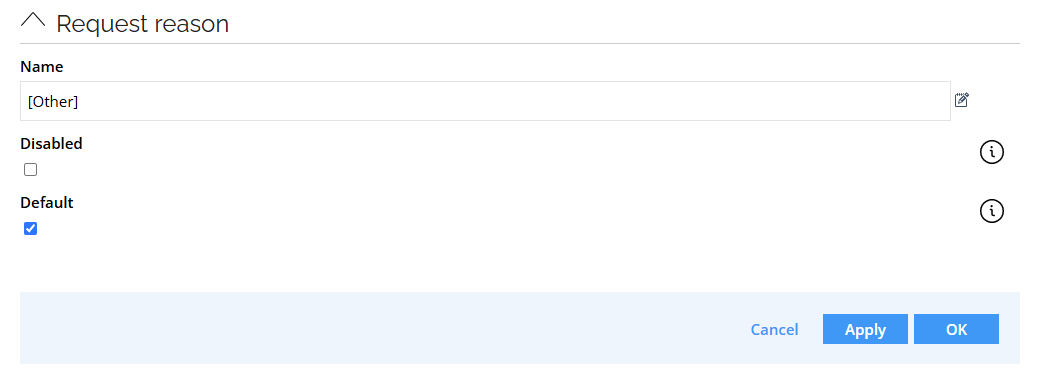
If you disable all reasons, a text input field is displayed (it is also displayed for the Other reason). It is a multiline field that allows entering custom reasons:

To remove Reason entirely, disable the Reason field in the request form.
See Access request configuration - Change default values for the Reason field for details.
Assignment timeline
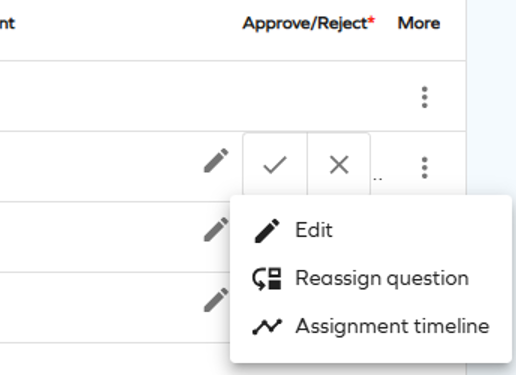
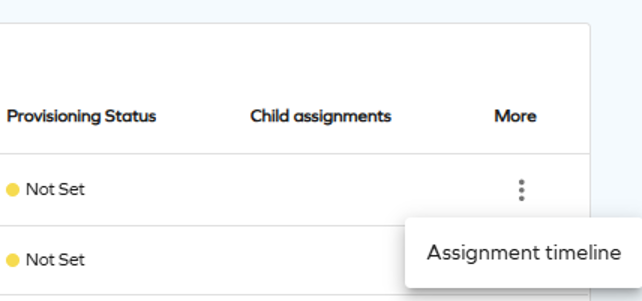
To make the access request process more convenient and easier to track, we have made the Assignment timeline option available to the requester, beneficiary, and approver. It allows tracking the progress and verifying how far are you from receiving access approval.
To access Assignment timeline as an approver, select it from the actions menu on the Approvals page.
To access Assignment timeline as a requester or beneficiary, select it from the actions menu on the Access page.
Rejection comment visibility in access request
Until this point, if the Approval rejection reason required customer setting was set to true, the comment entered when rejecting an access request was shown to the requestor only.
With this update, the rejection comment is always shown.
This change is applied retroactively - the rejection comments left before this change will also be shown.
Technical preview: new menu item: Service library
This technical preview feature is only available to System Administrators; however, you can change this by editing the access groups in the main menu configuration under Setup.
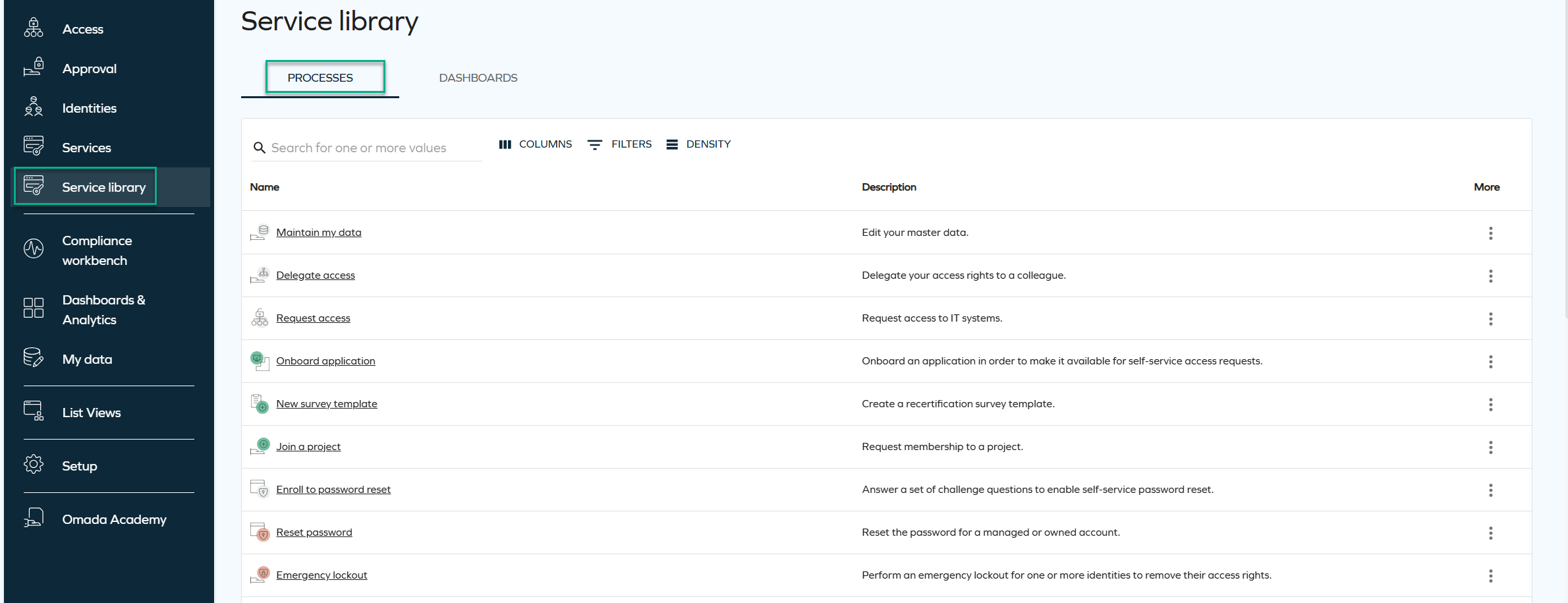
A new Service library menu item has been added, providing a modernized interface for accessing processes and dashboards.
The Service library page includes two tabs: Processes and Dashboards, with List Views being considered for future releases. All pages include standard filtering, sorting, pagination, and global search options.
-
In the Processes tab, process names are clickable and open in a new tab. The More menu includes the Open process view, prompting to display additional process-related actions based on product configuration, such as Reset password, My contexts, or Survey templates.
-
The Dashboards tab lists all dashboards the user has access to. By selecting the More menu and Open dashboard, you can go directly to the dashboard of your choice.
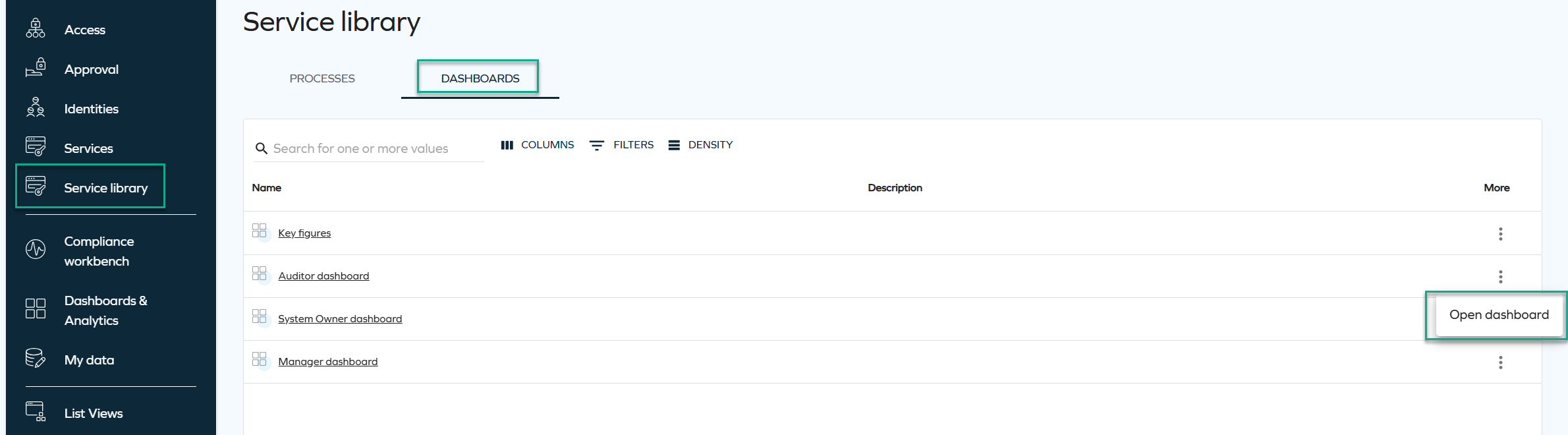
This page is designed to complement the existing Services menu by surfacing new UI capabilities and providing a cleaner, more unified navigation experience.
Resizable side panels
We have introduced a new capability that enables all side panels in the New UI to be resized. A small adjustment bar on the left side of each panel allows you to drag and change its width.
This enhancement gives you greater control over your workspace and improves overall usability by allowing panels to adapt to different workflows and information needs.
Below is an example image illustrating the range and amount of information that can be displayed at once when this capability is applied.
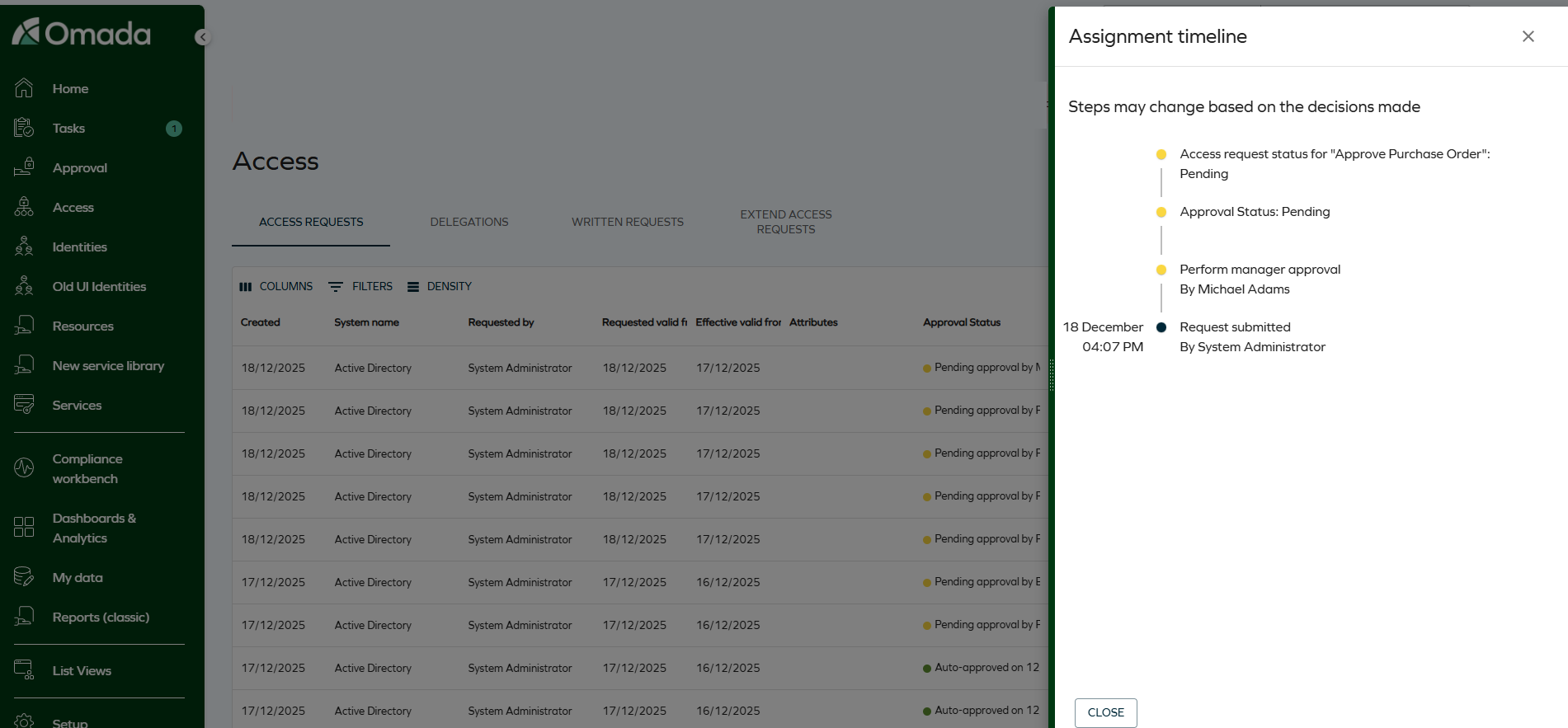
The selected size is saved as a user setting, so the panel automatically reopens with the last chosen width.
Improved accessibility - fixed colors (WCAG 2.2 AA)
Color use in Omada Identity was updated to better meet WCAG 2.2 AA accessibility requirements. Some interactive elements, such as buttons, now use fixed colors to ensure sufficient contrast.
Brand colors will still be used for larger interface areas (such as menus), where text contrast is handled automatically.
Default filter values for Access request
You can now define default values for Access request filters. When you configure a default value and open the Access request survey, the system automatically applies the filter.
You can define default values by configuring the customer settings AccessRequestIdentitiesPropertyFilters and AccessRequestResourcesPropertyFilters, for identities and resources, respectively.
To configure the default filter, use the following format: PropertyName=DefaultValue. The DefaultValue is optional. If you specify it, the value must be a valid GUID of an existing value for that property, for example: OUREF=dc0db0ca-aba2-4c93-b150-55b6f21a71d7.
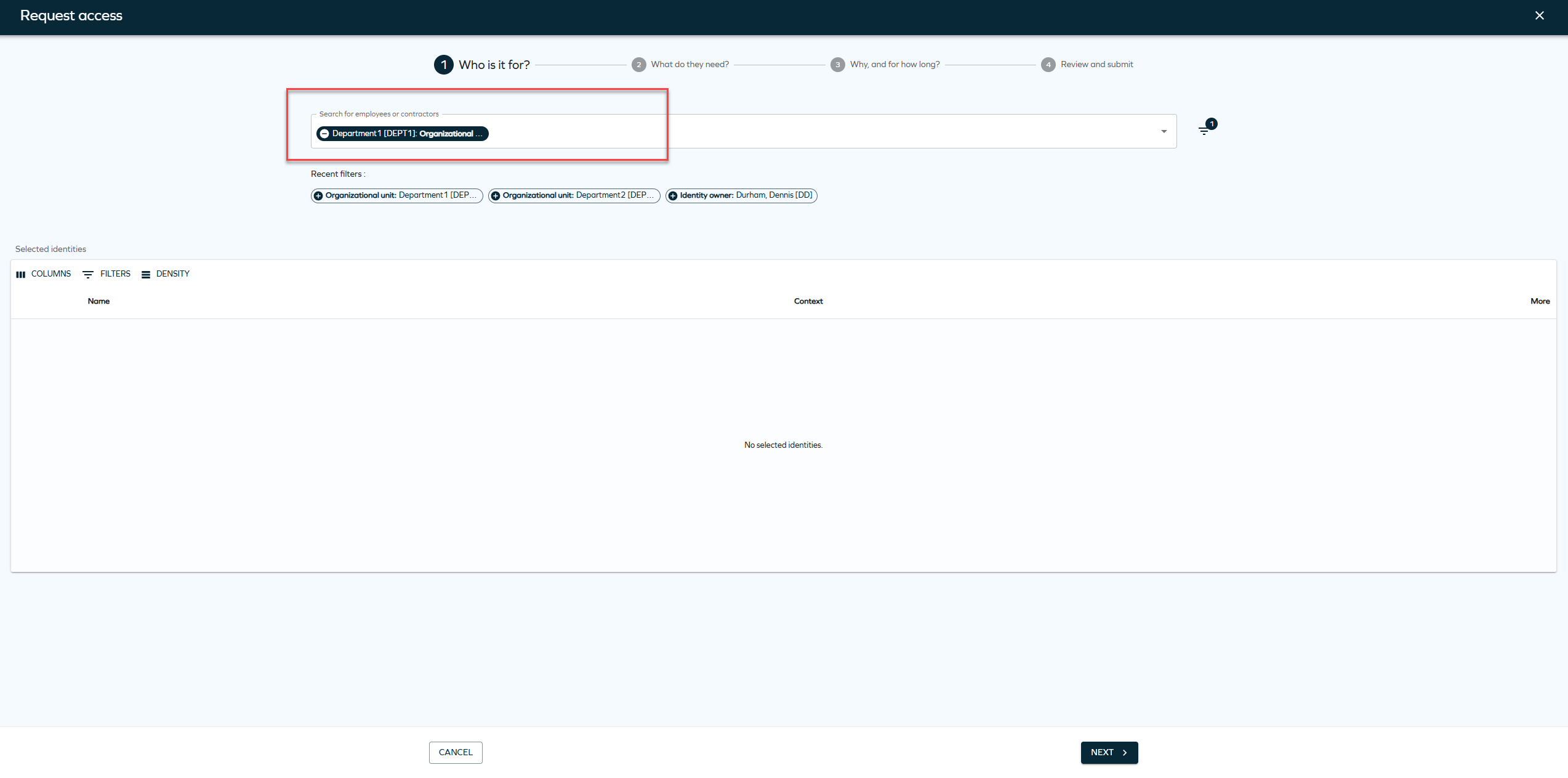
You can also configure multiple properties. Not all properties must have a default value, for example: SYSTEMREF,ROLECATEGORY=1bab597e-6d2a-4670-979b-0b2c1dc0ece8,ROLETYPEREF,ROLEFOLDER=5553d557-602e-40bd-9fc5-450e0cba5ed7. In this example, only ROLECATEGORY and ROLEFOLDER have default values.
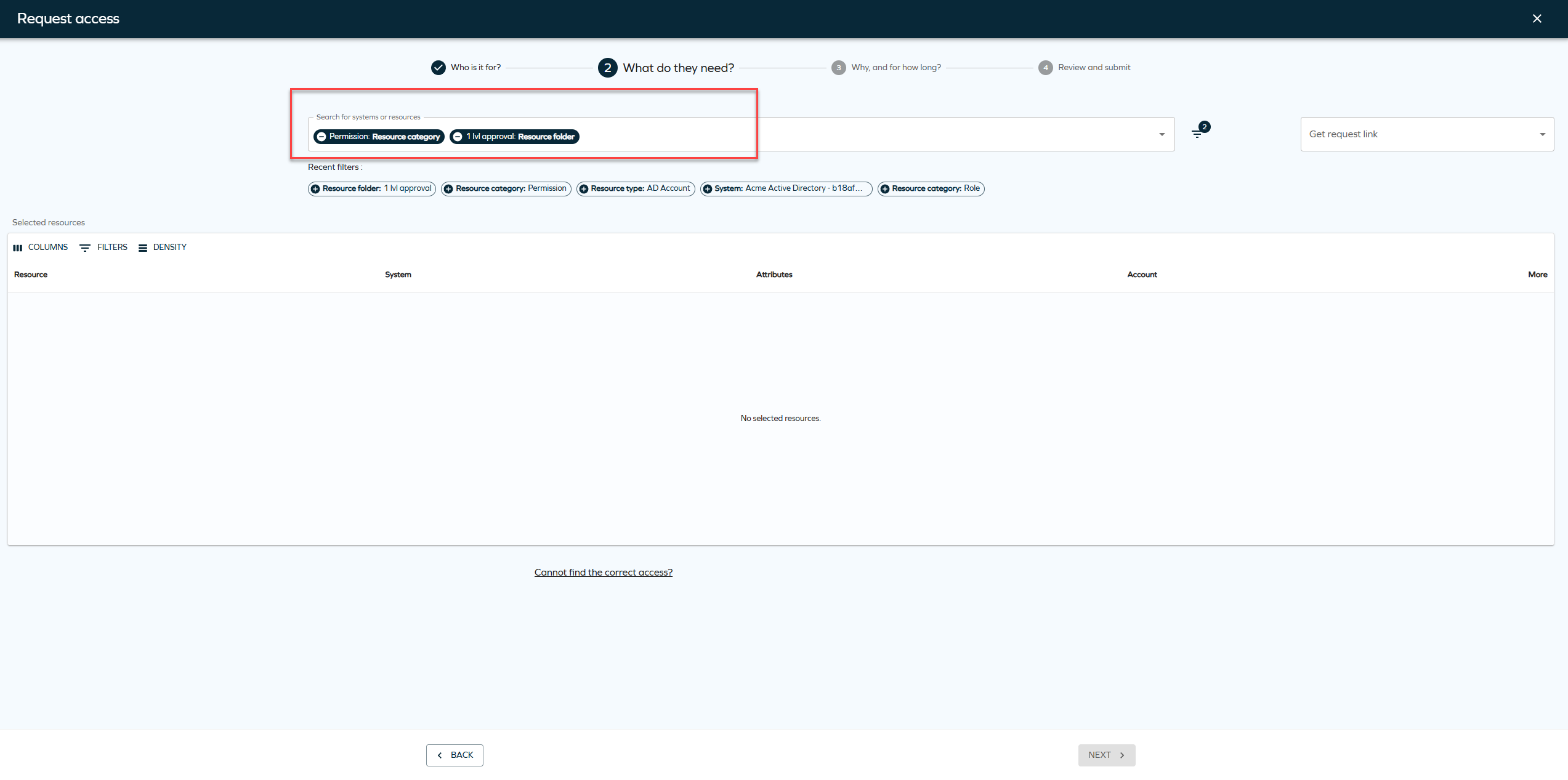
You can remove the default filters or add new filters when creating an Access request.
New customer settings for default Access request filters
We have introduced two new customer settings for default access request filters. To enable default filter values, you must configure the following customer settings:
-
AccessRequestIdentitiesPropertyFilters -
AccessRequestResourcesPropertyFilters
These settings control which properties are available as filters and which of them have default values. If you don't configure these systems, the system doesn't apply default filters on the access request page.
Referring objects view for identities
A new Referring objects option has been added to the Identities list and Identity details pages. The option is available from the three-dots menu in both views and opens a side panel displaying all data objects related to the selected identity, including the identity itself. This allows relationships to be reviewed directly from the list or details view.
-
From the Identities list, click the ellipsis button and select Referring objects.
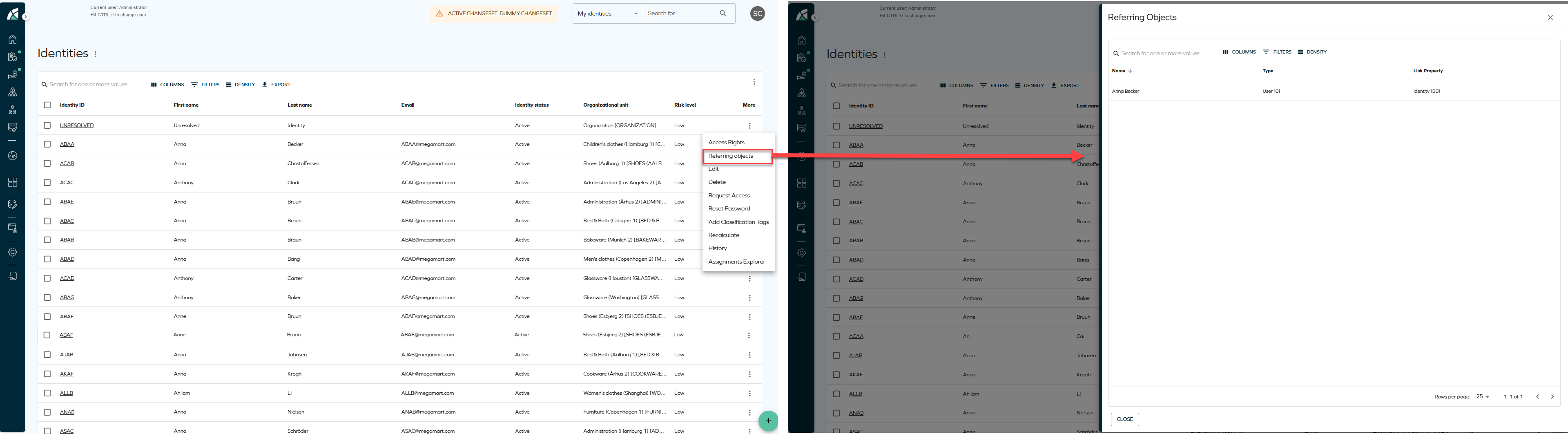
-
From the Identity details page, click the ellipsis button next to the identity name and select Referring objects.
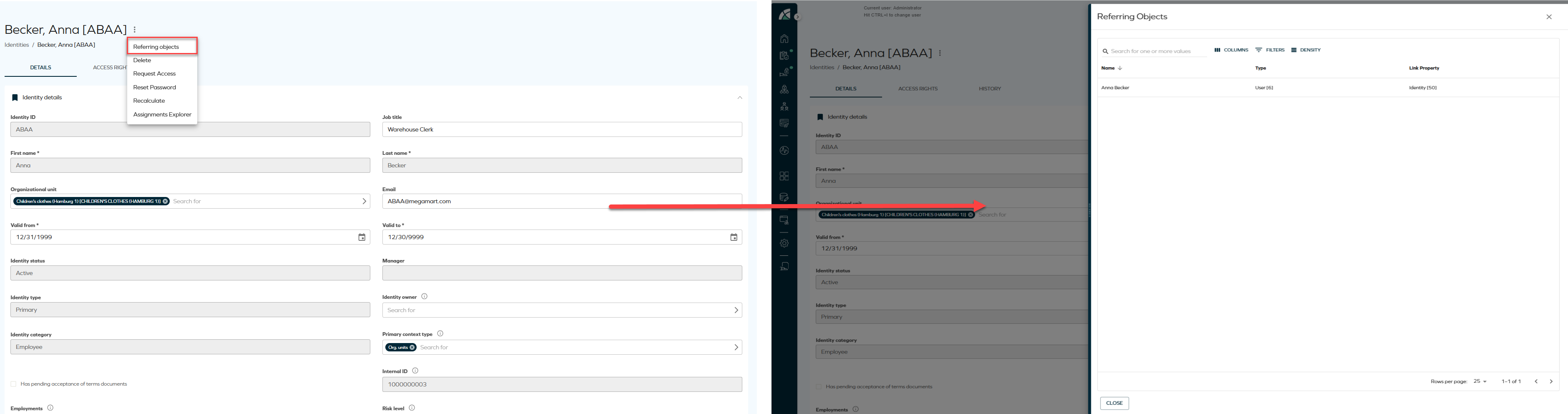
Updated Identity context view
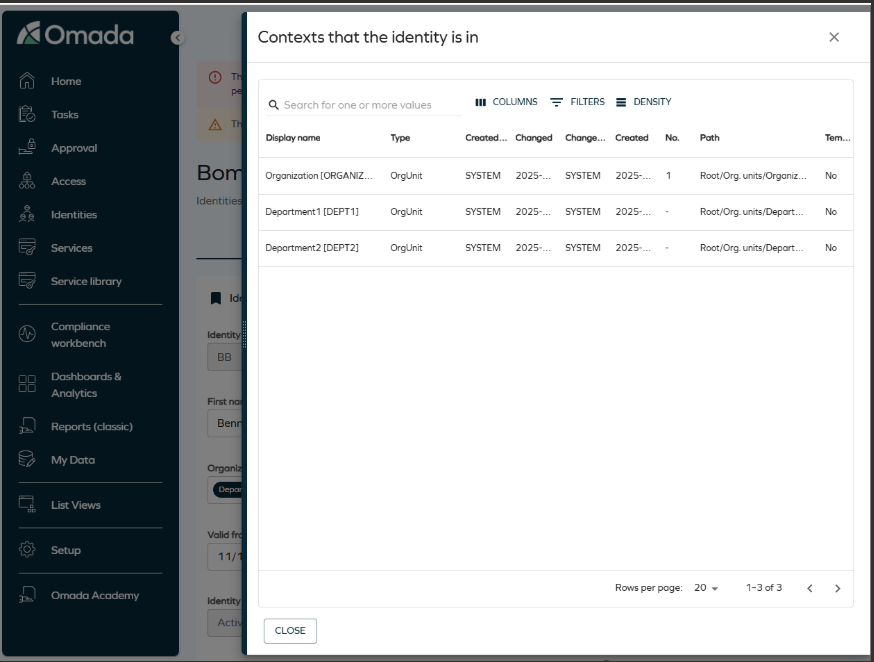
A UI action has been added to view the contexts an identity belongs to, providing the same functionality as in the legacy UI. From the Identities list or the Identity detail view, you can open a side panel displaying a configurable grid of all organizational contexts (such as organizational units) associated with the selected identity. The grid supports column selection, filtering, and row density controls, offering a modernized and more consistent user experience.
Enhanced navigation for reference properties
Reference properties now open directly in side panels, improving navigation. When you click a reference property chip, for example, an attribute set, the referenced object opens in a side panel. This allows you to view and edit related objects without leaving the current context.
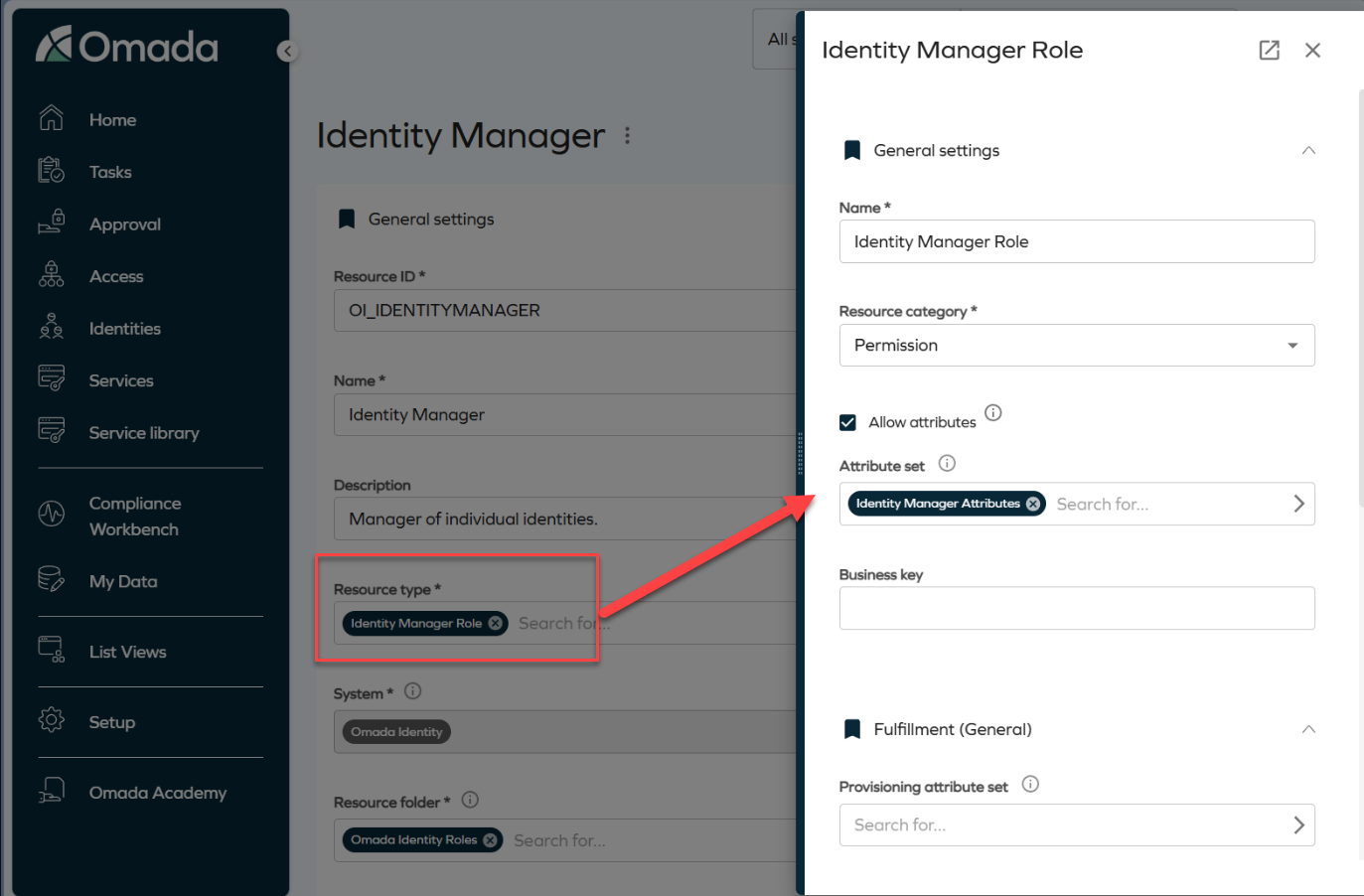
Side panels are stackable. For example, clicking an attribute set from within a role panel opens an additional panel layered on top of the existing one. Clicking the Identity Manager Attributes chip opens another panel, as shown in the image.
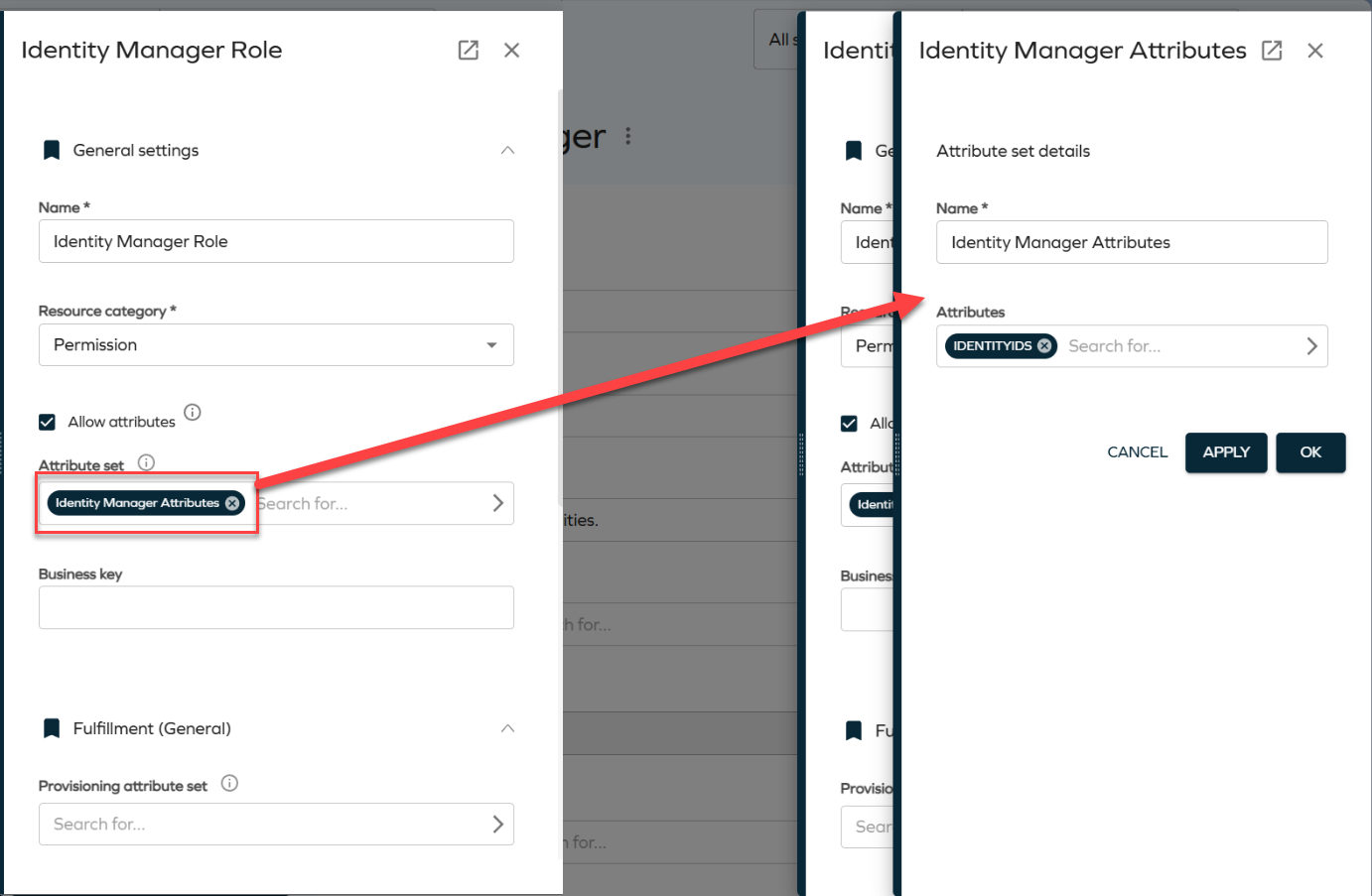
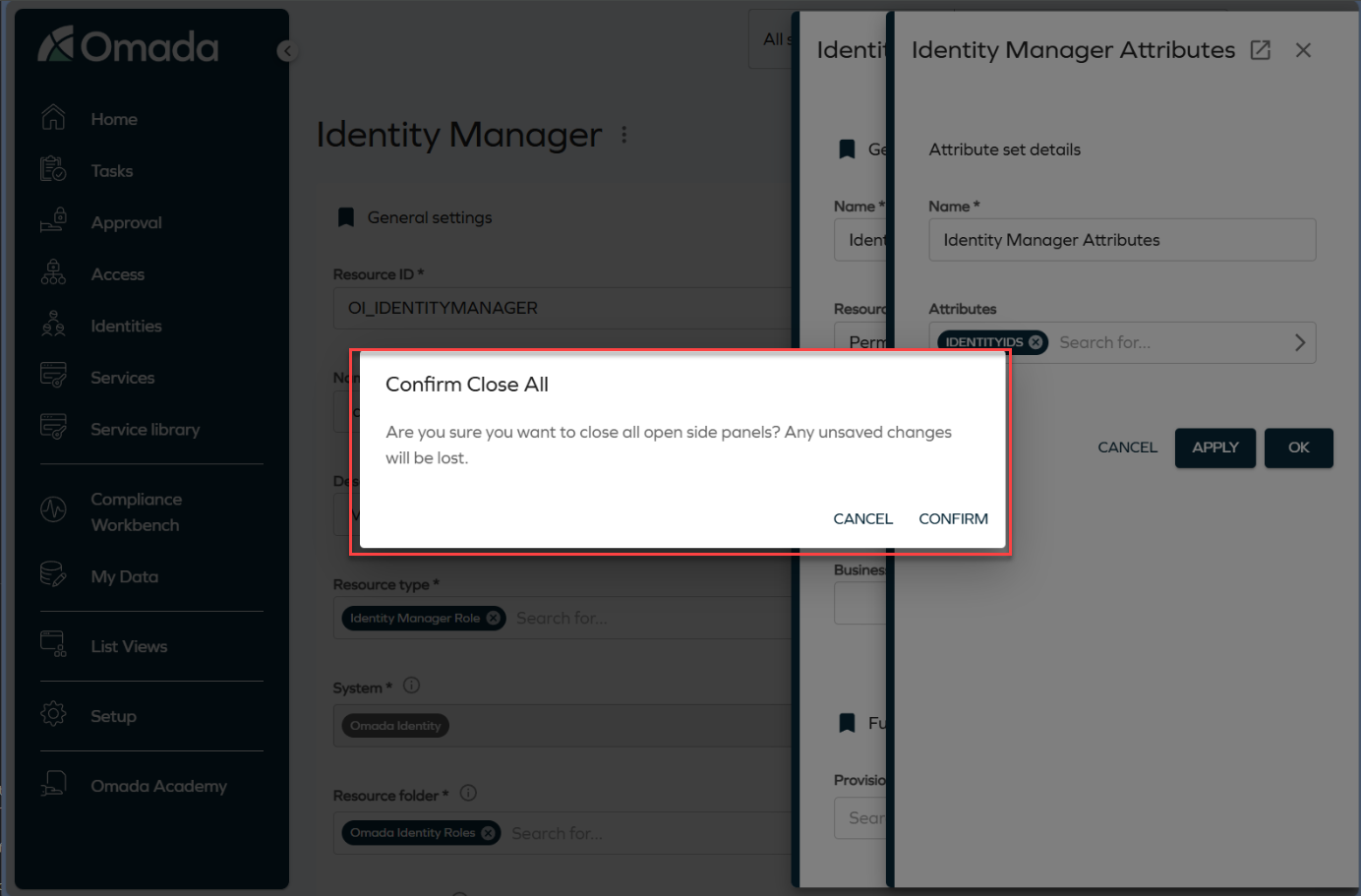
To close a panel, click the Close button or press the **Esc ** key. Clicking the backdrop closes all open panels at once. To prevent accidental data loss, the system displays a confirmation dialog before closing all panels.
Validation for unmapped extension attributes in Queries and Mappings
We have added validation that displays a warning if required extension attributes are not properly mapped when configuring Account or Resource Assignment queries in the Queries and Mappings dialog. You must now select valid Destination values before saving the configuration. For more information, refer to the Extension attribute validation documentation.
System message banner
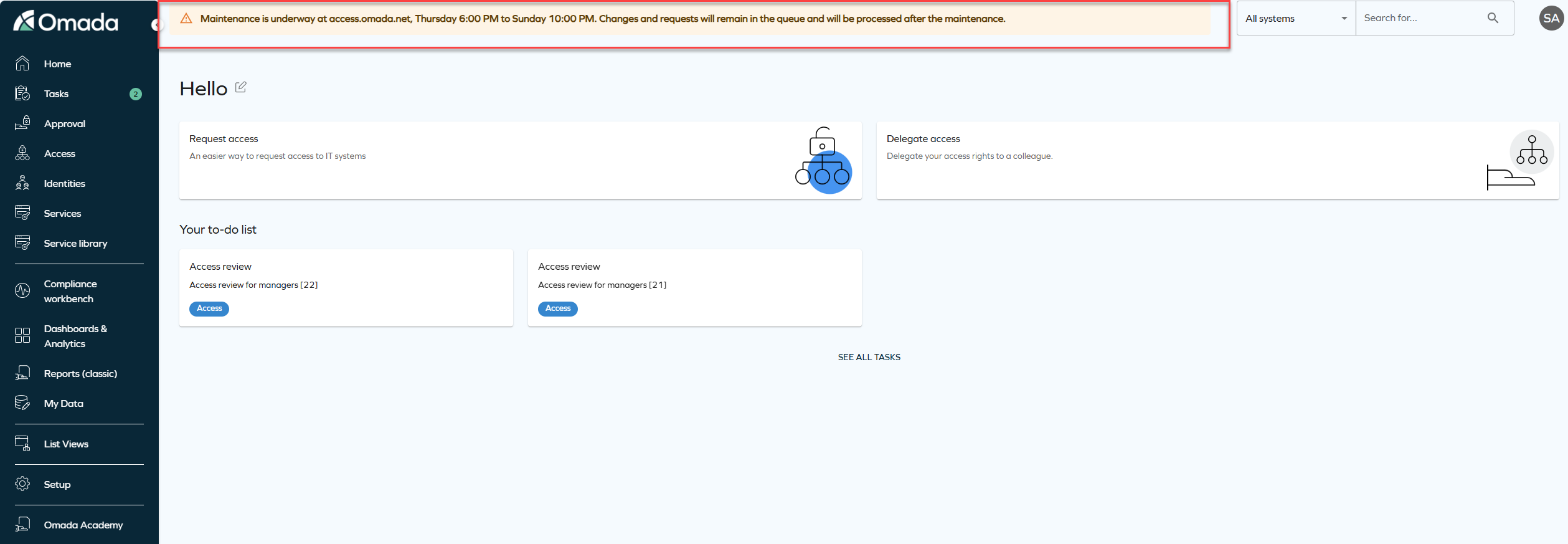
We have introduced a new feature that allows you to display system-wide messages to all users. The feature is configured via the new customer setting SystemMessage to show an informational, warning, or error message at the top of the application.
The message is configured as a JSON value with the following format:
{ "message": "System maintenance on Sunday at 2 AM", "type": "info" }
The type value controls how the banner appears:
-
Info: shows a blue banner for general information, for example, scheduled maintenance or new features.
-
Warning: shows a yellow banner for situations that require special attention, for example, performance issues or upcoming changes.
-
Error: shows a red banner for critical issues, for example, system outages or urgent alerts.
Remove access panel
This update introduces terminology changes and clarifications to the Remove accessfunctionality. The term Revoke has been replaced with Remove access across relevant areas of the product to improve clarity and consistency in the user interface and documentation. Additionally, the Remove access panel now provides two options:
-
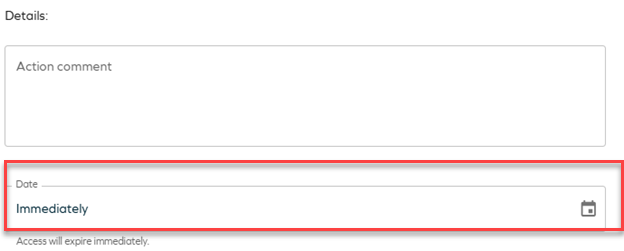
Immediate remove access:
- The resource assignment is expired immediately.
- RoPE recalculation and deprovisioning are triggered immediately.
-
Scheduled remove access:
- Access removal can be scheduled for a specific date.
- By default, access is removed at the end of the selected day, based on the identity’s time zone.
- When the scheduled time is reached, RoPE recalculation and deprovisioning are triggered immediately, and the resource assignment expires within a few minutes.
-
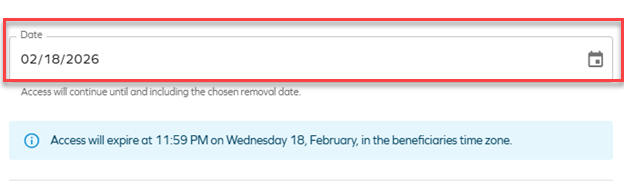
If the default RoPE configuration parameter extendValidityPeriods has been set to False, access expiration will occur at the beginning of the selected day instead of the end of the day. To ensure consistent behavior, verify that the customer setting Enable RoPE extend validity periods is configured accordingly.
For more information about the Remove access panel, see Identities.
Upcoming change in next release: new UI
Starting from version 16.0.0 and June 2026 Cloud Update, the New UI will become mandatory. The legacy menu system will be removed and will no longer be available. Customers currently using the legacy UI are encouraged to transition to the New UI before upgrading to version 16 to ensure a smooth transition.
API
New Omada Identity Graph API version 3.4
We have released a new version of the Graph API (v3.4), which introduces the following updates: the fields DefaultValue (default value of the property) and DefaultValueName (display name of the default value) have been added to both IdentityFilterPropertyType and ResourceFilterPropertyType. These fields define the default property filter value in an Access Request, when applicable. Additionally, in RevokeAssignmentInputType, the RevokeOn field is now optional.
Graph API: Updated handling of hidden form fields
The behavior of form fields configured as hidden client-side or hidden server-side has been clarified and standardized.
Client-side hidden fields are now included in form definitions and form-data responses, but are marked as "hidden": true in the form metadata. Server-side hidden fields are fully excluded from both form definitions and form-data responses.
This update ensures consistency with customer expectations: server-side hidden fields are not exposed through the API, while client-side hidden fields remain available for scenarios that require them but are visually hidden in the UI.
Refer to Omada Identity Graph API to know more.
OData page size
Starting from this release, the maximum page size for OData responses will be set to 1000 to help optimize API behavior and resource usage. (The date has been changed from Q4 2025.)
For more information on pagination, see the OData documentation and look up ODataPageSizeLimit in Customer settings - Standard application.
Updated internal API key authentication
As part of ongoing updates to Omada Identity’s encryption and security mechanisms, we have updated the API key authentication used for internal service-to-service communication. The API key is now implemented as a signed JWT instead of an AES-encrypted token.
This standards-based approach improves performance by eliminating encryption and decryption overhead while retaining secure validation through signature verification and token expiry checks.
This change applies to internal Omada service communication only and does not affect customer integrations or require customer action.
Connectors
Microsoft Exchange - updated connectors
Updated connectivity packages for Microsoft Exchange are now available. See Microsoft Exchange for details.
New configuration options for REST/OData connectors
Two new configuration options are now available for the REST and OData connectors (in Queries and mappings, in the Nested Requests tab):
- Skip escaping variables
- URL is a DynamicExpresso expression
They allow you to modify the values from the initial response to create new URLs (for example, by using the substring method) and use links provided in the initial responses whose values are not escaped. See the REST documentation - Nested Requests for details.
Atlassian Guard
A new connectivity package for Atlassian Guard is now available. See Atlassian Guard for details.
Role and Policy Engine
Support for additional UTC time zones
We have added support for the additional time zones with non-standard UTC offsets, including:
- UTC-11 - American Samoa, Midway Island, Niue
- UTC-09:30 - Marquesas Islands
- UTC+12:45 / UTC+13:45 (DST) - Chatham Islands (New Zealand)
- UTC+14 - Line Islands (Kiritimati)
These time zones are now mapped using the corresponding Windows time zone identifiers. For more information, refer to the Time zones documentation.
RoPE initial password extension - regenerating passwords for reactivated accounts
The initial password extension has been enhanced and now allows regenerating passwords for reactivated accounts. See Regenerating passwords for reactivated accounts for details.
Surveys
New column: Answered by
When exporting a survey, the downloaded file now includes a new column called Answered by. This column provides more visibility into who completed each workflow step within the survey. The column contains a semicolon‑separated list where each entry follows this format:
[WorkflowStepName]:[User Display Name];
[WorkflowStepName]:Auto-completed;
Each entry represents one workflow step and the user who completed it, but if a step was completed automatically, it will appear as Auto‑completed.
For surveys launched before this update, workflow steps that were auto‑completed will continue to show the System user’s display name instead of the text Auto‑completed.
Security
Shared secret configuration requirement
The ApiSharedSecret configuration key is now required for secure communication between Omada Identity components (ES, RoPE, and OPS). Administrators must verify that their configuration files include this key and specify a unique shared secret value.
If the setting is missing, add it using the format
Platform improvements
Improved homepage behavior for access request card
When the UseNewUIAR customer setting is enabled, the system now automatically updates the default homepage configuration to display the new UI access request card, replacing the legacy access request card.
The homepage is updated to display the new access request card by default only when:
- The customer setting UseNewUIAR is set to True.
- The existing UIUserSetting configuration contains exclusively the homepage actions Request access and Delegate access.
If you prefer to keep the legacy access request card, you can revert this behavior by manually adjusting the UIUserSettings customer configuration.
Improved description updates for obsolete resource assignments
The post-action logic for recertification surveys has been enhanced to ensure that direct resource assignments are updated with clear descriptions when they are set to Obsolete.
When access is Removed as part of a recertification campaign, the resource assignment description now records the removal context, date, acting user, and any campaign comment.
If a survey is closed without a response, the description explicitly states that no response was provided and that access was removed due to non-response.
Improved error visibility
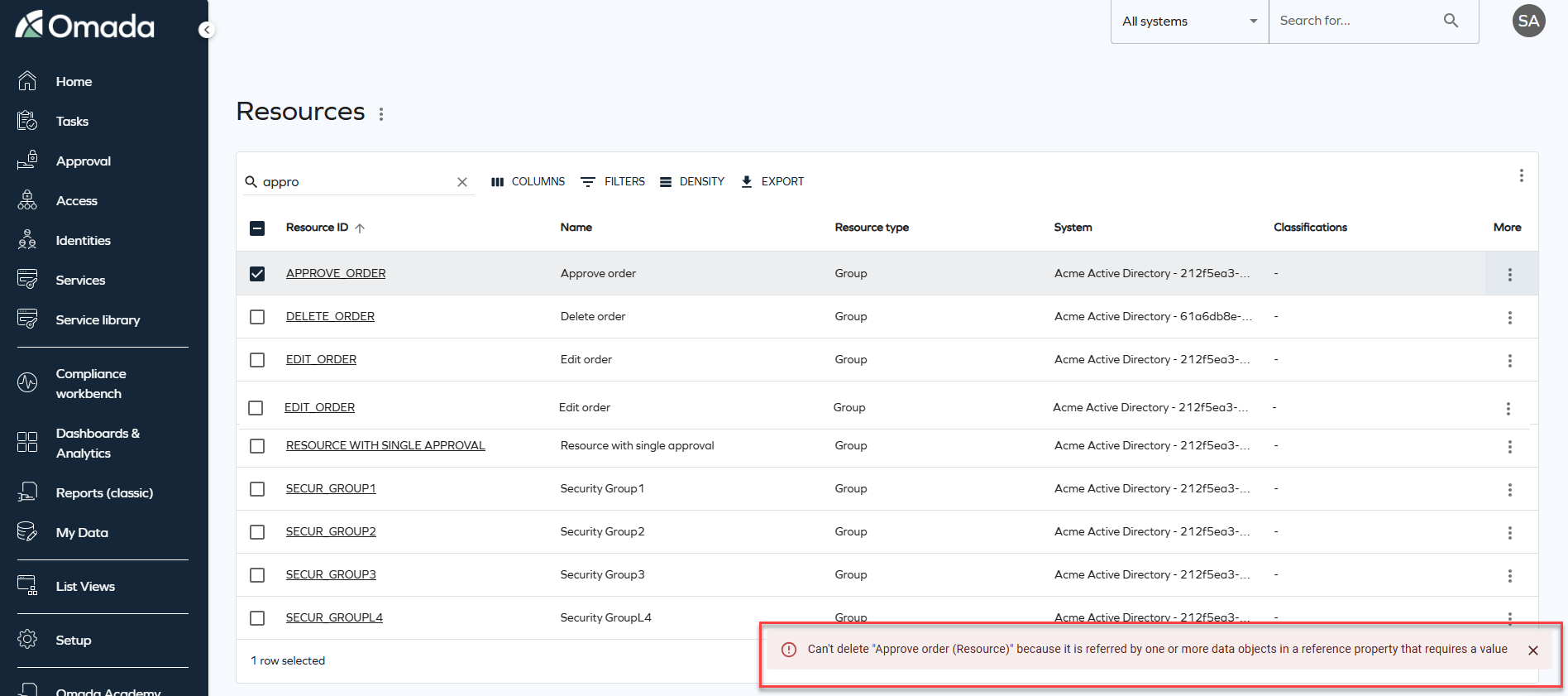
On-screen error notifications will now be displayed when data fails to load or an operation fails. Previously, these errors were only logged in the browser console. The new snackbar notifications provide clear feedback and context, helping you to understand when something goes wrong.
Improved full text search stability and performance
Full text search has been enhanced to improve performance and stability by optimizing how search data is evaluated. As part of this improvement, the SearchData column in tblDataObject is extended to include the corresponding ID of the DataObjectType.
For example, when searching for Resources, the search operation includes a filter on the Resource data object type ID and no longer evaluates search data belonging to other object types. This improves search performance by ensuring that only search data for the selected data object type is evaluated.
To support this change, an automatic background migration is executed by the timer service. This migration updates existing search data in batches until the search data for all data objects includes the data object type ID. During the migration period, full text search continues to behave as in previous versions.
Once the migration is completed successfully for all data objects, the system automatically enables the optimized search behavior, and the customer setting DataObjectSearchDataContainsTypeId is set to True, indicating that the migration is complete.
Other
Transition from HTTP Data Collector to Log Ingestion API
The HTTP Data Collector API is being deprecated and will no longer function after September 14, 2026. To ensure uninterrupted connector functionality, you must migrate to the Log Ingestion API, updating existing connectors for compatibility with Log Analytics workspaces and to leverage enhanced ingestion capabilities. For more detailed information and the migration steps, refer to the Azure Log Ingestion API configuration documentation.
New code method ExpireResourceAssignmentsIfLastContextAssignmentExpired
A new event definition Expire resource assignments if last context assignment has expired was added. It calls a code method with the corresponding name in 15-minute intervals.
The method examines context assignments and resource assignments of the identity. If it finds resource assignments that no longer have an associated active context assignment, the resource assignments are expired. It also uses the validTo value from the last expired context assignment as the expiration date on the resource assignments.
New customer setting to select Account type in Access request
We have introduced a new customer setting SetDefaultAccountTypeInAccessRequest with the default value set to True to maintain the existing behavior. With this customer setting, the system automatically selects the default account during an access request, maintaining the existing behavior. When set to False, users with more than one valid account for a resource will be required to explicitly select which account to use when submitting the access request.
New IgnoreNonPresentAssemblies option in Changeset Import Utility
We have added a new IgnoreNonPresentAssemblies command-line option with the -I flag to Changeset Import Utility. When this flag is set, missing referenced CodeAssemblies are reported as warnings instead of causing the import to fail. For more information, refer to the Changeset Import Utility documentation.
Changes to Archive and Purge feature behavior
We've introduced the following changes to the Archive and Purge functionalities, improving their effectiveness and overall usability.
In the Operations Dashboard > System Overview section, a new Requires archiving setting row was added.
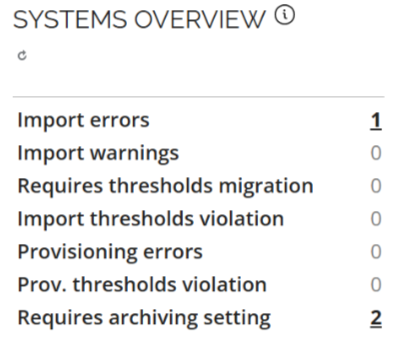
If you are a new customer or re-enabling the provisioning, the archiving and purging features are enabled by default and the default retention period is set to 30 days.
We've introduced the following changes to the Archive and Purge settings in the Advanced settings Provisioning section:
- The Automatically archive... setting is now enabled by default and cannot be changed.
- The Number of days setting, for both Archive and Purge, is limited to the maximum value of 90 days.
- Violation of those restrictions results in a notification message in the Commit Settings section advising user to review their settings.
We have introduced a both front-end and back-end validation mechanism, for the Number of days field, providing feedback when incorrect values are configured.
To handle missing or invalid settings, existing customers, who have not yet configured Archiving or Purging (with empty or null database values), receive the following message:
Archiving/Purging configuration required.
To ensure smooth adaptation to the behavioral change, in the transition period only warnings are issued if the configuration for Archiving or Purging is not done. With the January 2026 release only the high-priority provisioning jobs will be processed, with other jobs remaining in the pending state, until these values are configured.
New permission for bulk revocation
A new permission called Revoke bulk has been introduced, allowing authorized roles to perform bulk revocations of assignments. To enable this functionality, the following conditions must be met:
- The role must have the Revoke assignments and Revoke bulk role permission enabled.
- The customer setting Allow mass revoke of resource assignments must be activated.
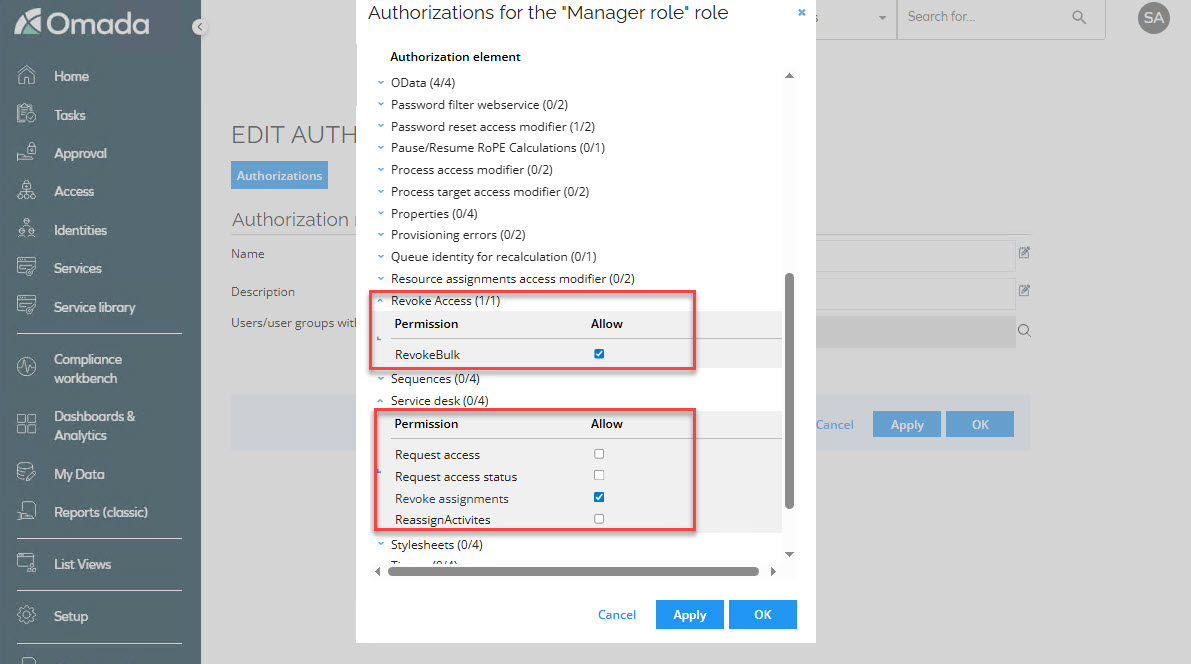
This change has been implemented to provide greater control over who can perform bulk revocations and under what circumstances, ensuring a more secure and flexible management of assignments.
New customer setting for revoking multiple assignments at once
A new customer setting called Allow mass revoke of resource assignments AllowMassRevoke has been added, enabling the bulk revocation of assignments. If True, users with permissions to revoke are allowed to revoke multiple assignments at once in the new UI.
This setting must be activated for roles with the Revoke bulk and Revoke assignments permissions to perform mass revocations.
With this change, administrators gain greater control and flexibility, enabling them to decide whether bulk revocation is available in their organization. By setting the customer setting to False, they can instantly remove bulk revocation capabilities from all roles that have the Revoke bulk permission enabled.
New customer setting to skip child account validation
A new customer setting Skip account validation for child resources has been added. This setting disables the system’s check for existing direct account assignments when a role request includes an account as a child resource. If set to True, the system will skip the validation for existing account assignments when requesting access to a role that includes an account as a child resource.
Use this setting with caution. Disabling this validation can lead to warnings or errors in RoPE if the identity already possesses an account of the same type.
`StartResynchronizationImportProfile' code method for Resynchronization event
A new StartResynchronizationImportProfile code method is available for event definitions. It initializes resynchronization import for the Omada Identity system.
Configuring the resynchronizeOnlyFailed parameter value determines the scope of the resynchronization import:
- true - Resynchronization import includes only previously failed records.
- false - Resynchronization import includes all records.
For more information, go to the Even definitions documentation.
New customer setting for revoking multiple assignments at once
A new customer setting called Allow mass revoke of resource assignments AllowMassRevoke has been added, enabling the bulk revocation of assignments. If True, users with permissions to revoke are allowed to revoke multiple assignments at once in the new UI.
This setting must be activated for roles with the Revoke bulk and Revoke assignments permissions to perform mass revocations.
With this change, administrators gain greater control and flexibility, enabling them to decide whether bulk revocation is available in their organization. By setting the customer setting to False, they can instantly remove bulk revocation capabilities from all roles that have the Revoke bulk permission enabled.
New customer setting for the GraphQL API
A new customer setting, IntrospectionEnabled, has been introduced to control whether introspection queries are allowed on the GraphQL API.
When you upgrade, introspection is enabled if you have enabled the API documentation customer setting. If the API documentation customer setting is disabled, introspection is disabled. You can configure this setting as a platform administrator.
Behavior and limitations:
- GraphQL introspection is available only to authenticated clients and continues to respect existing authorization rules.
- When you disable introspection, the schema is less visible, but this does not fully protect it. Clients can still infer schema details through normal API usage.
- Use this setting only if you have specific compliance or internal policy requirements. In most cases, keep introspection enabled to support developer tools and troubleshooting.
- Omada Identity security still relies on strong authentication, fine-grained authorization, and standard API protections.
Documentation
Deprecation Calendar
We have added a new Deprecation Calendar page to the Omada Identity documentation. This page provides a consolidated overview of features and components that have been announced as deprecated.
The calendar helps plan upgrades and transitions earlier by showing the deprecation announcement, target removal release, recommended replacements, and any action required. It is updated whenever lifecycle status changes or when a new release introduces deprecation-related updates.
You can find it in the documentation under Release Notes > Deprecation Calendar.
Information about Approve requested access survey admins added
The documentation has been updated with the information about the Approve requested access survey admins user group. Since this user group is by default included in the Survey admin field, you can add or remove users from the group, without the need to copy the survey template and all the configuration steps. This allows them to reassign questions.
For more information, go to the Users and user groups documentation.
Clarified security evaluation behavior (DOSM and access modifiers)
The documentation has been updated to clarify several aspects of the security evaluation model, improving transparency and predictability when configuring and integrating with Omada Identity.
The following clarifications have been added:
-
Default access mode behavior (Identities access modifier) - it is now documented that when the Identities access modifier is configured without explicitly specifying an
ACCESSMODE, the system defaults toORGUNIT. Guidance has been added recommending explicit configuration of access mode to ensure predictable behavior. -
Read vs update rights in access modifiers - the documentation now explains that different access modifiers may evaluate read and update rights differently in combination with the Data Object Security Model (DOSM). This may result in varying behavior when opening objects in read-only mode.
-
Identity category – Customer (legacy CIAM behavior) - clarification has been added that the Customer identity category may trigger legacy security behavior originating from deprecated CIAM functionality. This behavior can override or influence configured DOSM and access modifier settings.
-
API security enforcement (GraphQL and OData) - the API documentation now explicitly states that security enforcement through DOSM and access modifiers applies equally to GraphQL and OData endpoints.
These updates improve alignment between conceptual security documentation and actual system behavior and provide clearer guidance for configuration and API integrations. For details, refer to the Security and Access modifiers sections of the documentation.