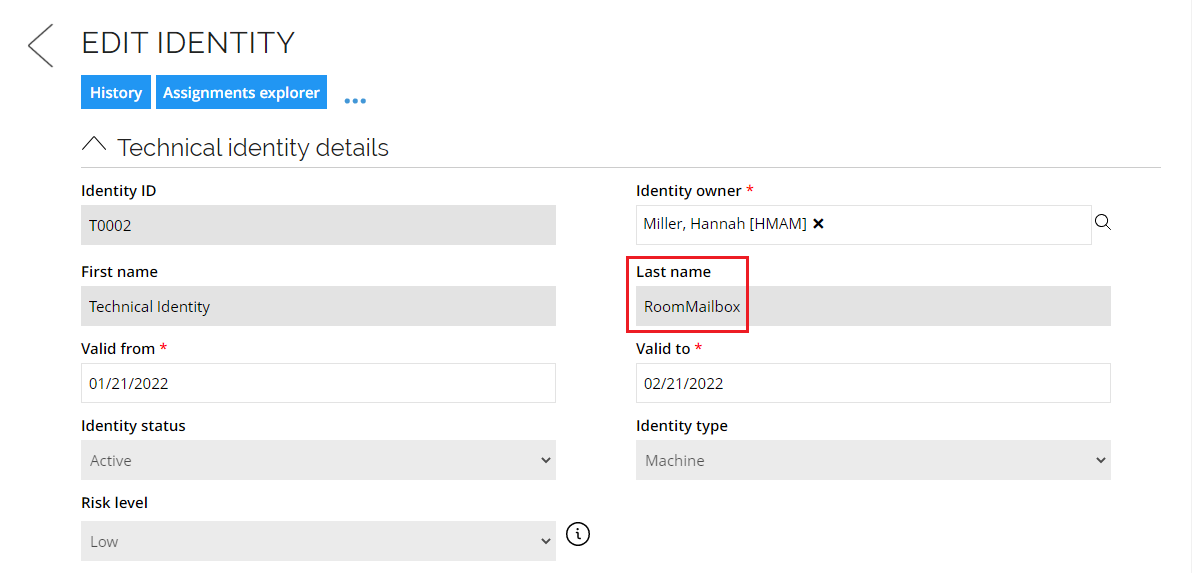
Data import
General settings
| Setting | Description |
|---|---|
| Name | Type a unique name for the system. Two systems cannot have the same name. |
| System ID | Type a unique System ID for the system. Two systems cannot have the same System ID. You cannot change this setting. |
| Description | Type an optional description of the system. |
| Status | Status of the system. Set the status to Removed to ensure the system is no longer included in warehouse imports, reconciliation, or provisioning. Setting a system as Removed will delete all objects referring to the system, including resources, manual and automated provisioning tasks, and assignment policies. |
| Content | This option is disabled and can be selected only when onboarding the Exchange Online Connector. |
| Trusts | Select one or more trusted systems to associate with the system. |
| Prevent self-service | Optionally, decide if it will be possible or not to request the resource in a self-service requests in that system. |
Connection details
| Setting | Description |
|---|---|
| Authentication | The authentication method to use with the Exchange system. You can use the following authentication methods: - Certificate thumbprint (on-premises only, not available in Omada Identity Cloud) - Certificate with password |
| Connection URI | The URL for Exchange Online PowerShell. In order to find the appropriate URL for your Exchange Online organization, go to: Microsoft documentation and Outlook documentation. |
| Username | The username for the user to authenticate against the Exchange server. |
| Password | The password for the user to authenticate against the Exchange server. Each time that you make a change to any of the settings in the Connection details dialog box, you must type your password again. |
| Organization | Specifies the organization that is used. Be sure to use an .onmicrosoft.com domain for the parameter value. |
| Application ID | Specifies the application ID of the service principal that's used in certificate based authentication. |
| Certificate thumbprint | Specifies the thumbprint value of the certificate used for certificate based authentication. Available only when the Certificate thumbprint is selected in the Authentication field. |
| Certificate (PEM format) | The certificate used for certificate based authentication. Value should be enclosed with -----BEGIN CERTIFICATE----- and -----END CERTIFICATE----- |
| Private key (PEM format) | A private key used for certificate based authentication. Value should be enclosed with -----BEGIN PRIVATE KEY----- and -----END PRIVATE KEY----- |
| Private key password | Specifies a password for the private key used for certificate based authentication. |
| Session options | Advanced options using New-PSSessionOption. For information about possible parameters and their functions, refer to the New-PSSessionOption article or the PSSessionOption Class article. -SkipCACheck -SkipCNCheck -SkipRevocationCheck |
| Import threads | Configure the number of simultaneous PowerShell sessions to use for retrieving the Send as and Full access information and speed up the run time for these two permissions. Use this setting for an asynchronous PowerShell to speed up the run time, wherever possible. Members of admin groups are fetched asynchronously. The default value is 1 (one). |
| Test connection | Enable this setting to test the connection information that you have specified. If you want to use this functionality you must install Omada Provisioning Service and make sure it has the necessary permissions to communicate with the target system. |
Queries and mappings
Out of the box, the Exchange Online Connectivity provides the mappings listed below. The suggested list of destinations to have the History checkbox enabled:
- ADDITIONAL_EMAILS
- HIDEINADDRESSLIST
- ISSUEWARNINGQUOTA
- PROHIBITSENDQUOTA
- PROHIBITSENDRECEIVEQUOTA
- WEBMAIL
Role Groups (Resource)
Parameters
| Parameter | Value |
|---|---|
| Source | Administrative resources |
| Distinct | No |
| Filter | Type=="RoleGroups" |
Mappings
| Destination | Operator | Source |
|---|---|---|
| Business key | Expression | string.Format(" |
| Security resource business key | Expression | string.Format(" |
| Name | Map | RoleGroupName |
| Category | Constant | Group |
| Type | Constant | Exchange Admin Role Group |
| Distinguished name | Map | RoleDistingushedName |
| Description | Map | RoleGroupDescription |
| Scope | Map | Scope |
| RoleGroup Type | Map | RoleGroupType |
Members group (Resource parent/child)
Parameters
| Parameter | Value |
|---|---|
| Source | Administrative resources |
| Distinct | No |
| Filter | Type=="Members" && RecipientType?.ToString().IndexOf("Group") !=-1 |
Mappings
| Destination | Operator | Source |
|---|---|---|
| Indirect | Constant | 0 |
| Parent resource business key | Expression | string.Format(" |
| Child resource - business key | Lookup | DistinguishedName=MemberDistinguishedName |
User mailboxes (Resource assignment)
Parameters
| Parameter | Value |
|---|---|
| Source | Mailboxes |
| Mailbox subtype | UserMailbox,LinkedMailbox |
| Distinct | No |
| Filter | Type=="User mailbox" |
Mappings
| Destination | Operator | Source |
|---|---|---|
| Resource Business key | Expression | |
string.Format("<system>{0}</system><genericresource>{1}</genericresource>",BuiltIn.SystemShortName,RecipientTypeDetails) | ||
| Account - CBK | Lookup | Name=GrantSendOnBehalfTo |
| Business key | Expression | Type=="User mailbox"?" |
| PRIMARY_EMAIL | Map | PrimarySmtpAddress |
| ADDITIONAL_EMAILS | Map | EmailAddresses |
| HIDEINADDRESSLIST | Map | HiddenFromAddressListsEnabled |
| ISSUEWARNINGQUOTA | Map | IssueWarningQuota |
| PROHIBITSENDQUOTA | Map | ProhibitSendQuota |
| PROHIBITSENDRECEIVEQUOTA | Map | ProhibitSendReceiveQuota |
| WEBMAIL | Map | OWAEnabled |
| MAILBOXLOCATION | Map | MailboxLocation |
Shared mailboxes (Resource assignment)
Parameters
| Parameter | Value |
|---|---|
| Source | Mailboxes |
| Mailbox subtype | DiscoveryMailbox, EquipmentMailbox, GroupMailbox, LegacyMailbox, LinkedMailbox, LinkedRoomMailbox, RoomMailbox, SchedulingMailbox, SharedMailbox, TeamMailbox |
| Distinct | No |
| Filter | Identity != null && Type !="Full access" && Type !="Send as" && Type !="Send on behalf" |
Mappings
| Destination | Operator | Source |
|---|---|---|
| Resource Business key | Expression | string.Format(" |
| Account - CBK | Lookup | Name=GrantSendOnBehalfTo |
| Business key | Expression | Type=="User mailbox"?" |
| PRIMARY_EMAIL | Map | PrimarySmtpAddress |
| ADDITIONAL_EMAILS | Map | EmailAddresses |
| HIDEINADDRESSLIST | Map | HiddenFromAddressListsEnabled |
| ISSUEWARNINGQUOTA | Map | IssueWarningQuota |
| PROHIBITSENDQUOTA | Map | ProhibitSendQuota |
| PROHIBITSENDRECEIVEQUOTA | Map | ProhibitSendReceiveQuota |
| LINKEDMAILBOXDOMAIN | Map | LinkedMasterAccount |
| WEBMAIL | Map | OWAEnabled |
| MAILBOXLOCATION | Map | MailboxLocation |
Mailbox access (Resource assignment)
Parameters
| Parameter | Value |
|---|---|
| Source | Mailbox access |
| Mailbox subtype | UserMailbox,EquipmentMailbox,RoomMailbox,SharedMailbox,LinkedMailbox |
| Distinct | No |
| Filter | LinkedMasterAccount != null && LinkedMasterAccount != "NT AUTHORITY" |
Mappings
| Destination | Operator | Source |
|---|---|---|
| Resource Business key | Expression | string.Format(" |
| Account - CBK | Lookup | Name=GrantSendOnBehalfTo |
| Target - CBK | Expression | string.Format("0_ |
| Business key | Expression | |
string.Format("<account>{0}</account><resource>{1}</resource><target>{2}</target>", LinkedMasterAccount, Type, ExchangeGuid) | ||
| LinkedMasterAccount | Map | LinkedMasterAccount |
| AccessType | Map | Type |
| MAILBOXREF | Expression | string.Format("0_ |
Send on behalf (Resource assignment)
Parameters
| Parameter | Value |
|---|---|
| Source | Mailboxes |
| Mailbox subtype | UserMailbox,LinkedMailbox,DiscoveryMailbox,EquipmentMailbox,GroupMailbox,LegacyMailbox,LinkedRoomMailbox,RoomMailbox,SchedulingMailbox,SharedMailbox,TeamMailbox |
| Distinct | No |
| Filter | Type=="Send on behalf" |
Mappings
| Destination | Operator | Source |
|---|---|---|
| Resource Business key | Expression | string.Format(" |
| Account - CBK | Lookup | Path=GrantSendOnBehalfTo |
| Target - CBK | Expression | string.Format("0_ |
| Business key | Expression | string.Format(" |
| PRIMARY_EMAIL | Map | PrimarySmtpAddress |
| Identity | Map | Identity |
| RecipientTypeDetails | Map | RecipientTypeDetails |
| ExternalDirectoryObjectID | Map | ExternalDirectoryObjectID |
| GrantSendOnBehalfTo | Map | GrantSendOnBehalfTo |
| MAILBOXREF | Expression | string.Format("0_ |
Role assignments (Resource assignment)
Parameters
| Parameter | Value |
|---|---|
| Source | Administrative resources |
| Distinct | No |
| Filter | Type=="Members" && RecipientType?.ToString().IndexOf("Group") < 0 |
Mappings
| Destination | Operator | Source |
|---|---|---|
| Resource Business key | Expression | string.Format(" |
| Account - CBK | Lookup | UID=MemberName |
| Description | Map | RecipientType |
Distribution groups (Resource)
By default, there is only one query for distribution groups. To onboard distribution groups and separately mail-enabled security groups, apply additional filtering. Use the DistributionGroupType attribute - provide the SecurityEnabled value to provision mail-enabled groups.
Parameters
| Parameter | Value |
|---|---|
| Source | Distribution groups |
| Distinct | No |
| Filter | Type==""DistributionGroups" |
Mappings
| Destination | Operator | Source |
|---|---|---|
| Business key | Map | DistributionGroupGuid |
| Secret resource business key | Map | DistributionGroupName |
| Name | Map | DistributionGroupName |
| Category | Constant | Distribution Group |
| Type | Constant | Exchange Distribution Group |
| Display name | Map | DistributionGroupDisplayName |
| Account - CBK | Lookup | BusinessKey=MemberExternalDirectoryObjectId |
Default source fields
Add the DistributionGroup prefix to use any other field returned by the Get-DistributionGroup command. Example: To get the alias field, add the mapping for DistributionGroupAlias.
DistributionGroupName
DistributionGroupDisplayName
DistributionGroupDistinguishedName
DistributionGroupType
DistributionGroupPrimarySmtpAddress
DistributionGroupManagedBy
DistributionGroupHiddenFromAddressListsEnabled
DistributionGroupRequireSenderAuthenticationEnabled
Type
Distribution group members (Resource assignment)
Parameters
| Parameter | Value |
|---|---|
| Source | Distribution groups |
| Distinct | No |
| Filter | Type==""DistributionGroupMembers" |
Mappings
| Destination | Operator | Source |
|---|---|---|
| Resource business key | Map | DistributionGroupGuid |
| Account - CBK | Lookup | BusinessKey = MemberName |
Default source fields
Add the Member prefix to use any other field returned by the Get-DistributionGroupMember command. Example: To get the ExchangeGuid field, add the mapping for MemberExchangeGuid.
DistributionGroupName
MemberDistinguishedName
MemberName
MemberDisplayName
MemberAlias
RecipientType
Type
Extension script
Utilizing the PowerShell extension script is supported for the Exchange collector.
To enable it specify the Script file name, containing available functions, in the Connection details section.
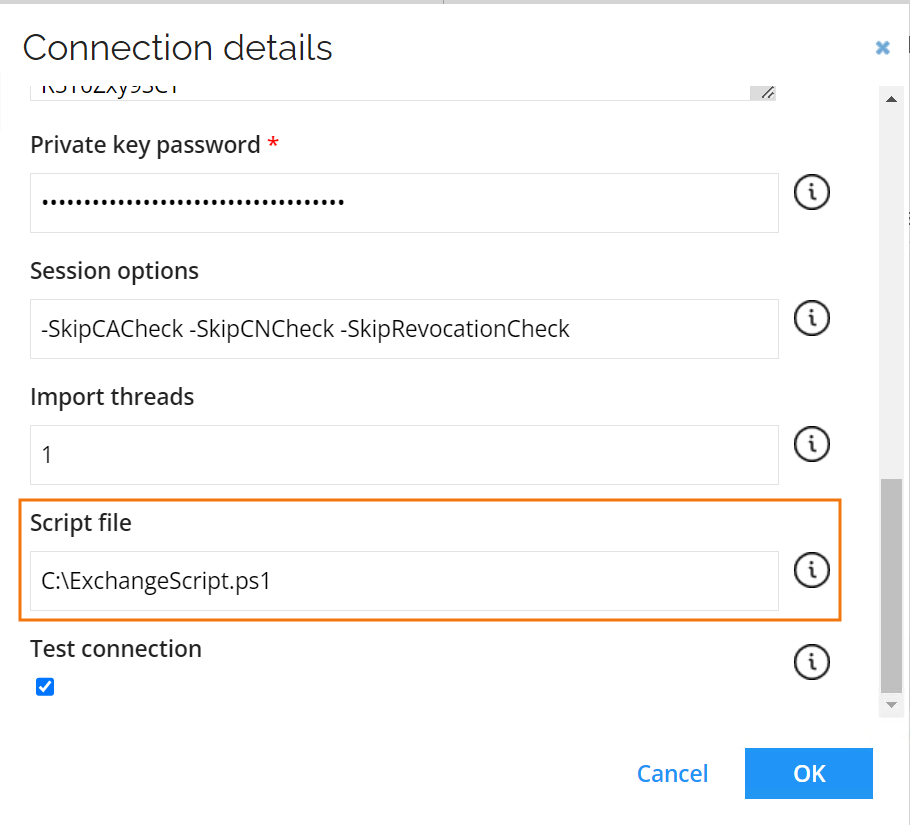
You can implement extension script in two ways.
In the Queries and mappings section add a mapping with the Source parameter set to Script. Then configure the Function name parameter to indicate which function from the extension script file you want to utilize. Then specify the required mappings.

Alternatively, for the queries with source set to Mailboxes there is an additional parameter Extension attribute function name. The specified function is then performed after retrieving the mailboxes. This provides additional attributes, that are otherwise not available with the Get-Mailbox command.
This way PSObjects are returned with the ExchangeGuid, used for mapping results of the function mailbox return by query, and required attributes.
Advanced queries and mappings configuration
If you require any custom mappings for your system implementation, this section describes the details of the fields available in the Queries and mappings task.
This collector supports any number of queries and has the following query parameters which should be specified when creating or editing a query.
- In the Distinct field, you can specify if the collector should remove possible duplicate rows.
- In the Filter field under the Parameters section, you can provide a Dynamic Expresso expression that is used for filtering the data imported into Omada Identity. It returns a TRUE/FALSE result for each imported data row. If the expression returns "FALSE" for the given row that row is skipped during import.
The filter can be supplied with special functions #MinRow() or #MaxRow(). The #MinRow()/#MaxRow() are custom functions that can be combined with regular DynamicExpresso expressions thanks to the # prefix, for example, in line:
#MinRow(col1, col2)#col=="active"
the custom function is encapsulated with # at the start and optionally at the end - if a regular filter is to be appended like in the example (col=="active").
The MinRow()/MaxRow() functions take two parameters. The intention is similar to a Group by function in SQL server that allows you to eliminate duplicates and to take the lowest or highest*[order by column] for each [unique column] row, i.e., MinRow([unique column], [order by column])*.
Naming convention for mapping and expressions
The name used for mapping or expressions is converted into a name that is usable as a C# parameter.
Names can contain the characters _, a-z, A-Z, and 0-9, but the first character of the name cannot be a digit (0-9).
Furthermore, any forbidden characters will be stripped from the name under the conversion.
For example, $somekey1 becomes somekey1 and 1another_key becomes another_key.
Overriding onboarding configuration in import profile
To decrease the import time you can override the SendAs and FullAccess onboarding values in the import profile from the true, to the false value. Those exclude import of SendAs or FullAccess permissions respectively while executing Mailbox access query.
To do so, go to Import profile and add a separate line in the Overridden onboarding configuration field for each setting you want to override.
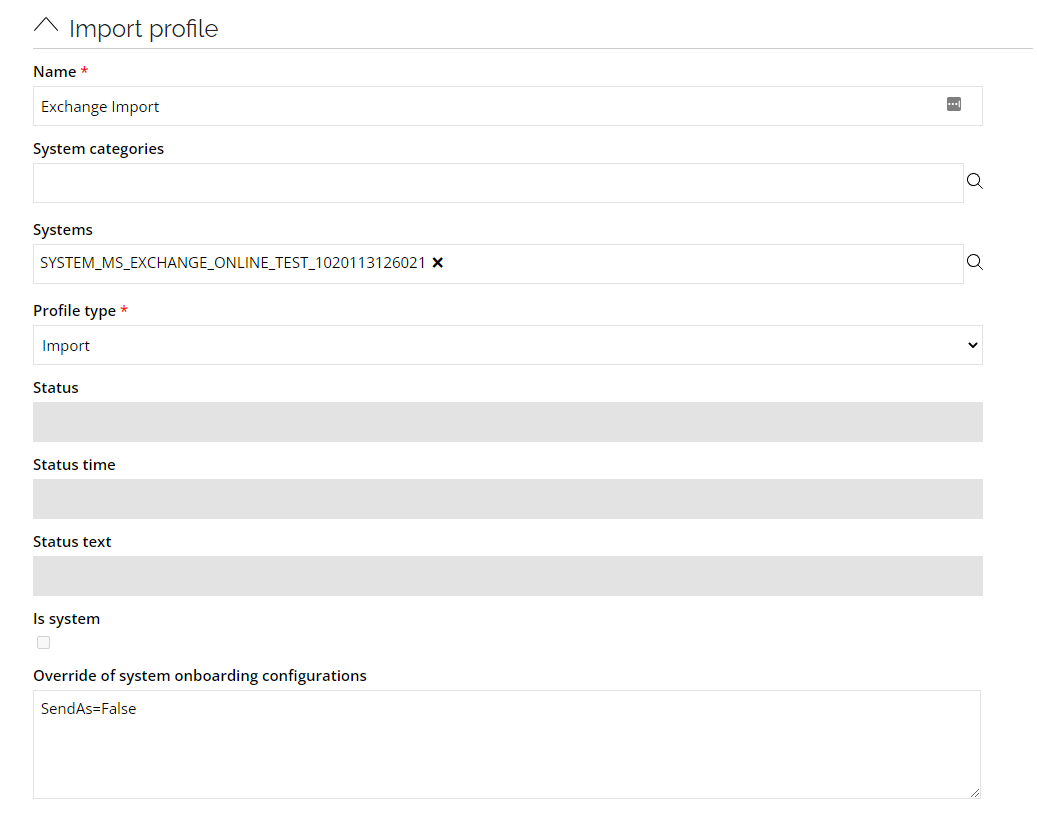
Each entry for a configuration value should be in a separate line and have a following format: 1SettingName=NewValue.
Advanced settings
When selecting the Use cache checkbox the executed PowerShell commands to get data from Exchange will be stored in local cache. When the same command is executed again for a different query, the result will be taken from cache resulting in faster execution.
Configure thresholds
The Configure thresholds function allows you to set the amount of changes that cannot be exceeded, relevant to the last import.
In the Configure import thresholds window, type a number (integer) in percentage for New objects, Modified objects, and Deleted objects to enable thresholds for the import of objects from this system.
The value for each operation is by default set to 0, which means that no threshold calculations take place for the operation(s) until you change the integer.
Account rules
Accounts reside in Microsoft Entra ID, and the mailboxes refer to the accounts in these systems, so there is no configuration required for the Exchange Online Collector in this regard. For the already onboarded Microsoft Entra ID system, default account rules are provided, or you may have configured your own, but if you want to match the Shared, Room and Equipment Mailboxes additional configuration is required, see the section below.
Shared, Room and Equipment Mailboxes configuration
The section contains information relevant for managing the Shared, Room, and Equipment mailbox resource types. If You are interested only in managing User Mailboxes, disable the Queries & Mappings for Shared, Room, and Equipment Mailbox resource types.
When a Mailbox is created in Exchange (no matter if it is a Shared, Room, Equipment Mailbox, etc.), a corresponding account is created in Microsoft Entra ID. For these mailbox types a disabled account is automatically created. As part of the import from Exchange we lookup the account of the mailbox in Microsoft Entra ID and assign the mailbox to the account as a resource assignment. The accounts are imported to ODW as part of the Microsoft Entra ID import. This means that importing from this system must have run before or together with Exchange import.
The Accounts for all the non-personal mailboxes must be matched to an Identity in Omada Identity, to avoid creating a Personal Identity per mailbox, we suggest creating a Technical Identity for each type of mailbox (you can also choose to create additional Technical Identities if you want to separate the ownership even further).
Since RoPE only allows to assign [one]{.underline} account of the Personal account type to an Identity, it is required to create new account types to handle Room, Equipment, or Shared Mailboxes.
The following section explain how these accounts can be matched to Technical Identities. Additionally, information required to properly configure Request Access process are provided ensuring requesting access for shared, room, and equipment mailboxes works properly.
Technical identities
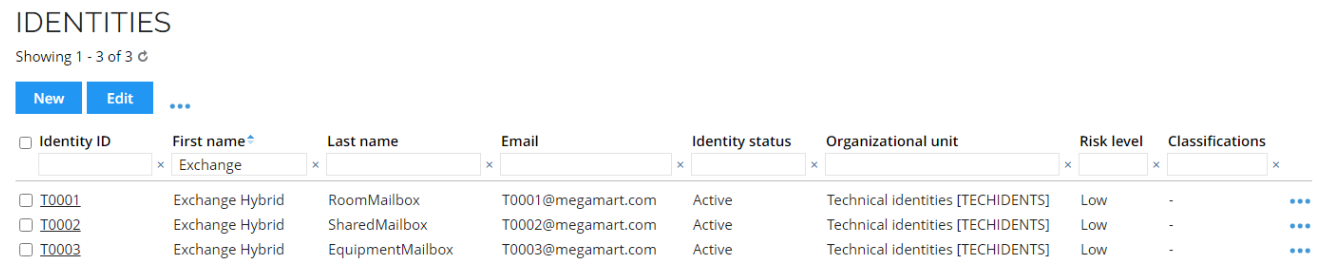
Create three Technical Identities using the Request technical identity process and assign them to the Exchange system in Omada Identity.
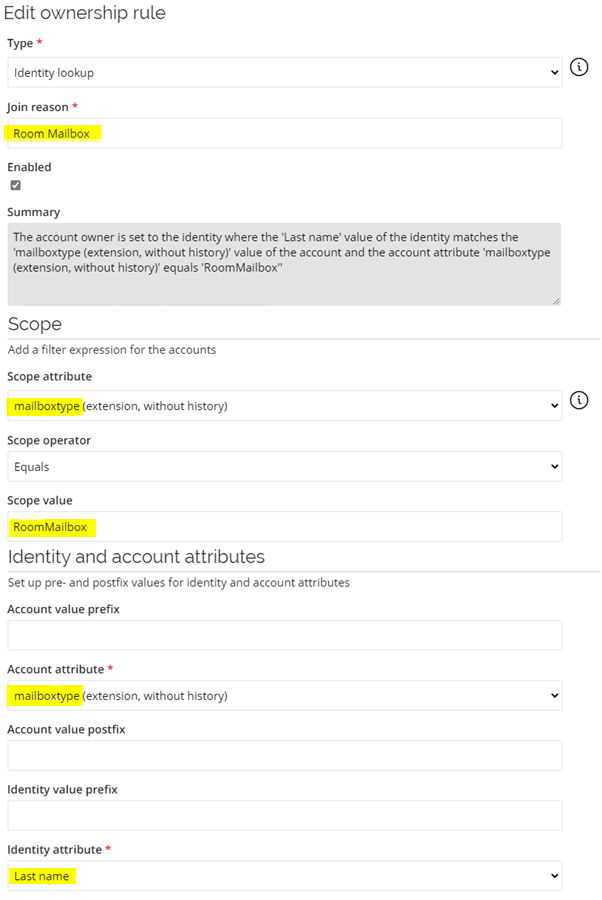
For the three Technical Identities the Last name property is used to specify the value of the mailbox type (RoomMailbox, SharedMailbox, EquipmentMailbox) as that will be imported from Microsoft Entra ID as an extension attribute.
New Account Types
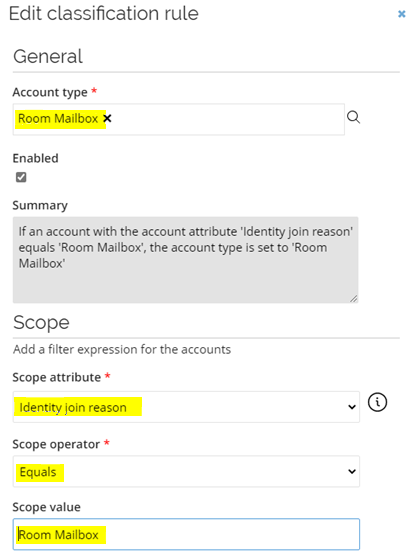
It is required to create new Account Types to support matching multiple accounts to same Technical Identity.
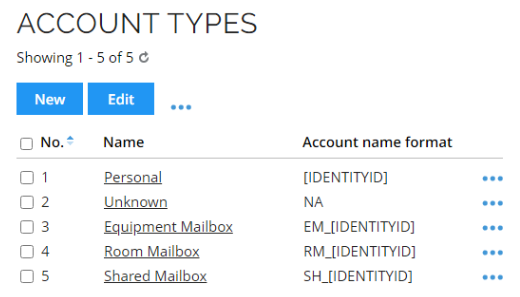
Assign Account type to Exchange resources
Prior to assigning Account type to Shared, Room, and Equipment Mailbox resources, an import from Exchange must be performed.
The Shared, Room, and Equipment Mailbox resources must have corresponding Account types configure.
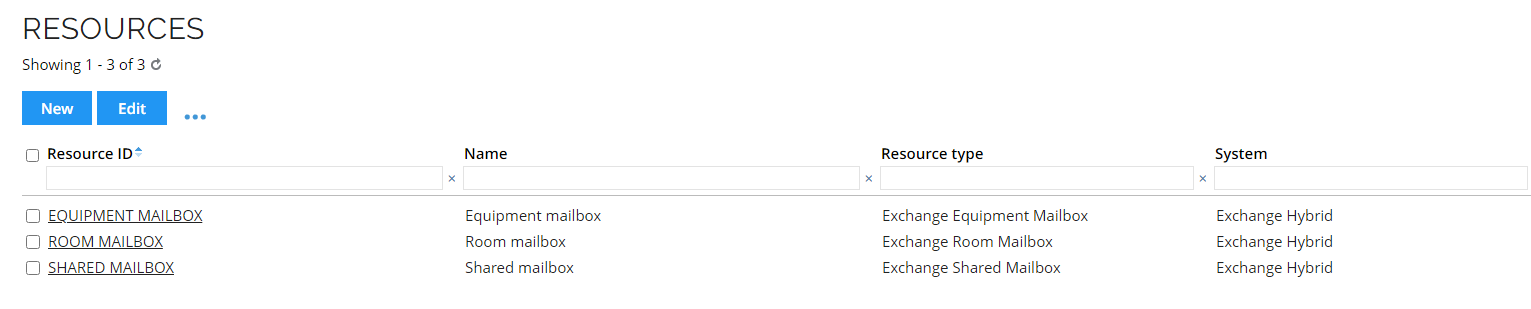
When a resource is opened, the Account types field can be found in the Advanced section of settings.
New Resource Type
It is required to create a new Resource Type. The new Account Resources use them, as we do not want to reuse the AAD account Resource Type since that contains attribute sets specific for user accounts in Microsoft Entra ID. The new Mailbox Account Resource Type can be used for all the new required Account Resources.
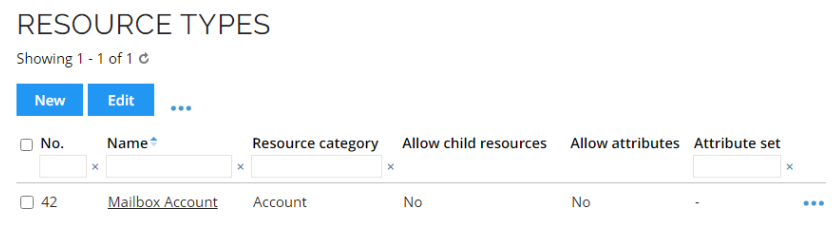
New Account Resources
It is required to create new Account Resources, one for each Account Type for each Microsoft Entra ID system.
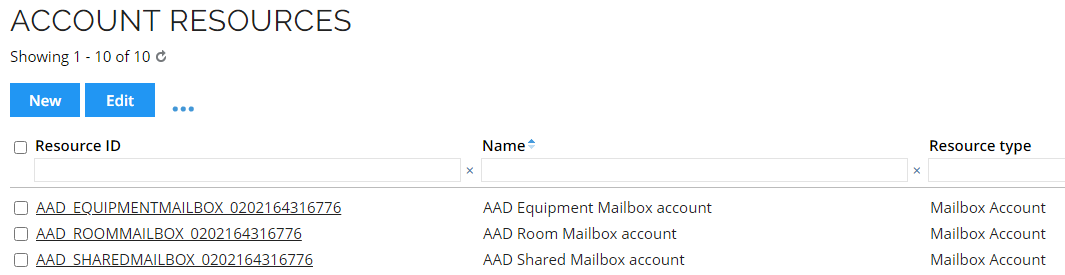
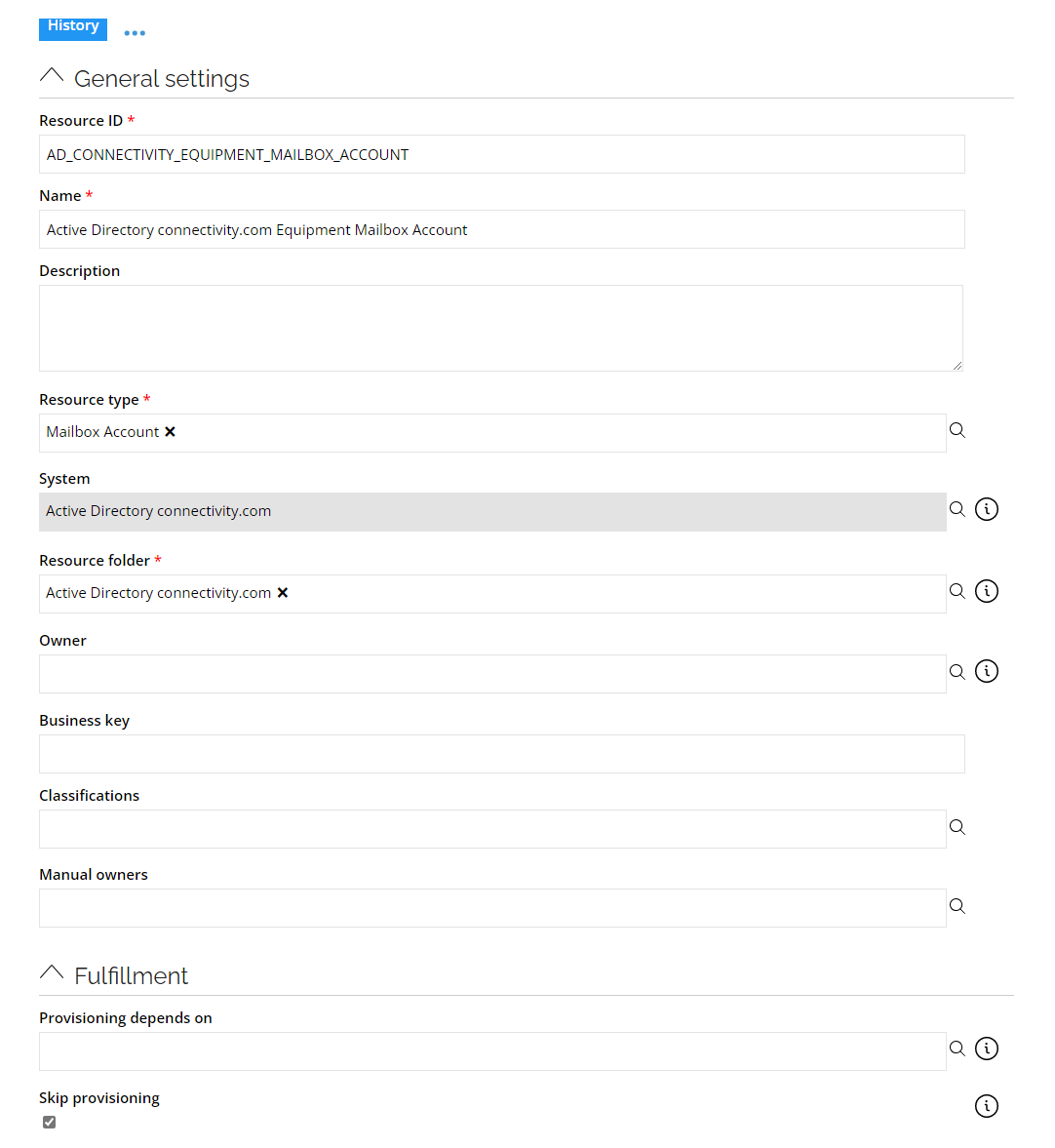
Additionally, go to Setup > Master Data> Account Resources and for each of the created Account Resources set the Skip provisioning setting to true.
Skipping provisioning
To enable skip provisioning setting for an account resource, do the following:
-
Go to Account Resources and open the resource you would like to configure.
-
Go to Fulfillment section of settings and enable the Skip provisioning option.
Extension Attribute
Importing mailboxes type directly from Microsoft Entra ID is impossible. To obtain it use following naming convention and mapping:
userPrincipalName.ToLower().Contains("room") ? "RoomMailbox" :
userPrincipalName.ToLower().Contains("shared") ? "SharedMailbox" :
userPrincipalName.ToLower().Contains("equipment") ? "EquipmentMailbox" :
"Unknown"
Account Rules
New Account Rules must be created to match the accounts with the Technical Identities. You must create Ownership and Classification rules for each mailbox type, for example:
Verification
As an example, the accounts and resource assignments for Room Mailboxes are matched to the T0003 Technical Identity with Last name set to RoomMailbox, as shown below: