Data provisioning
Enable provisioning
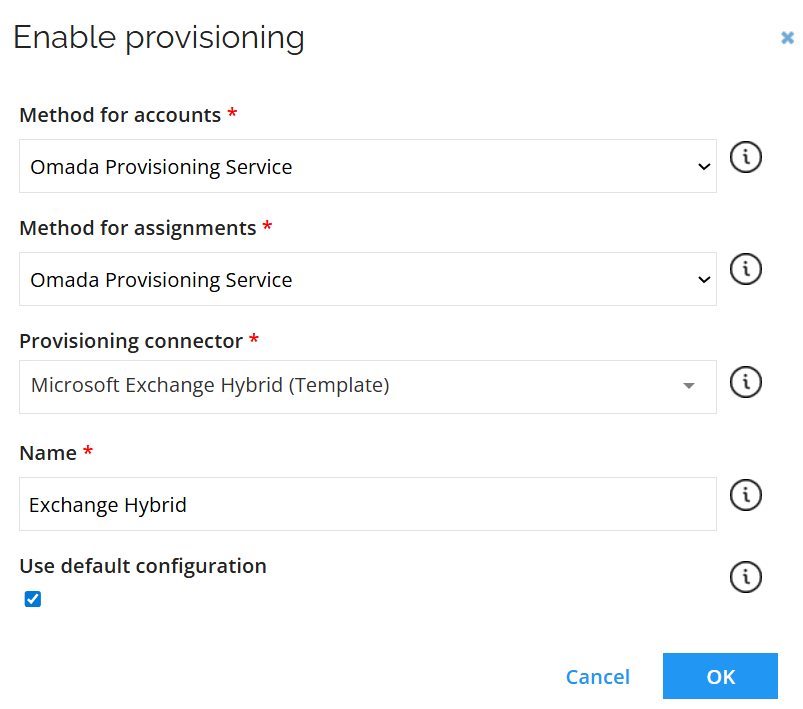
Connector settings
| Parameter | Value |
|---|---|
| Server Type | Hybrid |
| Local: Connection URI | https://[hostname]/powershell |
| Local: Authentication | Basic |
| Local: Username | [Username] |
| Local: Password | [Password] |
| Local: Session options | -SkipCACheck -SkipCNCheck -SkipRevocationCheck |
| Cloud: Authentication | Certificate with password |
| Organization | [Organization] |
| Application ID | [Application ID] |
| Certificate (PEM format) | -----BEGIN CERTIFICATE----- [Certificate] -----END CERTIFICATE----- |
| Private key (PEM format) | -----BEGIN CERTIFICATE----- [Private key] -----END CERTIFICATE----- |
| Cloud: Private key password | [Private key password] |
| Cloud: Remote domain | [Remote domain] |
| Test connection | Select the checkbox |
Task mappings
Omada Exchange Hybrid connectivity uses the following mappings:
| Parameter | Resource Type | Description |
|---|---|---|
| Mailbox - Assignment | Exchange User Mailbox | The mapping grants access to the specified mailbox for the target user, based on the requested permission level (example: Full Access). |
| SharedMailbox - Resource | Exchange Shared Mailbox | Includes mappings that handle the creation and deletion of shared mailbox resources. |
| MailboxAccess - Assignment | Exchange Shared Mailbox | The mapping grants access to the specified shared mailbox for the target user, based on the requested permission level (example: Full Access). |
| RoomMailbox – Resource | Exchange Room Mailbox | Includes mappings that handle the creation and deletion of room mailbox resources. |
| MailboxAccess - Assignment | Exchange Room Mailbox | The mapping grants access to the specified room mailbox for the target user, based on the requested permission level (example: Full Access). |
| EquipmentMailbox – Resource | Exchange Equipment Mailbox | Includes mappings that handle the creation and deletion of equipment mailbox resources. |
| MailboxAccess - Assignment | Exchange Equipment Mailbox | The mapping grants access to the specified equipment mailbox for the target user, based on the requested permission level (example: Full Access). |
| DistributionGroup – Resource | Exchange Distribution Group | Includes mappings that handle the creation and deletion of distribution groups. |
| DistributionGroupAssignment – Assignment | Exchange Distribution Group | The mapping adds the target user to the specified distribution group. |
| MailboxAccess - Assignment | Exchange Mailbox Access | The mapping grants access to user mailboxes (FullAccess, SendAs or SendOnBehalf). |
Mailbox (Assignment) – Resource Type Exchange User Mailbox
Supported operations: Create, update, and delete.
| Parameter | Description | Value |
|---|---|---|
| Object Id | Map | ObjectId |
| Object type | Constant | Mailbox |
| Operation | Map | Operation |
| Identity | Map | ROPE_AccountName |
| MailboxLocation | Map | ROPE_ATTR_MAILBOXLOCATION |
| bundledAttributes | Expression | string.Format("issueWarningQuota=0", ROPE_ATTR_ISSUEWARNINGQUOTA) |
| bundledAttributes | Expression | string.Format("prohibitSendQuota=0", ROPE_ATTR_PROHIBITSENDQUOTA) |
| bundledAttributes | Expression | string.Format("prohibitSendReceiveQuota=0", ROPE_ATTR_PROHIBITSENDRECEIVEQUOTA) |
| bundledAttributes | Expression | string.Format("webmail=0", ROPE_ATTR_WEBMAIL) |
| bundledAttributes | Expression | string.Format("hideInAddressList=0", ROPE_ATTR_HIDEINADDRESSLIST) |
| bundledAttributes | Expression | string.Format("primaryEmail=0", ROPE_ATTR_PRIMARY_EMAIL) |
SharedMailbox (Resource) – Resource Type Exchange Shared Mailbox
Supported operations: Create, update, and delete.
| Parameter | Description | Value |
|---|---|---|
| Object Id | Map | ObjectId |
| Object Type | Constant | SharedMailbox |
| Operation | Map | Operation |
| Identity | Expression | RLM_NAME.Replace("_SendOnBehalf", "").Replace("_SendAs", "").Replace("_FullAccess", "").Replace("_Local", "").Replace("_Cloud", "") |
| Name | Expression | Operation == "CreateIfNotExists" ? RLM_NAME.Replace("_SendOnBehalf", "").Replace("_SendAs", "").Replace("_FullAccess", "").Replace("_Local", "").Replace("_Cloud", "") : null |
| DisplayName | Expression | RLM_NAME.Replace("_SendOnBehalf", "").Replace("_SendAs", "").Replace("_FullAccess", "").Replace("_Local", "").Replace("_Cloud", "") |
| Alias | Expression | RLM_NAME.Replace(" ", "").Replace("_SendOnBehalf", "").Replace("_SendAs", "").Replace("_FullAccess", "").Replace("_Local", "").Replace("_Cloud", "") |
| MailboxLocation | Map | RLM_MAILBOXLOCATIONSET |
MailboxAccess (Assignment) – Resource Type Exchange Shared Mailbox
Supported operations: Create, update, and delete.
| Parameter | Description | Value |
|---|---|---|
| Object Id | Map | ObjectId |
| Object Type | Constant | MailboxAccess |
| Operation | Map | Operation |
| Identity | Map | ROPE_DistinguisedName |
| mailboxPermission | Expression | ROPE_ResourceIdentifier.Contains("FULLACCESS") ? "Full Access" : ROPE_ResourceIdentifier.Contains("SENDAS") ? "Send As" : ROPE_ResourceIdentifier.Contains("SENDONBEHALF") ? "Send on Behalf" : null |
| userMailboxGuid | Expression | ROPE_ResourceCBK.Substring(ROPE_ResourceCBK.IndexOf("_") + 1, ROPE_ResourceCBK.LastIndexOf("_") - ROPE_ResourceCBK.IndexOf("_") - 1) |
RoomMailbox (Resource) – Resource Type Exchange Room Mailbox
Supported operations: Create, update, and delete.
| Parameter | Description | Value |
|---|---|---|
| Object Id | Map | ObjectId |
| Object Type | Constant | RoomMailbox |
| Operation | Map | Operation |
| Identity | Expression | RLM_NAME.Replace("_SendOnBehalf", "").Replace("_SendAs", "").Replace("_FullAccess", "").Replace("_Local", "").Replace("_Cloud", "") |
| Name | Expression | Operation == "CreateIfNotExists" ? RLM_NAME.Replace("_SendOnBehalf", "").Replace("_SendAs", "").Replace("_FullAccess", "").Replace("_Local", "").Replace("_Cloud", "") : null |
| DisplayName | Expression | RLM_NAME.Replace("_SendOnBehalf", "").Replace("_SendAs", "").Replace("_FullAccess", "").Replace("_Local", "").Replace("_Cloud", "") |
| Alias | Expression | RLM_NAME.Replace(" ", "").Replace("_SendOnBehalf", "").Replace("_SendAs", "").Replace("_FullAccess", "").Replace("_Local", "").Replace("_Cloud", "") |
| MailboxLocation | Map | RLM_MAILBOXLOCATIONSET |
MailboxAccess (Assignment) – Resource Type Exchange Room Mailbox
Supported operations: Create, update, and delete.
| Parameter | Description | Value |
|---|---|---|
| Object Id | Map | ObjectId |
| Object Type | Constant | MailboxAccess |
| Operation | Map | Operation |
| Identity | Map | ROPE_DistinguisedName |
| mailboxPermission | Expression | ROPE_ResourceIdentifier.Contains("FULLACCESS") ? "Full Access" : ROPE_ResourceIdentifier.Contains("SENDAS") ? "Send As" : ROPE_ResourceIdentifier.Contains("SENDONBEHALF") ? "Send on Behalf" : null |
| userMailboxGuid | Expression | ROPE_ResourceCBK.Substring(ROPE_ResourceCBK.IndexOf("_") + 1, ROPE_ResourceCBK.LastIndexOf("_") - ROPE_ResourceCBK.IndexOf("_") - 1) |
EquipmentMailbox (Resource) – Resource Type Exchange Equipment Mailbox
Supported operations: Create, update, and delete.
| Parameter | Description | Value |
|---|---|---|
| Object Id | Map | ObjectId |
| Object Type | Constant | EquipmentMailbox |
| Operation | Map | Operation |
| Identity | Expression | RLM_NAME.Replace("_SendOnBehalf", "").Replace("_SendAs", "").Replace("_FullAccess", "").Replace("_Local", "").Replace("_Cloud", "") |
| Name | Expression | Operation == "CreateIfNotExists" ? RLM_NAME.Replace("_SendOnBehalf", "").Replace("_SendAs", "").Replace("_FullAccess", "").Replace("_Local", "").Replace("_Cloud", "") : null |
| DisplayName | Expression | RLM_NAME.Replace("_SendOnBehalf", "").Replace("_SendAs", "").Replace("_FullAccess", "").Replace("_Local", "").Replace("_Cloud", "") |
| Alias | Expression | RLM_NAME.Replace(" ", "").Replace("_SendOnBehalf", "").Replace("_SendAs", "").Replace("_FullAccess", "").Replace("_Local", "").Replace("_Cloud", "") |
| MailboxLocation | Map | RLM_MAILBOXLOCATIONSET |
MailboxAccess (Assignment) – Resource Type Exchange Equipment Mailbox
Supported operations: Create, update, and delete.
| Parameter | Description | Value |
|---|---|---|
| Object Id | Map | ObjectId |
| Object Type | Constant | MailboxAccess |
| Operation | Map | Operation |
| Identity | Map | ROPE_DistinguisedName |
| mailboxPermission | Expression | ROPE_ResourceIdentifier.Contains("FULLACCESS") ? "Full Access" : ROPE_ResourceIdentifier.Contains("SENDAS") ? "Send As" : ROPE_ResourceIdentifier.Contains("SENDONBEHALF") ? "Send on Behalf" : null |
| userMailboxGuid | Expression | ROPE_ResourceCBK.Substring(ROPE_ResourceCBK.IndexOf("_") + 1, ROPE_ResourceCBK.LastIndexOf("_") - ROPE_ResourceCBK.IndexOf("_") - 1) |
DistributionGroup (Resource) – Resource Type Exchange Distribution Group
Supported operations: Create, update, and delete.
| Parameter | Description | Value |
|---|---|---|
| Object Id | Map | ObjectId |
| Object Type | Constant | DistributionGroup |
| Operation | Map | Operation |
| Identity | Expression | RLM_NAME |
| Name | Expression | Operation == "CreateIfNotExists" ? RLM_NAME : null |
| DisplayName | Map | RLM_NAME |
| Type | Constant | Distribution |
| DistributionGroupLocation | Constant | Cloud |
| Alias | Map | RLM_NAME |
| bundleAttributes | Expression | string.Format("CustomAttribute1={0}", RLM_ODWLOGICKEY) |
DistributionGroupAssignment (Assignment) – Resource Type Exchange Distribution Group
Supported operations: Create, update, and delete.
| Parameter | Description | Value |
|---|---|---|
| Object Id | Map | ObjectId |
| Object Type | Constant | DistributionGroupAssignment |
| Operation | Map | Operation |
| Identity | Map | ROPE_DistinguisedName |
| distributionGroupGuid | Expression | ROPE_ResourceCBK.Substring(ROPE_ResourceCBK.IndexOf("_") + 1, ROPE_ResourceCBK.LastIndexOf("<") - ROPE_ResourceCBK.IndexOf("_") - 1) |
| DistributionGrouplocation | Constant | Cloud |
MailboxAccess (Assignment) – Resource Type MailboxAccess
Supported operations: Create, update, and delete.
| Parameter | Description | Value |
|---|---|---|
| Object Id | Map | ObjectId |
| Object type | Constant | MailboxAccess |
| Operation | Map | Operation |
| Identity | Map | ROPE_DistinguisedName |
| mailboxPermission | Expression | ROPE_ResourceIdentifier.Contains("FULLMAILBOXACCESS") ? "Full Access" : ROPE_ResourceIdentifier.Contains("SENDAS") ? "Send As" : ROPE_ResourceIdentifier.Contains("SENDONBEHALF") ? "Send on Behalf" : null |
| userMailboxGuid | Expression | ROPE_ATTR_MAILBOXREF.Remove(0, ROPE_ATTR_MAILBOXREF.IndexOf('>') + 1).Remove(ROPE_ATTR_MAILBOXREF.Remove(0, ROPE_ATTR_MAILBOXREF.IndexOf('>') + 1).IndexOf('<')) |
| MailboxLocation | Map | ROPE_ATTR_MAILBOXLOCATION |
Extension script
PowerShell extension script is supported for the Exchange connector. To enable it, specify the Script file name, containing available functions, in the Connection details section.
All Exchange commands in the PowerShell scripts require the following prefixes to determine which connection command should be carried out:
OnPrem- to execute a local connection.Online- to execute a cloud connection.
For on-premises deployments, you must place the file in the OPS installation folder.
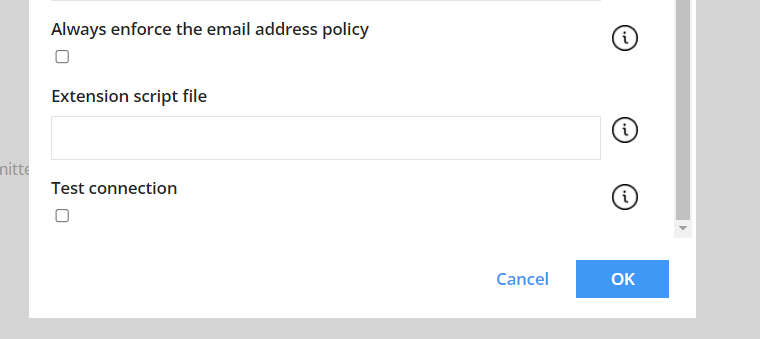
For the local deployment and Cloud Application Gateway, provide the entire file path to the script file. For the cloud deployment, providing only the file name is sufficient.