Cloud Application Gateway in Cloud Private
This page covers how the Cloud Application Gateway (CAG) is provisioned and used in Omada Identity Cloud Private, including the CAG instances that are part of the standard deployment, and what to do if you need connectivity that they do not cover.
For general CAG concepts, configuration, and usage, see the Cloud Application Gateway section of the Omada Identity Cloud documentation.
Architecture overview
The Cloud Application Gateway consists of one set of Provisioning and Import Workers registered to a single instance group. The instance group determines which systems a CAG serves – any system configured in the Enterprise Server (ES) to use a given instance group is handled exclusively by the CAG registered to that group.
Cloud Private deploys the Linux CAG inside the AKS cluster. It is registered to two instance groups, and each group is served by its own pair of workers:
-
The
Defaultinstance group handles customer system integrations. -
The
OmadaHostedinstance group handles Omada Identity internal operations exclusively. It cannot be reused or redirected for other system integrations.
This results in four Kubernetes Deployments – one import worker and one provisioning worker per instance group. All four are deployed by every Cloud Private installation. There is no option to deploy them selectively.
The Linux CAG uses Azure Workload Identity to authenticate against a CAG-specific Key Vault, where the instance group keys are stored – separate from the main application Key Vault. Each instance group has its own key.
Cloud Private does not provision or manage a Windows CAG VM. Earlier releases included one; it has been removed. If you need connectivity that the Linux CAG does not cover, see Self-hosted Windows CAG below.
The Linux CAG workers are displayed with the same name in the System Heartbeats section (Setup > Operations Dashboard > System Heartbeats), so you cannot tell the two instance groups apart by name alone. All workers function normally. To identify a specific worker, use the Cloud Application Gateway Instances page and match on Service UID rather than on Machine Name.
The following diagram illustrates the architecture of the CAG instances in a Cloud Private deployment:
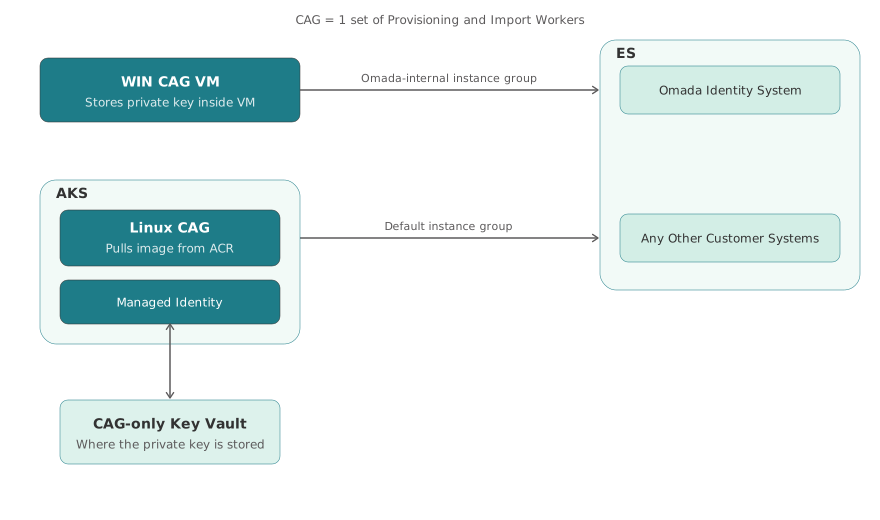
The two instance groups are independent – each serves its own systems and neither can be redirected to the other's.
The following table summarizes what Cloud Private provides and what you have to provide yourself:
| Linux CAG (provided) | Windows CAG (self-hosted) | |
|---|---|---|
| Runs as | Four AKS pods – an import worker and a provisioning worker per instance group | A Windows Server host that you provide |
| Instance groups | Default and OmadaHosted | A new, dedicated instance group |
| Connectivity | Cross platform connectivity packages only | All connectivity packages, including those that are not cross platform |
| Installed by | Installation script, Phase 1 – always deployed | You |
| Operated by | You, as part of the Cloud Private deployment – updated with each release by the installation script | You, separately from the deployment – hosting, patching, and updates |
The subsequent sections provide more details about each option.
Linux CAG
The Linux CAG runs as four Kubernetes pods on the AKS cluster – an import worker and a provisioning worker for each of the Default and OmadaHosted instance groups. Any system integration configured to use one of those instance groups is handled by the corresponding pair of workers.
The Linux CAG uses Azure Workload Identity for authentication and stores its instance group keys in a dedicated Azure Key Vault, separate from the main application Key Vault.
Connectivity compatibility
The Linux CAG supports cross platform connectivity packages only. Any system integration that uses a connectivity package that is not cross platform requires a self-hosted Windows CAG – see Self-hosted Windows CAG.
For the full list of supported connectivity options, see the Connectivity documentation.
Additional Linux CAG instances
Every deployment already includes two instance groups. If you have systems that need to be isolated into an instance group of their own, beyond Default and OmadaHosted, further Linux CAG instances can be added. Each additional instance runs as its own import/provisioning pod pair on the same shared AKS Linux node pool (see AKS node pools) and is registered to a separate instance group.
Adding further Linux CAG instances is a supported option that requires changes to the deployment configuration before running the installer. It is not a self-service step – contact your Omada deployment team to discuss requirements.
Self-hosted Windows CAG
The Windows CAG supports the connectivity packages that are not cross platform. Because a limited number of connectivity packages are currently cross platform, most Cloud Private deployments are expected to need a Windows CAG in addition to the Linux CAG.
Cloud Private does not provision or manage a Windows CAG. If any of your system integrations uses a connectivity package that is not cross platform, you have to run a Windows CAG yourself.
You choose where to host the Windows Server machine – for example, on-premises close to the target systems, or in your Azure tenant. Cloud Private does not require a specific location.
In that case, you are responsible for:
- Providing and hosting the Windows Server machine that runs the workers.
- Patching and operating it.
- Keeping it on a version that is supported by your Cloud Private release.
See Operational responsibilities for full information.
A self-hosted CAG must be registered to its own new instance group. Do not register it to Default or OmadaHosted – those are already in use by the Linux CAG, and registering a second CAG to an instance group that is already in use will not work.
The package is delivered with InstanceGroupId set to Default, so you must change it before the worker services are started for the first time. See Setting the instance group.
Downloading the CAG package
Cloud Private has no Cloud Management Portal, so the CAG package is not distributed from there. Instead, it is downloaded from your own deployment with the download-cag-worker.ps1 script, included in the scripts folder of your Cloud Private release package.
Before you start, ask your Omada deployment team for the tenant id, client id, and client secret of the CAG download identity provisioned in your deployment.
The script requires PowerShell 7.0 or later. Run it from pwsh, not from powershell.
Run it with your environment prefix – the same <global_prefix> used elsewhere in your deployment, for example oisaas-ab0001:
./download-cag-worker.ps1 `
  -TenantId <tenant-id> `
  -ClientId <client-id> `
  -GlobalPrefix <global_prefix> `
  -OutputPath C:\CAG
The script prompts for the client secret. The input is masked – paste it with right-click or Shift+Insert, as the Windows console host does not treat Ctrl+V as paste.
The package is built on request and is around 70 MB, so the download usually takes about a minute with no output until it completes. On success, the script saves a .zip file named after the worker versions and your environment, for example Omada.CloudApplicationGateway.Import.16.0.0.176.Provisioning.16.0.0.107.<commit>.<environment>.zip.
The package contains your environment's client id and password. Treat the .zip file as a secret – do not send it by email and do not attach it to support tickets.
Download the package again after each Omada release. Automatic updates are disabled in the delivered package, so it stays on the version it was downloaded at, and the Over-the-air upgrade section of the installation guide does not apply.
Installing the CAG package
Installation follows the standard Installing Cloud Application Gateway guide. Two things differ in Cloud Private:
-
The download step is replaced by the script above. The remainder of Step 1: Download still applies – unblock the
.dllfiles in the Connectivity folder, and do not change the folder structure. -
The package arrives already configured for your environment. The COPS API URL, client id, and password are set for both the import and the provisioning worker, and the worker versions are pinned. There are no connection values for you to collect or enter.
Setting the instance group
The package is delivered with InstanceGroupId set to Default, which is the instance group the Linux CAG already uses. Change it as part of Step 2: Configure security and storage, before the worker services are started for the first time:
- Create a new instance group for the self-hosted CAG in Setup > Administration > Cloud Application Gateway.
- Set
InstanceGroupIdto that new group inappsettings.Customer.jsonfor both the import and the provisioning worker. The file is in theWorker Servicefolder of each.
PrivateKeyLocation is delivered set to EnvironmentVariable, and is the same for both workers as the installation guide requires.
Monitoring
CAG logs are available in the Log Analytics workspace (<global_prefix>-law) associated with your Cloud Private deployment.
The following Kusto (KQL) queries apply to the Linux CAG pods running on the AKS cluster. A self-hosted Windows CAG is not covered by this workspace – consult that host directly.
Tool: Azure Log Analytics
Import worker logs (both instance groups):
ContainerLogV2
| where ContainerName contains "cag-import"
Provisioning worker logs (both instance groups):
ContainerLogV2
| where ContainerName contains "cag-provisioning"
The container name ends with the instance group, so you can narrow a query to a single instance group – for example cag-import-default or cag-provisioning-omadahosted:
ContainerLogV2
| where ContainerName contains "cag-import-default"
For interactive pod and log inspection on the AKS cluster, third-party Kubernetes tools can be used alongside the Log Analytics queries above. Consult your internal tooling guidelines for approved options.