ServiceNow integration
Here, you can find an information on how to install and configure the Omada Service Catalog application for ServiceNow integration.
This application allows joint Omada and ServiceNow customers to request access to Omada resources from ServiceNow and perform approval workflows directly in ServiceNow.
Overview
With the Omada Identity Cloud Service Catalog application for ServiceNow, you can:
-
Enable all identities to request access to business resources and applications whether on mobile, tablet, or desktop, within a single interface.
-
Allow approvers to approve or reject access requests directly in ServiceNow.
-
Synchronize approval decisions between ServiceNow and Omada Identity.
-
Provide a unified experience for both requesters and approvers within ServiceNow.
-
Provide a native experience directly in ServiceNow for all business requests.
-
Eliminate the need to have business users be fluent in multiple tools for accessing specific resources.
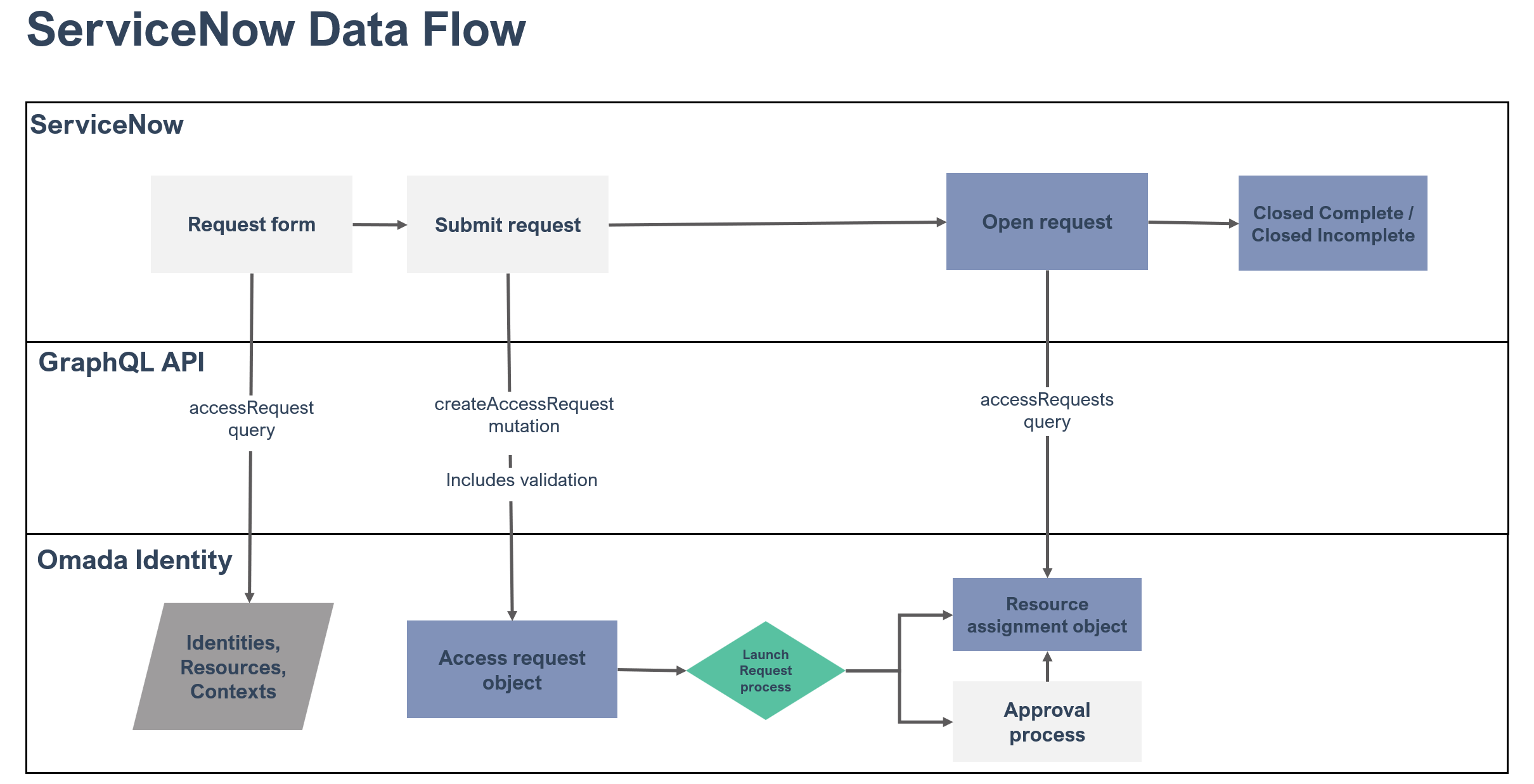
The integration uses the Omada Identity Graph API to exchange request and approval information between ServiceNow and Omada Identity, including identities, contexts, systems, resources, request status, and approval decisions. See the general data flow between ServiceNow, Graph API, and Omada Identity on the diagram:
The integration between ServiceNow and Omada Identity is based on a service user. This service user will impersonate the ServiceNow user in Omada Identity.
This means that you also need to make sure that ServiceNow and Omada Identity are able to correlate the ServiceNow user with the Omada Identity user that they will be impersonating.
By default, this is done by matching the user's ServiceNow email address with the user's Omada Identity username.
If you cannot use the username in Omada Identity for the email address registered for the user in ServiceNow, you can use the master setting IdentUserNameProps to define an alternative lookup.
To prevent privilege escalation, the impersonation of members of the System Administrators user group, or any user group requiring an authentication level higher than low, is restricted. See the Impersonation and authentication levels for details.
on-prem To leverage the ServiceNow integration, you must install at least the Omada Identity version 14 update 15.
Key Features
The application creates a Service Catalog item that allows users to request access to resources in Omada Identity Cloud.
- Request for self
- Request on behalf of another identity
- Select context to request in (if configured in Omada Identity Cloud)
- Filter resources on system
- Filter out already assigned resources
- Control which resources are available to be requested in ServiceNow (e.g., only expose business roles)
- Select validity
- See the status of access request
- Approve or reject access requests directly in ServiceNow
- Display approval tasks in the ServiceNow portal
- Synchronize approval decisions with Omada Identity workflows
The process currently does not support the following use cases:
- Request for accounts
- Selecting an account for identities with multiple accounts
- Resources with attributes.
For these resources, we recommend that the resource property Prevent self-service in third party applications is set to True.
Approval handling
The ServiceNow integration supports approval workflows directly in ServiceNow.
When an access request requires approval, approvers can review and approve or reject the request from the ServiceNow interface. Approval decisions are synchronized back to Omada Identity, where the request workflow continues according to the configured approval process.
This allows organizations to centralize both request submission and approval handling in ServiceNow while maintaining governance and workflow control in Omada Identity.