Resolved Issues and Bug Fixes
Read more about resolved issues and bug fixes in this release.
UI and UX
Inconsistent Revoke option display for birthright resources across different identity views
When viewing birthright resources across different identity views, there was an issue with an inconsistent Revoke option. It has been fixed by adding a missing verification to the grid row to decide whether the Revoke option should be shown or not.
INC-295006
Access request
Incorrect account option selection for access request
We've resolved an issue where users were able to select invalid account types during access request process. Now, it's possible to only select account types that exist on both the identity and the resource.
INC-298579 INC-298868
Access request assigning business context despite it being disabled
Due to an issue, the context was being added despite being disabled. It has now been resolved.
INC-297990
Written access request requiring to use context
There was an issue where access requests required providing a business context. It was caused by incorrectly checking if the context selector should be shown or not, and that has been fixed now.
Additionally, if you select 2 identities without a common context, we now show an error message indicating the problem: No common context between selected identities.
If you make the context not required in the Request access form, you also have to make the context not required in the Interpret request form; otherwise, you will not be able to interpret the request, as the context will be missing.
INC-297242
Tables infinitely loading when using the Norwegian language
In some cases, if users adjusted Norwegian application strings through the UI and then switched to use the Norwegian language, an issue could occur where some tables would display their loading animation indefinitely. This has now been fixed.
INC-297003
Written request and extend access map broken in Access page
Several improvements have been made to enhance grid behavior and navigation:
- Tabs now open the correct grids without errors.
- Grids display the appropriate data and column definitions.
- Filtering, sorting, and pagination work as expected.
- Visual styles have been corrected, removing unintended blue cell highlights.
Access page column positions resetting after each move
We have fixed an issue with column order: you can now reorder columns in the Access page grids across all tabs. The selected column order is saved in your user settings, so your preferred layout persists between sessions.
Access page: + button missing in languages other than English
The + button on the Access page was not displayed when using languages other than English. This occurred because the system relied on the English process name to locate the button link. The issue has been fixed: the button now appears correctly in all supported languages.
INC-296884
Access approval
Issue with the approval Reassign questions dialog box
In the access approval proces, there was an issue with filtering the Reassign questions dialog box. It is now fixed.
INC-295813
Role and Policy Engine
Failing RoPE calculations (property definition not being correctly loaded from cache)
Previously, RoPE calculations sometimes failed with the error message: Calculation of an Identity failed due to Error calculating queued identity '<Display Name> (Partition 0)': Object reference not set to an instance of an object.
The issue was related to the property definition not being correctly loaded from the cache, and it has now been fixed.
RoPE not queuing new changes
RoPE could fail to populate the queue because of an SQL timeout when querying modified data objects with owner property changes. The query has been optimized to process fewer objects at a time, preventing timeouts. In addition, error handling has been refactored so that transient SQL errors—such as timeouts—no longer block the remainder of the queue population process.
INC-295362
Enterprise Server
Governance missing DisplayName resolver
We have resolved an issue where the USERGROUPREF values in resource assignments were not displayed as human-readable names when included in the AttributesToResolveDispValuesFor customer setting. These values are now correctly resolved and shown with their display names.
INC-294553
Failure to open decision activity in process template
There was an issue that affected process template element coordinates in locales where the decimal separator is a comma (,). The issue occurred when saving graphs due to an incorrect transformation of element locations, and it has now been fixed.
INC-295055
Azure Log Analytics - missing mail content
After an issue with missing mail conent, we now limit mail message length in log targets to 256 bytes to prevent exceeding the Azure log limit of 32,000 characters.
INC-294487
Code method copying wrong data with reference path empty
An issue was fixed where the CopyPropertyValuesFromReferencePath code method could copy incorrect data if the reference path property on the source object was not set. To resolve this, a new method, CopyPropertyValuesFromReferencePath2, has been introduced, which exits safely when no reference path is defined. The previous CopyPropertyValuesFromReferencePath method has been marked as obsolete.
INC-292005
Security
Function level access control (purging objects)
Access to the PurgeDataObject web service is now limited to System Administrators, Operation Administrators, and Data Administrators.
INC-294061
Improvements to data display and encoding
As part of our ongoing security measures, we have improved data display and encoding across several areas of the platform. These changes ensure that information is displayed safely and consistently throughout the application.
- Improvements to the print functionality to ensure field values are rendered securely.
- Enhanced encoding of system properties for more reliable display.
- Better handling of messages shown during data object deletion to ensure consistent and safe output.
INC-294060
Connectors
Connector data model validation
During the connector setup using a data model without objects, the validator didn't detect that objects were missing and allowed saving the configuration. Now it validates them correctly.
INC-291484
CyberArk connectivity task mappings
The CyberArk connector didn't include the default task mappings during the system setup. This issue has been fixed.
EntraID multiple property values support
The EntraID connector didn't support multiple values in reference property lookups. This support has been implemented. See the Support for reference lookup with returned arrays section in the generic REST connector documentation for details on property lookups.
SR-296546
SOAP connectivity – support for the HTTP protocol version selection
The generic SOAP and some SOAP-based connectors now include a new parameter - HTTP protocol version selection:
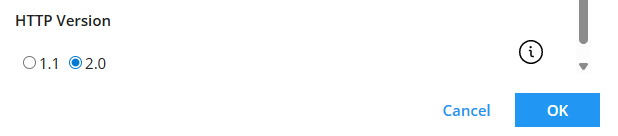
This setting dictates which version should be used during the handshake process with the target API. Set it to 2.0 for the services which require HTTP 2.0.
INC-296929
originJobId attribute prevented new jobs from being created in the Review mode
The originJobId attribute had the same value for all provisioning jobs created using the DOLM feature and shadow data objects. It prevented new jobs from being created if the system was in the Review state. This issue has been fixed.
INC-297225
REST-based connectors – incorrect URL resolution
After the August Cloud Update 2025, some of the REST-based connectors (Entra ID, Coupa) could incorrectly resolve URLs for some operations. The issue has been fixed.
INC-297856
DataTime dataType doesn't support null
The OPS data model now allows passing DateTime as null.
INC-297084
Flat file CSV connector failing with the Permission denied (password) error
Flat file CSV connector could fail with the Permission denied (password) error, but it worked successfully on the second attempt. This error may have been caused by the server configuration that was now improved:
- the connector now supports both password and keyboard-interactive authentication methods.
- the connector performs an automatic retry if the first login attempt fails.
INC-298874
Boolean parameters not sent correctly by the Powershell connector
Boolean parameters were not sent correctly by the Powershell connector to the Powershell scripts, causing provisioning task errors. This issue has been fixed.