Release highlights
We've just released Omada Identity Cloud update! What's new?
We have fixed an issue where multi-value fields displayed selected items horizontally instead of stacking vertically, making large selections difficult to review. This fix is effective as of March 26, 2026.
UX and UI
The legacy menu-based UI will be deprecated soon and will no longer be supported. Customers currently using the Legacy UI are encouraged to transition to the New UI before upgrading to the upcoming releases to ensure a smooth transition. For more information, see Deprecation calendar.
Default filter values for Access request
You can now define default values for Access request filters. When you configure a default value and open the Access request survey, the system automatically applies the filter.
You can define default values by configuring the customer settings AccessRequestIdentitiesPropertyFilters and AccessRequestResourcesPropertyFilters, for identities and resources, respectively.
To configure the default filter, use the following format: PropertyName=DefaultValue. The DefaultValue is optional. If you specify it, the value must be a valid GUID of an existing value for that property, for example: OUREF=dc0db0ca-aba2-4c93-b150-55b6f21a71d7.
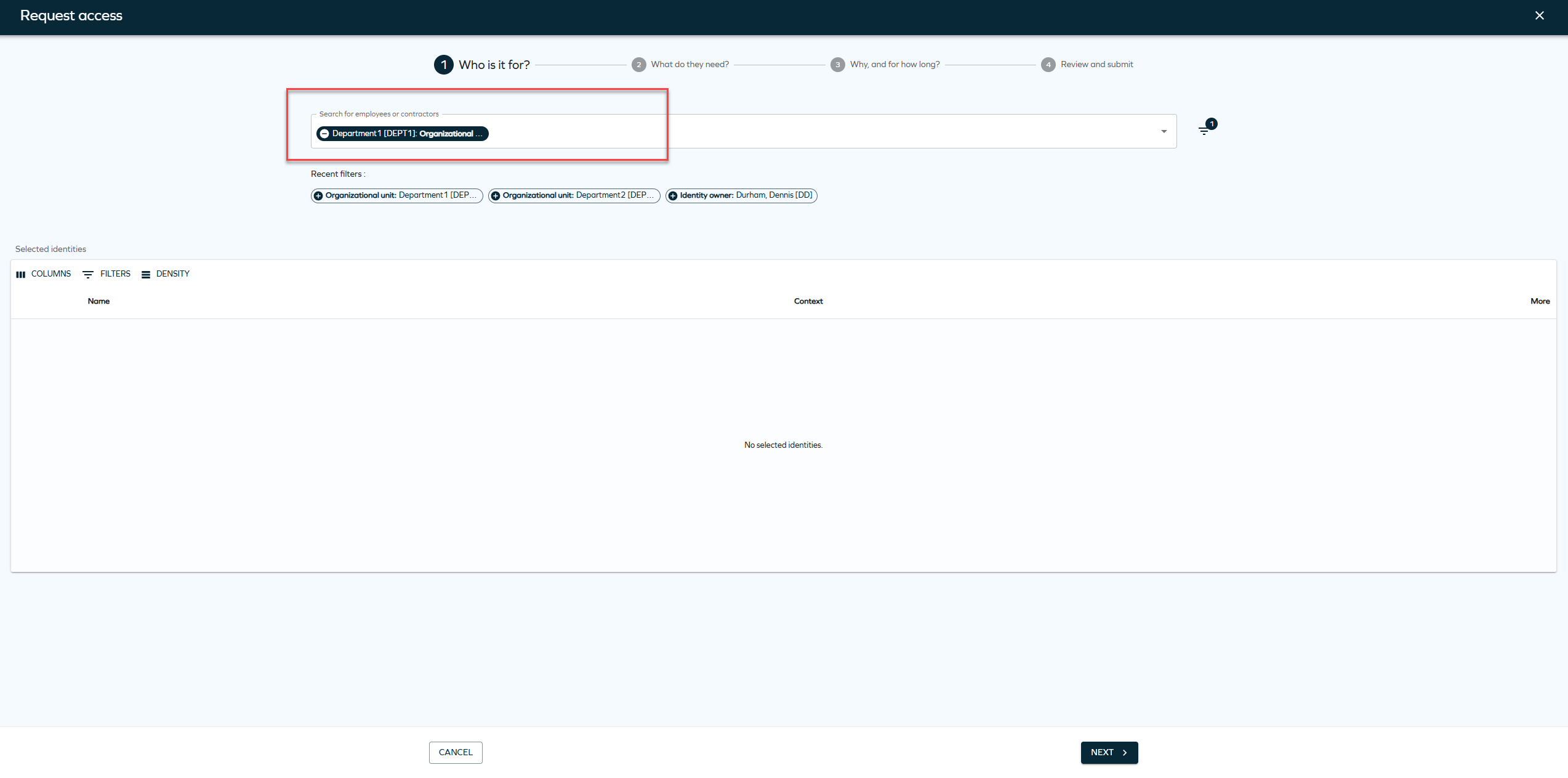
You can also configure multiple properties. Not all properties must have a default value, for example: SYSTEMREF,ROLECATEGORY=1bab597e-6d2a-4670-979b-0b2c1dc0ece8,ROLETYPEREF,ROLEFOLDER=5553d557-602e-40bd-9fc5-450e0cba5ed7. In this example, only ROLECATEGORY and ROLEFOLDER have default values.
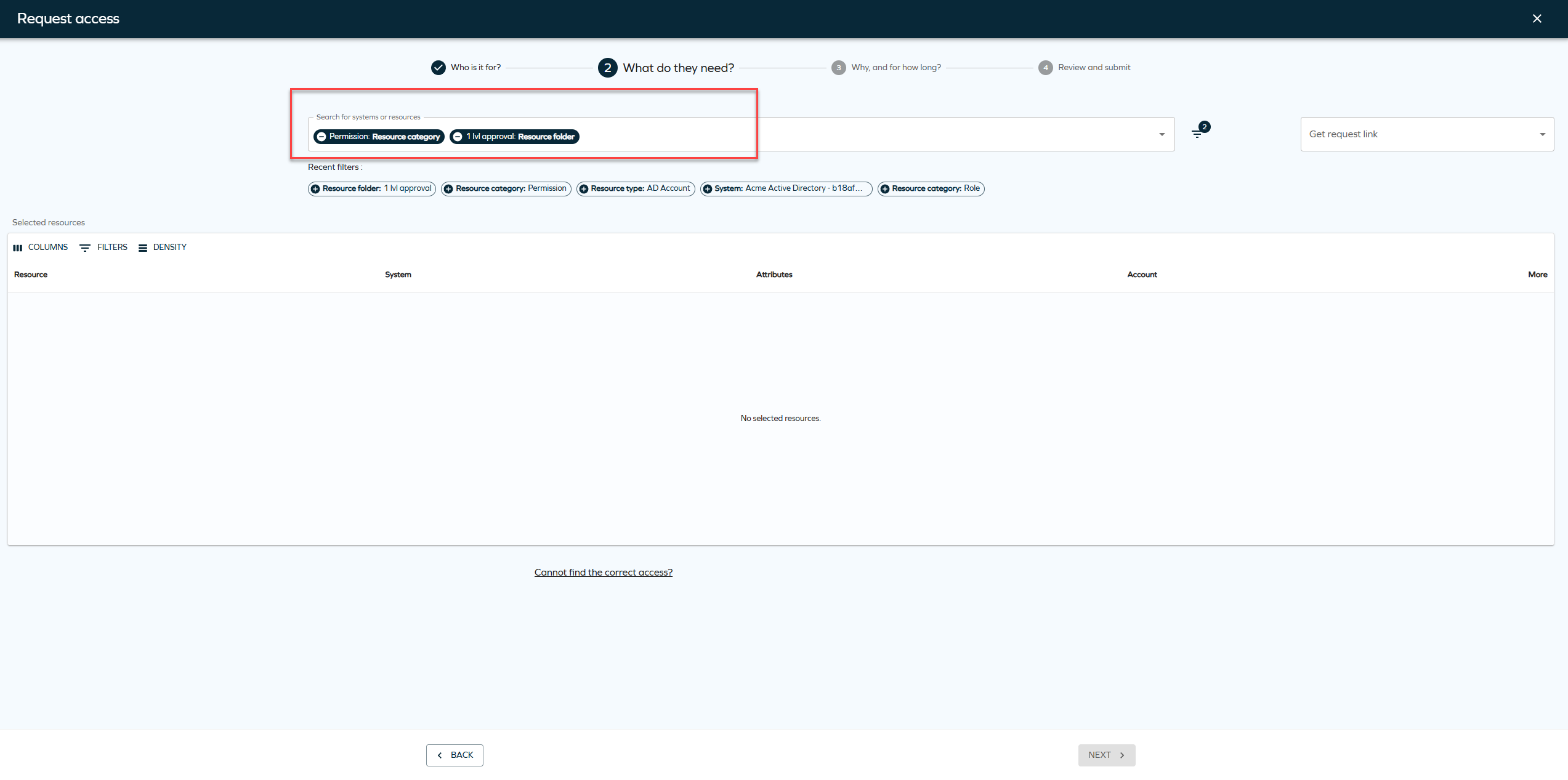
You can remove the default filters or add new filters when creating an Access request.
New customer settings for default Access request filters
We have introduced two new customer settings for default access request filters. To enable default filter values, you must configure the following customer settings:
-
AccessRequestIdentitiesPropertyFilters -
AccessRequestResourcesPropertyFilters
These settings control which properties are available as filters and which of them have default values. If you don't configure these systems, the system doesn't apply default filters on the access request page.
Updated Identity context view
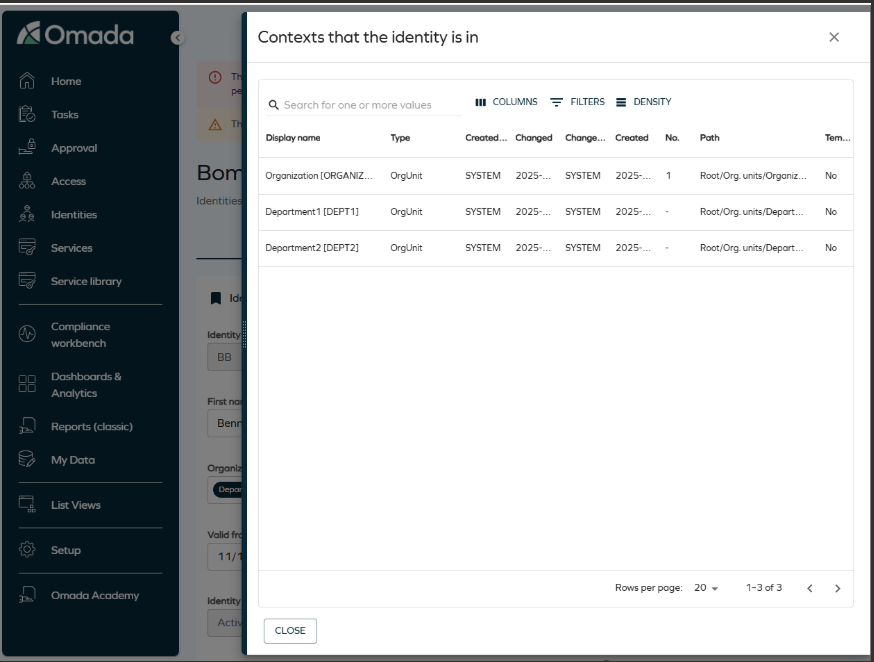
A UI action has been added to view the contexts an identity belongs to, providing the same functionality as in the legacy UI. From the Identities list or the Identity detail view, you can open a side panel displaying a configurable grid of all organizational contexts (such as organizational units) associated with the selected identity. The grid supports column selection, filtering, and row density controls, offering a modernized and more consistent user experience.
Enhanced navigation for reference properties
Reference properties now open directly in side panels, improving navigation. When you click a reference property chip, for example, an attribute set, the referenced object opens in a side panel. This allows you to view and edit related objects without leaving the current context.
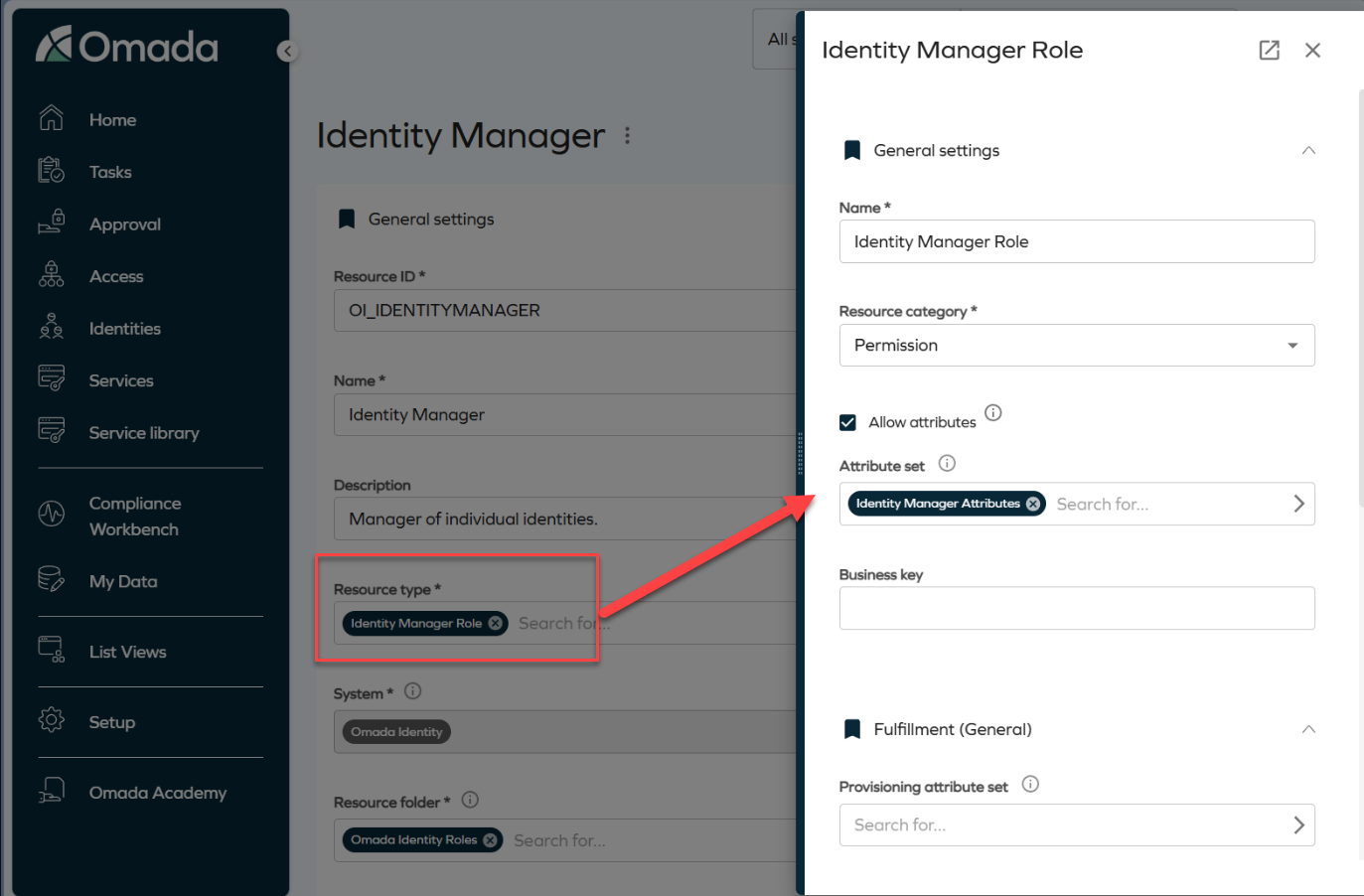
Side panels are stackable. For example, clicking an attribute set from within a role panel opens an additional panel layered on top of the existing one. Clicking the Identity Manager Attributes chip opens another panel, as shown in the image.
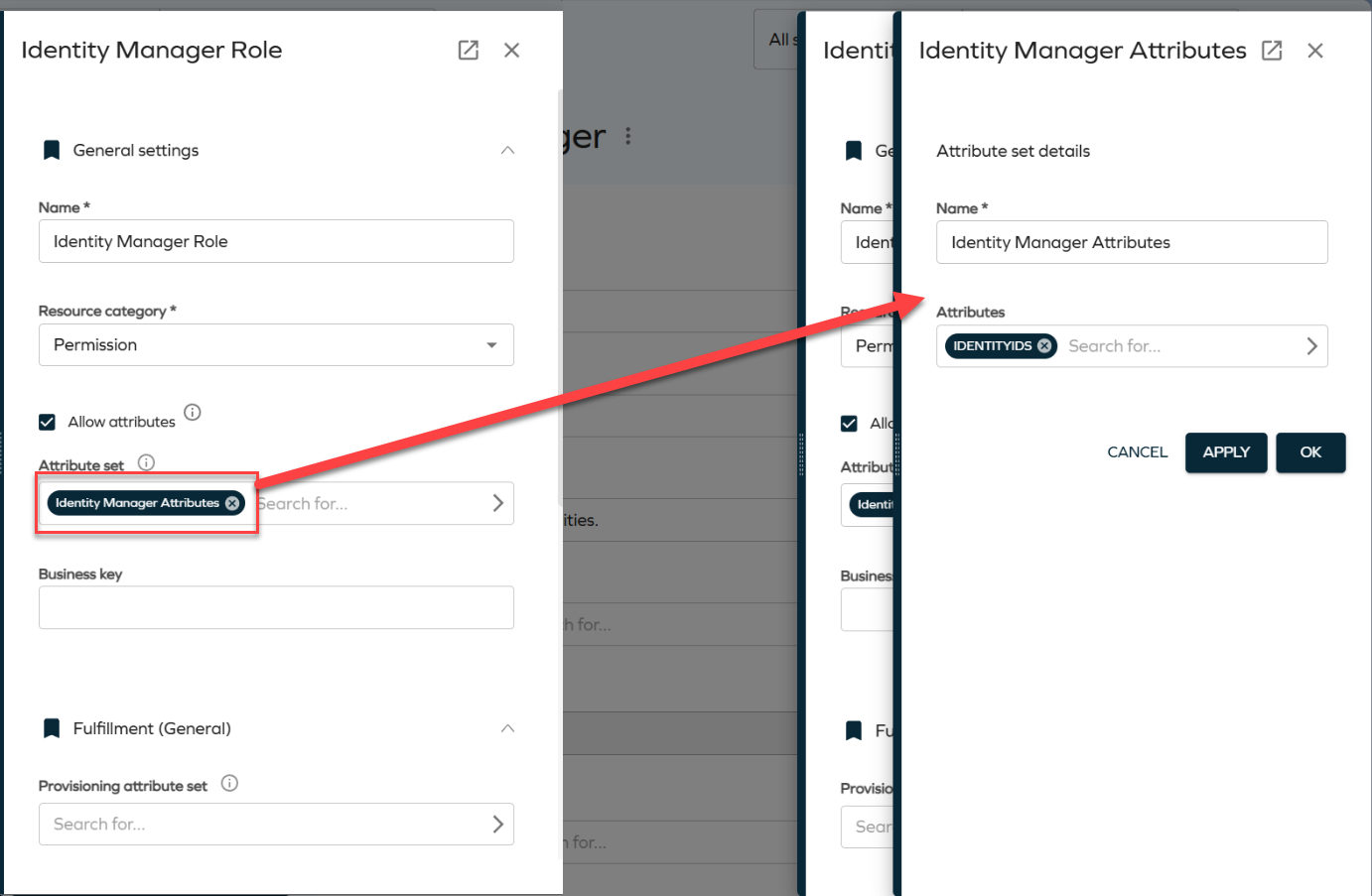
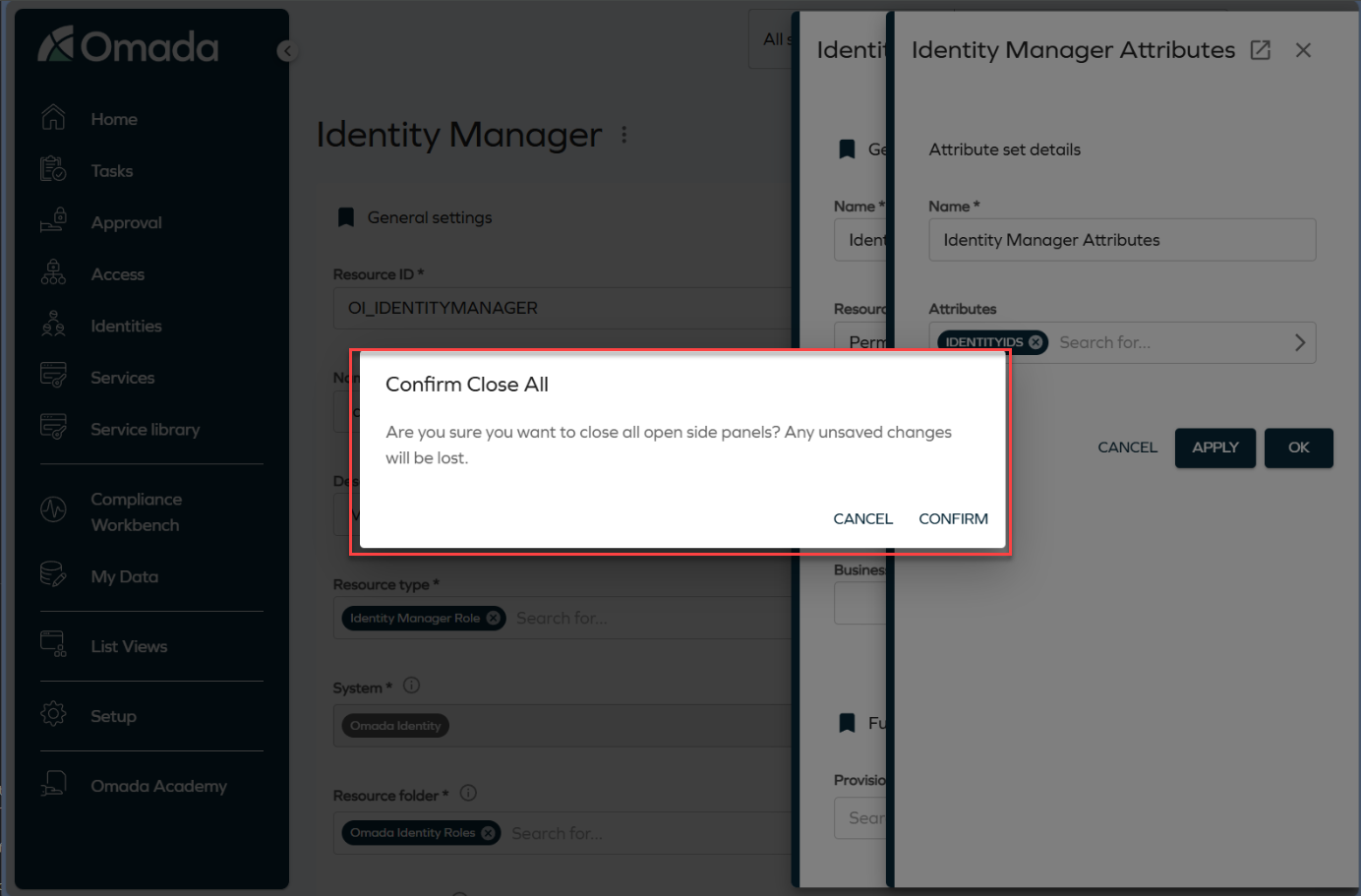
To close a panel, click the Close button or press the **Esc ** key. Clicking the backdrop closes all open panels at once. To prevent accidental data loss, the system displays a confirmation dialog before closing all panels.
Validation for unmapped extension attributes in Queries and Mappings
We have added validation that displays a warning if required extension attributes are not properly mapped when configuring Account or Resource Assignment queries in the Queries and Mappings dialog. You must now select valid Destination values before saving the configuration. For more information, refer to the Extension attribute validation documentation.
System message banner
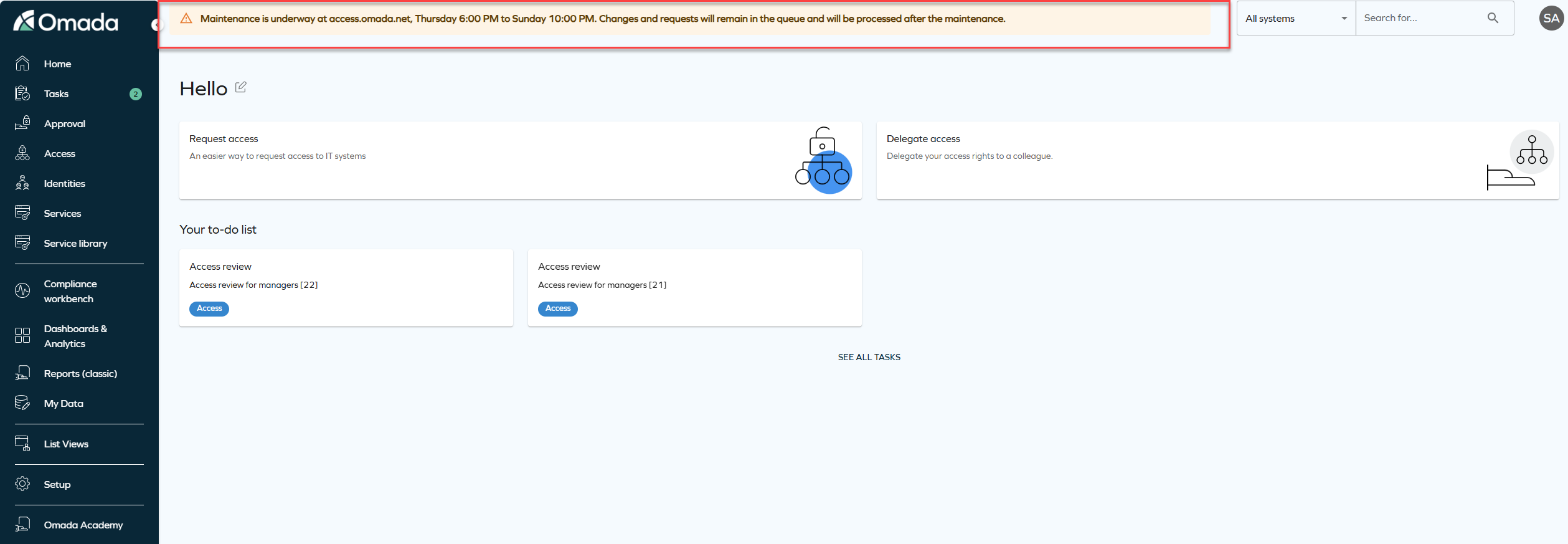
We have introduced a new feature that allows you to display system-wide messages to all users. The feature is configured via the new customer setting SystemMessage to show an informational, warning, or error message at the top of the application.
The message is configured as a JSON value with the following format:
{ "message": "System maintenance on Sunday at 2 AM", "type": "info" }
The type value controls how the banner appears:
-
Info: shows a blue banner for general information, for example, scheduled maintenance or new features.
-
Warning: shows a yellow banner for situations that require special attention, for example, performance issues or upcoming changes.
-
Error: shows a red banner for critical issues, for example, system outages or urgent alerts.
Remove access panel
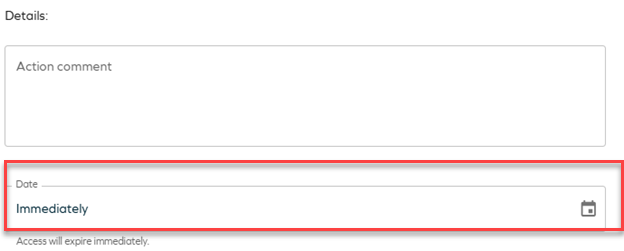
This update introduces terminology changes and clarifications to the Remove accessfunctionality. The term Revoke has been replaced with Remove access across relevant areas of the product to improve clarity and consistency in the user interface and documentation. Additionally, the Remove access panel now provides two options:
-
Immediate remove access:
- The resource assignment is expired immediately.
- RoPE recalculation and deprovisioning are triggered immediately.
-
Scheduled remove access:
- Access removal can be scheduled for a specific date.
- By default, access is removed at the end of the selected day, based on the identity’s time zone.
- When the scheduled time is reached, RoPE recalculation and deprovisioning are triggered immediately, and the resource assignment expires within a few minutes.
-
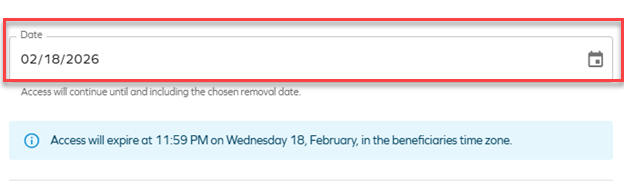
If the default RoPE configuration parameter extendValidityPeriods has been set to False, access expiration will occur at the beginning of the selected day instead of the end of the day. To ensure consistent behavior, verify that the customer setting Enable RoPE extend validity periods is configured accordingly.
For more information about the Remove access panel, see Identities.
Javi – Omada AI assistant
Integration with Slack
Javi, the Omada AI assistant, now supports integration with Slack, in addition to Microsoft Teams, allowing users to interact with Javi for access-related actions, Q&A, and notifications directly from Slack.
For more information on onboarding and configuring Javi, see Javi – Omada AI assistant.
Omada Identity Analytics (OIA)
New theme matching Omada's branding
The Omada Identity Analytics dashboards have been visually updated to match Omada's current branding, including colors and typography. The following screenshot reflects the updated look.

Updates to individual screenshots throughout the documentation will be applied incrementally in subsequent updates.
Report Generator
The Report Generator dashboard has been enhanced with an updated user interface and interaction model, making it easier to build flexible reports using dropdown selections and filters.
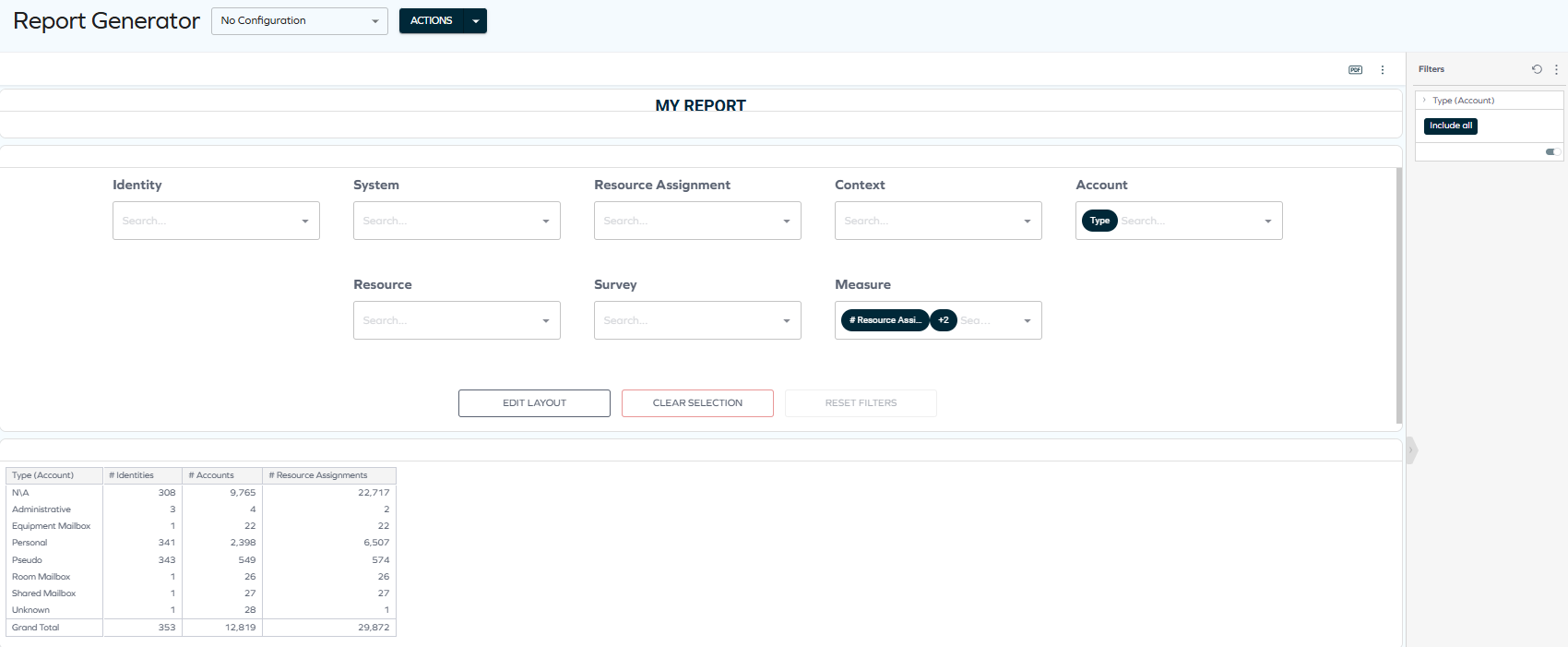
See the Report Generator documentation for details.
Access Intelligence (previously Role Insights)
-
The Role Insights dashboard has been renamed to Access Intelligence to better reflect its purpose and capabilities. The updated name emphasizes that the dashboard goes beyond providing static insights and delivers actionable intelligence based on machine learning (Role Mining) results.
-
Administrators can now request access directly from the Access Intelligence dashboard.
When analyzing role proposals, administrators can initiate access requests without navigating to the standard Access Request flow. This enhancement streamlines the role refinement process and supports faster remediation of access gaps identified through Role Mining.
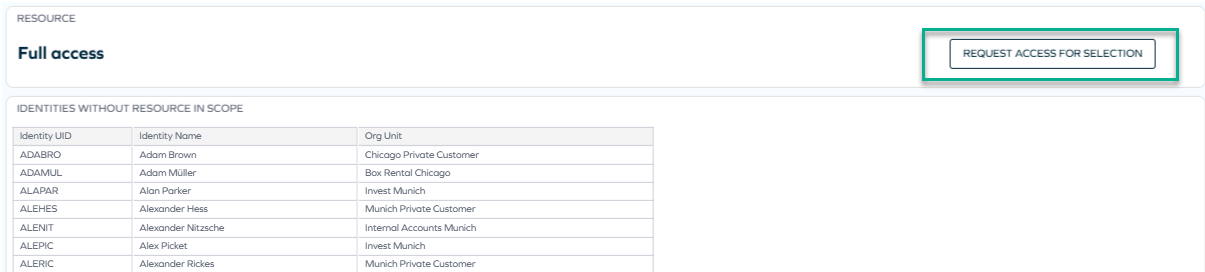
For more information, see the newly updated comprehensive documentation: Access Intelligence.
Role and Policy Engine
Support for additional UTC time zones
We have added support for the additional time zones with non-standard UTC offsets, including:
- UTC-11 - American Samoa, Midway Island, Niue
- UTC-09:30 - Marquesas Islands
- UTC+12:45 / UTC+13:45 (DST) - Chatham Islands (New Zealand)
- UTC+14 - Line Islands (Kiritimati)
These time zones are now mapped using the corresponding Windows time zone identifiers. For more information, refer to the Time zones documentation.
Platform improvements
Improved description updates for obsolete resource assignments
The post-action logic for recertification surveys has been enhanced to ensure that direct resource assignments are updated with clear descriptions when they are set to Obsolete.
When access is Removed as part of a recertification campaign, the resource assignment description now records the removal context, date, acting user, and any campaign comment.
If a survey is closed without a response, the description explicitly states that no response was provided and that access was removed due to non-response.
Improved error visibility
On-screen error notifications will now be displayed when data fails to load or an operation fails. Previously, these errors were only logged in the browser console. The new snackbar notifications provide clear feedback and context, helping you to understand when something goes wrong.
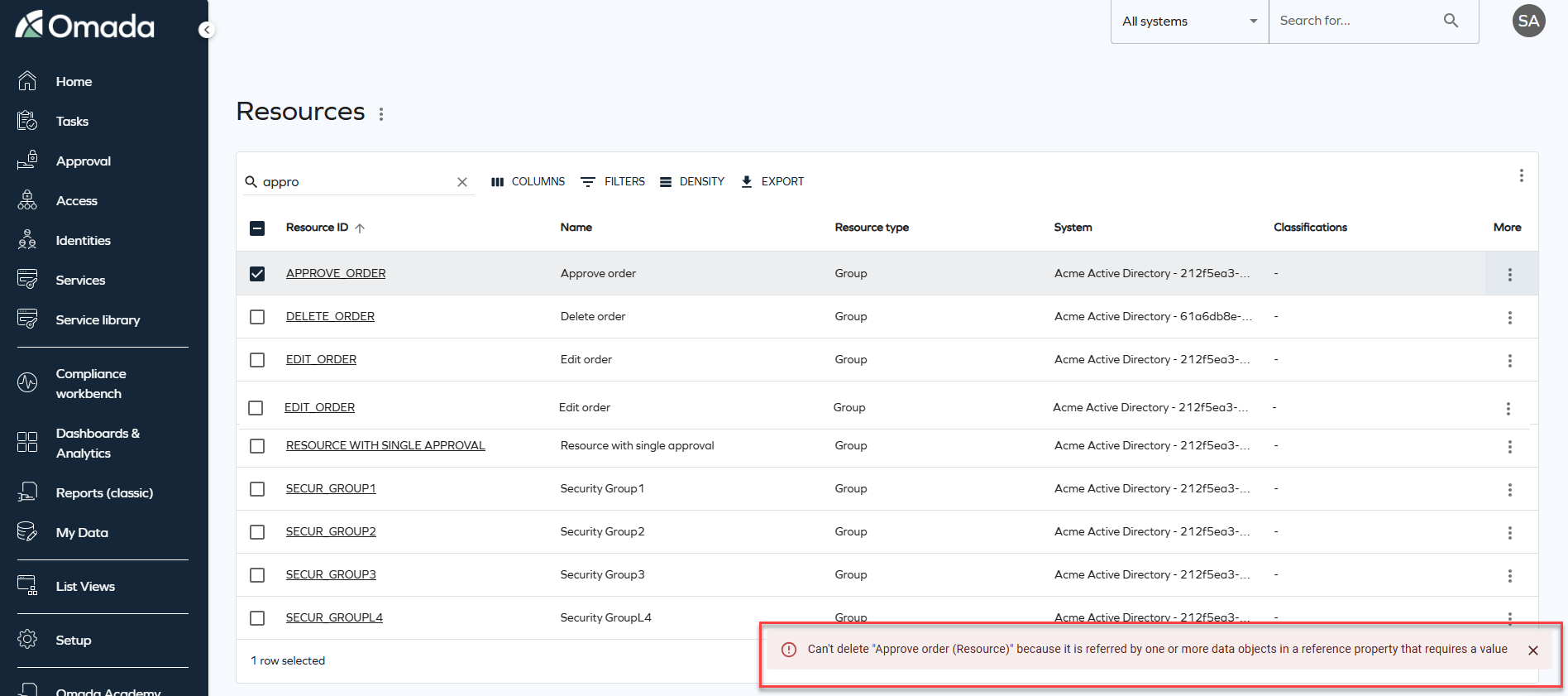
Improved full text search stability and performance
Full text search has been enhanced to improve performance and stability by optimizing how search data is evaluated. As part of this improvement, the SearchData column in tblDataObject is extended to include the corresponding ID of the DataObjectType.
For example, when searching for Resources, the search operation includes a filter on the Resource data object type ID and no longer evaluates search data belonging to other object types. This improves search performance by ensuring that only search data for the selected data object type is evaluated.
To support this change, an automatic background migration is executed by the timer service. This migration updates existing search data in batches until the search data for all data objects includes the data object type ID. During the migration period, full text search continues to behave as in previous versions.
Once the migration is completed successfully for all data objects, the system automatically enables the optimized search behavior, and the customer setting DataObjectSearchDataContainsTypeId is set to True, indicating that the migration is complete.
Connectors
Atlassian Guard
A new connectivity package for Atlassian Guard is now available. See Atlassian Guard for details.
API
New Omada Identity Graph API version 3.4
We have released a new version of the Graph API (v3.4), which introduces the following updates: the fields DefaultValue (default value of the property) and DefaultValueName (display name of the default value) have been added to both IdentityFilterPropertyType and ResourceFilterPropertyType. These fields define the default property filter value in an Access Request, when applicable. Additionally, in RevokeAssignmentInputType, the RevokeOn field is now optional.
Refer to Omada Identity Graph API to know more.
Documentation
Deprecation Calendar
We have added a new Deprecation Calendar page to the Omada Identity documentation. This page provides a consolidated overview of features and components that have been announced as deprecated.
The calendar helps plan upgrades and transitions earlier by showing the deprecation announcement, target removal release, recommended replacements, and any action required. It is updated whenever lifecycle status changes or when a new release introduces deprecation-related updates.
You can find it in the documentation under Release Notes > Deprecation Calendar.
Clarified security evaluation behavior (DOSM and access modifiers)
The documentation has been updated to clarify several aspects of the security evaluation model, improving transparency and predictability when configuring and integrating with Omada Identity.
The following clarifications have been added:
-
Default access mode behavior (Identities access modifier) - it is now documented that when the Identities access modifier is configured without explicitly specifying an
ACCESSMODE, the system defaults toORGUNIT. Guidance has been added recommending explicit configuration of access mode to ensure predictable behavior. -
Read vs update rights in access modifiers - the documentation now explains that different access modifiers may evaluate read and update rights differently in combination with the Data Object Security Model (DOSM). This may result in varying behavior when opening objects in read-only mode.
-
Identity category – Customer (legacy CIAM behavior) - clarification has been added that the Customer identity category may trigger legacy security behavior originating from deprecated CIAM functionality. This behavior can override or influence configured DOSM and access modifier settings.
-
API security enforcement (GraphQL and OData) - the API documentation now explicitly states that security enforcement through DOSM and access modifiers applies equally to GraphQL and OData endpoints.
These updates improve alignment between conceptual security documentation and actual system behavior and provide clearer guidance for configuration and API integrations. For details, refer to the Security and Access modifiers sections of the documentation.
Other
New customer setting to select Account type in Access request
We have introduced a new customer setting AutoSelectAccountTypeInAccessRequest with the default value set to True to maintain the existing behaviour. With this customer setting, the system automatically selects the default account during an access request, maintaining the existing behavior. When set to False, users with more than one valid account for a resource will be required to explicitly select which account to use when submitting the access request.