Context assignments
The relationship between an identity and a context is called a context assignment. An identity has a context assignment to a context - either a direct context assignment or a membership-based context assignment.
Becoming a member of a context
There are a number of steps to go through in order to become a member of a context.
End-users can request to join a context, also known as joining a project. To do this, you must go to Services > Join a project. If you are not using projects as a context type, you can rename the process to something more relevant than "Join a project".
Users must specify a reason for why they want to be a member of the context by typing a description of this in the Reason for request field.
The context owner must approve the end user's request for membership.
Membership-based context assignments
You can specify a membership property for contexts that create contexts assignments based on a reference between an identity and a context.
The identity data object has a reference property named OUREF which refers org. unit objects. In the context type definition Org. units, it is specified that this property refers the identity's membership to an org. unit.
In the example below, the identity, William Parker, is a member of the Administration (Chicago Downtown) organizational unit and the Primary context type is Org. Units, as illustrated below.
William Parker belongs to this context via a membership-based context assignment.
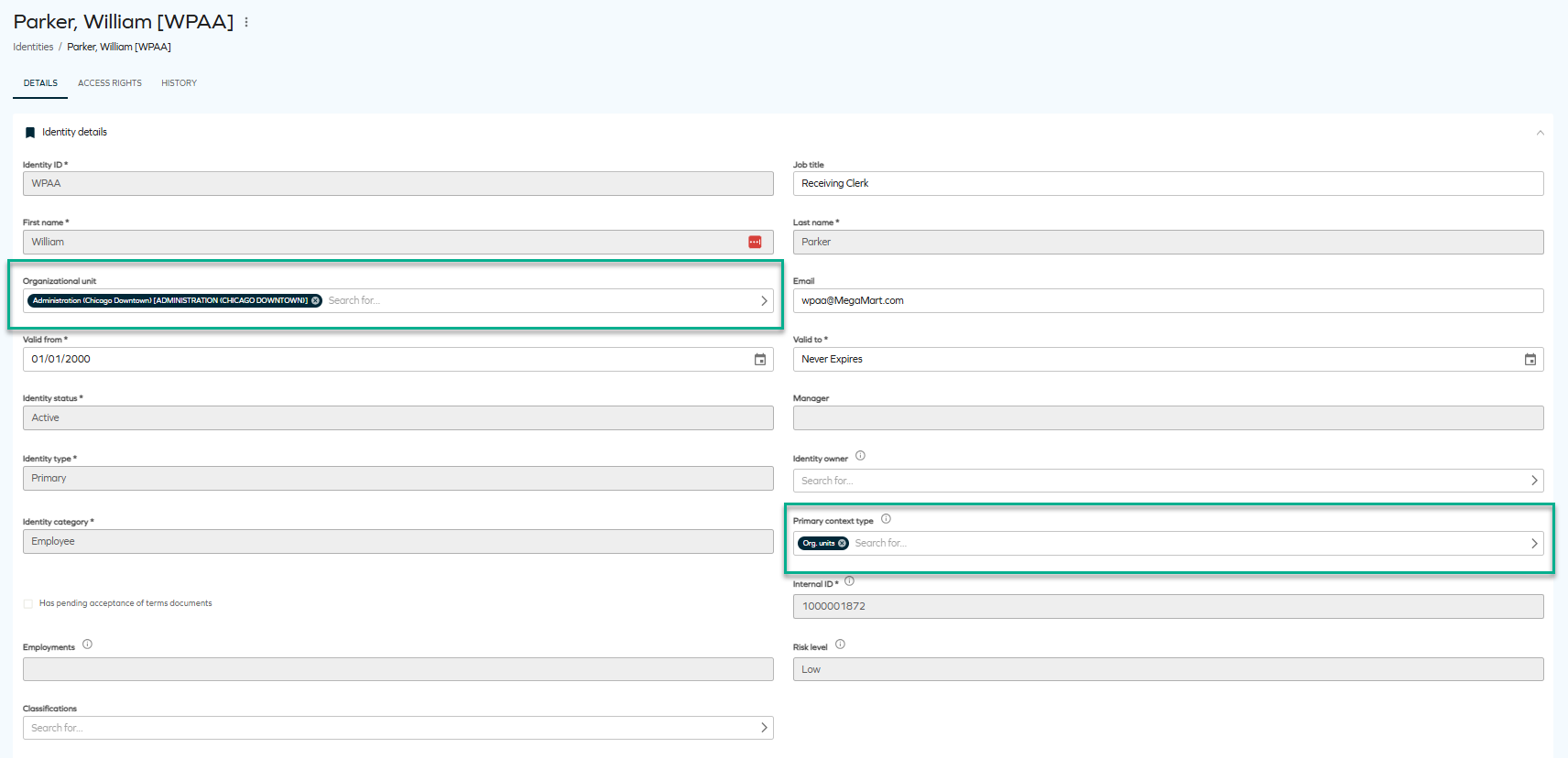
The benefit of handling context via membership-based context assignment is that it limits the work required to maintain context assignments.
Direct context assignments
You create direct context assignments through the Request Membership process if you have context owner rights when you edit the context object. Identities are also added to a context when a context owner requests access on their behalf in the request access process.
Note that in the default security setup, context owners can create context assignments, but not delete them.
- After editing the relevant values, click OK and Close.
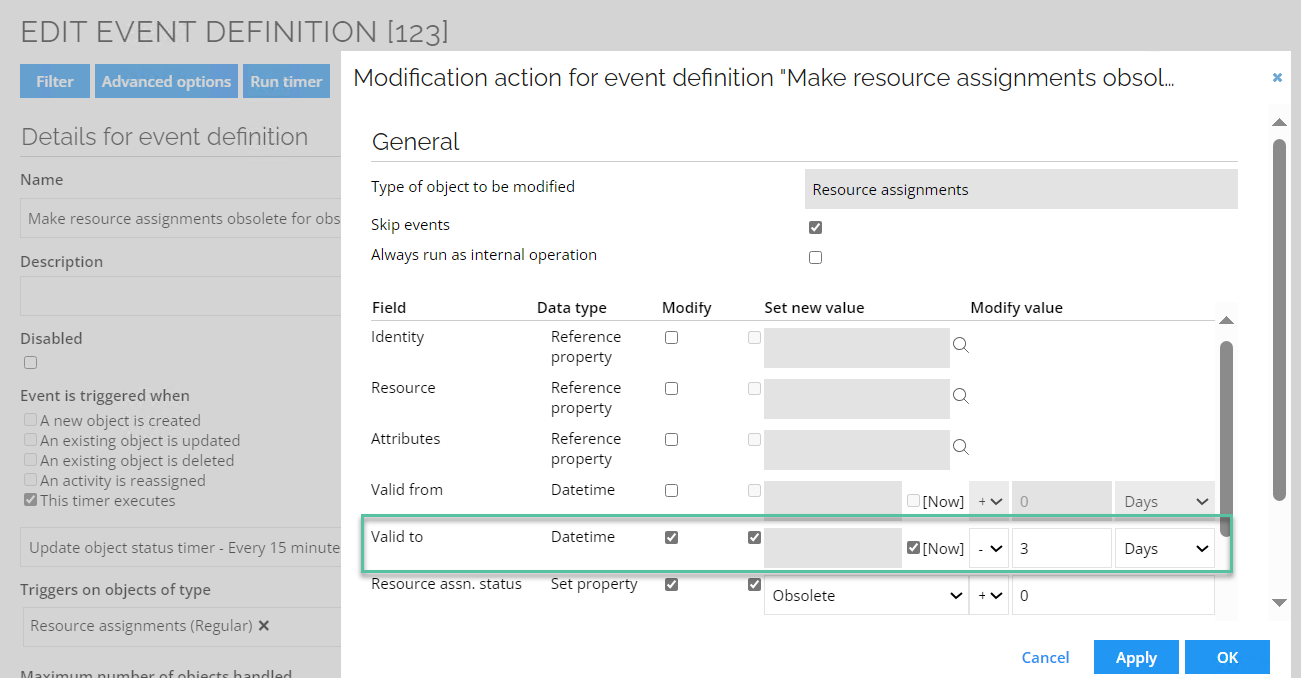
The value set on the resource assignment Valid To field should match the value set in the filter expression. To do so, follow these steps:
-
When editing the relevant event definition, at the bottom of the view, select the action type and then click Edit.
-
In the Modification action dialog box, in the Valid to field, enter the value so it matches with the value for the filter expression.
-
When you are finished, click OK.
Context assignments and resource eligibility
The context an identity is assigned to determines which resources are visible to them during an access request, when Eligibility Filtering is enabled.
The system evaluates eligibility by including the identity's assigned context and all parent contexts in the hierarchy (upward inheritance). For example, an identity assigned to Denmark is also considered eligible for resources tagged with Europe or Global, because Denmark is a child of Europe, which is a child of Global.
Upward inheritance works in one direction only. A resource tagged with Europe is visible to identities in any sub-context of Europe — there is no way to restrict it to identities whose context is exactly Europe. For details on this limitation and common scenarios, see Eligibility Filtering in the Access request documentation.
Context membership validity
When RoPE evaluates assignment policies, only valid context memberships are taken into account by default. Invalid context memberships are disregarded. This behavior is controlled by the RoPEContextMembershipsIncludeInvalid customer setting and applies from the April 2026 Cloud Update onwards.
A context membership is valid when the current date and time falls within its validity period. A context membership is invalid when its validity period has not started yet or has already ended.
The validity period of a context membership is determined by the intersection of the applicable validity periods:
- For a direct context assignment, the
Valid FromandValid Tovalues of the context assignment apply, where specified. - The
Valid FromandValid Tovalues of the context object always apply. The validity period of the context can therefore narrow the validity period of the membership. - Membership-based context assignments do not have validity limits of their own. However, the validity period of the context object still applies. A membership can therefore be invalid even when no context assignment object exists.
- The validity period of the identity is not included when determining whether a context membership is valid.
When the RoPE configuration parameter extendValidityPeriods is enabled, Valid From is interpreted as the beginning of the specified day and Valid To as the end of the specified day in the identity's time zone. Validity boundaries are therefore day-based and time zone-dependent.
For more information, see Time zones.
Context status
Context status is evaluated separately from membership validity. When RoPE evaluates assignment policies, a context membership is excluded based on context status only when the context has the status Deleted (accepted).
No other context status value has this effect. For example, statuses such as Inactive, Pending, and Terminated do not by themselves cause a context membership to be excluded from assignment policy evaluation.