Data provisioning
Connector settings
Enable provisioning:
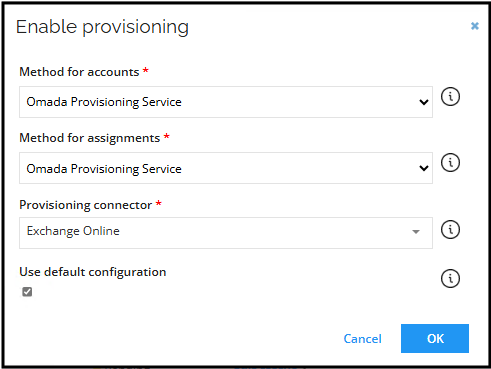
| Setting | Description |
|---|---|
| Authentication | The authentication protocol to use for provisioning. Select Certificate with password. |
| Organization | Specifies the organization that is used. |
| Application ID | Specifies the application ID of the service principal that's used in certificate based authentication. |
| Certificate (PEM format) | Specifies the certificate used. The value should be enclosed with -----BEGIN CERTIFICATE----- and -----END CERTIFICATE-----. |
| Private key (PEM format) | Specifies the private key used. The value should be enclosed with -----BEGIN CERTIFICATE----- and -----END CERTIFICATE-----. |
| Private key password | Specify password for private key used for certificate based authentication. |
| Script file | A custom script file. |
| Test connection | Enable this setting to test the connection information that you have specified. |
Task mappings
MailboxAccess (Assignment) – Resource Type Exchange Mailbox Access
| Parameter | Description | Value |
|---|---|---|
| Object Id | Map | ObjectId |
| Object Type | Constant | MailboxAccess |
| Operation | Map | Operation |
| Identity | Map | ROPE_AccountName |
| mailboxPermission | Expression | ROPE_ResourceIdentifier.EndsWith("SENDONBEHALFOFMAILBOXACCESS") ? "send on behalf" : ROPE_ResourceIdentifier.EndsWith("FULLMAILBOXACCESS") ? "Full Access" : ROPE_ResourceIdentifier.EndsWith("SENDASMAILBOXACCESS") ? "Send As" : null |
| userMailboxGuid | Map | ROPE_ATTR_MAILBOXREF |
MailboxAccess (Assignment) – Resource Type Exchange Shared Mailbox
| Parameter | Description | Value |
|---|---|---|
| Object Id | Map | ObjectId |
| Object Type | Constant | MailboxAccess |
| Operation | Map | Operation |
| Identity | Map | ROPE_AccountName |
| mailboxPermission | Expression | ROPE_ResourceIdentifier.Replace("\<EXCHANGEGUID\>","").Replace("\</EXCHANGEGUID\>","").EndsWith("FULLACCESS") ? "Full Access" : ROPE_ResourceIdentifier.Replace("\<EXCHANGEGUID\>","").Replace("\</EXCHANGEGUID\>","").EndsWith("SENDAS") ? "Send As" : ROPE_ResourceIdentifier.Replace("\<EXCHANGEGUID\>","").Replace("\</EXCHANGEGUID\>","").EndsWith("SENDONBEHALF") ? "Send on Behalf" : null |
| userMailboxGuid | Map | ROPE_ResourceIdentifier.Replace("<EXCHANGEGUID>","").Replace("</EXCHANGEGUID>","").Substring(0, ROPE_ResourceIdentifier.Replace("<EXCHANGEGUID>","").Replace("</EXCHANGEGUID>","").LastIndexOf("_")) |
Shared Mailbox (Resource) – Resource Type Exchange Shared Mailbox
| Parameter | Description | Value |
|---|---|---|
| Object Id | Map | ObjectId |
| Object Type | Constant | SharedMailbox |
| Operation | Map | Operation |
| Identity | Expression | Operation == "DeleteIfExists" || Operation == "Delete" ? RLM_NAME.Replace("\_FullAccess", "") : null |
| Name | Expression | RLM_NAME.Replace("\_FullAccess", "") |
| DisplayName | Expression | RLM_NAME.Replace("\_FullAccess", "") |
| Alias | Expression | RLM_NAME.Replace("\_FullAccess","").Replace(" ","") |
MailboxAccess (Assignment) – Resource Type Exchange Room Mailbox
| Parameter | Description | Value |
|---|---|---|
| Object Id | Map | ObjectId |
| Object Type | Constant | MailboxAccess |
| Operation | Map | Operation |
| Identity | Map | ROPE_AccountName |
| mailboxPermission | Expression | ROPE_ResourceIdentifier.Replace("\<EXCHANGEGUID\>","").Replace("\</EXCHANGEGUID\>","").EndsWith("FULLACCESS") ? "Full Access" : ROPE_ResourceIdentifier.Replace("\<EXCHANGEGUID\>","").Replace("\</EXCHANGEGUID\>","").EndsWith("SENDAS") ? "Send As" : ROPE_ResourceIdentifier.Replace("\<EXCHANGEGUID\>","").Replace("\</EXCHANGEGUID\>","").EndsWith("SENDONBEHALF") ? "Send on Behalf" : null |
| userMailboxGuid | Expression | ROPE_ResourceIdentifier.Replace("\<EXCHANGEGUID\>","").Replace("\</EXCHANGEGUID\>","").Substring(0, ROPE_ResourceIdentifier.Replace("\<EXCHANGEGUID\>","").Replace("\</EXCHANGEGUID\>","").LastIndexOf("\_")) |
RoomMailbox (Resource) – Resource Type Exchange Room Mailbox
| Parameter | Description | Value |
|---|---|---|
| Object Id | Map | ObjectId |
| Object Type | Constant | RoomMailbox |
| Operation | Map | Operation |
| Identity | Expression | Operation == "DeleteIfExists" || Operation == "Delete" ? RLM_NAME.Replace("\_FullAccess", "") : null |
| Name | Expression | RLM_NAME.Replace("\_FullAccess", "") |
| DisplayName | Expression | RLM_NAME.Replace("\_FullAccess", "") |
| Alias | Expression | RLM_NAME.Replace("\_FullAccess","").Replace(" ","") |
MailboxAccess (Assignment) – Resource Type Exchange Equipment Mailbox
| Parameter | Description | Value |
|---|---|---|
| Object Id | Map | ObjectId |
| Object Type | Constant | MailboxAccess |
| Operation | Map | Operation |
| Identity | Map | ROPE_AccountName |
| mailboxPermission | Expression | ROPE_ResourceIdentifier.Replace("\<EXCHANGEGUID\>","").Replace("\</EXCHANGEGUID\>","").EndsWith("FULLACCESS") ? "Full Access" : ROPE_ResourceIdentifier.Replace("\<EXCHANGEGUID\>","").Replace("\</EXCHANGEGUID\>","").EndsWith("SENDAS") ? "Send As" : ROPE_ResourceIdentifier.Replace("\<EXCHANGEGUID\>","").Replace("\</EXCHANGEGUID\>","").EndsWith("SENDONBEHALF") ? "Send on Behalf" : null |
| userMailboxGuid | Expression | ROPE_ResourceIdentifier.Replace("\<EXCHANGEGUID\>","").Replace("\</EXCHANGEGUID\>","").Substring(0, ROPE_ResourceIdentifier.Replace("\<EXCHANGEGUID\>","").Replace("\</EXCHANGEGUID\>","").LastIndexOf("\_")) |
EquipmentMailbox (Resource) – Resource Type Exchange Equipment Mailbox
| Parameter | Description | Value |
|---|---|---|
| Object Id | Map | ObjectId |
| Object Type | Constant | EquipmentMailbox |
| Operation | Map | Operation |
| Identity | Expression | Operation == "DeleteIfExists" || Operation == "Delete" ? RLM_NAME.Replace("\_FullAccess", "") : null |
| Name | Expression | RLM_NAME.Replace("\_FullAccess", "") |
| DisplayName | Expression | RLM_NAME.Replace("\_FullAccess", "") |
| Alias | Expression | RLM_NAME.Replace("\_FullAccess","").Replace(" ","") |
DistributionGroup (Resource) – Resource Type Exchange Distribution Group
| Parameter | Description | Value |
|---|---|---|
| Object Id | Map | ObjectId |
| Object Type | Constant | DistributionGroup |
| Operation | Map | Operation |
| Identity | Expression | Operation == "Create" || Operation == "CreateIfNotExists" ? null : RLM_ODWBUSIKEY.Substring(RLM_ODWBUSIKEY.IndexOf("\_") + 1, RLM_ODWBUSIKEY.LastIndexOf("\<") - RLM_ODWBUSIKEY.IndexOf("\_") - 1) |
| Name | Expression | RLM_NAME |
| DisplayName | Map | RLM_NAME |
| Type | Constant | Distribution |
| bundleAttributes | Expression | string.Format("CustomAttribute1={0}", RLM_ODWLOGICKEY) |
DistributionGroupAssignment (Assignment) – Resource Type Exchange Distribution Group
| Parameter | Description | Value |
|---|---|---|
| Object Id | Map | ObjectId |
| Object Type | Constant | DistributionGroupAssignment |
| Operation | Map | Operation |
| Identity | Map | ROPE_AccountName |
| distributionGroupGuid | Expression | ROPE_ResourceCBK.Substring(ROPE_ResourceCBK.IndexOf("\_") + 1, ROPE_ResourceCBK.LastIndexOf("\<") - ROPE_ResourceCBK.IndexOf("\_") - 1) |
Event definitions
Establish event definitions for efficient resource provisioning (including distribution groups). You need to implement a code method to GenerateGUID in the logical key field.
Event Exchange Online – distribution group (create)
-
In Omada Identity, go to Setup > Administration > Process configuration > Event definitions. Click New and enter the following details:
- Name: Event Exchange Online - Distribution Group - Create
- Event is triggered when: Select the A new object is created checkbox
- Triggers on objects of type: Resources
-
Click Apply.
-
At the bottom part of the window, click New to create the first new Execute code method action with the following configuration:
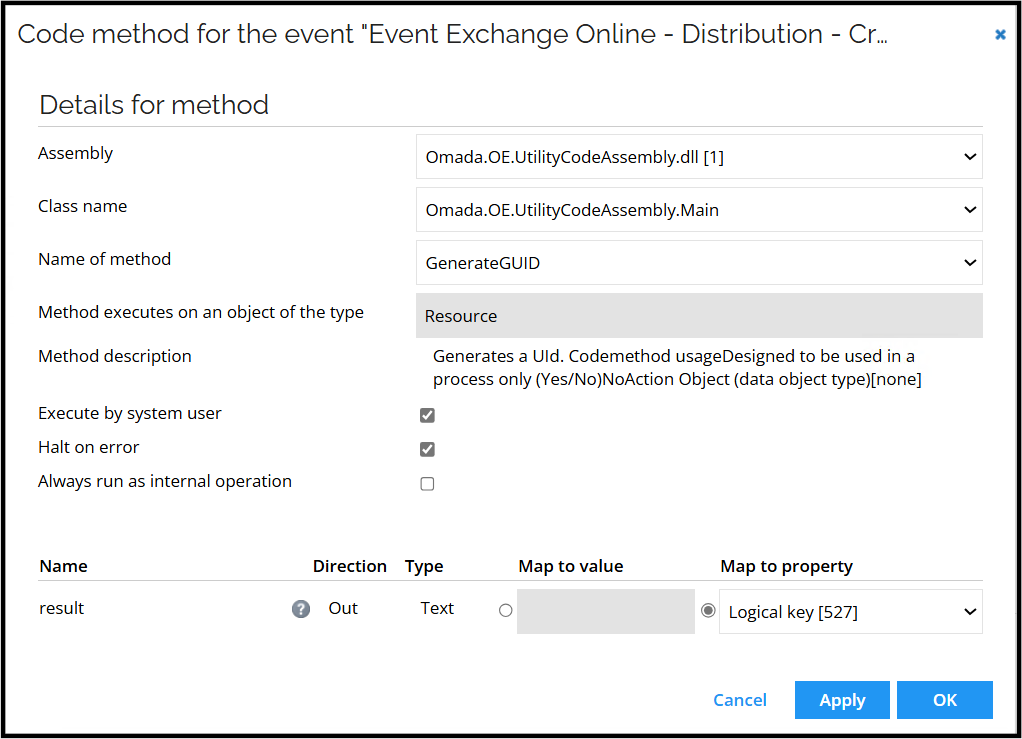
-
Create the second code method:

-
Click Filter and then create a new filter.
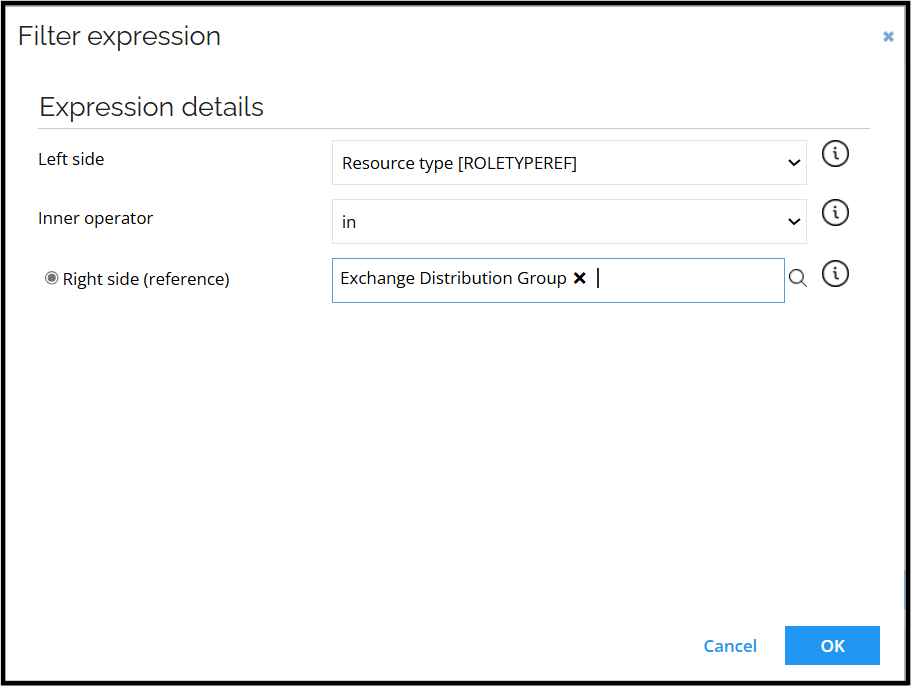
-
Click OK and Close.
Event Exchange Online – distribution group (delete)
-
In Omada Identity, go to Setup > Administration > Process configuration > Event definitions. Click New and enter the following details:
- Name: Event Exchange Online - Distribution Group - Delete
- Event is triggered when: Select the an existing object is deleted checkbox
- Triggers on objects of type: Resources
-
Click Apply.
-
At the bottom part of the window, click New to create the first new Execute code method action with the following configuration:

-
Click OK and then Filter. Create a new filter:
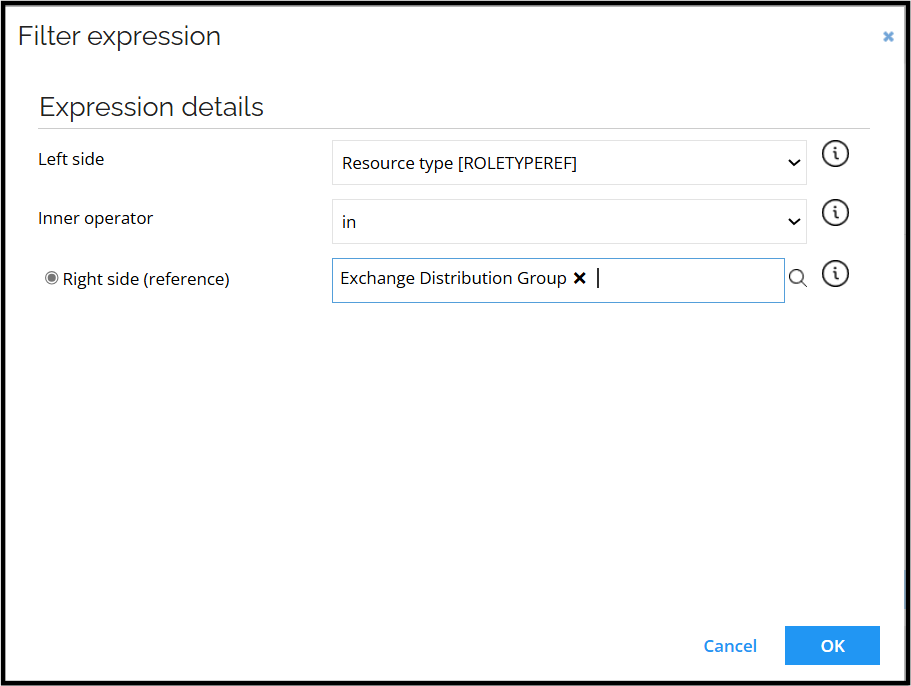
-
Click OK and Close.
Event Exchange Online – SharedMailbox, RoomMailbox and EquipmentMailbox - Create
-
In Omada Identity, go to Setup > Administration > Process configuration > Event definitions. Click New and enter the following details:
- Name: Event Exchange Online - SharedMailbox, EquipmentMailbox, RoomMailbox – Create
- Event is triggered when: Select the A new object is created checkbox
- Triggers on objects of type: Resources
-
Click Apply.
-
At the bottom part of the window, click New to create the first new Execute code method action with the following configuration:
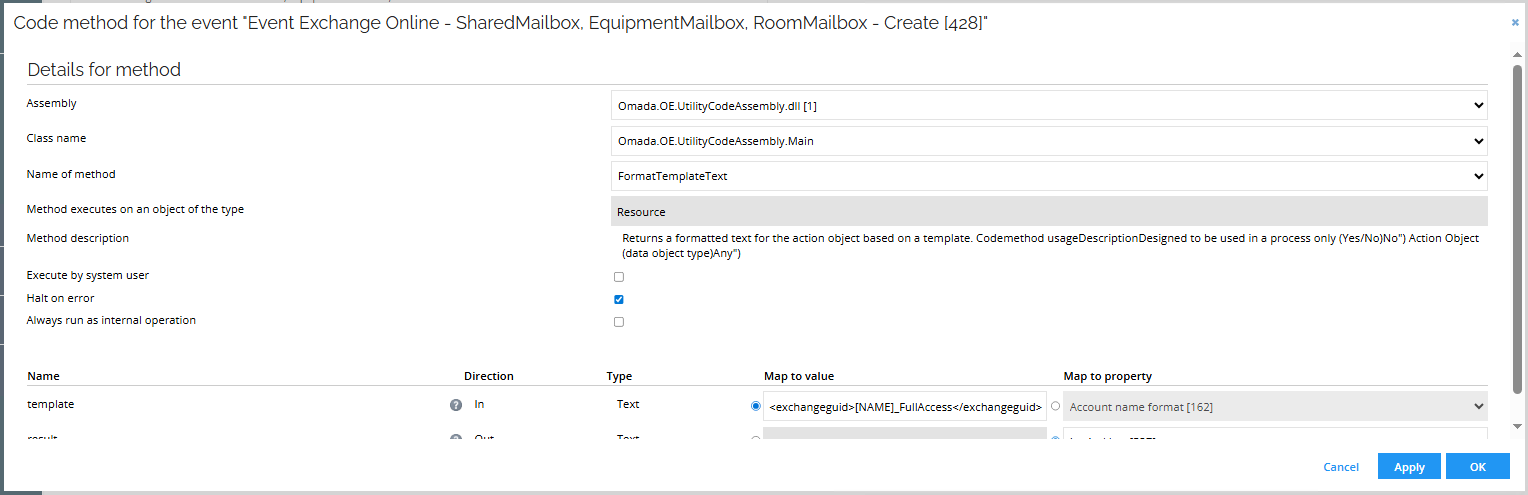
-
Create the second code method (execute code method):
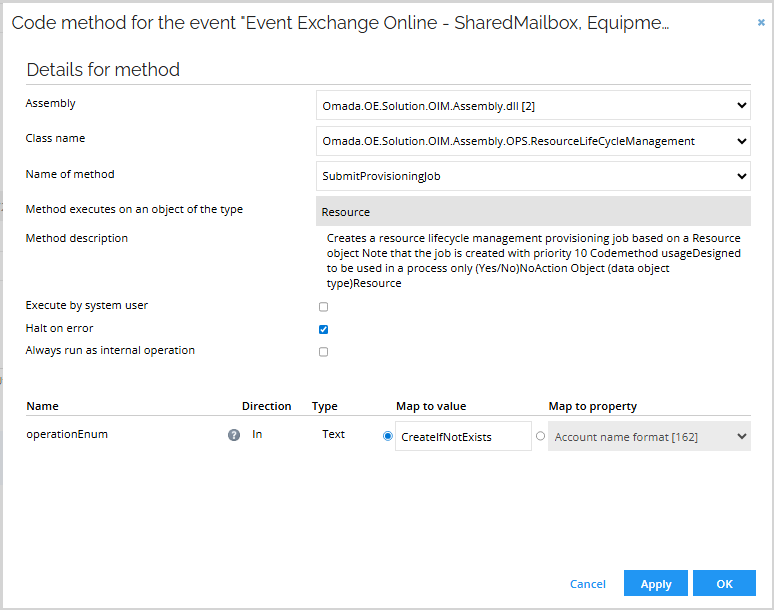
-
Click Filter and then create a new filter.
-
Click Filter expressions and then New. Select the following options:
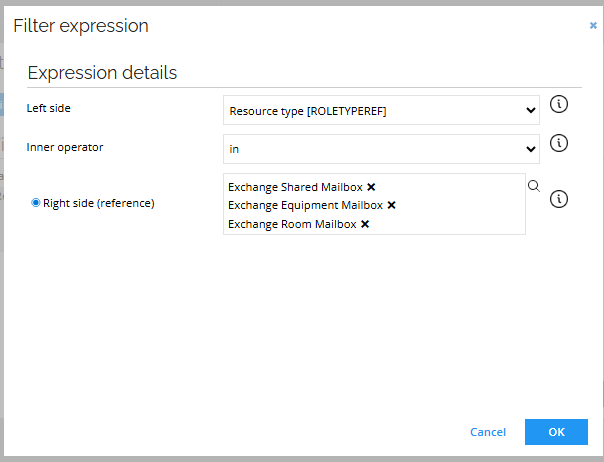
-
Click OK.
-
Create a new filter. Select the following options:
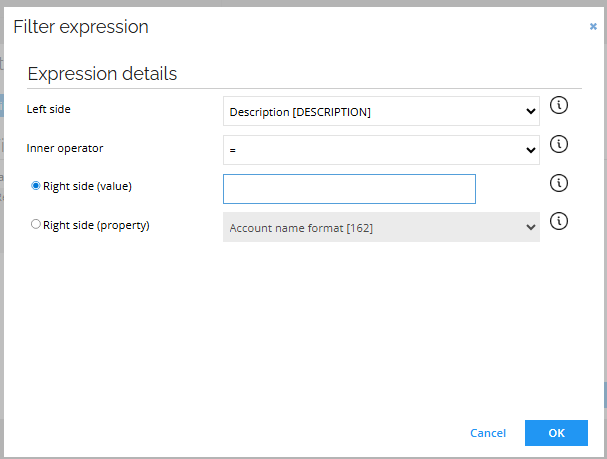
-
Click OK.
Event Exchange Online – SharedMailbox, RoomMailbox and EquipmentMailbox - Delete
-
In Omada Identity, go to Setup > Administration > Process configuration > Event definitions. Click New and enter the following details:
- Name: Event Exchange Online - SharedMailbox, EquipmentMailbox, RoomMailbox – Delete
- Event is triggered when: Select the *An existing object is deleted checkbox
- Triggers on objects of type: Resources
-
Click Apply.
-
At the bottom part of the window, click New to create the first new Execute code method action with the following configuration:

-
Click OK.
-
Click Filter and then Filter expressions. Click New. Select the following options:
-
Click OK.
-
Create a new filter. Select the following options:
-
Click OK.