Data import
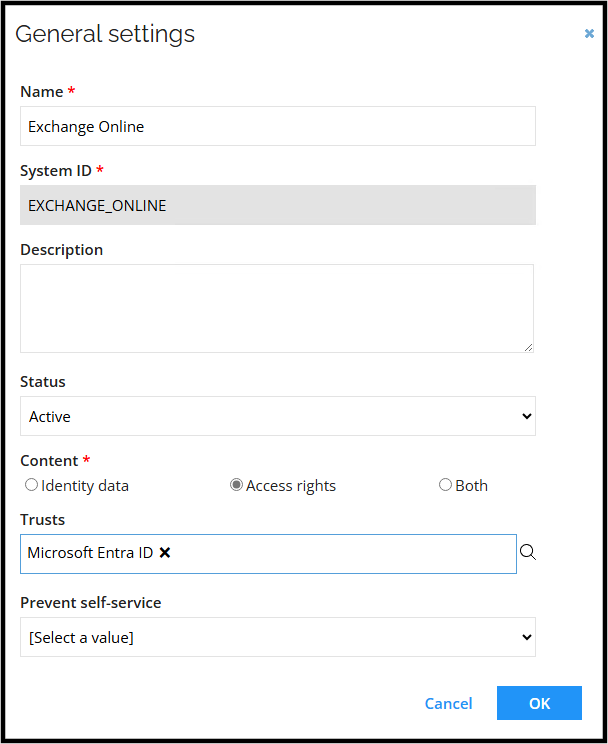
General settings
Connection details
| Setting | Description |
|---|---|
| Authentication | Certificate with password |
| Organization | Organization - specifies the organization that is used. |
| Application ID | Specifies the application ID of the service principal that's used in certificate-based authentication. |
| Certificate (PEM format) | The certificate used for certificate-based authentication. Value should be enclosed with -----BEGIN CERTIFICATE----- and -----END CERTIFICATE----- |
| Private key (PEM format) | A private key used for certificate-based authentication. Value should be enclosed with -----BEGIN PRIVATE KEY----- and -----END PRIVATE KEY----- |
| Private key password | Specifies a password for the private key used for certificate-based authentication. |
| Private key password | Private key password. |
| Script file | A custom script file. |
| Test connection | Enable this setting to test the connection information that you have specified. |
Before the first import
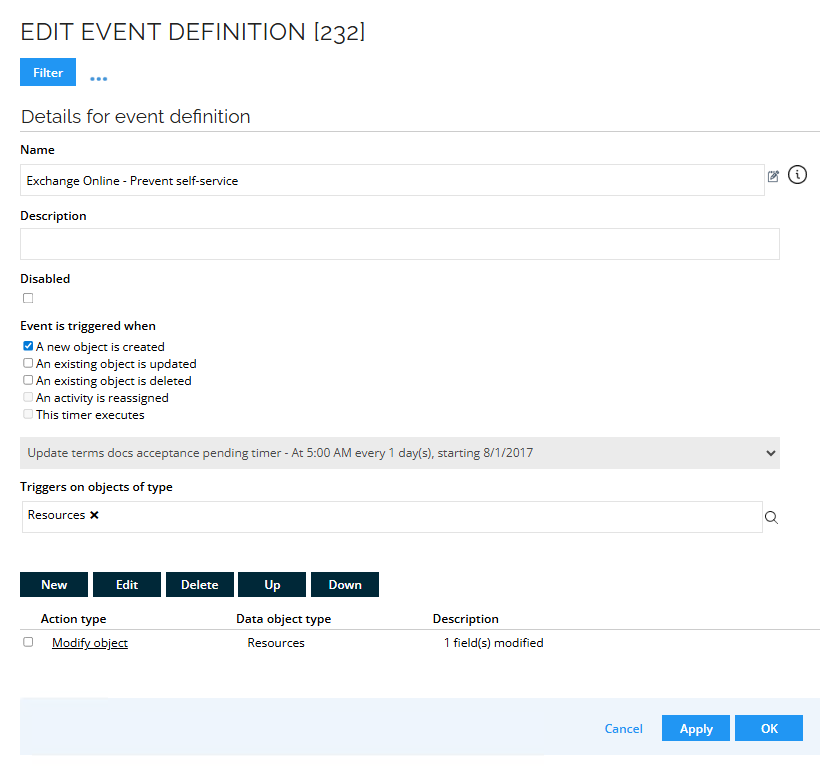
Before starting the import, create an Event Definition to populate the Prevent Self-Service field of the Shared Mailbox resources.
-
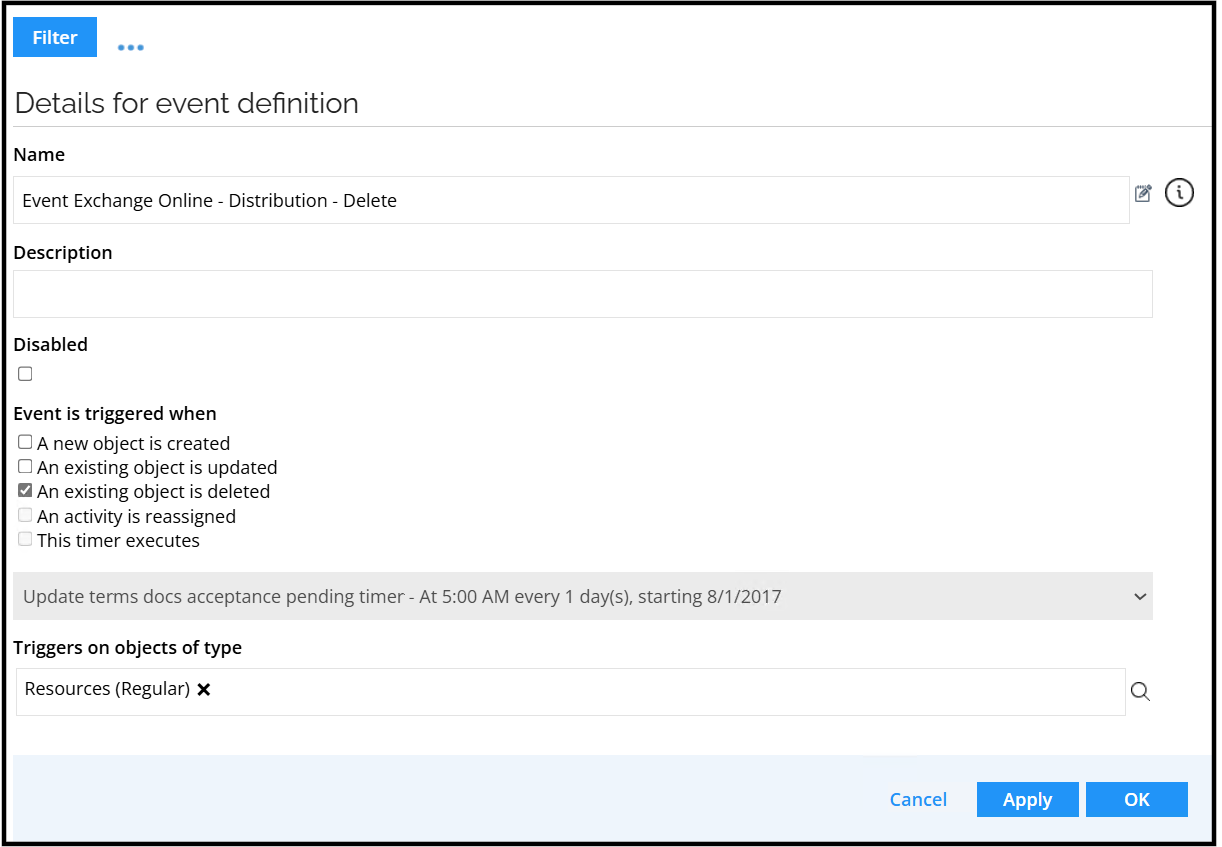
In Omada Identity, go to Setup > Administration > Process configuration > Event definitions. Click New. Enter the following details:
- Name: Exchange Online - Prevent self-service
- Event is triggered when: Select the A new object is created checkbox
- Triggers on objects of type: Resources
-
Click Apply.
-
At the bottom part of the window, click New to create a new Execute code method action.
-
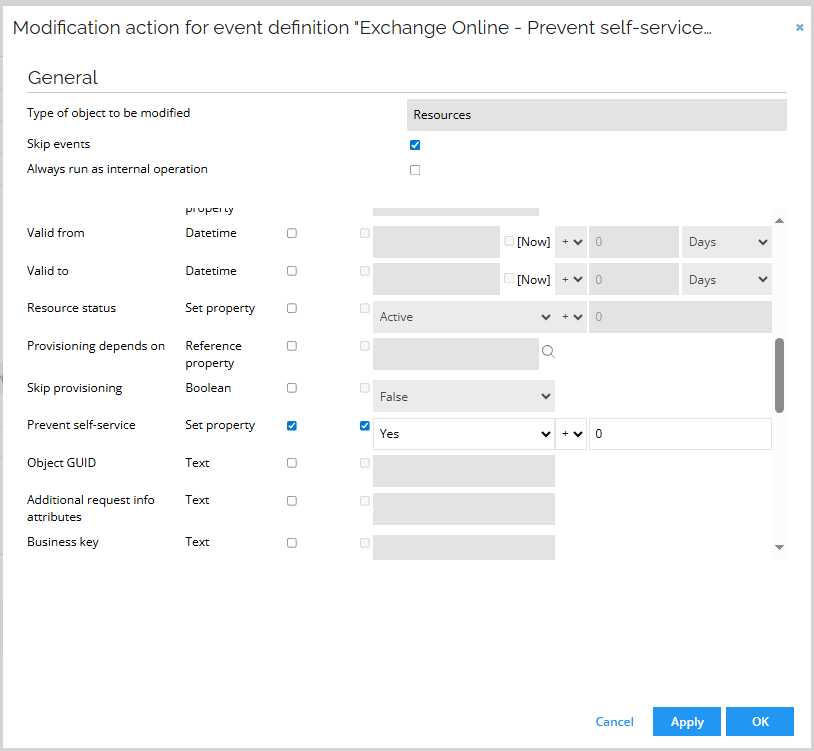
Select Modify object and ensure the following configuration is applied:
-
Click OK.
-
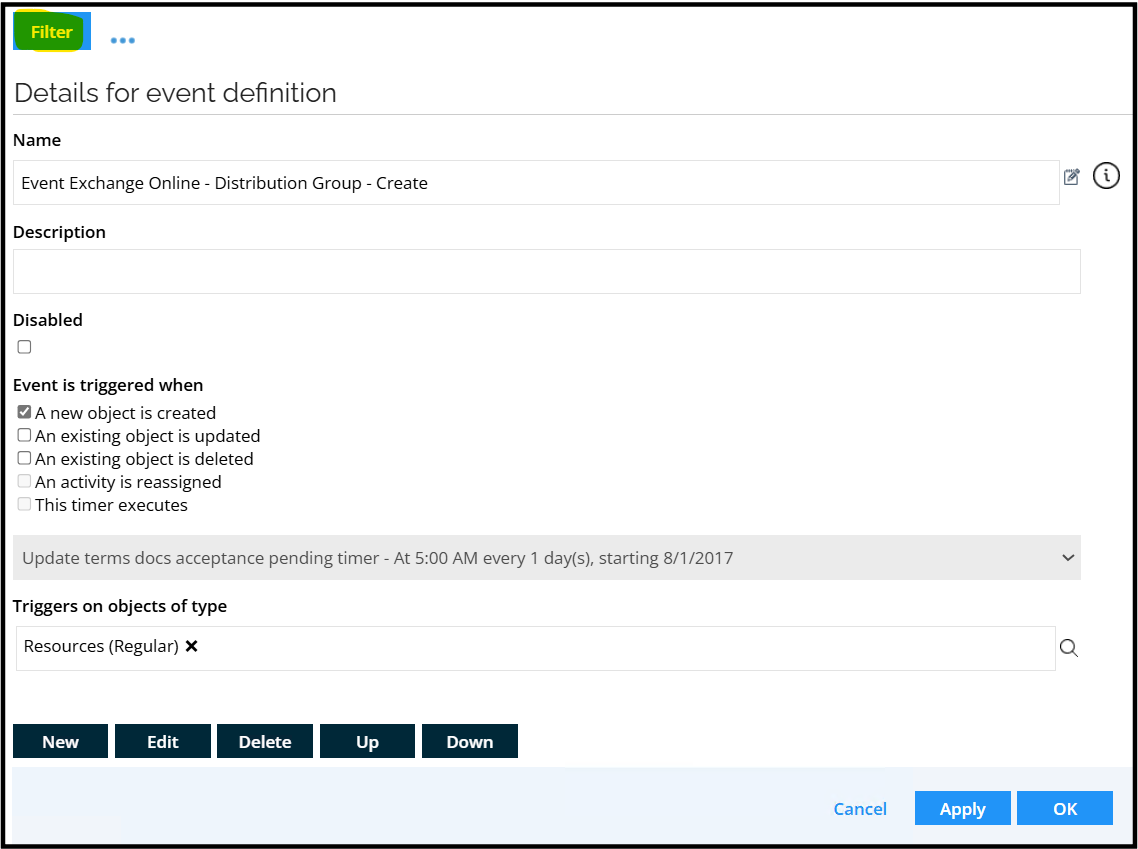
Click Filter.
-
Create 3 new filters:
- Left side: Resource Type
- Right side (reference): Exchange Shared Mailbox
- Left side: System
- Right side(reference): Choose the name of your Exchange Online System
- Left side: Name
- Right side (value): Shared mailbox
-
Click OK and then Close.
Queries and mappings
Generic Resources - Resource
Parameters:
| Parameter | Value |
|---|---|
| Source | Generic resources |
| Distinct | Yes |
| Filter | Type=="Exchange User Mailbox" || Type=="Exchange Mailbox Access" |
| Description | Generic resources - User Mailbox and Mailbox Access |
Mappings:
| Destination | Operator | Source |
|---|---|---|
| Business key | Expression | string.Format("<system>{0}</system><genericresource>{1}</genericresource>",BuiltIn.SystemShortName, BusinessKey) |
| Security resource business key | Expression | string.Format("<system>{0}</system><genericresource>{1}</genericresource>",BuiltIn.SystemShortName, BusinessKey) |
| Name | Map | Name |
| Category | Map | Category |
| Type | Map | Type |
| Short name | Expression | string.Format("{0}_{1}", BuiltIn.SystemShortName, BusinessKey) |
| Logical key | Expression | string.Format("{0}_{1}", BuiltIn.SystemShortName, BusinessKey) |
User Mailbox – Resource Assignments
Parameters:
| Parameter | Value |
|---|---|
| Source | Mailboxes |
| Mailbox subtype | UserMailbox |
| Filter | Type=="User mailbox" |
| Description | Online user mailboxes assignments |
Mappings:
| Destination | Operator | Source |
|---|---|---|
| Resource Business key | Expression | string.Format("<system>{0}</system><genericresource>{1}</genericresource>",BuiltIn.SystemShortName,RecipientTypeDetails) |
| Account - CBK | Lookup | BusinessKey=ExternalDirectoryObjectID |
| Business key | Expression | Type=="User mailbox"?"<exchangeguid>"+ExchangeGuid+"</exchangeguid>":null |
| PRIMARY_EMAIL (1) | Map | PrimarySmtpAddress |
| ADDITIONAL_EMAILS (2) | Map | EmailAddresses |
| HIDEINADDRESSLIST (1) | Map | HiddenFromAddressListsEnabled |
| ISSUEWARNINGQUOTA | Map | IssueWarningQuota |
| PROHIBITSENDQUOTA | Map | ProhibitSendQuota |
| PROHIBITSENDRECEIVEQUOTA | Map | ProhibitSendReceiveQuota |
| WEBMAIL (1) | Map | OWAEnabled |
(1) - history
(2) - history and multivalued
User - Access Mailbox (send on behalf) – Resource Assignments
Parameters:
| Parameter | Value |
|---|---|
| Source | Mailboxes |
| Mailbox subtype | UserMailbox |
| Filter | Type=="Send on behalf" |
| Description | Online user mailbox access - Send on Behalf |
Mappings:
| Destination | Operator | Source |
|---|---|---|
| Resource Business key | Expression | string.Format("\<system\>{0}\</system\>\<genericresource\>sendonbehalfofmailboxaccess\</genericresource\>",BuiltIn.SystemShortName) |
| Account – CBK | Lookup | BusinessKey=GrantSendOnBehalfTo |
| Target – CBK | Expression | string.Format("{0}\_\<exchangeguid\>{1}\</exchangeguid\>", BuiltIn.SourceSystemID, ExchangeGuid) |
| Business key | Expression | string.Format("\<account\>{0}\</account\>\<resource\>{1}\</resource\>\<target\>{2}\</target\>", GrantSendOnBehalfTo, Type, ExchangeGuid) |
| PRIMARY_EMAIL (1) | Map | PrimarySmtpAddress |
| Identity | Map | Identity |
| RecipientTypeDetails | Map | RecipientTypeDetails |
| ExternalDirectoryObjectID | Map | ExternalDirectoryObjectID |
| GrantSendOnBehalfTo | Map | GrantSendOnBehalfTo |
| MAILBOXREF | Expression | string.Format("{0}\_\<exchangeguid\>{1}\</exchangeguid\>", BuiltIn.SourceSystemID, ExchangeGuid) |
(1) - history
Shared, Room and Equipment Mailbox – Full Access – Resource
Parameters:
| Parameter | Value |
|---|---|
| Source | Mailboxes |
| Mailbox subtype | EquipmentMailbox,RoomMailbox,SharedMailbox |
| Distinct | Yes |
| Description | Online SharedMailbox, EquipmentMailbox, RoomMailbox - FullAccess |
Mappings:
| Destination | Operator | Source |
|---|---|---|
| Business key | Expression | string.Format("{0}\_\<exchangeguid\>{1}\_FullAccess\</exchangeguid\>", BuiltIn.SourceSystemID, ExchangeGuid) |
| Security resource business key | Expression | string.Format("{0}\_\<exchangeguid\>{1}\_FullAccess\</exchangeguid\>", BuiltIn.SourceSystemID, ExchangeGuid) |
| Name | DisplayName + "_FullAccess" | |
| Category | Constant | Permission |
| Type | Expression | RecipientTypeDetails == "RoomMailbox" ? "Exchange Room Mailbox" : RecipientTypeDetails == "SharedMailbox" ? "Exchange Shared Mailbox" : RecipientTypeDetails == "EquipmentMailbox" ? "Exchange Equipment Mailbox" : null |
| Short Name | Expression | string.Format("\<exchangeguid\>{0}\_FullAccess\</exchangeguid\>", ExchangeGuid) |
| Logical key | Expression | string.Format("\<exchangeguid\>{0}\</exchangeguid\>", DisplayName) |
| PRIMARY_EMAIL (1) | Map | PrimarySmtpAddress |
| RecipientTypeDetails | Map | RecipientTypeDetails |
| Identity | Map | Identity |
(1) history
Do not use the description field, Omada is using this field to trigger event definitions.
Shared, Room and Equipment Mailbox – Send As – Resource
Parameters:
| Parameter | Value |
|---|---|
| Source | Mailboxes |
| Mailbox subtype | EquipmentMailbox,RoomMailbox,SharedMailbox |
| Distinct | Yes |
| Description | Online SharedMailbox, EquipmentMailbox, RoomMailbox - SendAs |
Mappings:
| Destination | Operator | Source |
|---|---|---|
| Business key | Expression | string.Format("{0}\_\<exchangeguid\>{1}\_SendAs\</exchangeguid\>", BuiltIn.SourceSystemID, ExchangeGuid) |
| Security resource business key | Expression | string.Format("{0}\_\<exchangeguid\>{1}\_SendAs\</exchangeguid\>", BuiltIn.SourceSystemID, ExchangeGuid) |
| Name | DisplayName + "_SendAs" | |
| Category | Constant | Permission |
| Type | Expression | RecipientTypeDetails == "RoomMailbox" ? "Exchange Room Mailbox" : RecipientTypeDetails == "SharedMailbox" ? "Exchange Shared Mailbox" : RecipientTypeDetails == "EquipmentMailbox" ? "Exchange Equipment Mailbox" : null |
| Short Name | Expression | string.Format("\<exchangeguid\>{0}\_SendAs\</exchangeguid\>", ExchangeGuid) |
| Description | Expression | string.Format("\<exchangeguid\>{0}\_SendAs\</exchangeguid\>", DisplayName) |
| PRIMARY_EMAIL (1) | Map | PrimarySmtpAddress |
| RecipientTypeDetails | Map | RecipientTypeDetails |
| Identity | Map | Identity |
(1) history
Do not use the description field, Omada is using this field to trigger event definitions.
Shared, Room and Equipment Mailbox – Send on Behalf – Resource
Parameters:
| Parameter | Value |
|---|---|
| Source | Mailboxes |
| Mailbox subtype | EquipmentMailbox,RoomMailbox,SharedMailbox |
| Distinct | Yes |
| Description | Online SharedMailbox, EquipmentMailbox, RoomMailbox - SendOnBehalf |
Mappings:
| Destination | Operator | Source |
|---|---|---|
| Business key | Expression | string.Format("{0}\_\<exchangeguid\>{1}\_SendOnBehalf\</exchangeguid\>", BuiltIn.SourceSystemID, ExchangeGuid) |
| Security resource business key | Expression | string.Format("{0}\_\<exchangeguid\>{1}\_SendOnBehalf\</exchangeguid\>", BuiltIn.SourceSystemID, ExchangeGuid) |
| Name | DisplayName + "_SendOnBehalf" | |
| Category | Constant | Permission |
| Type | Expression | RecipientTypeDetails == "RoomMailbox" ? "Exchange Room Mailbox" : RecipientTypeDetails == "SharedMailbox" ? "Exchange Shared Mailbox" : RecipientTypeDetails == "EquipmentMailbox" ? "Exchange Equipment Mailbox" : null |
| Short Name | Expression | string.Format("\<exchangeguid\>{0}\_SendOnBehalf\</exchangeguid\>", ExchangeGuid) |
| Description | Expression | string.Format("\<exchangeguid\>{0}\_SendOnBehalf\</exchangeguid\>", DisplayName) |
| PRIMARY_EMAIL (1) | Map | PrimarySmtpAddress |
| RecipientTypeDetails | Map | RecipientTypeDetails |
| Identity | Map | Identity |
(1) history
Do not use the description field, Omada is using this field to trigger event definitions.
Shared, Room and Equipment Mailbox (Full Access) – Resource Assignments
Parameters:
| Parameter | Value |
|---|---|
| Source | Mailbox access |
| Mailbox subtype | EquipmentMailbox,RoomMailbox,SharedMailbox |
| Filter | LinkedMasterAccount != null && LinkedMasterAccount != "NT AUTHORITY" && Type == "Full access" |
| Description | Online EquipmentMailbox, RoomMailbox and SharedMailbox access - Full Access |
Mappings:
| Destination | Operator | Source |
|---|---|---|
| Resource Business key | Expression | string.Format("{0}\_\<exchangeguid\>{1}\_FullAccess\</exchangeguid\>", BuiltIn.SourceSystemID, ExchangeGuid) |
| Account - CBK | Lookup | DistinguishedName=LinkedMasterAccount |
| Target - CBK | Expression | string.Format("{0}\_\<exchangeguid\>{1}\_FullAccess\</exchangeguid\>", BuiltIn.SourceSystemID, ExchangeGuid) |
| Business key | Expression | string.Format("\<account\>{0}\_\</account\>\<exchangeguid\>{1}\_FullAccess\</exchangeguid\>", LinkedMasterAccount, ExchangeGuid) |
| LinkedMasterAccount | Map | LinkedMasterAccount |
| AccessType | Map | Type |
Shared, Room and Equipment Mailbox (Send As) – Resource Assignments
Parameters:
| Parameter | Value |
|---|---|
| Source | Mailbox access |
| Mailbox subtype | EquipmentMailbox,RoomMailbox,SharedMailbox |
| Filter | LinkedMasterAccount != null && LinkedMasterAccount != "NT AUTHORITY" && Type == "Send as" |
| Description | Online EquipmentMailbox, RoomMailbox and SharedMailbox access - Send as |
Mappings:
| Destination | Operator | Source |
|---|---|---|
| Resource Business key | Expression | string.Format("{0}\_\<exchangeguid\>{1}\_SendAs\</exchangeguid\>", BuiltIn.SourceSystemID, ExchangeGuid) |
| Account - CBK | Lookup | DistinguishedName=LinkedMasterAccount |
| Target - CBK | Expression | string.Format("{0}\_\<exchangeguid\>{1}\_SendAs\</exchangeguid\>", BuiltIn.SourceSystemID, ExchangeGuid) |
| Business key | Expression | string.Format("\<account\>{0}\_\</account\>\<exchangeguid\>{1}\_SendAs\</exchangeguid\>", LinkedMasterAccount, ExchangeGuid) |
| LinkedMasterAccount | Map | LinkedMasterAccount |
| AccessType | Map | Type |
Shared, Room and Equipment Mailbox (Send on Behalf) – Resource Assignments
Parameters:
| Parameter | Value |
|---|---|
| Source | Mailboxes |
| Mailbox subtype | EquipmentMailbox,RoomMailbox,SharedMailbox |
| Filter | Type==”Send on behalf” |
| Description | Online EquipmentMailbox, RoomMailbox and SharedMailbox access - send on behalf |
Mappings:
| Destination | Operator | Source |
|---|---|---|
| Resource Business key | Expression | string.Format("0_<exchangeguid>1_SendOnBehalf</exchangeguid>", BuiltIn.SourceSystemID, ExchangeGuid) |
| Account - CBK | Lookup | BusinessKey=GrantSendOnBehalfTo |
| Target - CBK | Expression | string.Format("0_<exchangeguid>1_SendOnBehalf</exchangeguid>", BuiltIn.SourceSystemID, ExchangeGuid) |
| Business key | Expression | string.Format("<account>0_</account><exchangeguid>1_SendOnBehalf</exchangeguid>", GrantSendOnBehalfTo, ExchangeGuid) |
| PRIMARY_EMAIL (1) | Map | PrimarySmtpAddress |
| Identity | Map | Identity |
| RecipientTypeDetails | Map | RecipientTypeDetails |
| ExternalDirectoryObjectID | Map | ExternalDirectoryObjectID |
| GrantSendOnBehalfTo | Map | GrantSendOnBehalfTo |
(1) - history
Distribution groups - Resource
By default, Omada applies a single query to retrieve only distribution groups during the import process. This means that Microsoft 365 Groups and mail-enabled security groups are not included. You can remove or adjust the filter to import all group types. To onboard distribution groups and mail-enabled security groups separately, use additional filtering - use the DistributionGroupType attribute and provide the SecurityEnabled value to specifically provision mail-enabled security groups.
| Parameter | Value |
|---|---|
| Source | Distribution Group |
| Filter | Type=="DistributionGroups" && DistributionGroupIsDirSynced == "False" && !(Convert.ToString(DistributionGroupType).Contains("SecurityEnabled")) |
| Description | Distribution Groups |
Mappings:
| Destination | Operator | Source |
|---|---|---|
| Business key | Expression | DistributionGroupGuid |
| Security resource business key | Expression | DistributionGroupGuid |
| Name | Map | DistributionGroupName |
| Category | Constant | Distribution Group |
| Type | Constant | Exchange Distribution Group |
| Display name | Map | DistributionGroupDisplayName |
| Short Name | Expression | DistributionGroupName |
| Logical key (1) | Expression | !string.IsNullOrEmpty(DistributionGroupCustomAttribute1) ? DistributionGroupCustomAttribute1 : DistributionGroupGuid |
| Distinguished name | Map | DistributionGroupDistinguishedName |
| DistributionGroupType | Map | DistributionGroupType |
| DistributionGroupExternalDirectoryObjectId | Map | DistributionGroupExternalDirectoryObjectId |
| DistributionGroupIsDirSynced | Map | DistributionGroupIsDirSynced |
(1) Omada uses DistributionGroupCustomAttribute1 to store the logic key when creating distribution groups through resource. This is used to prevent the duplication of resources during the import process. If you're already using this attribute for another purpose, you can choose any other available custom attribute. Exchange supports up to 15 (CustomAttribute1 to CustomAttribute15). Make sure to update the reference in your task mappings (DistributionGroup) configuration accordingly.
Distribution Groups – Resource Assignments
Parameters:
| Parameter | Value |
|---|---|
| Source | Distribution groups |
| Filter | Type=="DistributionGroupMembers" && MemberRecipientTypeDetails == "UserMailbox" && DistributionGroupIsDirSynced == "False" && !(Convert.ToString(DistributionGroupType).Contains("SecurityEnabled")) |
| Description | Online distribution groups members |
Mappings:
| Destination | Operator | Source |
|---|---|---|
| Resource Business key | Map | DistributionGroupGuid |
| Account - CBK | Lookup | BusinessKey=MemberExternalDirectoryObjectId |
| Description | Map | MemberRecipientTypeDetails |
| MemberExternalDirectoryObjectId | Map | MemberExternalDirectoryObjectId |
Administrative roles – Resource
Parameters:
| Parameter | Value |
|---|---|
| Source | Administrative resources |
| Filter | Type=="RoleGroups" |
| Description | Role Groups |
Mappings:
| Destination | Operator | Source |
|---|---|---|
| Business key | Expression | string.Format("<system>{0}</system><resource>{1}</resource>",BuiltIn.SystemShortName, RoleGroupSamAccountName.ToLower() ) |
| Security resource business key | Expression | string.Format("<system>{0}</system><resource>{1}</resource>",BuiltIn.SystemShortName, RoleGroupSamAccountName.ToLower() ) |
| Name | Map | RoleGroupName |
| Category | Constant | Group |
| Type | Constant | Exchange Admin Role Group |
| Short Name | Expression | string.Format("{0}_{1}", BuiltIn.SystemShortName, RoleGroupName) |
| Logical key | Expression | string.Format("{0}_{1}", BuiltIn.SystemShortName, RoleGroupName) |
| Distinguished name | Map | RoleDistinguishedName |
| Description | Map | RoleGroupDescription |
| Scope | Map | Scope |
| RoleGroupType | Map | RoleGroupType |
Administrative Roles – Resource Assignments
Parameters:
| Parameter | Value |
|---|---|
| Source | Administrative resources |
| Filter | Type=="Members" && RecipientType?.ToString().IndexOf("Group") \< 0 && MemberRecipientTypeDetails =="UserMailbox" |
| Description | Online role assignments |
Mappings:
| Destination | Operator | Source |
|---|---|---|
| Resource Business key | Expression | string.Format("<system>{0}</system><resource>{1}</resource>",BuiltIn.SystemShortName, RoleGroupSamAccountName.ToLower() ) |
| Account - CBK | Lookup | BusinessKey=MemberId |
| Business key | Expression | string.Format("<account>{0}</account><resource>{1}</resource><target>{2}</target>", MemberName, MemberRecipientTypeDetails, RoleGroupSamAccountName.ToLower()) |
| Description | Map | MemberRecipientTypeDetails |
| MemberName | Map | MemberName |
Administrative Role – Resource Parent Child
Parameters:
| Parameter | Value |
|---|---|
| Source | Distribution groups |
| Filter | Type=="DistributionGroupMembers" && MemberRecipientTypeDetails != "UserMailbox" |
| Description | Online distribution groups members - groups, sharedmailbox, roommailbox, equipmentmailbox |
Mappings:
| Destination | Operator | Source |
|---|---|---|
| Indirect | Constant | 0 |
| Parent resource business key | Map | DistributionGroupGuid |
| Child resource - business key | Lookup | BusinessKey=MemberExternalDirectoryObjectId |