Migrate to new Microsoft Exchange Hybrid connectivity
Perform the following process to update the current Exchange Hybrid connector to the new version.
Installation requirements
Cloud: No manual installation required. Perform the process below to update the connector.
On-prem : Download and then install the connectivity package for the new Exchange Hybrid connectivity. Update it by following this section.
Modify the existing queries and mappings
Modify the following Resource and Resource assignment objects in queries and mappings:
Resources
- Add the following expression in the Filter:
Type != "Exchange Equipment Mailbox" && Type != "Exchange Room Mailbox" && Type != "Exchange Shared Mailbox"
- Modify the resource for DistributionGroups:
Distinct - Yes
| Destination | Operator | Source |
|---|---|---|
| Security resource business key | Map | DistributionGroupGuid |
| Category | Constant | Permission |
| Logic key | Expression | !string.IsNullOrEmpty(DistributionGroupCustomAttribute1) ? DistributionGroupCustomAttribute1 : DistributionGroupGuid |
- Create a new Resource object type:
| Source | Mailboxes |
|---|---|
| Query scope | Local and Cloud |
| Mailbox subtype | EquipmentMailbox, RoomMailbox, SharedMailbox |
| Distinct | Yes |
| Enabled | Selected |
| Description | SharedMailbox, EquipmentMailbox, RoomMailbox - FullAccess |
| Destination | Operator | Source |
|---|---|---|
| Business key | Expression | ExchangeGuid + "_FullAccess" |
| Security resource business key | Expression | ExchangeGuid + "_FullAccess" |
| Name | Expression | DisplayName + "_FullAccess" + "_" + (ServerName == "exchange-ps" || ServerName == "exchange-local" ? "Local" : "Cloud") |
| Category | Constant | Permission |
| Type | Expression | RecipientTypeDetails == "EquipmentMailbox" ? "Exchange Equipment Mailbox" : RecipientTypeDetails == "RoomMailbox" ? "Exchange Room Mailbox" : RecipientTypeDetails == "SharedMailbox" ? "Exchange Shared Mailbox" : null |
| Short name | Expression | DisplayName + "_FullAccess" + "_" + (ServerName == "exchange-ps" || ServerName == "exchange-local" ? "Local" : "Cloud") |
| Logical key | Expression | string.Format("<exchangeguid>{0}</exchangeguid>", DisplayName) |
| RecipientTypeDetails | Map | RecipientTypeDetails |
| PrimarySmtpAddress | Map | PrimarySmtpAddress |
| Identity | Map | Identity |
- Create a new Resource object type:
| Source | Mailboxes |
|---|---|
| Query scope | Local and Cloud |
| Mailbox subtype | EquipmentMailbox, RoomMailbox, SharedMailbox |
| Distinct | Yes |
| Enabled | Selected |
| Description | SharedMailbox, EquipmentMailbox, RoomMailbox - SendAs |
| Destination | Operator | Source |
|---|---|---|
| Business key | Expression | ExchangeGuid + "_SendAs" |
| Security resource business key | Expression | ExchangeGuid + "_SendAs" |
| Name | Expression | DisplayName + "_SendAs" + "_" + (ServerName == "exchange-ps" || ServerName == "exchange-local" ? "Local" : "Cloud") |
| Category | Constant | Permission |
| Type | Expression | RecipientTypeDetails == "EquipmentMailbox" ? "Exchange Equipment Mailbox" : RecipientTypeDetails == "RoomMailbox" ? "Exchange Room Mailbox" : RecipientTypeDetails == "SharedMailbox" ? "Exchange Shared Mailbox" : null |
| Short name | Expression | DisplayName + "_SendAs" + "_" + (ServerName == "exchange-ps" || ServerName == "exchange-local" ? "Local" : "Cloud") |
| Description | Map | DisplayName |
| RecipientTypeDetails | Map | RecipientTypeDetails |
| mailPrimarySmtpAddress | Map | PrimarySmtpAddress |
| Identity | Map | Identity |
- Create a new Resource object type:
| Source | Mailboxes |
|---|---|
| Query scope | Local and Cloud |
| Mailbox subtype | EquipmentMailbox, RoomMailbox, SharedMailbox |
| Distinct | Yes |
| Enabled | Selected |
| Description | SharedMailbox, EquipmentMailbox, RoomMailbox - SendOnBehalf |
| Destination | Operator | Source |
|---|---|---|
| Business key | Expression | ExchangeGuid + "_SendOnBehalf" |
| Security resource business key | Expression | ExchangeGuid + "_SendOnBehalf" |
| Name | Expression | DisplayName + "_SendOnBehalf" + "_" + (ServerName == "exchange-ps" || ServerName == "exchange-local" ? "Local" : "Cloud") |
| Category | Constant | Permission |
| Type | Expression | RecipientTypeDetails == "EquipmentMailbox" ? "Exchange Equipment Mailbox" : RecipientTypeDetails == "RoomMailbox" ? "Exchange Room Mailbox" : RecipientTypeDetails == "SharedMailbox" ? "Exchange Shared Mailbox" : null |
| Short name | Expression | DisplayName + "_SendOnBehalf" + "_" + (ServerName == "exchange-ps" || ServerName == "exchange-local" ? "Local" : "Cloud") |
| Description | Map | DisplayName |
| RecipientTypeDetails | Map | RecipientTypeDetails |
| PrimarySmtpAddress | Map | PrimarySmtpAddress |
| Identity | Map | Identity |
After applying all the changes, the queries and mappings should list the following objects:

Resource assignments
-
Modify the Resource assignment for Local shared mailboxes:
- Remove EquipmentMailbox, RoomMailbox, SharedMailbox from the Mailbox subtype.
- Distinct: Yes
-
Modify the Resource assignment for Cloud shared mailboxes:
- Remove EquipmentMailbox, RoomMailbox, SharedMailbox from the Mailbox subtype.
- Distinct: Yes
-
Modify the Resource assignment for Local send on behalf mailboxes:
- Remove EquipmentMailbox, RoomMailbox, SharedMailbox from the Mailbox subtype.
-
Modify the Resource assignment for Cloud send on behalf mailboxes:
- Remove EquipmentMailbox, RoomMailbox, SharedMailbox from the Mailbox subtype.
-
Modify the Resource assignment for Local user mailboxes:
- Remove EquipmentMailbox, RoomMailbox, SharedMailbox from the Mailbox subtype.
-
Modify Resource assignment for Cloud user mailboxes:
- Remove EquipmentMailbox, RoomMailbox, SharedMailbox from the Mailbox subtype.
-
Modify the Resource assignment for Cloud administrative role:
- Distinct: Yes
- Filter:
Type=="Members" && RecipientType?.ToString().IndexOf("Group") < 0 && RecipientType =="UserMailbox"|
| Destination | Operator | Source |
|---|---|---|
| Business key | Expression | string.Format("<account>{0}</account><resource>{1}</resource><target>{2}</target>", MemberName, MemberRecipientTypeDetails, RoleGroupSamAccountName.ToLower()) |
- Create a Resource assignment for Local equipment, room and shared mailboxes (send on behalf):
| Source | Mailboxes |
|---|---|
| Query scope | Local |
| Mailbox subtype | EquipmentMailbox, RoomMailbox, SharedMailbox |
| Distinct | Yes |
| Filter | Type=="Send on behalf" |
| Enabled | Selected |
| Description | Local send on behalf - equipment, room and shared mailboxes |
| Destination | Operator | Source |
|---|---|---|
| Resource business key | Expression | ExchangeGuid + "_SendOnBehalf" |
| Account - CBK | Lookup | Path=GrantSendOnBehalfTo |
| Target - CBK | Expression | string.Format("{0}_<exchangeguid>{1}</exchangeguid>", BuiltIn.SourceSystemID, ExchangeGuid) |
| Business key | Expression | string.Format("<account>{0}</account><resource>{1}</resource><target>{2}</target>", GrantSendOnBehalfTo, Type, ExchangeGuid) |
| PRIMARY_EMAIL | Map | PrimarySmtpAddress |
| Identity | Map | Identity |
| RecipientTypeDetails | Map | RecipientTypeDetails |
| ExternalDirectoryObjectID | Map | ExternalDirectoryObjectID |
| GrantSendOnBehalfTo | Map | GrantSendOnBehalfTo |
| MAILBOXREF | Expression | string.Format("{0}_<exchangeguid>{1}</exchangeguid>", BuiltIn.SourceSystemID, ExchangeGuid) |
- Create a Resource assignment for Cloud equipment, room and shared mailboxes (send on behalf):
| Source | Mailboxes |
|---|---|
| Query scope | Cloud |
| Mailbox subtype | EquipmentMailbox, RoomMailbox, SharedMailbox |
| Distinct | Yes |
| Filter | Type=="Send on behalf" |
| Enabled | Selected |
| Description | Cloud send on behalf - eq, room and shared mailboxes |
| Destination | Operator | Source |
|---|---|---|
| Resource business key | Expression | ExchangeGuid + "_SendOnBehalf" |
| Account - CBK | Lookup | BusinessKey=GrantSendOnBehalfTo |
| Target - CBK | Expression | string.Format("{0}_<exchangeguid>{1}</exchangeguid>", BuiltIn.SourceSystemID, ExchangeGuid) |
| Business key | Expression | string.Format("<account>{0}</account><resource>{1}</resource><target>{2}</target>", GrantSendOnBehalfTo, Type, ExchangeGuid) |
| PRIMARY_EMAIL | Map | PrimarySmtpAddress |
| Identity | Map | Identity |
| RecipientTypeDetails | Map | RecipientTypeDetails |
| ExternalDirectoryObjectID | Map | ExternalDirectoryObjectID |
| GrantSendOnBehalfTo | Map | GrantSendOnBehalfTo |
| MAILBOXREF | Expression | string.Format("{0}_<exchangeguid>{1}</exchangeguid>", BuiltIn.SourceSystemID, ExchangeGuid) |
- Create a Resource assignment for Local Mailbox access:
| Source | Mailbox access |
|---|---|
| Query scope | Local |
| Mailbox subtype | EquipmentMailbox, RoomMailbox, SharedMailbox |
| Distinct | Yes |
| Filter | LinkedMasterAccount != null && LinkedMasterAccount != "NT AUTHORITY" && Type == "Full access" |
| Enabled | Selected |
| Description | Local mailbox access- FullAccess |
| Destination | Operator | Source |
|---|---|---|
| Resource business key | Expression | ExchangeGuid + "_FullAccess" |
| Account - CBK | Lookup | Name=LinkedMasterAccount |
| Target - CBK | Expression | string.Format("{0}_<exchangeguid>{1}</exchangeguid>", BuiltIn.SourceSystemID, ExchangeGuid) |
| Business key | Expression | string.Format("<account>{0}</account><resource>{1}</resource><target>{2}</target>", LinkedMasterAccount, Type, ExchangeGuid) |
| LinkedMasterAccount | Map | LinkedMasterAccount |
| AccessType | Map | Type |
| MAILBOXREF | Expression | string.Format("{0}_<exchangeguid>{1}</exchangeguid>", BuiltIn.SourceSystemID, ExchangeGuid) |
- Create a Resource assignment for Local Mailbox access (Send as):
| Source | Mailbox access |
|---|---|
| Query scope | Local |
| Mailbox subtype | EquipmentMailbox, RoomMailbox, SharedMailbox |
| Distinct | Yes |
| Filter | LinkedMasterAccount != null && LinkedMasterAccount != "NT AUTHORITY" && Type == "Send as" |
| Enabled | Selected |
| Description | Local mailbox access- SendAs |
| Destination | Operator | Source |
|---|---|---|
| Resource business key | Expression | ExchangeGuid + "_SendAs" |
| Account - CBK | Lookup | Name=LinkedMasterAccount |
| Target - CBK | Expression | string.Format("{0}_<exchangeguid>{1}</exchangeguid>", BuiltIn.SourceSystemID, ExchangeGuid) |
| Business key | Expression | string.Format("<account>{0}</account><resource>{1}</resource><target>{2}</target>", LinkedMasterAccount, Type, ExchangeGuid) |
| LinkedMasterAccount | Map | LinkedMasterAccount |
| AccessType | Map | Type |
| MAILBOXREF | Expression | string.Format("{0}_<exchangeguid>{1}</exchangeguid>", BuiltIn.SourceSystemID, ExchangeGuid) |
- Create a Resource assignment for Cloud Mailbox access:
| Source | Mailbox access |
|---|---|
| Query scope | Cloud |
| Mailbox subtype | EquipmentMailbox, RoomMailbox, SharedMailbox |
| Distinct | Yes |
| Filter | LinkedMasterAccount != null && LinkedMasterAccount != "NT AUTHORITY" && Type == "Full access" |
| Enabled | Selected |
| Description | Online mailbox access - FullAccess |
| Destination | Operator | Source |
|---|---|---|
| Resource business key | Expression | ExchangeGuid + "_FullAccess" |
| Account - CBK | Lookup | DistinguishedName=LinkedMasterAccount |
| Target - CBK | Expression | string.Format("{0}_<exchangeguid>{1}</exchangeguid>", BuiltIn.SourceSystemID, ExchangeGuid) |
| Business key | Expression | string.Format("<account>{0}</account><resource>{1}</resource><target>{2}</target>", LinkedMasterAccount, Type, ExchangeGuid) |
| LinkedMasterAccount | Map | LinkedMasterAccount |
| AccessType | Map | Type |
| MAILBOXREF | Expression | string.Format("{0}_<exchangeguid>{1}</exchangeguid>", BuiltIn.SourceSystemID, ExchangeGuid) |
- Create a Resource assignment for Cloud Mailbox access (Send as):
| Source | Mailbox access |
|---|---|
| Query scope | Cloud |
| Mailbox subtype | EquipmentMailbox, RoomMailbox, SharedMailbox |
| Distinct | Yes |
| Filter | LinkedMasterAccount != null && LinkedMasterAccount != "NT AUTHORITY" && Type == "Send as" |
| Enabled | Selected |
| Description | Online mailbox access - SendAs |
| Destination | Operator | Source |
|---|---|---|
| Resource business key | Expression | ExchangeGuid + "_SendAs" |
| Account - CBK | Lookup | DistinguishedName=LinkedMasterAccount |
| Target - CBK | Expression | string.Format("{0}_<exchangeguid>{1}</exchangeguid>", BuiltIn.SourceSystemID, ExchangeGuid) |
| Business key | Expression | string.Format("<account>{0}</account><resource>{1}</resource><target>{2}</target>", LinkedMasterAccount, Type, ExchangeGuid) |
| LinkedMasterAccount | Map | LinkedMasterAccount |
| AccessType | Map | Type |
| Identity | Map | Identity |
| MAILBOXREF | Expression | string.Format("{0}_<exchangeguid>{1}</exchangeguid>", BuiltIn.SourceSystemID, ExchangeGuid) |
- Run an import.
Event definitions
Create the following event definitions:
Event Exchange Hybrid – Shared, Equipment, Room - Create
-
Go to Setup > Administration > Process configuration > Event definitions. Click New. Enter the following details:
- Name: Event Exchange Hybrid – Shared, Equipment, Room - Create
- Event is triggered when: A new object is created
- Triggers on objects of type: Resources
-
Click Apply and then New.
-
Select Execute code method and click OK.
-
Enter the following configuration:
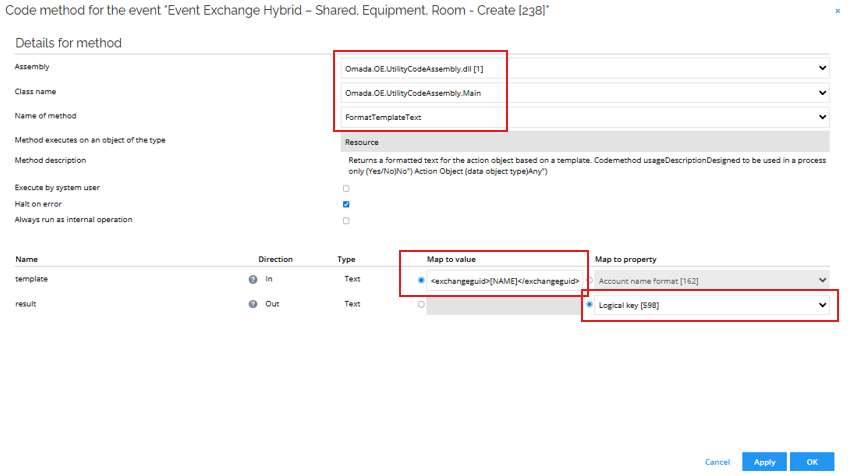
-
Click OK.
-
Select Execute code method and click OK.
-
Enter the following details:
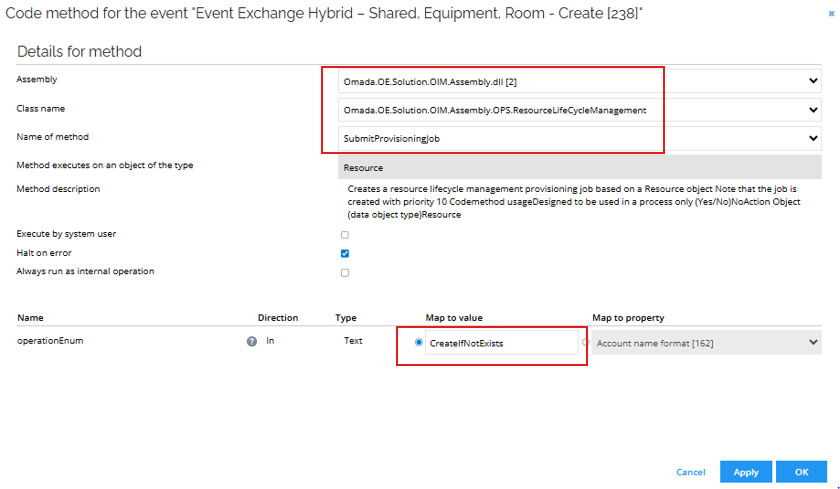
-
Click Filter and then Filter expressions. Click New.
-
Enter the following details:
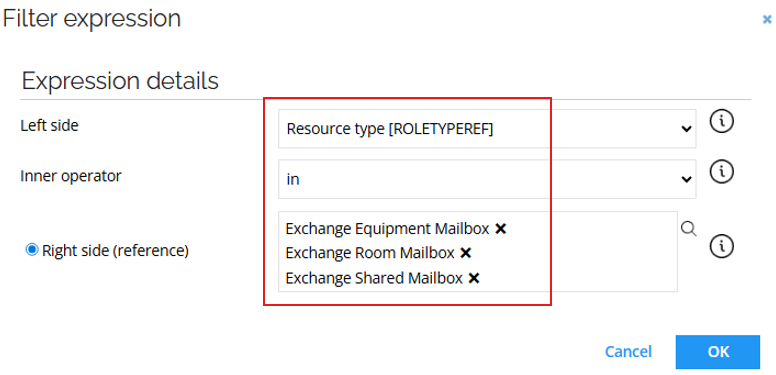
-
Click New and enter the following details:
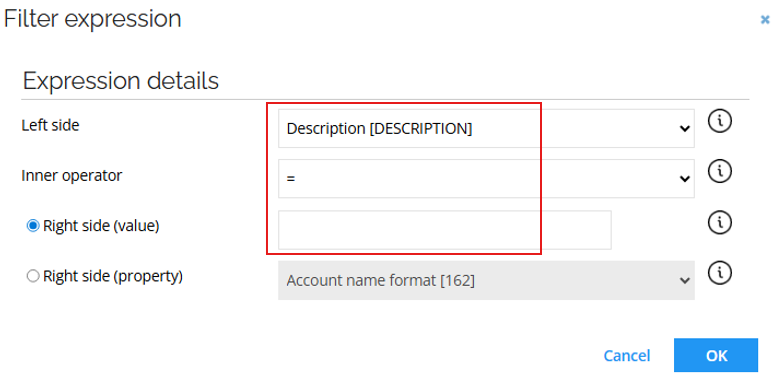
-
Click OK.
Event Exchange Hybrid – Shared, Equipment, Room – Delete
-
Go to Setup > Administration > Process configuration > Event definitions. Click New. Enter the following details:
- Name: Event Exchange Hybrid – Shared, Equipment, Room - Delete
- Event is triggered when: An existing object is deleted
- Triggers on objects of type: Resources
-
Click Apply and then New.
-
Select Execute code method and click OK.
-
Enter the following configuration:
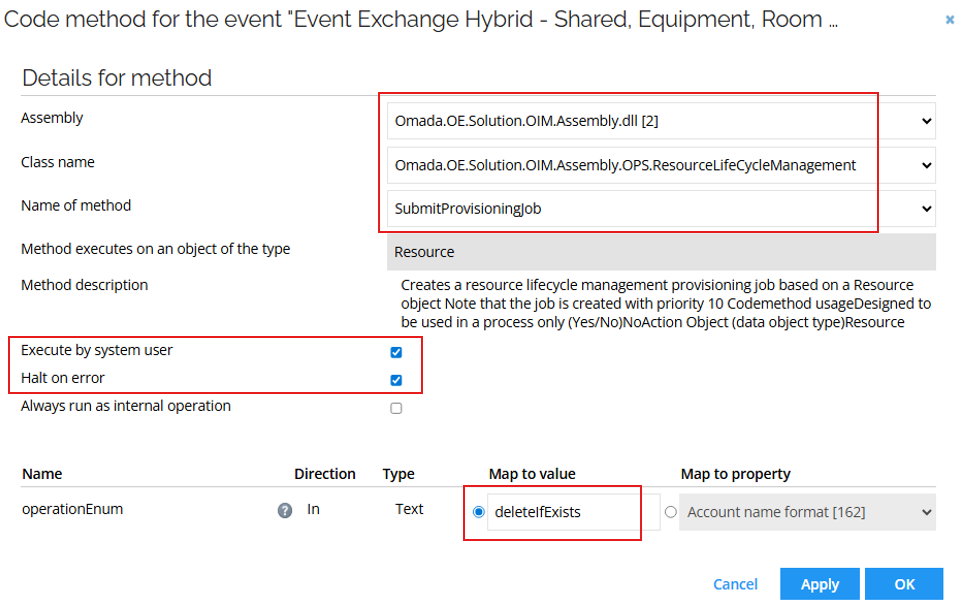
-
Click Filter and then Filter expressions. Click New.
-
Enter the following details:
-
Click New and enter the following details:
-
Click OK.
Event Exchange Hybrid – Distribution Group - Create
-
Go to Setup > Administration > Process configuration > Event definitions. Click New. Enter the following details:
- Name: Event Exchange Hybrid – Distribution Group - Create
- Event is triggered when: A new object is created
- Triggers on objects of type: Resources
-
Click Apply and then New.
-
Select Execute code method and click OK.
-
Enter the following configuration:
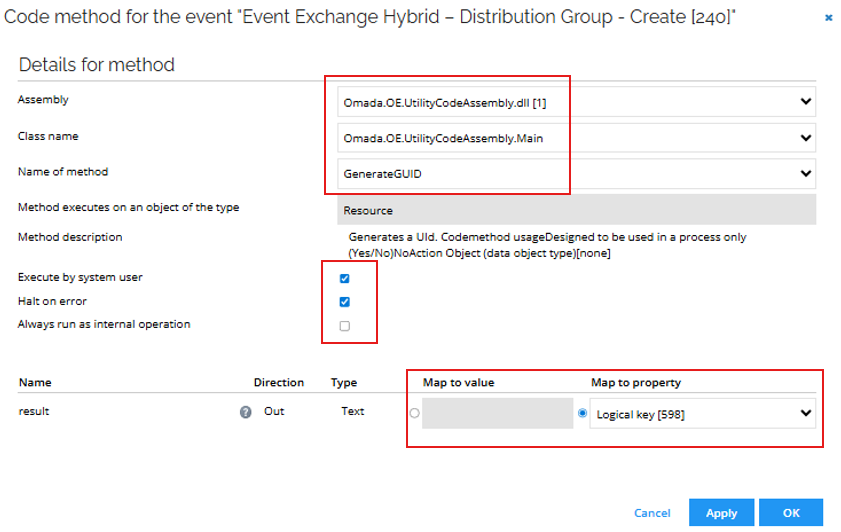
-
Click Filter and then Filter expressions. Click New.
-
Enter the following details:
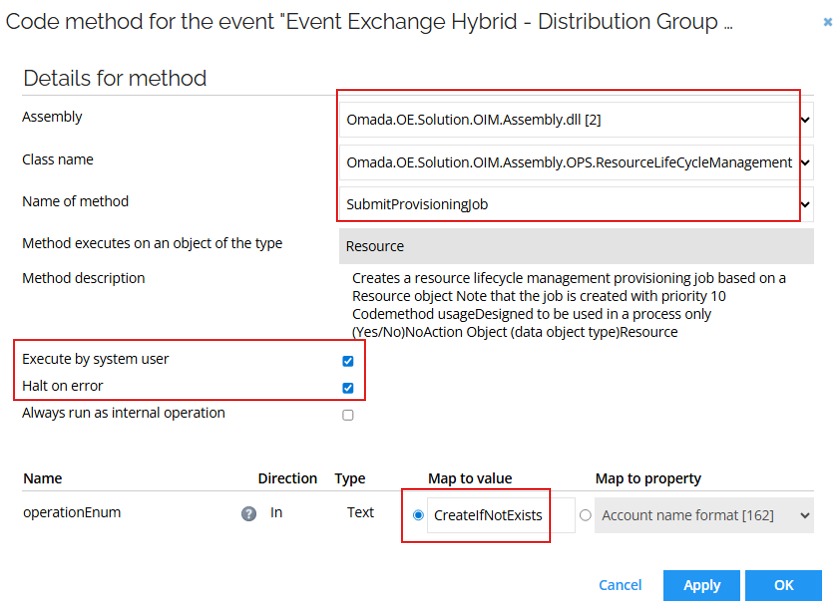
-
Click OK. Click Filter and then Filter expressions. Click New.
-
Enter the following details:
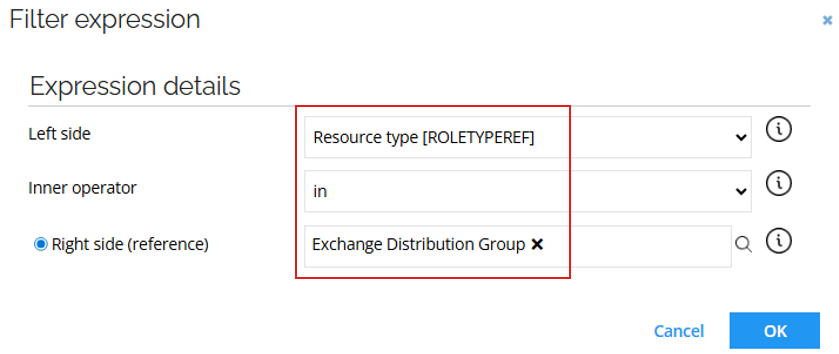
-
Click OK.
Event Exchange Hybrid – Distribution Group - Delete
-
Go to Setup > Administration > Process configuration > Event definitions. Click New. Enter the following details:
- Name: Event Exchange Hybrid – Distribution Group - Delete
- Event is triggered when: An existing object is deleted
- Triggers on objects of type: Resources
-
Click Apply and then New.
-
Select Execute code method and click OK.
-
Enter the following configuration:
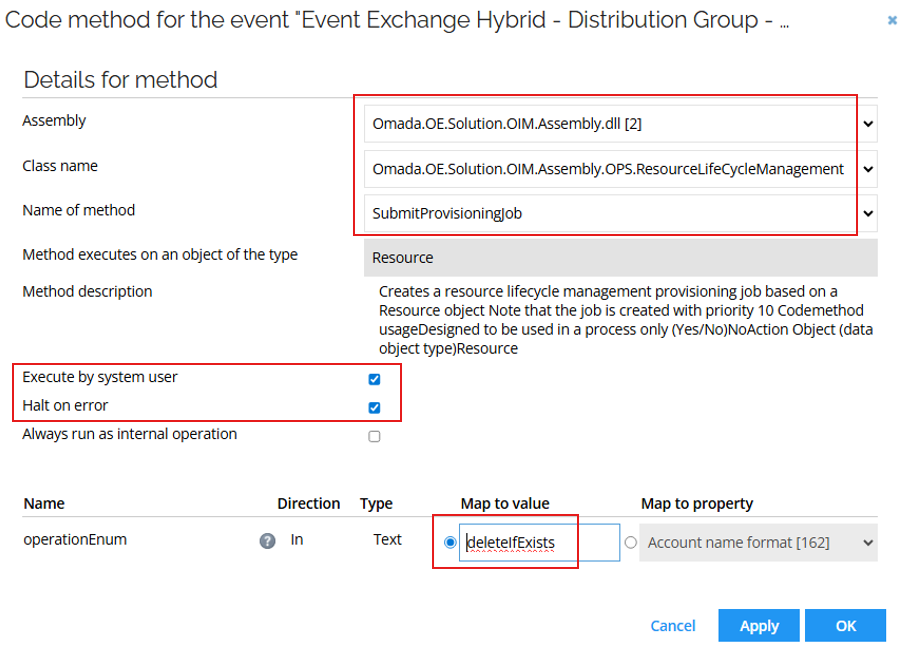
-
Click OK. Click Filter and then Filter expressions. Click New.
-
Enter the following details:
-
Click OK.
Provisioning
Task mappings
The following task mappings should be available as the starting point:
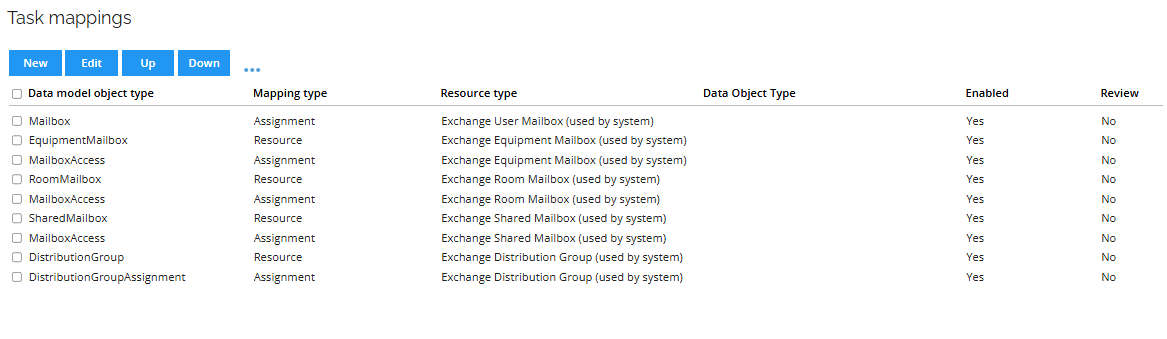
Equipment Resource Type
- Go to Task mappings. Click New and select EquipmentMailbox.
- Enter the following details:
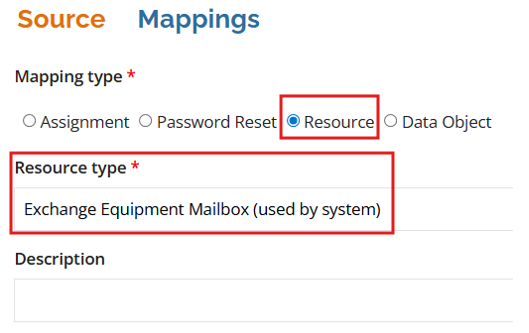
- Click Mappings. Enter the following details:
| Destination | Operator | Source |
|---|---|---|
| Object Id | Map | ObjectId |
| Object type | Constant | EquipmentMailbox |
| Operation | Map | Operation |
| Identity | Expression | RLM_NAME.Replace("_SendOnBehalf", "").Replace("_SendAs", "").Replace("_FullAccess", "").Replace("_Local", "").Replace("_Cloud", "") |
| Name | Expression | Operation == "CreateIfNotExists" ? RLM_NAME.Replace("_SendOnBehalf", "").Replace("_SendAs", "").Replace("_FullAccess", "").Replace("_Local", "").Replace("_Cloud", "") : null |
| DisplayName | Expression | RLM_NAME.Replace("_SendOnBehalf", "").Replace("_SendAs", "").Replace("_FullAccess", "").Replace("_Local", "").Replace("_Cloud", "") |
| Alias | Expression | RLM_NAME.Replace(" ", "").Replace("_SendOnBehalf", "").Replace("_SendAs", "").Replace("_FullAccess", "").Replace("_Local", "").Replace("_Cloud", "") |
| MailboxLocation | Map | RLM_MAILBOXLOCATIONSET |
- Click OK and then New.
- Select MailboxAccess and click OK.
- Enter the following details:
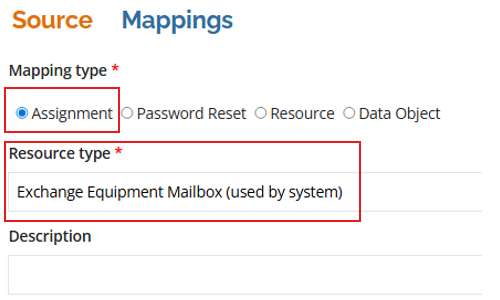
- Click Mappings. Enter the following details:
| Destination | Operator | Source |
|---|---|---|
| Object Id | Map | ObjectId |
| Object type | Constant | MailboxAccess |
| Operation | Map | Operation |
| Identity | Map | ROPE_DistinguisedName |
| mailboxPermission | Expression | ROPE_ResourceIdentifier.Contains("FULLACCESS") ? "Full Access" : ROPE_ResourceIdentifier.Contains("SENDAS") ? "Send As" : ROPE_ResourceIdentifier.Contains("SENDONBEHALF") ? "Send on Behalf" : null |
| userMailboxGuid | Expression | ROPE_ResourceCBK.Substring(ROPE_ResourceCBK.IndexOf("_") + 1, ROPE_ResourceCBK.LastIndexOf("_") - ROPE_ResourceCBK.IndexOf("_") - 1) |
- Click OK.
Room Resource Type
- Go to Task mappings. Click New and select RoomMailbox.
- Enter the following details:
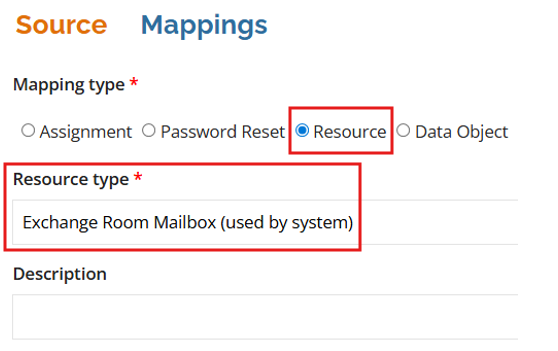
- Click Mappings. Enter the following details:
| Destination | Operator | Source |
|---|---|---|
| Object Id | Map | ObjectId |
| Object type | Constant | RoomMailbox |
| Operation | Map | Operation |
| Identity | Expression | RLM_NAME.Replace("_SendOnBehalf", "").Replace("_SendAs", "").Replace("_FullAccess", "").Replace("_Local", "").Replace("_Cloud", "") |
| Name | Expression | Operation == "CreateIfNotExists" ? RLM_NAME.Replace("_SendOnBehalf", "").Replace("_SendAs", "").Replace("_FullAccess", "").Replace("_Local", "").Replace("_Cloud", "") : null |
| DisplayName | Expression | RLM_NAME.Replace("_SendOnBehalf", "").Replace("_SendAs", "").Replace("_FullAccess", "").Replace("_Local", "").Replace("_Cloud", "") |
| Alias | Expression | RLM_NAME.Replace(" ", "").Replace("_SendOnBehalf", "").Replace("_SendAs", "").Replace("_FullAccess", "").Replace("_Local", "").Replace("_Cloud", "") |
| MailboxLocation | Map | RLM_MAILBOXLOCATIONSET |
- Click OK and then New.
- Select MailboxAccess and click OK.
- Enter the following details:
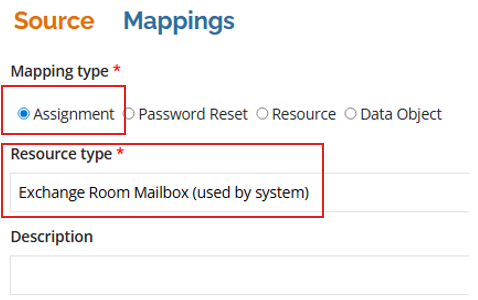
- Click Mappings. Enter the following details:
| Destination | Operator | Source |
|---|---|---|
| Object Id | Map | ObjectId |
| Object type | Constant | MailboxAccess |
| Operation | Map | Operation |
| Identity | Map | ROPE_DistinguisedName |
| mailboxPermission | Expression | ROPE_ResourceIdentifier.Contains("FULLACCESS") ? "Full Access" : ROPE_ResourceIdentifier.Contains("SENDAS") ? "Send As" : ROPE_ResourceIdentifier.Contains("SENDONBEHALF") ? "Send on Behalf" : null |
| userMailboxGuid | Expression | ROPE_ResourceCBK.Substring(ROPE_ResourceCBK.IndexOf("_") + 1, ROPE_ResourceCBK.LastIndexOf("_") - ROPE_ResourceCBK.IndexOf("_") - 1) |
- Click OK.
Shared Resource Type
- Go to Task mappings. Click New and select SharedMailbox.
- Enter the following details:
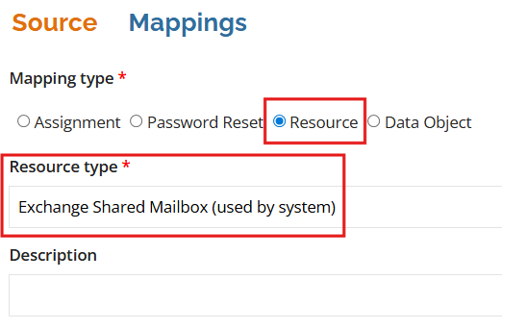
- Click Mappings. Enter the following details:
| Destination | Operator | Source |
|---|---|---|
| Object Id | Map | ObjectId |
| Object type | Constant | SharedMailbox |
| Operation | Map | Operation |
| Identity | Expression | RLM_NAME.Replace("_SendOnBehalf", "").Replace("_SendAs", "").Replace("_FullAccess", "").Replace("_Local", "").Replace("_Cloud", "") |
| Name | Expression | Operation == "CreateIfNotExists" ? RLM_NAME.Replace("_SendOnBehalf", "").Replace("_SendAs", "").Replace("_FullAccess", "").Replace("_Local", "").Replace("_Cloud", "") : null |
| DisplayName | Expression | RLM_NAME.Replace("_SendOnBehalf", "").Replace("_SendAs", "").Replace("_FullAccess", "").Replace("_Local", "").Replace("_Cloud", "") |
| Alias | Expression | RLM_NAME.Replace(" ", "").Replace("_SendOnBehalf", "").Replace("_SendAs", "").Replace("_FullAccess", "").Replace("_Local", "").Replace("_Cloud", "") |
| MailboxLocation | Map | RLM_MAILBOXLOCATIONSET |
- Click OK and then New.
- Select MailboxAccess and click OK.
- Enter the following details:
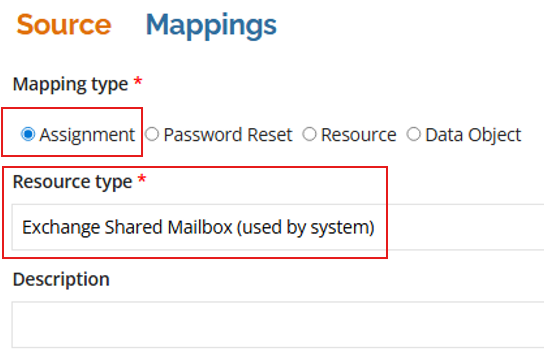
- Click Mappings. Enter the following details:
| Destination | Operator | Source |
|---|---|---|
| Object Id | Map | ObjectId |
| Object type | Constant | MailboxAccess |
| Operation | Map | Operation |
| Identity | Map | ROPE_DistinguisedName |
| mailboxPermission | Expression | ROPE_ResourceIdentifier.Contains("FULLACCESS") ? "Full Access" : ROPE_ResourceIdentifier.Contains("SENDAS") ? "Send As" : ROPE_ResourceIdentifier.Contains("SENDONBEHALF") ? "Send on Behalf" : null |
| userMailboxGuid | Expression | ROPE_ResourceCBK.Substring(ROPE_ResourceCBK.IndexOf("_") + 1, ROPE_ResourceCBK.LastIndexOf("_") - ROPE_ResourceCBK.IndexOf("_") - 1) |
- Click OK.
Distribution Resource Type
- Go to Task mappings. Open DistributionGroup and click Mappings.
- Modify/add the following items to the already existing task mapping:
| Destination | Operator | Source |
|---|---|---|
| Name | Expression | Operation == "CreateIfNotExists" ? RLM_NAME : null |
| Alias | Map | RLM_NAME |
| bundledAttributes | Expression | string.Format("CustomAttribute1=0", RLM_ODWLOGICKEY) |
- Click OK and then New.
- Select DistributionGroupAssignment and click OK. Enter the following details:
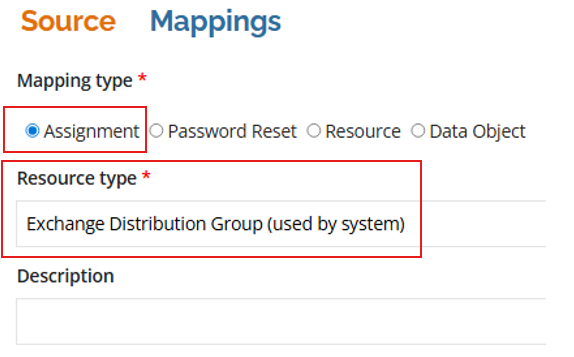
- Click Mappings. Enter the following details:
| Destination | Operator | Source |
|---|---|---|
| Object Id | Map | ObjectId |
| Object type | Constant | DistributionGroupAssignment |
| Operation | Map | Operation |
| Identity | Map | ROPE_DistinguisedName |
| distributionGroupGuid | Expression | ROPE_ResourceCBK.Substring(ROPE_ResourceCBK.IndexOf("_") + 1, ROPE_ResourceCBK.LastIndexOf("<") - ROPE_ResourceCBK.IndexOf("_") - 1) |
| DistributionGroupLocation | Constant | Cloud |
- Click OK.
MailboxAccess Resource Type
- Go to Task mappings. Click New and select MailboxAccess.
- Enter the following details:
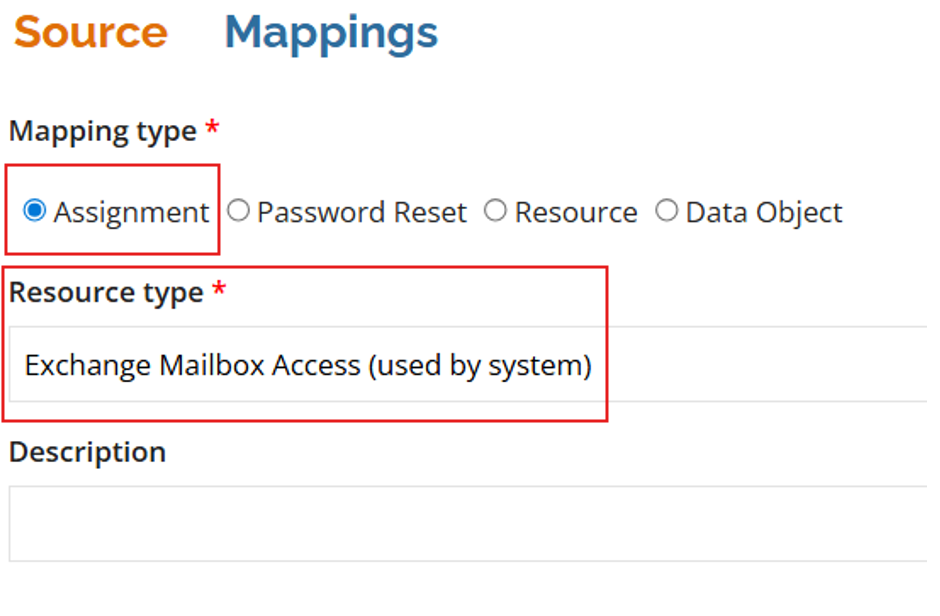
- Click Mappings. Enter the following details:
| Destination | Operator | Source |
|---|---|---|
| Object Id | Map | ObjectId |
| Object type | Constant | MailboxAccess |
| Operation | Map | Operation |
| Identity | Map | ROPE_DistinguisedName |
| mailboxPermission | Expression | ROPE_ResourceIdentifier.Contains("FULLMAILBOXACCESS") ? "Full Access" : ROPE_ResourceIdentifier.Contains("SENDAS") ? "Send As" : ROPE_ResourceIdentifier.Contains("SENDONBEHALF") ? "Send on Behalf" : null |
| userMailboxGuid | Expression | ROPE_ATTR_MAILBOXREF.Remove(0, ROPE_ATTR_MAILBOXREF.IndexOf('>') + 1).Remove(ROPE_ATTR_MAILBOXREF.Remove(0, ROPE_ATTR_MAILBOXREF.IndexOf('>') + 1).IndexOf('<')) |
| MailboxLocation | Map | ROPE_ATTR_MAILBOXLOCATION |
Click OK.
Attribute sets
- Go to Setup > Attribute sets
- Click Exchange User Mailbox Attributes and then the Mailbox Location attribute.
- Disable the Hide Attribute option.
- Click OK.