Release highlights
We've just released Omada Identity Cloud update! What's new?
Cloud Application Gateway
The configuration of the Cloud Application Gateway for the Provisioning Worker has been simplified by consolidating relevant settings into domain-based groups. It improves the usability of the solution and makes the configuration process more efficient.
The settings are now divided between the appsettings.json and appsettings.Customer.json files.
- appsettings.json
- appsettings.Customer.json
In this .json format file you can find settings related to the following domains of the Cloud Application Gateway solution.
- Logging
- CopsApiConfiguration
- ServiceConfiguration with a reduced scope
- TelemetryFilter
- CloudApplicationGatewayConfiguration reduced to core settings
- Heartbeat
- ExternalHeartbeat
- WorkerOptions
- Version
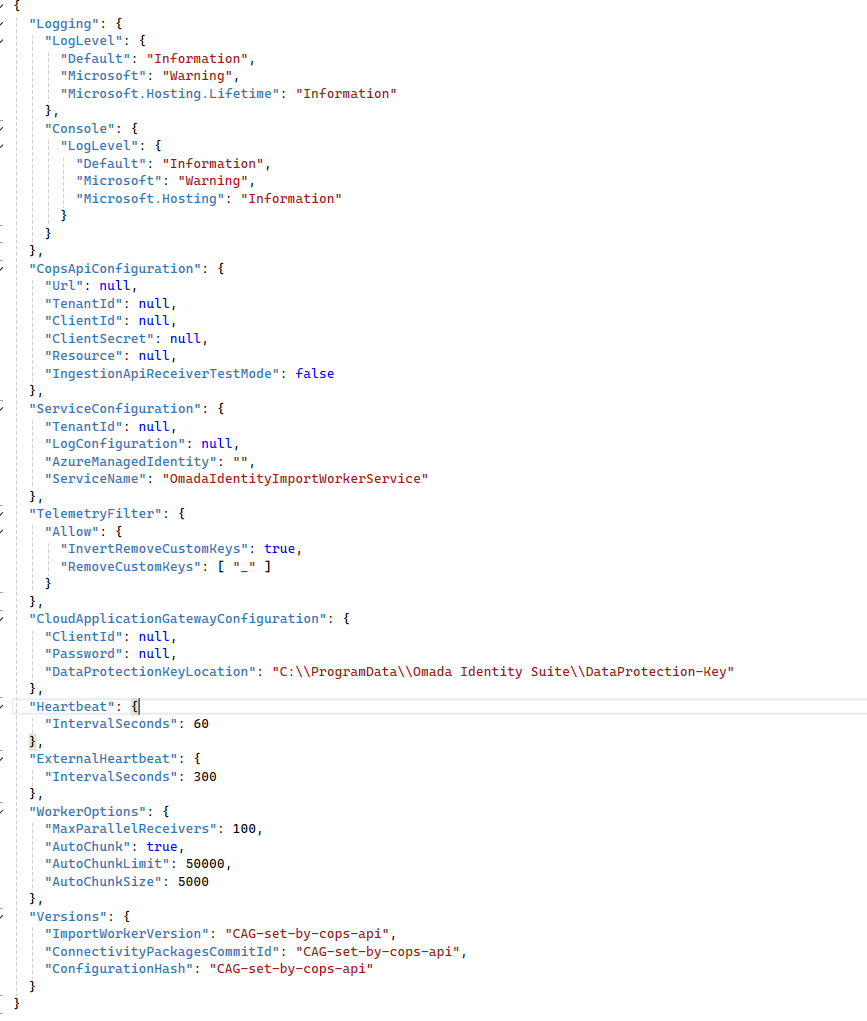
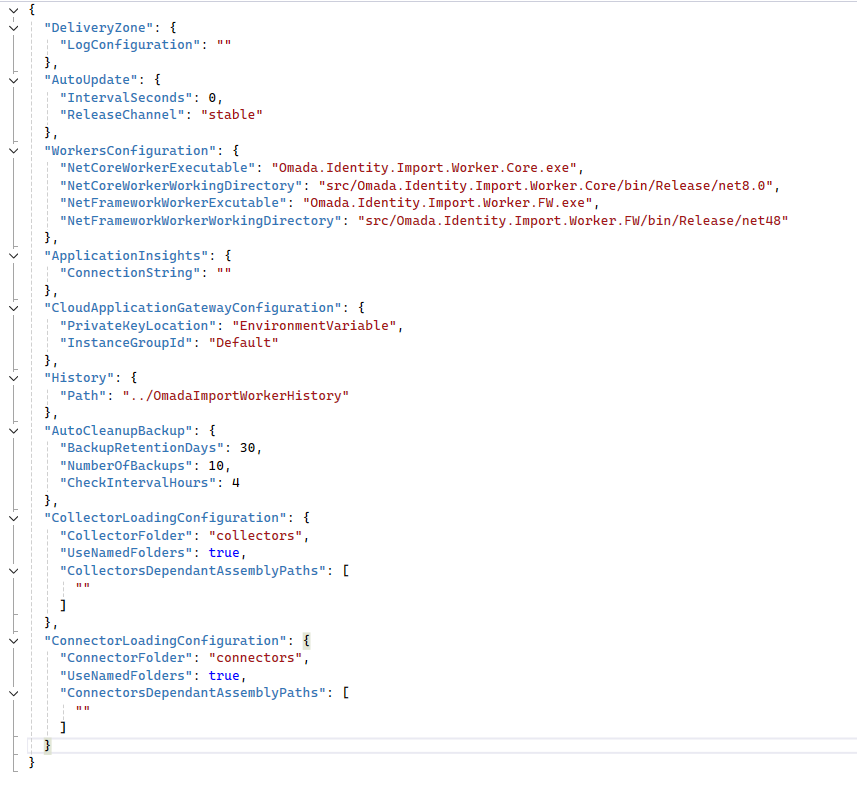
In this .json format file you can find settings related to the following domains of the Cloud Application Gateway solution.
- DeliveryZone
- AutoUpdate
- WorkersConfiguration
- ApplicationInsight
- CloudApplicationGatewayConfiguration for private key and instance groups
- History
- AutoCleanupBackup
- CollectorLoadingConfiguration
- ConnectorLoadingConfiguration
Zero Knowledge/BYOK
To ensure customers have full control over their data, customer-managed encryption keys are used for decryption of secrets, and the whole process remains contained within their infrastructure where CAG was deployed. This approach limits and regulates access minimizing security risks.
UI and UX
- Role Insights promotion form: The form for promoting a cluster to a Role resource has been modified to show only relevant fields.
Reason for access request form – new properties
You can now use two new properties in the access request reason form – disabled and default:
- if disabled is set to true, the query returning the reasons does not return this reason.
- if default is set to true, the reasons are automatically selected in the third step of the access request process.
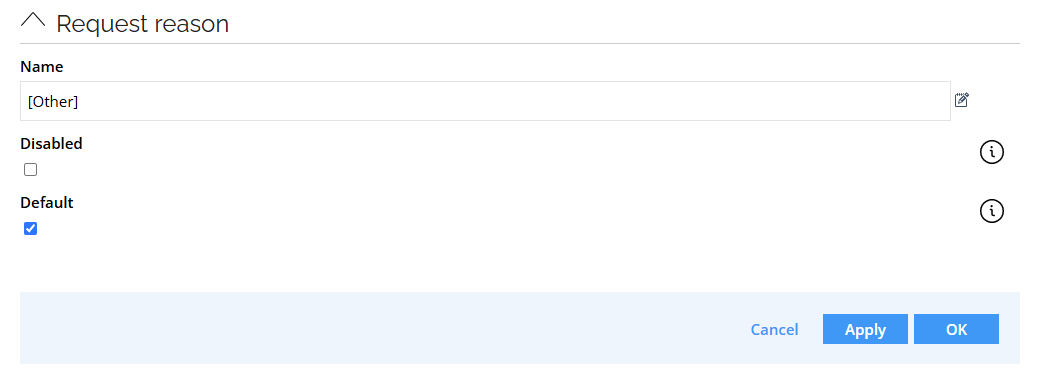
If you disable all reasons, a text input field is displayed (it is also displayed for the Other reason). It is a multiline field that allows entering custom reasons:

To remove Reason entirely, disable the Reason field in the request form.
See Access request configuration - Change default values for the Reason field for details.
Assignment timeline
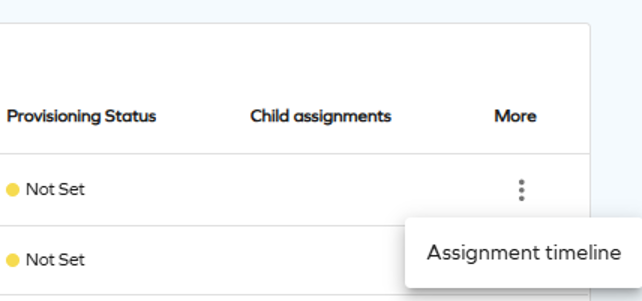
To make the access request process more convenient and easier to track, we have made the Assignment timeline option available to the requester, beneficiary, and approver. It allows tracking the progress and verifying how far are you from receiving access approval.
To access Assignment timeline as an approver, select it from the actions menu on the Approvals page.
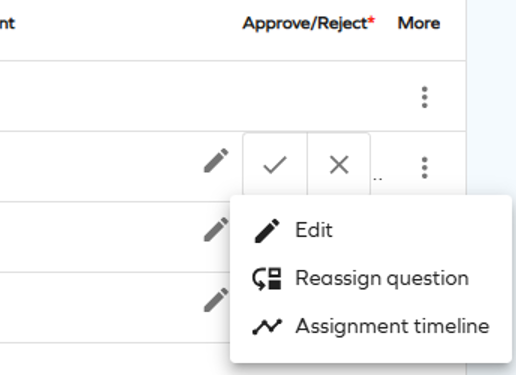
To access Assignment timeline as a requester or beneficiary, select it from the actions menu on the Access page.
Rejection comment visibility in access request
Until this point, if the Approval rejection reason required customer setting was set to true, the comment entered when rejecting an access request was shown to the requestor only.
With this update, the rejection comment is always shown.
This change is applied retroactively - the rejection comments left before this change will also be shown.
API
Upcoming change: OData page size

Starting with the January 2026 Cloud Update, the maximum page size for OData responses will be set to 1000 on production environments to improve performance and optimize data handling.
The change is controlled by the ODataPageSizeLimit customer setting. For more information, look up ODataPageSizeLimit in Customer settings - Standard application and OData documentation.
The new page size will only be applied to new environments and those existing environments whose current page size value is unset or 0.
You should review and update your scripts to ensure they implement pagination when retrieving data, helping maintain optimal performance and prepare for upcoming changes.
Connectors
Microsoft Exchange - updated connectors
Updated connectivity packages for Microsoft Exchange are now available. See Microsoft Exchange for details.
New configuration options for REST/OData connectors
Two new configuration options are now available for the REST and OData connectors (in Queries and mappings, in the Nested Requests tab):
- Skip escaping variables
- URL is a DynamicExpresso expression
They allow you to modify the values from the initial response to create new URLs (for example, by using the substring method) and use links provided in the initial responses whose values are not escaped. See the REST documentation - Nested Requests for details.
Platform improvements
This Cloud Update introduces multiple stability, performance, and reliability enhancements across core platform components. Improvements include better transaction handling, optimized background processes, and clearer user feedback in various system operations.
Omada Identity Analytics
Deprecation of SSRS reports

As the next step of the deprecation process of legacy SSRS reports (announced in the August 2025 Cloud Update release notes), the Reports (legacy) page is now removed from the main menu, and will be part of the Dashboards & Analytics page.
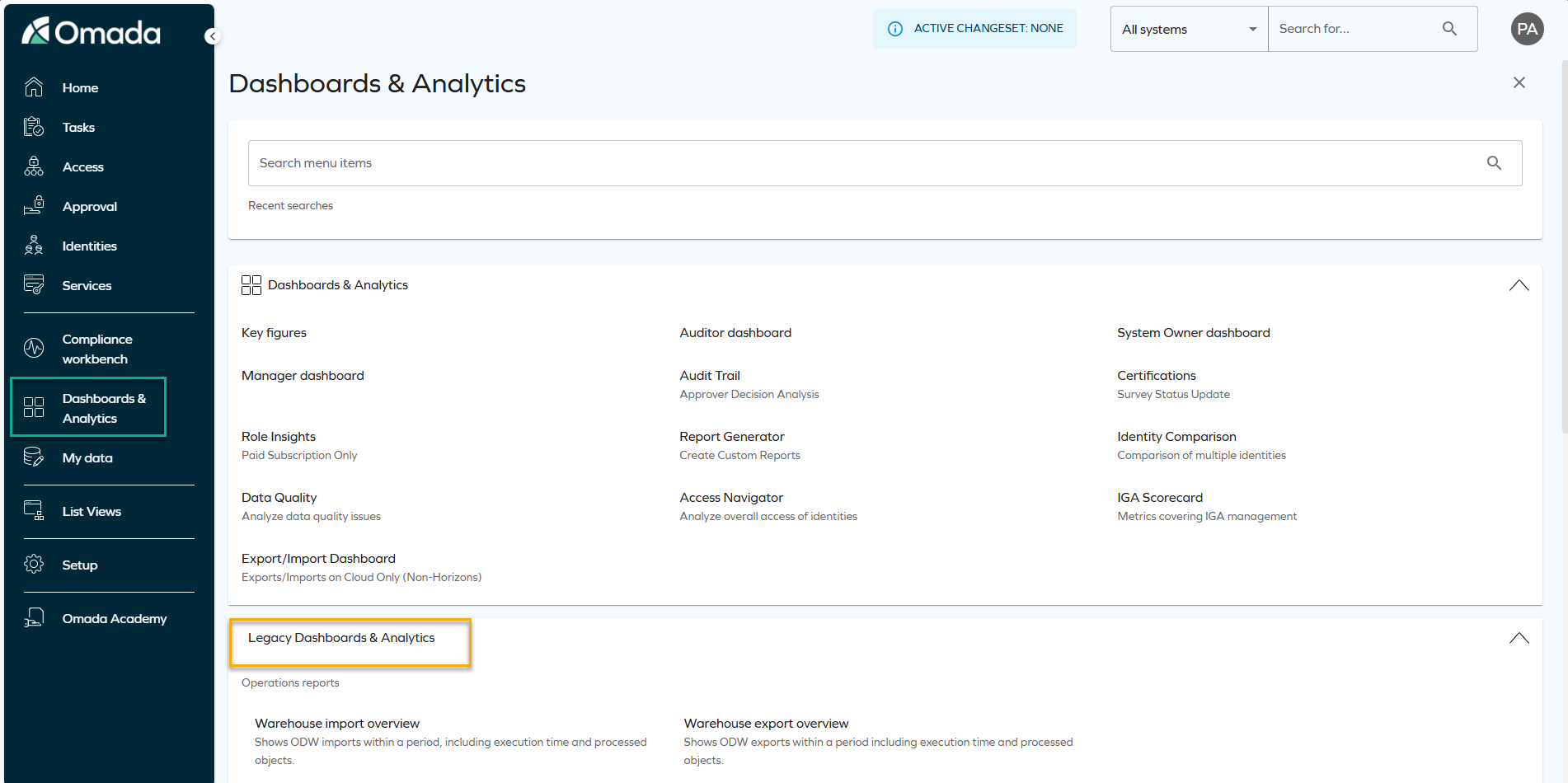
To learn how to find the same data through reports and OIA dashboards, see Legacy reports vs. Omada Identity Analytics Platform.
Navigation between the Identities list and Omada Identity Analytics dashboards
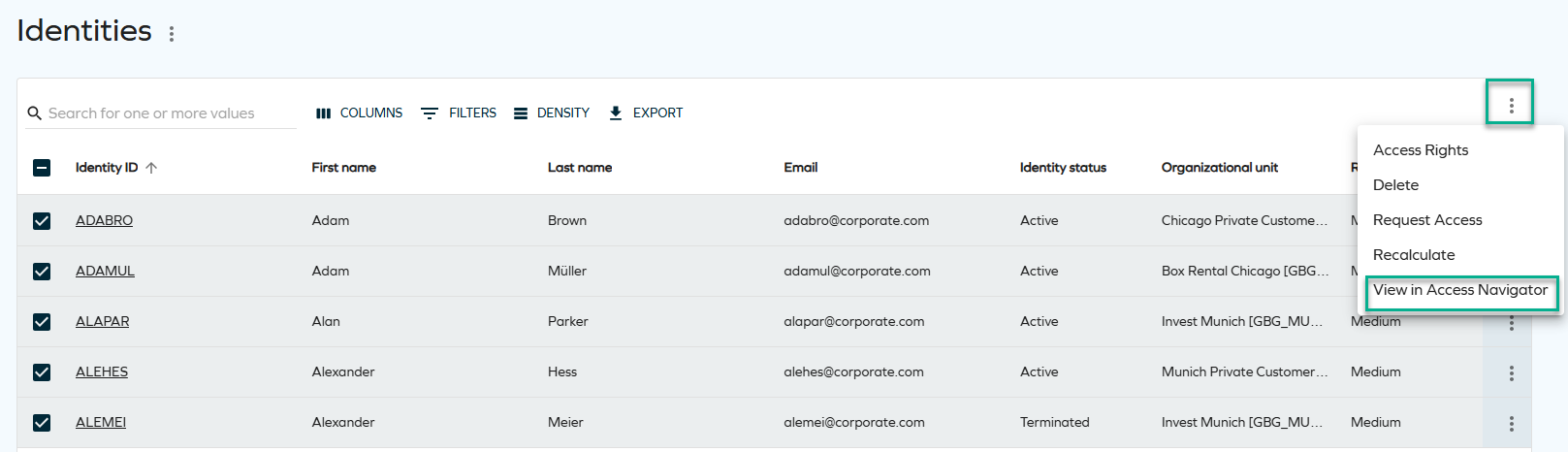
Identities can now be viewed both in the Omada Identity Portal (Enterprise Server) and in Omada Identity Analytics (OIA) dashboards. This bidirectional navigation reduces manual context switching and enables a smoother workflow between operational identity management and analytical insights.
-
Enterprise Server (ES) provides current, operational production data, and lets you switch to OIA.
-
OIA offers analytical views and historical insights based on a daily-built data model, and lets you switch to ES.

For more information on how to pre-select identities and view them populated on the dashboard or on the list, see Navigation between dashboards and Identities list in the OIA documentation.
Changes to Archive and Purge feature behavior
We've introduced the following changes to the Archive and Purge functionalities, improving their effectiveness and overall usability.
In the Operations Dashboard > System Overview section, a new Requires archiving setting row was added.
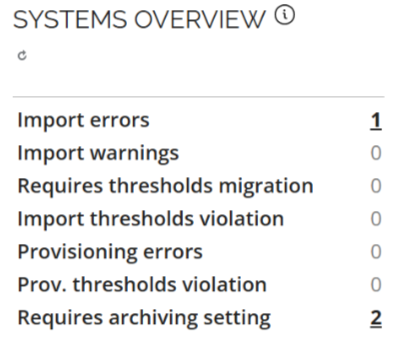
If you are a new customer or re-enabling the provisioning, the archiving and purging features are enabled by default and the default retention period is set to 30 days.
We've introduced the following changes to the Archive and Purge settings in the Advanced settings Provisioning section:
- The Automatically archive... setting is now enabled by default and cannot be changed.
- The Number of days setting, for both Archive and Purge, is limited to the maximum value of 90 days.
- Violation of those restrictions results in a notification message in the Commit Settings section advising user to review their settings.
We have introduced a both front-end and back-end validation mechanism, for the Number of days field, providing feedback when incorrect values are configured.
To handle missing or invalid settings, existing customers, who have not yet configured Archiving or Purging (with empty or null database values), receive the following message:
Archiving/Purging configuration required.
To ensure smooth adaptation to the behavioral change, in the transition period only warnings are issued if the configuration for Archiving or Purging is not done. With the January 2026 release only the high-priority provisioning jobs will be processed, with other jobs remaining in the pending state, until these values are configured.
Role and Policy Engine
Updated conditional inheritance matching logic
The Conditional inheritance evaluator RoPE extension has been updated to align with the intended design for context-based matching. A child resource must now contain a value in the property configured in MatchContextMembershipTo; otherwise, the inheritance rule does not match and the child resource is not assigned. Earlier versions could match even when this value was missing, which was unintended.
If you're upgrading from versions prior to the September 2025 Cloud Update, you may observe changes in conditional inheritance results, including removal of child permissions that no longer meet the corrected matching criteria.
Administrators should ensure that resources participating in conditional inheritance have the required context attributes populated or adjust their configuration accordingly.
For more details, see Conditional inheritance evaluator.
Other
A new code method ExpireResourceAssignmentsIfLastContextAssignmentExpired
A new event definition Expire resource assignments if last context assignment has expired was added. It calls a code method with the corresponding name in 15-minute intervals.
The method examines context assignments and resource assignments of the identity. If it finds resource assignments that no longer have an associated active context assignment, the resource assignments are expired. It also uses the validTo value from the last expired context assignment as the expiration date on the resource assignments.
Documentation
To help with deciding on the use of the Restore functionality for environments, we've expanded available documentation. Now it's easier to make an informed decision and use the functionality efficiently when it is truly necessary.
For more information, go to the Managing environment section of documentation.