System definition
This section describes the settings allowing you to define onboarded systems.
Specify general settings
This is optional. Follow these steps to specify general settings:
- Click the General settings task to open its settings dialog box.
- In the Name dialog enter a unique name for the system. This name will be displayed on the system list.
- The System ID is a unique identifier for the system, and it can only be set while adding a new system. For existing systems, this field has a read only state.
- In the Description field you can add an optional description for the system. This field is for information purposes only.
- The Status menu allows you to set the status of the system whether it is Active or Removed. All systems that you actively work with should have Active status. Removed systems are no longer available for warehouse imports, provisions, and reconciliation.
- Thanks to the Content selector you can define what type of data should be imported from the system. The system can provide Identity data, Access rights, or Both types of data. Similarly, as with the System ID, this selector is only available during system creation. For existing systems Content selector is disabled.
- In the Trust dialog you can associate one or more trusted systems. In order to do so, click the lookup icon to open the Select trusted systems dialog.
- In the Select trusted systems dialog, select one or more systems. You can search for the System ID, Name, Software, Description or the system. When you have made your selections, click OK to close the dialog box.
- Back in the General settings dialog box, the Trust field displays all the systems that you selected. You can remove the system again if you need to.
- The Prevent self-service menu allows you to decide if the system will be available for self-service access requests. You can select Yes or No.
- Click OK to save your selections.
Settings' definition
Here you will find some definitions of the settings:
- Name: type a unique name for the system. Two systems cannot have the same name.
- System ID: Type a unique System ID for the system. Two systems cannot have the same System ID.
- Description: Type an optional description of the system.
- Status: Status of the system.
- Prevent self service: Enable this setting if you want the system to be available for self-service access requests.
Specify queries and mappings
For systems using the template collectors, you can define queries and mappings. While the query options for each type of collector will be different, the mappings part and the use of the dialog are the same.
If you want to manually edit the XML queries, click and hold CTRL before you select the Queries and Mappings task on the individual system’s page.
To specify Queries and Mappings, follow these steps:
- In the Queries and mappings dialog box, click New, then select the object type to create a query for.
- In the New query and mapping dialog box, under the Parameters heading, specify any relevant query parameters. These will be different depending on the collector type.
- Under the Mappings header, map the relevant Destination properties in the left column to a value in the Source on the right side. You can specify whether the Operator is a Map, a Constant, Lookup or an Expression. As a minimum, you must always type a value for the Destination properties that are followed by a red asterisk (*).
- If you need to, you can also add other extension attributes if you click the Add extension button. In such a case, you must type both a name for the extension attribute under the Destination column and a value in the Source column.
- For any manually typed extension attributes, select the History checkbox if you want to enable recording the history of the relevant extension attribute. Click OK to save and close when you are done.
- When you return to the Queries and mappings dialog box, you can copy one or more object types in the overview by selecting the individual object type. Then click … and then Copy.
- When you have added the Queries and Mappings, click OK to close the dialog box. The system validates your details. If there are no errors, the status in the Status column changes to OK.
Queries and parameters
Here all possible query parameters available for the template collectors. However, each template collector has a different set of parameters. Please refer to individual Connectivity guides for more information.
- URL is a DynamicExpresso expression: here you can selected if the URL field is interpreted as a DynamicExpresso expression.
- URL: here you need to enter the OData URL to the OData service endpoint.
- Nested URL: this field allows you to specify a nested URL that causes the collector to iterate over the result from URL and then execute the Nested URL for each returned object. Fields from the URL result can be specified in the Nested URL, for example, groups{PARENT_id}members.
- Append: here you can set parameters to append to URL for each chunk. Setting this value will override the global setting.
- Collection: this field allows you to specify the name if the response contains more than one root collection [].
- Base DN: type the name of a Base DN to associate with this query. If you leave this field empty, the query uses the Base DN that you typed in under Connections details.
- Filter: type in an LDAP filter to limit the number of objects fetched, for example, objectClass=user.
- Scope: choose a scope for the query.
- Base: a base search limits the search to the base object. The maximum number of objects returned is always one.
- One-level: a one-level search is restricted to the immediate children of a base object but excludes the base object itself. This setting can perform a targeted search for immediate child objects of a parent object.
- Sub tree: a sub tree search (also known as a deep search) includes all child objects in addition to the base object.
- Distinct: in some situations, a query will yield duplicate rows due to the nature of the data. To avoid import failures, enable the Distinct option.
- Description: optionally, type a description for the query.
- Destination: map Destination fields to values in the Source fields. To add extension attributes, go to the text field below the last the pre-defined Destination property, then type a name for the relevant extension attribute.
- History: if you have typed in the name of an extension attribute under the Destination column, enable this setting to permit recording of history. The History checkbox is only available to manually specified extension attributes.
- Multivalued: if you have typed in the name of an extension attribute under the Destination column, enable this setting if Source field has multiple values. The Multivalued checkbox is only available to manually specified extension attributes.
- Operator: there are various operators that you can specify for the query:
- Map allows you to map the value of a property from the returned objects of the query. Type the name of the property in the Source field.
- Note that to retrieve data in the json format, if properties are in nested arrays, you must use the underscore to separate the name of the parent and the child property, for example, emails_value
- Constant allows you to set a fixed value. Type the fixed value in the Source field.
- Lookup allows you to resolve the ComposedBusinessKey for accounts and resources in trusted systems.
- Lookup can be also used to resolve the BusinessKey for accounts and resources in resource assignment queries and the parent and child resource BusinessKey in resource parent/child queries.
- While ComposedBusinessKey lookup searches within trusted systems, BusinessKey lookup searches within the current system category.
For example, a resource assignment query can look up the BusinessKey of the resource whose Name attribute is equal to the GroupList attribute returned by the resource assignment query.
In order for the BusinessKey lookup to work, the source and account queries must be listed above the resource assignment and the resource parent/child queries in Queries and mappings.
In the Source field, type the name of an attribute (extension attributes cannot be specified) of the account or resource that you have imported from a trusted system, followed by the = sign and then the name of a property or an Expression.
If the system trusts multiple systems, the lookup includes accounts and resources in all trusted systems.
For example, businesskey=properties_principalId.
In this example, you use the princpalId attribute from the target system to match the businesskey attribute on the account in the trusted system.
The following attributes can be specified for Account CBK:
- businesskey (similar to ComposedBusinessKey except for the trailing number and the or
postfix) - uid
- name
- domain
- displayname
- distinguishedname
- path
- description
- status
- statusmask
- validfrom
- validto
- lastlogon
- lastpasswordchange
The following attributes can be specified for Child resource CBK:
-
businesskey (similar to ComposedBusinessKey except for the trailing number and the or
postfix) -
shortname
-
name
-
domain
-
displayname
-
distinguishedname
-
path
-
description
-
Expression allows you to write single line C# expressions in the Source field. All properties from the objects returned by the query are available. For example, string.Format("0, 1", LastName, FirstName ). In this example, you use the C# string formatter, and insert the LastName and FirstName values. To enable multivalued attribute imports there are following functions available:
-
GetValuesAsMultiValueAttribute(values) - this function returns provided variables as multivalues, with null values being ignored.
-
ConvertStringToArray(text, separator) - this function splits provided text using the chosen separator, with null values returning empty arrays.
Extension attribute validation
When saving the Queries and Mappings form, validation of extension attributes may display the following dialog:
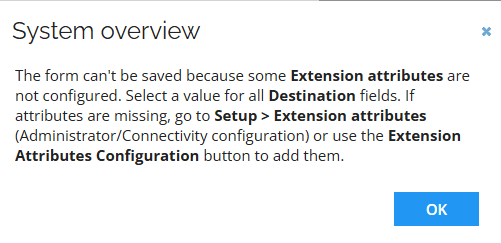
This occurs if one or more required Destination fields for extension attributes are not configured.
To resolve the issue, follow these steps:
- Ensure that all required Destination fields contain a value selected from the dropdown list.
- If a required value is missing from the Destination list, add a new extension attribute by doing one of the following:
- Click the Extension Attribute Configuration button. A new tab opens displaying the list of extension attributes.
- Navigate to Setup > Extension attributes.
- Click New.
- Complete the form and save the data.
To use the newly added extension attribute:
- Close the Queries and Mappings form.
- Reopen the configuration and reselect the relevant object type.
- Complete the mapping, including the previously missing extension attribute.
If you specify destination properties for resource assignments or resource parent/child, you must specify EITHER the business key OR the Composed Business Key for the resource assignment, or resource parent/child, not both of these destination properties. If you specify a value for both properties, the mapping will not work.
It is required that you add a mapping for the security resource business key when defining queries and mappings. If you do not do this, you must select the Automatically populate security resource business key checkbox when setting up the import configuration. For details, see section Configure import (optional).
Extension attributes in queries and mappings
Queries and mappings employ extension attributes that allow to map properties. Some of the extension attributes are specific only to Template collectors while some are specific only to non-template collectors.
The section below describes extension attributes that are specific to the template collectors. For the non-template collectors, please refer to corresponding connectivity guides.
Omada Identity does not have any predefined list of extension attributes. These additional attributes can be defined within the Mappings section of Queries and Mappings task of each template collector, Setup > Systems > (selected system based on template collector) > Queries and Mappings.
Depending on the system, some queries and mappings can be defined out of the box. Even if the queries and mappings are defined, you can add new ones and edit the existing ones. Extension attributes are an example of what can be changed in the mappings.
Object types
There are several object types for which query mappings are available in Omada Identity
- Account: comprises of query mappings for account attributes.
- Context: comprises of query mappings for context attributes.
- Identity: comprises of query mappings for identity attributes.
- Resource: comprises of query mappings for resource attributes.
- Resource assignment: comprises of query mappings for resource assignment attributes.
Add new extension attribute
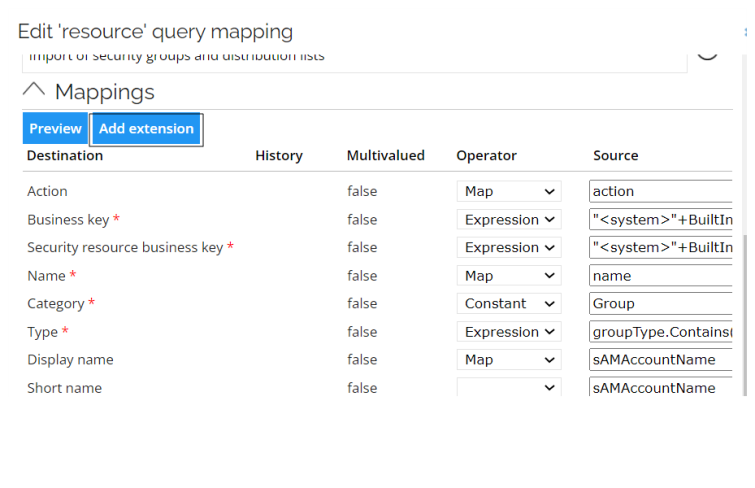
In order to add new extension attributes edit one of the existing query mappings or add a new one and follow the steps below:
- Go to Mappings section of the query mapping dialog box.
- Click the Add extension button
- Enter a new Destination of the extension attribute at the bottom of the mappings list.
- Select, if the history for this attribute should be recorded by selecting or deselecting the History checkbox.
- Select, if Source field has multiple values by selecting or deselecting the Multivalued checkbox.
- Select the Operator. The operator are Map, Constant, Expression, or Lookup.
- Enter the Source of the extension attribute.
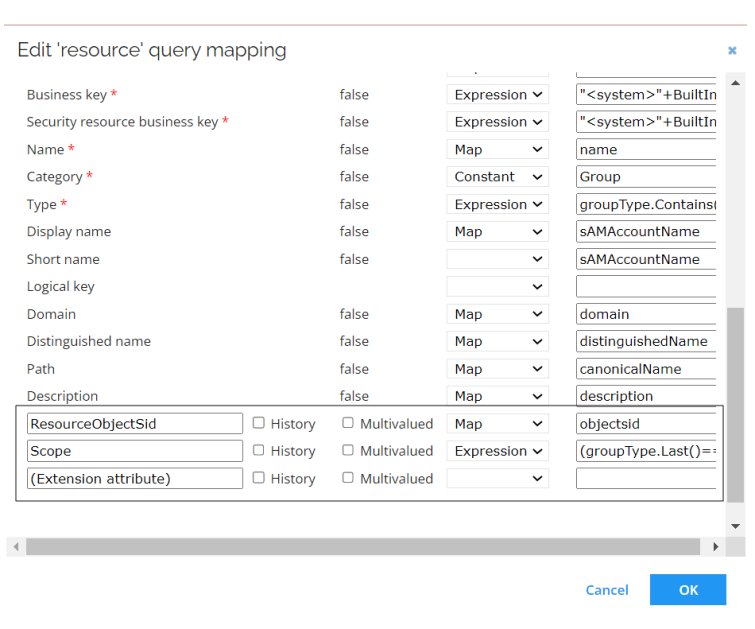
You can also use these extension attributes in the Account rules. For more information on how to define Account rules please refer to Set up account rules section.
The names of extension attributes can be only composed of the following characters: [^A-Za-z0-9_-$]. Spaces are not allowed in the attribute names.
Select system owners
This is optional. Follow these steps to select system owners:
- Click the System owners task to open its settings dialog box.
- In the System owners dialog, to the right of the Owners field, click the lookup icon to open the Select owner(s) dialog.
- In the Select owner(s) dialog, select one or more identities as system owner. If you cannot immediately see the identity on the list, you can search for the ID, First name, or Last name of the identity. When you have made your selections, click OK to close the dialog box.
- Back in the System owners dialog box, the Owners field displays all the identities that you selected. You can remove the system owners again if you need to. Click OK to save your selections.