Omada Identity Ansible package
The purpose of the Omada Identity Ansible package is to provide you, our partners and customers, with the opportunity to automate the installation of the on-premises version of Omada Identity.
This feature is currently in Technical Preview. The goal of this preview phase is to gather initial customer feedback and ensure the feature reaches necessary parity with the Omada Identity Installation Tool.
What is Ansible?
Ansible is a well-known automation tool. For more information on how to use it alongside Windows servers, you can refer to the official Ansible documentation:
To learn more about getting started with Ansible on Windows and possible limitations, check the Windows Frequently Asked Questions.
-
Linux text editors:
-
WSL Setup Guide: WSL Installation Guide
Use cases with Ansible
The following list covers example use cases for the Ansible package:
Installation of Omada Identity, its components, and post-installation configuration/actions
Installation of Omada Identity components:
- Enterprise Server
- Role and Policy Engine
- Omada Data Warehouse
- Omada Provisioning Service
- Standard Collector package deployment
- Standard Connector package deployment
- New UI Changesets deployment
Post-installation tasks:
- Portal initialization with Windows Integrated authentication
- License key setup
- Feature package import
- OPS and RoPE endpoints setup
- Data connections update
- Customer settings
- Service users creation in Omada Identity portal
- Archive DB initialization
- Standard Collector, Connector, and OData package registration and import
- ODW Imports trigger
- New UI Changesets import
Upgrade of Omada Identity and post-upgrade configuration/actions
-
Directory backup of Omada components
-
Uninstall and removal of existing directory of Omada components
-
Installation of Omada components:
- Enterprise Server
- Role and Policy Engine
- Omada Data Warehouse
- Omada Provisioning Service
- Data Preview
- Standard Collector package deployment
- Standard Connector package deployment
- OData Omada Identity package deployment
-
Post-upgrade tasks:
- Portal initialization
- Feature package import
- Customer settings
- Data connections update
- Standard Collector, Connector, and OData package registration and import
- ODW Imports trigger
- New UI Changesets import
- RoPE and OPS service startup
Configuration of installed components
- PSWencryptionKey
- APISharedSecret
- WebService Endpoints
- Connection Strings
After upgrade, RoPE EngineConfiguration.config will be created from scratch. As a consequence, all customization done before the upgrade will need to be re-applied to the new file.
The following components are considered for future implementation:
- Password rotation
- Changeset merging and deployment
- GMSA support
Ansible package file structure
The package contains a structured set of directories and files.
Playbooks
At the core, there are two playbooks:
-
installation_playbook.ymlHere is an example section of a playbook with comments:
---- hosts: es # Group of hosts for which role's tasks will runroles: # List of roles which will be executed against the group of hosts- estags: # List of tags for more granular run options- esvars_files: # List of additional variable files- vars/main/main.yml- vars/main/users.yml -
upgrade_playbook.ymlHere is an example section of a playbook with comments:
---- hosts: pre_upgrade # Group of hosts for which the role's tasks will runroles: # List of roles to be executed against the group of hosts- pre_upgradetags: # List of tags for more granular run options- pre_upgradevars_files: # List of additional variable files- vars/main/main.yml- vars/main/users.yml
Variable files
Playbooks are supported by variable files:
vars/main/users.ymlvars/main/main.yml
These files contain all the information on how the environment should be configured.
Inventories
The environment landscape definition is kept in the hosts inventory file. It describes which Omada components run on which hosts. The path to this file is as follows: inventories/dev/hosts.
Role directories
A role directory represents a general goal to achieve or a topic to handle. For example, the es role (Enterprise Server) defines everything needed to support the installation and upgrade tasks of the Enterprise Server component. The post_installation role groups together all tasks related to what needs to be done after installing Omada Identity components to initialize the environment and make it ready for consultants.
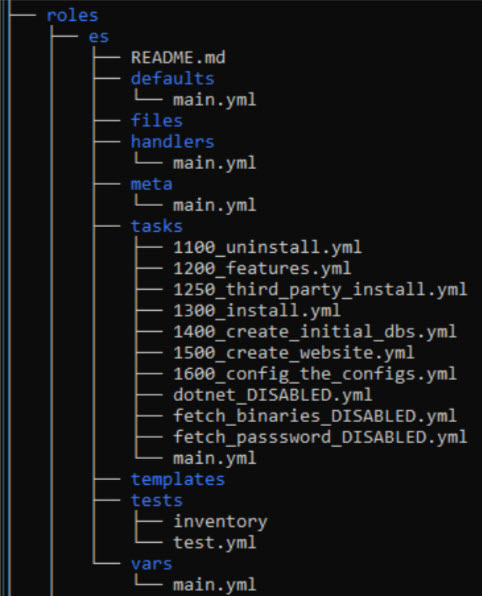
Here is a short explanation of some subdirectories and files typically found in a role directory:
README.md- provides basic information about role requirements and examples of how to use it.defaults/main.yml- contains default values required for the role to work properly.tasks/main.yml- orchestrates all tasks to be run in this role.tasks/*.yml- other YAML files containing specific task or action code.templates- contains Jinja2 template files used for component configuration or other tasks.
Installation and upgrade prerequisites
Before proceeding with the Omada Identity Ansible package installation or upgrade, the following prerequisites are expected to be present and working in the environment:
-
SQL Server DB engine in a supported version
-
SQL Server integration Services in a supported version
-
SQL Server Reporting Services in a supported version
- Connection to the DB engine is configured
- ReportServer endpoint is reachable
- Reports endpoint is reachable
-
Set of domain users for service run purposes
-
SPNs (Server Principal Name) set for:
- Omada Identity portal (forms authentication is not yet supported by the package)
- SSRS (unless you decide to use a specific SSRS access account)
- SQL Server (unless you decide to use local SQL Server accounts)
-
The user used by Ansible to control target Windows Server nodes needs to be a Local Administrator and SYSADMIN in DB engines across the environment.
-
All software and sizing prerequisites are the same as for a standard installation. For more information, refer to the Omada Identity Installation guide and Software prerequisites.
-
Additionally, an Ansible control node to run Ansible playbooks is required. Furthermore, communication between the Ansible control node and Windows Server nodes in the environment is necessary. Check here for details:
Define hosts file
The optimal approach is to begin by defining your environment's hosts file.
Exemplary host file with comments
# Define host aliases and map them to your server FQDNs or IP addresses
web1 ansible_host=web-server01.corporate.com

# You can define more servers if needed.
# Just add an alias, define the host, and add it to the appropriate group later on.
#web2 ansible_host=web-server02.corporate.com

rope1 ansible_host=web-server01.corporate.com instances=2
#rope2 ansible_host=web-server02.corporate.com instances=2

# ssrs1 and ssis1 can point to the same server if SSRS and SSIS are co-located on one machine
ssrs1 ansible_host=app-server01.corporate.com
ssis1 ansible_host=app-server01.corporate.com
ops1 ansible_host=app-server01.corporate.com

preview_collector1 ansible_host=app-server01.corporate.com
preview_preview1 ansible_host=web-server01.corporate.com

db1 ansible_host=db-server01.corporate.com

#vault1 ansible_host=app-server01.corporate.com

# Do not modify the controller line below
controller ansible_host=localhost ansible_connection=local

# "es" group of hosts, used to define all hosts where Omada Enterprise Server should be installed
[es]
web1
#web2

# "rope" group of hosts, used to define all hosts where Omada Role and Policy Engine should be installed
[rope]
rope1
#rope2

# "ssrs" group of hosts, used to define all hosts where Omada Data Warehouse should be installed to support Reporting
[ssrs]
ssrs1

# "ssis" group of hosts, used to define all hosts where Omada Data Warehouse should be installed to support SSIS/import
[ssis]
ssis1

# "odw" group of hosts, used to define all hosts where Omada Data Warehouse should be installed
[odw:children]
ssis
ssrs

# "ops" group of hosts, used to define all hosts where Omada Provisioning Service should be installed
[ops]
ops1

[preview_preview]
preview_preview1

[preview_collector]
preview_collector1

[data_preview:children]
preview_preview
preview_collector

#[vault]
#vault1

# "pre_upgrade" group of hosts, used to define all hosts where the pre_upgrade role should run
[pre_upgrade:children]
es
rope
odw
ops
data_preview
#vault

# "post_upgrade" group of hosts, used to define all hosts where the post_upgrade role should run
[post_upgrade:children]
es
rope
odw
ops
data_preview
#vault

# "post_installation" group of hosts, used to define all hosts where the post_installation role should run
[post_installation:children]
es
rope
odw
ops
data_preview

# "all" general group of hosts
[all:children]
es
rope
ops
odw
data_preview
#vault

# vars section, used to define connection details for Windows Server nodes
[post_installation:vars]
ansible_user=<<domain>>\<<installation_account>>
ansible_password=<<Your Password goes here>>
ansible_port=5986
ansible_connection=winrm
ansible_winrm_transport=credssp
ansible_winrm_server_cert_validation=ignore
As an alternative to defining connection variables inline in the hosts file under [post_installation:vars], you can move them to a dedicated file: inventories/<env>/group_vars/post_installation.yml. This approach is recommended when managing multiple environments (e.g., dev/, qa/, production/) because each environment gets its own credentials file, and it makes encrypting credentials with ansible-vault straightforward.
Example inventories/dev/group_vars/post_installation.yml:
ansible_user: "<<domain>>\\<<installation_account>>"
ansible_password: "<<Your Password goes here>>"
ansible_port: 5986
ansible_connection: winrm
ansible_winrm_transport: credssp
ansible_winrm_server_cert_validation: ignore
Both approaches produce the same result.
Define variable files
The next step in preparing for the Omada Identity Ansible package installation is to ensure all variables are provided in variable files.
Exemplary vars\main\main.yml file with comments
# Do not modify
third_party: "{{ installation_binaries }}\\ThirdParty\\ThirdParty"
installers_path: "{{ installation_binaries }}\\Install"
log_path: "{{ installation_binaries }}\\Logs"
db_access_rights: db_owner
timer_service: OETSVC
# Do not modify

# Defines which inventory environment to use (corresponds to inventories/<env>/ directory)
env: dev
log_and_config_files_path: "inventories/{{ env }}/log_and_config_files"

## Keep attention to the version!
# Root path on the target hosts where installation binaries are present
omada_packages: "C:\\OmadaInstall\\"
omada_packages_version: "<<Omada Identity vX.Y.Z.W>>"
installation_binaries: "{{ omada_packages }}\\{{ omada_packages_version }}\\{{ omada_packages_version }}"
collectors_path: "{{ omada_packages }}\\<<Omada.Connectivity.StandardCollectors.version>>"
connectors_path: "{{ omada_packages }}\\<<Omada.Connectivity.StandardConnectors.version>>"
odata_omada_identity_path: "{{ omada_packages }}\\<<Omada.Connectivity.OData.OmadaIdentity.version>>"
new_ui_path: "{{ omada_packages }}\\{{ omada_packages_version }} New UI Changesets\\{{ omada_packages_version }} New UI Changesets"
data_preview_path: "{{ omada_packages }}\\{{ omada_packages_version }} Data Preview Service\\{{ omada_packages_version }} Data Preview Service"

# Specify .NET binaries version, use the latest version available
dot_net_version: "<<version>>"

# Full path to backup directory
backup_path: "C:\\OmadaBackup"

# Customer's License Key
license_key: "<<Your License Key goes here>>"
customer_name: "<<Your Customer Name>>"

# Define Feature Package import mode, default is FULL.
# FULL    >> imports all Omada features; for upgrade scenarios, OMADAIDENTITYGOVERNANCE is removed from the list.
# CORE    >> imports only the CORE set of features
# CUSTOM  >> fill in custom_feature_package_list with a comma-delimited list of features to import
# MANUAL  >> pauses the playbook at import time; resume manually after importing via the portal
feature_packages_import_mode: "FULL"
custom_feature_package_list: ""

drive_letter: C
es_install_result_path: "{{ drive_letter }}:\\Program Files\\Omada Identity Suite\\Enterprise Server"
ops_install_result_path: "{{ drive_letter }}:\\Program Files\\Omada Identity Suite\\Provisioning Service"
rope_install_result_path: "{{ drive_letter }}:\\Program Files\\Omada Identity Suite\\Role and Policy Engine"
odw_install_result_path: "{{ drive_letter }}:\\Program Files\\Omada Identity Suite\\Datawarehouse"
preview_install_result_path: "{{ drive_letter }}:\\Program Files\\Omada Identity Suite\\Preview"
vault_install_result_path: "{{ drive_letter }}:\\Program Files\\Omada Identity Suite\\Vault Service"

backup_list:
  [
    "{{ es_install_result_path }}",
    "{{ ops_install_result_path }}",
    "{{ rope_install_result_path }}",
    "{{ odw_install_result_path }}",
    "{{ preview_install_result_path }}",
    "{{ vault_install_result_path }}",
  ]
omada_registry: HKLM:\SOFTWARE\Omada\

# Domain Base Name
# Example Full Domain Name >> corporate.com
# Domain >> corporate
domain: "<<domain>>"
full_domain: "{{ domain }}.com"

# Data Store DB server (NetBIOS name or DNS alias)
# The filter "| split('.') | first" extracts the hostname from the FQDN defined in the hosts file.
# Remove the filter if you want to use the full FQDN.
data_store_db_server: "{{ hostvars['db1'].ansible_host | split('.') | first }}"
data_store_db_port: 1433

# SSIS DB server (NetBIOS name or DNS alias)
ssis_db_server: "{{ hostvars['ssis1'].ansible_host | split('.') | first }}"
ssis_db_port: "1433"
# SSIS installation path — uses single backslash format intentionally
ssis_binn_path: 'C:\Program Files\Microsoft SQL Server\140\DTS\Binn\'
# Version of ODW component package based on SSIS version
ssis_sql_server_version: "<<2017|2019|2022>>"

# Database names for each Omada component
es_db: "OIS"
ssddb_db: "SSDDB"
es_archive_db: "OISA"
rope_db: "ROPE"
ops_db: "OPS"
odw_staging_db: "ODWS"
odw_master_db: "ODWM"
odw_db: "ODW"

# Define authentication type against SQL Server
db_connstr_authentication: "Integrated Security=SSPI"
# db_connstr_authentication: 'user id={{ db_user }};password="{{ db_user_pwd }}"'

# DB collation for ES, SSDDB, and ES_ARCHIVE databases
# All other databases are created by the product installers and use their default collation
db_collation: "SQL_Latin1_General_CP1_CI_AS"

# Connection string options (optional). Must begin with ";" if provided, must not end with ";".
# Example: ";Trusted_Connection=yes;Use Encryption for Data=False;TrustServerCertificate=yes"
connstr_options: ""
connstr_provider: "Provider=msoledbsql19"
es_connstr: "initial catalog={{ es_db }};data source={{ data_store_db_server }};{{ db_connstr_authentication }}{{ connstr_options }}"
ssddb_connstr: "initial catalog={{ ssddb_db }};data source={{ data_store_db_server }};{{ db_connstr_authentication }}{{ connstr_options }}"
es_archive_connstr: "initial catalog={{ es_archive_db }};data source={{ data_store_db_server }};{{ db_connstr_authentication }}{{ connstr_options }}"
rope_connstr: "initial catalog={{ rope_db }};data source={{ data_store_db_server }};{{ db_connstr_authentication }}{{ connstr_options }}"
ops_connstr: "initial catalog={{ ops_db }};data source={{ data_store_db_server }};{{ db_connstr_authentication }}{{ connstr_options }}"
odw_staging_connstr: "initial catalog={{ odw_staging_db }};data source={{ data_store_db_server }};{{ db_connstr_authentication }}{{ connstr_options }}"
odw_master_connstr: "initial catalog={{ odw_master_db }};data source={{ data_store_db_server }};{{ db_connstr_authentication }}{{ connstr_options }}"
odw_connstr: "initial catalog={{ odw_db }};data source={{ data_store_db_server }};{{ db_connstr_authentication }}{{ connstr_options }}"

# Service users for Omada components
db_user: "<<sql_user>>"          # Used only when SQL Server authentication is enabled instead of SSPI
es_service_user: "<<srvc_oi>>"   # Timer Service and Application Pool user
rope_service_user: "<<srvc_rope>>" # RoPE Service user
ops_service_user: "<<srvc_ops>>"   # OPS Service user
preview_collector_service_user: "{{ es_service_user }}"
preview_preview_service_user: "{{ es_service_user }}"
sql_agent_user: "{{ es_service_user }}" # Must match es_service_user
app_pool_user: "{{ es_service_user }}"  # Must match es_service_user
ssrs_access_user: "<<srvc_ssrs>>"  # User to access SSRS reports
ansible_installation_user: "<<domain_admin_user>>" # Used for first portal access via Windows Integrated Auth

# Enterprise Server website configuration
# HTTPS is not yet supported
es_mode: http
es_web_config: "Web.config"
es_binding: "{{ hostvars['web1'].ansible_host | split('.') | first }}"
es_app_pool: "{{ es_binding }}"
es_http_binding_port: 80
es_https_binding_port: 443
es_certificate_thumbprint: ""

# Role and Policy Engine listener configuration
# HTTPS is not yet supported
rope_mode: http
rope_binding: "{{ hostvars['rope1'].ansible_host | split('.') | first }}"
rope_http_binding_port: 8010
rope_https_binding_port: 8011
rope_certificate_thumbprint: ""

# Omada Provisioning Service listener configuration
# HTTPS is not yet supported
ops_mode: http
ops_binding: "{{ hostvars['ops1'].ansible_host | split('.') | first }}"
ops_http_binding_port: 8000
ops_https_binding_port: 8001
ops_auth_behavior: "ProvisioningServiceServiceBehaviorApiSharedSecret"
ops_certificate_thumbprint: ""

# SSRS ReportServer WebService endpoint
ssrs_report_server_url_ws: "http://{{ hostvars['ssrs1'].ansible_host | split('.') | first }}/ReportServer_SSRS"
# SSRS installation path at target host
ssrs_installation_path: "C:\\Program Files\\Microsoft SQL Server Reporting Services\\SSRS\\ReportServer"

# Customer Settings to be configured during deployment.
# If a key does not exist in tblCustomerSetting, an INSERT will be performed.
customer_settings_value_str:
  - { key: "SSRSUrl", value: "{{ ssrs_report_server_url_ws }}" }
  - { key: "RoPERemoteApiUrl", value: "{{ rope_mode }}://{{ hostvars['rope1'].ansible_host | split('.') | first }}:{{ rope_http_binding_port }}/RoPERemoteApi/" }
# - { key: "SSISExecutionUser", value: "NULL" }
# - { key: "SSISExecutionUserPassword", value: "NULL" }
  - { key: "SSISInstallationPath", value: "{{ ssis_binn_path }}" }
  - { key: "SSISServer", value: "{{ ssis_db_server }}" }
  - { key: "SqlAgentJobProxyAccountName", value: "{{ domain }}\\{{ sql_agent_user }}" }
  - { key: "SqlAgentJobServerInstance", value: "{{ ssis_db_server }}" }
  - { key: "SqlAgentJobSSISServerInstance", value: "{{ ssis_db_server }}" }
  - { key: "ItemsPerPage", value: "20,40,200,1000" }
  - { key: "StagingHostingServiceHost", value: "{{ hostvars['preview_collector1'].ansible_host | split('.') | first }}" }
  - { key: "StagingPreviewServiceHost", value: "{{ hostvars['preview_preview1'].ansible_host | split('.') | first }}" }

customer_settings_value_int:
  - { key: "StagingPreviewServicePort", value: "5001" }
  - { key: "StagingHostingServicePort", value: "5002" }
# Set appropriate value to 1 depending on the import method of your choice.
# For a Single Server setup, both must be 0.
# For multi-server setups, set SqlAgentJobUse to 1.
customer_settings_value_bool:
  - { key: "SSISUseKerberos", value: "0" }
  - { key: "SqlAgentJobUse", value: "1" }
Exemplary vars\main\users.yml file with comments
# Provide passwords for service users
es_service_user_pwd: "<<PASSWORD>>"
rope_service_user_pwd: "<<PASSWORD>>"
ops_service_user_pwd: "<<PASSWORD>>"
app_pool_user_pwd: "{{ es_service_user_pwd }}"
ssis_agent_user_pwd: "{{ es_service_user_pwd }}"
ssrs_access_user_pwd: "<<PASSWORD>>"
preview_preview_service_user_pwd: "<<PASSWORD>>"
preview_collector_service_user_pwd: "<<PASSWORD>>"

# Leave empty when using Windows Authentication (Integrated Security=SSPI).
# Provide a value only when SQL Server authentication is required.
db_user_pwd: ""

# Provide values for encryption and API shared secret
psw_encryption_key: "<<SomeEncryptionKey>>"
api_shared_secret: "<<SomeAPISharedSecret>>"
The above file examples are shown in plain text, but the recommended approach is to encrypt them using the ansible-vault utility to enhance security. Here's the exemplary encryption:
ansible-vault encrypt vars/main/users.yml

New Vault password:

Confirm New Vault password:

Encryption successful
After encryption, the content of the file looks as follows:
$ANSIBLE_VAULT;1.1;AES256
65326331666563626564336636396536363165386138376S63373638B23366396139323439653664
33653234343662333236386561376S3661356436663139330a3735346S3831626233383938616137
65363436666433313330613661663538306239366630353133656138643465386434326564373163
3064353637336338630a326461623233616337376563636431613866623639626238333433373132
34656266323635383734616539376462643235313464316132626261396135343861323534636265
37666664623537633536353163663239663436626365366662303065623038303364343532323035
37356230343339396535623861393862646130616230643361383636343031306636376165376266
34353961666666366334316239353936333435613764613830626435306436303566613931323333
62613437323933336132636133313338373533336364313363353238373630303463663139303335
34613031666361353761393434346461323331313234326136326164363438653139336137373662
66373463646363303436393035663362363763393162313739363034323030306236316634363564
39323266343966306536633631333263623733393666393832643531623235336433616238636564
61343266616365633163623731663635623564336164656366643862373463323566363630313462
33396234303765383233653661353538396265356666336436343563356136316239326466353563
63613836343664366361633564663639643333373262646130376464333261646236626530366361
64633563633361303631666138626266316439393666313365306235383435376232663234353731
36336431303037306435373263313232616531663231613839656563316462383933633136653066
62343963316162636135353966613732396464313166663139613533393037373330303566336464
363066643231306538376236333835663739
However, furthermore, to edit the file, you need to use ansible-vault:
ansible-vault edit vars/main/users.yml

Vault password:
For information on the ansible-vault, refer to the Protecting sensitive data with Ansible vault documentation.
Upload installation files on all servers
The expectation is to have a single directory containing installation binaries, structured as shown below:
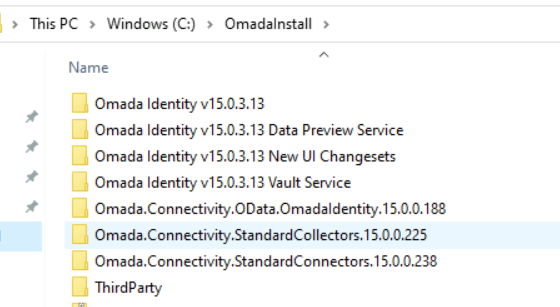
This comprises the standard contents of the installation zip package, along with additional directories for Third-party, Standard Collectors, Standard Connectors, New UI Changesets, and Data Preview:
-
The Standard Collectors and Standard Connectors directories result from unzipping the respective packages from Omada Community.
-
The Third-party directory contains all third-party software required for Omada installation.
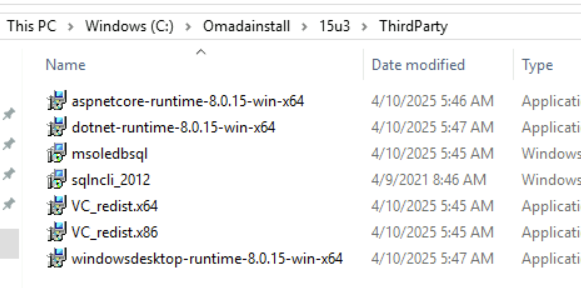
At this moment, the Third-party directory is not provided as a package.
If the pre_installation role is included in your package, you can automate copying installation files to all target hosts instead of uploading them manually. This requires the installation binaries to be accessible from the Ansible control node. Use the transfer_files tag to run only this step:
ansible-playbook -i inventories/dev/hosts installation_playbook.yml --tags transfer_files
Installation steps
Before proceeding with installation steps, make sure you've completed all tasks described in the Installation and upgrade prerequisites section.
Run installation playbook
Installation playbook can be triggered in various ways.
-
For a holistic approach, use the following command:
ansible-playbook -i inventories/dev/hosts installation_playbook.yml --tags installThis command executes all installation tasks defined in the playbook.
limitationBy default, Ansible is idempotent, meaning it is safe to re-run scripts multiple times without causing unintended side effects, as Ansible will skip anything that is already in the desired state.
However, certain Omada-related tasks could not be implemented this way. If the installation fails after one of these non-idempotent steps, re-running the script without skipping that step may cause errors. One known example is the creation and initialization of Enterprise Server-related databases.
To exclude it, run the installation playbook as shown below:
ansible-playbook -i inventories/dev/hosts installation_playbook.yml --tags install --skip-tags initialize_dbsSo far, no other points have been identified, and it's considered safe to simply re-run the installation playbook as shown above.
-
For a more specific approach, use the following command to run the installation for a particular component in Omada Identity:
ansible-playbook -i inventories/dev/hosts installation_playbook.yml --tags install --skip-tags rope,ops,odw,data_preview,post_installation,post_installation_esDue to the ambiguity of Ansible tags inheritance, this method is the only way to execute installation for just one Omada component. In the example above, the installation is executed solely for the Enterprise Server (the only tag not skipped). Additional examples can be found in the role's README.md file.
To run a playbook with ansible-vault encrypted files, use the following command:
ansible-playbook -i inventories/dev/hosts installation_playbook.yml --tags install --skip-tags rope,ops,odw --ask-vault-pass
To check which tasks will be executed when you are uncertain about tags used, use the following command:
ansible-playbook -i inventories/dev/hosts installation_playbook.yml --tags install --skip-tags rope,ops,odw --list-tasks
Upgrade steps
Prerequisites
Before proceeding with installation steps, make sure you've completed all tasks described in the Installation and upgrade prerequisites section.
The upgrade runbook encompasses steps outlined in the upgrade guides available in the Upgrade guides section.
Software requirements can be reviewed in the Installation guide section.
However, Omada recommends to double-check to ensure all necessary steps are covered, ensuring a seamless upgrade experience.
Run upgrade playbook
Upgrade playbook can be triggered in various ways.
-
For a holistic approach, use the following command:
ansible-playbook -i inventories/dev/hosts upgrade_playbook.yml --tags upgradeThis command executes all upgrade tasks defined in the playbook.
-
For a more specific approach, use the following command to run the upgrade for a particular component in Omada Identity:
ansible-playbook -i inventories/dev/hosts upgrade_playbook.yml --tags upgrade --skip-tags rope,ops,odw,post_upgrade,post_upgrade_esDue to the ambiguity of Ansible tags inheritance, this method is the only way to execute upgrade for just one Omada component. In the example above, the upgrade is executed solely for the Enterprise Server (the only tag not skipped). Additional examples can be found in the role's README.md file.
To run a playbook with ansible-vault encrypted files, use the following command:
ansible-playbook -i inventories/dev/hosts upgrade_playbook.yml --tags upgrade --skip-tags rope,ops,odw --ask-vault-pass
To check which tasks will be executed when you are uncertain about tags used, use the following command:
ansible-playbook -i inventories/dev/hosts upgrade_playbook.yml --tags upgrade --skip-tags rope,ops,odw --list-tasks
Available tags reference
Use --tags and --skip-tags to control which parts of a playbook run.
Playbook phase tags
| Tag | Description |
|---|---|
install | Run all installation tasks. |
upgrade | Run all upgrade tasks. |
uninstall | Run uninstall/removal tasks. |
Component tags
Use these to include or exclude specific components:
| Tag | Component |
|---|---|
es | Enterprise Server |
rope | Role and Policy Engine |
ops | Omada Provisioning Service |
odw | Omada Data Warehouse |
data_preview | Data Preview Service |
vault | Vault Service |
pre_upgrade | Pre-upgrade preparation (stop services, backup) |
post_installation | Post-installation phase |
post_installation_es | Post-installation tasks specific to the ES host |
post_upgrade | Post-upgrade phase |
post_upgrade_es | Post-upgrade tasks specific to the ES host |
Operational tags
Use these to run individual operations without executing a full playbook:
| Tag | Description |
|---|---|
customer_settings | Update customer settings in the database only. |
data_connections | Update data connection strings only. |
website | Configure IIS website for Enterprise Server. |
machine_key | Generate and apply machine key for load-balanced ES deployments. |
transfer_files | Copy installation binaries to target hosts. |
backup | Back up installed component directories. |
stop_all_services | Stop all Omada services. |
initialize_dbs | Create and initialize Enterprise Server databases. |
import_reports | Deploy SSRS reports. |
https | Configure HTTPS URL reservations. |
add_instances | Add additional RoPE service instances. |
newUI | Deploy New UI changesets. |
third_party | Install third-party prerequisites (.NET runtime). |
Use --list-tasks to preview which tasks will run for any combination of tags before executing the playbook:
ansible-playbook -i inventories/dev/hosts installation_playbook.yml --tags install --list-tasks
Considerations and limitations
Known issues and missing features
This consolidated list highlights known issues and features that are not yet implemented or covered in the current setup:
-
Initial surveys import
-
Language packages import
-
The Vault Service role is not yet implemented. The vault host can be defined in the hosts file, but no installation or configuration tasks will be executed.
-
SQL Server local account authentication is not yet fully supported:
- Omada components can currently only be installed using integrated authentication towards SQL Server.
- If user/password authentication is defined in connection strings in the
main.ymlvar file, it will overwrite configuration files and data connections to the desired state. - Encryption of connection strings in Datawarehouse\Common\Omada ODW WebService.dtsConfig is not covered yet and needs to be done manually after installation.
- In general, passwords in data connections will not be encrypted.
-
Sometimes after deinstallation of Enterprise Server, deletion of the directory fails, and it needs to be removed manually to ensure proper upgrade. Example error message:
TASK [es : Delete folder]fatal: [web1]: FAILED! => {"changed": false, "msg": "Failed to delete C:\\Program Files\\Omada Identity Suite\\Enterprise Server\\website\\Themes\\Default\\Infragistics\\structure\\Fonts\\jquery-ui.ttf: Access to the path 'C:\\Program Files\\Omada Identity Suite\\Enterprise Server\\website\\Themes\\Default\\Infragistics\\structure\\Fonts\\jquery-ui.ttf' is denied."}
Need to know
-
Tasks for which errors are ignored on purpose:
-
Certain tasks may result in errors, indicated by red text, for example:
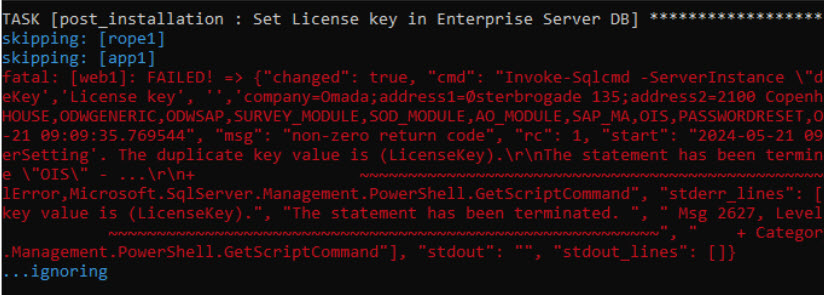
-
The message "...ignoring" signifies that the error has been deliberately ignored, allowing the playbook to continue executing.
-
The
ignore_errorsflag is used to achieve this. However, it's important to review ignored errors, as they may lead to subsequent task failures.
-
-
Re-run tasks creating a log file:
-
Some tasks are designed to run only when a log file is not already created.
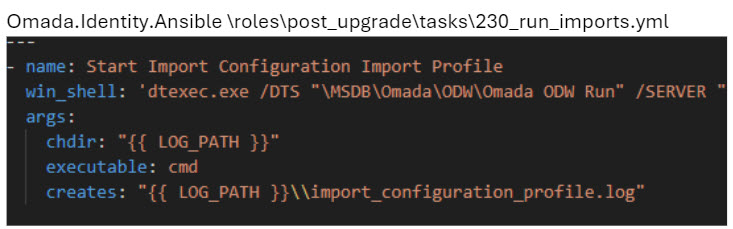
-
For instance, the task in the
post_upgraderole at roles\post_upgrade\tasks\230_run_imports.yml creates a log file"{{ log_path }}\import_configuration_profile.log"during its execution. Subsequently, it won't run again if the log file already exists. -
When re-running such tasks, ensure to delete the existing log file.
-
-
Import product packages behavior:
-
In the
post_installationandpost_upgraderoles, a task is responsible for importing new product features. -
The import mode is controlled by the
feature_packages_import_modevariable invars/main/main.yml. The following modes are available:Mode Description FULLImports all Omada feature packages. During upgrade, OMADAIDENTITYGOVERNANCEis automatically excluded.COREImports only the core set of features. CUSTOMImports only the features listed in custom_feature_package_list(comma-delimited).MANUALPauses the playbook at import time and prompts you to import features manually via the Omada Identity portal. The playbook resumes once you confirm. -
The default mode is
FULL. If there are unlicensed features in your environment, consider usingCOREorCUSTOMand importing additional packages through the portal after playbook completion.
-
-
Machine key configuration for load-balanced Enterprise Server deployments:
-
When Enterprise Server is deployed across multiple hosts (for example,
web1andweb2), all instances must share the same machine key to correctly encrypt ViewState tokens and forms authentication cookies. -
The package handles this automatically: the key is generated on the primary ES host and then distributed to all ES hosts in the group.
-
To run only the machine key setup step, use the
machine_keytag:ansible-playbook -i inventories/dev/hosts installation_playbook.yml --tags machine_key
-
-
RoPE multi-instance approach in package:
- The package supports adding multiple RoPE service instances, all using the same directory as the source. Consequently, all instances will utilize the same settings and configuration.
- For example, if specific priority calculation is desired for certain instances, manual configuration is necessary. For more information, refer to the Multiple instances of RoPE section in the Installation guide.