Grids
The grids section defines the columns in the grid(s) that are presented to the users who performs the workflow tasks. This is an example of a grid:
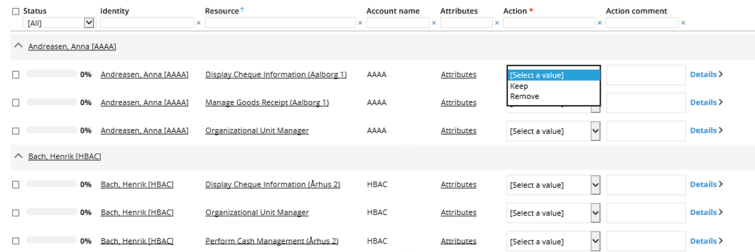
The action required in this survey is to give a response in the Action and Action comment fields. The remaining fields are read-only and cannot be edited in this grid.
It is possible to define several grids, if you want to use an alternative grid for the admin view, or different grids for the different workflow steps.
If a grid field shows a reference property, a number of quick form properties can be defined. If at least one property is listed the user will be able to click on a value in the column and a form will be displayed with the details of the referred object. The form will show the specified properties of the referred object. The properties are read only.
It is possible to control the initial grouping in the definition of survey template.
Child grid
You can define which grid is a child grid for a given grid. In a parent/child survey the grid will be presented as a sub grid with child questions for parent grid.
Grids Markup language
A survey template is authored in the SurveyTemplateML xml language. The schema definition file, SurveyTemplateML.xsd.
Attributes
The table below lists the available attributes for grids:
| Attribute | Description |
|---|---|
| AdminGrid | The name of the grid that will be used for the Survey Administrator view. |
| Name | The name of the grid. |
| SortOn | The property the grid is sorted on initially. It is possible to change the sorting in the grid. |
| SortDescending | True/False. If set to true, the grid will be sorted in descending order. The default is false. |
| GroupBy | The property the grid is initially grouped by. It is possible to change the grouping in the grid. |
| GroupState | How the grouping is initially displayed (expandAll, collapseAll, or expandFirst). The default is expandAll. |
| childGrid | This attribute is only applicable if a data object of a data source is configured with a childObjectRefProperty. Name of a grid that will be used for child questions. |
The table below lists the available attributes for gridField:
| Attribute | Description |
|---|---|
| Property | The system name of a property used in the objectType. |
| Width | The column width in pixels. |
| State | Used to specify whether the state of the field will be readOnly, editable, hidden or requiresValue. The default is readOnly. |
| QuickFormProperties | Comma-separated list of the properties displayed in the quick form. |
| Caption | Either a string that will be used instead of the name of the property, or an application string (S_). This attribute is optional; if not specified the display name of the property is used. |
  <grids adminGrid="adminGrid">

    <grid name="ResourceOwner" sortOn="ROLEREF" sortDescending="false" groupBy="IDENTITYREF">

      <gridFields>

        <gridField property="IDENTITYREF" state="readOnly" width="150" quickFormProperties="FIRSTNAME,LASTNAME,IDENTITYID,OUREF,EMAIL,MANAGER"/>

        <gridField property="ROLEREF" state="readOnly" width="150" quickFormProperties="NAME,DESCRIPTION,SYSTEMREF,ROLETYPEREF,ROLEFOLDER"/>

        <gridField property="VALIDFROM" state="readOnly" width="100"/>

        <gridField property="VALIDTO" state="readOnly" width="100"/>

        <gridField property="SURV_ACTIONCOMMENT" state="requiresValue" width="120"/>

        <gridField property="SURV_ACTION" state="requiresValue" width="200"/>

        <gridField property="SURV_LASTATTESTED" state="requiresValue" width="100"/>

      </gridFields>

    </grid>
Quick Form Properties
If a grid field shows a reference property a number of quickFormProperties can be stated. If at least one property is listed the user will be able to click on a value in the column and a form will be displayed with the details of the referred object. The form will show the specified properties of the referred object. The properties are readOnly.
-
AdminGrid: The adminGrid is what is displayed to the survey administrator(s) in the Administration tab when they monitor running surveys using the Survey Administration View.
-
Caption: A grid field can have an optional caption attribute which (if specified) will be displayed instead of the property name. An application string constant can be stated instead of a literal string (example:
S_SURVEY_Text_MyColumnCaption) if multilingual support is needed. Note that this requires prior creation of an appropriate application string.
If the specified caption starts with “S_”, it is assumed to be an application string.
<gridField property="VALIDFROM" state="readOnly" width="100" caption="valid fra"/>

<gridField property="VALIDTO" state="readOnly" width="100" caption="S_SURVEY_ERR_UNKNOWN_ERROR_Message"/>
Multi-valued properties
Multi-valued reference properties cannot be used in the grid. If such properties are needed, you can use them in the forms and in the survey object.