Omada Identity Graph API
Overview
Omada Identity Cloud customers can integrate access request workflows directly within other clients through Omada Identity Graph API. It is Omada Everywhere initiative, building capabilities for third parties to build clients for Omada’s access processes.
To view the latest changes in supported versions, see the Changelog.
Version 1.0 and Version 1.1 are no longer supported.
Enabling the GraphiQL browser page
Prerequisites
- Enable the new user interface (UI).
- GraphiQL browser page should only be enabled in test or development environments (not in production).
Steps
-
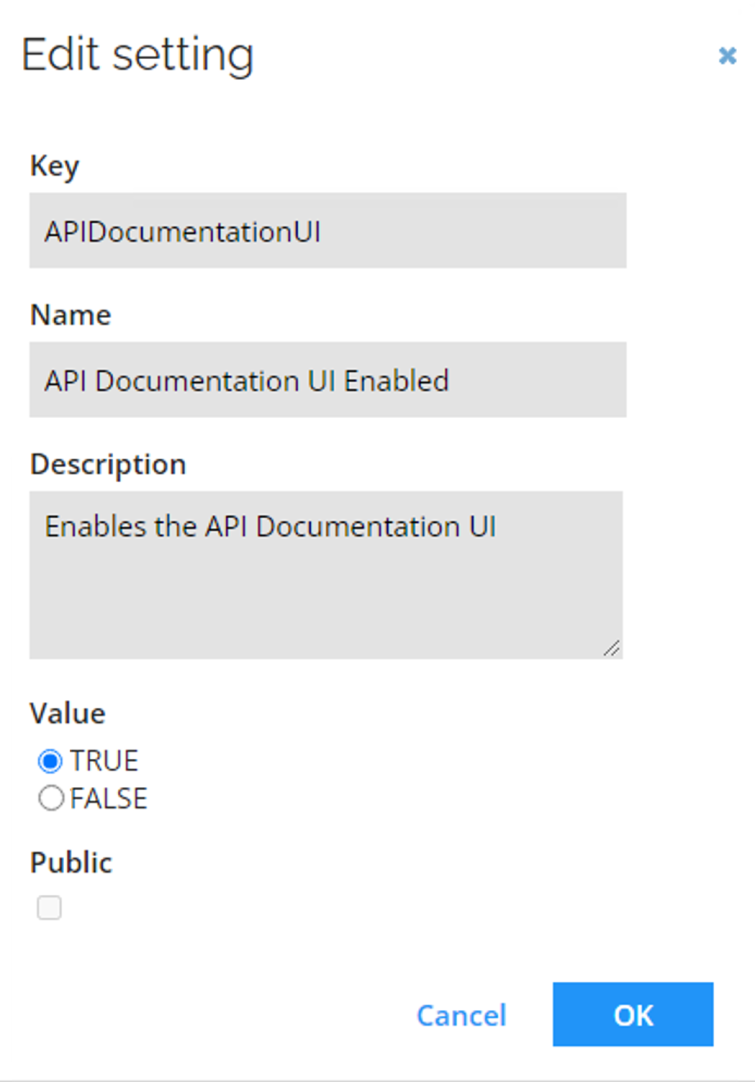
Open the ticket is Omada Service Desk Support to set the API Documentation UI Enabled customer setting to TRUE.
-
Enter the URL, for example:
https://< instancename>.omada.cloud//ApiDoc.aspx?api=domain&version=X.X/.
Authentication and impersonation
The Omada Identity Graph API applies the same authentication level rules as the standard Omada Identity session model. Authentication levels determine which user group memberships are applied to a session.
Read Authentication level concept to learn the following rules and more:
- In authentication with impersonation (via an Impersonation Service User), the authentication level is set to Low.
- Only memberships in groups with an authentication level that is equal or lower than the session's authentication level are applied to the user session.
Use of DomainApi to create Access Requests
- Use the basic queries to determine the lists of: reasons, systems, and optionally context.
query {
  accessRequestComponents {
    reasons {
      id
      name
    }
    systems(
      filters: { name: { filterValue: "" } }
      sorting: { sortBy: NAME, sortOrder: DESCENDING }
      pagination: { page: 1, rows: 5 }
    ) {
      data {
        id
        name
      }
    }
    contexts(identityIds: "cf12e9f1-1cf8-4a75-b189-26a0677fdc01") {
      id
      displayName
    }
  }
}
The context property is optional.
- Use the resources query to, optionally with a systemId as input, get a list of applicable resources for the user to choose between. Be sure to respect the intent of the flag includeThirdPartyExcludedResources.
query {
  accessRequestComponents {
    resources(
      filters: {
        systemId: "590c58a0-fdee-4d44-83ea-8b20911af15e",
        includeThirdPartyExcludedResources: false
      }
    ) {
      data {
        id
        name
      }
    }
  }
}
- Call the mutation createAccessRequest with the parameter accessRequest being an object that looks like this:
mutation {
  createAccessRequest(
    accessRequest: {
      identityResources: {
        identity: { id: "cf12e9f1-1cf8-4a75-b189-26a0677fdc01" },
        resources: {
          id: "b366b716-4022-4328-98a1-36f9a1cc2525",
          accountInfo: {
            accountTypeId: "c366b716-4022-4328-98a1-36f9a1cc2529",
            systemId: "g4366b716-4022-4328-98a1-36f9a1cc2525"
          }
        }
      },
      context: "1a53fe46-de0a-4d36-b160-25799a0082b7",
      reason: "Need additional access",
      validFrom: "2023-06-01T11:11:11Z",
      validTo: "2023-10-01T11:11:11Z"
    }
  )
}
- Use the accessRequest query to get status of your access request.
{
  accessRequests(ids: ["1f195673-e33b-44c7-b1b3-698e3f04a717"]) {
    id
    beneficiary {
      id
      firstName
      lastName
      displayName
    }
    requestedBy {
      id
      firstName
      lastName
    }
    resource {
      id
      name
    }
    status {
      approvalStatus
    }
  }
}
If you don’t include the ids-parameter, you will get all the access requests created by the user.
Graph API search filtering
The accessRequestComponents/resources query offers enhanced filtering capabilities. It allows filtering based on beneficiaries, context, name or system.
- resourceType sample query:
query {
  accessRequestComponents {
    resources(pagination: { page: 1, rows: 5 }) {
      data {
        resourceType {
          id
          name
        }
      }
      pages
      total
    }
  }
}
- resourceType sample result:
  {
  "data": {
    "accessRequestComponents": {
      "resources": {
        "data": [
          {
            "resourceType": {
              "id": "e2dbab91-f258-4d1b-ad56-4a8a0acf1c41",
              "name": "Resource Folder Owner Role"
            }
          },
          {
            "resourceType": {
              "id": "e175b025-3b7b-4413-ac2b-9d56f8be377f",
              "name": "Resource Owner Role"
            }
          },
          {
            "resourceType": {
              "id": "cd31481d-2d65-44bc-85f6-7533b5cfa7ed",
              "name": "System Owner Role"
            }
          },
          {
            "resourceType": {
              "id": "5bd6c538-ae25-4e4d-85dc-069d0fa6ebf0",
              "name": "Org. Unit Manager Role"
            }
          },
          {
            "resourceType": {
              "id": "847f63f6-dd32-40d5-8bab-2acd0c636d80",
              "name": "Identity Manager Role"
            }
          }
        ],
        "pages": 235,
        "total": 1174
      }
    }
  }
}
- Sample query for narrowing the search using systemID search filter:
query {
  accessRequestComponents {
    resources(
      pagination: { page: 1, rows: 5 }
      filters: { systemId: "f05c44fa-7256-4b8b-8471-eaf598d9a99e" }
    ) {
      data {
        resourceType {
          id
          name
        }
      }
      pages
      total
    }
  }
}
- Query result:
{
  "data": {
    "accessRequestComponents": {
      "resources": {
        "data": [
          {
            "resourceType": {
              "id": "e2dbab91-f258-4d1b-ad56-4a8a0acf1c41",
              "name": "Resource Folder Owner Role"
            }
          },
          {
            "resourceType": {
              "id": "e175b025-3b7b-4413-ac2b-9d56f8be377f",
              "name": "Resource Owner Role"
            }
          },
          {
            "resourceType": {
              "id": "cd31481d-2d65-44bc-85f6-7533b5cfa7ed",
              "name": "System Owner Role"
            }
          },
          {
            "resourceType": {
              "id": "5bd6c538-ae25-4e4d-85dc-069d0fa6ebf0",
              "name": "Org. Unit Manager Role"
            }
          },
          {
            "resourceType": {
              "id": "847f63f6-dd32-40d5-8bab-2acd0c636d80",
              "name": "Identity Manager Role"
            }
          }
        ],
        "pages": 3,
        "total": 11
      }
    }
  }
}
Policy checks
The query accessApprovalPolicyChecks runs policy checks for assignments awaiting your approval. If you don't have any assignments to approve, the policy checks will show an empty result. The query includes three types of policy checks:
-
SoD Policy Check (Graph API type:soDPolicyCheck): this check evaluates Segregation of Duties conflicts via a RoPE calculation. It checks for violations to constraint policies defined in Omada Identity.
-
Risk analysis in SAP GRC (Graph API type: sAPPolicyCheck): this check is performed in SAP GRC. Organizations can define risks and Segregation of Duties rules in SAP GRC for SAP roles that are more granular than normally handled in Omada Identity.
-
Peer Access Analysis (Graph API type: peerReviewAccessPolicyCheck): this policy check compares the identity's peer group via its context assignments and calculates a percentage of how closely the requested assignment matches the peer group. For example, a 100 % match indicates that all of the person's peers are already assigned to the resource.
These checks are related to the Policy and Risk check data objects configurable in the Enterprise Server. If the corresponding Policy & Risk check data object is inactive, hidden in the approval survey, or only used in calculations, the policy checks will return null.
For more information refer to Policy & Risk check feature.
- Sample query for accessApprovalPolicyCheck_SoD:
query accessApprovalPolicyCheck_SoD {
  accessApprovalPolicyChecks {
    soDPolicyCheck {
      title
      description
      policyCheckResults {
        identity {
          displayName
        }
        resource {
          name
        }
        description
        status
      }
    }
  }
}
References
For further reference on GraphQL APIs and GraphiQL, see the following resources: