Reference path attribute value resolver
The extension resolves and assigns the value(s) for assignment attributes based on the configured data object reference paths. You can configure it with a number of attributes and corresponding reference aths.
A reference path is resolved using the CRA as starting point. A reference path must start with either #IDENTITY, #RESOURCE, or #ASSIGNMENTS_PER_RESOURCETYPE.
This extension only exists for backward compatibility purposes. It is recommended to use AttributeValueResolver instead.
A reference path can have a display name format.
Attribute values resolved with the Reference Path Attribute Value Resolver extension takes precedence over the existing attribute values for a CRA.
Use the prefix #ASSIGNMENTS_PER_RESOURCETYPE to resolve attribute values for values assigned using the Resource driven attributes concept. For this prefix, the target attribute specification is of the
format: [resource type name]:[attribute property system name].
Note that the format is only supported for the #ASSIGNMENTS_PER_RESOURCETYPE prefix.
Configuration and example
Each setting key must be the name of an assignment attribute for which we want the value resolved using a reference path. The setting value is the reference path that we want to have resolved.
<add type="Omada.RoPE.Controller.OISX.Extensions.ReferencePathAttributeValueResolver, Omada.RoPE.Controller.OISX">
    <settings>
        # We want to assign the "system identifier" as a CRA attribute value
        <add key="SYSTEMID" value="/#RESOURCE/SYSTEMREF:[SYSTEMID]" />

        # We want to assign the identifier of the identity's orgunit as a CRA attribute value
        <add key="OUID" value="/#IDENTITY/OUREF:[OUID]" />

        # We want to assign the value of the attribute "Issuewareningquota" stated for resources of the type "Exchange Mailbox Option" that the identity is assigned to
        <add key="Exchange User Mailbox:ISSUEWARNINGQUOTA" value="/#ASSIGNMENTS_PER_RESOURCETYPE/Exchange Mailbox Option:[ISSUEWARNINGQUOTA]" />
    </settings>
</add>
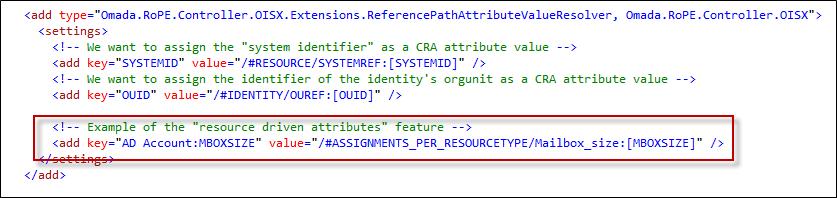
The example below should be read as: Concerning CRAs for resources of the resource type AD account: We assign the value of the CRA attribute MBOXSIZE this way: Look in the other CRAs in the calculation: Only the subset for resources of the resource type Mailbox_size: Get the value of the assigned resource's MBOXSIZE attribute: