Release highlights
We've just released Omada Identity Cloud update! What's new?
If you use an SAP connector with a customized SAP Access data model, upgrading to January 2026 Cloud Update may overwrite those customizations. Perform one of the following procedures to prevent this scenario:
If you haven't upgraded to the January 2026 Cloud Update yet
-
Go to Setup > All systems.
-
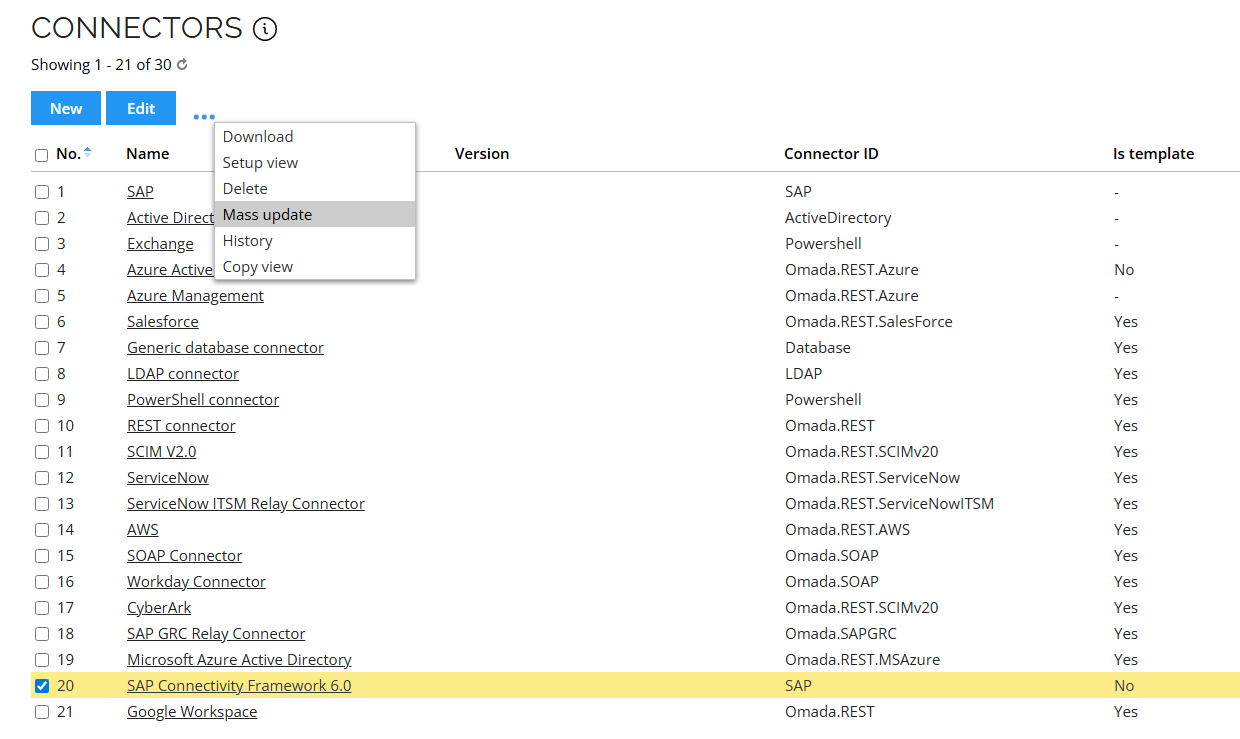
Select the SAP Connectivity Framework 6.0 checkbox. Click the ellipsis (three dots), and then Mass update.
-
Select the Is template checkbox. Click Perform update.
-
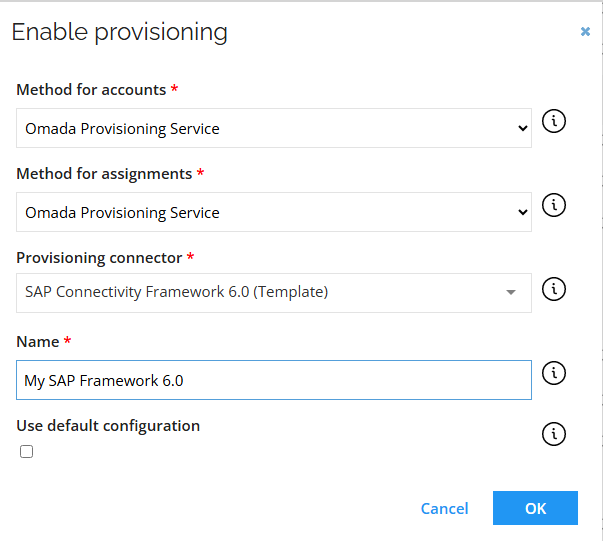
Go back to your system view. Click Enable provisioning. Enter the name of your new connector (this will create a dedicated copy that the system will use):
You can now upgrade to January 2026 Cloud Update.
If you have already upgraded to the January 2026 Cloud Update
-
Go to Setup > All systems. Select SAP Connectivity Framework 6.0 and click Edit.
-
Click History.
-
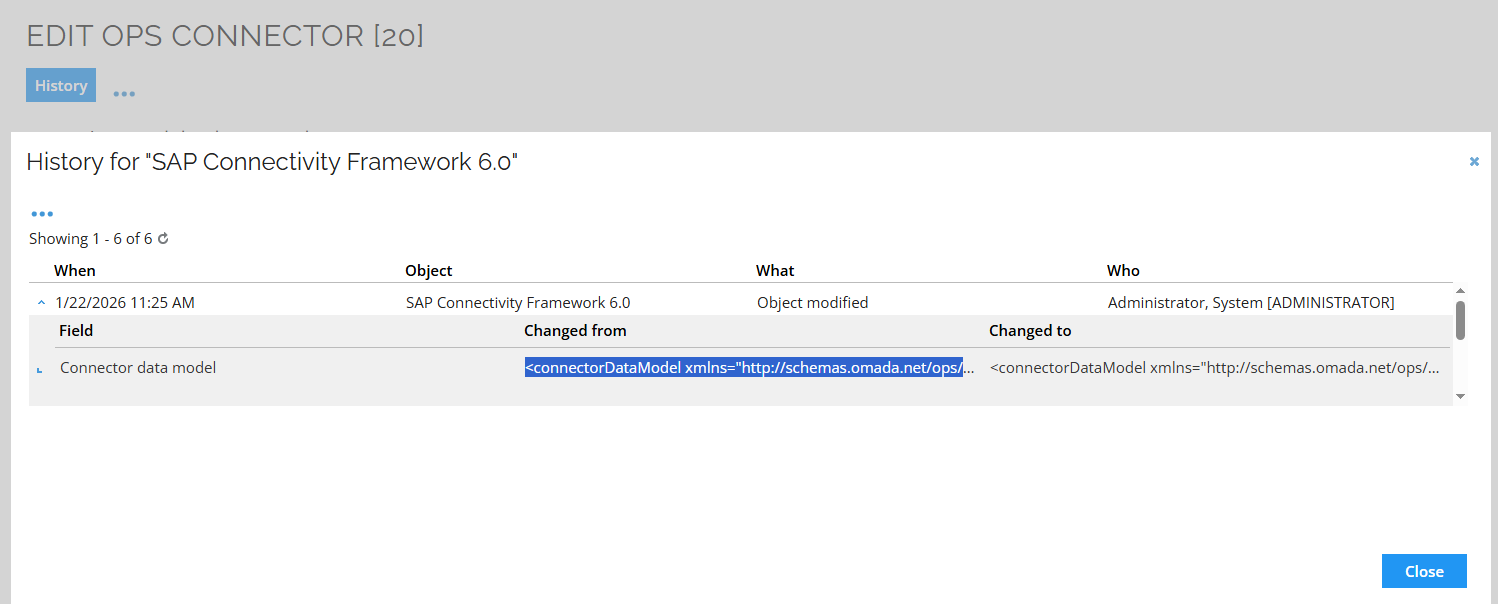
Expand the last change. In the Changed from column, select the whole entry (by clicking three times), and then copy it.
-
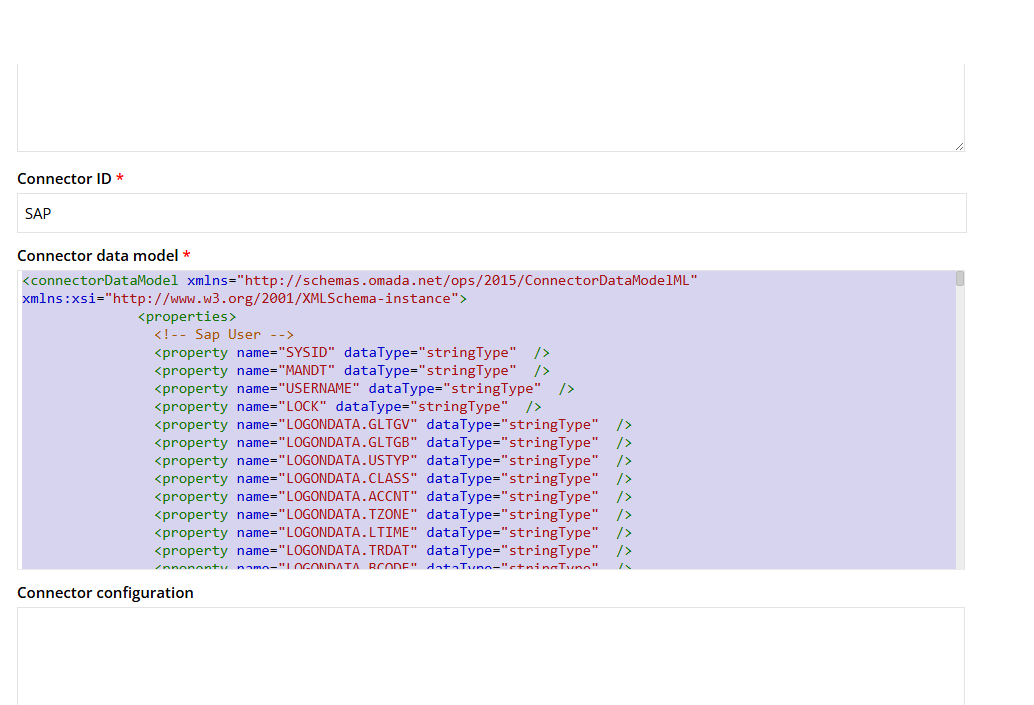
Go to the connector's data model configuration and paste the value. Save the changes.
-
Go to your system and click Commit settings.
With the January 2026 Cloud Update, Omada now centrally schedules and distributes cleanup jobs. As a result, the Run ODW cleanup import profile has been removed from the Event Definitions list. By managing cleanup operations automatically, the process becomes more efficient and runs more smoothly. To minimize operational impact, cleanup tasks are executed during periods of lowest activity on the platform.
GetPagingData serviceA new internal customer setting (Items displayed per page - LimitMaxGetPagingDataRows) has been introduced. This setting enforces the maximum number of rows returned by the GetPagingData service, with the default limit of 2000. This change applies to all views in the old and new UI, paging data requests will return no more than 2000 rows per call. Any requests exceeding this limit are automatically capped at 2000. The setting is configured by Omada support per environment.
This update ensures more stable and predictable performance.
UI and UX
Technical preview: new menu item: Service library
This technical preview feature is only available to System Administrators; however, you can change this by editing the access groups in the main menu configuration under Setup.
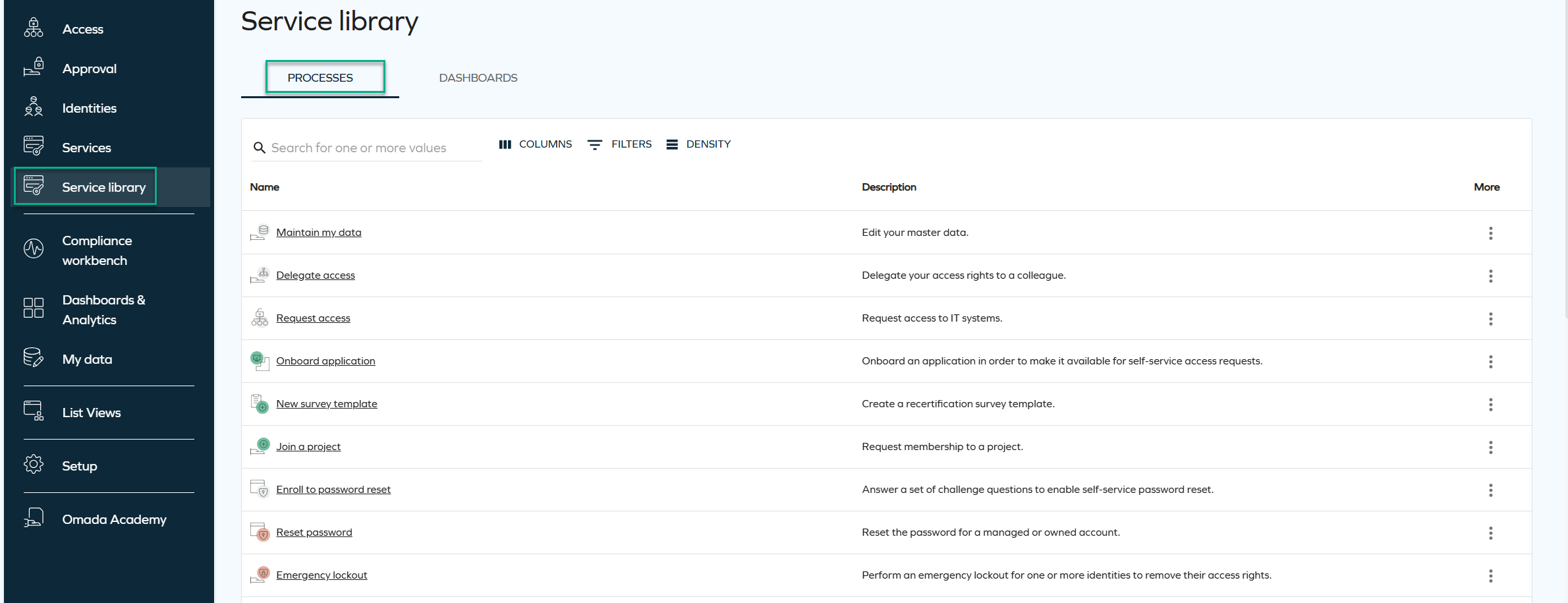
A new Service library menu item has been added, providing a modernized interface for accessing processes and dashboards.
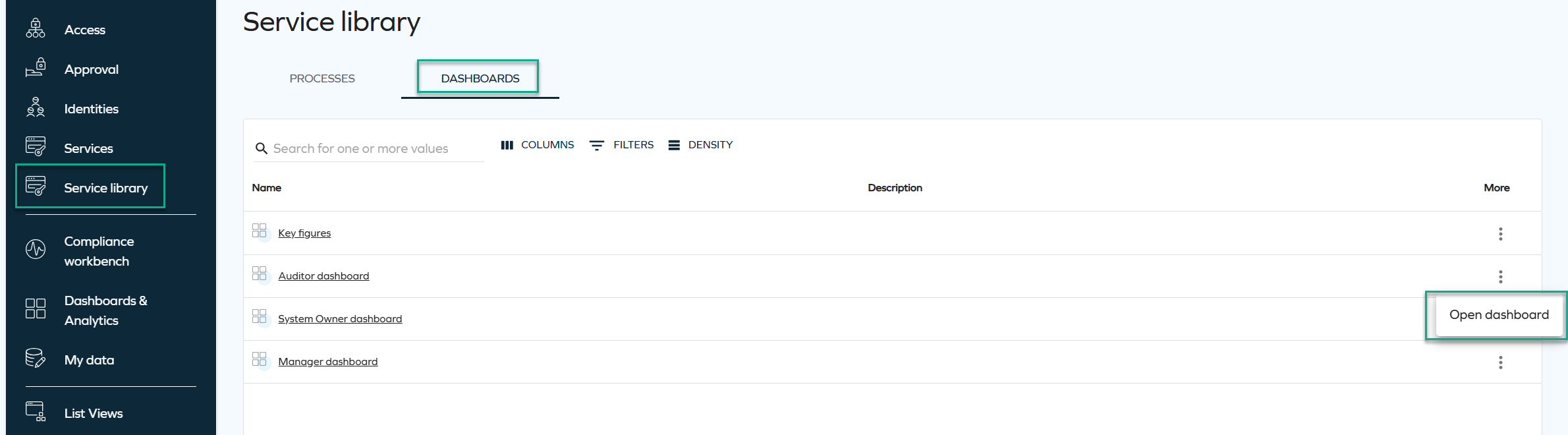
The Service library page includes two tabs: Processes and Dashboards, with List Views being considered for future releases. All pages include standard filtering, sorting, pagination, and global search options.
-
In the Processes tab, process names are clickable and open in a new tab. The More menu includes the Open process view, prompting to display additional process-related actions based on product configuration, such as Reset password, My contexts, or Survey templates.
-
The Dashboards tab lists all dashboards the user has access to, including Dashboards & Analytics for Cloud users. By selecting the More menu and Open dashboard, you can go directly to the dashboard of your choice.
This page is designed to complement the existing Services menu by surfacing new UI capabilities and providing a cleaner, more unified navigation experience.
Resizable side panels
We have introduced a new capability that enables all side panels in the New UI to be resized. A small adjustment bar on the left side of each panel allows you to drag and change its width.
This enhancement gives you greater control over your workspace and improves overall usability by allowing panels to adapt to different workflows and information needs.
Below is an example image illustrating the range and amount of information that can be displayed at once when this capability is applied.
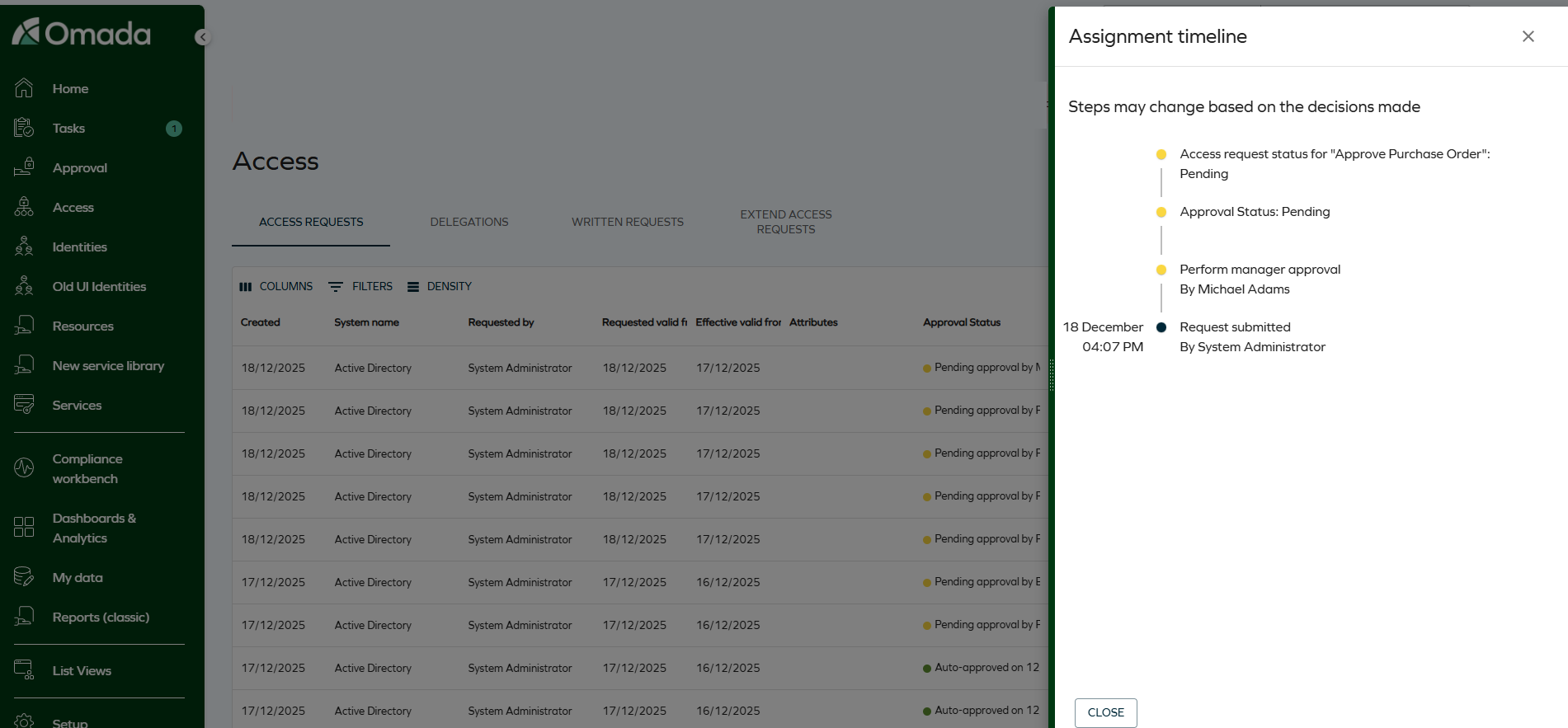
The selected size is saved as a user setting, so the panel automatically reopens with the last chosen width.
Improved accessibility - fixed colors (WCAG 2.2 AA)
Color use in Omada Identity was updated to better meet WCAG 2.2 AA accessibility requirements. Some interactive elements, such as buttons, now use fixed colors to ensure sufficient contrast.
Brand colors will still be used for larger interface areas (such as menus), where text contrast is handled automatically.
API
Graph API: Updated handling of hidden form fields
The behavior of form fields configured as hidden client-side or hidden server-side has been clarified and standardized.
Client-side hidden fields are now included in form definitions and form-data responses, but are marked as "hidden": true in the form metadata. Server-side hidden fields are fully excluded from both form definitions and form-data responses.
This update ensures consistency with customer expectations: server-side hidden fields are not exposed through the API, while client-side hidden fields remain available for scenarios that require them but are visually hidden in the UI.
OData page size
Starting from this Cloud Update, the maximum page size for OData responses will be set to 1000 on Cloud environments to help optimize API behavior and resource usage. (The date has been changed from Q4 2025.)
For more information on pagination, see the OData documentation and look up ODataPageSizeLimit in Customer settings - Standard application.
Connectors
New SAP HANA DB client version
A new SAP HANA DB client version was added as part of the January 2026 Cloud Update: 2.26.25
To change the client version, go to the connector's connection details and modify the Assembly version number field value. See SAP HANA DB - Connection details for more information.
Other
Clean-up import profile for Horizons
With the Horizons solution the clean-up import profile implementation has been improved to boost efficiency and minimize downtime risks.
Previously the clean-up import profile was performed by an event definition. With the introduced changes, a scheduler component acts as a replacement for the event definition. It is operated and managed by Omada to optimize efficiency and minimize negative performance impact by adjusting the schedule based on recorded and predicted data load.
The clean-up feature itself is not affected by this change, providing instead more predictable and controllable behavior.
For more information, go to the Clean-up import profile section.
Data integrity import profile
We have introduced a new Data integrity import profile acting as a safeguard mechanism for imports that failed during the Processing phase. It can be manually initiated to check data included in previous imports, across all systems, for inconsistencies. If required the affected system are reprocessed.
Additionally, the reprocessing is automatically scheduled for system imports that failed during the Processing phase. In this case it affects only the system that encountered issues and the reprocessing is scheduled with a ten-minutes delay.
For more information, go to the Import profiles documentation.
New permission for bulk revocation
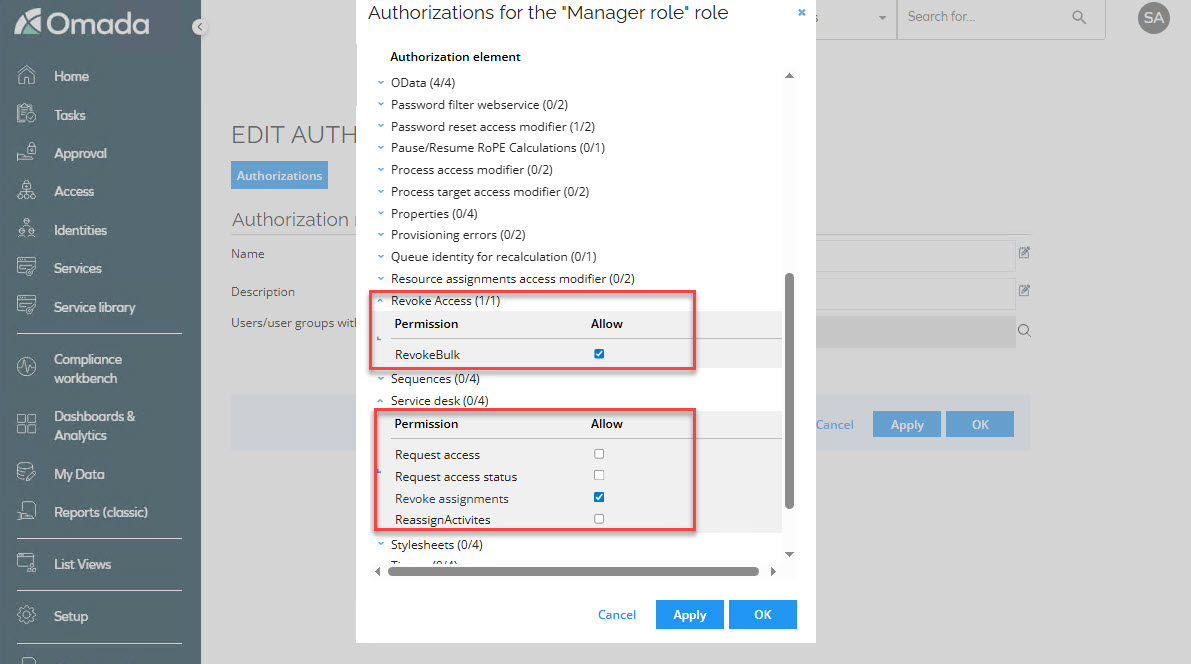
A new permission called Revoke bulk has been introduced, allowing authorized roles to perform bulk revocations of assignments. To enable this functionality, the following conditions must be met:
- The role must have the Revoke assignments and Revoke bulk role permission enabled.
- The customer setting Allow mass revoke of resource assignments must be activated.
This change has been implemented to provide greater control over who can perform bulk revocations and under what circumstances, ensuring a more secure and flexible management of assignments.
New customer setting for revoking multiple assignments at once
A new customer setting called Allow mass revoke of resource assignments AllowMassRevoke has been added, enabling the bulk revocation of assignments. If True, users with permissions to revoke are allowed to revoke multiple assignments at once in the new UI.
This setting must be activated for roles with the Revoke bulk and Revoke assignments permissions to perform mass revocations.
With this change, administrators gain greater control and flexibility, enabling them to decide whether bulk revocation is available in their organization. By setting the customer setting to False, they can instantly remove bulk revocation capabilities from all roles that have the Revoke bulk permission enabled.
New customer setting to skip child account validation
A new customer setting Skip account validation for child resources has been added. This setting disables the system’s check for existing direct account assignments when a role request includes an account as a child resource. If set to True, the system will skip the validation for existing account assignments when requesting access to a role that includes an account as a child resource.
Use this setting with caution. Disabling this validation can lead to warnings or errors in RoPE if the identity already possesses an account of the same type.
`StartResynchronizationImportProfile' code method for Resynchronization event
A new StartResynchronizationImportProfile code method is available for event definitions. It initializes resynchronization import for the Omada Identity system.
Configuring the resynchronizeOnlyFailed parameter value determines the scope of the resynchronization import:
- true - Resynchronization import includes only previously failed records.
- false - Resynchronization import includes all records.
For more information, go to the Even definitions documentation.
Defer processing location
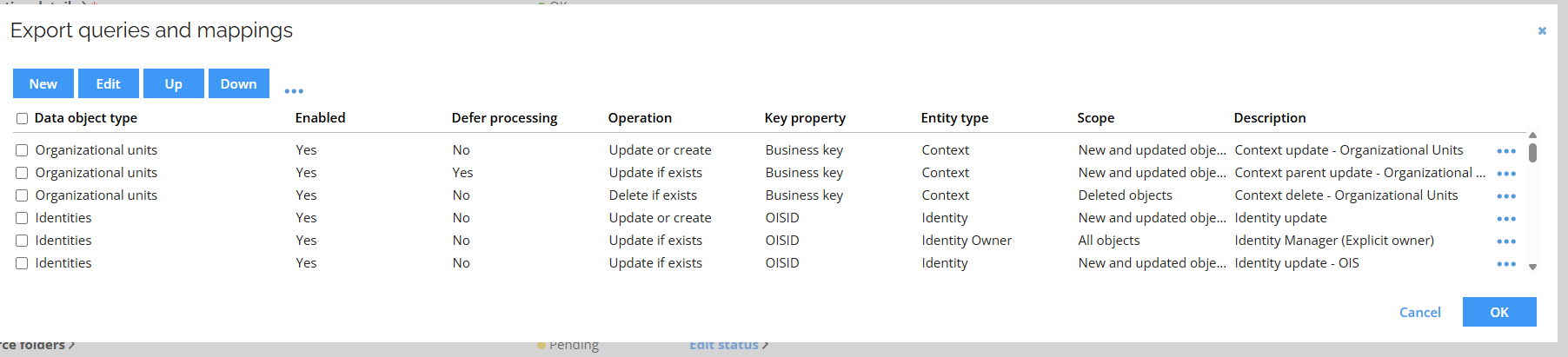
The Defer processing setting location has been changed to a dedicated Advanced tab in the query mapping edit window, improving organization and making advanced options easier to find.
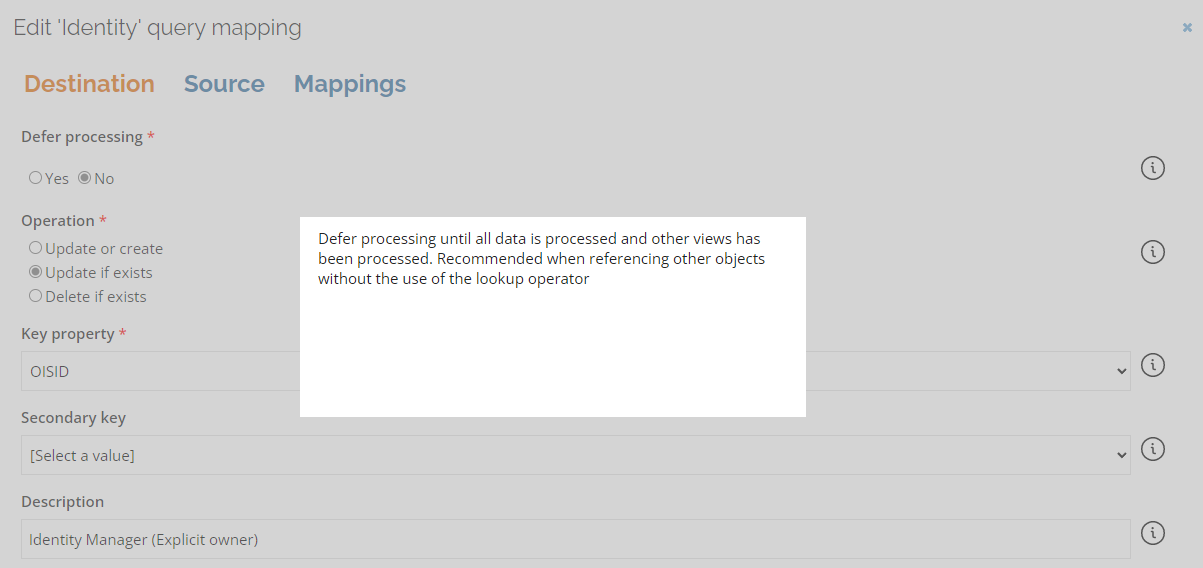
Additionally, a Defer processing column is added in the Export queries and mappings.
New customer setting for revoking multiple assignments at once
A new customer setting called Allow mass revoke of resource assignments AllowMassRevoke has been added, enabling the bulk revocation of assignments. If True, users with permissions to revoke are allowed to revoke multiple assignments at once in the new UI.
This setting must be activated for roles with the Revoke bulk and Revoke assignments permissions to perform mass revocations.
With this change, administrators gain greater control and flexibility, enabling them to decide whether bulk revocation is available in their organization. By setting the customer setting to False, they can instantly remove bulk revocation capabilities from all roles that have the Revoke bulk permission enabled.
New customer setting for the GraphQL API
A new customer setting, IntrospectionEnabled, has been introduced to control whether introspection queries are allowed on the GraphQL API.
When you upgrade, introspection is enabled if you have enabled the API documentation customer setting. If the API documentation customer setting is disabled, introspection is disabled. You can configure this setting as a platform administrator. For cloud customers, contact Omada support.
Behavior and limitations:
- GraphQL introspection is available only to authenticated clients and continues to respect existing authorization rules.
- When you disable introspection, the schema is less visible, but this does not fully protect it. Clients can still infer schema details through normal API usage.
- Use this setting only if you have specific compliance or internal policy requirements. In most cases, keep introspection enabled to support developer tools and troubleshooting.
- Omada Identity security still relies on strong authentication, fine-grained authorization, and standard API protections.
RoPE initial password extension - regenerating passwords for reactivated accounts
The initial password extension has been enhanced and now allows regenerating passwords for reactivated accounts. See Regenerating passwords for reactivated accounts for details.
Surveys
When exporting a survey, the downloaded file now includes a new column called Answered by. This column provides more visibility into who completed each workflow step within the survey. The column contains a semicolon‑separated list where each entry follows this format:
[WorkflowStepName]:[User Display Name];
[WorkflowStepName]:Auto-completed;
Each entry represents one workflow step and the user who completed it, but if a step was completed automatically, it will appear as Auto‑completed.
For surveys launched before this update, workflow steps that were auto‑completed will continue to show the System user’s display name instead of the text Auto‑completed.
Platform improvements
Improved homepage behavior for access request card
When the UseNewUIAR customer setting is enabled, the system now automatically updates the default homepage configuration to display the new UI access request card, replacing the legacy access request card.
The homepage is updated to display the new access request card by default only when:
- The customer setting UseNewUIAR is set to True.
- The existing UIUserSetting configuration contains exclusively the homepage actions Request access and Delegate access.
If you prefer to keep the legacy access request card, you can revert this behavior by manually adjusting the UIUserSettings customer configuration.
Omada Identity Analytics
Upcoming UI change: Q1 2026
In Q1 2026, the Omada Identity Analytics dashboards will be visually updated to match Omada's current branding, including colors and typography. The following screenshot reflects the updated look.

Updates to individual screenshots throughout the documentation will be applied incrementally in subsequent updates.
Navigation between Identities list and OIA dashboards - new documentation
We have added new documentation describing the existing bidirectional navigation between the Identities list (Enterprise Server) and Omada Identity Analytics (OIA) dashboards. You can find it in the following sections:
This documentation explains how users can move seamlessly between operational identity data in Enterprise Server and analytical and historical insights in OIA, clarifying a capability that was introduced in an earlier release.
Documentation
Information about Approve requested access survey admins added
The documentation has been updated with the information about the Approve requested access survey admins user group. Since this user group is by default included in the Survey admin field, you can add or remove users from the group, without the need to copy the survey template and all the configuration steps. This allows them to reassign questions.
For more information, go to the Users and user groups documentation.