Resolved Issues and Bug Fixes
Read more about resolved issues and bug fixes in this release.
UI and UX
Encoding wrong in Process templates because of opening of process template
An issue caused unnecessary text encoding in the Process Designer. It has now been fixed: special characters now display correctly, ensuring proper readability and consistent formatting.
INC-298435
Role and Policy Engine
RoPE calculation
An incorrect update of internal IDs during changeset import resulted in RoPE failing to calculate actual assignments for the system. The issue has been resolved.
INC-301695
Performance and identity calculations
We have addressed a performance issue in RoPE where implicit assignment calculations in trusted system scenarios experienced severe performance degradation as the number of trusted systems increased. The optimization now maintains consistent performance regardless of scale.
INC-300254
RoPE calculations failing with Null reference exception
When SOD policy checks (simulations) were executed at the same time as RoPE calculations, the RoPE calculations could fail, logging the Null reference exception. This issue has now been fixed.
INC-301142, INC-301890
RoPE: enhanced error message for account pool lock conflicts
We've improved the Can't merge – account pool locks differ! error message shown during RoPE calculations when two assignments for the same identity and resource reference different accounts (a scenario commonly seen when trusted systems are involved). The updated message now includes details about the affected resource, as well as the specific accounts and systems involved, making it easier to identify and resolve the conflict.
INC-291771
Failed calculations requeued every day when new calculation discarded
There was an issue where calculations that failed due to a transient error, and then were recalculated with no changes (discarded calculations), were requeued again as failed calculations. It has now been fixed.
Governance feature package overwriting ALLOWDELEGATION property
Due to an issue, applying the Governance feature package caused certain resource type properties to revert to their default values instead of retaining their existing configurations. Now, resource type properties are preserved correctly during package application, ensuring that no unintended changes occur.
INC-297327
RoPE OutOfMemoryException in the Self-management extension
There were issues with RoPE throwing an OutOfMemoryException in the Self-management extension. We've improved the memory usage for this extension by storing results in custom data structure.
Slow RoPE processing
To fix the issue with slow RoPE processing, we have improved the process for removing historical RoPE calculation data.
INC-303239
Timezone issues creating deprovisioning jobs
An incorrect valid from date was set to direct resource assignments when created automatically as a result of a Keep survey verdict. This has now been fixed.
INC-301739
RoPE queues all identities with child roles when a new role is added
RoPE now queues identities with child roles only when a new role is added and CalculateImplicitAssignments is enabled. This resolves a performance issue where RoPE unnecessarily queued identities for calculation.
INC-303239
RoPE using a provisioning claim date for valid to on a SAP account
We have added the Provisioning claims and validity of assignments section to the Assignments documentation to clarify:
- why RoPE can use the provisioning claim date as the valid to value for SAP account assignments
- how long-running review periods can result in provisioning claims being purged based on the configured retention period.
INC-297022
Enterprise Server
Triggering continuous jobs and deleting the ENDUSER role
We have fixed an issue where some child resource assignments with multiple parents were incorrectly disabled when only one of the parent assignments was revoked. The issue was related to the order in which the parent assignments were merged.
INC-301985
Updated default error page behavior and HTTP status codes
The default Error page behavior in ES has been changed. Previously, it always returned HTTP 500 – Internal Server Error. Now, it returns the HTTP status code associated with the underlying exception. When no specific status is provided, the default is HTTP 400 – Bad Request.
All unhandled application errors are still redirected to error.aspx, which includes a reference code that can be used to look up detailed information in the logs.
Fetching secrets from Omada Vault in ES causing multiple loads
To resolve an issue where fetching secrets from Omada Vault in Enterprise Server triggered multiple loads, we have improved the speed of loading secrets from the vault.
SR-300534
Policy check error
We have applied the following optimizations in the performance of simulated RoPE calculations executed during policy checks:
- Optimizing resource loading during the batch preparation phase.
- Executing simulation calculations within the same RoPE engine instance to reduce redundant data loading.
INC-301142
INC-293583
Missing export mappings
We have resolved an issue with the missing export mappings in the Advanced view for the Omada Identity system.
INC-302706
Horizons
Extended import time
There was a recurring issue with extended import times that, in some cases, were halted. The issue was mostly related to the Exchange Hybrid connector and led to blocked queues, aborted imports, and repeated manual import restarts as a primary recovery action.
The issue was resolved with the deployment of the connector hotfix, which reduced import times and prevented imports from halting.
INC-303618
Surveys
Attestation surveys not launching
There could be issues with launching attestation surveys. To fix it, we have enhanced the Surveys and Compliance Workbench RoPE views.
INC-302175
Error returned by server blocking survey completion
Users could face an Error returned by server that prevented them from completing surveys. This has now been fixed.
For details, see the updated the documentation of the technical preview feature Approve survey questions create direct resource assignments documentation.
INC-302004
Access request
Issue with access requests and account types
We have fixed an issue where the request access form required selecting an account type before proceeding, causing unnecessary confusion.
INC-300270
Homepage shows legacy access request card
We have fixed a bug where the homepage continued to show the legacy access request card. To fix this, we have added a new customer setting UseNewUIAR. When set to True, the system now automatically updates the default homepage configuration to display the new UI access request card.
Go to January 2026 Cloud Update Release Notes to know more.
No applicable account type in access request
We have fixed an issue where, after the November 2025 update, the access request process for Exchange hybrid user mailboxes failed with the error ‘No applicable account type’ despite the identity having a valid AD account.
INC-301895
INC-302390
Send on behalf request for Exchange Online not working
We have fixed an issue where the Send on behalf request for Exchange Online in the access request workflow did not work because a mailbox could not be selected as a parameter.
INC-299942
Account type issue in access request
We have fixed an issue where a personal account was auto‑assigned even when a valid non‑personal account was available.
INC-303190
Connectors
Salesforce connector - malformed URL when using ResourceGetPath
The Salesforce connector incorrectly combined the value from the path for Salesforce objects setting with the ResourcePathGet object detail (if defined). It occurred in operations that checked if the object exists, and it resulted in malformed URLs (for example: .../services/data/v45.0/sobjects/.../services/data/v45.0/query?q=...). The issue has been fixed. The path for Salesforce objects value is not used anymore for checking if the object exists (if the ResourcePathGet object detail is specified).
INC-301617
Documentation
SoD simulation during access request does not use validity period
The documentation has been updated to clarify how validity dates are handled for SoD checks during both access requests and access approvals.
Go to the Segregaton of Duties documentation to learn more.
INC-303144
Future revoke behavior
New documentation has been added to clarify the behavior of the Revoke action when a future date is selected, including how and when recalculation and deprovisioning are triggered. You can find it in the Survey verdicts – Revoke section, in the info box titled Important behavior for future revocation.
INC-301193
Cannot change to default layout view
The documentation has been updated to include additional guidance on view layout configuration.
Go to the Creating a view documentation to learn more.
INC-303458
Translations
Missing translation of menu item Compliance Workbench in all languages
We have fixed an issue where the Compliance Workbench menu item lacked translation and remained in English across all supported languages.
Other
Internal high watermarks not resetting
There was an issue where scheduled data synchronization was not resetting internal high watermarks. The issue has been resolved with the introduction of the StartFullSyncImportProfile code method that also resets the internal high watermarks. This allows scheduling a full synchronization of master data, either by configuring the Master data import profile or pairing it with a full source system data import.
INC-291379
Failing clean-up import
The clean-up import consistently failed and rolled back deletions, preventing a correct audit trail clean-up. This issue has been resolved.
INC-299338
Inconsistencies in environments with Horizons enabled
We have resolved an inconsistency issue in environments with the Horizons solution enabled, including issues with the recalculation of identities while the import was still running.
INC-298001
System overview loading time
We have improved the performance of the System overview page for the Horizons users, reducing loading times and improving user experience.
INC-301552
Request of app role not possible when user already has an account
We have fixed an issue where you couldn't request an app role if they already had an existing account in the system. To address this, we introduced a new customer setting that ensures the system correctly processes app role requests for users with pre‑existing accounts. For more details, see the Changes section in Release notes
INC-298443
GraphQL introspection queries
We fixed an issue that prevented you from configuring certain GraphQL API behaviors. You can now enable or disable GraphQL introspection by using the new customer setting IntrospectionEnabled.
INC-302112
Multi-byte Unicode icons not displayed properly
We have fixed an issue where the Unicode icons were not rendering correctly in the Reference tree.
INC-294577
Function-level access controls issues
We have fixed an issue where improper access controls allowed lower‑privileged users to perform actions intended only for higher‑privileged roles.
INC-294061
Trying to delete an assignment
We have fixed an issue where the error message was not displayed correctly when deleting an assignment.
INC-301029
Omada Provisioning Service
Incorrect ExpiresOn value for provisioning claims
We have resolved an issue where the ExpiresOn parameter value for relayed provisioning jobs and failed claims was incorrectly set to two days. The value is now configured to ten days, resolving the issue.
INC-297420
Parallel processing of provisioning jobs
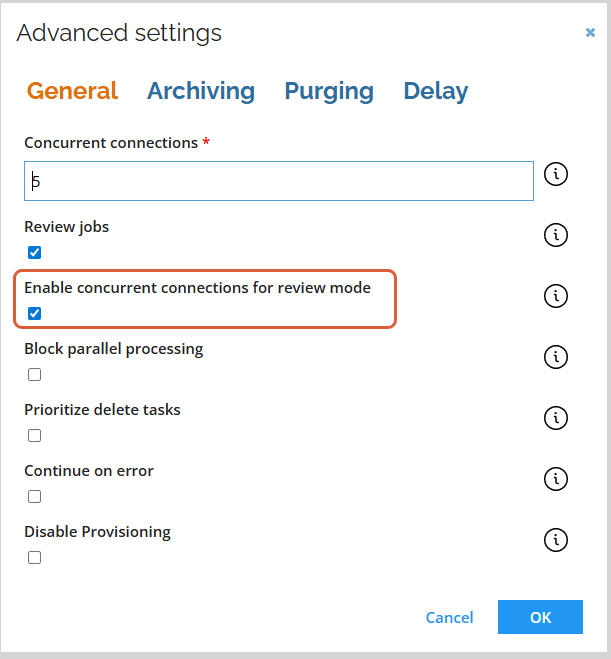
There was an issue with provisioning jobs running one at a time rather than in parallel, despite the Block parallel processing setting was unchecked. In Review mode and for provisioning jobs exceeding the configured threshold, the concurrent connections are ignored, causing the issue. To address it, we have introduced the Enable concurrent connections for review mode setting, allowing parallel processing even when Review mode is enabled.
INC-299684