Solution concepts
This chapter describes Omada Identity solution concepts that are important to understand in the context of this document.
Conceptual Data Model
The diagram shows the main concepts that are in scope in Omada Identity as well as how the concepts are related.
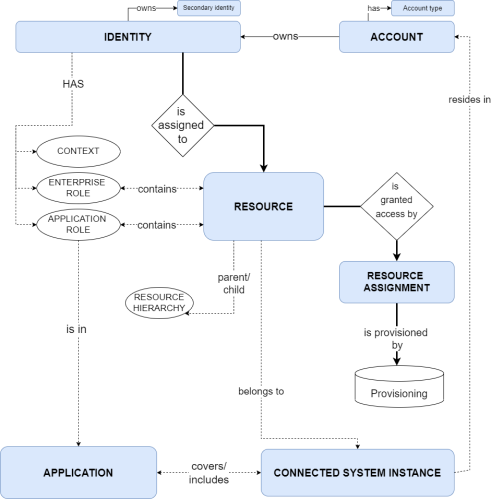
For definitions and explanations of the above concepts and abbreviations, see the Glossary.
Identity status
The diagram and table show the standard identity statuses and their transitions in Omada Identity:
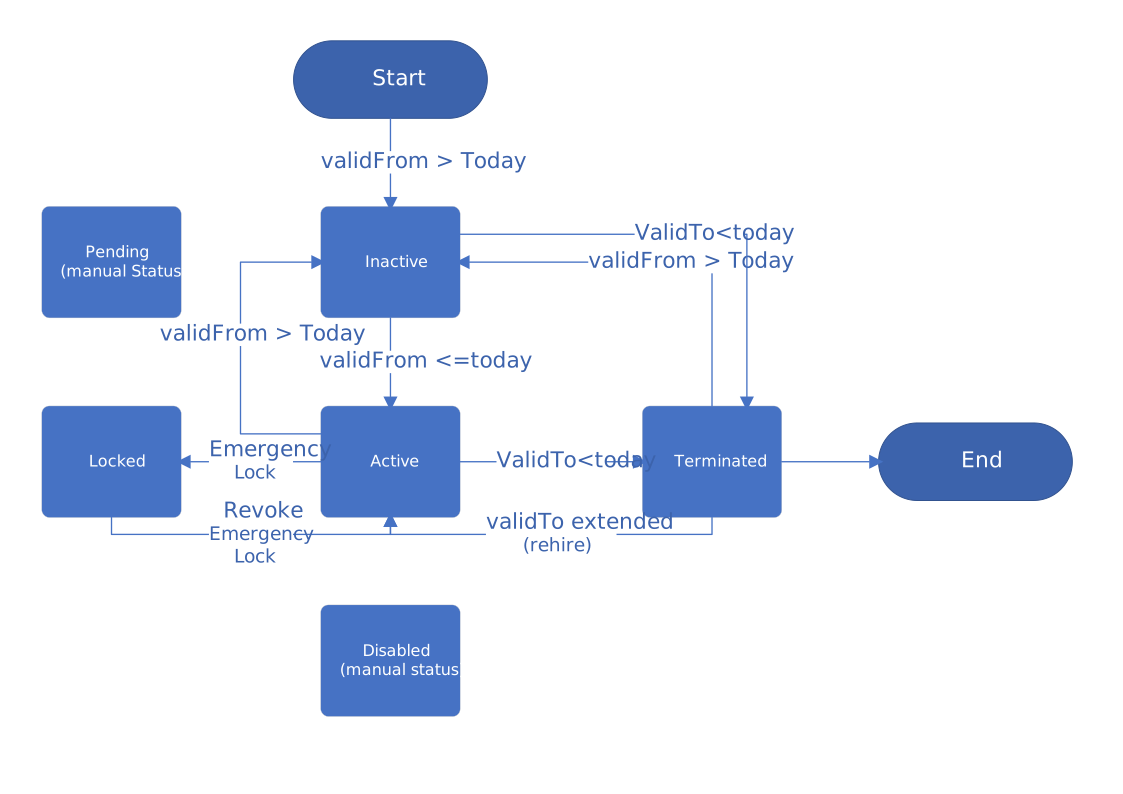
An identity is considered disabled by RoPE if its status is Terminated, Disabled, or Locked. If an identity is disabled, all of the identity’s CRA (calculated resource assignments) are also disabled.
| Status | Description |
|---|---|
| Active | The identity is active. This is the normal status for an identity (employee). |
| Disabled | This is a manual status and not reached by default. |
| Inactive | The identity is onboarded or otherwise approved; however, its validity period has not yet been reached. An event sets the status to Active when the validity period is reached for the identity. |
| Locked | The identity has been locked for security reasons, for example, due to the suspicion of a security breach. |
| Pending | This is a manual status and not reached by default. |
| Terminated | An event sets the status to Terminated when the Valid to date is reached. |
Resource Status
The diagram and table below show the standard resource statuses and their transitions in Omada Identity.
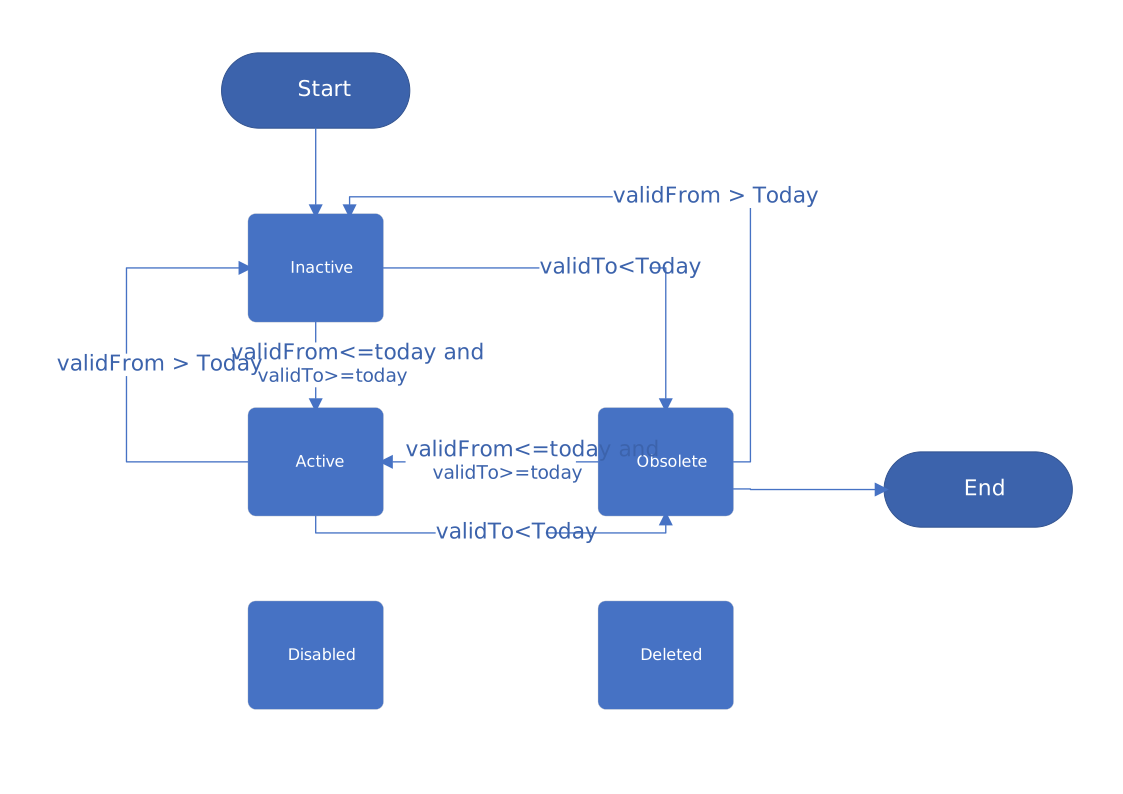
The resource status is not synchronized from the target systems.
| Status | Description |
|---|---|
| Active | The resource is active. This is normal state of a resource. The Active status is updated by automated event when the Valid from date is reached. |
| Disabled | This is a manual status and not reached by default. All related assignments will also be disabled, if applicable. |
| Inactive | The resource is not yet active (the Valid from date has not been reached). RoPE will discard assignments. |
| Obsolete | The resource Valid to date has been reached. RoPE discards assignments. |
| Deleted | The resource is set to Deleted during an import when it is no longer available in the target system. |
Assignments are considered Disabled if the resource status is Disabled, Inactive, Obsolete, or Deleted.
Resource Assignment Status
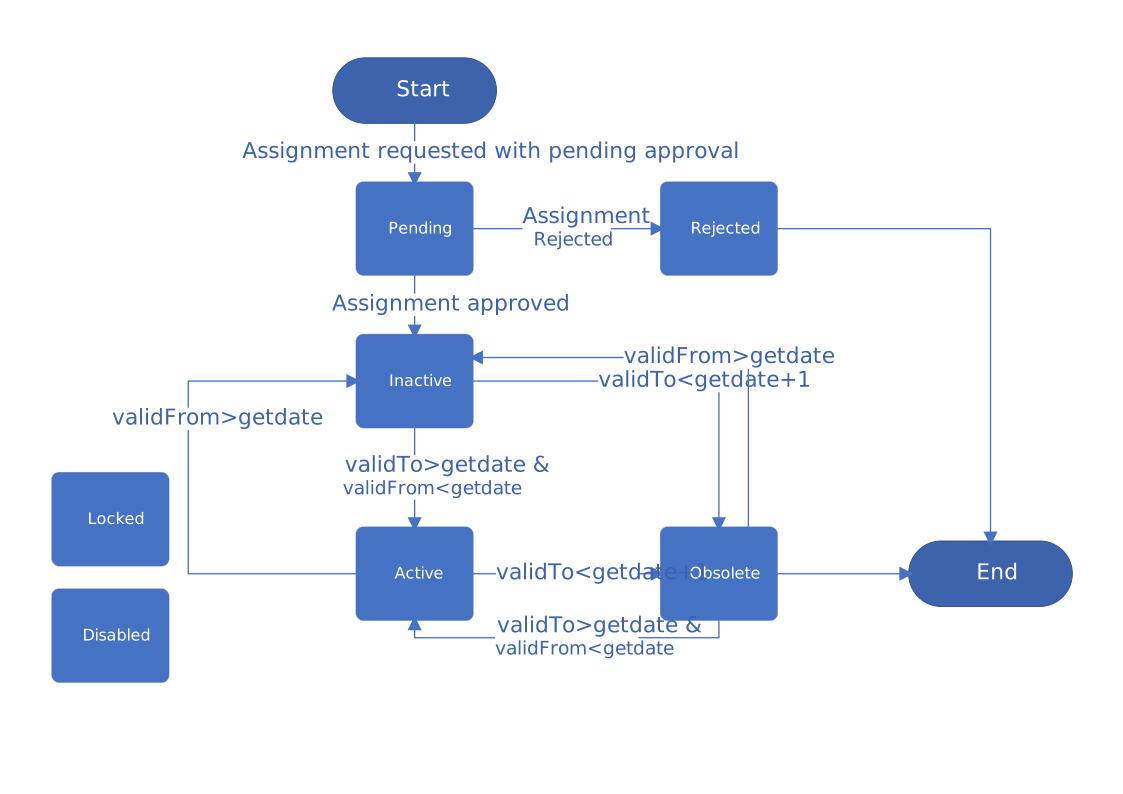
The diagram and table show the standard Resource Assignment statuses and their transitions in Omada Identity:
| Status | Description |
|---|---|
| Active | The resource assignment is active. This is the normal status of the assignment after approval and within validity. |
| Disabled | This is a manual status and not reached by default. If applicable, all related calculated assignments are also disabled. |
| Inactive | The assignment is valid; however, the Valid from date has not been reached. |
| Locked | This is a manual status and not reached by default. If applicable, all related calculated assignments are disabled. |
| Obsolete | The Valid to date of the direct assignment is reached. |
| Pending | The direct assignment was requested using the access request process and has a pending approval. The direct assignment uses the standard access request process - an identity requests access, the request is approved, then a resource assignment is created that is associated with identities. |
| Rejected | The direct assignment was rejected in the Approval of access requests process. |
| Cancelled | The resource assignment has been cancelled because the user cancelled an access request. |
Assignments are considered Disabled if the resource assignment status is Disabled, Locked, or Obsolete.
Role and Policy
Identity Calculation Trigger
Each RoPE calculation cycle has two phases:
- Phase one is event-based queuing.
- Phase two is identity processing.
During the event-based queuing, RoPE checks all events in the Desired state data (Enterprise Server) and in the Actual state data. Then, RoPE flags the identity for calculation.
The potential calculation events in Enterprise Server are:
- Creation,
- Resources,
- Context assignments,
- Delegations,
- Modification,
- Resource assignments,
- Assignment policies,
- Expiration of identities,
- Contexts,
- Constraints.
In the Omada Identity Data Warehouse (ODW) account, the potential calculation events are Resources and Resource Assignments.
Birth right provisioning
When identities are onboarded, basic entitlements or roles (birth rights) are assigned to them. These roles are updated in case of organizational changes, and then removed when employment is terminated.
Account types
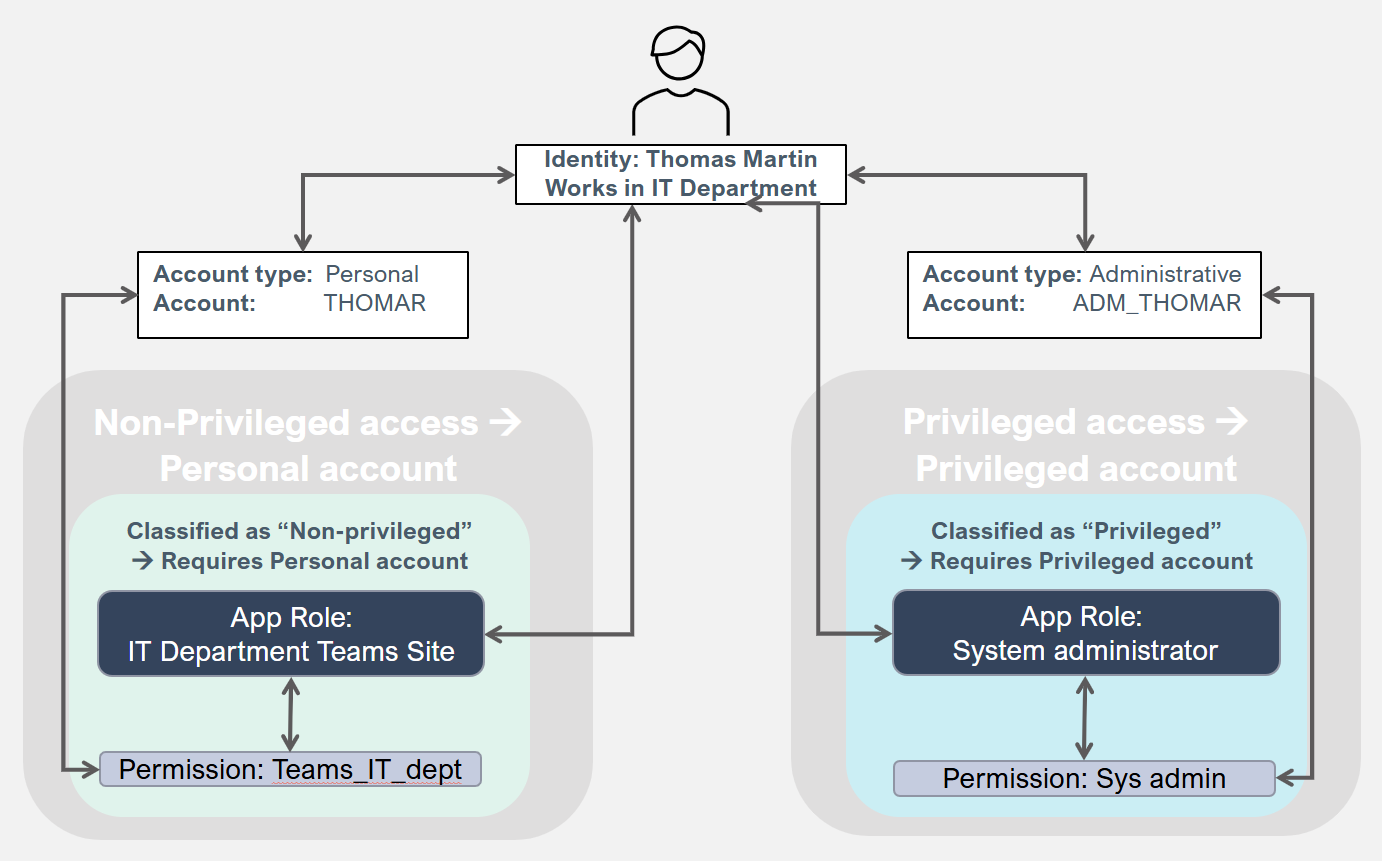
In Omada Identity, all account resources have an account type. Account types should be kept to a few logical and meaningful types to ensure a well-functioning solution when using roles. However, oone important reason for having more than one account type is to separate the privileged access from the personal account.
A Personal account is the default/primary account for employees and contractors.
A Privileged account enables elevated access.
The following diagram shows how resources are assigned:
The following diagram demonstrates how resources are assigned when business roles are used:
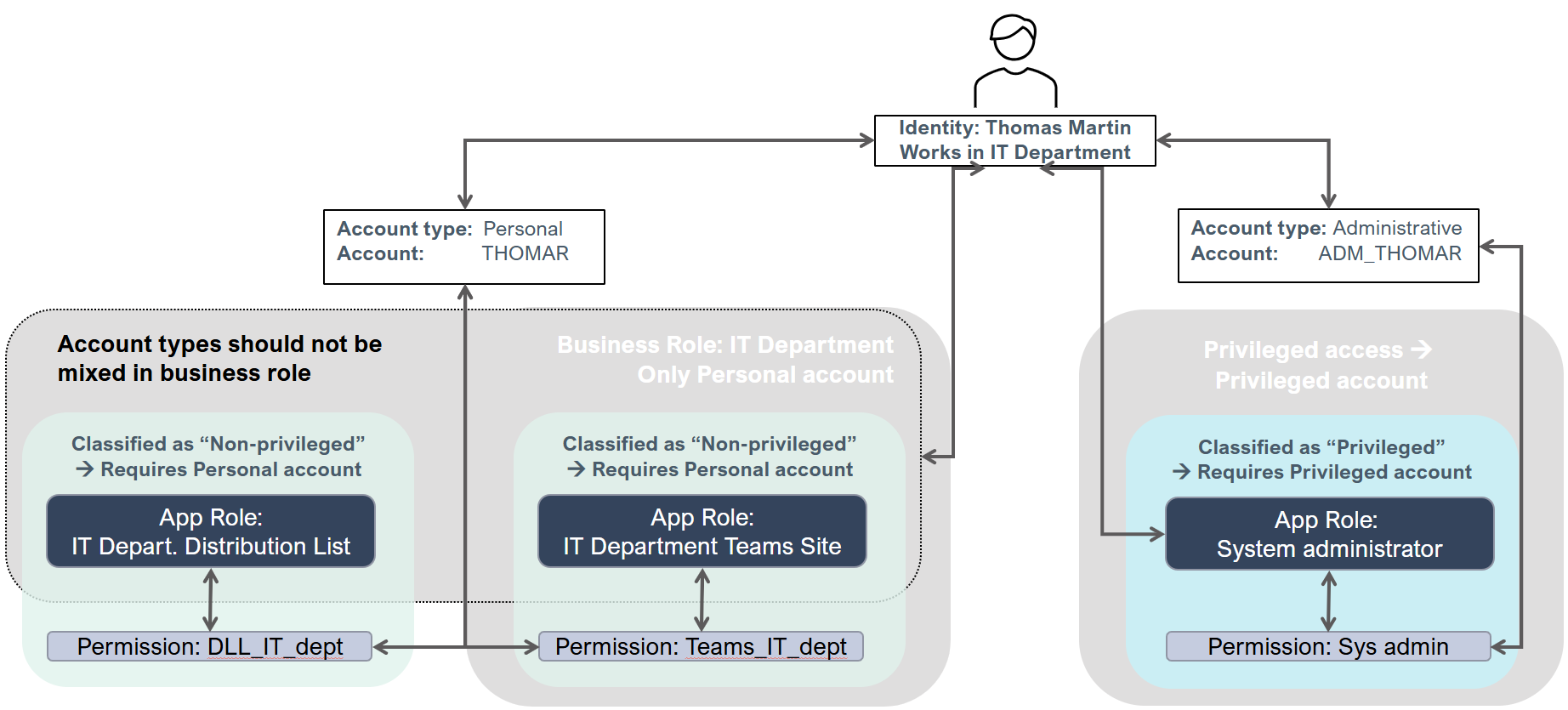
All resource objects are defined for one or more account types.
A resource (permission or role) can only be assigned to an account type that it's defined for. To use an account type in a system, you need a corresponding Account resource. Account resources can only be defined for a single account type. Permissions can be defined for multiple account types. Roles should only be defined for a single account type to avoid increased complexity for the end-user. Child permissions are only assigned to accounts of the account type of the role.
When you define an assignment policy, you should specify that it only applies to accounts of specific account types. We recommend that you only include one account type per assignment policy to avoid increased complexity.
The Microsoft tier model
Some organizations use the Microsoft tier model to mitigate unauthorized privilege escalation. Without it, there would be multiple privileged account types, for example:
- Personal – Default/primary account for employees and contractors
- Privileged Tier0 – Account that enables elevated access
- Privileged Tier1 – Account that enables elevated access
- Privileged Tier2 – Account that enables elevated access
The diagram shows the assignment of privileged access:
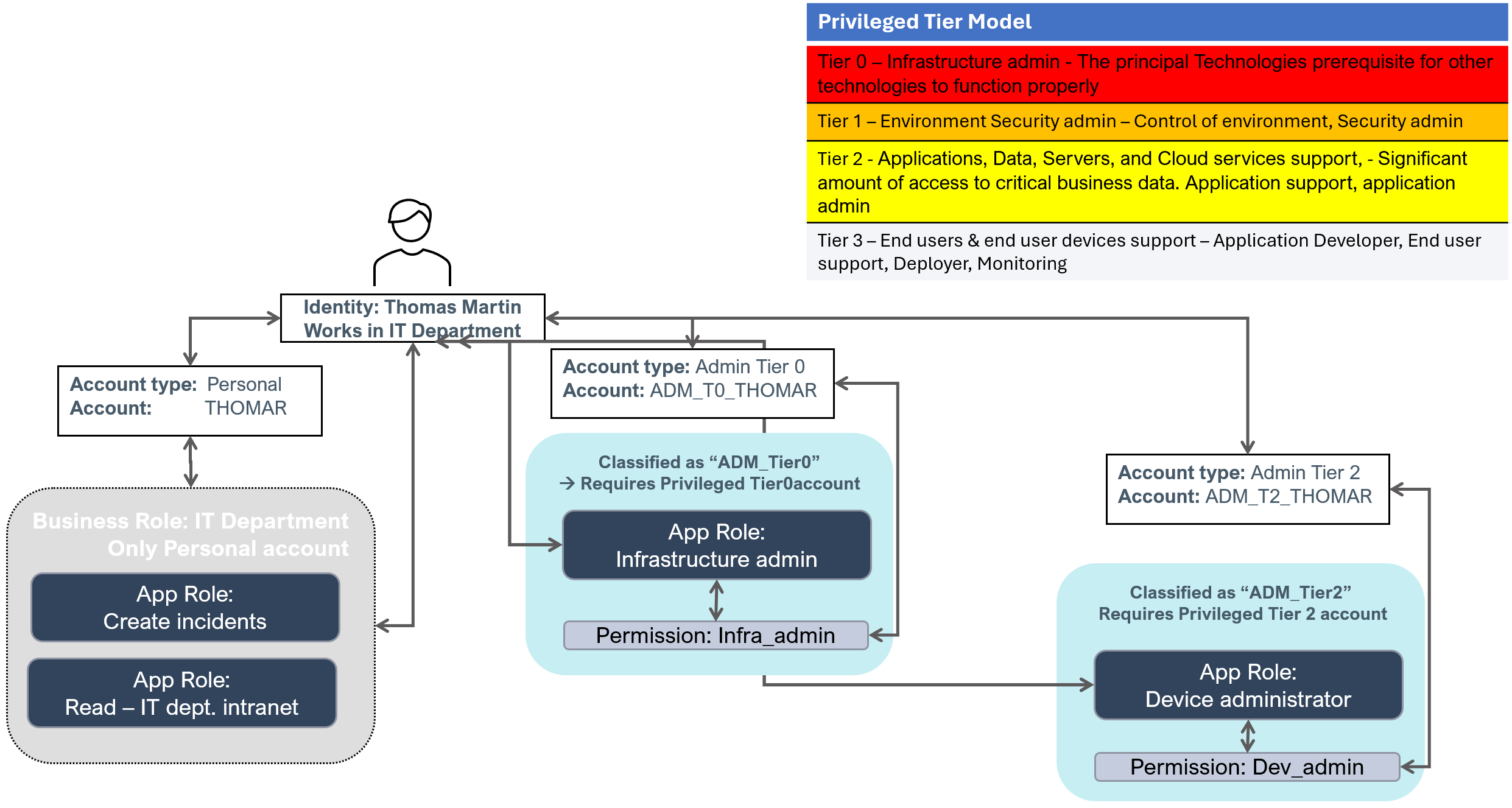
For more details, see the information provided by Microsoft: Securing privileged access Enterprise access model | Microsoft Learn.
Account type model
The account type model prescribes that an identity can only have one account in a system of a specific account type.
The account type model only applies to ordinary (human) identities, and does not apply to Technical identities or the special Unresolved identity, as they are allowed to have more than one account of the same type in the same system.
Technical identities are used to bundle accounts and access rights that are used by a specific system or application. A Technical identity has an owner who is always an ordinary (human) identity.
The Unresolved identity is assigned by Omada Identity as owner of all accounts for which an actual owner cannot be determined.
Account type policies
In the ODW, the account type for accounts can be set by an account type policy or by a custom join extension. (A custom join extension is a custom SSIS package that can perform advanced join logic.)
Account type policies are set per source system. For more information, refer to Import and onboarding.
If an account type is present in a connected system or created in an account type policy but does not exist in the Enterprise Server, then it's automatically created when data is exported from ODW to the Enterprise Server.
Assignment reasons and states
All calculated resource assignments have at least one reason that indicates why the assignment was created. For example, an assignment has a reason type that indicates whether the assignment was created due to a direct assignment or an assignment policy.
In addition, a reason type belongs to a state which can be either Actual or Desired:
- Actual state assignments represent the access that an identity currently has in the connected systems.
- Desired state assignments represent the access that companies or organizations would like an identity to have based on assignment policies and other criteria.
The following table shows an overview of reason types and states:
Actual state
| Reason type | Description |
|---|---|
| Actual direct | The assignment was added due to the existence of a direct resource assignment in ODW. |
| Actual indirect | The assignment was added due to the existence of an indirect resource assignment, for example, an assignment due to group-in-group in ODW. |
| Unconfirmed actual | The assignment was assigned because of a provisioning claim based on a Manual or Omada Provisioning Service provisioning task. |
Desired state
| Reason type | Description |
|---|---|
| Direct | The assignment was added due to the existence of a Resource assignment data object. The resource assignment must have one of the following statuses: Inactive, Active, Obsolete, Disabled, Locked. Also, if the Resource assignment has an Active, Inactive, or Obsolete status, it's only considered if the time of calculation is within the validity period (plus post-validity days). |
| Policy | The assignment was added due to the existence of an Assignment policy data object. |
| Child resource | The assignment was added due to the assignment of an Enterprise role (or Application role) that the resource is a child of. |
| Auto account | The account assignment was added due to the identity not having an account for a system, for which the identity has a CPRA (calculated permission resource assignment), and the automatic creation of accounts has been defined for the system or a resource type. |
| Review OK | The assignment was added due to the existence of a verdict made in an authoritative access review. Note: The Review OK reason type can never be the only reason for a calculated resource assignment. |
| Additional | The assignment was added by a standard or custom extension in RoPE. |
No state
| Reason type | Description |
|---|---|
| Implicit assignment | The assignment of an Enterprise role or Application role was added because the identity has assignments for all resources that are contained in the role. |
| Implicit child | The assignment was added due to the implicit assignment of an Enterprise or Application role which the resource is a child of. |
Validity periods and disabled status
RoPE calculates a validity period and Disabled status for all CRAs. Outside the validity period (measured from the time of calculation of the identity), the CRA is always disabled. However, when it's within the validity period, it can be enabled or disabled.
Deriving a validity period and disabled status
RoPE calculates the validity period for a CRA based on the objects that are involved in its creation. The involved objects always include the identity to which the CRA belongs to and the resource being assigned. More objects may be involved, depending on the reason for the assignment. Some involved objects have a validity period and some have an explicit setting indicating that they should be regarded as disabled.
RoPE narrows down the validity period by using the largest Valid from and the smallest Valid to of the involved objects. Similarly, it narrows down the Disabled status. If at least one of the involved objects is disabled, then the CRA is disabled as well.
If RoPE calculates a CRA and the current time is outside the validity period of the CRA, that is, before the validity period starts or after the validity period ends, then, the CRA is disabled or completely disregarded. This means that the CRA will be omitted from the calculation result. Inside the validity period, the CRA can be either enabled or disabled.
Objects involved in all CRAs:
| Object involved | Validity period | Disabled state |
|---|---|---|
| Identity | Yes | Yes, derived from the Identity.IDENTITYSTATUS property. Disabled if the identity status is Terminated, Disabled, or Locked. |
| Resource | Yes | Yes, derived from the Resource.RESOURCESTATUS property. Disabled if the resource status is Disabled or Deleted. |
Based on the reason for an assignment, additional objects can be involved:
| Reason | Additional object involved | Validity period | Disabled state |
|---|---|---|---|
| Direct | Resource Assignment | Yes | Yes, derived from the ResourceAssignment.ROLEASSNSTATUS property. Disabled if the resource assignment status is Disabled, Locked, or Obsolete. |
| Policy | Assignment Policy | Yes | No |
| Direct, Policy | Context (For a CRA that is created due to an access request, the selected business context is considered, if available. For a CRA that is created due to an assignment policy, the scoped business context(s) are considered, if available.) | Yes | No |
| Child Resource, Implicit Child | Parent Assignment | No | No |
| Actual Direct, Actual Indirect | Actual Assignment | Yes | Yes |
| Unconfirmed Actual | Provisioning Claim | Yes | Yes |
| Review OK | Approved Assignment | Yes | Yes |
If the reason for an assignment is either Direct or Policy, the membership period of the business context for the identity that was selected in the access request or used to scope the policy with is considered as well.
Pre-validity and Post-validity
If RoPE calculates a CRA and the current time is outside the validity period of the CRA, that is, before the validity period starts or after the validity period ends, the CRA is normally disregarded, so that it is not included in the calculation result.
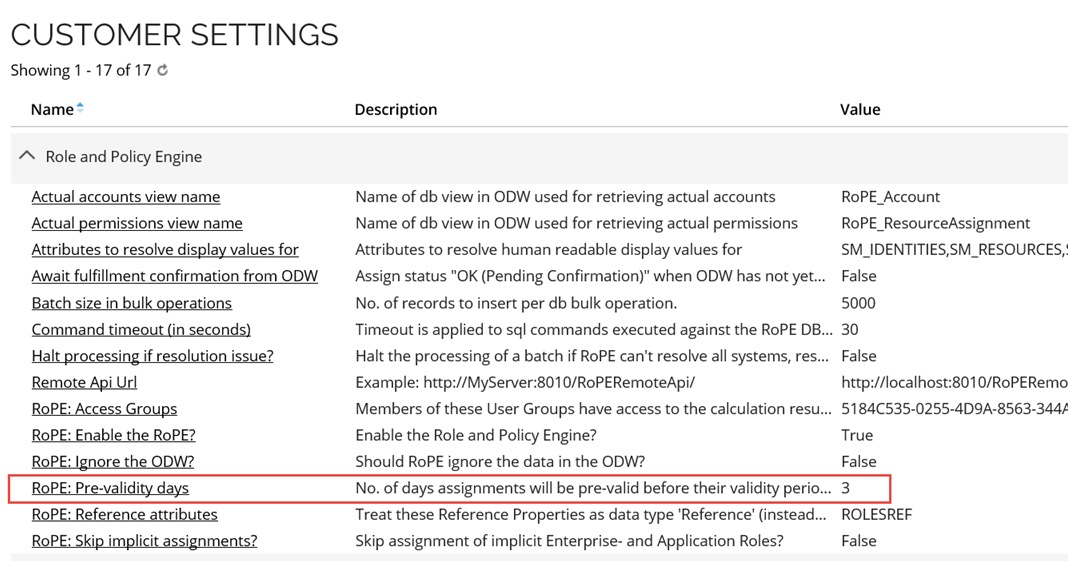
However, RoPE has a concept of pre-validity and post-validity. RoPE includes a CRA in the calculation result a number of days before it becomes valid and a number of days after it stops being valid, but it is marked as Disabled.
This allows for provisioning account assignments before a user’s start date, and mitigation of incorrect HR termination triggers. It also ensures that accounts are not deleted on the last working day of an identity.
If it is the Identity itself that is either pre-valid or post-valid, RoPE will extend the validity period of Calculated Permission Resource Assignments (CPRA). In the extended period before and after the validity period, the identity is not marked as disabled. This is to prevent the permission assignments from being deprovisioned and to allow that permissions can get provisioned during the pre-validity period. This is safe to do since the accounts for which the permissions are granted will always be disabled.
By default, the pre-validity period is 3 days for all CRAs of all types. It can be configured in the customer settings, as shown below (path: Setup > Administration > More > Customer settings).
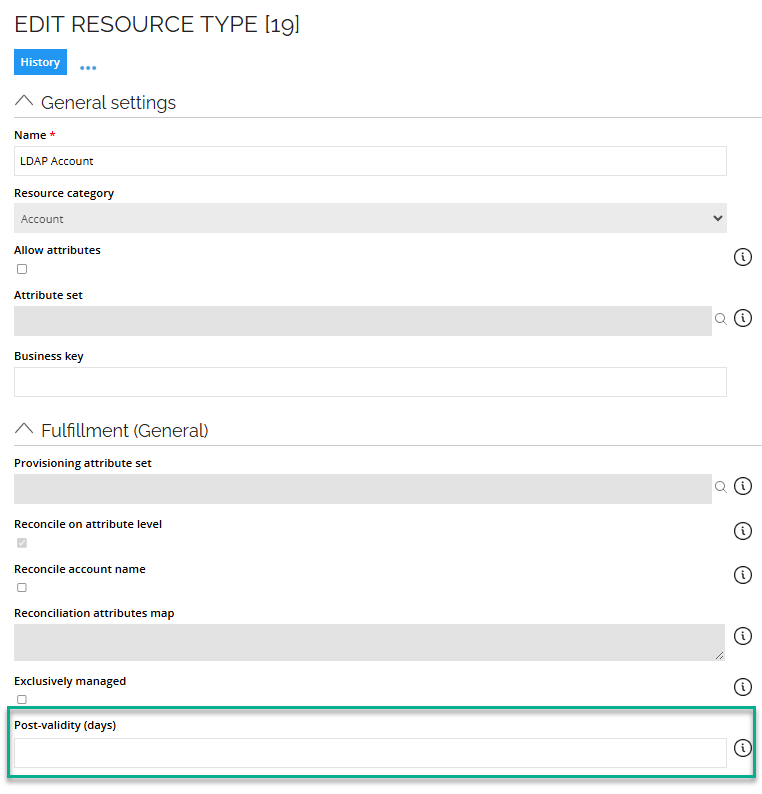
By default, the post-validity is 0 days. It can be configured per resource type in the Edit Resource Type dialog, as shown below. If you do not enter any value in the field, it is interpreted as zero.
Thresholds
In the ODW and for the provisioning of rights by OPS, threshold values for the data import process can be set up.
Data import thresholds
In the case of errors in a system’s imported data, the data import threshold feature is designed to prevent unintentional incidents in Omada Identity.
Examples of such errors could be an incomplete .csv file or accidental changes in connection details. The data import threshold feature works by calculating the rate of created, changed, and deleted objects since the last import. If the rate exceeds the configured maximum value, it suspends the import process.
The system owner is notified about the suspension and can decide either to resume or discard the import. If the user chooses to resume the import, the suspended data is moved to the staging tables and imported during the next import. If the user chooses to discard the suspended data, the same data is extracted from the target system on the next import.
The threshold calculation applies to accounts, resources, and resource assignments.
The systems that you register in Omada Identity may include a different number of objects and a different number of changes. For this reason, you must individually set the threshold values for each system.
An object is considered as modified even if you have changed only the master data, for example, its compliance state. When you specify the threshold for changed objects, you must also consider changes to master data when you set the value.
Provisioning thresholds
The Provisioning threshold feature is designed to prevent a high number of unwanted provisioning tasks being run and works as an emergency brake where provisioning to a specific target system is suspended or when the number of performed operations exceeds a defined number within a defined time interval.
In addition, operations that are started before the specified threshold is reached are still processed.
Data administrators can treat the suspended data in three different ways:
- Resume processing until thresholds are exceeded again. To resume the provisioning job after which the calculation of thresholds statistics is started.
- Allow processing current pending jobs and resume processing. To resume the provisioning job but the calculation of threshold statistics is not started until all currently pending jobs have run. If new jobs are received during processing the already pending jobs, these are included in the threshold statistics.
- Suspend the checking of threshold settings for a specified number of hours.
Attribute concept
A calculated account resource assignment (CARA) and calculated permission resource assignment (CPRA) can have attribute values.
The use of attributes typically falls into one of the following categories:
- Account fields, such as Email address or Mailbox limit required by the connected system.
- Role parameters (for example, Approval amount limit) that provide additional information on an assignment, for example, an ERP role such as Approve purchase order for an identity. Moreover, role parameters are supported and required by the connected system.
- Information attributes that hold information that's only relevant inside Omada Identity and is not provisioned to the connected system, for example, the Compliance status.
Moreover, the set of legal attributes for a calculated resource assignment is dictated by the attribute set that's specified on the resource type in Omada Identity Enterprise Server.
An attribute definition is merely a wrapper for an Enterprise Server property; in RoPE calculation data, an attribute is represented by the system name of the property (and not the name of the attribute definition itself).
A RoPE assignment attribute has one of the following data types:
BooleanDateTimeIntegerStringReference
The data type of a RoPE assignment attribute is dictated by the type of Enterprise Server property.
Not all types of Enterprise Server properties are supported. A RoPE assignment attribute is always multivalued regardless of whether said property supports multiple values.
The table shows Enterprise Server properties mapping to RoPE attribute data type:
| Enterprise Server property | Maps to RoPE attribute data type |
|---|---|
Value property, data type Text | String |
Value property, data type Integer | Integer |
Value property, data type DateTime | DatetTime |
Value property, data type Decimal | Not supported |
Value property, data type Boolean | Boolean |
Value property, data type Hyperlink | Not supported |
Value property, data type TimeSpan | Not supported |
Value property, data type MultiLangText | Not supported |
Value property, data type XML | Not supported |
| Reference property | String or Reference |
| Set property | Not supported |
An assignment attribute is only saved and stored if it has a value. However, if it does not have a value, but did have one in the past, it's saved in all subsequent calculations (for RoPE to be able to provide a proper delta for the provisioning layer).
Attribute values are automatically assigned from the involved objects of an assignment. For example, if an attribute that's legal for a calculated resource assignment is present on the identity data object, then, the value of the identity is assigned to the calculated resource assignment.
A property should only be used as a definition for a single attribute. The system property's name should never be specified on multiple attribute types.
With respect to the master data in ES, ensure that all Attribute data objects state a unique system property name in the Definition section. If two attributes in the same attribute set have the same definition, RoPE merges them together. As a result, all attributes should state a unique system property name as the definition.
Survey concept
The Attestation module is used to run different types of surveys on data.
Surveys included in the module are an (account) ownership survey confirming who is the owner of an account (by consequence eliminating orphan accounts) and resource assignment surveys.
An example of this resource assignment survey is when a manager attests that it's correct that the people working for the manager have the access they have been assigned.
In addition to the included surveys, additional surveys covering other scenarios can easily be configured and used.
The results of the surveys are used for two main purposes:
- Approval/removal data is used for calculation input for RoPE.
- Approval/removal data is written back to ODW for the capture of historical data and making it available in reporting.
The Attestation module can be used to confirm and/or suggest ownership for accounts that could not be matched during the ODW import and can be used to reassign ownership of, for example, systems or resources when a person leaves the organization.
Survey verdicts
Survey verdicts are used in authoritative Access review surveys to create a desired state for assignments. This can apply to assignments that already have a desired state as well as assignments without another desired state.
Survey verdicts are an efficient way to manage desired states for assignments as they are not a separate data object but applied to an assignment during the calculation in RoPE. Survey verdicts are meta data that is stored in the database, and shown as an attribute, therefore you need database access to manage survey verdicts that have been created by mistake or are no longer applicable. This makes the management of survey verdicts limited to a platform administrator.
Another way of establishing a desired state for assignments is the Direct reason, which is caused by a Resource assignment data object. This object contains meta data such as Valid to, Valid from, context etc. The benefit of using direct assignments is that you have more visibility, although there is a slight performance overhead in these assignments as they are data objects that need to be read in the RoPE calculation.
Survey verdict expiry
Survey verdicts will always have an expiry date. This can be set on a short timeframe (short term verdict), or a long timeframe (long term verdict) hundreds of years in the future which effectively means that the survey will not expire. There are risks and advantages to both these approaches.
Risks of using short term verdicts
One use case of using short term verdicts is to ensure that assignments are regularly recertified and are not assigned to identities indefinitely to maintain a least privileged access approach. When a survey verdict is the only desired state reason for an assignment and that verdict expires, the assignment is deprovisioned. However, if recertification is not performed before the expiration of assignments, it can lead to unexpected deprovisioning actions which could disrupt the business.
If the CRA has another desired state reason (for example, a Resource assignment), then the expiry of the survey verdict does not cause any deprovisioning actions and the assignment remains active.
Risks of using non-expiring verdicts
To reduce the risk of unexpected deprovisioning, it can be tempting to assign a survey verdict expiry many years in the future. The prevents unexpected deprovisioning, but on the other hand, this may result in that assignments that should have been deprovisioned are not, because the desired state through a survey verdict remains active.
This is a risk especially when assigning a desired state to a “lower level” such as a permission or application role, that you later build into a parent role. The parent role is then intended to be the primary desired state, and any assignments associated with that to follow the lifecycle of that assignment. But if the lower-level assignment has a desired state through a survey verdict, the child assignment is not deprovisioned if the parent role is no longer desired, as it has an independent desired state.
While correct from a calculation perspective, this can cause compliance issues if this was not the intended behavior.
There is currently no central place in the solution where survey verdicts can be inspected and removed.
Omada recommends the following best practices when onboarding new applications to establish a desired state:
-
Roles assigned by policy do not need to be recertified individually. We therefore recommend that you build application roles, business roles, and use policies to assign access where possible, which can help reducing the workload for managers and owners.
-
When not using policies, we recommend that you use direct resource assignments. This way assignments will have a desired state reason that is not affected by keeping survey verdicts that expire.
-
When you onboard new applications, create direct resource assignments to the application role to establish a desired state. Depending on the role structure you want to use, normally 2 or 3 levels, you need to decide what level you need to create direct assignments for.
If you are using a 2-level model, likely you want to create direct assignments on the top role layer and leave Permissions as calculated assignments only. If you create a desired state on multiple layers, you risk getting multiple desired states on the same permission which may lead to assignments not being deprovisioned as expected.
-
When you are regularly performing recertifications of your access rights, you can schedule the launch of recertification surveys to ensure assignments are recertified according to regulations.
-
Set built-in Access review surveys to only run on assignments with a Direct reason (Resource Assignment data object). Set the survey verdict is set with an expiry of 0 days. This will keep the compliance state to “Explicitly approved” but will keep the number of verdicts low. The Audit trail from the surveys is available in the historical reports even though the survey verdict is set to 0 days. You can use the Decision log/Audit trail report.
-
Do not set a survey verdict expiry date that “never” expires.
-
Do not run surveys on system permissions, Unresolved identity, Orphans account and technical identities. Only run surveys on Explicit Resource Assignments (make sure that all have a Resource Assignment object).
Desired state of initial load
Omada recommends the following best practices when you load initial assignments.
- Load these as “Not approved” and create the desired state after their first Access Review. In this way you have the full audit trail in Omada.
- Do not use approve-all function in the System onboarding page. Instead, you can create resource assignments objects with a short validity period to establish a temporary desired state until the first Access review campaign can be launched.
In some organizations, the initial load may count as a desired state, for example if you are migrating from an existing IGA solution where you have an established desired state. In this situation, you may want to do an “initial load” of direct assignments to create an approved state for all assignments. Use this option with caution as the audit trail for these approvals is not available in Omada Identity.
If you have survey verdicts that are impacting your compliance, follow these steps:
- Create direct resource assignments either manually, through an OData integration, or through a data exchange.
- If direct resource assignments have verdicts that has a long-term expiry, expire the verdicts with a new survey with 0-day expiration.
- Verdicts on system permissions, Unresolved identity, Orphan accounts and technical identities can only be cleaned up in the database. If you are an Omada Identity Cloud customer, please contact Omada Support for this task.
Business context concept
The Business context concept makes it possible to manage business contexts in addition to the organizational structure of a company/organization. For example, the business context concept allows for managing of a project hierarchy.
Each project can have one or more owners with the responsibility of managing who is assigned to the project context. Identities who are assigned to a project context are allowed to request access to be used while performing duties in the project.
Once an identity is no longer assigned to a project, the system automatically revokes the access granted to it. The business benefits that stem result from it include:
- The ability to manage other business contexts in addition to the organizational structure.
- Self-service requests for access to be used in a specific context with the following approval of the context owner.
- Automatic revocation of access granted for use in a context when an identity is no longer in it. This is due to the identity’s context assignment being expired or otherwise removed, or because the context itself has a validity period and its end date has been reached, for example, at the end of a project.
When looking for a business context for an identity, the system goes through the following steps:
- Checks whether the primary context type for the identity specifies a Supervisor reference property on the identity object. If this is the case, any user or user group listed is considered the manager(s).
- If the property is empty or if the context type does not specify a Supervisor property, any user or user group listed as the context owner of the identity’s primary context is considered the manager(s).
- If there are no direct managers found in step 2, the system checks whether the parent context has one or more direct managers and continues upwards in the context hierarchy until it finds a manager.
- For access requests, it's always the owner of the context the request is made for that receives any manager approval task(s).
- If you're using Org. Unit as the primary context type for identities, Omada Identity is by default set up to use the reference property called Manager on the identity data object type as Supervisor property.
- If an identity has no value in the property, the system looks at who is the manager of the Org. Unit the identity is in, and then the parent Org. Unit, and so on.
Business Contexts in Omada Identity and RoPE
The Role and Policy Engine considers the business context model in its calculations. If the identity is no longer in the business context it was assigned to, RoPE disables the calculated resource assignments that are caused by directly-assigned resources (for example, from the Access request process).
If an identity joins a project and requests access in this context, the access will be valid till the identity leaves the project. Then, it will be disabled.
If the identity has a primary context type specified and has no memberships, RoPE disables all the calculated resource assignments.
Primary context type
All identities must have specified primary context type and a context assignment for a context of this type. An identity’s primary context type is specified on the identity object as standard, but can also be set for all identities in an Enterprise Server custom setting.
The primary context type for identities is often the Org. Unit, which is a built-in context type in the standard application. However, a contractor could have projects as its primary context type.
The primary context is used to determine an identity’s primary manager for approval and attestation tasks, when these are not made in a specific context.
If an identity does not have an assignment for a context of its primary context type, no assignments are calculated for the identity.
Manager of an identity
It's important for each identity to have a manager. Among other reasons, the system requires an identity to have a manager to whom access request approvals can be assigned.
Similarly to the case of the business context, when looking for a manager for an identity, the system goes through the following steps:
- Checks whether the primary context type for the identity specifies a Supervisor reference property on the identity object. If this is the case, any user or user group listed is considered the manager(s).
- If the property is empty or if the context type does not specify a Supervisor property, any user or user group listed as the context owner of the identity’s primary context is considered the manager(s).
- If there are no direct managers found in step 2, the system checks whether the parent context has one or more direct managers and continues upwards in the context hierarchy until it finds a manager.
- For access requests, it's always the owner of the context the request is made for that receives any manager approval task(s).
- If you're using Org. Unit as the primary context type for identities, Omada Identity is by default set up to use the reference property called Manager on the identity data object type as Supervisor property.
- If an identity has no value in the property, the system looks at who is the manager of the Org. Unit the identity is in, and then the parent Org. Unit, and so on.
Direct context assignments
Direct context assignments are created through the Request Membership process or context owners can add them when they edit the context object.
Membership-based context assignments
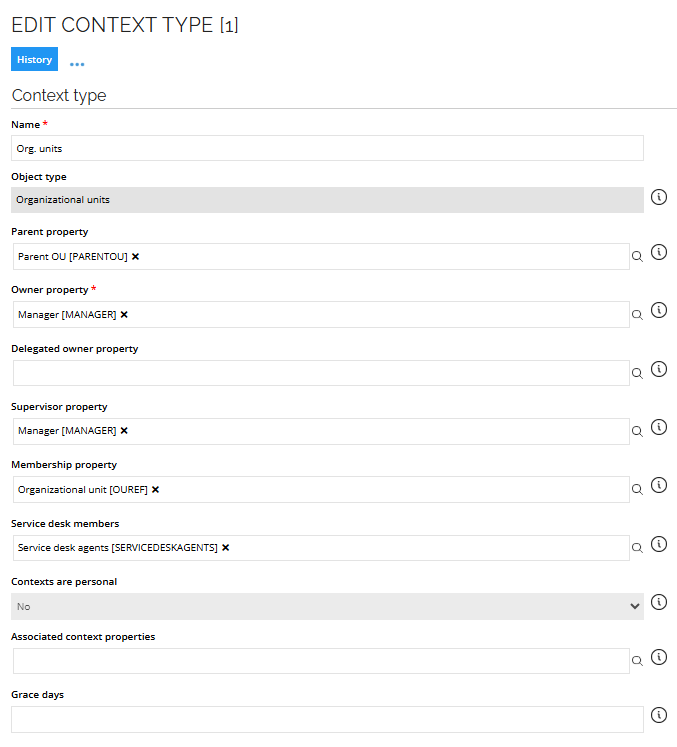
You can specify a membership property for contexts that create context assignments based on a reference between an identity and a context, instead of direct resource assignments. The built-in context Org. Unit is configured in this way.
The identity data object has a reference property called OUREF that refers to Org. Unit objects.
In the context type definition Org. Unit, we have specified that this property refers the identity’s membership to an Org. Unit.
The following image shows an example of editing the context type:
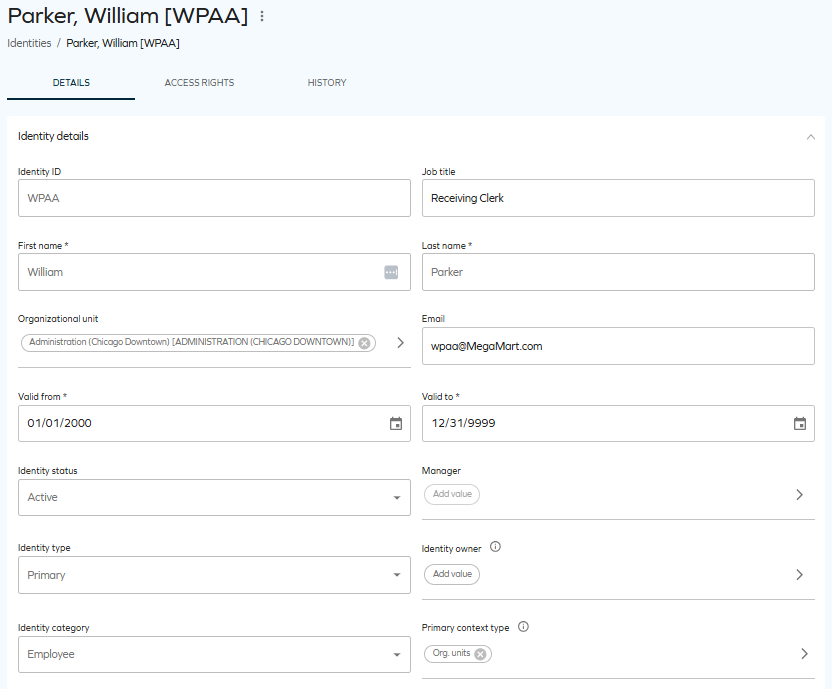
In the next screenshot, you can see that the identity refers to the US Chicago Downtown Administration organizational unit in the Org. Unit (OUREF) property. As a result, this identity belongs to this context through a membership-based context assignment.
The benefit of handling context through membership-based assignments is that it limits the work required to maintain context assignments.
Prominent cybersecurity frameworks such as NIST, ISO 27002, COBIT, and CIS emphasize the significance of incorporating classifications to establish a risk-centric approach to cybersecurity. This section emphasizes the significance of classification within Identity Governance and Administration, and provides comprehensive guidance on initiating the classification process for IGA.
Classifications: Information classification vs. IGA classification
Incorporating classifications to facilitate a risk-centric methodology in the field of cybersecurity is a fundamental component shared by prominent cybersecurity frameworks such as NIST, ISO27002, COBIT, and CIS. By providing comprehensive insights into the reasons and methods behind this IGA classifications, you will be equipped to create a classification framework customized to meet the requirements of IGA within your organization.
Both Information and IGA classifications play pivotal roles in upholding data security, privacy, and ensuring that users possess appropriate access levels based on their roles within the organization. Regular reviews of classification schemas are imperative.
Over-classification could lead to unnecessary control implementation and increased expenses, while under-classification might result in inadequate access protection measures.
If an information/IGA classification schema is absent in your organization, it is crucial to establish one. Doing so not only enhances your cybersecurity defense, but also ensures compliance with guidelines from prominent cybersecurity frameworks.
Information classification
Information classification practices have existed for well over a century. Early adopters of classification systems included government agencies and military organizations, which formalized classification levels like Top Secret, Secret, and Confidential. These practices continue to be observed in corporate environments today, where classification can drive requirements about encryption, storage, certificates, and more.
IGA classification
Managing access to applications entails regulating user access to software applications and their functionalities. This practice has been in place since the 1990s, when corporations rapidly integrated applications across all facets of their operations.
The example of our customers shows that an average employee has access to over 80 applications. These access privileges vary significantly and, from a risk-based standpoint, should not be treated uniformly.
Creating an efficient IGA classification schema supports cybersecurity defense, enhances compliance, and empowers organizations to manage access risks tailored to their unique needs.
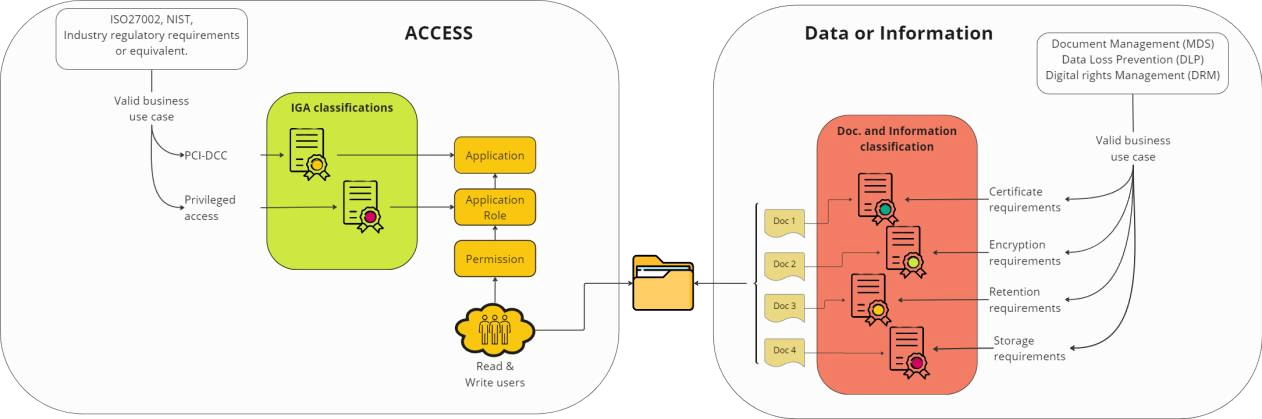
The following diagram shows a visualization of the main differences between IGA and Information classifications.
The details of an IGA Classification schema
In order to create a fit for purpose IGA classification schema its essential to understand how access is structured and managed, equally important is understanding the business cases behind each potential classification groups. The image below is an illustration of best practice access structure in Omada Identity.
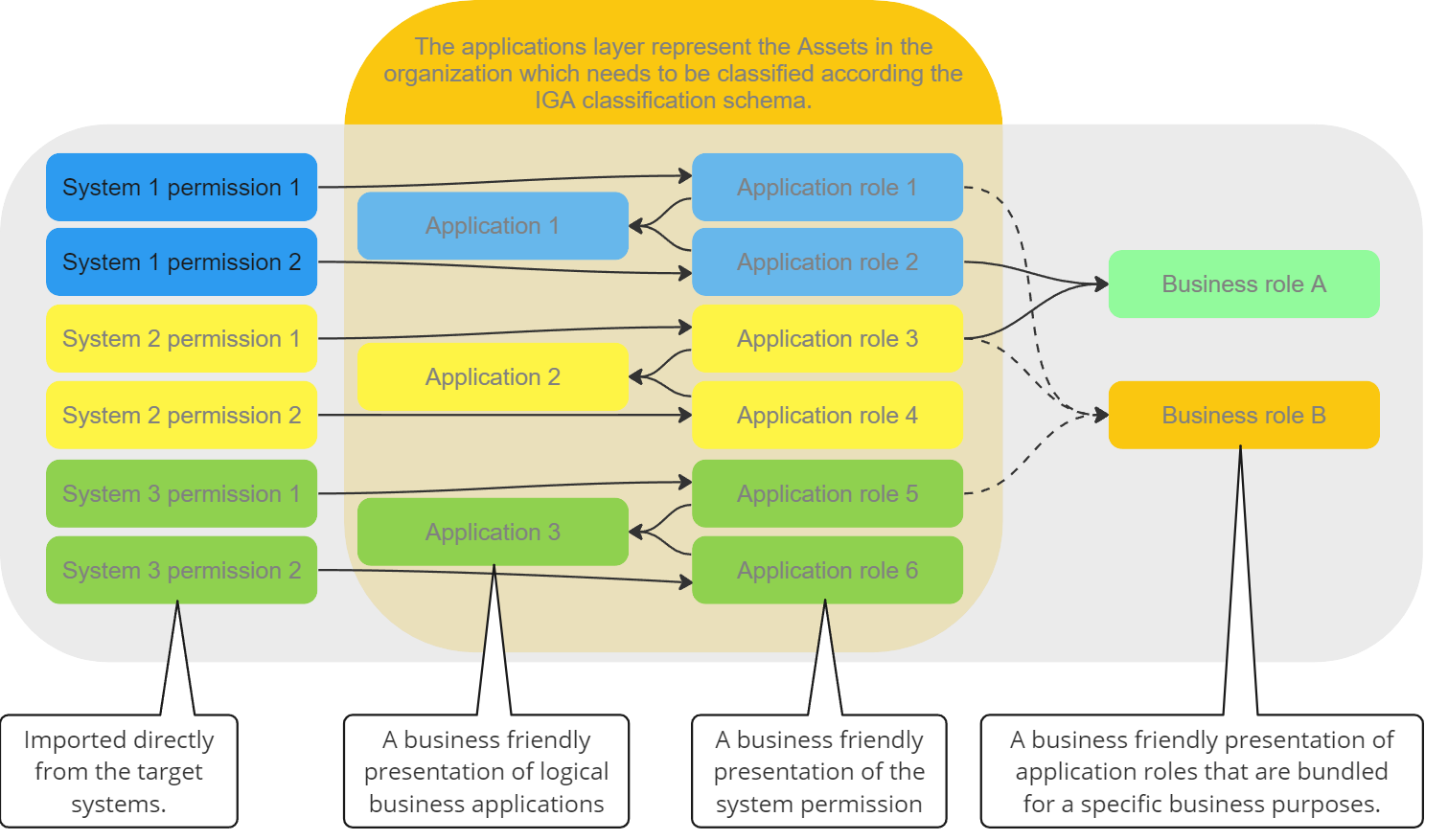
Application classification
An Application represents a logical business system. Classification of the Application layer is typically used for mapping high level business requirements. This could be the mapping of business systems that are under regulatory compliance requirements.
Below follows an example using PCI Data Security Standards (PCI DSS), which applies to organizations that handle credit card information. Establishing a Classification category called PCI could be a valid business use-case if your organization handles credit card details and you could tag all Applications with either:
- PCI
- Non-PCI.
It is now simple to single out the PCI applications and enforce the PCI regulatory requirements. The high-level business requirement for PCI applications could be a higher frequency of recertification or a stricter approval process for gaining access. The reason for having both a PCI and a Non-PCI tag is to eliminate any confusion that could arise regarding if an application is Non-PCI or it simply has not received a classification tag.
Other examples of Application classifications include: SOX, GxP, Contains sensitive data, Part of Critical infrastructure, Business critical, or other cases that fulfill a high level business requirement.
Application role classification
An Application role represent a specific access into a specific Application. Classification of the Application roles are typically used for mapping the process in relation to access request, i.e. is a specific account type required, who should approve or does it even have to be approved and once access is established how the access should be recertified.
We have created three examples to give a deeper understanding of how Classification of Application roles can be used:
An application role could give privileged access in an application, that the business requires is only accessed with an administrative account. Establishing a Classification category called Privileged could be a valid business use-case and it would enable you to tag all Applications role with either:
a. Privileged - only granted to an admin account and not personal account,
b. Non-privileged.
Application role classifications can also be subsets of Application classification.
For example, if an Application, is classified as PCI-DSS, it is likely that there are specific Application roles within the Application that do not grant access to view credit card information. From a PCI-DSS requirements point of view, this access does not require the same level of protection as an access that allows you to view credit card information.
The application roles within the Application do not need to be treated equally if the risk they are associated with is not equal. Various subsets of the Application Classification can result in variations of the Approval flow, Access duration, Recertification, Reporting, and more.
Establishing an Application role Classification category, that is activated by the parent Application classification, could be referred to as the PCI level. It can have a valid business use-case and require you to tag all Applications role in Application that are classified “PCI” with either:
a. PCI - needs to be recertified according to standard PCI requirements, or
b. PCI Low - a reduced recertification requirement due to the nature of the
specific access.
Application role classification can also serve as a refined tool for granular access control, preventing specific access privileges from getting lost within broader business roles.
Consider a scenario where certain access rights demand an extra layer of scrutiny. Application role classification provides a solution. When constructing a business role, application role owners are prompted to provide their approval for inclusion during the business role's creation. As a result, when the business role is assigned to an identity, the associated application roles are automatically assigned, eliminating the need for additional approval from the application role owners at the point of distribution.
This dynamic prompts the consideration of whether certain application roles should be eligible or ineligible for inclusion within a business role, thus establishing a valid and strategic business case for such classifications:
a. Non-business role, b. Potential business role.
Business role classification
Business roles are groups of Application roles across Applications that fulfill a business purpose. This could be in the context of basic business roles that are distributed to active identities, Organizational roles that are distributed according to you organizational belonging or Job functional roles that are granted due to the specific job function that you have.
The business role classification should inherit all of the underlying classification from both the Application and Application roles that make up the business role. The business role should be handled according to the strictest inherited classifications.
Classification schema
The illustration below demonstrates the differences between the classic information classification and IGA classification, together with examples of what classification categories could look like.
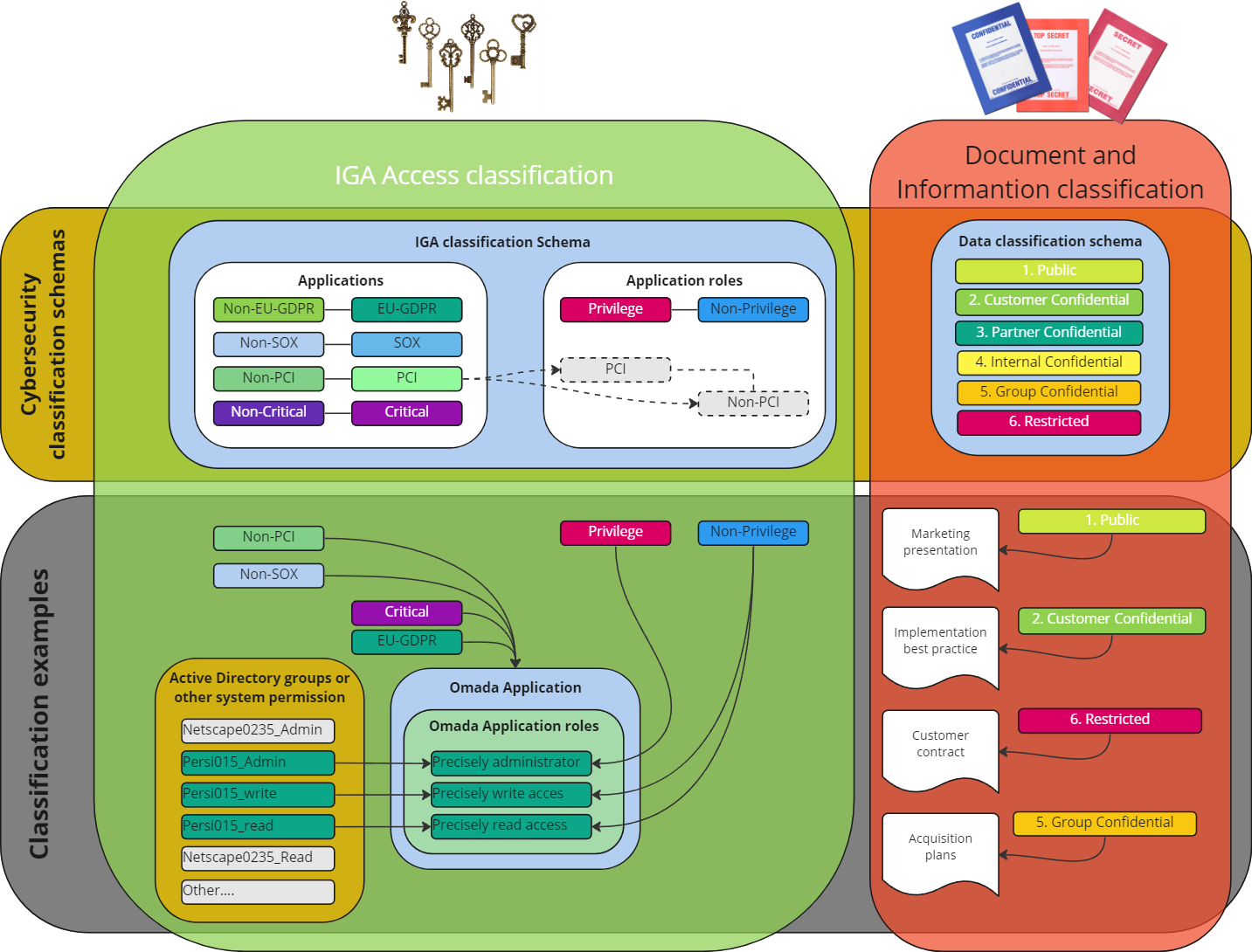
Key considerations for an effective classification schema design
When designing a classification schema, several elements should be considered to ensure its effectiveness and usability. Here are some key elements that should be included:
- Business purpose
All classification groups should be supplemented with a description of the business purpose. The individual classification tags within the classification category should also be supported with a description of why it exists. Purpose should be concise, unambiguous, and easily understandable to users.
- Hierarchical structure
If applicable, the schema may incorporate a hierarchical structure, organizing categories into levels or subcategories. This allows for a more granular classification system and helps in navigating and organizing large amounts of data.
- Rules or Criteria
Establish clear rules or consequences for the classified items. These rules should be objective, consistent, and well-defined, ensuring that Applications and Application roles are assigned the correct classification.
- Documentation
Document the classification schema thoroughly to provide guidelines and instructions for users. This documentation should explain the purpose and scope of the schema, describe the categories and attributes, provide examples, and offer guidance on how to apply the classification criteria.
- Quality Control
Implement governance for quality control to ensure the accuracy and consistency of classifications. This may involve regular reviews, audits, or validation processes to identify and rectify any misclassifications or errors.
- User Feedback
Incorporate a feedback mechanism to allow users to provide input, report issues, or suggest improvements to the classification schema. User feedback can be invaluable for refining and enhancing the schema over time.
Remember that the specific elements of a classification schema depend on the nature of the items being classified and the context in which the schema is used. The goal is to create a schema that is logical, comprehensive, and user-friendly, facilitating the efficient organization and retrieval of information.
An effective classification schema design should be tailored to the specific needs of your organization and industry. It should prioritize clarity, usability, and accuracy in order to facilitate efficient organization and management of access and privileges.
- Information Classification and IGA classifications are different.
- IGA classifications schema is an essential design element required to stay compliant with prominent cybersecurity frameworks.
- For every classification category there needs to be a valid business use case.
- Classifications categories require a lifecycle setup to ensure the integrity and quality of the schema.
Appendix
The table below shows an example of a classification schema. The classification schema should be adapted to the specific requirements of the organization with the above recommendations taken into account.
Applications classification
| Mandatory classification | Business purpose | Approval | Account type | Recertification frequency |
|---|---|---|---|---|
| Minimum requirement | All Application roles in all applications. | Line Manager | NA | Recertification by Line Manager every 24 months. |
| EU-GDPR | For reporting purposes we must be able to easily list all application where EU-GDPR sensitive information is stored. | Line Manager | NA | All application roles must be recertified on an annual basis. |
| Non-EU-GDPR | To eliminate any chance of confusion if an application contains EU-GDPR sensitive data or it has not been classified. | NA | NA | NA |
| SoX Sarbanes-Oxley Act | As we must comply with SoX regulations, we must be able to easily report all application where we manage financial transactions. | Line Manager + resource owner | NA | All application roles must be recertified on an annual basis. |
| Non-SoX | To eliminate any chance of confusion if an application contains SoX or it has not been classified. | NA | NA | NA |
Application roles classification
| Mandatory classification | Business purpose | Approval | Account type | Recertification frequency |
|---|---|---|---|---|
| Minimum requirement | Line Manager | NA | Annual recertification by user. | |
| EU-GDPR - Non-EU-GDPR | When the access means access to non EU-GDPR classified information. | NA | NA | NA |
| EU-GDPR-Non-Sensitive | For reporting purposes we must be able to easily list all application where EU-GDPR non-sensitive information is stored. | Line Manager | NA | All application roles classified as EU-GDPR-Non-Sensitive must be recertified on an annual basis. |
| EU-GDPR-Sensitive | For reporting purposes we must be able to easily list all application where EU-GDPR-Sensitive information is stored. | Line Manager + resource owner | NA | All application roles classified as EU-GDPR-sensitive must be recertified on a quarterly basis. |
| Privileged | Privileged access grants elevated rights to system resources, allowing users greater control and potentially the ability to bypass the dedicated end user interface. | Line Manager + resource owner | Admin account | All application roles classified as Privileged must be recertified on a quarterly basis. |
| Non-privileged | To eliminate any chance of confusion if an application role is privileged or it has not been classified. | NA | NA | NA |
Omada Process Framework overview
The Omada Process Framework is based on Omada’s experience with solution implementation, providing advisory services, and facilitating organizational change in relation to IGA.
The framework covers the challenges that organizations meet when dealing with:
- Documenting who has access to which data and resources, and why.
- Ensuring that changes to employees and contractors work implies changing which information resources they have access to.
- Improving efficiency in providing the right people with the right access at the right time.
- Raising awareness and understanding of information security in organizations.
- Performing necessary ad-hoc and periodic reviews of employees and contractors’ access to information resources.
- Maintaining crucial information security by ongoing reconciliation of desired versus actual access to corporate information resources.
- Maintaining a sufficient level of information security in an ever-changing technical environment.
The process framework is divided into the following process areas:
- Identity Lifecycle Management
- Business Alignment
- Administration
- Auditing
- Access Management
- Governance
- Identity Security Breach
The following table includes descriptions of concepts mapped to Omada documentation.
| Concept | Location |
|---|---|
| Audit Trail, History, Data object type versioning | Omada Identity Documentation – Audit, especially the following parts: Audit Trail (AUD01), History (AUD02), Data Object Type Versioning (AUD03). |
| Operations dashboard | Omada Identity Documentation – Ease of deployment, especially the following part: Operations dashboard (AUD05). |
| Email log, Code Method log, Provisioning service log, Role and Policy Engine log, Timer execution log | Omada Identity Documentation – Operations, especially the following parts: Location of logs, Log overview. |
| Data Warehouse log | Omada Identity Documentation – Operations, especially the following part: Omada Identity Data Warehouse Sysssislog. |
Each of the process areas are further subdivided into main processes for each process area. The following image shows an overview of the Omada Process Framework:
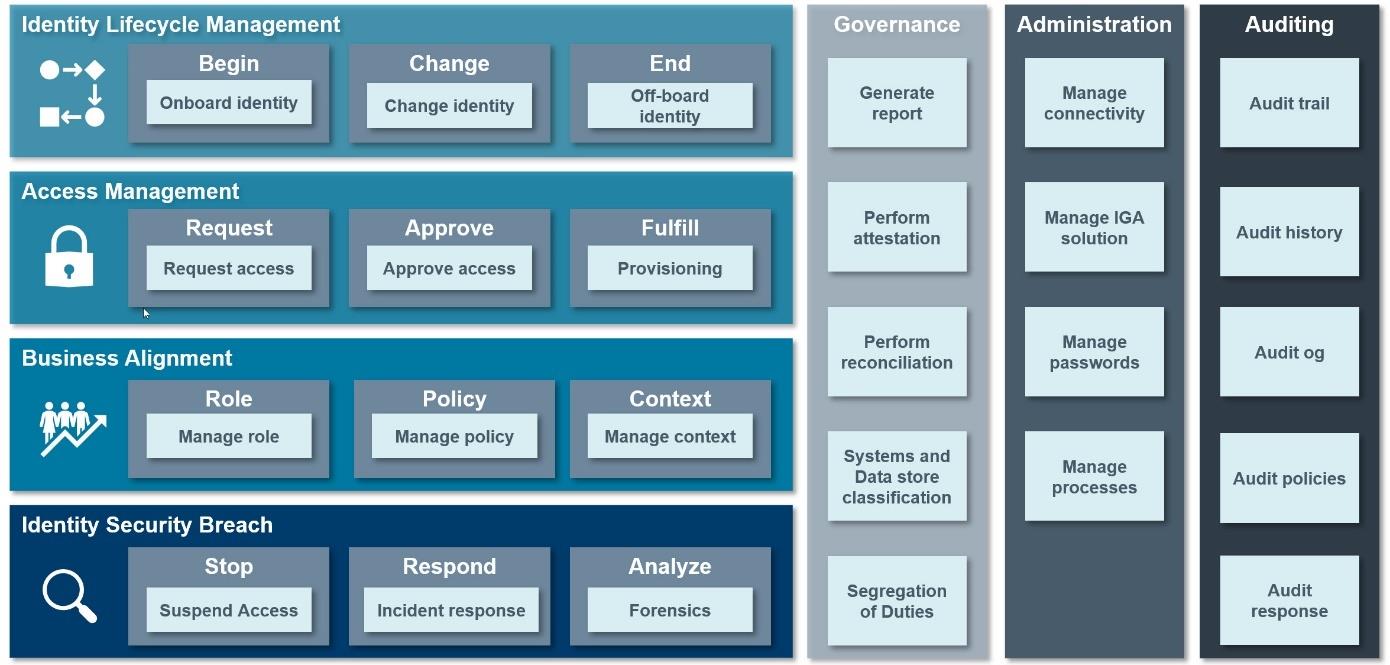
The Omada Process Framework, together with its process areas, main processes and sub- processes, covers most user scenarios and cases related to the IGA domain.
Out of the box, the Omada Identity provides coverage for most of the processes included in the framework. However, some of them are customer- or industry-specific; in those cases, no common standard applies.
Whenever this guide mentions Master Data Management, it means that Omada Identity does not include an explicit process, however, the functionality is achieved via direct Master Data Management in Omada Identity, typically performed by members of the Data Administrators role in Omada Identity.