Identity security breach
In some cases, it may be necessary to lock out one or more identities from using any type of system connected to Omada Identity, typically in the case of a security breach or other system irregularities.
Omada Identity provides the emergency lockout feature to handle such types of incidents. External systems such as SIEM, UEBA (User and Entity Behavior Analytics), or Threat Analytics platforms can integrate with Omada Identity via the OData REST API as part of an incident response process.
Identity Security Breach covers the Suspend or reactivate access process.
Suspend or reactivate access
Suspending access to an identity can happen for many reasons such as cybercrime or a similar event. However, in case of a false alarm it's important for a user to have their access rights reactivated by revoking the lockout.
Emergency lockout
The Emergency lockout feature is implemented as a built-in workflow in Omada Identity.
External systems can integrate with Omada Identity in support of incident response scenarios, but workflow execution is not initiated directly through the OData REST API. Instead, OData is used for data-centric integration, such as creating or updating data objects that may trigger customer-defined processes.
For details, see section Initiating lockout from external systems.
The goal of the emergency lockout is to lock an identity, disabling all assignments.
In case of cybercrime suspicion or similar criminal events, it might be necessary for a manager, Operation Administrator, or Compliance/Security to be able to set an identity to locked. When this happens, RoPE calculation as well as deprovisioning tasks are handled with priority.
As a result of the lockout, all assignments are disabled, however, they can be restored.
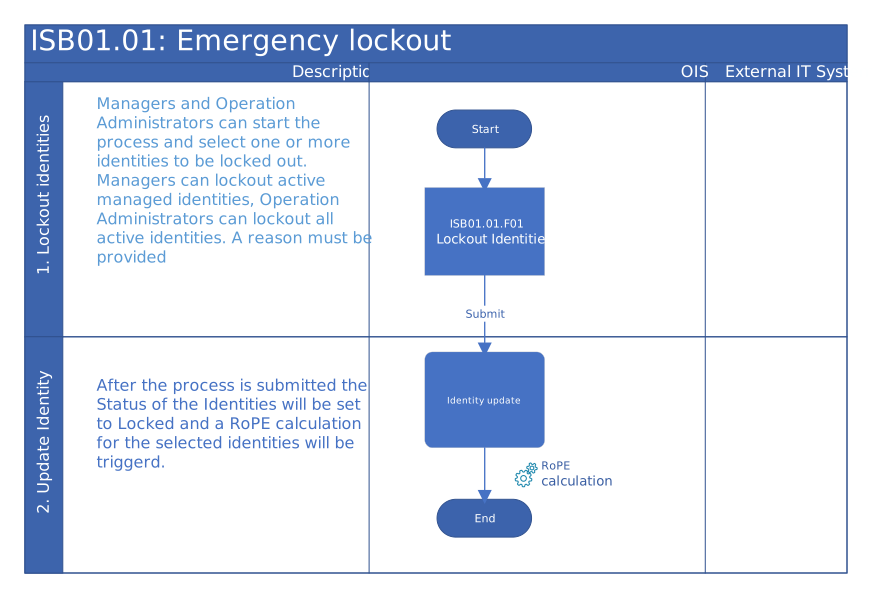
Process flow
A suspicion of cybercrime by an identity requires immediate action.
- In the case of an emergency or breach, a manager, Operation Administrator, or Compliance/Security can start the process by using the appropriate menu item in Omada Identity.
- A manager can block their managed identities and give a reason.
- Operation Administrators can block all identities and give a reason.
- An identity is set to locked, while accounts and assignment are set to disabled.
- An identity is calculated, and provisioning is started.
- When an identity has the locked status, the status cannot be overwritten by any external interface.
- Only users who are members of the Operation Administrators group have permissions to overwrite the identity with the locked status.
- Ensure that the company/organization has a formal written policy for the Emergency lockout process.
- The My lockout and revocations view contains an entry for each lockout and revocation that the active user has made. The Type column displays either Lockout or Revocation depending on the type of process that the user has run for that specific identity.
Revoke emergency lockout
The goal of revoking emergency lockout is to reactivate identities that have been previously locked out due to an emergency.
- Only Operation Administrators can reactivate all locked identities.
- Managers can only reactivate identities managed by them.
When the revocation is performed, the existing access rights are reinstated in the target systems. As a result of revoking the lockout, all assignments are enabled.
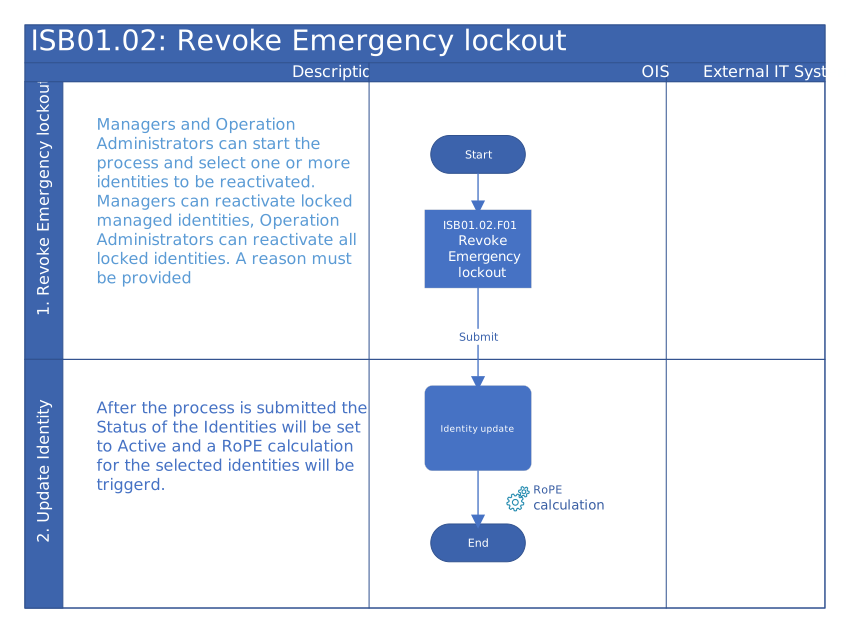
Process flow
The following actions take place when a cybercrime suspicion has not been confirmed.
- A manager or Operation Administrator starts the process in Omada Identity.
- A manager can unblock their managed identities, and give a reason.
- Operation Administrators can unblock all identities, and give a reason.
- Identity, accounts, and assignments are set to Active.
- Identity is calculated and provisioning is started.
- Ensure that the company/organization has a formal written policy for this process.
- The My lockout and revocations view contains an entry for each lockout and revocation that the active user has made. The Type column displays either Lockout or Revocation depending on the type of process that the user has run for that specific identity.
Incident Response
External systems such as SIEM, UEBA, or Threat Analytics platforms can integrate with Omada Identity through the OData REST API as part of an incident response process.
The OData REST API supports integration with external incident response systems by enabling the exchange of incident and identity-related data with Omada Identity. This data can be used as input to customer-defined workflows in Omada Identity to execute emergency lockout or revocation actions in accordance with organizational security and audit requirements.
For organizations using Microsoft Entra ID Identity Protection, Omada Identity also supports integration through the Identity Risk Subscription, allowing identity risk signals to be consumed as part of automated or semi-automated incident response processes. For details, see Identity Risk Subscription with Microsoft Entra ID Identity Protection.
Initiating lockout from external systems
When integrating external incident response systems with Omada Identity, the following patterns can be used:
-
Direct identity status update
External systems can update an identity’s status to Locked via the OData REST API. This approach is immediate but bypasses the dedicated Emergency lockout workflow and its associated process-level audit trail.This approach should be used with caution in environments with strict compliance or audit requirements.
-
Custom trigger object and process (recommended)
External systems create or update a dedicated trigger data object via OData (for example, containing incident ID, source system, severity, and context). A customer-defined workflow in Omada Identity can then react to this trigger and execute a lockout or revocation process with full auditability.
The appropriate approach depends on organizational security policies, audit requirements, and process design.
Only lockouts and revocations performed through the built-in workflows appear in the My lockout and revocations view.
Direct identity status changes performed via OData do not create entries in this view.