Users and user groups
Built-in user groups
Below you will find a table with the user groups that are available in the Omada Identity system.
A user can be assigned to a user group in a number of ways: for instance, through an access request, assignment policies, or the self-management configuration. You can also always be manually added to a group.
With the Governance for Omada Identity feature enabled, adding users to user groups is managed by roles: all the groups have a corresponding resource for managing user group membership. Creating a user group triggers the creation of a corresponding resource. (For details, see Resources.)
Users with roles related to managing access and ownership of objects are assigned to user groups through the so-called self-management RoPE extension. These roles include:
- Resource ownership
- Resource folder ownership
- Org. Unit management
- Identity management
- System ownership
- Cost center ownership
- Company ownership
- User group membership
- Service Desk agent role
- Classification tag ownership
- Employment ownership
A good example of the self-management method is the Managers role. Managers get their role automatically, following the concept of ownership. Self-management assigns the effective managers to the Org. Unit Manager role, which assigns the child resource Managers. Governance then provisions that resource by adding the user to the Managers user group.
For more details on the self-management RoPE extension, see:
There are two user groups that are added to user groups through a default assignment policy: the Employee and the Contractor. For details, see Assignment policies.
| User Group | Description | How to become one |
|---|---|---|
| Application Onboarding Admins | Users tasked with reviewing the result of the Application onboarding process. | Requested through access request, assigned through policy, or manually added to the Application Onboarding Admins user group. |
| Auditors | Internal and external auditors who access Omada Identity occasionally to verify that things are as they are supposed to be. | Requested through access request, assigned through policy, or manually added to the Auditors user group. |
| CIAM End Users | Users external to the organization who have performed self-registration via the CIAM portal. | A person who completes CIAM self-registration becomes a member of this user group. |
| CIAM Service Users | Service user group for the CIAM portal. See also the Impersonation service users user group. | Requested through access request, or manually added to the CIAM Service Users user group. For details, see Assignment policies. |
| Constraint Owners | Individuals appointed as owners of one or more constraints. | Requested through access request, or manually added to the Constraint owners user group. |
| Contractors | Individuals working for an external organization and hired as contract workers for a specified period. | Classify the identity as Contractor to automatically add them to the Contractors user group. This is done through an automatic assignment policy (for details, see Assignment policies). |
| Data Administrators | Individuals managing the "master data" related to identity management, including identities, resources, and systems. Note: Data admins cannot change the configuration of OIS or manage properties and data object types | Requested through access request, assigned through policy, or manually added to the Data administrators user group. |
| Employees | Regular employees. | Classify identity as Employee to automatically add them to the Employees user group. This is done through an automatic assignment policy (for details, see Assignment policies). |
| Everyone | All users. | All users are added to this group automatically . |
| Impersonation Service Users | Service users that are used for integration from third party integrations for example the Omada ServiceNow application. | Requested through access request, or manually added to the Impersonation service users user group. |
| Managers | Individuals who are managers of employees and contractors. | All identities assigned to the Manager resource in the Omada Identity system are automatically added to the Managers user group. This assignment can be obtained through methods such as the access request, assignment policies, or self-management configuration. |
| Operation Administrators | Individuals tasked with ensuring that Omada Identity runs smoothly. | Requested through access request, assigned through policy, or manually added to the Operation administrators user group. |
| Platform Administrators | Individuals tasked with ensuring that Omada Identity is installed correctly. | Managed by Omada Service Desk in Omada Identity Cloud. Only Platform administrators can manage access to the Platform administrators user group. |
| Provisioning users | Service users that must have permissions for special objects. These users can manage users and user groups in the Data Object Security Model. By default, it has no authorization roles and a Medium authentication level. | Requested through access request, assigned through policy, or manually added to the Provisioning users user group unless the Governance feature is enabled. |
| Request Interpreters | Individuals appointed to interpret access requests stated in clear text into specific access rights. | Requested through access request, assigned through policy, or manually added to the Request interpreters user group. |
| Resource Owners | Individuals appointed as owners of one or more resources, responsible for approving access requests and monitoring assignments. | All identities assigned to the Resource ownership resource in the Omada Identity system are automatically added to the Resource Owners user group. This assignment can be obtained through methods such as the access request, assignment policies, or self-management configuration. |
| Security Officers | Individuals appointed to conduct evaluation approvals in the SoD violation workflow. | Requested through access request, assigned through policy, or manually added to the Security officers user group. |
| Service Desk Agents | Individuals working in the service desk for a part of the organization. | All identities assigned to the Service Desk agent role in the Omada Identity system are automatically added to the Service Desk Agents user group. This assignment can be obtained through methods such as the access request, assignment policies, or self-management configuration. |
| System Administrators | Individuals administering the configuration of Omada Identity, including properties and data object types. | Requested through access request, assigned through policy, or manually added to the System administrators user group. |
| System Owners | Individuals who own one or more systems. | All identities assigned to the System ownership resource in the Omada Identity system are automatically added to the System owners user group. This assignment can be obtained through methods such as the access request, assignment policies, or self-management configuration. |
| Vault Service Users | Service users that are used for integration from third party vault integrations. | Requested through access request, or manually added to the Vault service users user group. |
User creation in the Omada Identity system (Governance for Omada Identity feature)
Now, user creation is done by provisioning. When client identities are created, they are automatically assigned to a role: for example, an Employee. Since this role corresponds to a group, the identity automatically receives an account for the group’s associated resource, which in this case is the Omada Identity user.
The provisioning process allows organizations to define rules: if an identity has certain rights, it automatically receives a user account (that is, it becomes a user in Omada). The goal is to ensure that access is granted only to those who have such needs and meet specific requirements, because not all identities might need a user (an account) in Omada Identity.
For users to be created automatically, based on being assigned a role/group, the system/resource type needs to be enabled for Auto Account.
Manual user creation
Though it is not the typical manner, it is possible to create a user manually. To do that, go to the list of users (Setup > Administration > Users) and click New.
Only a user with the Administrator role or the Provisioning User role can create new users directly from the users list.
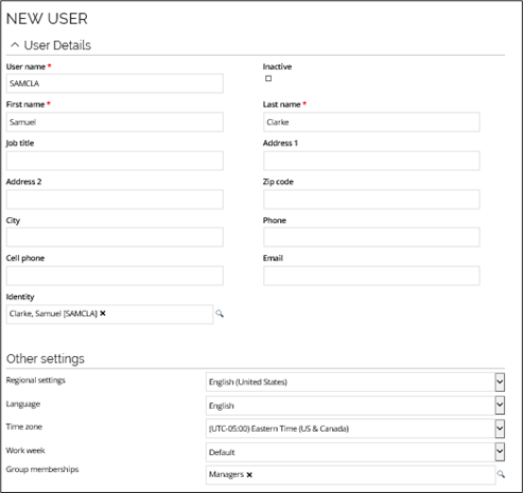
The New User view is where you add or edit users. It is also where you assign group memberships to a user. In this example, Samuel Clarke is a new user who becomes a member of the Managers group.
Passwords
This section is only relevant for Forms authentication, which is usually only enabled in test/development environments. In most cases, Omada Identity is set up with Single sign-on, so that users are authenticated through federation to an external IdP (Identity Provider). In these cases, users do not have a separate password to Omada Identity.
For the existing users, you can change their password if needed. To do this, click the ellipsis (...) > Change password. Select Notify user of new password to send an email about the change.
You can decide if you want to make it a requirement to always create a password for a new user when you create one. Go to Setup > Administration > More... > Customer Settings and locate the Set new user password setting. If you set the value to True, a new password dialog box appears after you have created a new user.
Create new user group
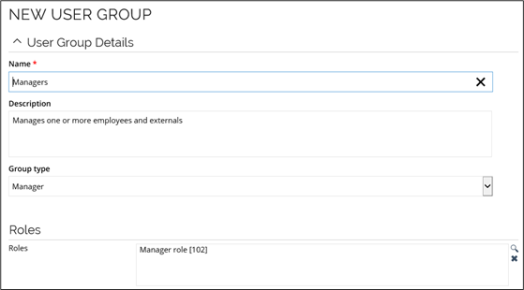
A user group is a collection or bundled group of users you can assign to one or more authorization roles. For a list of all users, go to Setup > Administration > Users & Security > User Groups. When window opens, click any of the user groups to display the details or click New to create a new user group. The user groups view is where you add or edit user groups. It is also where you define members of a user group and assign resources to that group.
Only a user with the Administrator role or the Provisioning User role can modify user group memberships.
The security summary link is where you can view the authorization roles assigned to this user group.
Create user groups via CM and OData API
You can also create users group via code method and OData API.
-
To create the user group via OData API, you should create a sample request for creating the user group as below:
POST: http://\[Omada Identity server\]/OData/DataObjects/UserGroup Body: { \"NAME\": \"NewUserGroup\", \"DESCRIPTION\": \"Description for NewUserGroup \" } -
You can also create the user group via the following code method
CreateDataObjectFromTemplate. In order to use this code method, you must configure it with the parameternewDataObjectTypeUIdStrpointing to User Group data object type UId.
Give users access to process templates
If needed, you can give users access to start processes based on a particular process.
-
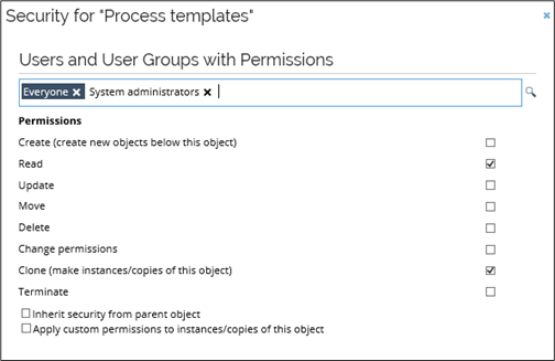
Go to Setup > Administration > Users and user group security setup > Process templates.
-
Enable the Read and Clone permissions for user groups that should have access to launch processes based on the template. When you are done, click OK to save the settings and close the dialog box.
-
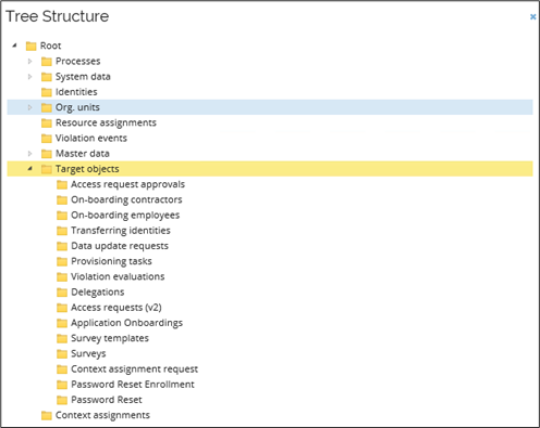
In Setup > Administration > Users & security > Data object security setup, move the target object of the process to below the Target objects folder in the Tree structure.
Authentication level concept
The authentication level concept in Omada Identity allows a user session to have differentiated access levels for user group memberships and accesses derived through user groups, depending on the authentication method.
The default required authentication level for the following user groups is set to Medium.
- System administrators
- CIAM service users
- System owners
- Data administrators
- Operation administrators
- Auditors
- Application onboarding admins
- Security officers
- Service desk agents
The authentication level for all other groups is set to Low. To change the authentication level of a user group in the Omada Identity portal, go to Setup > Administration > Users & security > User groups and select a user group. Change the value of the Required authentication level field accordingly and click Apply.
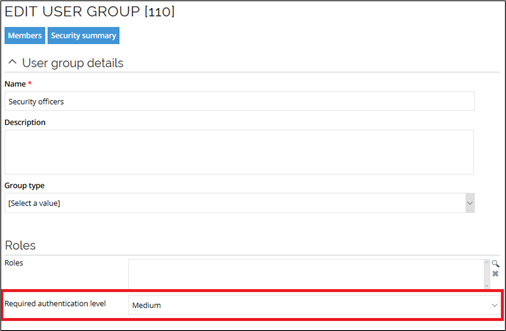
The authentication level of a user group is evaluated when a user session is initiated.
Only memberships in groups with an authentication level that is equal or lower than the session's authentication level are applied to the user session.
The authentication level of a user session is determined by the authentication method:
- Regular authentication: authentication level is set to Medium.
- Authentication with impersonation (via an Impersonation Service User): authentication level is set to Low.
- The user must not be a member of the System Administrators user group.
- This means authentication fails if a user group requires authentication level higher than low. It is set to low to prevent from impersonating a user with authentication roles that are Medium or High.
- The user must not be a member of the System Administrators user group.
Changing the default authentication level using a custom authentication module on-prem
It is possible to change the default authentication level in Omada Identity by overriding the GetAuthLevel method in a customized Omada Identity authentication module.
Authentication level for specific authentication method or provider
It is possible to control what maximum authentication level is applied, based on the authentication provider. The AuthLevel column in the tblCustomerAuth table can be used to specify what authentication level is applied to the specific authentication method or provider. You can use it, for example, to limit the access to Platform and System administration for less secure providers or users from a specific provider.
Setting the authentication level to Medium will prevent users logged via an IDP provider from obtaining Platform administrator permissions.
Please ensure through a firewall that the host header parameter is not tampered. Spoofing the host name could be misused to elevate the authentication level.